-
Welcome to Hatsune Miku Anime Manga Cafe ☕
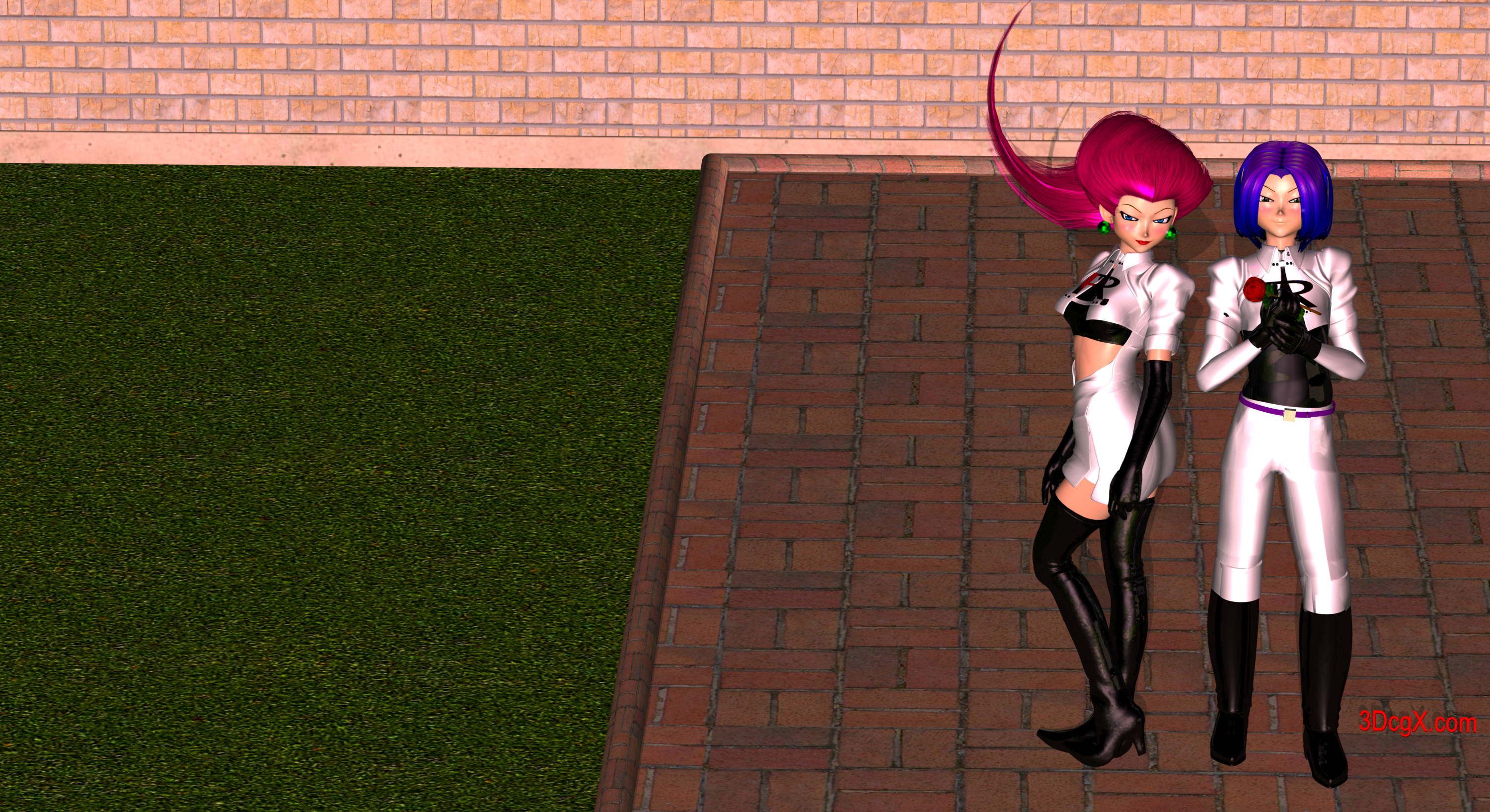
Jessie
Base: Aiko 3
Morph: Kioki
Engine: carrara
Can using Meshroom to create rocks for Bryce possible?use 3Dzephyr from 3D flow
it kicks Meshroom to the kerb
and exports a prefectly ready to use obj
retopology and texture transfer in Blender may be a good idea though
January 2019 - Daz 3D New User Challenge - Composition@Linwelly I appreciate the input very much, will have a new version up in a day or two.
@sueya I like being able to see the characters face more but would like to see the items on the table as well. Do you need the empty space at the bottom of your scene?
@vpaintersue You evened that lighting out very well! Your layering of the background is very good too, and the characters being closer really adds to them sharing this experience IMHO. That is a very nice render!
@ariochsnowpaw I think you are going in the right direction. I still want to see some light glinting off that blade.

@frank1998220 Welcome to the new user challenge.
You have a very nice portrait going there. Nice morph. Some pretty advanced stuff going on with the lighting, it looks great, but to my eye the back light might be a little intense. (personal taste) I think her screen left eye needs a bit of an adjustment, it looks to be maxed out to the side, the screen right eye is fine. I think there might be a bit of poke through with the hair on her the screen right shoulder and perhaps the hair folds/bends are too high at the shoulders. I think that hair is going to be challenging with that kind of thing. I have often found the hair line a problem but your character's is great and the garment fit is excellent. Great start!@Angelik_M Welcome to the new user challenge also.
I like the image you've created! It definitely elicits a emotional reaction for me, very sweet. The background seems dark compared to the lighting on the girl, and the light does not carry through to the background, which looks odd to me. I am not sure what you are using for a background, so this might be a challenge, but I think your image would look better if it was all lit from the same source. I think the girls pose is a bit aloof and stiff, I would like to see her reacting to her pal more. The tigers pose and expression is excellent! The tiger really looks like it cares about her. Great start!Genesis 8F ProblemI have no idea why this is happening. I currently don't own any of the morph packs, only use characters that don't need them or one's that can partially morph her. The image below is the base character and that is how she loads (I added the skin after she loaded), with screwed up hip bones and it affects every character I apply to her. I thought maybe redownloading the starter pack and installing it again might fix the problem, but didn't happen. This only happens with the G8 Female, I have no issues with the Male version. It also does not happen with any other model version (just finished loading and checking for a possible repeat on other versions). I am using Daz 4.10 64bit version, and it happens in the 32 bit version as well. Yes I have both on my computer.
Does anyone know what is going on and how I can fix this?
new computer - procedures with DAZ - non-technicalAnything you bought will be available in your account to dowonload again as you need to.
As for transfering fromone computer to another, I found the best way was to use an external HDD. Transfer from current computer to external and then later from the external to your new computer.
The Official aweSurface Test TrackJust tested out AWE Surface 1.2 on this scene.
FullHD 1920x1080, 8x8 pixel samples and 2048 irradiance samples on everything. 42 min 31.7 secs. At 720p, it took 19 min 7.78 secs. LIt with a single area light, with a single instance. If I don't use the area light and rely soley on a HDRI on the enviroment sphere, render times goes down to 17 min 8.46 secs (due to disabling the diffuse and solely relying on ambient).
The hair has both translucency and subsurface scattering. Thanks to new optimizations in the 1.2 build, render times have improved even if you don't filter out opacity values. All surfaces with opacity are set to 0% optimization. I didn't used each hair color textures though, since I wanted to see what the shading look like with pure colors, spec and bump/displacement if enabled. Obviously, with proper color textures, the hair will look better.
Used the new AWE Environment Light to set camera exposure controls, but used the defaults : f-stop 1/8, ISO 100 and shutter time 1/60. Then I simply raise the scene exposure to max, letting the camera based exposure do its thing. White balance is set to 5750K.
Materials settings are just the ones used by the reworked presets. All I did was run the transfer script to copy specular textures and apply AWE presets (hair, cloth, translucent cloth).
This is very interesting! Very little noise... did you use 256 SSS samples on the skins? Wait, specular textures...you mean for skins or clothing...hair? I think the clothing presets are quite an improvement. Skins too btw:) SSS is much cooler, specular/reflection too. So if you didn't make any adjustments to the skins, does that mean diffuse strength is 50% and SSS strength 75% (or thereabout)?
Looks very promising:) Seems rendertimes with high sample settings have gone down quite a bit:)
The Official aweSurface Test TrackJust tested out AWE Surface 1.2 on this scene.
FullHD 1920x1080, 8x8 pixel samples and 2048 irradiance samples on everything. 42 min 31.7 secs. At 720p, it took 19 min 7.78 secs. LIt with a single area light, with a single instance. If I don't use the area light and rely soley on a HDRI on the enviroment sphere, render times for the 720p shot goes down to 17 min 8.46 secs (due to disabling the diffuse and solely relying on ambient).
The hair has both translucency and subsurface scattering. Thanks to new optimizations in the 1.2 build, render times have improved even if you don't filter out opacity values. All surfaces with opacity are set to 0% optimization. I didn't used each hair color textures though, since I wanted to see what the shading look like with pure colors, spec and bump/displacement if enabled. Obviously, with proper color textures, the hair will look better.
Used the new AWE Environment Light to set camera exposure controls, but used the defaults : f-stop 1/8, ISO 100 and shutter time 1/60. Then I simply raise the scene exposure to max, letting the camera based exposure do its thing. White balance is set to 5750K.
Materials settings are just the ones used by the reworked presets. All I did was run the transfer script to copy specular textures and apply AWE presets (hair, cloth, translucent cloth).
Edit : The 17 min shot was done in 720p.
the freakHi, guys - I have the michael 4 base and also the freak 4. Can't seem to figure out how to get the freak the work, however. I've tried loading him by himself. Tried loading Michael 4 and seeing if he comes up as a morph or material - nothing there. Just interested in any suggestions/help you can give.
Marvelous Designer and Posed figuresI drape in MD and export to Studio, which for me is much faster and less frustrating than attaining dForce compliance. I’m far from an MD expert, but I do have a method that works for me. Creating folders to keep the multiple steps organized is key. FWIW, this is my MD to DAZ Studio workflow:
Create folder “ObjFiles” with subfolders “Bases” (for A or T posed figures), “Clothes”, “Poses”, “Props”; create folder “DufFiles” with subfolders “Bases”, “Poses”; create folder “MDfiles” for .Zprj projects.
Load figure in Studio and change resolution to base, remove eyelashes (G8). Save as .duf file in DufFiles Bases.
Export A posed figure as .obj file. Save in ObjFiles Bases.
Pose the figure in Studio, taking care to avoid extreme bending and hands too close to the body. If you use a preset, you’ll want to make sure that the figure stays at 0,0,0. Save as .duf file in DufFiles Poses.
Export posed figure as .obj file. Save in ObjFiles Poses.
Open MD. Click “File” “Import” “OBJ”. Navigate to ObjFiles/Bases folder and open your saved .obj file. Choose Load Type “Open”, Object Type “Load as Avatar”, if it isn’t already, check the box for “Automatically Add Arrangement Points”, Scale “cm (DAZ Studio)” click ok.
Create garment and save as .Zprj project in MDfiles folder. You may also want to save as a garment to use with other figures. Once garment is draped to your satisfaction on the A Pose avatar, Import the .obj pose into MD. Choose Load Type “Open”, Object Type “Load as Morph Target”, Scale “cm (DAZ Studio)” click ok.
Your avatar will assume the new pose. Once garment is draped to your satisfaction again (there will be tugging!), choose Export, “OBJ”, navigate to ObjFiles/Clothes and click “Save”. Under Object, click the “Select All Patterns” box (uncheck “Select All Avatars”), choose “Single Object”, choose “Weld” and “Thin”, check “Unified UV Coordinates” and “Unified Texture” (these are important even if you don’t plan to use MD textures, because they allow you to select the individual pattern piece surfaces in Studio). Scale “cm (DAZ Studio)”, click OK.
In Studio, open the corresponding .duf file in DufFiles Poses. Import the saved clothing .obj. Please note that all this saving of different file versions is because the .obj garment won’t be autofitted when you import it into Studio. It will, however, import directly onto the saved figure in the DufFiles Poses. If you need to move the figure away from 0,0,0, be sure to parent the garment to the figure.
Note: the “Props” folder is for props such as chairs/beds exported as .obj from DAZ Studio and then imported into MD (“Import (Add)” “OBJ”) for draping.
Hope this was helpful.
Body and Face Morph not showing different results.Hi all,
I am reasonably new to DAZ3d (have built a few characters before), but am wanting to get a bit of extra quality out of a character that I am working on for a project.
I recently pruchased this model : https://www.daz3d.com/vladimir-8 , and when I loaded it in, I was unable to get the vein/ skin details found in the preview shots. So, I bought the add on: https://www.daz3d.com/vladimir-8-hd-add-on . Everything seams to have installed properly, but for the life of me, cannot tell the different between the two, even when zooming extremely close up and doing iray previews.
Does this morph make any changes to the mesh, or is it just a texture modifier? I have gone through all the sliders in the shaping tab, and I can increase "details", but makes no real difference. My goal is to then export and set up in C4D. any suggestions, or ideas on what Im doing wrong?Characters and MorphsYou can further adjust a characters look after applying a morph.
(Note that you are quite limited in how much you can change any character unless you've purchased additional products. For M4 that would be M4 Morph ++)
Hair can always be changed and is unrelated to morphs. In fact if you purchase a character, it will come without hair, unless it specifically says that the hair is included.
[Released] Oso AmmonoidsYou've done a crazy cool job on those I love the feel the materials and everything (special thanks fo the alien typoe ones) and the possibility to morph them.
I didn't plan to spend much til march madness but I had to get the shaved dreadlocks as well...
Characters and MorphsMichael 4 is quite a few generations ago, not familiar with it. But with genesis 3 and 8 you can apply morphs on any character. Say you have the body morph pack, you can go for an athletic look, thin or more chubby by applying those morphs. Or in the face you can change the eyes or nose or mouth. The morph packs can be invaluable for this.
Hair can always be changed. Its basically an object parented (glued) to the head. So you can delete the hair and apply another. The easiest is if you products from the same generation, as it was specifically made for it, but some conversion is possible and not particularly difficult if you worked a while with Studio. The bigger generation gap the harder it gets, and from older to newer is usually easier.
Characters and MorphsIf I apply a morph to a character (Michael 4, for instance), can I change the way the character looks, or is the character set permanently? Can I change the hair?
Daz Studio Posing Errors when reloading scenesNot saving Perspective View is by design.
Does your figure have any custom morphs applied that have not been saved as moprh assets (so spawned from dForms, or brought in from the ZBrush or Hexagon bridge or imported with one of the Morph Loaders)?
Geoshell and material zonesActually I don't think my method works... Messing with it it seems the shell doesn't really have independent zones. But it seems like you can export the geoshell as .obj and reload it as though you modeled it and it's going to be an outfit. Then I think you can create your own zones.... and use the transfer utility to make an outfit.
edit: OR if it's easier to edit the surfaces of the human figure you could do that, seems like the geoshell surfaces can save out with the .obj. (Of course, don't use the modified human, throw it out and use your own character. It won't matter once the geoshell is converted to clothes)
Sydney 8I think it's cool to get age diversity with these characters. She's that age that rarely gets created as a character - older, but not "granny" with a walker age.
Her skin has some nice detail "out of the box". :) I like that her morph isn't highly stylized nor overly "perfect". And her slightly larger nose is charming, imo, and gives a nice touch to the character. So many characters often look like they've had nose jobs. lol :) I like Sydney's more natural face.
Couple of things many folks don't realize is that the nose and ears never stop changing shape and usually get a bit larger as we age. Look at any actress or actor that's been in the biz for decades... now compare their ears and noses ... quite a bit of difference for some, not so much for others so Kudo's on the sculpt for her as it's more realistic.
How to convert support assert morphs back to non-universal morphs.I don't think there's any way to have a morph saved as an asset for a figure not appear when you load the figure.
I suppose you could try saving the character in your particular scene as a totally new figure and not just as a G8F character, so that it uses a different "data" folder than default G8F.
Well I still think the obvious solution is to not save as support asset, just apply the morphs you want to the base figure at base resolution and make sure everything else is zeroed out, export as .obj, import with morphloader, save as scene or scene subset.
GenX & Rana for M4 combined with Ribbits for GenesisBunyip02_carrara thank you for those renders. I wasn't sure if the Rana morphs would add enough variance to use to make a group of frogs say at HighSchool or something like that. The textures would be helpful so it could still be helpful to get those packs from Sparky. I have his Rhino morph and a couple the Genesis chracters that would be interesting for me to bring it over and maybe get somthing more like the photo below.How to convert support assert morphs back to non-universal morphs.I don't think there's any way to have a morph saved as an asset for a figure not appear when you load the figure.
I suppose you could try saving the character in your particular scene as a totally new figure and not just as a G8F character, so that it uses a different "data" folder than default G8F.
Daz 3D is part of

Connect
DAZ Productions, Inc.
7533 S Center View Ct #4664
West Jordan, UT 84084Licensing Agreement | Terms of Service | Privacy Policy | EULA
© 2026 Daz Productions Inc. All Rights Reserved.