-
Anybody still use the older Genesis figures?
..yeah I basically cut things off after G3 as well. Not only because of budget, but also as I didn't see G8 being a significant improvement over what I had to warrant rebuying a lot of morph, pose, and resoruce content all over, and rebuilding all my characters again.
Mousso's Juniper... what hair is this?I gave it a shot... it's the part. There's no morph for the part. Thank you, though! I appreciate it.
Scott
3DXChange and DAZ rigging confusionkwannie said:
pdr0,
I use a simple TDAbase as the MMD model and run the PMX2FBX converter to create an FBX which is then opened in 3Dxchange. I extract the imotion from the FBX then close 3dXchange, then re-open with a DAZ FBX. I usually only use a G1 FBX to re import the iclone motion I created then export a BVH. I did discover that if I simply import the FBX that was created with PMX2FBX into Ikinema WebAnimate and then save it out as a FBX (with a different name), I can remove the root bone issues it would have had in 3DXchange, ( sliding feet, clipping.....). I am wondering now if I can use a G3 or G8 FBX and apply the imotion and export to BVH, then inside of DAZ unlock nodes to remove the arm twist and sliding feet that I was getting before. As I said I normally export the BVH only for G1 then do an animation transfer to G3.
But in 3DX , how clean was the FBX motion when you imported it ? eg. There might be incompatible bones with your specific motion, or PMX model issues
There should not be any major sliding feet or big issues at that stage. If there is, go back and try a different PMX base.
But PMX2FBX is not perfect, neither is any other VMD conversion method - There are always some interpolation issues with vmd to anything - motion is never 100% perfect. You almost always have to do some cleanup
I mostly use motionbuilder . It's definitely better and more powerful, but more complex. My friend has iclone/3dx, so I played with it and know the basic workflow works. Most problems are from bad T-pose or bad characterization. Same with motionbuilder. If you start with good T-pose, you reduce the amount of clean up you have to do later. For example, the base G1,G2,G3,G8 aren't in a proper T-pose when exported from DS. And some models (source or destination) are not quite normal (e.g they have distortions, some are fat which push out the arms, or some rotations are weird, or some bones are weird), so sometimes you might need to adjust the T-pose slightly
You should not need to apply to G1 then something else if you have 3dx, or any retargetting software. That defeats the purpose, introduces more errors. You should apply directly to the model you are using (G3, G8 or any other class, even non Daz)
kwannie said:
By the way pdr0, what VMD was that in your example?
"Whatta Man" motion trace by NatsumiSan - because you mentioned issues with hands clapping, hands on hips. This section had both - to explain the reason behind why it is occurring with the twist bones and locked x-rotation
Anybody still use the older Genesis figures?Just asking out of curiosity. I really want to use Victoria 4.2 because of a morph that is made for it but was still wondering if these older characters like Genesis and Genesis 2 are used these days.
And would love to hear your thoughts on them in general - as well as using them with iray- is it better to use 3DL with these older figures due to their skin textures being made for it or is a skin texture converter to iray script a better choice?
Thanks
Any older, pre GF3 figures I like, I just transfer the morphs using GenX and then use them on the newer figures. I stopped using non Iray skins since I never use 3DL.No matter how much I tweak a skin not made for Iray it never really looks that great IMO
Anybody still use the older Genesis figures?Just asking out of curiosity. I really want to use Victoria 4.2 because of a morph that is made for it but was still wondering if these older characters like Genesis and Genesis 2 are used these days.
And would love to hear your thoughts on them in general - as well as using them with iray- is it better to use 3DL with these older figures due to their skin textures being made for it or is a skin texture converter to iray script a better choice?
Thanks
New Smith Micro "La Femme" base figure for Poser at RendoI I have poser 11 and so I downloaded and played with the La Femme base. this is my opinion of La Femme base
1) it is a new poser character (About Time) that is well done the SSS maps render beautiful with plenty of options for adjustment for superfly .and when she is rendered it looks very much like Blackhearted GND character.
2) I was able to parent any v4 hair type to her very well. pretty3d hairs looks fabulous on her. . But she does not accept any type of v4 clothing(at all) that i tried to conform to the base figure it just would not conform no matter what clothing item i tried leaving me the impression she will need her own clothing line to truly make her useable..
3) I was able to pose her easily with any v4/a4 pose set I had tried with little or no adjustments need to correct the poses which i was pleasantly surprised. the rigging was excellent done and she poses very easier with just using the dials .
My conclusion is This is new character is beautiful and i really like her design & the shape and face & body buttons are a refreshing change for changing the morphs & she was offered free with any $3.50 or more purchase at renderosity, But somehow I feel like this new character fits in to the Daz Genesis sales gimmick. where you get the base for free but you will need to purchase the clothing, morphs, skins ect to get the full functions of use. which is a good idea SM are trying to revive poser user base interest..
Lastly because I do not have clothing i could fit to La femme i am not able to post the test renders I did of her because they are nudes. I do like the looks of La femme over all & I will properly will invest in her when the products are released to expands her usability ..
That is my 2 cents
long dynamic skirts that cover the feet and dynamic hair

might take a bit of playing with the morph brush to fit some made for other figures
she has a few morphs under poses you inject
and rigged labia and butt cheeks so she doesn't need clothes for some users

I did use the injection morphs that cam with it and she does come with hair skull cap as wel for dynamic hair. but the morphs injections didn't give me enough variance to fit anything v4 to her. . I'll try some of Alyson content later & I did not have a chance to try her with Dynamic clothing or hair as i went to bed before getting that far. I am sure your right though it that should work pretty well I've had pretty good luck with poser dynamics in the past I'm just slow at setting up all the perimeters . later tonight when i get home from work I'll give her a try with dynamic content and see how that works .
Over all I like her she reminds me of Alyson very much only a little curvier
3DXChange and DAZ rigging confusionpdr0,
I use a simple TDAbase as the MMD model and run the PMX2FBX converter to create an FBX which is then opened in 3Dxchange. I extract the imotion from the FBX then close 3dXchange, then re-open with a DAZ FBX. I usually only use a G1 FBX to re import the iclone motion I created then export a BVH. I did discover that if I simply import the FBX that was created with PMX2FBX into Ikinema WebAnimate and then save it out as a FBX (with a different name), I can remove the root bone issues it would have had in 3DXchange, ( sliding feet, clipping.....). I am wondering now if I can use a G3 or G8 FBX and apply the imotion and export to BVH, then inside of DAZ unlock nodes to remove the arm twist and sliding feet that I was getting before. As I said I normally export the BVH only for G1 then do an animation transfer to G3.
[Released] dForce Magnet [Commercial]New tutorial: Setup of a dForce Magnet with a morphed dress
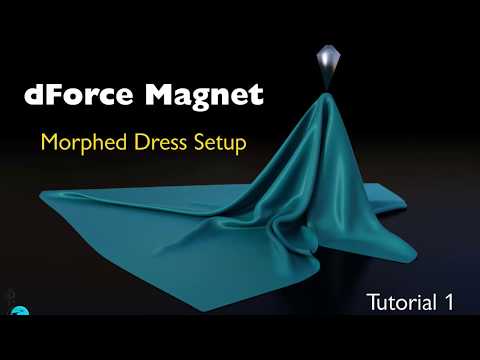
Same procedure works for an unmorphed dress, just skip the morph part.
Contents
Scene Setup 0:19
Morphed Figure / Dress 4:42
Using a Helper Polygon (Marker) 8:04
Following the Hand 12:38
Excluding Hand from Simulation 14:47
Translating / Rotating the Figure 15:56
Magnets on Posed Figures 20:17I'm wrong or still there's no way to make the fingers grab the cloth and then release it?
Anyone know a product close to forsworn armor?mods extract too, I have a few Skyrim mods I extracted the mesh and textures from
they are all in dds format but fortunately iray and 3Delight both render that even though openGL can be a bit fussy displaying it, you do need to manually load every map though as no mtl file from nifskope, and there will be about 5 sets of overlapping geometry that needs to be deleted using the geometry editor as they export with levels of detail, its rather a lot of twiddling around and don't even think about Dforce it will all fall apart.
Ok so how do I import the meshes and textures then? Im still new at that sort of thing.
well you need to export the objs from your Skyrim Meshes bsa using Nifskope first and extract the textures using BSAopt from the Skyrim Textures bsa
then you can import the object via import and apply the textures in surfaces
the links I gave you have tutorials on the first part and there are plenty of tutorials in the DAZ wiki on importing objects and using the transfer utility
[Commercial] Muelsfell Clay Golem HD for G8MHello! Let me introduce you to the Muelsfell Clay Golem, a classic creature of mythology but perhaps better known as the challenging automaton from roleplaying games (aka, "Seriously, DM? We're only level 5!! WTH!").
I was always fascinated by golems when I was a kid playing D&D and Warhammer. They seemed like such difficult opponents with immunity to magic and most weapons, it really left an impact on me, so I've wanted to create one for quite some time now.

I know this is a VERY niche product, but sometimes as a PA you have to create something that you personally enjoy making. Besides the obvious D&D influences, I also took some inspiration from an old Ray Harryhausen movie and gave the golem an alternative skin:

Though this set is for a very specific design, I did try to make sure that dialing in the clay golem partially would add something interesting to existing characters. Pardon Darius' goofy look, he wasn't expecting me to hit render so soon.


In addition to both an SD and HD morph, which can be dialed independently, there's a basic clothing set (loincloth, collar, headband) that works with Michael, Lucas, Darius, the Brute, and Lee, and a dozen poses to get you going.
I'm planning to create more HD characters in the future, and specifically ones that make much more use of the power behind HD morphs... not to mention ones that aren't quite so niche. :)
Enjoy, and as always I'm open to hearing thoughts and suggestions.
https://www.daz3d.com/muelsfell-clay-golem-hd-for-the-genesis-8-male
[edit] Oops, moving this from Commons to the correct forum
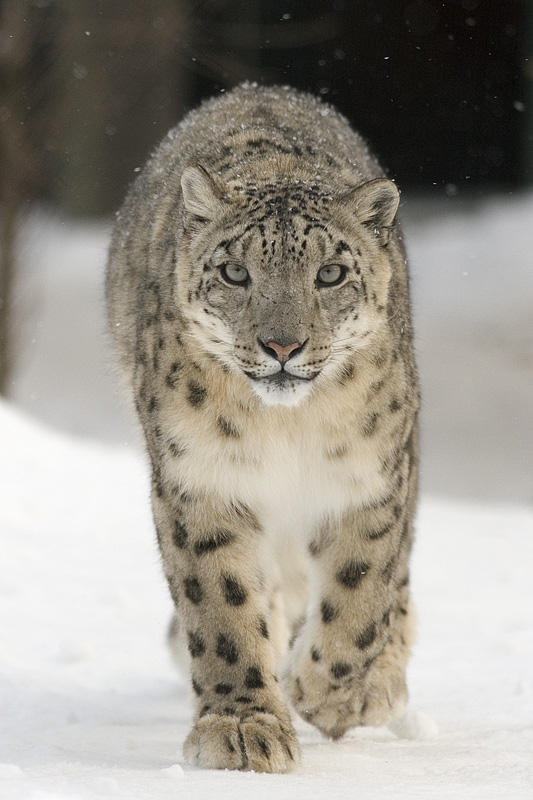
Snow Leopard!I recontly noticed there's no snow leopard available here, and the only snow leopard on Renderosity is rather dated-looking. I'd love to see a snow leopard skin and morph for the DAZ Big Cat 2, or even just a more up-to-date stand-alone snow leopard figure, though that would be less versatile. Preferably with a LAMH preset or somthing to make it floofy, but I'd be happy with any new snow leopard.
 [Released] dForce Magnet [Commercial]
New tutorial: Setup of a dForce Magnet with a morphed dress
Same procedure works for an unmorphed dress, just skip the morph part.
Contents
Scene Setup 0:19
Morphed Figure / Dress 4:42
Using a Helper Polygon (Marker) 8:04
Following the Hand 12:38
Excluding Hand from Simulation 14:47
Translating / Rotating the Figure 15:56
Magnets on Posed Figures 20:17[Released] dForce Magnet [Commercial]Thanks for the heads up and link. It is kind of cool seeing how far that diamond gizmo will stretch to reach back to zero, though...
Prior to dForce, I mostly use Keymate for animating. If I morph a figure or change a postion of anything somewhere down the timeline with that product, keyframes are created automatically. I don't have to add one. Keymate knows where zero is. I don't have to track that; the start position zero is automatically inserted. If I return to frame zero, the changes revert to zero all by themselves.
Not the case with dForce Magnets? Oh well. I don't see that I couldn't achieve simnilar results on my own, without the $17.47 crash factory.
Refund to PayPal time.
You can use the dForce Magnets with Keymate. I did that for my promos and it worked perfectly fine.

The problem with that zero keyframe thing is a problem of the Daz Studio timeline, it has nothing to do with the Magnets or any other content.Yes, I've been using the magnets with Keymate, too, My guess on the issue with frame 0 is that there isn't any "change" to record when something is first added to the scene. Anyway, as esha says, it is a problem for all animation in Daz Studio. I've always have to "fix" frame 0 for all dForce animated simulations, long before magnets came on the scene.
[Released] dForce Magnet [Commercial]Thanks for the heads up and link. It is kind of cool seeing how far that diamond gizmo will stretch to reach back to zero, though...
Prior to dForce, I mostly use Keymate for animating. If I morph a figure or change a postion of anything somewhere down the timeline with that product, keyframes are created automatically. I don't have to add one. Keymate knows where zero is. I don't have to track that; the start position zero is automatically inserted. If I return to frame zero, the changes revert to zero all by themselves.
Not the case with dForce Magnets? Oh well. I don't see that I couldn't achieve simnilar results on my own, without the $17.47 crash factory.
Refund to PayPal time.
You can use the dForce Magnets with Keymate. I did that for my promos and it worked perfectly fine.
The problem with that zero keyframe thing is a problem of the Daz Studio timeline, it has nothing to do with the Magnets or any other content.New Smith Micro "La Femme" base figure for Poser at RendoI I have poser 11 and so I downloaded and played with the La Femme base. this is my opinion of La Femme base
1) it is a new poser character (About Time) that is well done the SSS maps render beautiful with plenty of options for adjustment for superfly .and when she is rendered it looks very much like Blackhearted GND character.
2) I was able to parent any v4 hair type to her very well. pretty3d hairs looks fabulous on her. . But she does not accept any type of v4 clothing(at all) that i tried to conform to the base figure it just would not conform no matter what clothing item i tried leaving me the impression she will need her own clothing line to truly make her useable..
3) I was able to pose her easily with any v4/a4 pose set I had tried with little or no adjustments need to correct the poses which i was pleasantly surprised. the rigging was excellent done and she poses very easier with just using the dials .
My conclusion is This is new character is beautiful and i really like her design & the shape and face & body buttons are a refreshing change for changing the morphs & she was offered free with any $3.50 or more purchase at renderosity, But somehow I feel like this new character fits in to the Daz Genesis sales gimmick. where you get the base for free but you will need to purchase the clothing, morphs, skins ect to get the full functions of use. which is a good idea SM are trying to revive poser user base interest..
Lastly because I do not have clothing i could fit to La femme i am not able to post the test renders I did of her because they are nudes. I do like the looks of La femme over all & I will properly will invest in her when the products are released to expands her usability ..
That is my 2 cents
long dynamic skirts that cover the feet and dynamic hair
might take a bit of playing with the morph brush to fit some made for other figures
she has a few morphs under poses you inject
and rigged labia and butt cheeks so she doesn't need clothes for some users
Modeling Novice Question: Imported Objects Get DeformedFor earrings like that I would not use the transfer utility but simply parent them to the ears.
As for why they distort, since the hoops are quite big my guess would be that the transfer utility template used (default one) has "split" the hoops in sections related to different G2F body parts, so the "top part" probably follows the head and the "bottom part" follows the neck, which would explain why it distorts when you move the head.
Modeling Novice Question: Imported Objects Get DeformedHi everybody
I am quite a novice in modeling and I am facing now a little problem with a pair of earrings I created in Hexagon. I try to explain it step by step.1. I modeled a very simple pair of earrings in Hexagon
2. I exported it as an OBJ file
3. Now I imported the earrings OBJ file ( In Daz3D I had the identical character as in Hexagon for modeling)
4. The earrings appeared in the Viewport, where I expected them (at the ears)
5. I started the Transfer Utility and set the parameters as displayed in the picture below.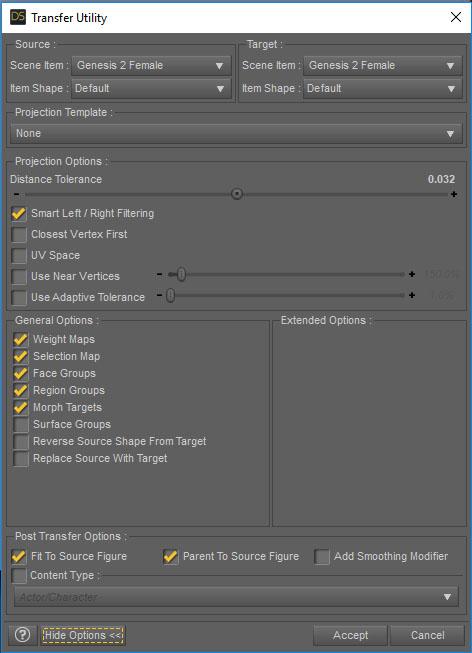
6. Then I applied any pose and got the following result. The earrings were deformed.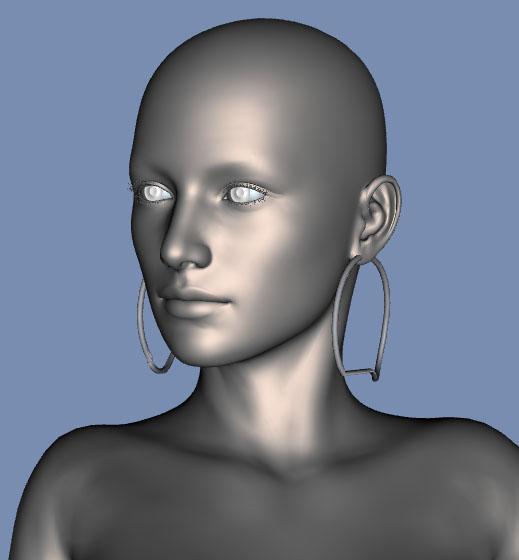
Obviously I did something wrong or missed a crucial step. Thanks for any hint in advance.
Novica & Forum Members Tips & Product Reviews Pt 11Well for example the Wear Them All prpducts are 'hidden' in that they are fitting clones I believe only and you'll only notice they are installed by the increased number of 'Autofit' dialogue choices you are given.
And for all the DAZ Originals Genesis through Genesis 8 head and body morph and expressions products they have no user available preset icons just sliders in the Parameter or Shaping tabs.
And so on probably for most products you mention.
Yes I am aware of that. That's not the problem unfortunately, I've had to go in and uninstal and reinstall from DIM because they just went missing, I was getting error messages from items that use those. Once I re install those messages go away. But like I said, that's a very small sampling of items, there are well over a hundred items that are missing and its across all categories, not just morph, but characters, clothing, environents, shaders and lights.
Because of problems with the database I mostly only use root directories. I move content manually and don’t use product view at all. I now have a far better understanding of where stuff is and the mistakes that are getting made with file locations because of this. It takes some getting used to to reorganize at the root level, but I now no longer have issues with messed up database. Because I don’t bother with those any longer.
I don't even know where to look for that kind of stuff. I have a bit of a fear of messing with things as I've screwed up my installation once or twice. It was not fun...Even less fun than the issue I am having now lol.
[Released] dForce Magnet [Commercial]Thanks for the heads up and link. It is kind of cool seeing how far that diamond gizmo will stretch to reach back to zero, though...
Prior to dForce, I mostly use Keymate for animating. If I morph a figure or change a postion of anything somewhere down the timeline with that product, keyframes are created automatically. I don't have to add one. Keymate knows where zero is. I don't have to track that; the start position zero is automatically inserted. If I return to frame zero, the changes revert to zero all by themselves.
Not the case with dForce Magnets? Oh well. I don't see that I couldn't achieve simnilar results on my own, without the $17.47 crash factory.
Refund to PayPal time.
Genesis Morphshttps://www.daz3d.com/genesis-evolution-morph-bundle are the base sets for Genesis (1)
Daz 3D is part of

Connect
DAZ Productions, Inc.
7533 S Center View Ct #4664
West Jordan, UT 84084Licensing Agreement | Terms of Service | Privacy Policy | EULA
© 2026 Daz Productions Inc. All Rights Reserved.