-
AIUTO...CHI CONOSCE L’ITALIANO? PARTE DODICI
Una semplice luce distante o spotlight, nelle opzioni trovi "Shadow type", scegli quelle software.
Boh, ho provato, ma non sono riuscito a vedere mezza ombra!
Mi sembra un po' troppo sperimentale la cosa;
Non so nemmeno se è possibile dargli una grafica decente;
Se è possibile, richiede un sacco di lavoro;
Ho appena potenziato di 3 volte il mio hardware, quindi il tempo che richiede Iray davvero non è il problema adessoIndi, magari darò un'altra occhiata a Filament fra qualche mese, quando sarà più maturo e ci saranno tanti prodotti e guide a riguardo!
Per adesso continuo con texture shaded come viewport.Come sarebbe a dire, non riesci ad attivare le ombre? Me l'hai detto tu come fare!

Su una cosa hai ragione, è ancora giovane... ma è una bella promesa, molto meglio di IRay!
 Presto sistemeranno tutto e vai di render! Te ne allego uno fatto veloce veloce con una delle scene pronte di DAZ.
Come vedi mi è bastato aggiungere una distant light e attivare le ombre per avere subito l'effetto voluto.
Filament tutorials/shaders/lights?I have blast from the past , just tried my Buddy textures ( Buddy to M5 ) looks better than Genesis 8 in Filament
no .. the maps was PBR based that was the issue in 3DL , it was not rendering it optimal as it should especially the metallic parts
and of course 3DL engine is better than Filament when you look from the technical side .. Filament is like Poser 4 + to be exactly
When I look on the new products in the store , I have flash back to 1998 exactly ...
Yeah exactly 3DL + extra I used PBR maps on my 3DL clothing characters before iray in DS but it never looking as good as in Filament , baked AO make it just looking better like in an old game
thanks for the tip of AO baked for skin, Filament is more like a "3Delight reinforced" in some way
Maybe you should have used the 3DL built in pathtracer?
New DS Filament Render EngineI think Filament has its place but the materials are so different than Iray that you really can't set up a scene and get good renders out of both Filament and Iray. All the surfaces need to change, sometimes drastically. Plus lighting. So far the best I've been able to get resembles my early 3Delight renders from 10 years ago, before the AoA lights and some better shaders made those start to look a lot better --- okay, I'll admit it, a LITTLE better - my composition still was what it was unfortunately. Anyway lighting and materials - all the difference. Who'd have thunk it?.
Now I could undoubtedly work on a scent for a good bit and adjust the lights and materials to look better in Filament but then it's a Filament only scene, no longer suitable for Iray. That's not necessarily a bad thing depending on your needs. The speed is unreal compared to Iray and if you animate I could see it becoming essential once the learning curve starts ascending. I ony do still renders and since nothing I've gotten so far out if it is even close to looking as good as Iray for simple things like transmaps with all the surface lookingl like their made out of molded plastic I'll personally wait and see where it goes from here.
New DS Filament Render EngineHey guys, i thought i'd just throw my 2c in on the conversation here. As i've mentioned elsewhere on the forums, i threw my support behind this endeavor because i coach and train a lot of budding artists and PA's from developing countries where the purchase of high-end Nvidia cards is almost impossible. I wanted broke students to be able to pick this up as a hobby, even if their only available pc is a 10-year-old laptop that's being held together by duct tape. Lowering the bar of entry is good for daz. As it stands right now, you can pick up daz, grab a load of freebies and get started with rendering in filament without spending a dime. If you're lucky enough to be dual-wielding titans and overclocked i9's, then there's still plenty of goodies lined up for you. It's not replacing iray it's just an addition.
I'm also seeing a lot of comparisons to eevee and UE4, which i don't think is a fair comparison. Eevee and UE4's renderers along with Filament *can* look great if you put forth the effort, but none of them are going to do it for you. Whenever you see awesome quality work in eevee or UE4, or any other engine, i guarantee you that there was a seasoned visual effects artist that created it. We have Iray for people with hardware capable of using effectively, we have filament for those who don't have that luxury. Both of them will look terrible if you don't put forth adequate effort. Both will look great if you do.
Early in the port process when FIlament was still crashing regularly and had no documentation, i made these -
They're certainly not avengers level CG obviously, but if i told people they were made in Iray, i'm pretty sure they'd believe me.
I'm not saying this to cause a flamewar, - i too am looking forward to more high-tier goodies being introduced into daz. The wishlists being presented in this thread are valid, and i'd like to see improvements in a lot of areas too. I'd just like to get my point across that many people will benefit from this, and i hope it will breed a lot of new daz artists who would not have been able to use the software previously. It's the Artist, not the brush, make something awesome.

Your renders are amazing but they are not the kind of thing I render - ever. You seem to be a master of the "epic" scene - all atmospheric effects and action but my renders are more mundane and personal. Human beings in close-up in a room or a street with a few props. So in my few experiments so far I have not been able to get the hair to look like hair rather than semi-transparent plastic, the skin to look like skin rather than a plastic doll or cloth with any level of translucency to look like cloth rather than almost fully transparent plastic. Moreover, I can't figure out how to use Photometric lights. I use spotlights a lot in IRay but if I move a spotlight in Filament more than a couple of feet from the figure's face, the drop-off is almost total. I have not been able to get HDRi images to work at all.
A quick video about how to handle those issues would be much appreciated.
The Mac FAQ@Platnumk: OK, thanks for the info.
Btw, what about this Filament and Filament Viewport that DAZ is now introducing. I watched the tutorial videos. It almost looked like you could option to chose it without buying anything more, but now there are numerous products being offered, such as this one: https://www.daz3d.com/sf-beautiful-skin-filament
New DS Filament Render EngineHey guys, i thought i'd just throw my 2c in on the conversation here. As i've mentioned elsewhere on the forums, i threw my support behind this endeavor because i coach and train a lot of budding artists and PA's from developing countries where the purchase of high-end Nvidia cards is almost impossible. I wanted broke students to be able to pick this up as a hobby, even if their only available pc is a 10-year-old laptop that's being held together by duct tape. Lowering the bar of entry is good for daz. As it stands right now, you can pick up daz, grab a load of freebies and get started with rendering in filament without spending a dime. If you're lucky enough to be dual-wielding titans and overclocked i9's, then there's still plenty of goodies lined up for you. It's not replacing iray it's just an addition.
Thank you for this. Most of my art circles are made up of people who use offbeat tools to make weird and unique experimental stuff and transformative works. Daz would be fantastic for that except for the thing where I have to explain not only asset purchasing (which can be mitigated with free community resources) but that you need a pretty good computer to get started. If DS were to take off in that subculture there'd be more people sharing resources, making tutorials, and joining the community. I want DS to be a tool people can use to try animation for the first time, or to make experimental games to share on itch.io or just to get used to 3D. In a lot of ways the look of Filament would be more comfortable than Iray because it looks like a video game from 1995, and many of those artists create work that references games they grew up with.
This is something I feel strongly about because if I hadn't ended up in the job I have now, about 90% of the software and hardware I use to make art would have been completely out of my reach.
Novica & Forum Members Tips & Product Reviews Pt 13I didn't purchased any of the filament products. I will be interested to see your review of them, Novica.
Has anyone tried Ultrascenery with Filament?
I won't be reviewing them any time soon, unfortunately. I'm in the middle of scrutinizing html coding. I lost all my bookmarks when the driver ruined my computer so I'm having to redo all my research. While tempted to divert to Filament testing, I'm not installing the newest version of the studio as I JUST got it back to working. :(
Novica & Forum Members Tips & Product Reviews Pt 13Ultrascenery in Iray and Filament (after adjusting the brightness down in the Tonemapper options). I'd call that a no-go, except strictly for positioning the camera in the viewport (which is useful), but not for rendering...
Hmmm, interesting cartoon result. Cartoon fantasy..
Now that you mention it ...
 Novica & Forum Members Tips & Product Reviews Pt 13
Ultrascenery in Iray and Filament (after adjusting the brightness down in the Tonemapper options). I'd call that a no-go, except strictly for positioning the camera in the viewport (which is useful), but not for rendering...
Hmmm, interesting cartoon result. Cartoon fantasy..
Animation SuggestionsFrom the promo video of Filament, i guess they have a LOT of packs ready to.
I'm interested in the behicle ones, both general character/vehicle interactions like the ones you suggest and vehicle specific like the one seen briefly in the promo.
Novica & Forum Members Tips & Product Reviews Pt 13Ultrascenery in Iray and Filament (after adjusting the brightness down in the Tonemapper options). I'd call that a no-go, except strictly for positioning the camera in the viewport (which is useful), but not for rendering...
Edit: and it may not be useful for positioning either for Ultrascenery, since the camera became very slow to respond, at least in this scene (may need more experimentation)
AIUTO...CHI CONOSCE L’ITALIANO? PARTE DODICIUna semplice luce distante o spotlight, nelle opzioni trovi "Shadow type", scegli quelle software.
Boh, ho provato, ma non sono riuscito a vedere mezza ombra!
Mi sembra un po' troppo sperimentale la cosa;
Non so nemmeno se è possibile dargli una grafica decente;
Se è possibile, richiede un sacco di lavoro;
Ho appena potenziato di 3 volte il mio hardware, quindi il tempo che richiede Iray davvero non è il problema adessoIndi, magari darò un'altra occhiata a Filament fra qualche mese, quando sarà più maturo e ci saranno tanti prodotti e guide a riguardo!
Per adesso continuo con texture shaded come viewport.New DS Filament Render EngineIt's not the efford we have to put in it... It's the workflow that breaks and breakes and breakes again and is way to complicated since day one i found DAZ and this was a few years ago.
You also should "say" what you are using and what you've maybe discovered to make it better. Because this is the way to give people the "power" to actually do something with this program. Else it is just showing off and nothing more. And this is my point. Daz could be more, could be faster, could be right from the start a "setup the scene and render crazy nice images..." But it still (after years) just isn't!
And without in depth tutorials, sharing and a steep learning curve, it's just trail and error and this is frustrating... Adding another render engine means just more of that frustrating learning by figuring it out in days or weeks.In comparison, I could also name Photoshop, as an example of how incredibly extremely important the user is. Especially the sharing of ideas, brushes, new filters, plugins and so on was exactly the same like with Blender, even it wasn't free.
BTW, i don't want to make Daz a bad thing, i just want to point out where everything is going and what Daz maybe could improve "first" before adding more things that are half done...
My Scene: Connor finds... (setup around 30-60 minutes)GM8 Standart...
Skin/Character: Owen 8
Eyebrows: Old SHB self created (Parameters: Render Line Tesslation Sides 4, Preview PR Hairs ON, Visible ON, Visible in Render ON, Visible in Viewport ON)
*NOTE: Render Line Tesslation Sides NUMBER seems to thicken the hair, without changing it (you may try it for other hairs that look "thin"?!)
Beard: Old SHB self created (Parameters: Render Line Tesslation Sides 2, Preview PR Hairs ON, Visible ON, Visible in Render ON, Visible in Viewport ON)
*NOTE: Render Line Tesslation Sides NUMBER seems to thicken the hair
(don't work here, looks awful... the "old" shader seem to break if i change the RLTS down/up but it looks "right and nice" just when i load it without a change)
Clothing: Alt Style Outfit
Pose: Z CHA 12 Genesis 8 Male (Hands and Arms modified)
Scene Environment: Standart DAZ Alchemy Chasm
Scene environment options Standart: Environment Intensity 0.0025 (night, dark mood / around 0.050 is midday i'd say, 0.025 evening/moonshine)
Light #1: Distant Light in front, over his head, 5 meters away, slight rotated to the sky
- Ilumination: ON, Color: 255, 255, 226, Intensity: 25%, Photometric Mode: ON, Luminous Flux (Lumen) 1500, Temperature 1500
Light #2: SpotLight from behind right, in his neck, 5 meters away, straight
- Ilumination: ON, Color: 255, 131, 93, Intensity: 125%, Photometric Mode: ON, Everything else standart. Luminous Flux (Lumen) 25000, Temperature 15004 Planes, with some quick and dirty shader settings and a marble texture on it. Placed one after the other, rotated to simulate some mist looking suroundings
2 more lights at his feet, lighting the "mist" a little more up... (planes had metallicity around 0.70)Rendered with the Filament Viewport render on 16:9, 1920x1080
Sceene without the character (because it's a payed one) ready to render to download... here
Just load Alchemy Chasm, load a model with a proper skin and pose it on the spot... (..if you like it ^^)
Textures are free textures from Polygon... therefor credits and my gratitute to Andrew Price
(...who shows you also the power of blender with photorealistic evee btw)Oh... and my first 3 renders where not saved... another nice experience (...even when i did it the manual way...) Maaaannnn... you know?!

And i just realized, the ball i made was more transparent and glowy, before saving the scene. So this means something is off... because after loading it, it was strangely looking like a ball and the nice effect it had was lost in the nirvana...Novica & Forum Members Tips & Product Reviews Pt 13I didn't purchased any of the filament products. I will be interested to see your review of them, Novica.
Has anyone tried Ultrascenery with Filament?
Daz Studio 4.14 Pro, General Release!but I can't even see how they are used, unless they match the changes I make in those setting and thus become saved with the scene?
Yes, they are saved with the scene. They always were saved with the scene. Those settings are scene+camera+frame specific however. If you load an existing (pre 4.14) scene on which any of the relevant options have been set it appears with Tonemapper and Environment options nodes. My understanding is that these are just the scene-global data copied to scene nodes. If you set "viewport" rendering in the Rendering tab the tonemapper and environment options disappear; mostly they weren't used with the viewport and *most* of them aren't used with Filament rendering, but now if you click on the relevant new nodes it is possible to set the settings.
Unfortunately this is half implemented; I can only have one "Environment", which is probably reasonable, but I can't animate the Sun-Sky settings (e.g. to do a time-lapse sunset). In fact the only properties that can be animated are translate/rotate/scale and these properties are actually hidden... Likewise I can't have per-camera tone mapping settings, I can move the Tonemapper Options node to a camera but I cannot create a second one. Much more important I can't animate the all important EV in tone mapping - this is the only part of TM that filament rendering uses (it uses a fixed gamma encoding and no true tonemapping). This means I still can't adjust the exposure as I pan a camera; a long standing issue with Daz which makes it all but impossible to do real-world tracking-camera type animations.
To make the point with a real example; I just stood in the middle of my living room with my camera and panned the camera through 360 degrees. The exposure (fixed aperture/shutter) went from ISO4000 to ISO200 and that is with a 36mm(35mm equiv) focal length. So that is an EV 4.3 exposure range from a single position and using what I consider to be a wide angle lens. For another example think of entering a building from the outside; there are about 5s of the room being dark before we adapt. It does seem that filament rendering is doing some kind of global adjustment to HDRI exposure; I generated a 360 degree rotate movie of a similar scene to my living room (actually an HDRI of my office) and the HDRI settings required in the environment were completely different to the Iray ones - the map intensity went from 0.01 with Iray to approximately the default (1.0) with filament. However the adaption is global - at EV13 the windows are over-exposed and the room under-exposed.
It's all very promising, but some work is required; these bugs (no per-camera exposure, no exposure animation) have been in Daz since I started using it and are very obvious; I can animate the camera aperture but it only affects the depth of field, not the exposure!
Like everytime I create a group I have to remember to type my group name into the second line because anything typed in the first one is ignored for a group numbered by the program
Yep, that's really annoying too, it applies to everything I think - "name" and "label" are synonyms in the language I speak but Daz seems to ascribe extra meaning to them.
New DS Filament Render Engine@chrom if you're talking about the atmosphere, or the fire, you're probably only going to need a single prop. The atmosphere is one large grid that uses transparency maps for falloff. You just load an appropriate size into the scene and it just works. The fire is similar, just load a fire prop that you like and it's pre-lit.
@KindredArts Any suggestions on getting Iray Distance Fog/Mist to work with Filament? I already have them.
New DS Filament Render EngineAfter reading thru the forum, it seems most of us are trying to use Filament in the way we *wish it would work instead of maybe what it was intended for, as a fast preview renderer for scene setup or animations. After playing with it and seeing it's limitations, that was my conclusion anyway. I may still use it for a final render here and there when I know I can Photoshop it to death but I'm going to stop trying to make it do things that just aren't feasible to do. At least right now. I *love it tho for quick scene composition; absolutley love it for that so it's still a win for me!
New DS Filament Render EngineI don't now if anyone else already reported this, but the shadows in Filament seems to not work properly for me.
They get partly "cut" by the camera angle, like in the video I linked, and also if I move the props too much distant form world's center, the shadows doesn't even appear. However, I can see the shadows of far objects if I use a camera next to the world's center. It's a bit complicated to explain...
In more crowded scenes, with more elements, the shadows gets suddenly and totally blocked if I orient the distant lights "overhead", it's like something big goes in front of the light source.
I tried all the options with no results, in all the pissible panes and tabs, even in the DAZ Studio's viewport options (f2 button). I don't know if it's an hardware issue, since the VRAM is pretty empty and my GPU fully supports OpenGL 4.6.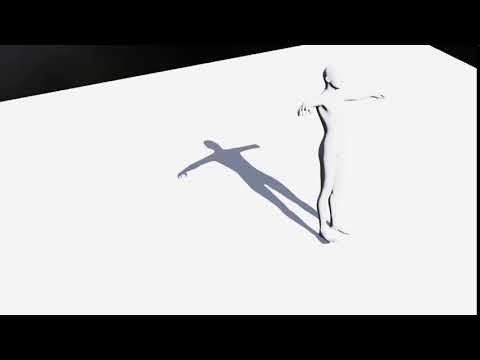
So... I'm the only one having this issue?
I'm asking because I need to find if it's GPU related or if I do something wrong.
no, moving the camera seems to affect the distant light, static cameras are OK and indoor shots
Thanks, Wendy! So it's another little thing that needs to be fixed.

Anyway, even in this "early stage", Filament is great. Hope to see it fully functional soon, with this DAZ Studio will definitely give all other 3D animations softwares some hard time.
New DS Filament Render EngineQuick Question - I just started trying out Filament yesterday, and was working fine. When I tried today, when I load a subject I get an overlay on the screen of a texture map. The texture map doesnt show up when I click render, I simply get an empty render.
I'm not sure what is happening here. I think I am doing all the same things I did yesterday. I simply add a character, create the filmament nodes (texture, envirenoment, etc), select viewport, and select filament from the droppdown. And I get the texture map overlay on the viewport.
Any thoughts?
New DS Filament Render EngineI don't now if anyone else already reported this, but the shadows in Filament seems to not work properly for me.
They get partly "cut" by the camera angle, like in the video I linked, and also if I move the props too much distant form world's center, the shadows doesn't even appear. However, I can see the shadows of far objects if I use a camera next to the world's center. It's a bit complicated to explain...
In more crowded scenes, with more elements, the shadows gets suddenly and totally blocked if I orient the distant lights "overhead", it's like something big goes in front of the light source.
I tried all the options with no results, in all the pissible panes and tabs, even in the DAZ Studio's viewport options (f2 button). I don't know if it's an hardware issue, since the VRAM is pretty empty and my GPU fully supports OpenGL 4.6.So... I'm the only one having this issue?
I'm asking because I need to find if it's GPU related or if I do something wrong.
no, moving the camera seems to affect the distant light, static cameras are OK and indoor shots
Daz 3D is part of

Connect
DAZ Productions, Inc.
7533 S Center View Ct #4664
West Jordan, UT 84084Licensing Agreement | Terms of Service | Privacy Policy | EULA
© 2026 Daz Productions Inc. All Rights Reserved.