-
Question about saving a prop from an outfit autofitted
Hello, I'm not sure if what I am observing is an issue or if it is just normal, but I prefer to ask to understand what happen. Since I am not sure exactly how it works, I will explain everything from the biginning, sorry if it's a bit long...
I got recently the Cheyenne for M4 (https://www.daz3d.com/cheyenne-for-m4), and I want to use its outfits on G8M. To do that, I created a clone of M4 by following this tutorial (https://www.youtube.com/watch?v=og6YYWasj74), and I saved this clone as a modifier asset. I checked at how the Cheyenne's War Bonnet looks like on my G8M, and I had some issues on the back tie that I fixed in blender and by using Morph Loadder Pro:
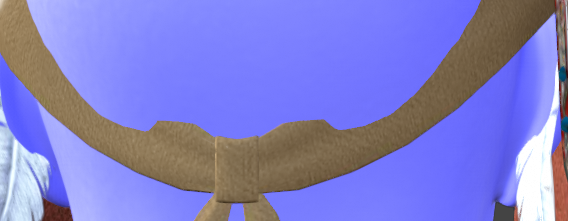
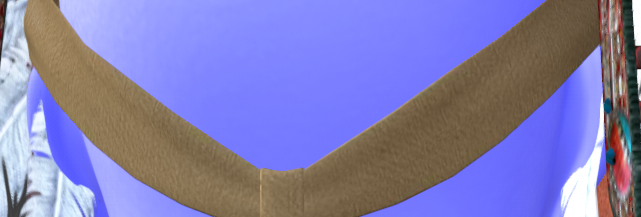
Now I fixed it, I would like to save the morph that I created, in order to use it every time I need, but when I tried, I received this error message:

So, I saved the War Bonnet as a new prop, by doing Save As -> figure/Prop Asset, but I observe something that I don't understand : when I load the new prop with G8M selected, it is automatically placed correctly, on the head of the character. When I load the prop without having G8M selected, I thought that it will be placed as the same position that the original War Bonnet from which I saved it. I mean, the original War Bonnet is placed a bit too high above the G8M, when I load it without having selected the character. But the new prop is placed on the ground.
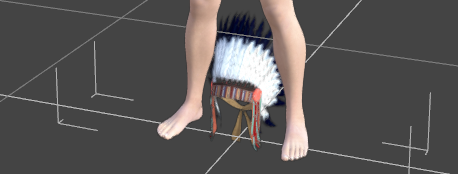
I made a short video to compare it: https://workupload.com/file/6epqjF3tnT2
I guess that it is not a problem, since the prop is correctly placed when I load it whith the G8M selected, but yet, I would like to understand how it works... Why, when the character is not selected, the new prop is not placed as the same position that the original one? Could you explain me how it works, please?
Thank you in advance!
*Released* dForce Faustian Fringe HairLooks like the update is available, and the missing morph is now there.
I'll be posting my render soon.
Transfering utility but not JCMsgodless1893 said:
crosswind said:
godless1893 said:
crosswind said:
godless1893 said:
crosswind said:
You should rig the amors to the base figure with default A-Pose... then Transfer Utility won't create pJCMs on the armors when rigging the armors to the figure.
Then you need to fix necessary FBM and pJCMs with different poses.
So the JCMs still exist in different poses and I can't stop them from appearing or delete at once?
If you make armors on Genesis 8/9, you can simply turn off or zero Base Joint Correctives on G8 / G9.
May I ask how to turn off them all at once?
That's a control property... if you turn it off, no pJCM / cbs will be triggered on the figure and generated on the wearables. Select G8 / G9, filter by Base Joint in Parameters Pane.
Thanks I see it, but this will turn off JCMs on all wearables and the figure itself...If I want to turn off them on one single armor and keep others on, there is no one-cilck option,right?
Right.... there's no other options except for using rigidity, by clearing generated morphs on a target wearable. You either fix pJCMs or set a rigidity... each option has its pros & cons.
diffeo simulation tool, softbody + cloth will occur distortionI easy import a G9 character, add some facs morph and jCMs. if I only add softbody or make cloth simulation respectively, softbody effect or cloth simulation works well. If I both add two simulations, cloth simulation seem nice but the figure's chest will appear distorted. use Diffeo 4.2.1 and blender 4.0
Clothing for UE5.4 from DAZOK so when building the Genesis character in Daz Studio the clothing should be attached as part of the Genesis base which in turn inherents the morph targets from the character base. To mantaine the shape change the clothing needs to be exported as part of the main shape so when exporting the clothing as stand alone will not fit right and in some cases deform in the manner you discribed. Now if you want to export and maintain the current shaping you need to set all of the parts not part of the clothing to invisable and set the exporter to export visable objects, in the FBX dialogue, to send only what is visable and the morph targes will be baked into the mesh and can then be used as a component.
Transfering utility but not JCMscrosswind said:
godless1893 said:
crosswind said:
godless1893 said:
crosswind said:
You should rig the amors to the base figure with default A-Pose... then Transfer Utility won't create pJCMs on the armors when rigging the armors to the figure.
Then you need to fix necessary FBM and pJCMs with different poses.
So the JCMs still exist in different poses and I can't stop them from appearing or delete at once?
If you make armors on Genesis 8/9, you can simply turn off or zero Base Joint Correctives on G8 / G9.
May I ask how to turn off them all at once?
That's a control property... if you turn it off, no pJCM / cbs will be triggered on the figure and generated on the wearables. Select G8 / G9, filter by Base Joint in Parameters Pane.
Thanks I see it, but this will turn off JCMs on all wearables and the figure itself...If I want to turn off them on one single armor and keep others on, there is no one-cilck option,right?
Transfering utility but not JCMsgodless1893 said:
crosswind said:
godless1893 said:
crosswind said:
You should rig the amors to the base figure with default A-Pose... then Transfer Utility won't create pJCMs on the armors when rigging the armors to the figure.
Then you need to fix necessary FBM and pJCMs with different poses.
So the JCMs still exist in different poses and I can't stop them from appearing or delete at once?
If you make armors on Genesis 8/9, you can simply turn off or zero Base Joint Correctives on G8 / G9.
May I ask how to turn off them all at once?
That's a control property... if you turn it off, no pJCM / cbs will be triggered on the figure and generated on the wearables. Select G8 / G9, filter by Base Joint in Parameters Pane.
Transfering utility but not JCMscrosswind said:
godless1893 said:
crosswind said:
You should rig the amors to the base figure with default A-Pose... then Transfer Utility won't create pJCMs on the armors when rigging the armors to the figure.
Then you need to fix necessary FBM and pJCMs with different poses.
So the JCMs still exist in different poses and I can't stop them from appearing or delete at once?
If you make armors on Genesis 8/9, you can simply turn off or zero Base Joint Correctives on G8 / G9.
May I ask how to turn off them all at once?
Transfering utility but not JCMsgodless1893 said:
crosswind said:
You should rig the amors to the base figure with default A-Pose... then Transfer Utility won't create pJCMs on the armors when rigging the armors to the figure.
Then you need to fix necessary FBM and pJCMs with different poses.
So the JCMs still exist in different poses and I can't stop them from appearing or delete at once?
If you make armors on Genesis 8/9, you can simply turn off or zero Base Joint Correctives on G8 / G9.
Transfering utility but not JCMscrosswind said:
You should rig the amors to the base figure with default A-Pose... then Transfer Utility won't create pJCMs on the armors when rigging the armors to the figure.
Then you need to fix necessary FBM and pJCMs with different poses.
So the JCMs still exist in different poses and I can't stop them from appearing or delete at once?
HeadShop QuestionsBrief update: So far, sadly, I'm not really impressed. But I've dedicated my spare time this week to playing with it and watching the tutorials.
Initial thoughts are that while I like some of the features- the 'autodots,' and an easy ability to mirror sides of the head without photoshop- the resulting mesh still relies too heavily on skin tone shadows substituting for real facial contours. It's something that the base Face Transfer also does. Swap the scanned UV maps out in favor of a vendor's maps and it can radically alter the appearance of the eyes, cheeks, and mouth, usually spoiling the model.
Transfering utility but not JCMsYou should rig the amors to the base figure with default A-Pose... then Transfer Utility won't create pJCMs on the armors when rigging the armors to the figure.
Then you need to fix necessary FBM and pJCMs with different poses.
Transfering utility but not JCMsI wanted to rig some models I made in Daz, and most of them are armors. I need them to keep the original shape most of the time(apparently not the rigid follow node type), but transfering utilities will make many JCMs, which causes unwanted morphs. I can delete them, but hidden JCMs never show at one time, they will only show after I transform the corresponding bones so I can't delete them all at once. I want to know if there is a way can transfer utility except JCMs or delete them all at once.
Save morph as a support asset (depricated) - so how to?I want to save a morph, but the usual way "File->Save as->Support Asset->Morph" is gone (due to a new version?). It's grayed out and "depricated". My morph? The export function? My model?
How do I save my morph?
Copying Character File(s) from one folder to another, keeping the metadata?As the title indicates, is there a method to moving/saving a character from one folder to another while keeping the character file's metadata?
I can copy/move a character (my own morphs) from one folder - Characters/MyStuff - to another folder - Characters/MyStuff/Coolstuff. In doing so, however, it "loses" the Actor tag, and any other tags, and metadata.Is there an easier way to transfer/move that character from its original folder to the new one without going through loading the character and resaving it to the new folder?
Thanks for the hints.Felix/FFDS
Face transfer 2 not showing genesis 9 optionrhbogaard_9fc5200211 said:
Couldn't find an update for the plugin, removed the plugin manual but when i restarted daz studio nothing. In the DAZ Install Manager nothing, so I reinstalled daz studio completly and on startup indead found face transfer 2.1.0 and now i have the genesis 9 option in the face transfer window. I whas on daz studio 4.23 and still after all this, so don't understand what i updated but its working now.
I'm not sure what caused your FT2 to not be updated, but it sounds like it's working properly now.
That's good!Face transfer 2 not showing genesis 9 optionCouldn't find an update for the plugin, removed the plugin manual but when i restarted daz studio nothing. In the DAZ Install Manager nothing, so I reinstalled daz studio completly and on startup indead found face transfer 2.1.0 and now i have the genesis 9 option in the face transfer window. I whas on daz studio 4.23 and still after all this, so don't understand what i updated but its working now.
Face transfer 2 not showing genesis 9 optionrhbogaard_9fc5200211 said:
here is a screenshot:https://ibb.co/Tt5VRWZ
I don't see anything strange
In my environment, Face Transfer 2's version is displayed as 2.1.0.0.
It seems like your FT2 version is old.
Could you try checking for FT2 updates or reinstalling it?G9F/G8F Size DifferenceElor said:
DarkElf said:
Richard Haseltine said:
How huge? The default height has certainly been reduced for Genesis 9.
Thanks Richard. Is there a specific ration difference?
G8F is around 10cm taller than G9.
It can vary from character to character (most PAs will simply use G9 default height, letting users change the height of a character to their taste with the Proportion Height morph) and can vary between core figures in the same line:
- Olympia 9 is taller than G9, almost as tall as G8F while Olympia 8 is smaller than G8F and Olympia 9.
- Victoria 9 is the smallest Victoria, smaller than G9 and a couple of centimeters smaller than Victoria 8.1.
- Michael 9 is taller than G9, he is the same height than Michael 8.1 and both are shorter than Michael 8.
A couple of things to keep in mind:
- G9 core figures who are smaller or taller than G9 usually have a specific proportion morph to get to the advertised height, a morph active if you're loading the character preset, but you'll have to activate it yourself if you start from Genesis 9 Base, because dialing, as an example, Victoria 9 character morph will not activate her proportion morph, only her head and body morphs.
- Don't trust the height advertised on Daz Store, at least not without checking with people who bought the core figure your interested with: Daz had publisher wrong advertised heights a couple of time already (no idea if other measurements can also be wrong, height is the simplest to check by comparing two characters and discovering than the one supposedly 10 cm shorter than the other is actually a couple of centimeters taller
 ).
).
Thanks so much for the explanation about the character morphs and how they work in comparison to starting with the G9 Base. I'm going to pay more attention to this so I can at least start with what the PA intended.
G9F/G8F Size DifferenceElor said:
DarkElf said:
Richard Haseltine said:
How huge? The default height has certainly been reduced for Genesis 9.
Thanks Richard. Is there a specific ration difference?
G8F is around 10cm taller than G9.
It can vary from character to character (most PAs will simply use G9 default height, letting users change the height of a character to their taste with the Proportion Height morph) and can vary between core figures in the same line:
- Olympia 9 is taller than G9, almost as tall as G8F while Olympia 8 is smaller than G8F and Olympia 9.
- Victoria 9 is the smallest Victoria, smaller than G9 and a couple of centimeters smaller than Victoria 8.1.
- Michael 9 is taller than G9, he is the same height than Michael 8.1 and both are shorter than Michael 8.
A couple of things to keep in mind:
- G9 core figures who are smaller or taller than G9 usually have a specific proportion morph to get to the advertised height, a morph active if you're loading the character preset, but you'll have to activate it yourself if you start from Genesis 9 Base, because dialing, as an example, Victoria 9 character morph will not activate her proportion morph, only her head and body morphs.
- Don't trust the height advertised on Daz Store, at least not without checking with people who bought the core figure your interested with: Daz had publisher wrong advertised heights a couple of time already (no idea if other measurements can also be wrong, height is the simplest to check by comparing two characters and discovering than the one supposedly 10 cm shorter than the other is actually a couple of centimeters taller ).
This is so true and happens way too often. Sometimes they're quite accurate while at times we have the Ashley 9 Petite form situation. It would be nice if the Daz Original products listed accurate heights as they're typically perceived as higher quality and should be presented as such.
With that said, it's really a superficial thing when you have height sliders, alternate forms, specific body part morphs, to make any model the size you really want.
Daz 3D is part of

Connect
DAZ Productions, Inc.
7533 S Center View Ct #4664
West Jordan, UT 84084Licensing Agreement | Terms of Service | Privacy Policy | EULA
© 2026 Daz Productions Inc. All Rights Reserved.