-
UltraScenery [Commercial]
This is as much as I could get visible in a Filament scene before it had a fatal crash - i.e. not much.
 Filament doesn't understand Sun-Sky lighting either, evidently.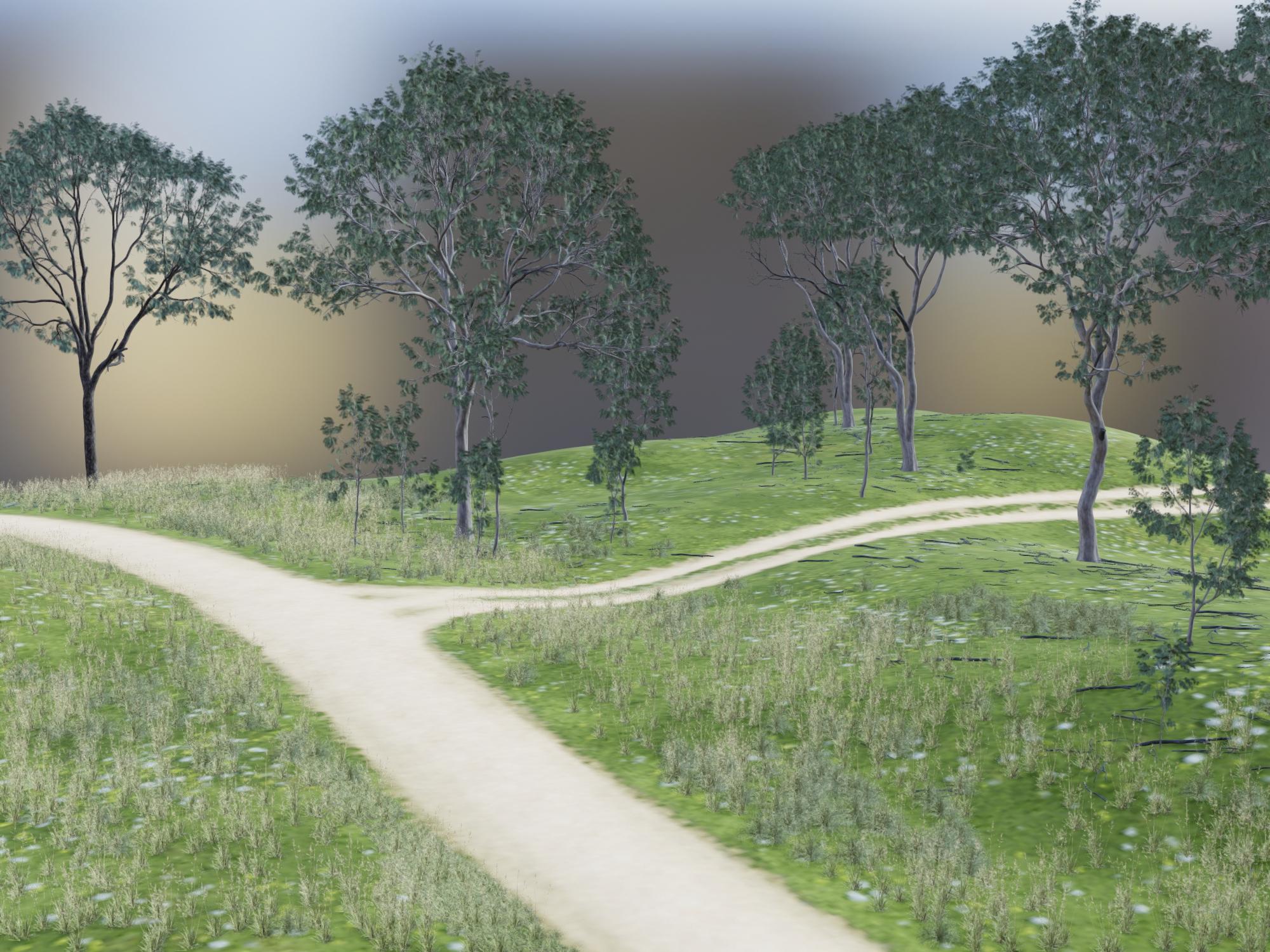
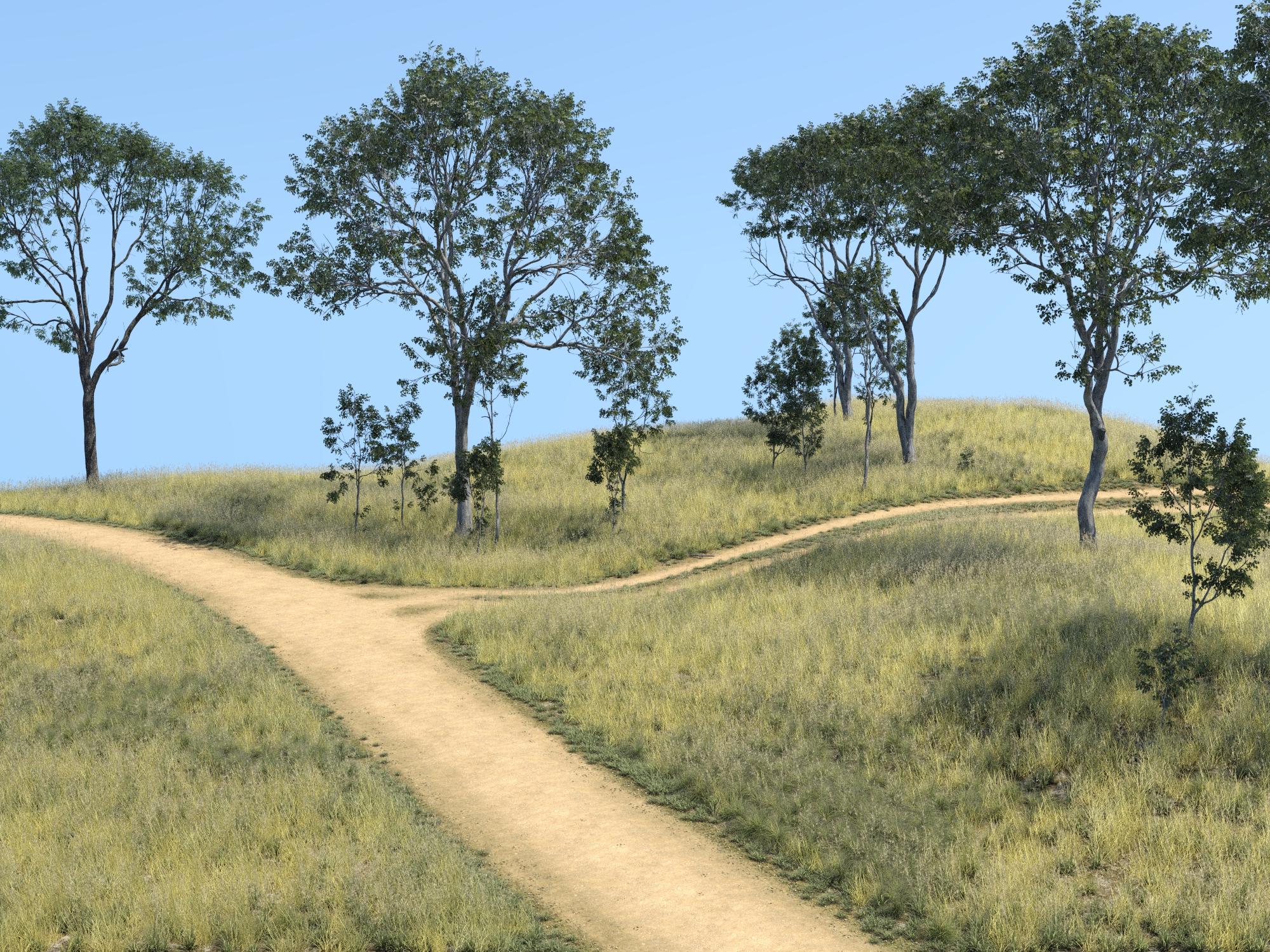
This is the corresponding Iray render. I only let it render for 2 minutes, just to get a comparison of the scene content.
 UltraScenery [Commercial]
Turn off the visibility of a bunch of the instances that don't have proxies anyway, to make the Filament viewport responsive to adjust your scene view.
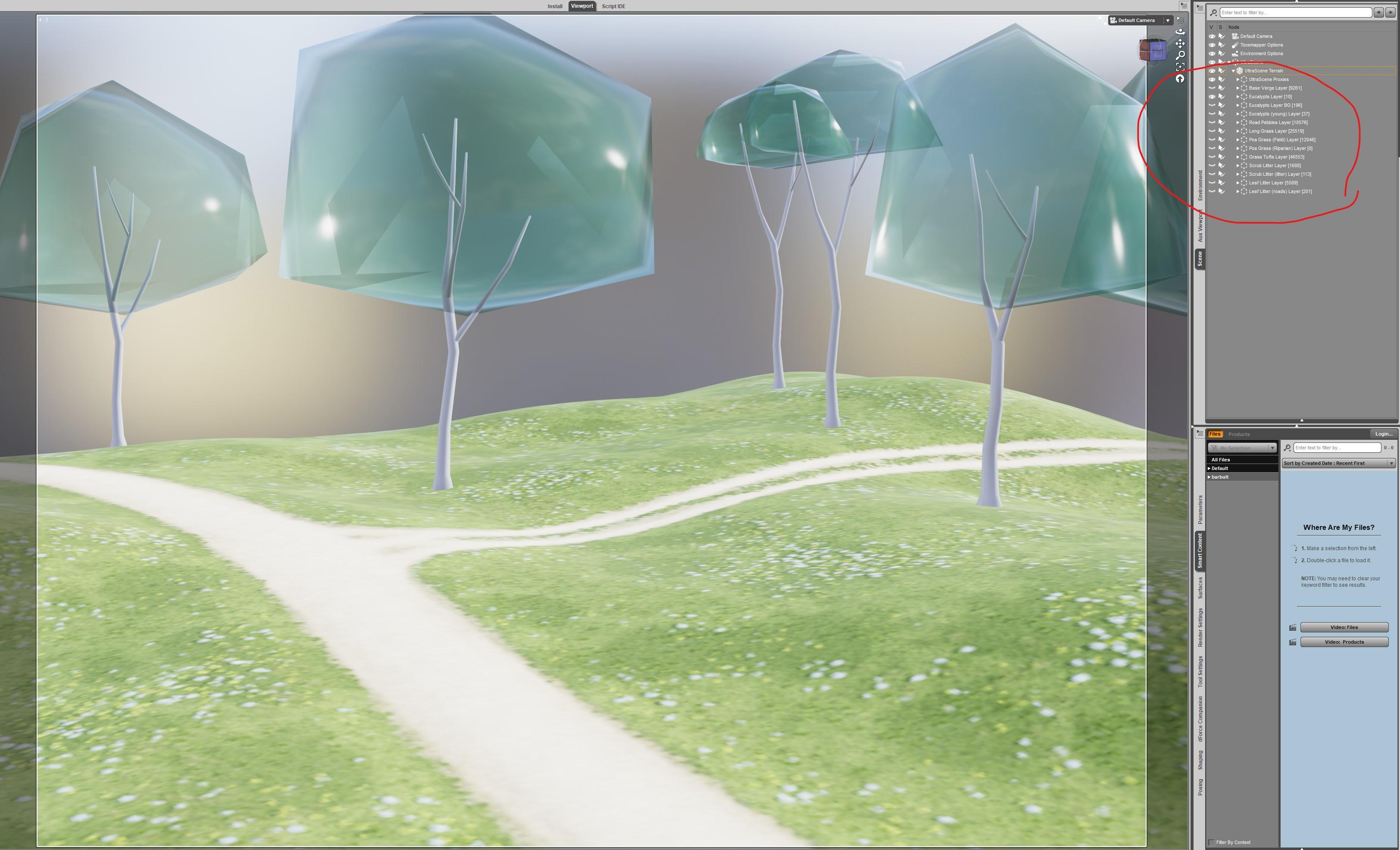
Um... those BUBBLE TREES are flippin' AWESOME! I want them as actual models like that! (In IRAY)
I take that as a challenge! I will give it a try.
UltraScenery [Commercial]Turn off the visibility of a bunch of the instances that don't have proxies anyway, to make the Filament viewport responsive to adjust your scene view.
Um... those BUBBLE TREES are flippin' AWESOME! I want them as actual models like that! (In IRAY)
UltraScenery [Commercial]Turn off the visibility of a bunch of the instances that don't have proxies anyway, to make the Filament viewport responsive to adjust your scene view.
Character skin seams.Iray does compress images (at thresholds set in the Advanced tab of render Settings) which might show seams, you could try raising the strong threshold and see if that helps. I'm not sure about Filament.
New DS Filament Render EnginePeople are expecting more from Filament because Eevee and Unreal set the bar of realtime rendering too high.
After DS 4.14 upgrade, Iray stopped working. Only CPU rendering without denoising feature is currently possible with this PC. Filament is really need to improve. Specially I like to know how to render hair better.
Character skin seams.I had the seams in Filament with Millawa 8, which is a pretty recent character. Don't know where the seams came from either.
New DS Filament Render EngineSorry, don't want to read the whole thread, anybody else having a (Filament) Environment + Tonemapper node in the scene which can't be removed/ deleted ?
Thats the new way of displaying those render options, I wouldn't mind them too much. These are the same fields you had in your tabs of Render Settings before.
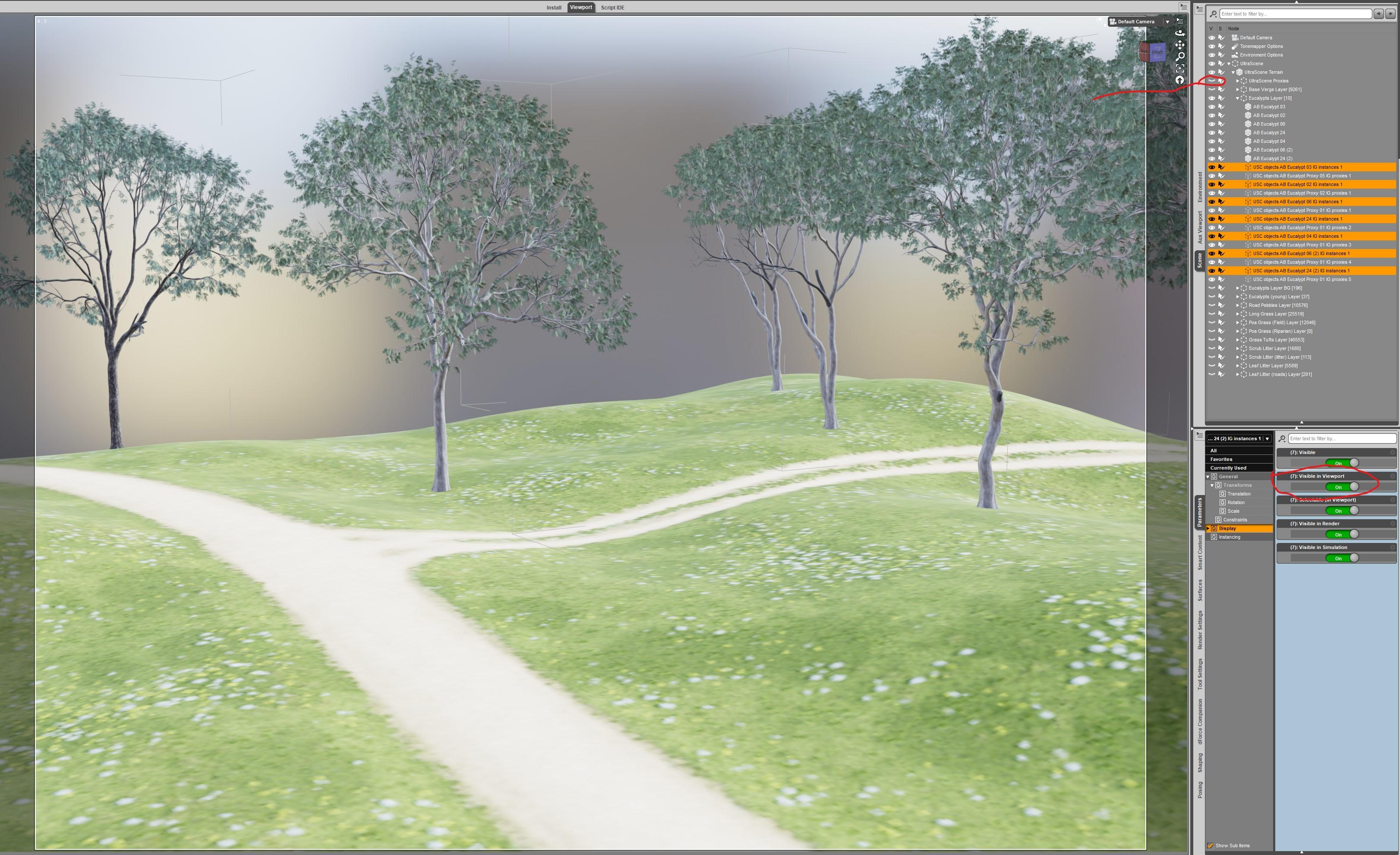
UltraScenery [Commercial]Only the proxies show in the viewport, because Visible in Viewport is turned OFF for all of the instances. I set Visible in Viewport to ON for a few and they showed up in the Filament viewport. So, I got over confident and turned them all on at once. CRASH!!!
I tried again with only a few instances visible in viewport. I turned the proxies to not visible with the eye icon.
 Novica & Forum Members Tips & Product Reviews Pt 13
The products i sell that are tagged as "Filament" are specifically for people who want to use filament as their renderer. If they're just using filament as a precursor to an iray render, they should obviously stick to iray products and just take what they're seeing in the viewport with a pinch of salt. Maybe in the future there will be more parity between the renderers, and there won't be the need for any distinction, but for now, you're going to get different results depending on whether you're using FIlament products or Iray products.
The "Fire for Filament" set, for instance, is different than my Fireworx set, because filament doesn't do emissive shading, it requires a load of parented lights and shading changes to make it look right. Iray, however, does do emissive shading, and can handle translucent smoke, so it's shaded differently.
Hope that helps, thank you for your custom! Good luck

KA
New DS Filament Render EngineSorry, don't want to read the whole thread, anybody else having a (Filament) Environment + Tonemapper node in the scene which can't be removed/ deleted ?
Novica & Forum Members Tips & Product Reviews Pt 13@KindredArts Hi, and thanks for popping in! QUESTION: Do products tagged "filament" work in the iray render context? For instance, the "Fire for Filament" product looks great but would it also work in Iray? It'd be nice to use filament for creating and adjusting scenes & then use iray for final output.
PS: Have nearly all of your catalog available here at Daz, Love your stuff!
~GenCharacter skin seams.I'm not sure what to name it, or where to place it. Just wondering if others are having the same issue. All my characters are for some reason show their shell seams, as to where the uv maps all connect. This is in filament and iray, including rendering/ rendered images. Is there any way to fix this or maybe I have something on I don't know about.
How to stop using Filament!!If the rendered image is black then you probably don't have the required minimum version of the Nvidia driver. Required minimum Nvidia driver is 451.48.
My drivers are fine. I've been rendering in Iray for years now. It was endering IRay fine before I tested Filament.
Previous versions of Iray had different driver requirements, unless you have verified that you are curently using a recent enough version (451.48 or later) then it could be, and probably is, the root of the issue.
Daz Studio Pro BETA - version 4.12.2.60! (*UPDATED*)[The issue is] the fact that DS doesn't allow the user to access the UI in order to eg. save ongoing changes made to the currently loaded scene while an Iray render relegated to an external window is actively being rendered, despite the fact that each Iray render task launched by DS to an external window gets its own separate Iray Render Context.
I agree that the UI as designed is far from ideal and I certainly agree that changing the scene while a render is in progress is highly desireable; at present I start a second instance/run the beta to make such changes. I.e. I start a render then load exactly the same scene in another instance so that I can keep working on it. However this statement is perhaps misleading:
Meaning that it is programmatically immune from changes made to the currently loaded DS scene or the DS UI in general (apart from closing the program entirely) since each Iray Render Context is given its own working copy of all relevant 3d assets and render settings at initialization time and then refers only to those for the completion of its task.
Ok, yes, everything I've seen indicates that the Iray render, and possibly others like a filament (viewport) render could be made immune from scene changes and this would be a very good thing. However if you change any of the tone mapping settings using the tab in the render window they are immediately reflected back in the scene. These changes can be made without pausing/cancelling the Iray render, so long as there is no canvas the render just continues (well, it jumps back to updating per iteration, but it doesn't restart unless there is a canvas.) Now I admit that is a UI feature and I would like it a whole lot more if I could not only tweek the tone mapping, particularly the EV, during the render but also not have those changes made to the scene, well, unless I chose to push them back. Of course I'd also like to be able to enter the file name during the render and not have the render window disappear when I click "save"; as it is I frequently have several render windows open so I can do direct on-screen comparisons of different settings, normally the image convergence settings.
On that matter, why does the UI allow me to change the pixel filter gaussian radius on the fly? That always requires a restart doesn't it; changing the sampling width, or the sampled width requires recomputation of every sample. (I'm not sure whether it changes the guaussian radius or the amount of space that is sampled for a gaussian with the correct radius, I hope the latter ;-)
Filament tutorials/shaders/lights?I am not 100% sure , but I believe there is no Filament for Mac users in the last build yet
Hi all. Not to but in but I'm on a Mac and I downloaded the updates and have the Filament engine stuff installes but one minor issue is I don't see th
Filament tutorials/shaders/lights?Hi all. Not to but in but I'm on a Mac and I downloaded the updates and have the Filament engine stuff installes but one minor issue is I don't see th
The Mac FAQOh! It didn't even say that in the tutorials I watched. (At least, I didn't hear it.) Hmmm. Well, I think what we'd really like is Metal in DS. Filament, anyway, doesn't have all of the features that iRay has.
The Mac FAQ@Platnumk: OK, thanks for the info.
Btw, what about this Filament and Filament Viewport that DAZ is now introducing. I watched the tutorial videos. It almost looked like you could option to chose it without buying anything more, but now there are numerous products being offered, such as this one: https://www.daz3d.com/sf-beautiful-skin-filament
Would be nice if Filament worked on the Mac but at this time its Windows only
New DS Filament Render EngineI'm absolutely blown away by Filament because hey, new free stuff to play with and I'll never say no to that. It's another spanner in the toolbox, and one that lets me render a scene in under 5 seconds. That's incredible by any measure. And I can see the same scene in the viewport as the final output, should I decide to keep with Filament as the render engine - I have that choice. Filament is one more option, and it's one that is only going to improve over time. You don't have to use it or even like it, but it's there should you want to use it (however you want to use it), and it's cost you nothing.
Is it perfect for every render and every scene? Absolutely not, but then neither is 3Delight or iray either. This is another option, and I'm very glad it exists. Thank you, Daz.
All of the images below were rendered using Filament. Each took less than 3 seconds to render, and I could make all of these (and more) in the time it would have taken to render just one of them in 3Delight or iray. Maybe they'd look "better" in iray but n my ancient laptop if the choice is between "good enough" in 3 seconds or 4+ hours for "better", I'll take good enough for all but the most precious of renders thanks. For those, I'll render in Filament first, adjust the lights then leave the iray version chugging overnight. Choice is a wonderful thing, don't you think?
Daz 3D is part of

Connect
DAZ Productions, Inc.
7533 S Center View Ct #4664
West Jordan, UT 84084Licensing Agreement | Terms of Service | Privacy Policy | EULA
© 2026 Daz Productions Inc. All Rights Reserved.