-
morph identity
Some morphs work quite well when dialed in both directions, so if the character you have has the right sized hips for your purpose but the wrong sized waist, you can try dialing the waist morphs in a positive or negative direction to suit your needs. If the morph starts at a 0% state and you want to go negative you can click on the little wheel/cog at the right of the dial to pull up a properties menu and then uncheck the "limits" option. This will allow you to dial the morph in an unintended direction but it may still work. Depending on how different your intended character shape is from your actual character shape, this can be more or less work.
Customized Character TutorialsOK, time for another custom dial-spun character, based upon G3F in this case. This is the result of attempting what I believe to be one of the more difficult morphing tasks, to create a character based upon a real individual. It can be a painstaking and occasionally frustrating exercise. The key to peace of mind is not to become too obsessed and knowing when to say, "Close enough!". Created completely using morph sliders in DAZ Studio, rendered in 3Delight. Click on the thumbnail for full size.
Welcome to Hatsune Miku Anime Manga Cafe ☕Not that anyone has asked, but when using Aiko 3, I have a "default' .CR2 loaded with the "Mila" face morph by Thorne & Sarsa which I've tweaked a bit with various dials from Beth Capsces' "Kioki". That mixture gives A3 a somewhat more realistic nose and fuller lips. For my Alita renders, I used T&S' earlier product "Sylphie" for its slightly more stylized, triangular features. Like most of their character sets, Sylphie" had the full, pouty lips befitting the Panzer Kunst master of Scrap Iron City.
Sincerely,
Bill
morph identityHi i was wondering if there is a way or a product that would allow me to see all the morphs/morph values ? that were used in making a character , so that if i i just want the hips , and legs or other parts, i could zero the rest out and make the rest of her or him back to the org genesis product. If there is no such product i would be interested in one being made.
Transfering Clothing MorphsI've done this a several times and it works quiet good.
You just need to open the extended options of the Transfer Utility dialogue and change some settings.
See the sceenshot I once uploaded for something else the settings are not exactly suitable in your case but show some important checkmarks to set.
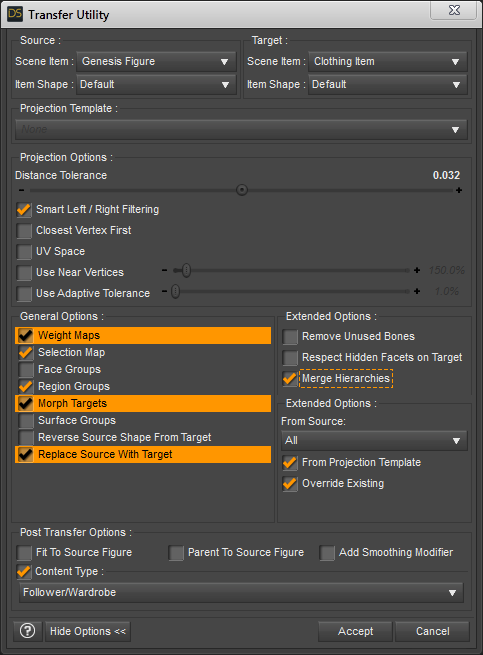
1. Weight Maps: have this checked - Merge Hierarchies - you don't need to have that checked since the new mesh object set as Target has no rigging so there is nothing to be merged
2. Selection Map: have it checked - not shure what it is good for the Joint Editor got Selection Group settings and the Geometry Editor got Selection Sets maybe it has something to do with those
3. Face Groups: uncheck this - if your updated geometry object you've imported still got the Face Groups or updated Face Groups - I haven't had good results with the Face Group projection of nearly identical meshes
4. Morph Targets: you defenatly need to have this checked - it is important to switch the From Source: None to All in the extended options to have all morphs from the Source transfered over to the Target
5. Region Groups: I don't know exactly what this is for - the Geometry Editor shows some body area Region Groups but if you mouse over a body part the Face Groups are actualy used to select the bone
6. Surface Groups: uncheck this - it's the same like with the Face Groups the Surface Groups also refered to as Material Zones gets imported by the OBJ anyway and don't have to be projected/transfered
7. Reverse Source Shape From Target: let it unchecked - if your geometry mesh is unmorphed and represents the default base shape
8. Replace Source With Target: this is the most important setting to make shure all property sliders (not just morphs) from the Source gets transfered - Post Transfer Options gets greyed out with this
GenX2 - Need HelpI tried to revisit this and I think I have a clue as to where I'm going wrong, but I'm not sure how to fix it. (I tried looking at the videos available but they are all for transferring V4 to Genesis.) I'm trying to go from Genesis 2 to Genesis 3. Near the top, there is a drop down where you can pick the source character. I pick Genesis 2 and the window below populates with things like Actor, Head, etc. Those I believe are the morphs. Next you have to add the character you want to convert. In the videos, they drag a character from their library over and drop it. That sets the morphs. In the videos, it is always a Cr2. But I don't have Cr2s; I have dufs. Except for the older figures like Mike 4. If I try to drag Michael 6 over to the window and drop it, nothing happens. His icon for loading him is a duf. There is nothing for him under the Poser Library. There is a load button but that only takes Cr2s. There is also a Load Pose button and that will accept a duf, but nothing still seems to get set. In the video I watched, they dragged a character called Elena over and when they dropped it, check marks got added to the first column under some of the sections. When I load a pose, nothing gets checked in the first row. So do you have to use a Cr2 for this? Or am I just dong something wrong? It seems like I have to load the figure I want to convert, but I can't figure out how to do it. I would think dufs would work, since Genx is suppose to transfer between M4V4, genesis, genesis2 and geneis 3. I thimk M3V3 can be transferred. I have that product too.
Have you tried using the method as outlined by MN-150374 on page 1?, give it a go. https://www.daz3d.com/forums/discussion/comment/2189421/#Comment_2189421
M3V3 will convert up to Genesis 2. If you want to use a M3V3 morph on a Genesis 3 figure, convert it to a Genesis/Genesis 2 morph then convert the new morph to Genesis 3.
No HD, No Peace! Or... A little peace? I dunno...I've never purchased HD. What is HD and how is it used ? thanks.
HD, as handled by DAZ Studio, is a way of adding details to a model that is independent of the textures applied to the figure. Instead of using a normal map for details, the additional details are sculpted into the model at a much higher subdivision level than is usually used by DAZ Studio. This higher detail model becomes the basis for an HD morph for the character.Thanks so much for explaination friend. Will have to give it a try
 Issue with eyes from Generation X2 converted figures..
Another issue I've found is that if I have used GenX to transfer the SAME morphs more than once, such as, transferring Victoria 4 twice, then the Victoria 4 slider has to be set at 50%.
GenX2 - Need HelpI tried to revisit this and I think I have a clue as to where I'm going wrong, but I'm not sure how to fix it. (I tried looking at the videos available but they are all for transferring V4 to Genesis.) I'm trying to go from Genesis 2 to Genesis 3. Near the top, there is a drop down where you can pick the source character. I pick Genesis 2 and the window below populates with things like Actor, Head, etc. Those I believe are the morphs. Next you have to add the character you want to convert. In the videos, they drag a character from their library over and drop it. That sets the morphs. In the videos, it is always a Cr2. But I don't have Cr2s; I have dufs. Except for the older figures like Mike 4. If I try to drag Michael 6 over to the window and drop it, nothing happens. His icon for loading him is a duf. There is nothing for him under the Poser Library. There is a load button but that only takes Cr2s. There is also a Load Pose button and that will accept a duf, but nothing still seems to get set. In the video I watched, they dragged a character called Elena over and when they dropped it, check marks got added to the first column under some of the sections. When I load a pose, nothing gets checked in the first row. So do you have to use a Cr2 for this? Or am I just dong something wrong? It seems like I have to load the figure I want to convert, but I can't figure out how to do it. I would think dufs would work, since Genx is suppose to transfer between M4V4, genesis, genesis2 and geneis 3. I thimk M3V3 can be transferred. I have that product too.
No HD, No Peace! Or... A little peace? I dunno...I can tell right away if a male character has his elements by looking at his groin...
Can I ask a stupid question? How do you get the pants to cover the "parts"? Everytime I load them up, they stick out of everything I put on the character (I'm using Genesis 3, BTW, if that makes a difference). I'd love for my guys to look more realistic there, but not show off everything they've got...
sadly it doesnt work on all clothing, and works best on things like swimsuits and short and underwear. The trick is you have to move the elements around so they are kind of pushed back into the figure. The idea is to have a suggestion that something is there but the reality is it likely would be rather painful.

Then you turn smoothing up on the clothing item. Sometimes use a touch If bulge as well if the clothing item has the morph,
you can also use bulge morphs on the figures. but they don’t have as much detail as the method describe, but may be appropriate for thicker clothing.
Ah, ok. It seems to me this should be easier. Oh well. Thanks! Sorry for going a bit OT.
Mimic Pro standalone final versionthe default dmc file will be somewhere
am not sure actually where as I have it in so many places

is a .dmc file
in plain text can open in notepad
save as all files .dmc not .txt afterwards
if you read it will see values and morph names etc you change those to suit
No HD, No Peace! Or... A little peace? I dunno...
I would love to see this option.A compromise could be readily achieved which would satisfy both camps with a create your own pro bundle approach. Take the starter bundle and a pool of the 5 addons which would normally comprise the pro pack. Add the HD morph to that pool. Of the six packages the customer chooses 5 to add to the starter bundle to convert it into the Pro bundle. That way Daz controls and effectively delivers what they would want in the pro bundle, and people won't be feeling they are missing out if the HD morph is included.
Morph Keyframes and KeymateBy Keyframing the morphs dials , you get a better dynamic animated
look to the morphs and you don't need key-mate or graph-mate in order
to animate the morphs dial and you can go back and change and customize
the morph value as you work along the timeline.I always animate the morph dial values
If you use alot of lipsynch with additional facial animation layered on top
of the basic mouth phonemes then
IMHO you need graphmate for timing when to blend in a smile or a frown
and it also makes it easier if you need to move that facial expression
forward or backward in time by marquee selecting the keys and dragging
them left or rightHere is an example of a shot already sent over to C4D
and is rendering as I write thisThis Female crew member was speaking a line of dialogue (via mimic live)
but was suddenly interrpeted by a fairly
horrific scene being broadcast on her workstation monitor.You can see on the spline graph where her "fear" morph
suddenly blends from zero to one.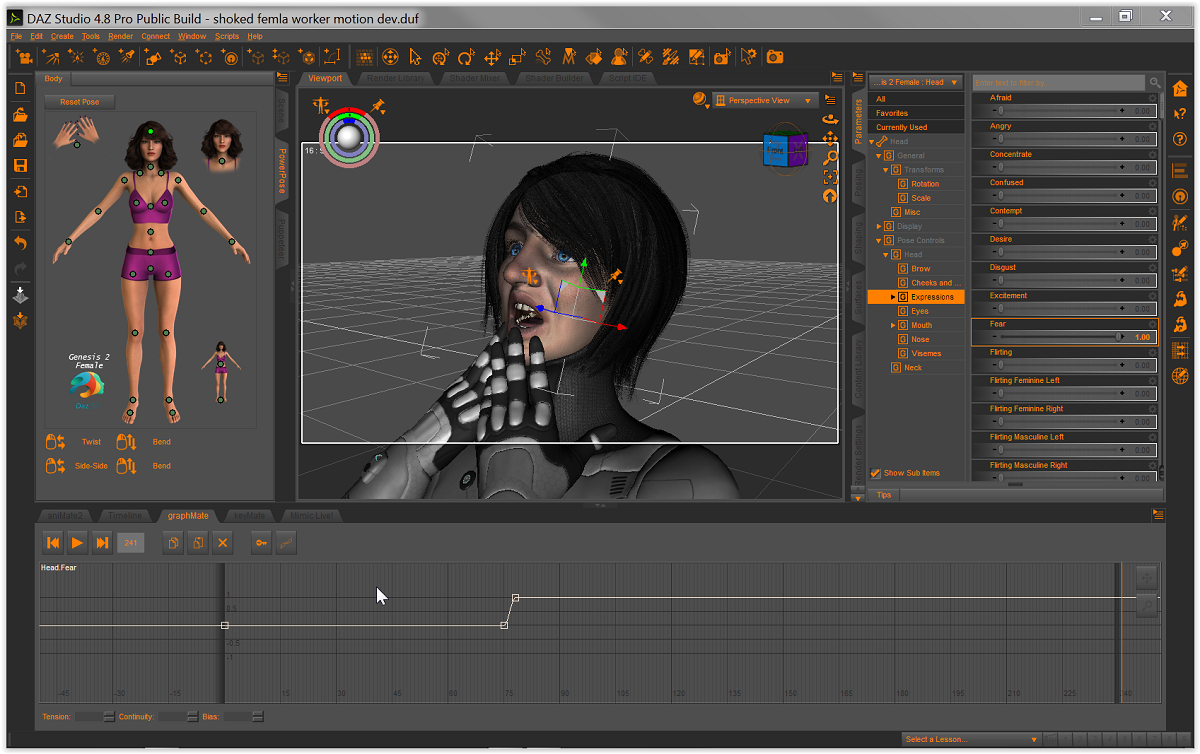
I have Hundreds of morphs for the G2 female
(possibly every morph ever released for G2F) .To be able to isolate any one
of them in the spline graph editor
is the type of visual feedback I need when developing motion
or fine tuning existing motions imported from Iclone.No HD, No Peace! Or... A little peace? I dunno...I prefer that the HD morph be included in the pro bundles. Since they are basically another option of the base character the bundle is built around, it makes sense to have it included. I dont use them often but I do like them for close up renders.
Morph Keyframes and KeymateWhere do morph keyframes like facial expression morphs show up in Keymate? All I see are bone keyframes.
when animating morphs with daz studio Its so much easier to use the morphs values in the dials and "Apply the morphs value movements to each keyframe as the morphs is needed using the morph dials instead of trying to actually do the morph in the keyframe its self which would require a deformer be added to the mesh.
By Keyframing the morphs dials , you get a better dynamic animated look to the morphs and you don't need key-mate or graph-mate in order to animate the morphs dial and you can go back and change and customize the morph value as you work along the timeline.
But that is just my opinion when animating with daz studio, Its so much easier to use the morphs values in the dials and "Apply the morphs value movements to each keyframe.
No HD, No Peace! Or... A little peace? I dunno...I can tell right away if a male character has his elements by looking at his groin...
Can I ask a stupid question? How do you get the pants to cover the "parts"? Everytime I load them up, they stick out of everything I put on the character (I'm using Genesis 3, BTW, if that makes a difference). I'd love for my guys to look more realistic there, but not show off everything they've got...
sadly it doesnt work on all clothing, and works best on things like swimsuits and short and underwear. The trick is you have to move the elements around so they are kind of pushed back into the figure. The idea is to have a suggestion that something is there but the reality is it likely would be rather painful.
Then you turn smoothing up on the clothing item. Sometimes use a touch If bulge as well if the clothing item has the morph,
you can also use bulge morphs on the figures. but they don’t have as much detail as the method describe, but may be appropriate for thicker clothing.
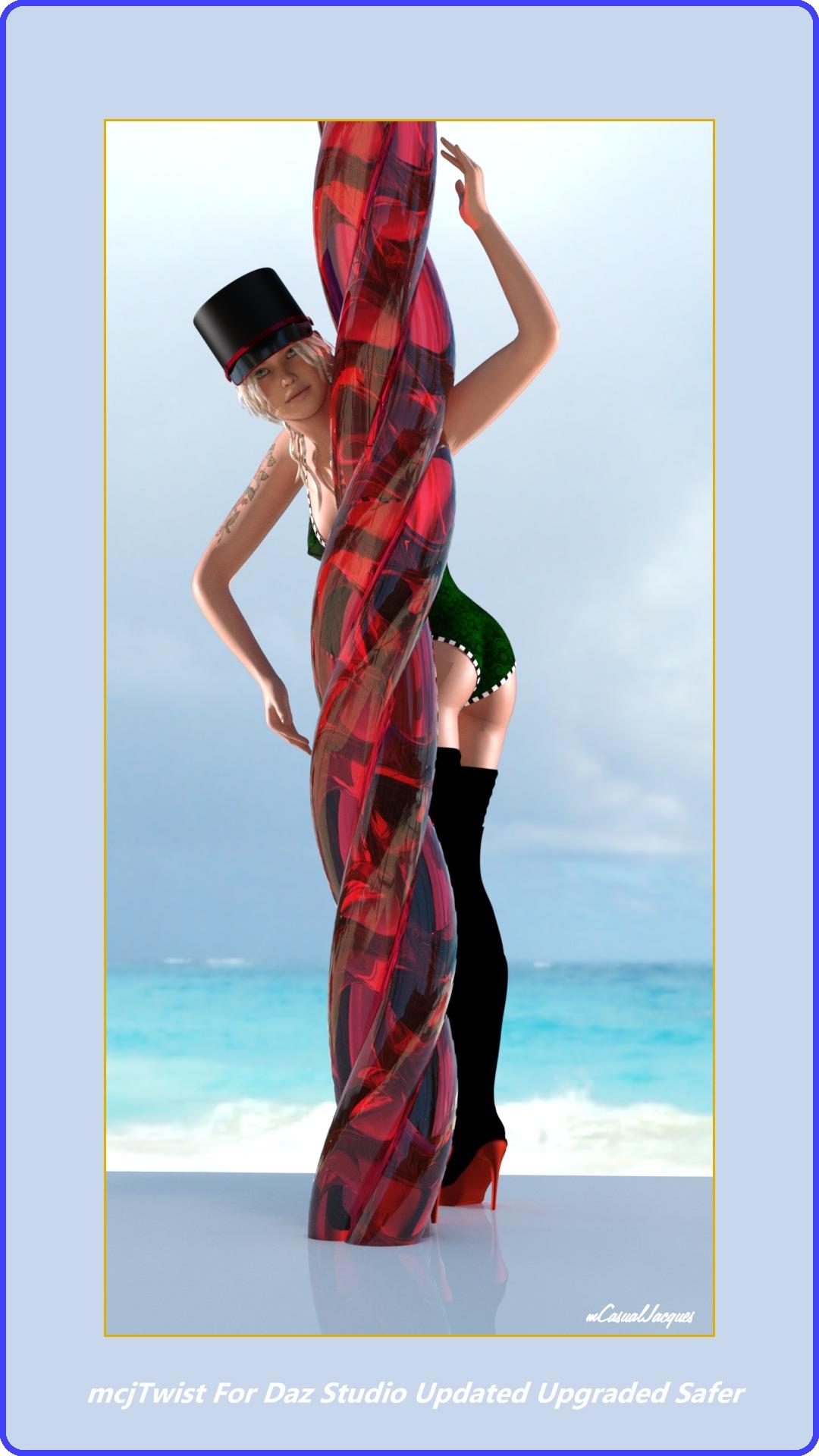
mcjTwist - Script to add Twist Morphs to anything ! Updated and made safermcjTwist for Daz Studio HAS BEEN updated, upgraded and made safer-
https://sites.google.com/site/mcasualsdazscripts2/mcjtwist
by safer i mean, if you used version 1 to create a morph on an object in subdivided state, the scene could never be reopened after you save it
unless maybe you temporarily removed the /data/ files for the twisted object

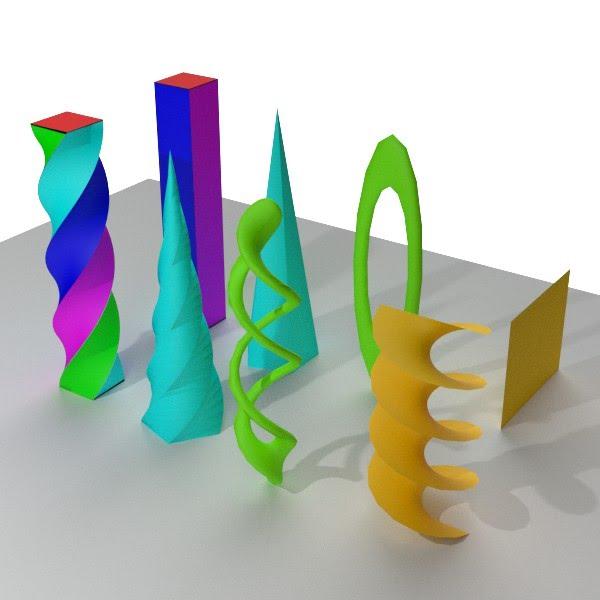 Carrara Non Photo Realistic Works
Continuing the colourful Alien saga....
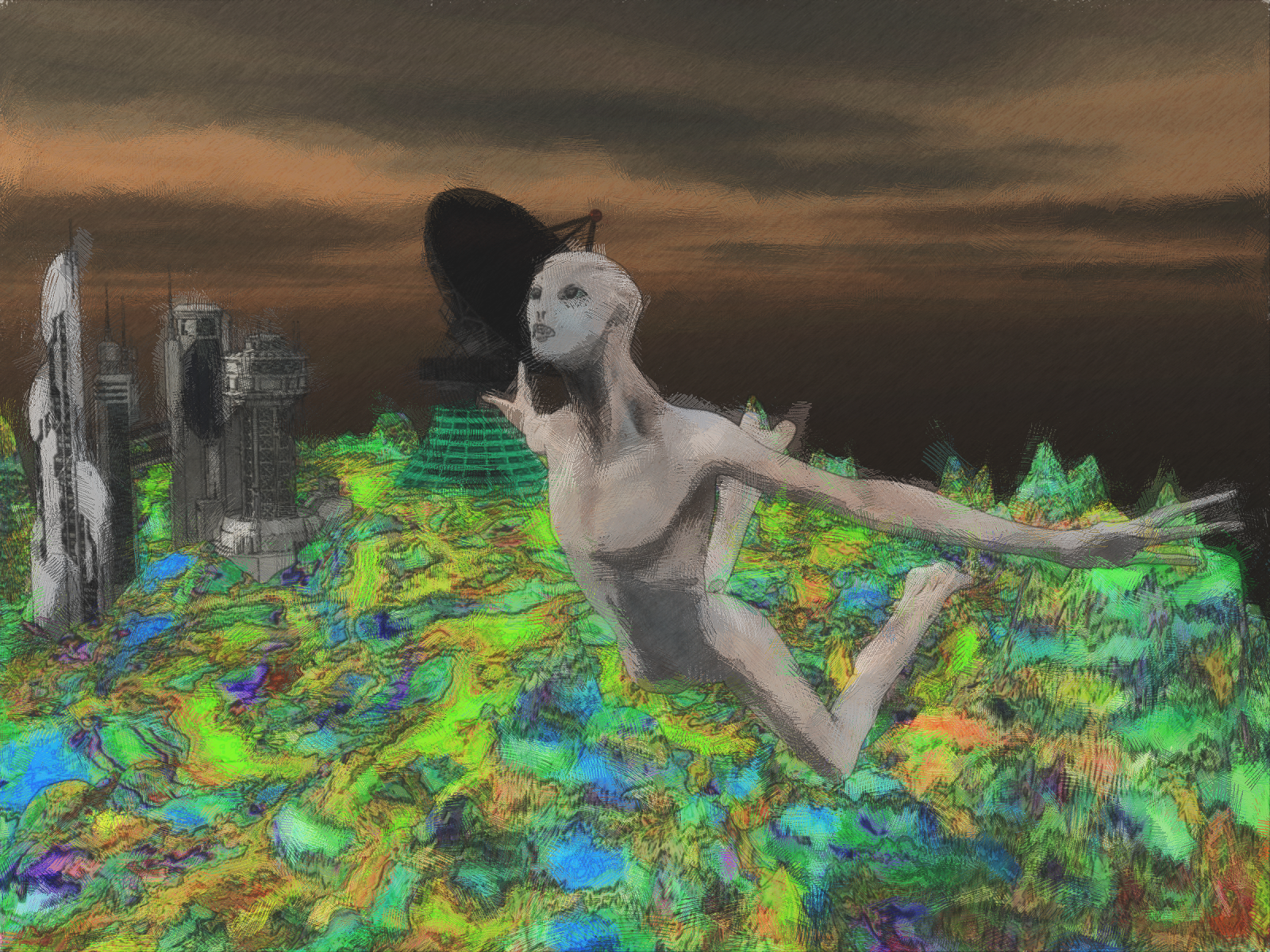
great to see a narrative unfolding - you should make a book in the end!
Before I got started in Carrara, I would make an Alien head morph in that other software that they have to give away for free, make a background in Bryce, then combine the two renders in PaintShopPro. Doing a bit more advanced work in Carrara.
Can a morph be linked to a rigged motion? (Solved)Hello lukon 100,
About the creation of link between properties (Such as between motion and morph), you can also look at my tutorial at:https://www.renderosity.com/mod/freestuff/tutorial-daz-studio-erc-feadture/81207
Allstereo
Thanks Allstereo. I'll be sure to consult your tutorial when the time comes.
No HD, No Peace! Or... A little peace? I dunno...A compromise could be readily achieved which would satisfy both camps with a create your own pro bundle approach. Take the starter bundle and a pool of the 5 addons which would normally comprise the pro pack. Add the HD morph to that pool. Of the six packages the customer chooses 5 to add to the starter bundle to convert it into the Pro bundle. That way Daz controls and effectively delivers what they would want in the pro bundle, and people won't be feeling they are missing out if the HD morph is included.
I think this would be a great idea. I would love to be able to switch out a pose set or a hair I don't care for and instead get the HD morphs!
Daz 3D is part of

Connect
DAZ Productions, Inc.
7533 S Center View Ct #4664
West Jordan, UT 84084Licensing Agreement | Terms of Service | Privacy Policy | EULA
© 2026 Daz Productions Inc. All Rights Reserved.