-
[Released] RSSY Clothing Converter from Michael 4 to Genesis 8 Male [Commercial]
I'd like to ask a few questions about what to do after conversion - a few pointers would be great, not sure if I'm overcomplicating things.
I'm using the converter morphs to tweak the fit to the G8M or G8F base. RiverSoftArt said about then saving the item but when I do I'm just getting back the item with the morph sliders where I previously set them. I was thinking if I could save the adjusted item as a 'base' fit then when I load it to a morphed figure it would have a better fit to that morped figure? Or put it another way, can I save the item so the converter sliders don't have to be used again after that first fitting?
Also is there any advantage in adding G8 morphs to the clothing item? For instance I use the bodybuilder morph a lot to tweak the figure. If it is worth it then how would I do it? (I'm guessing somewhere in the transfer function).
Thirdly, particularly with M4 and V4, some items have a whole list of redundant character morphs. Partiicularly if I am going to add G8 morphs, is there any advantage to deleting them and how would I do it?
The answer may be just go with it as it is, like I said, I may be over-thinking it.
Thanks.
Yes, resaving is just saving the morph sliders as you set them. The script automates a procedure by Sickleyield and uses her conformers to make it fit G8. To do more than that or deleting morphs, that is beyond the scope of the product which I don't know how to do.
Thanks for the reply - yes I realised this was outside the scope of the script, in fact I nearly posted as a new thread in the Commons as although its a follow through on the conversion it isn't actually about the product. I just thought somebody else churning through conversions may have thought about this and could suggest 'no, don't bother' or 'yes, its worth looking into' (for me that is, not yourselves).
I'm currently bashing away with your 3Delight to Iray converter as converting all this old stuff has left me with a tonne of usable content with Poser only materials. The Iray converter gives a good base to start from. As the hair converter moves back through the generations then it's going to make even more work. Good problem to have though, and a great excuse to sort out my Runtime and even junk a few things I've finally admitted I'll never actually use!
Thank you for your support!
 The 3Delight to Iray converter has been a huge time saver as I convert more and more stuff in my library.[Released] RSSY Clothing Converter from Michael 4 to Genesis 8 Male [Commercial]
I'd like to ask a few questions about what to do after conversion - a few pointers would be great, not sure if I'm overcomplicating things.
I'm using the converter morphs to tweak the fit to the G8M or G8F base. RiverSoftArt said about then saving the item but when I do I'm just getting back the item with the morph sliders where I previously set them. I was thinking if I could save the adjusted item as a 'base' fit then when I load it to a morphed figure it would have a better fit to that morped figure? Or put it another way, can I save the item so the converter sliders don't have to be used again after that first fitting?
Also is there any advantage in adding G8 morphs to the clothing item? For instance I use the bodybuilder morph a lot to tweak the figure. If it is worth it then how would I do it? (I'm guessing somewhere in the transfer function).
Thirdly, particularly with M4 and V4, some items have a whole list of redundant character morphs. Partiicularly if I am going to add G8 morphs, is there any advantage to deleting them and how would I do it?
The answer may be just go with it as it is, like I said, I may be over-thinking it.
Thanks.
Yes, resaving is just saving the morph sliders as you set them. The script automates a procedure by Sickleyield and uses her conformers to make it fit G8. To do more than that or deleting morphs, that is beyond the scope of the product which I don't know how to do.
Thanks for the reply - yes I realised this was outside the scope of the script, in fact I nearly posted as a new thread in the Commons as although its a follow through on the conversion it isn't actually about the product. I just thought somebody else churning through conversions may have thought about this and could suggest 'no, don't bother' or 'yes, its worth looking into' (for me that is, not yourselves).
I'm currently bashing away with your 3Delight to Iray converter as converting all this old stuff has left me with a tonne of usable content with Poser only materials. The Iray converter gives a good base to start from. As the hair converter moves back through the generations then it's going to make even more work. Good problem to have though, and a great excuse to sort out my Runtime and even junk a few things I've finally admitted I'll never actually use!
I don't need anything...still need a new cat, with fur and different breed morphs (including Manx and Maine Coon), that's all really.
Yes, yes, YES! I just adopted a Maine Coon mix from a shelter and would LOVE a cat with that morph! Also a Bengal. That’s the one thing I really need and want now is a really good cat & kitten model (better than Hivewire’s) with multiple morphs, breeds and furs. The dog only has limited breeds too. Cats and new dog breeds are really the only things I need at this point... And Linday’s hair model that I missed in the blink sale. Grrrr...
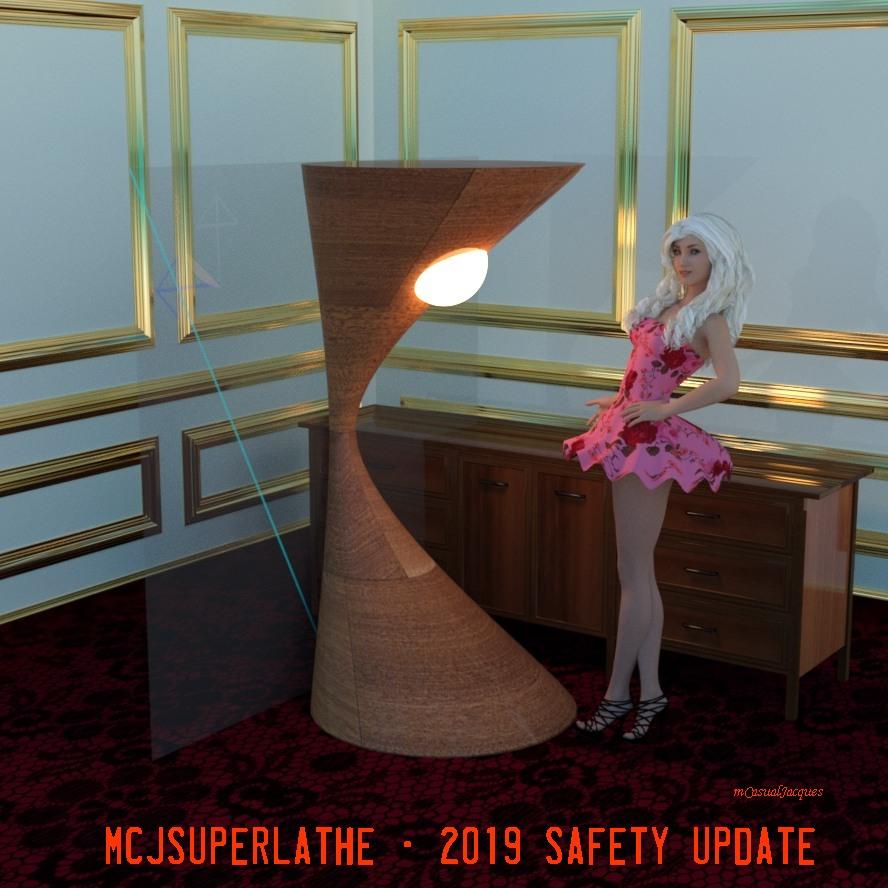
mcjSuperLathe - Spline-based morph and prop creation - 2019 SAFETY UpdateMarch 1st 2019 - The Script is Safer : It refuses to build a morph on subdivided surfaces which rendered scene files un-loadable
well it does accept to work on subdivided surfaces as long as they are placed in Low-Resolution mode
 [Released] Altern8 Lee 8 (Commercial)
Looks great Diva and some really nice promo images. I doubt I will be able to pick this up since I have no interest in Lee 8 of makeup for males, but best of luck with it!

lol Well it's much more than that. It's like a morph set and skin settings and shader set, pose set, and makeup set, all in one. :)
MorphsOr if you dont mind paying for it ---> https://www.daz3d.com/x-morphs
I used it with great success and it doesn't create sharp joints.
Unfortunately it didn't work so I had to rebuild the model from 0.
That is odd, I use that product to do just that, seperate the head from the body morph. Worked great on Ronen since I didn't care for his head morph https://www.daz3d.com/ronen-character-hair-and-briefs-for-genesis-8-male
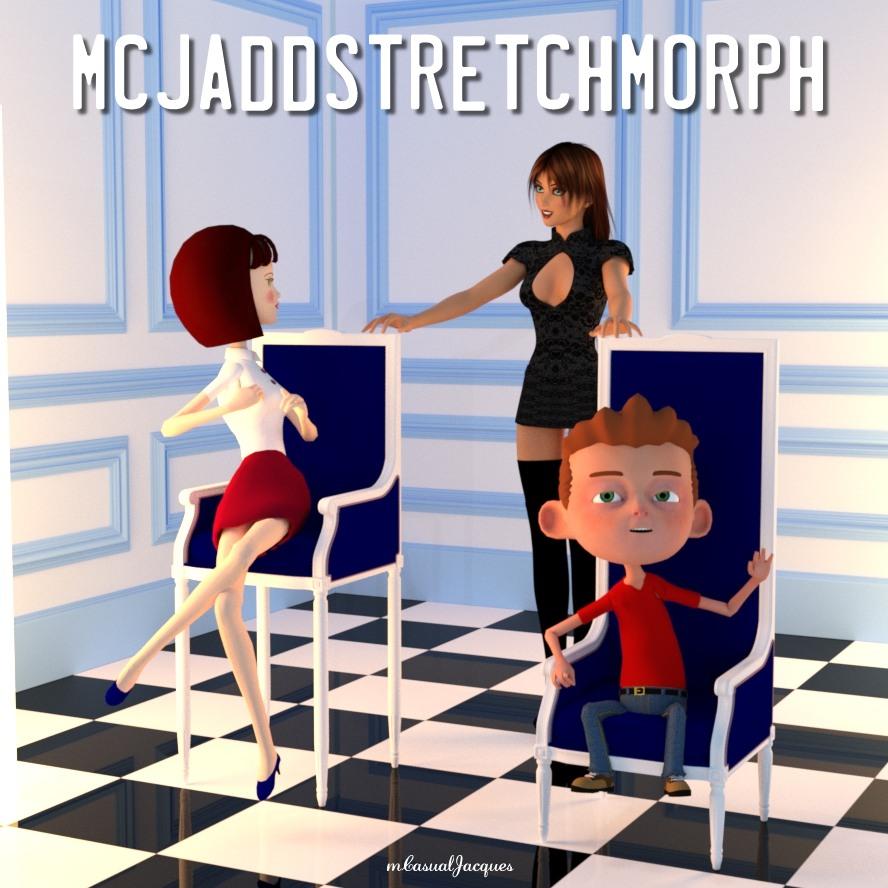
mcjAddStretchMorph: add stretch morphs to anythink Updated and Safer 2019mcjAddStretchMorph IS updated upgraded and made safe for use on subdivided geometry -
in this example it was used to stretch the chair legs and back rest
before V4 : creating a morph on a subdivided surface could render the scene file un-openable
 No HD, No Peace! Or... A little peace? I dunno...
Not a problem. Just because I'm not going to use it doesn't mean I can't help folks that want to learn more about it.I've never purchased HD. What is HD and how is it used ? thanks.
HD, as handled by DAZ Studio, is a way of adding details to a model that is independent of the textures applied to the figure. Instead of using a normal map for details, the additional details are sculpted into the model at a much higher subdivision level than is usually used by DAZ Studio. This higher detail model becomes the basis for an HD morph for the character.Thanks so much for explaination friend. Will have to give it a try
Bringing older generations up to modern standards - might be fun ;)I installed GenX and all the plugins with DIM. In the GenX pane, what happens when you click the Source button in the top left corner in the Transfer sub tab?
You should see a drop down list offering Genesis, plus all the other Genesis figures you own plugins for.
There's nothing there (or I should say it's grayed out). And I had to install GenX2 manually because it didn't even show up in Install Manager *shrug*. Gremlins ;).
I get a whole lotta nothing. No Genesis, nothing newer and nothing older. LOL Blank. I do get the GenX2 tab tho. But it's sorta useless to me at the present ;).
Laurie
If it is blank you have got something screwed up with the install. Is GenX installed in the same location as the main Genesis, G2F, G2M etc base figures? It should also be in the same place as where V4 and M4 are installed.
Well, my DS install (the beta in my case - and that is where GenX2 is currently installed) and my content folders are on two different drives, so, no. They aren't installed in the same place ;). They can't be...well, not unless I install DS to the drive that has just my content on it, which wouldn't really be efficient since my SSD is faster and DS is currently installed there. I don't have any problems with any other plugin I've got. Just this one *sigh*.
Laurie
It should work fine when the content is not on your c drive, nor does it matter if it is on the same drive as where DS is installed. However GenX must be installed in the same location as the base figures (ie all the Genesis essential packages) I also do not use the standard DS install location.
Ok, now THAT makes sense. I must have the base packages installed to 4.10 ;). I'll install GenX to 4.10 and use it there and see what happens. LOL.
Laurie
Bringing older generations up to modern standards - might be fun ;)I installed GenX and all the plugins with DIM. In the GenX pane, what happens when you click the Source button in the top left corner in the Transfer sub tab?
You should see a drop down list offering Genesis, plus all the other Genesis figures you own plugins for.
There's nothing there (or I should say it's grayed out). And I had to install GenX2 manually because it didn't even show up in Install Manager *shrug*. Gremlins ;).
I get a whole lotta nothing. No Genesis, nothing newer and nothing older. LOL Blank. I do get the GenX2 tab tho. But it's sorta useless to me at the present ;).
Laurie
If it is blank you have got something screwed up with the install. Is GenX installed in the same location as the main Genesis, G2F, G2M etc base figures? It should also be in the same place as where V4 and M4 are installed.
Well, my DS install (the beta in my case - and that is where GenX2 is currently installed) and my content folders are on two different drives, so, no. They aren't installed in the same place ;). They can't be...well, not unless I install DS to the drive that has just my content on it, which wouldn't really be efficient since my SSD is faster and DS is currently installed there. I don't have any problems with any other plugin I've got. Just this one *sigh*.
Laurie
It should work fine when the content is not on your c drive, nor does it matter if it is on the same drive as where DS is installed. However GenX must be installed in the same location as the base figures (ie all the Genesis essential packages) I also do not use the standard DS install location.
Bringing older generations up to modern standards - might be fun ;)I installed GenX and all the plugins with DIM. In the GenX pane, what happens when you click the Source button in the top left corner in the Transfer sub tab?
You should see a drop down list offering Genesis, plus all the other Genesis figures you own plugins for.
There's nothing there (or I should say it's grayed out). And I had to install GenX2 manually because it didn't even show up in Install Manager *shrug*. Gremlins ;).
I get a whole lotta nothing. No Genesis, nothing newer and nothing older. LOL Blank. I do get the GenX2 tab tho. But it's sorta useless to me at the present ;).
Laurie
If it is blank you have got something screwed up with the install. Is GenX installed in the same location as the main Genesis, G2F, G2M etc base figures? It should also be in the same place as where V4 and M4 are installed.
Well, my DS install (the beta in my case - and that is where GenX2 is currently installed) and my content folders are on two different drives, so, no. They aren't installed in the same place ;). They can't be...well, not unless I install DS to the drive that has just my content on it, which wouldn't really be efficient since my SSD is faster and DS is currently installed there. I don't have any problems with any other plugin I've got. Just this one *sigh*.
Laurie
Bringing older generations up to modern standards - might be fun ;)I installed GenX and all the plugins with DIM. In the GenX pane, what happens when you click the Source button in the top left corner in the Transfer sub tab?
You should see a drop down list offering Genesis, plus all the other Genesis figures you own plugins for.
There's nothing there (or I should say it's grayed out). And I had to install GenX2 manually because it didn't even show up in Install Manager *shrug*. Gremlins ;).
I get a whole lotta nothing. No Genesis, nothing newer and nothing older. LOL Blank. I do get the GenX2 tab tho. But it's sorta useless to me at the present ;).
Laurie
If it is blank you have got something screwed up with the install. Is GenX installed in the same location as the main Genesis, G2F, G2M etc base figures? It should also be in the same place as where V4 and M4 are installed.
Bringing older generations up to modern standards - might be fun ;)I installed GenX and all the plugins with DIM. In the GenX pane, what happens when you click the Source button in the top left corner in the Transfer sub tab?
You should see a drop down list offering Genesis, plus all the other Genesis figures you own plugins for.
Thanks Havos. Yes, I do see the drop down. But then comes the part of selecting them, and they don't select or something else happens (which I can't remember). But tell me: Does GenX still work with 4.11?
I have not used 4.11 yet, but I have not heard there are any problems with it. I do know however that when using the beta the GenX plugin needs to be reinstalled so that the relevant dll files are installed into the beta location too.
Bringing older generations up to modern standards - might be fun ;)I installed GenX and all the plugins with DIM. In the GenX pane, what happens when you click the Source button in the top left corner in the Transfer sub tab?
You should see a drop down list offering Genesis, plus all the other Genesis figures you own plugins for.
There's nothing there (or I should say it's grayed out). And I had to install GenX2 manually because it didn't even show up in Install Manager *shrug*. Gremlins ;).
I get a whole lotta nothing. No Genesis, nothing newer and nothing older. LOL Blank. I do get the GenX2 tab tho. But it's sorta useless to me at the present ;).
Laurie
Bringing older generations up to modern standards - might be fun ;)I installed GenX and all the plugins with DIM. In the GenX pane, what happens when you click the Source button in the top left corner in the Transfer sub tab?
You should see a drop down list offering Genesis, plus all the other Genesis figures you own plugins for.
Thanks Havos. Yes, I do see the drop down. But then comes the part of selecting them, and they don't select or something else happens (which I can't remember). But tell me: Does GenX still work with 4.11?
Bringing older generations up to modern standards - might be fun ;)I installed GenX and all the plugins with DIM. In the GenX pane, what happens when you click the Source button in the top left corner in the Transfer sub tab?
You should see a drop down list offering Genesis, plus all the other Genesis figures you own plugins for.
Bringing older generations up to modern standards - might be fun ;)I've had the same problem. I transferred a bunch of Genesis 2 and quite a few V4's but I couldn't get anything to select for M4. I transferred Giselle 6, and then when I went to transfer Stephanie 6 and Olympia 6, I couldn't get anything to show up. I've been putting off updating DS because I want to transfer all of my previous generations to Genesis 3, and I haven't been able to find out if 4.11 breaks GenX.
Bringing older generations up to modern standards - might be fun ;)The problem I seem to be having at the moment is that I can't select anything. LOL There's nothing there to select. It's maddening. I need to devote some more time to it to figure out why I'm not getting anything at all to transfer.
The plugin is installed and it is registered. I might need to re-install the addons. Do they need to go in the DS folder too? Because right now I think those are in the content folders.
Laurie
Edit: Well, reinstalling the addons did nothing. I have DS and the content folders on different drives and GenX2 probably isn't finding anything. I don't know how to MAKE it find anything either ;). I have to have my folders set up this way though because my C: drive is an SSD and is only so big, so I keep content elsewhere. So lost...lol.
[Released] RSSY Clothing Converter from Michael 4 to Genesis 8 Male [Commercial]I'd like to ask a few questions about what to do after conversion - a few pointers would be great, not sure if I'm overcomplicating things.
I'm using the converter morphs to tweak the fit to the G8M or G8F base. RiverSoftArt said about then saving the item but when I do I'm just getting back the item with the morph sliders where I previously set them. I was thinking if I could save the adjusted item as a 'base' fit then when I load it to a morphed figure it would have a better fit to that morped figure? Or put it another way, can I save the item so the converter sliders don't have to be used again after that first fitting?
Also is there any advantage in adding G8 morphs to the clothing item? For instance I use the bodybuilder morph a lot to tweak the figure. If it is worth it then how would I do it? (I'm guessing somewhere in the transfer function).
Thirdly, particularly with M4 and V4, some items have a whole list of redundant character morphs. Partiicularly if I am going to add G8 morphs, is there any advantage to deleting them and how would I do it?
The answer may be just go with it as it is, like I said, I may be over-thinking it.
Thanks.
Yes, resaving is just saving the morph sliders as you set them. The script automates a procedure by Sickleyield and uses her conformers to make it fit G8. To do more than that or deleting morphs, that is beyond the scope of the product which I don't know how to do.
Genesis 9 delayed until at least 2020. Will you be buying it?Unfortunately so many utilities are not available when a generation is first released that it's not useable for custom characters. It was maddening waiting for them to be released. Will I buy it? Probably, but I think I'll wait a year or so. Now if Daz temps me with the "Buy a Genesis 9 pro bundle and get one or more Genesis 8 or lower pro bundles free" deal, I'll probably succumb....my position as well. To get all the different morph, eye, mouth, and skin utilities useful for creating custom characters not only takes funds, but time waiting for them to be released. By the time you have everything you need (as I discovered) the next generation is on its way (or as in the case of G8, already) out. So the process has to begin anew as all the various tools required need to be compatible with the new figure mesh. This also means taking the time to rebuild your characters on the new model as well.
Sometimes you just have to stand up, pull the signal cord, and get off the bus before it goes into the next zone and you have to pay more.
Daz 3D is part of

Connect
DAZ Productions, Inc.
7533 S Center View Ct #4664
West Jordan, UT 84084Licensing Agreement | Terms of Service | Privacy Policy | EULA
© 2026 Daz Productions Inc. All Rights Reserved.











