-
Bringing older generations up to modern standards - might be fun ;)
I really wish DAZ would bring their original older characters like David 5 up to Genesis 8. That would be fantastic. Poor David has been totally forgotten, even though they've continued Stephanie. Maybe someone could make some of those older characters for Genesis 8. I have Michael 7 for Michael 8. I also have Gianni 6 for Gianni 7. It would be great if they could bring David 5 up to Genesis 8 in a similar way, even though there's no David 8 (and probably never will be, sadly).
I did get my customized David over to G3M at least with GenX2, but he looks a bit different. I'm customizing him further and am starting to get something I can live with ;). He doesn't look like the Genesis 1 David 5 that I customized, but at least he looks like his brother. LOL He's wearing Malachai for G3M's skin and borrowing M7's HD details morph here. I still have to set the skin up to chromatic tho. No special lights either...just the default HDRI.
Getting old figures over can be done, they just aren't gonna look exactly the same, but only like a close relative :( However, I would definitely buy a "David 5 for Genesis 8 Male" if he looked as good as some of the ones Gravity Studios has been doing.
Laurie
I believe the reason he doesn't look exactly the same is because of the lower poly count of the G3/8 models. But it's good you're finding ways to adjust.
Well, I have three choices. Use David 5 (which I will), use the G3M version (which I will, probably) and have Mike 7 as a brother between the two (would probably work). LOL I have not yet begun to customize!! I find it extremely fun and rewarding making something no one else has ;). Probably why I can't leave a character alone "as is" LOL.
You are so right about the lower poly too....I'm finding it hard to just add small details to the G3/G8 figures. In a weird way, they are very "doughy" and smooth, which looks so totally wrong to me. I find myself adding another characters HD details just to give the skin SOME tiny details, but that creates its own issues. There's a lot to like about the newer figures, but they do NOT lend themselves well to small details unless you add HD (which since I'm not a PA I can't obviously and can only borrow another characters) or make normals (there again, I'm borrowing from another character).
Bringing older generations up to modern standards - might be fun ;)I really wish DAZ would bring their original older characters like David 5 up to Genesis 8. That would be fantastic. Poor David has been totally forgotten, even though they've continued Stephanie. Maybe someone could make some of those older characters for Genesis 8. I have Michael 7 for Michael 8. I also have Gianni 6 for Gianni 7. It would be great if they could bring David 5 up to Genesis 8 in a similar way, even though there's no David 8 (and probably never will be, sadly).
I did get my customized David over to G3M at least with GenX2, but he looks a bit different. I'm customizing him further and am starting to get something I can live with ;). He doesn't look like the Genesis 1 David 5 that I customized, but at least he looks like his brother. LOL He's wearing Malachai for G3M's skin and borrowing M7's HD details morph here. I still have to set the skin up to chromatic tho. No special lights either...just the default HDRI.
Getting old figures over can be done, they just aren't gonna look exactly the same, but only like a close relative :( However, I would definitely buy a "David 5 for Genesis 8 Male" if he looked as good as some of the ones Gravity Studios has been doing.
Laurie
I believe the reason he doesn't look exactly the same is because of the lower poly count of the G3/8 models. But it's good you're finding ways to adjust.
Bringing older generations up to modern standards - might be fun ;)I really wish DAZ would bring their original older characters like David 5 up to Genesis 8. That would be fantastic. Poor David has been totally forgotten, even though they've continued Stephanie. Maybe someone could make some of those older characters for Genesis 8. I have Michael 7 for Michael 8. I also have Gianni 6 for Gianni 7. It would be great if they could bring David 5 up to Genesis 8 in a similar way, even though there's no David 8 (and probably never will be, sadly).
I did get my customized David over to G3M at least with GenX2, but he looks a bit different. I'm customizing him further and am starting to get something I can live with ;). He doesn't look like the Genesis 1 David 5 that I customized, but at least he looks like his brother. LOL He's wearing Malachai for G3M's skin and borrowing M7's HD details morph here. I still have to set the skin up to chromatic tho. No special lights either...just the default HDRI.
Getting old figures over can be done, they just aren't gonna look exactly the same, but only like a close relative :( However, I would definitely buy a "David 5 for Genesis 8 Male" if he looked as good as some of the ones Gravity Studios has been doing. And I mean I'd want him to look the same right down to the tips of his toes ;)
Laurie
Problem with transfer utilityHi, i'm trying to wear a character with a jacket ("GIACCA" in italian language), but as you can see in the picture, opening the menu - EDIT-FIGURE-TRANSFER UTLITY-SELECT AN ITEM-it doesn't show "WhiteRabbit" in the SOURCE MENU, but only "WhiteRabbitHair" and "GIACCA". Of course it can't works without the exact source item "WhiteRabbit", what's wrong? Thanks in advance who help with suggestions.
freelance animatorHi I am a daz studio animator. Can you tell me what country you are located in & Is this an Adult rated animation?
I work exclusively using Daz Studio versions 4.6 through daz 10 and Poser. I use Adobe Premiere pro for film editing if required.
I do a lot of free lance animation work using Daz Studio & I would not mind working with you on your project as long as you keep in mind. I do not work from exclusive contracts. I have few other clients I am working with everyday on animated projects and i take animation work in the order i receive them, I work from storyboards and scripts, written or drawn. & I charge by pre scene completed, payment via to my paypal account. No Exceptions, I've been burned a few times.
I can deliver your animation electronically in formats of .DUF animated scene files , BVH animation scripts, Aniblocks. or FXB.
I do file transfer through my website only, so you can view the progress of the work and to access the completed animation there . I will send you a demo video of the completed animation for you to view before payments is made and i release the animation to you..in case you need to make some changes. I do animation work through my website, which allows me to freely share assets with my clients without restrictions and I keep a log of the work being transferred this way for our records.
Do you require just the animation file? or do you require me to do the rendering too? I use a a number render cloud options and the cost is past on to client.
If you only required the animated scene file & your working with just a base daz character Or only need a BVH script motion files import/export method. so you can load the animation script it into your own daz studio to create what ever scene then no license is require. and transfers will be quick
But one Issue that keeps arising If I do not own the assets you require, and the 3d content is not something you created yourself you can share with me freely you will need a to purchase the assets for me that I need in order to share the scene files accurately, The interactive and gaming licenses does not cover sharing of content unfortunately. So if we are using Daz Studio store assets that may require animating like trees, water, etc.,& if i do not already own those assets you will need a to purchase the assets for me required using a daz gift card. keeping us within the Daz ELUA https://www.daz3d.com/eula I have a huge library of content so chances are I own what you require.. But because the fact I work exclusively using Daz Studio for animation work, I do not want to loose my user rights or my account from daz so I stay within the ELUA
I've been doing this a very long time working with daz in animation since 2010, I never had any complaints. so I just want you to know what hurdles need to be jump before I accept any work orders,
you can review some of my animation work here to see if this is something you are looking for , https://www.youtube.com/c/IvySummers
Serious inquires only please I stay very busy. & I do have client references if you require them.
Pease contact me through Daz3d.com SMS portal https://www.daz3d.com/forums/messages/inbox or through my website http://www.ivysdomain.com/ for more discussions on this matter if your interested for price and requirements
I work with daz studio. But I do not work for or am I an employee of Daz3d.com
Thank you
Ivy Summers
LEGS AND MORPHS! SOLVEDIt will save with the propertyn listed in Save As - for a JCM that would usually be the morph itself. If you exapnd the property under the Subcompoents heading (the oens bracketed in your screen shot) that should have the entries.
Need the name of the modelI would like also to know which character ( morph ) was use in the main promo image of Fantasy Skins for Genesis 8 presenting a woman with green skin and many arms in motions.I saw that rendering image was marked as Genesis 8.It's a custom character ?Figure Metrics ignoring or messing with inputYou select as you seelcted the Scale/Portly properties - just pick a diffrent property, a morph or transform that is (as far as possible) going to affect only the area and dimension the measure reads.
Figure Metrics ignoring or messing with inputYou are using only two properties - overall scale and the Portly morph - in the visible measures. It's unlikely that the same values for those will yield the various measures you have set, so as the script gos through each iteration it's going to be tugging their values first one way and then the other. You need to select much more specific properties, and geenrally you need a separate proeprty for each value you wish to adjust directly.
Duplicate Formulas ErrorDuplicate Formulas is kind of an annoying error. The error you see in the log is only for the second occurrence of the formula; it doesn't tell you what the first occurrence was. The problem isn't necessarily the G8F Head and Body morphs themselves, but with something that references/calls on them. (Also, the issue won't be that there are two morph files -- there won't be two PBMNipples.dsf files in a particular directory -- but that there is an issue with the text inside the files.)
What was the last G8F character that you installed? It's very likely that the last character you installed introduced that issue, if you didn't see it before. If you can isolate it to the last character and uninstall that one, you can tell if that's the one that introduced the issue. Depending on how many recent characters you've installed, you may need to slowly go back through your purchases and uninstall one by one until the issue disappears. Once you no longer see the issue, you will have located the source of the conflict. You can then file a ticket to have the error fixed.
Alternately, if you got something updated recently -- a character or morph set or some such -- that may also have introduced the issue.
The good news, sort of, is that you can normally just click on the message to clear the error from your screen, and it won't interfere with anything. The caveat is that if you're doing an animation sequence or batch render, the duplicate formulas message may stop that process dead in its tracks.
MorphsOr if you dont mind paying for it ---> https://www.daz3d.com/x-morphs
I used it with great success and it doesn't create sharp joints.
Unfortunately it didn't work so I had to rebuild the model from 0.
That is odd, I use that product to do just that, seperate the head from the body morph. Worked great on Ronen since I didn't care for his head morph https://www.daz3d.com/ronen-character-hair-and-briefs-for-genesis-8-male
When I used the program and tried to dial the body morph or the head morph nothing happend I don't know why. On other models works but on a specific model it doesn't.
I don't need anything...I tend to purchase items that I actually will use directly in my illustration/story work and character design/development as I am on an extremely tight budget. Hence why I don't buy pro or starter bundles as they tend to have items I don't use, and I rarely even purchase a premade characters (unless they have features I cannot recreate with the morph resources I have or custom morphs/sculpting that works with my ideas).
For having been with this for nearly a dozen years, I have a much smaller collection of content than most here, even some who have been at this for less time than I have.
What kind of clothing are you sorely missing?With Riversoft's script, G8 clothing is backward compatible with G3. Even without the script you can do it yourself with just a little work.
Laurie
It is on my wishlist, but likely to stay there a while longer. I still have to autofit back from G3 to G1, and the morphs seem to effectively vanish when I do that. I read there was a way to transfer morphs, but I don't currently have the knowledge of it. Usually just easier and quicker to use what already works.
What kind of clothing are you sorely missing?I've only been doing 3D art for a couple of years now, but it seems like the V4 era had a lot of really big elaborate outfits and armour that I'd love to see brought to the newer gen. I've tried transferring some of those types of outfits to the newer gens but due to their "largeness", things get warped, even with really good transfer scripts like RiversoftArt and Sickleyield's.
We get awesome elaborate outfits like that every once in a while but they're very few and far between:


There are already some amazing V4 era pieces that would be great to be able to use on the new generations.


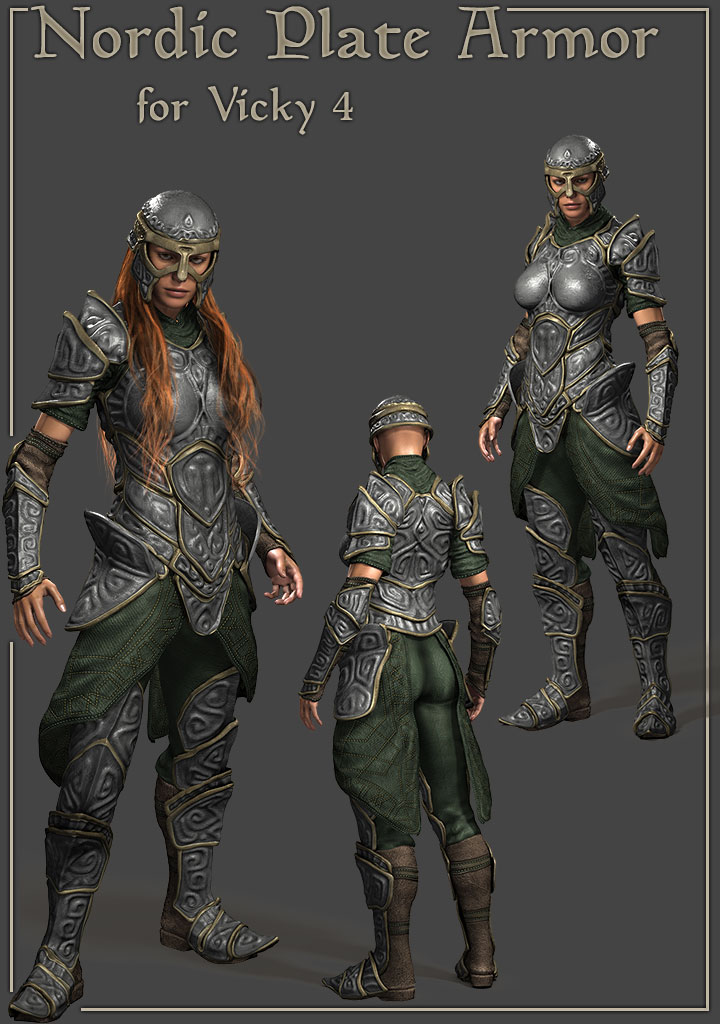
There are SO MANY great Victoria 4 era pieces and it's such a shame that they don't transfer well via clones or scripts. I think if some took the time to bring those already sculpted gorgeous outfits and updated them for the newer gen, it would be amazingly good! I think a lot of people would love to be able to use those highly detailed and elaborate outfits on the newer generations without the warps and misfits that often come with trying to transfer them ourselves via cones and such. Most automated transfer methods just don't do well with the larger, more elaborate, outfits. Not to mention fiddling with the mats and settings to get them Iray compatible.
If some of the gorgeous, elaborate V4 outfits could be updated and brought to the newer gen, I think that would be AWESOME! :)
Agreed. Arki updated The Sylph Outfit for Genesis 8 Female and I would love her to update her other ones as well
There's also the trick of using V4, hiding the head/hands, and using another generation and hiding the body. It helps if you have every morph kit available for V4.
female dragonoo wow she looks elegent and fallowed the were picture is put it in fav,...... so did you do the reform in daz ?or use somthing different .like what did you use for Faraleth file download was easy to do as i do basic stuffAll the editing was done in either Blender or Photoshop. Unfortunately, it's not a simple process - she's never actually been in Daz, as she'd be a collosal pain to import - Daz can't correctly import skeletons (from any file format I've yet tried - apparently taking FBX files via Poser can work, but I don't have Poser), and I really don't want to have to go through the rigging process from step 1 again.
As such, she's always been rendered in other programs.
the drakon is very nice but as female form its not elgent as female gose and like the hips and breast , me be i could play around ,.or could would think i could do like confert into a female form me beAgentUnawares has done some "transgender" morphs (which basically add a G8F shape to G8M, vice versa, and also for G3)
https://www.deviantart.com/agentunawares/art/Transgender-Genesis-8-723851486
https://www.deviantart.com/agentunawares/art/Transgender-Genesis-3-724928721They have their limits and I'm not sure exactly how well they'll work on an extreme shape like Dragkon, but in combination with auto-fit, they're still pretty useful tools. For example, a hypothetical "Michelle 7" (a.k.a. Michael 7 with the transgender morph, and Victoria 7's materials to get rid of the stubble and chest hair) has clearly been spending time at the gym, but it's still a plausible result.

You can also with models that don't rely on geographs or too heavily on HD morphs (however, unfortunately, Dragkon isn't such a model) use Daz's transfer utility and some of the UV swap products out there to permanently convert a non-HD version of the morph to the other gender - I've actually done that with one of RawArt's other models, Boaris (although the fang shape needed a little clean-up in Blender). The results, plus quite a lot of extra dial spinning, can be seen here:

intresting thanks for info , well i did convert the female dragon in blender but yes the riging is not happing , am not great in blender i had watch video on youtube to just do the converting then save as obj and save textures it looks nice but thats about it i was thinking i could use hex highlight movmen needed and then resend in to daz ,............... but i did download the lizards it has both sexses and i done the addons textures so can play around with that i could use the tail and wings from drakon to the lisards , see how works ............. i did play around with drakon male mrphed the chest bit to pop out a bit ,i could then move into hex and bring chest out bid more but is still kinda beafed up at moment i play around see wat i can do
any way thanks for info
What kind of clothing are you sorely missing?I've only been doing 3D art for a couple of years now, but it seems like the V4 era had a lot of really big elaborate outfits and armour that I'd love to see brought to the newer gen. I've tried transferring some of those types of outfits to the newer gens but due to their "largeness", things get warped, even with really good transfer scripts like RiversoftArt and Sickleyield's.
We get awesome elaborate outfits like that every once in a while but they're very few and far between:
There are already some amazing V4 era pieces that would be great to be able to use on the new generations.
There are SO MANY great Victoria 4 era pieces and it's such a shame that they don't transfer well via clones or scripts. I think if some took the time to bring those already sculpted gorgeous outfits and updated them for the newer gen, it would be amazingly good! I think a lot of people would love to be able to use those highly detailed and elaborate outfits on the newer generations without the warps and misfits that often come with trying to transfer them ourselves via cones and such. Most automated transfer methods just don't do well with the larger, more elaborate, outfits. Not to mention fiddling with the mats and settings to get them Iray compatible.
If some of the gorgeous, elaborate V4 outfits could be updated and brought to the newer gen, I think that would be AWESOME! :)
Agreed. Arki updated The Sylph Outfit for Genesis 8 Female and I would love her to update her other ones as well
LEGS AND MORPHS! SOLVEDOk thanks Richard I'm going to try your steps. Meanwhile look the pics. Pic 1 is what it say each time I save the Morph Asset then character. Pic 2 is what happens when I load the character. Could be useful to find the wrong step!
I le you know!
What kind of clothing are you sorely missing?I've only been doing 3D art for a couple of years now, but it seems like the V4 era had a lot of really big elaborate outfits and armour that I'd love to see brought to the newer gen. I've tried transferring some of those types of outfits to the newer gens but due to their "largeness", things get warped, even with really good transfer scripts like RiversoftArt and Sickleyield's.
We get awesome elaborate outfits like that every once in a while but they're very few and far between:
There are already some amazing V4 era pieces that would be great to be able to use on the new generations.
There are SO MANY great Victoria 4 era pieces and it's such a shame that they don't transfer well via clones or scripts. I think if some took the time to bring those already sculpted gorgeous outfits and updated them for the newer gen, it would be amazingly good! I think a lot of people would love to be able to use those highly detailed and elaborate outfits on the newer generations without the warps and misfits that often come with trying to transfer them ourselves via cones and such. Most automated transfer methods just don't do well with the larger, more elaborate, outfits. Not to mention fiddling with the mats and settings to get them Iray compatible.
If some of the gorgeous, elaborate V4 outfits could be updated and brought to the newer gen, I think that would be AWESOME! :)
LEGS AND MORPHS! SOLVEDFind the property in the Property Hierarchy (you can do this bu right-click from the Parameters pane in Edit mode) and expand the options under the ERC link - one property should be save with, which tells you whether the link is saved with the controller or the sub-component. Make sure it's saving with the morph.
female dragonoo wow she looks elegent and fallowed the were picture is put it in fav,...... so did you do the reform in daz ?or use somthing different .like what did you use for Faraleth file download was easy to do as i do basic stuffAll the editing was done in either Blender or Photoshop. Unfortunately, it's not a simple process - she's never actually been in Daz, as she'd be a collosal pain to import - Daz can't correctly import skeletons (from any file format I've yet tried - apparently taking FBX files via Poser can work, but I don't have Poser), and I really don't want to have to go through the rigging process from step 1 again.
As such, she's always been rendered in other programs.
the drakon is very nice but as female form its not elgent as female gose and like the hips and breast , me be i could play around ,.or could would think i could do like confert into a female form me beAgentUnawares has done some "transgender" morphs (which basically add a G8F shape to G8M, vice versa, and also for G3)
https://www.deviantart.com/agentunawares/art/Transgender-Genesis-8-723851486
https://www.deviantart.com/agentunawares/art/Transgender-Genesis-3-724928721They have their limits and I'm not sure exactly how well they'll work on an extreme shape like Dragkon, but in combination with auto-fit, they're still pretty useful tools. For example, a hypothetical "Michelle 7" (a.k.a. Michael 7 with the transgender morph, and Victoria 7's materials to get rid of the stubble and chest hair) has clearly been spending time at the gym, but it's still a plausible result.
You can also with models that don't rely on geographs or too heavily on HD morphs (however, unfortunately, Dragkon isn't such a model) use Daz's transfer utility and some of the UV swap products out there to permanently convert a non-HD version of the morph to the other gender - I've actually done that with one of RawArt's other models, Boaris (although the fang shape needed a little clean-up in Blender). The results, plus quite a lot of extra dial spinning, can be seen here:
Daz 3D is part of

Connect
DAZ Productions, Inc.
7533 S Center View Ct #4664
West Jordan, UT 84084Licensing Agreement | Terms of Service | Privacy Policy | EULA
© 2026 Daz Productions Inc. All Rights Reserved.