-
New DS Filament Render Engine
Shadows on now: Choose your light -> Parameters -> Distand/Spot/LiniarPoint Light -> Light -> Shadow -> Raytraced (if its hidden right click on Shadow -> Hidden -> Unhide Selected Properties)
And another SBH improvement:
Beard:
Anistrophy: 0.64
Anistrophy Rotations: 0.58
in combination with:
Root Tip to Bias: 0.81There is a sweet spot between the first two, that can be slightly adjusted then again with the third one
Top Hair Set:
Anistrophy: 0.64
Anistrophy Rotations: 0.82
in combination with:
Root Tip to Bias: 0.57Left Side Hair Set:
Anistrophy: 0.64
Anistrophy Rotations: 0.33
in combination with:
Root Tip to Bias: 0.57The coloring is the same for all of the hair, so with these three i think you can work things out pretty good to match things up and make it look better in Filament
The thing i miss for SBH (at least my old sets that i test right now) is the thickness of the strands. To adjust that would be the missing factor i guess.Animation SuggestionsFrom the promo video of Filament, i guess they have a LOT of packs ready to.
I'm interested in the behicle ones, both general character/vehicle interactions like the ones you suggest and vehicle specific like the one seen briefly in the promo.
Please post a link to the video?
Filament tutorials/shaders/lights?Hi all. Not to but in but I'm on a Mac and I downloaded the updates and have the Filament engine stuff installes but one minor issue is I don't see th
Now maybe if I completed my sentence - My Mac downloaded all the updates and the Fillament engine is there with all the necessary nodes, etc. It's just when I pull down that preview render option I don't see the "PBR" option? Anyone on a Mac know why?
I'm pretty sure it is not available on Macs (yet?).
Fed up with Iray and looking for alternative (Rant inside)
A textureless primative will use mbs if not kbs of vram. I sometimes render whole interiors sans texture and they are universally sub 1gb vram, so if you cannot get textureless primative s to render it sounds line something else is going on.My issue with Iray is that it takes a long time to render, well compared to 3DL that is. As far as I know the VRAM problem you mention above is unrealated to Iray rendering. It's just how much your GPU can hold in v memory. So if your scene doesn't fit your VRAM, you'll have the same problem regardless if you're rendering in Iray or 3DL.The only solution is to render smaller (less heavy) scenes or optimise your scenes by reducing texture sizes, or get a card with more VRAM.
Even a primitive e.g. cube, plane etc. without any texture I cannot render with Nvidia GPU. CPU render is possible but without denoising feature makes it useless too.
If 3dl is slow on your computer unless you're currently doing really slow stuff like using Uber environment for bounce light, you're odds of finding an iray-like engine that will be super fast are slim - with or without denoising. Most demos you see of render engines on the internet are on the latest and greatest hardware. You are not going to get those results. You're best bet if you want speed is probably a game engine - export to something like unreal or blender and use eevee. Also if you post your specs you'll potentially get more useful advice for what will and won't work.Depending on what you're looking to do, you can get some excellent results with 3DL.
Currently 3DL is my only render engine for that PC but sometimes 3DL is very slow compared to render engine with denoising feature. I am also strugling to mix Filament with hair etc.
New DS Filament Render EngineCamera: Perpective OFF changes view, material and light handling?! (to switch back to normal, reload by using any other Display Draw style, like textured and switch back to Filament (PBR)
SBH = Solution to prevent "glowing" parts -> Surfaces -> Torso -> change colors to faforite overall hair color till the effect is gone
SBH = improvement -> change these changed colors more to a desired effective shading, by coloring them new
Glossy layer weight: Around 0.30-0.40 seems quite good (higher seems to strengthen the color to black! you loose effects and highlights of the hair)
Base Roughness: 0.20 (0.something small seems better)
Highlight Weight: 0.11 (0.something small seems better)
Highlight Roughness: 0.11 (0.something small seems better)
Highlight Seperation: 0.22 (0.something small seems better)
Anistrophy: 1.00 (...changing can make a difference)SHB converted to a figure: Preview color is the hair color! (i did not manage to color with anything else)
SHB raw would be the way to go, to color the hair properly with effects!Skin: Normal & Bump works perfectly fine. Displacement seems to lack "stength", so it's out of reach for now. If you want more skin color, use Base color and add a slight skin tan color to the mix, adjusting it futher with Diffuse Overlay Weight (0.00something works best i think). You can also add for all skin settings a Diffuse Overlay Color texture, so face, torso, arms and legs will give you the opportunity to strengthen the skin tones, giving tan to it, slight colorings and so on. Also adjustable by using Diffuse Overlay Weight! (0.05 - 0.20 works best i guess)
Using Normal and Bump gives you possibilties to add wrinkles and contrast where you need it. The real lights act pretty good with it.
Lips is the same game here. Just adjust it a little less extreme, to get something more colorful.
For Torso, arms and legs i would recommend that you first make the face skin, then the torso and adjust the arms and legs acordingly to the torsos settings. They should perfectly match up and when you seem to see seems, the skin textures are just not created the right way! Take another skin, where this is not happening and you are fine!Eyes: Use the regular eyes texture also in the Diffuse Overlay Color and match then again with Diffuse Overlay Weight your desired eyes effect
Eye Socket: Adjust the base color to a desired "reddish/pinkish", add a the face texture to Diffuse Overlay Color and adjust Diffuse Overlay Weight to the desired effect. If you want more detail, add a bump and normal map, adjust the normal map in a decent way and set the bump to: 1.5
Eye Moisture: It's found in both, character and eyelashes BUT the settings that work here you find with the eyelashes! Glossy reflectivity and Roughness can make a difference. But i did not see any reason to tweak anything else here.
Eye Lashes: Just adjust the base color, there is not much to it...Updated: "Whispering Devil"
Rendertime: 1 Second
Adjusting time: ~3 hours (one hour i think, when we don't need to figure things out... )First picture the old one, second the new updated skins, eyes, hair, poses, settings for the "mist", using propper, less "laggy" items that have no bugs for the devil, new created and includet normal maps for him, recoloring and adjusting
Hope it helps!
Note* IF your normal and bump maps not work, they are maybe not right! try settings: Bump 1.5 and Normal: 0.5 - 1.5! If nothing happens, use another normal & bump set for your overall skins of the character
Fire for FilamentDoes someone know if this product is animatable?
UltraScenery [Commercial]HDRIs work, but you have to play a bit with lighting levels. One very good thing is that you can see the HDRI in Filament (if you turn it to visible in Environment settings) and can position it exactly, rather than several iterations of guess-rotate-render.
Filament tutorials/shaders/lights?Hi all. Not to but in but I'm on a Mac and I downloaded the updates and have the Filament engine stuff installes but one minor issue is I don't see th
Now maybe if I completed my sentence - My Mac downloaded all the updates and the Fillament engine is there with all the necessary nodes, etc. It's just when I pull down that preview render option I don't see the "PBR" option? Anyone on a Mac know why?
UltraScenery [Commercial]This is as much as I could get visible in a Filament scene before it had a fatal crash - i.e. not much.
 Filament doesn't understand Sun-Sky lighting either, evidently.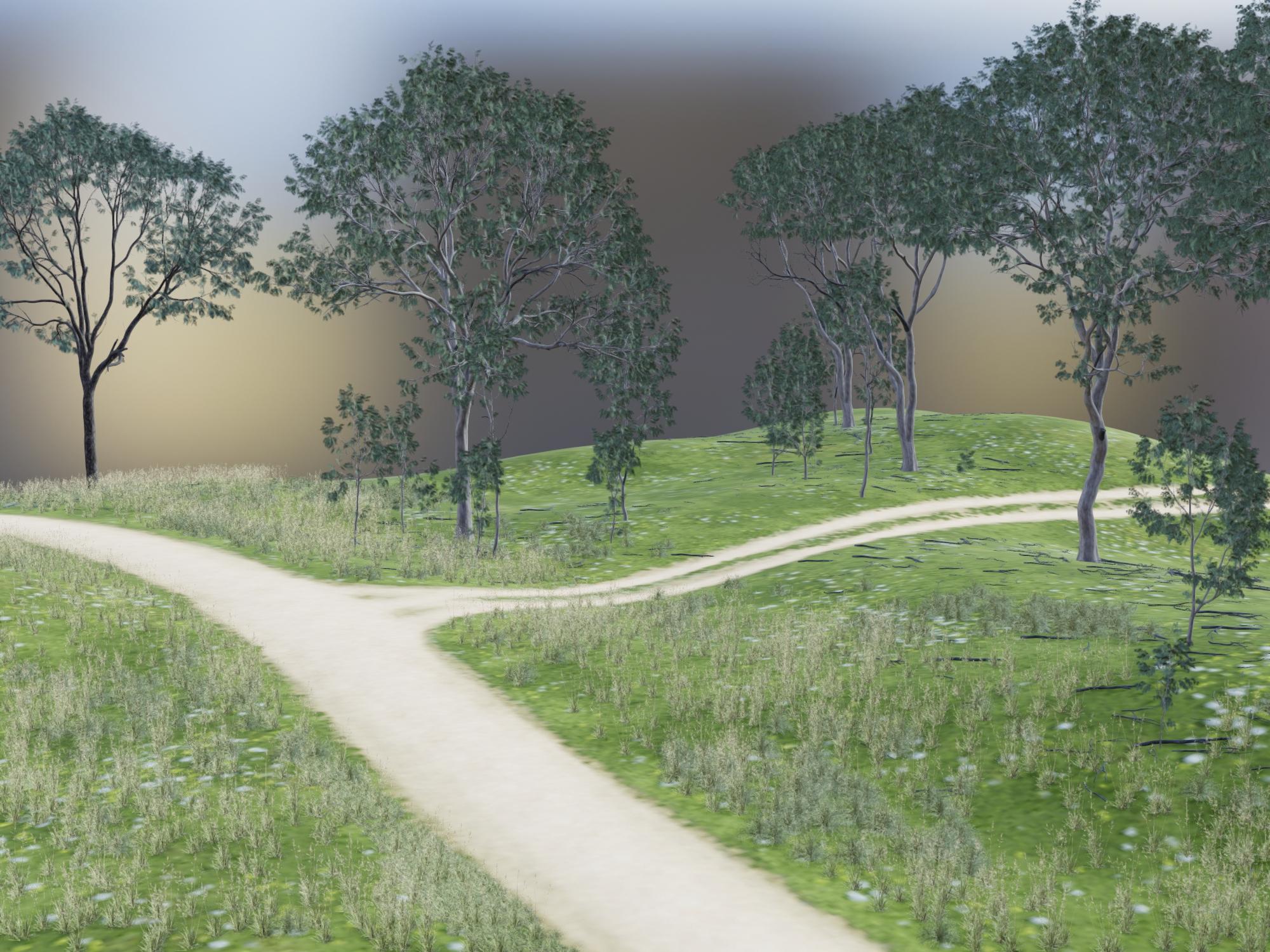
This is the corresponding Iray render. I only let it render for 2 minutes, just to get a comparison of the scene content.
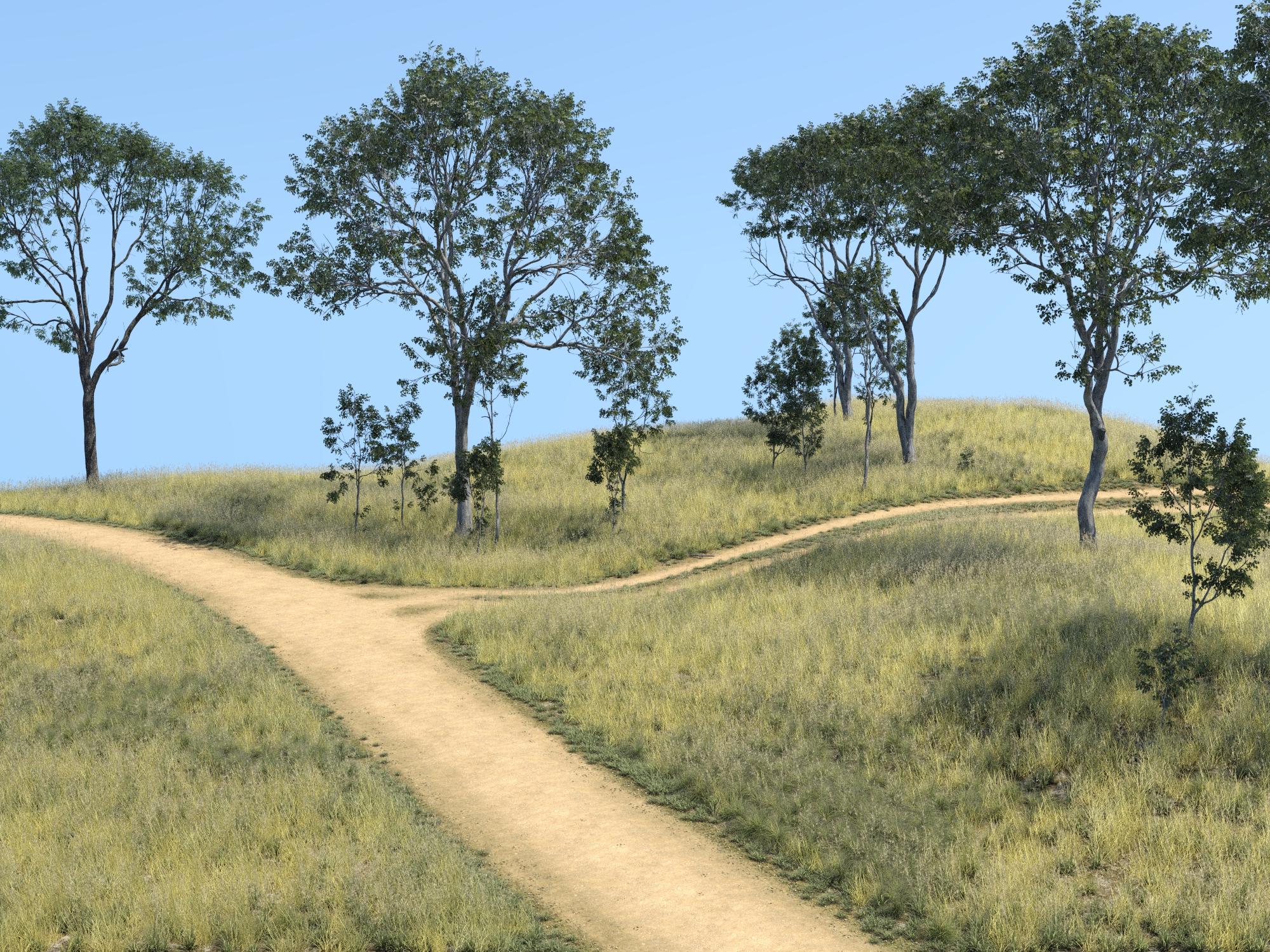
Well, shucks! This was the primary reason I wanted to test Filament. Has anybody tried it with HDRI lighting? I've been really liking the results I get with Orestes skies or DimensionTheory's Skies of Economy but trying to get the lighting set right is pain. Using the tiny aux window set to Iray preview helps but in the end, a lot of time the trees end up blocking the perfect view I found in the preview. Very time-consuming...
Novica & Forum Members Tips & Product Reviews Pt 13They do look different.
And point lights and distant lights are the two I have the least experience with. The one point light I used in my scene took me so long to find, then to move it into position. I did try the light dish from Monochrome Edition Lights, but I think I only saw it in the accidental Iray renders and not the Filament ones after it was there.
I think I am going to have to really look at my existing shaders and lights and sort them by 3DL and Iray, and type of light. Before I really understood the difference when I started I bought a lot of stuff, then I focused on Iray. I recently started searching out 3DL shaders again. But other than a handful of 3DL renders, I haven't tried it much.
Is Daz Studio (as we know it) Heading South?Daz Studio itself is great but in future that Iray engine will might convert it an Elite software like Autodesk products, only full time professionals will remain due to Nvidia's policy of high end graphics card only access.
This is literally why Filament was added according to @KindredArts
Filament runs on CPU/GPU. Plus you have countless export options to other softwares , like the free Blender.
Iray runs fine on an average gaming PC, which is, according to Steam a Nvidia 1060 with 8gb VRAM and 16Gb RAM. I render on an 1060, and it is fine to work with.
So that argument is not correct. If not, Daz has become far more accessable this year rather than less.
It would be an improvement...If Daz didn't crash when you use "point at".
This is what it should look like! Thank's for participating. Can someone clean up off topic entrys please?!
I managed to identify the problem i had yesterday. The whole Set: Hellion Outfit is not able to "fit" the right way on the model, so for all items i used i had to use "Enable smoothing" with way to high settings. It should also not even be possible to go overboard with this feature, since it causes the massive loading time in the beginning, by opening a saved scene, when smothing is enabled. Then it also causes massive loading times, when i do ANYTHING at all with the model/skin/hair or whatever else the GM3 uses at this point! Daz should give the opportunity to smoth out things YES! but, in order to prevent a crash and to give Daz the normal loading possibilities it has, this has to be scaled down! This was tested with a Filament scene i created: https://www.daz3d.com/forums/discussion/comment/6210166/#Comment_6210166
Really nothing special here. It happened with these characters/models/items:
Beard, hair and eyebrown of prince charming here is SHB selfmade. The hair seems to glow at the back of the head, but changing the thickness again makes it look odd like black painted whatever. The GM8 model is standart with the same pose i made before. The Skin is "upcycled" GM8, nothing fancy or special, but still better quality than the normal skin. The eyes are also remade. The glowing ball looks now more like it was before, but also not really like it was at the time i had created it at first. Seems verry strange to me that these changes happen.
The GM3 Model (the devil) is a little morphed here and there, but pretty much the Damien Demon with his horns, eyes, skin, scaled up a little, with heath hair, helion pants, helion belt, helion necklace, a changed pose from Basix - G3M - 16 and the face expression is Night Creatures - Night Creatures Expressions 05. .If a smoothing of a number like five or ten with a collision iteration of 1-10 not does the trick, the Vendor or PA should rework their product! It's a matter of quality and many items lack this quality, so we have to scale up things and this creates the problem with the program. At some point Daz has to decide to draw a line, for the customer and user! You want to improve? You want to make things better? Limit the smoothing, disable the settings when smoothing is disabled and talk to the verndors and pa's that it is inexaptable to release items, that need more than 10 iterations of each! This will improve the program overall by a lot. (Btw, we talk about loading times around 10-20 minutes with a Ryzen 7 3700X, 32 GB DDR4 3200 and two Geforce 1070 ti! This is no joke and Daz should be ashamed of such conditions!)
New DS Filament Render EngineIt should and it's a matter of tweaking. This is why many people look into this. The reason why your renders are not "too good" has more to do with the materials, lights, shadows at the moment. For Filament i guess it is important to light the scene even more propperly with normal lights here and there, crank up the skin and crank up in the Preferences -> Interface -> Texture Ressources all the way up to Quality to get slightly more out of it and then i would say play with the displacement (Owen 8 showed that the skin can be detailed i guess, but by shadows and lights, not so much because of coloring in a texture). So my advice would be using textures that have displacements. I cannot say at this point what is really better, but my guess is, if the textures are "complete" in a manner of PBR standarts, you get more out of a skin/character with Filament.
By the way, this "so called Tutorial" is more likely a "what you cannot do in Filament" introduction. But, it's nice to have. A Tutorial (just for explanation) is a step by step guide for inexperienced users, to help them get to a specific item/picture/skript by telling step by step what to do and what the influence of things we do is on the model/picture/in a script! This is what i meant a few days back with: Daz lacks Tutorials and References that actually DO give you the skill to a specific result!
A better approach would have been @KindredArts to really show of the way your pictures are done. So everyone sees and understands the behavior and the influences of the new Filament part here at Daz. And don't get me wrong, i'm not bashing here or something. i just want to say: "Do it the right way!" I mean look at the people here, all testing on their own but with no idea of where to look at closer. We all just stumble around testing everything. Tutorials are meant to show the right ways to a/the result, what creates the right workflow and when you look at the pictures, we are not even close.*BTW Forum Bug: if it laggs and i hit edit a second time i have two editing fields beneath each other...
 Fed up with Iray and looking for alternative (Rant inside)
Depending on what you're looking to do, you can get some excellent results with 3DL.
Currently 3DL is my only render engine for that PC but sometimes 3DL is very slow compared to render engine with denoising feature. I am also strugling to mix Filament with hair etc.
New DS Filament Render EngineI have a default scene load which I have set up for IRay so that I don't need to go tweaking things before I start adding to the scene. I'd be very surprised if I'm alone in this so here's a question:
Has anyone created a default load scene for Filament and, if so, what are your environment, tonemapper and draw style settings?
Ähhh... are you joking?! Yesterday the whole tonemapper pane was off for me, since it dit no changes to the viewport at all, while switching from left to right. So no changes to the render viewport eigther. I may look into the camera settings, since there is something totally off (we read it often here, cutted lines at points where seems come together, missing shadows, texutures get opaque or transparent and so on...). Yesterday i've seen this depends on the angle and how near or far we are from our target, so there has to be a twaeking for the camera to prevent this.
I have come to the conclusion that what you save in rendering time you spend on configuring the shaders.
time to render: almost 2 seconds!
time to make shaders look right (or even trying to) : AN HOUR!


my findings are:
- Better use iRay shaders FOR tweaking!
- And turn off SSS, simply does not work
- Bump mapping is marvelous!
- Get rid of Normal maps
- Your best friend here is Glossy Anysotropy
- Your other best friend is Metallicity
- Refraction Weight fakes glass and fog
- Skin...use another color for diffuse, except white
Thanks for these neat information, some i was aware of but all in all a good overview over the situation...

And just between ous... time to make shaders look right (or even trying to) : AN HOUR! (that you waste while you would have to tweak it back to iray...)
Anyone a script ready for scaling everything in the scene down, putting everything you "don't need to bother with" on the off side?! I guess that would be something... AIUTO...CHI CONOSCE L’ITALIANO? PARTE DODICI
Una semplice luce distante o spotlight, nelle opzioni trovi "Shadow type", scegli quelle software.
Boh, ho provato, ma non sono riuscito a vedere mezza ombra!
Mi sembra un po' troppo sperimentale la cosa;
Non so nemmeno se è possibile dargli una grafica decente;
Se è possibile, richiede un sacco di lavoro;
Ho appena potenziato di 3 volte il mio hardware, quindi il tempo che richiede Iray davvero non è il problema adessoIndi, magari darò un'altra occhiata a Filament fra qualche mese, quando sarà più maturo e ci saranno tanti prodotti e guide a riguardo!
Per adesso continuo con texture shaded come viewport.Come sarebbe a dire, non riesci ad attivare le ombre? Me l'hai detto tu come fare!

Su una cosa hai ragione, è ancora giovane... ma è una bella promesa, molto meglio di IRay!
Presto sistemeranno tutto e vai di render! Te ne allego uno fatto veloce veloce con una delle scene pronte di DAZ.Come vedi mi è bastato aggiungere una distant light e attivare le ombre per avere subito l'effetto voluto.
Le ho attivate in quel modo, ma la scena era al chiuso, e lo spotlight non le generava. Forse perché l'environment intensity era quasi a 0. Boh. Riproverò fra qualche mese magari, per ora non mi è utile Filament.
Invitante per le animazioni, ma come render statico è molto lontano dall'effetto che vorrei io.
Bella la texture bagnata. Io non so farla, però col prodotto wet skin è molto semplice e il risultato finale è superbo.
AIUTO...CHI CONOSCE L’ITALIANO? PARTE DODICIImago, ma per usare Filament, devo inserire i nodi di rendering nella scena, ho visto di sfuggita il tutorial, ma non l'ho ancora provato.
Un altra cosa, ho trovato questo sito che vende arte virtuale (sic), e c'è questo signore che vende questo video:
Maxstealth's Collection | Rare Digital Art | MakersPlace
Guaradatelo e ditemi se non riconoscete qualcosa.
Lo hanno fatto con quei cosi strani che hai sul tuo sito?
Veramente è della DAZ Saba'a AlKair Bundle | 3D Models and 3D Software by Daz 3D
Iray Preview PC Reboot?Do you have an old Daz Studio version, like before this started to happen? Would be interested to hear how that would work for you.
Also, maybe post what you were doing with Filament opacity. DreamLight's Instant grass gave me trouble in filament only, and that would likely have opacity and/or transmap variables. I could test what you were doing on my PC to see if I have trouble too.
Have a spare PSU for troubleshooting my stuff. It's handy the odd time. But in your case, just replacing parts with new stuff can get expensive quick. So still think something like a stress test would be good.
Put in my search engine key words "PC best stress test benchmark"
- One free program that was recommended by first site i checked was: https://www.jam-software.com/heavyload
- The tool carries out complex calculations to simulate the heavy load on the processor, and employs 3D rendered graphics to simulate a high load on GPU. Also, users can allocate a specific amount of memory to see how the system performs with scarce memory
Just suggesting this as a type of program you may want to use to test your system, and not necesarily this one. You would have to dig through each test to see if it ramps up power needs like Iray in DAZ does.
Character skin seams.Huh. Interesting. What bump strength do you have? Have mine at 2. Also how zoomed in are you? From further out my seams aren't that visible but zoom in like your head is next to seam in RL, and it's very visible.
Did not update/merge menus yet (is thay why?)_, so I had to use create menu to add the "Filament Draw Options" node. The Tonmapping & Enviornoment Nodes were added auto from start. Use the Create menu for all kinds of things so can't see why different.
So with Filament Draw Options Visible, did toggle the MipMaps off/on, and flipped between render engines, and preview styles a few times in case something needed a refresh. Still no change. Whereas Bump map change to aero again makes the seam 100% disappear. Also did a render but with it set to viewport, result was identical. Seam is there.
UltraScenery [Commercial]The bubble trees in Filament are cute - I got some myself when I experimented with US and Filament. Unintended, but worth exploring :-)
Something else I noticed on my computer is that the camera is really slow to reposition in a Filament viewport in a US scene compared to Textured. Is that just me, or is it slow for others as well?
It is slow. That is why I posted this tip above.
Daz 3D is part of

Connect
DAZ Productions, Inc.
7533 S Center View Ct #4664
West Jordan, UT 84084Licensing Agreement | Terms of Service | Privacy Policy | EULA
© 2026 Daz Productions Inc. All Rights Reserved.