-
Leon not part of the G8-family?Wouldn't you be able to make a G8 clone (or any other generation) of him and both ways and then the clothing would fit both ways? Similar to what other figures have done to have access different genesis generation of clothes.
Still tracking down my other links. Here is a clone-related thread. Note - the thread won't be exactly the same but very, very similar to Patrick's suggestion.
Leon not part of the G8-family?Wonderful figure!
For Daz Studio users, Wendy mentioned one way to convert (DForce). Another way of adapting clothing across figures can be done by adjusting the mesh to fit and running the transfer utility. It is a more experienced user method, but the bridge to Hexagon minimizes some of the litte things one would have to know. You could lose some morphs, though. If I get a chance this week, I'll track down the (formerly male) content creation thread and post an example. In the meantime, I'm sure SickleYield or another generous person has posted the workflow somewhere using other figures.
James for Christian 8 applies when i open G8 characters?That's the head morph, it's been driven by soemthing else (note that the Raw value is 0) - check the master James slider.
Manfred for G8M [commercial]Manfred Rocks!
https://www.daz3d.com/manfred-for-genesis8-male
Manfred is a character with a lot of personality. Whether haunting ancient crypts, or rocking out on his bass at a major concert setting, this grizzled wizard will always meet you with a twisted (maybe sinister) grin and a wink. So if you need a caretaker for you ancient mansion, or to raise the dead with his necromancy, Manfred is just the guy for you.
The set comes complete with custom crafted High Definition Morphs, and Highly detailed Textures for the utmost realism.
- Product Includes
- One Manfred Character Preset
- One Fiber Mesh Eyebrow Figure
- One Manfred Full Body HD Morph
- One Manfred Shaping Preset
- One Manfred Full Body Material Preset including anatomical elements
- Three Face Material Presets
- Four Eye Material Presets
- Includes both Iray and 3Delight Material Presets


 Experiments, discovery and experience
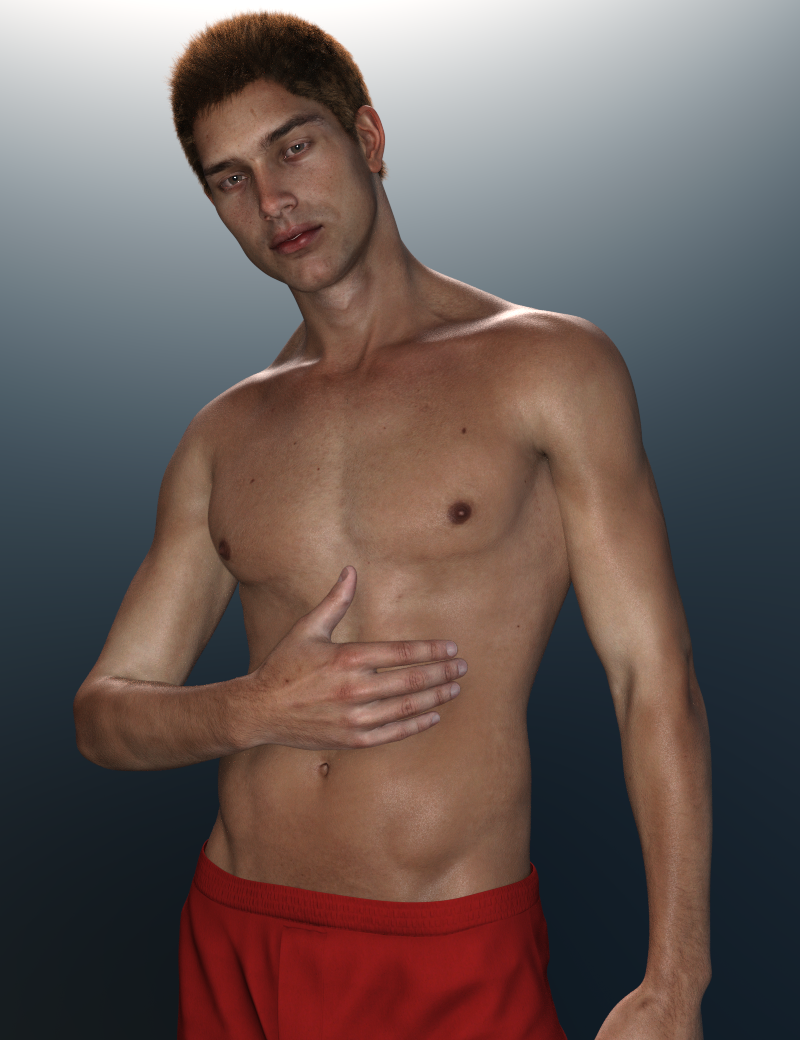
Congratulations on the new release, Veronika! Leon looks great. Thanks for the video.
So, Leon is not a full body morph of an existing Daz genesis figure, but is a completely original new figure?
OK, found the thread in The Commons.
What an amazing achievement!
Experiments, discovery and experienceCongratulations on the new release, Veronika! Leon looks great. Thanks for the video.
So, Leon is not a full body morph of an existing Daz genesis figure, but is a completely original new figure?
Animated props, need help please !Hi all,
I need your help about how to animate a prop. For the needs of a comic book I'm preparing , I need to animate a helmet. I started from the Leviathan one from Midnight Stories scifi suit. I prepared it on my 3D modeleur. I divided it into parts.
What I need is to understand how to animate the helmet in the way of a morph , such as simple. I would want a parameter cursor to control the process.
Raah I'm explaining my problem badly....
The idea is to show that the helmet will be reconstituted part by part.
And I never did such a thing lol. No doubt that I have to rig the model , but I don't how how and where to start...
Can anybody could help ? Thanx a lot !Download failed on DIMI bought this product three days ago
https://www.daz3d.com/genesis-2-female-morph-resource-kit-ii
I sent a Ticket to Help Desk but so far No Reply - Thank you very much!
When i look at install i dont see it anywhere and when i try to Download it in DIM
i get "Download Failed."
What would be wrong with this product?Probably nothing. With March Madness, the servers are getting a workout. The file is probably stalling during download, and timing out. When I was still using DSL, it was quite common for me to restart downloads via DIM sometimes 2 or three times.
You could try going to the product page in your Product Library and see if you can download the file manually. It's the same file, and will have all the elements needed for DIM, so you can actually download it to the DIM download folder, then hit the "Sync" button on DIM. It should then show up to be installed.
Download failed on DIMI bought this product three days ago
https://www.daz3d.com/genesis-2-female-morph-resource-kit-ii
I sent a Ticket to Help Desk but so far No Reply - Thank you very much!
When i look at install i dont see it anywhere and when i try to Download it in DIM
i get "Download Failed."
What would be wrong with this product?Look at my hair alternativesif you can do a nice Carrara fur preset it does using Philemo's mesh conversion plugin have the same advantage Zbrush fibermesh has over LAMH and Garibaldi in that it keeps vertex count regardless of length and styling.
So you can export a zero length one for the transfer utility as well as growth and drape morphs
Daz to Maya's Morph-Exporting?Hello, I have a question about Exporting Morphs.
When I used DaztoMaya plugin to export models, I found all the clothes' morphs have been lost after exporting to maya
If I export fbx manually, then clothing's morphs would exist.
How can I solve this issue. I mean exporting clothes morphs separately using daztomaya plugin. I'll continue searching. Just wonder how can I do that?
Transfer Rigging vs Transfer UtilityThat is a tough question. Let me try to explain.
1) This is just a little cheat that I heared from that may work in some situations if the figure the item was originaly made for is most likely the same like the one you try to fit the item to.
Transfer Rigging (Figure Space) the name is actualy missleading it dosn't "transfer" the whole rigging it can only adjust the joint positions if the bones are named the same in both selected figures.
So the figures you use it for have to share the same rigging maybe it can work with same genesis generations and fitting clothes between genders. The thing is the clothing mesh has some default shape that will fit the figure it is made for. The method will not adjust any difference in default base shape. For example if you fit female clothes to male there will be bulges for the breast and the overall proportions of the figures gets igoned.
Also this would not take into account any morphs that already exists in the conforming figure (eg. clothes). I guess already existing morphs in the clothes from the original figure will autofollow if named the same on the other but results may vary. If you dial up a morph that dosn't already exists in the fitted clothing it will get automaticly generated.
2) I prefer the second method it will create the rigging based on the Source figure and has alot of options what to transfer and what not. With the right Transfer Utility settings you can get far better results.
Terrains?This is Terradome 3 using A Zone, Water, Canal Terrain Morph, Stormy Sky HDRI and various plants from a few other sets.
Gentle Stream
2019-03-24 07:24:29.926 Total Rendering Time: 21 hours 34 minutes 38.7 seconds
Click on image for full size.
Thats an awesome image, definetly must be seen full size.
Thank you :)
Terrains?This is Terradome 3 using A Zone, Water, Canal Terrain Morph, Stormy Sky HDRI and various plants from a few other sets.
Gentle Stream
2019-03-24 07:24:29.926 Total Rendering Time: 21 hours 34 minutes 38.7 seconds

Click on image for full size.
Thats an awesome image, definetly must be seen full size.
Shape Rigger Plus(Commercial)Hi Zev0,
Just bought this product. Looks awesome.
If I made a character variation within Daz itself, by using shaping dials; should I freeze it into a single dial morph and favourite that dial?
I'm a bit confused as to what to fave tbh.
Thanks for getting back to me when you find a spare moment.
xxmom
Mesh not binding to Bone after Bone SplitI'm glad you found a solution. Yeah after Weight Editing: Fill by Bone Selection Groups and Weight Editing: Fill Selected I would use Weight Editing: Smooth Selected. have a look at this post.
[Quote]: Advise rigging pilot helmet with front hose and back-wire assembly
Here I made a simple example rigging a primitive the video starts at the time I did the weight map smoothing with all segments selected.
And FWIW, I'm still only working in the embedded scene, not a saved asset.
I had to watch my video again to see what didn't worked there. And to be more precise I tried to transfer embedded morphs only this is what I meant with "Transfer Utility didn't work properly".
It seems to be no issue for the Transfer Utility with transfering customized rigging and weight maps with an embedded Figure/Prop Asset.
But if you try to transfer embedded morphs it failes. I can see what the issue may be in the progress dialog. By default the list shows the Morph Asset files loaded and transfered one by one but in this case it tries to load the scene file itself multible times exactly the ammount of morphs to transfer. Depending on the file size of the scene file and the ammount of morphs to transfer Daz Studio hung up on me in the past and I had to kill the task.
See the attached screenshot.
help ID character & hair used in i13's Classroom Teacher Outfit for G3FHair looks like this one:
OK thank you, thats what i thought too.
Yea, I see now, apparently I just read the subject line not the comment. :)
What about the character? anyone recognize her? Victoria 7 maybe? hard for me to tell the face with the glasses and maybe because some eye posing might have been done.
Here's some general observations and common rules I've made after helping tracking down a lot of characters over the years:
Contrary to hairs and many other products characters can be extremely difficult to identify because there are so many of them, they share a lot of general characteristics, the original character can be morphed in an almost infinite number of ways and textures can be switched and altered as well, plus various cosmetic presets can be applied.
So first look at the release date of the product the promos are from (the readme page will tell you if there is one), the products used in promos are almost always from before that date.
The texture used is generally the easiest to identify, the eyebrows are usually unique and it may have spots, moles or freckles so if you have some possible candidates these characteristics can make it a lot easier to recognize which one among them it is. But it usually requires some good close up photos. It looks like the expression set belonging to the bundle for this product uses the same character, it has some better promos which may make it easier to identify it:
https://www.daz3d.com/i13-expressions-of-teaching-for-the-genesis-3-female-s
The spots over the left eyebrow and on the left cheek and the breast for example are good clues for the texture used. From these I think the texture may be from this character, the eyebrows also match quite well:
Jolina HD for Victoria 7 - https://www.daz3d.com/catalog/product/view/id/32449
The body must have been morphed quite a bit though, maybe also the face, perhaps the morph is from another character.
The texture may also be from another character using the same merchant resource for the skin, but I'm not aware of any, I was just browsing through my own V7 characters looking for these spots and found this one.
Genesis 9 delayed until at least 2020. Will you be buying it?The thing is, unless there is a big jump in the underlying tech or the kind of backwards compatibility that we got with Genesis 8, There is no compelling reason for myself to “go all in” when Genesis 9 releases. It’s definitely not a financially sound decision to move into Genesis 9 if it means that my previous content cannot transfer to the new figures. Of course I will play around with the starter essentials that we may be given for free based on previous release history but depending on the compatibility issue, it’s looking very likely that I will stay with just the “starter essentials” or maybe just get the Michael 9 and Victoria 9 characters and stop there until I start seeing the utilities, tutorials, morph packages and whatnot I would need to transfer things forward and backward. It’s just the most financially responsible way I can see at this point. None of us really knows what G9 is going to bring to the table at this point after all.
Help Identifying a G2M Hair [Solved]Probably Michael 6 and this hair https://www.daz3d.com/real-short-hair-for-genesis-2-male-s
Oh thank you! The main promo image for that looks nothing like the hair, so I totally missed that! It looks like the PA that made it hasn't released anything in about a year - hopefully they'll release something new soon so that it will go on sale. :)
You think the character is Michael 6? I thought it might be too, but since I've not really used Michael 6 I wasn't sure. I'll have to check him out. This is the second time I've been kind of "wowed" by a character just to have someone tell me it's Michael 6 - so looks like I need to do some renders with him. heheh
Thanks for the help. :)
Mike 6 is one of the better looking males IMVHO. There is an issue with his chest tho - he has some real man boobs...lol. I still use him a lot tho ;). Also, that outfit is quite awesome if you don't have it. Super detailed for a male outfit and one of my favorites.
Laurie
Apparently, I had purchased him about a 17 months ago but never got around to messing with him much. But after reading this thread I had to dig him out. And WHOA, I found my new favorite guy to render! lol
Here he is with Altern8.
And now I'm ruined! lol Because I have next to nothing for Genesis 2 Males. Dang it... why does he have to be so fine!? How is "Well, he's pretty hot, but he's no Michael 6." not a saying? lol I'm either going to have to invest in G2M or figure out how to transfer him to G8M. Because now that I know he looks this good with Iray and some Altern8 tweaks, I absolutely have to render this guy a LOT more. :)
I feel that way about David 5 also. LMAO
Hey, nothing keeping you from using him (not even clothes...wink....lol).
FWIW, there is a G3M clone for G2M in the store that lets you put G3M (and G8M clothes if you've converted them to G3M) on Mike 6, and it works rather well. This outfit is for G3M and that's Mike 6 :)
Oh!...and Ildanach just did this a couple weeks ago. How gorgeous is that?! :)
Laurie
Whoa! That IS gorgeous! I love that render! I hope I can make awesome renders like that someday. :) I need to practice more and start working on learning to do more "artsy" type renders.
I'm definitely happy that I took a few minutes to give Michael 6 some skin settings tweaks. I feel like I have a brand new figure and he was sitting in my runtime these past months just waiting. lol
Funny enough I have that G3M clone for G2M and forgot I had it (I had bought it when I discovered how great Lee 6 is). Thank you for the reminder about it! :D That helps a lot as I have much more G3M stuff than G2M.
Mesh not binding to Bone after Bone SplitJust checking in- updating etc. And man have I wasted a ton of time on both that more nuanced model and then a very simple model where the same issue occurred from the get-go (mesh not properly attaching but without any bone splits or re-parentling) and I was trying to figure ways around the issue. It appears Weight Node Brush Map / Weight Editing / Fill by Bone Selection Groups gets grumpy about different, unconnected bits of geometry that are physically close to each other (the model was a hinge of sorts, so there were different parts almost overlapping).
The upshot of it all ...
- I could not find what broke the association in the first place - when I made a simple model rigged it and then split or re-parented bones nothing appeared to break - obviously some reassignment is needed for the split bone but before that reassignment the geometry remained attached to the first of the split bones.
- For the nuanced and advanced model, Transfer Utility transfered all the badness in the associations BUT I could then Weight Node Brush Map / Weight Editing / Fill by Bone Selection Groups afresh and that re-established correct associations and I could then copy and paste the XYZ-Rots and Scales from the damaged model to the rectified model. So through that, I got my model back to undamanged and with all my weight paint work preserved without too much trouble.
- I then diverted to the simple model (build geometry from scratch and rig a unique skeleton from scratch) and found the gumpy problem. BUT I finally found an easy solution. In Geometry Editor select all the surfaces relevant to the bone (one click of the "+" for that bone face group). Then in Weight Node Brush Map / Weight Editing use Fill Selected on the general map (add it if its not there, and use 1.00 weights) and the geometry attachment gets fixed.
So at this point, I appear able to make progress again at last. And FWIW, I'm still only working in the embedded scene, not a saved asset. Cheers, Lx
Daz 3D is part of

Connect
DAZ Productions, Inc.
7533 S Center View Ct #4664
West Jordan, UT 84084Licensing Agreement | Terms of Service | Privacy Policy | EULA
© 2026 Daz Productions Inc. All Rights Reserved.