-
Daz Central not connecting
having the same issues with both DIM and Daz Central. I was able to login for a short time last evening but once again the error began popping up. I am however glad to see I am not the only one having issues.
!! Store Issues - Known Problems - Please Read !!DAZ_Rawb said:
Kerya said:
The newest freebie is Daz Central only ... sigh, I hope the other download options are going to show up.
All the download options exist for real, just the product page was off, next time the cache monster decides to release it's jaws from that page it should be updated.
Thank you - the last time that problem showed up it meant that there were no download options at all. But yes: my product library shows all options.
By the way: thanks to whoever took the time to fix the product library sorting!
!! Store Issues - Known Problems - Please Read !!Kerya said:
The newest freebie is Daz Central only ... sigh, I hope the other download options are going to show up.
All the download options exist for real, just the product page was off, next time the cache monster decides to release it's jaws from that page it should be updated.
!! Store Issues - Known Problems - Please Read !!The newest freebie is Daz Central only ... sigh, I hope the other download options are going to show up.
https://www.daz3d.com/a-glass-and-bottle-of-champagne
Able to Post in Forum when not logged in..McGyver said:
Sevrin said:
McGyver said:
The other day the store was doing the "You Must Be Logged In To... Blah, Blah, Blah" once I'd attempt to add something to my wishlist... despite the fact that I was logged in already... if I'd attempt to login, it would reject it because I was logged in already... logging out and logging back in did nothing to change that... and neither did clearing my cookies.
Now I want cookies.
Actually pie would be better...
anyway...
Both the store and forums are slow as molasses running uphill for the past couple of days... I don't want to question the wisdom of doing this switchover right before the holidays, but I thought we went through this once before already...
I feel bad for the folks trying to keep things stitched together here who I'm guessing are going to be fighting all sorts of fires here and there for a few more weeks until this all balances out... holidays are the worst time to have to deal with these sort of things.
I feel bad for the loyal Daz customers, e.g. me, who were looking forward to a pleasant shopping experience with our phat loyalty discounts, earned by spending a bunch of money at the Daz Store, and are being denied it because of how badly the store and content delivery changeover was planned and and continues to be executed.
Or... it could have been one individual wearing a Viking helmet, a grass skirt who was chugging a bottle of moonshine... or it could've been one of those mind control gerbils that pushed the buttons on this... Who really knows... Sometimes I get the feeling that the people who know, don't know... You never know.
...hmm, was it a traditional viking helmet with the horns or Minnesota Vikings helmet? If it is the latter I think I saw him in the stands when the Packers were playing Minnesota a couple years ago.
And there is in all situations someone who gets the raw, splintery end of the poop covered stick... that poor dope who is working as hard as they can, who is working magic, yet because of events, circumstances and choices beyond their control, the appearance of the ongoing operation buries their contributions, efforts and sacrifices, and they get lumped in with the overall bad experiences that others are having...
...you didn't happen to hack the central computer of company I used to work for, did you?
Daz Central not connectingI still cannot sign in on Daz Central, my account seems to be good since I can sign in on the Daz website
i hate daz centralIf you were using manual or DIM installation before, there's no real reason to use Central. It's a "training wheels easy setup for beginners" — Central is supposed to play nice with an existing manual or DIM setup, but every now and then it tosses all that and uses its own default all-in-one-location settings. I don't trust it.
Daz Central not connectingI have been getting this error and Daz Central is not connecting:
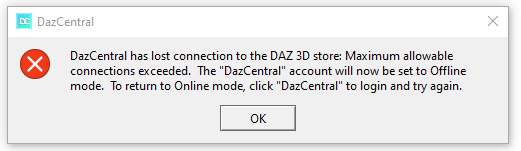
I hope anybody can help me.
Thank you.
!! Store Issues - Known Problems - Please Read !!I'm not having any problems getting into DIM and downloading fortunately, and just downloaded 52 items. Also, one that wouldn't download previously zipped right along. It was downloading easily at 258mbps. So perhaps try downloads again. (It's 1:30pm Central Time)
No Database Found! When click Login in Daz 4.14bootbabe said:
I have sort of the same problem, When i did the 4;14 update i lost my smart content and cant log in. So im working off line.
manually starting the just refreshes the derectry tree and nothing else.
Daz central and Install manager still show all my content, but it isn't in smart content as i can't log in.
Is this your problem as well?
Andrea
Is the content available in the Content Library under Daz Studio Formats and Poser Formats?
getting a daz installer?alan bard newcomer said:
thanks .. I knew it was buried somewher
okay.. big stupid.. found it in product library but I clicked to go to the product page.. sometimes OLD abounds.It's not your fault if the download links are hidden in a drop down named "Descrioption"... It took me 2 days of deductions to click that button and scroll to the bottom. (Notice blank product page. Notice the forum is not in flames. Notice the drop down and click it. Yep, just description, close. Check again and scroll down. There it is. WHY?)
I think this bad design choice was made to discourage manual downloads in favor of the new Daz Central, or Install Manager.
I wonder why Daz doesn't leverage available platforms instead of pulling off subsequent generations of proprietary tools. If Daz Studio was available on the Microsoft Store, I might consider installing it from there. Content will be installed manually anyway.
No Database Found! When click Login in Daz 4.14I have sort of the same problem, When i did the 4;14 update i lost my smart content and cant log in. So im working off line.
manually starting the just refreshes the derectry tree and nothing else.
Daz central and Install manager still show all my content, but it isn't in smart content as i can't log in.
Is this your problem as well?
Andrea
[Solved] Trouble installing productsSolved. I was looking in the Files tab and not the Product tab. If I have to go to the Product tab to install stuff then wtf is Daz Central doing for us?
Bought Vaeriety Sword Pack Animations.
Daz Central says it is installed. Daz Install Manager says it is installed.
It appears in my Content Library but there is says it is not installed. (see attachment)
Did I miss a step?
i hate daz centralif central doesnt recognize that you had to do an uninstall / reinstall of studio
it wont let you redownload it , help please
Cannot download purchased product !hansmolleman33 said:
I have an issue with product Jurogumo, I cannot download it with DAZ central.
Yes, this is being reproted to the main sales and issues threads, so I am closing this one.
Cannot download purchased product !I have an issue with product Jurogumo, I cannot download it with DAZ central.
Cannot Log-in via Daz Central or DIM - accompanied by 503 error.Hello, I just started an account with Daz 3d recently, and I just installed the most recent version of the Daz Central app for Windows 10. Even though I can log into my account on a web browser, it seems that I cannot log in via the Daz Central app.
Furthermore, in the moments after I try to log in on the app, trying to access any site under the www.daz3d.com domain results in a 503 HTTP error (using Chrome). This only lasts for a few minutes, and then I can connect to the website again no issue. I thought maybe switching to the Daz 3d Install manager would help, but the same thing happened.
Has anyone else ran into similar problems? If so, what have you tried?
!! Store Issues - Known Problems - Please Read !!...hmm, after some of the issues I've had in the past, I'm surprised none of this has been occurring on my account. The last serious issue I had was my card not being recognised but I submitted a ticket on that and it was taken care of a couple weeks ago.
Have been able to download and install everything I purchased for the last couple weeks through the IM without a hitch, no products missing, and for the last week or so, no download failures even with large files. Haven't ever used Daz Connect or Daz Central, just manual downloads and the IM
Running the latest version of Chrome with advert blockers, popup blockers, and other extensions active on the site, have the same AV active that I've used for years, and still on W7 Pro.
So far the only issues I've been running into are mildly annoying ones most others are experiencing
- When I open a previous post on the forums here to edit it, the edit window opens in HTML mark-up instead of normal mode,
- My Product Library sorts in "A - Z" sequence rather than the usual "newest to oldest" purchase.
- The store search is wonky as heck,
- Getting intermittent #500 Server Errors after selecting items in the store to view, posts in the Forums to read, and returning to the forum menus/store page.
Hisashi is NOT a femaleIf this is still annoying some users, and you don't want to wait for an official correction, it will only take you a few minutes to make the correction yourslf. Note that vendor metadata (and I mean the metadata that comes with the product, whoever makes it) is considered read-only in the Content DB Editor. The only way to change it permanently is to modify the metadata file directly. Look in the [Library]/Runtime/Support folder for the .dsx file that corresponds to the product in question. For example, the SKU for Hisashi is 60235, so search for a 60235, or scroll down to DAZ_3D_60235_Hisashi_HD_for_Genesis_8_Male.dsx. Open it in your favourite text editor and search for the string /Female and change it to /Male. (There was only one in Hisashi, others might have more). Save and re-import the metadata. In DIM it's from a right-click on the product, in Studio it's in Content DB Maintenance. I do not know how for other install methods (Connect and Central). Refresh your Library and you're good to go. (Keep a copy of the .dsx somewhere in case you need to re-install, or replace the one in the package you use to install, if you keep the zips.)
Almost 100 Broken Products: Updates and New Purchases not working
Tried a few. It appears to be a user related issue. Can also be found in Daz 4.10 4. 11 and 4.14 but I use DIM to download. I never use connect or central.Marshian said:
Here is the full list of my products that are broken. The update as of today, which is troubling, is that several of these have now completely disappeared from Smart Content and Content library. A few I checked still show in DIM and online in my Product List but nowhere within Daz Studio.
-
Oneiros 8949
-
Old West Sheriffs Office 9087
-
Wristbreakers 9332
-
Divinity Skies Ascension 9717
Daz 3D is part of

Connect
DAZ Productions, Inc.
7533 S Center View Ct #4664
West Jordan, UT 84084Licensing Agreement | Terms of Service | Privacy Policy | EULA
© 2026 Daz Productions Inc. All Rights Reserved.