-
What is up with Daz Central?
Daz Central has become the most hated peice of software on my PC. I can log into the website (sometimes when i am not getting an error message saying that Daz3d.com is an unsafe website) and the very same credintials will not work on Daz Central. Everytime i visit Daz3d it tells me to get started and download this PoS software that really has no business whatsover being a part of our pipeline.
Also, why doesn't the genesis 8 pose for unreal engine show up when you go to rig the skeleton. I even have all the proper things checked in the pose settings.Daz install still sucks after 10 yearsTo the OP, you might want to change the title of your post to "Daz install still sucks "FOR ME" after 10 years" since 1000s of other users don't have any issues.
FYI I never use smart content or Daz central and know where all my files are being installed so I can find them.
Photoshop BridgeSince downloading Daz Central I see where I can download and use photoshop bridge. I am leery of new software and just curious as to what Bridge is and if anyone use it now and have you any words of sage that can enlighten me. Is it safe? What does it do?
Trying to get started with a MacI'm on a Mac. I use the DIM installer for all the content. It's the best way as I hear Daz Central is buggy.
Products in Available Tab of Smart Content Greyed Out with a "U Folder" IconWeird problem.
Although I have my content installed via DIM, the Smart Content "Available" tab still shows several hundred products uninstalled. So I installed them anyway, but have a handful which are greyed out and have a weird "folder with a U" icon on them. The menu for them does not offer "Install" or "Update", and nothing I do can change their status. However, I can confirm that the actual products are there.
Screenshot attached.
Just to be clear:
- Yes, DIM shows these products as installed, and they do seem to work (eg. the morphs are there). I check and the files are also there. DAZ Central confirms them as owned.
- It's a tiny percentage of files (I have over 7000 products)
- Nothing I do seems to fix this
I would appreciate it if anyone has any thoughts, as this kinda bugs me. ????
Cant get DAZ Studio on my new MacI have been using Daz on my macbook pro for a while now... got my imac in today and wanted to download everything fresh with Daz Central. Daz Central is having other ideas. It wouldnt download Daz... then would crash before it even opened. DazCentral keeps going non-responsive.... and my latest evil is that its continually loading my profile.... until it goes non-responsive. I tried deleting everying restarting and reinstalling... nothing seems to be working.
Cannot Log-in via Daz Central or DIM - accompanied by 503 error.Yup. Trying to download DIM or Central to reload on a new hard drive. Can't login on either one but can login on the website. Have a ticket in with Daz right now but the email back to me stated it could take between 4 and 6 WEEKS to get an answer!!!!!!!!!!!!!!!!!!!!!!!!!!!!!!! WTF....
Fixed: Daz to Blender bridge, blender cannot find the exported fileHi.
For storage space reasons I have the following setup:
Blender (2.8.9 LTS) is on my G drive
Daz Central (4.14) is on my C drive
Data is usually on my H drive. For daz the cache is default in C, the temp folder is on HI have windows 10.
I am new to Daz, the bridge to blender got me interested. To see how it worked I used the gensis 8 model and the bridge (scripts -> bridges ...) which said it had exported the model. In blender I used this: https://prnt.sc/vxtccj ; (which differs from the tutorial). Just clicking as per the tutorial gives https://prnt.sc/vxtdgl ;
I am not sure where the exported model is or how to tell blender where to look (or where blender is actually looking).
Any help much appreciated. Thank you.
UPDATE:
I tried this with blender 2.83.2 and it worked (blender found the needed files). I replaced 2.8.9 and that worked.
writeAuth: Couldn't open configuration file for writingI made it work!
On my laptop:
I was not logged in on OneDrive, so I logged in. And suddenly LAMH worked on my laptop! With no error messages and no crash!
But now Daz Central crashed. A reinstall of central fixed it.
On my workstation:
I waited for the OneDrive to update.
Without configuring anything on my workstation, LAMH worked with no error messages.
Daz Central and DIM also works.
I really do not know why it works on my workstation. Neither Daz Central or DIM has any visible search/loading paths to my OneDrive on my workstation. And neither Daz Central or DIM attempted to install LAMH on the OneDrive.
It's a mystery to me.
But I am happy it works.
Thank you for your help Fixmypcmike.writeAuth: Couldn't open configuration file for writingI have tried to install Daz Studio and LAMH on my laptop:
I used Daz Central to install Daz Studio and LAMH. Without LAMH: No crash. With LAMH: Daz Studio crashes when "Creating Main Window" loading text occurs.
Reinstalling LAMH did not help. Either did reinstalling Daz Studio.
Installing Daz Central, Daz Studio and LAMH created thise folders:C:\Users\[UserName]\OneDrive\Documents\DAZ 3D\Studio\lookatmyhairAM (Contains the "lookatmyhair.cfg")
C:\Users\[UserName]\OneDrive\Documents\DAZ 3D\Studio\My Daz Connect Library\data\cloud\meta
C:\Users\[UserName]\OneDrive\Documents\DAZ 3D\Studio\Render Library
C:\Users\[UserName]\Documents\Daz 3D (empty)C:\Program Files\DAZ 3D\DAZCentral1
C:\Program Files\DAZ 3D\DAZStudio4C:\Users\Public\Documents\DAZ 3D (Contains an "Install Manager" folder)
C:\Users\Public\Documents\My DAZ 3D Library (A content folder)
Doing the same on my workstation makes this:
C:\Daz 3D\Applications\64-bit\DAZ 3D\DAZStudio4
C:\Daz 3D\Applications\64-bit\DAZ 3D\PostgreSQL CMS
C:\Daz 3D\Applications\Data\DAZ 3D\DAZStudio4 Temp (Contain three folderes: "Face Transfer", "RenderAlbumTmp" and "textureConvert")
C:\Daz 3D\Applications\Data\DAZ 3D\InstallManager
C:\Daz 3D\Applications\Data\DAZ 3D\My DAZ 3D LibraryC:\Program Files\DAZ 3D\DazCentral1
Why does Daz Studio install itself in a "C:\Daz 3D" folder instead of "C:\Program Files\DAZ 3D"?
And why does the LAMH error message occur? And why does it crash on my laptop?Daz Central not connectinghaving the same issues with both DIM and Daz Central. I was able to login for a short time last evening but once again the error began popping up. I am however glad to see I am not the only one having issues.
!! Store Issues - Known Problems - Please Read !!DAZ_Rawb said:
Kerya said:
The newest freebie is Daz Central only ... sigh, I hope the other download options are going to show up.
All the download options exist for real, just the product page was off, next time the cache monster decides to release it's jaws from that page it should be updated.
Thank you - the last time that problem showed up it meant that there were no download options at all. But yes: my product library shows all options.
By the way: thanks to whoever took the time to fix the product library sorting!
!! Store Issues - Known Problems - Please Read !!Kerya said:
The newest freebie is Daz Central only ... sigh, I hope the other download options are going to show up.
All the download options exist for real, just the product page was off, next time the cache monster decides to release it's jaws from that page it should be updated.
!! Store Issues - Known Problems - Please Read !!The newest freebie is Daz Central only ... sigh, I hope the other download options are going to show up.
https://www.daz3d.com/a-glass-and-bottle-of-champagne
Able to Post in Forum when not logged in..McGyver said:
Sevrin said:
McGyver said:
The other day the store was doing the "You Must Be Logged In To... Blah, Blah, Blah" once I'd attempt to add something to my wishlist... despite the fact that I was logged in already... if I'd attempt to login, it would reject it because I was logged in already... logging out and logging back in did nothing to change that... and neither did clearing my cookies.
Now I want cookies.
Actually pie would be better...
anyway...
Both the store and forums are slow as molasses running uphill for the past couple of days... I don't want to question the wisdom of doing this switchover right before the holidays, but I thought we went through this once before already...
I feel bad for the folks trying to keep things stitched together here who I'm guessing are going to be fighting all sorts of fires here and there for a few more weeks until this all balances out... holidays are the worst time to have to deal with these sort of things.
I feel bad for the loyal Daz customers, e.g. me, who were looking forward to a pleasant shopping experience with our phat loyalty discounts, earned by spending a bunch of money at the Daz Store, and are being denied it because of how badly the store and content delivery changeover was planned and and continues to be executed.
Or... it could have been one individual wearing a Viking helmet, a grass skirt who was chugging a bottle of moonshine... or it could've been one of those mind control gerbils that pushed the buttons on this... Who really knows... Sometimes I get the feeling that the people who know, don't know... You never know.
...hmm, was it a traditional viking helmet with the horns or Minnesota Vikings helmet? If it is the latter I think I saw him in the stands when the Packers were playing Minnesota a couple years ago.
And there is in all situations someone who gets the raw, splintery end of the poop covered stick... that poor dope who is working as hard as they can, who is working magic, yet because of events, circumstances and choices beyond their control, the appearance of the ongoing operation buries their contributions, efforts and sacrifices, and they get lumped in with the overall bad experiences that others are having...
...you didn't happen to hack the central computer of company I used to work for, did you?
Daz Central not connectingI still cannot sign in on Daz Central, my account seems to be good since I can sign in on the Daz website
i hate daz centralIf you were using manual or DIM installation before, there's no real reason to use Central. It's a "training wheels easy setup for beginners" — Central is supposed to play nice with an existing manual or DIM setup, but every now and then it tosses all that and uses its own default all-in-one-location settings. I don't trust it.
Daz Central not connectingI have been getting this error and Daz Central is not connecting:
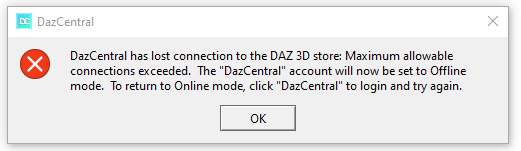
I hope anybody can help me.
Thank you.
!! Store Issues - Known Problems - Please Read !!I'm not having any problems getting into DIM and downloading fortunately, and just downloaded 52 items. Also, one that wouldn't download previously zipped right along. It was downloading easily at 258mbps. So perhaps try downloads again. (It's 1:30pm Central Time)
No Database Found! When click Login in Daz 4.14bootbabe said:
I have sort of the same problem, When i did the 4;14 update i lost my smart content and cant log in. So im working off line.
manually starting the just refreshes the derectry tree and nothing else.
Daz central and Install manager still show all my content, but it isn't in smart content as i can't log in.
Is this your problem as well?
Andrea
Is the content available in the Content Library under Daz Studio Formats and Poser Formats?
Daz 3D is part of

Connect
DAZ Productions, Inc.
7533 S Center View Ct #4664
West Jordan, UT 84084Licensing Agreement | Terms of Service | Privacy Policy | EULA
© 2026 Daz Productions Inc. All Rights Reserved.