-
Lengthen Pant Legs of Jeans
Better do it when the figure is in A-pose... then if the jeans are fully symmetrical, you can tweak both sides at the same time (ss1 ~ 2.)
I don't know Hexagon but just use Blender. It's also very easy to adjust the length in Blender by using Grab brush + Symmetry. Then import as an adjustment morph. (ss 3 ~ 6)
Lengthen Pant Legs of JeansNo adjustment morph on the jeans ? If so.... I remember you have Mesh Grabber 3.0 correct ? You can easily fix it in DS:
1) Alt Shift + G to activate Geometry Editor, with Polygon Selection Type + Marquee Selection Mode, select the lower part of the jeans (ss1).
2) Alt Shift +E to activate Mesh Graber, drag and push until you're satisfied with the result (ss2). The trick is while dragging and pushing, shrink the polygon selection by pressing Ctrl + - (minus on num pad) and Ctrl + Mid-Mouse button to shrink the mesh grabber gizmo... to assure the mesh looks good, i.e. stretching no more no less..
How to prevent pocking through in multiple layer fabric?I've often experience pocking through when there are multiple layer fabrics in simulation.
Is there a solution for this?
I've always has to send to blender to fix it, and import it back again as morph, just take times especially if I had to do it multiple times.
Lengthen Pant Legs of JeansHaven't used Hexagon much but was wondering if it could be used to lengthen the pant length of some jeans?
Is the character exported to Hexagon in A-pose or in a pose like below?
Is anything else need for transferring and receiving?
I understand that Hexagon make a morph slider in Daz to adjust the parameter, is that correct?
 more....Wacky Modelling ~ In Carrara ~
Stezza said:
Bunyip02 said:
Stezza said:
so, today I went all out wacky after looking at a photo @Headwax posted of his fishing paddleboard....
and I'm posting it here for you to improve and or add to ( see the pic )... lot's I didn't do as I ran out of time 'cause the cricket is on..

have fun fishing in your runtime... it's in the zip file for you to paddle around with

Headwax's photo
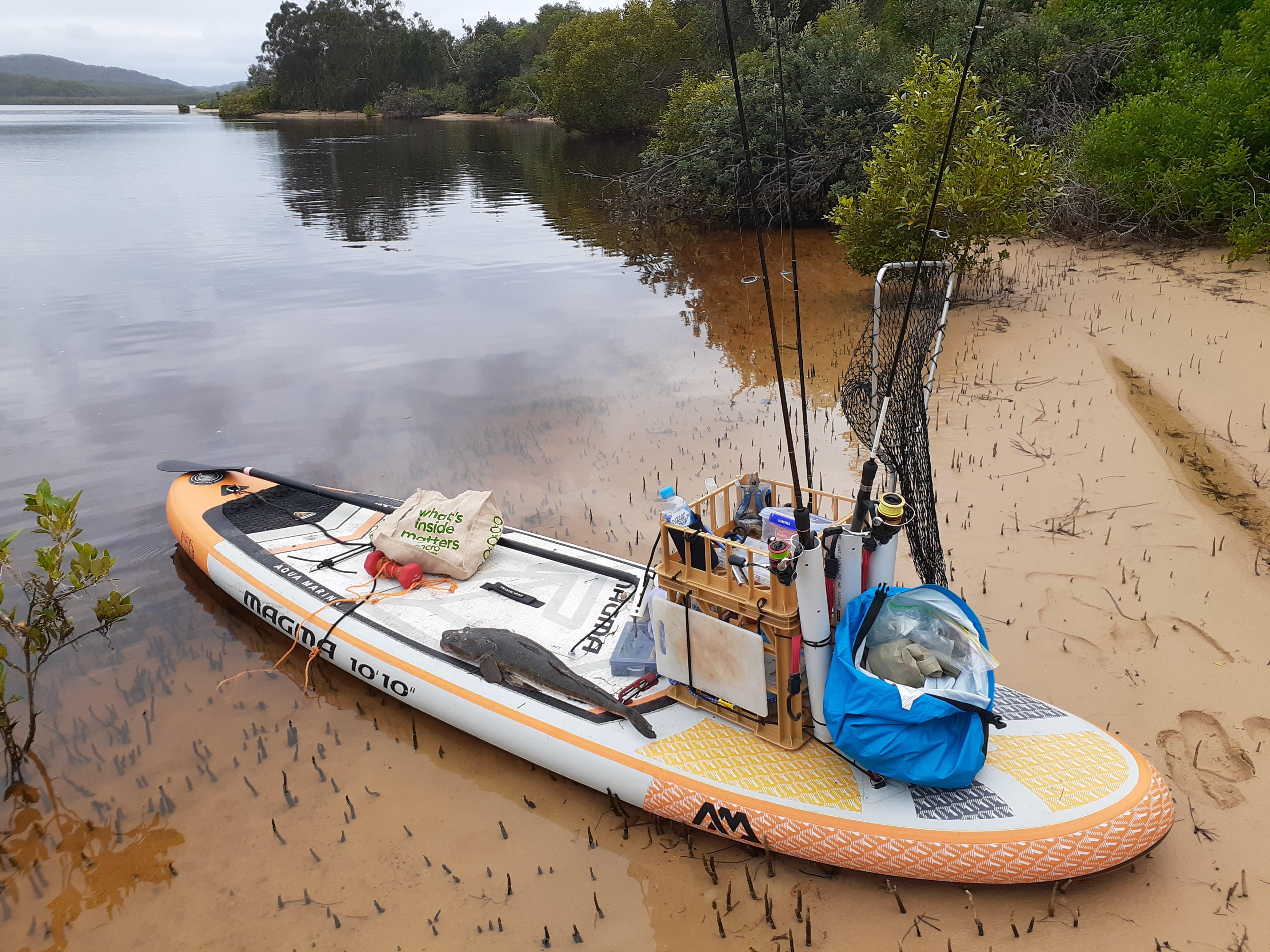

Thanks Stezza - but it's missing the Flathead !!!
lol..... caught a cube and fisherised it...

one morph but not boned... I'll leave that up to you Carrarians to explore that

a basic flathead
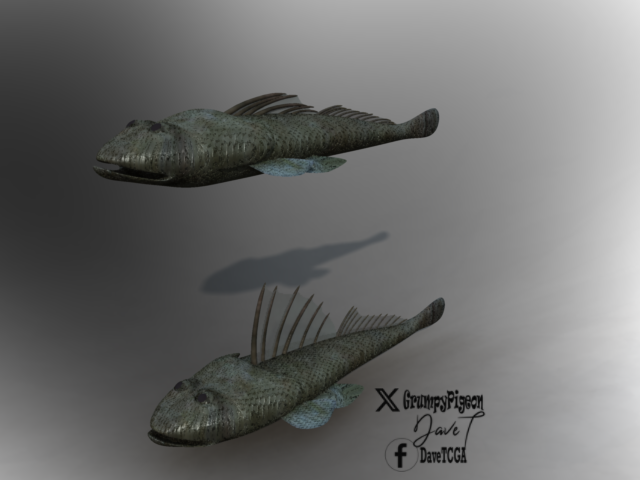
Woohoo - Thanks Stezza !!!
more....Wacky Modelling ~ In Carrara ~Bunyip02 said:
Stezza said:
so, today I went all out wacky after looking at a photo @Headwax posted of his fishing paddleboard....
and I'm posting it here for you to improve and or add to ( see the pic )... lot's I didn't do as I ran out of time 'cause the cricket is on..
have fun fishing in your runtime... it's in the zip file for you to paddle around with
Headwax's photo
Thanks Stezza - but it's missing the Flathead !!!
lol..... caught a cube and fisherised it...
one morph but not boned... I'll leave that up to you Carrarians to explore that
a basic flathead
What's the single most annoying issue about Daz prevent you from using it more often?The biggest thing holding me back from using DAZ Studio more is the lack of a 64-bit lip sync option for Mac and the inabilty to render out a movie; it's a real hassle running my 2012 iMac just to use the 32-bit lip sync, then transfer all the work to a 64-bit machine to render in individual frames, convert the frames to a movie, then add the speech audio to the movie. Too many hoops for something that I used to do in 2012 in one fell swoop.
The second biggest thing is the non-release of DAZ Studio 5 and its Filmaent rendering engine for Mac. My goal is to take another run at 3D animation in the new year, but I'm no longer waiting for DAZ Studio 5, Filament, a 64-bit lip sync option nor purchasing new assets. Until DAZ Studio 5 is released, I'm considering DAZ Studio to be "done" for me and not worth further financial investment and only limited time investment. Too much of why I originally bought assets is no longer a vialble option. Maybe 2025 will turn things around for me, but after waiting over four years for Filament on the Mac and over three years for DAZ Studio 5, I'm not holding my breath.
pants male anatomical elementsThere's a bulge morph named Hip Genital Bulge (a morph in G9 Starter Essential), dial it with a proper value.
You don't need an AE when wearing clothing. But if you do want to keep the AE, fit it to None and hide it in Scene pane. Then when you need the AE in some cases later on, fit the AE to the figure again.
Texture converter G8 to G9 and Golden Palaceneoman said:
crosswind said:
What ? Manfriday never made a texture converter.....Which product on earth?
Sorry, I was thinking of ManFriday's Figure Converter. Legacy made the texture UV converter. Both work great to turn a G8 character into a G9 character except for the Golden Palace... Perhap a different gen prop such as Advanced P...y???
Ah... that's it, but only having Legacy G8 > G9 is not enough. I used to convert texture maps with Blender or Faceform Wrap but there's an easiest alternative... Do you have this product ? https://www.daz3d.com/genesis-9-uvs-for-genesis-8-and-81-female
If you do, you can easily convert G8F's Torso or Body texture to G9 on your G8F character by using Map Transfer and directly assign the maps to GP for G9 on your G9 character. It 100% works.
1) Convert with Map Transfer on G8F or G8.1F ( screenshot 1 )
2) After assigning converted Torso or Body texture maps on GP for G9 > 6 surfaces (screenshot 2), hide the surfaces of Legacy grafts on two geo-shells of labia by setting Cutout Opacity to 0 and Lock the slots. Done! ( screenshot 3 ~ 4 )
[BROKEN!] Product inclusion (to gen 9)It's more likely a guess, but as I find more and more Items that "seem" to be broken, I have to make this one public! These different Items I installed over this year into a folder that has a purpose (clothings that are new). Since I am using genesis 9, I want to make use of all the features a PA gives me without having the trouble myself, fitting everything to the gen 9 generation. I did deinstalled and installed of these products again today! So there has to be something wrong. The genesis 8 versions of these products are there and linked. They work. But the genesis 9 version not!
I have a setting of a scene, where it - is - important that these transisions work flawless. I cannot transfer the genesis 8 versions of them onto the genesis 9 figures in the scene. It's just to much, since the items would be "cloned" to multiple node instances. I also cannot "fit" or "manipulate" things in this sceene. It's loading shapes, adding materials, adding clothings onto the main figures and that is it.
Apart from my very performance-heavy scene I think it's only right to make this "public" so any PA get's the notification and any user/buyer can also take a look if they have similar experiences with chlothing items. It's not a small thing for me. I would need to transfer every Item one by one to genesis 9 AND check every item on multiple differend parts, that are known as "buggy" or let's call it complex and create odd or strange destructive behaviors in the process of transfering them over to the other generation. Even with these really nice scripts some different PSs provide to do that.
Anyways. The thing is, I pay for these products to - spare time - and I really want to have the features I pay for available to use! This is no error in my database, since I installed them again and again. If the DIM would be broken, this would happen not only to them. But it does! So these products (and many more items by the look of the smart content file search) seem to have problems getting into the database "the right way". I cannot use the product and the image is also missing. If I manage to content library -> products the product is there! The genesis 8 version of it too and is available to work with. The genesis 9 version not! The link is missing, even after a complete de-reinstall process.
Please check your own databases.
If there is an issue with the DIm (what may can create similar problems I guess), then it would be nice if at some point a problem like this would be fixed some kind of "reinstall this contend" process would happen, so we would know for usre now we can and should install our products again. I don't really know where the real problem is. But, I CANNOT file 50.000 support tickets for every product this happens. This topic is no ranting about PAs! Mistakes can happen. It's more likely an information for all to look into this. Some of you may install some products manually. But that I also CANNOT to for this mass of products I see like "broken" in my database. Everything else works fine, many other products work as intended and are in fact also created like the broken ones. So there has to be a reason why this happens and it cannot be on my end, except the DIM is broken right now. But I do not believe that, since I installed a lot lately which works great and without problems.
These are the products I sorted out. But again, that are not all of them! I just stopped trying to fix them by uninstalling and installing those that are broken. Sady I did not list all of those I tried to fix before. I was at least 2-3 hours doing this. With NO souccess it seems. Some of these products are just seperated products of a complex outfit. But is does not matter. Even for any kind of part it's not working
dForce MK Strapless Tight Dress for Genesis 9 (Cv)
dForce Hellen Outfit and Weapons for Genesis 9 (Cv)
dForce Cozy Winter Outfit for Genesis 9, 9, and 9 (Cv)
dForce Mabel Outfit for Genesis 9 (Cv)
dForce Autumn Breeze Outfit for Genesis 9 (Cv)
dForce Brooklyn Outfit for Genesis 9 (Cv)
dForce Meiying Chinese Outfit for Genesis 9 9 (Cv)
dForce X-Fashion Urban Outfit for Genesis 9 (Cv)
Work Day Outfit for Genesis 9 (Cv)
Cool Lace Outfit for Genesis 9 (Cv)
Trench Coat Outfit for Genesis 9 (Cv)
dForce Hayden Outfit for Genesis 9 (Cv)
MK Flounces Outfit dForce T-Shirt for Genesis 9 (Cv)
MK Flounces Denim Outfit dForce Skirt for Genesis 9 (Cv)
Gothic Style Outfit V2 Gloves for Genesis 9 (Cv)
Dark Whispers Outfit for Genesis 9 (Cv)
Cold Weather Outfit for Genesis 9 (Cv)
dForce Christmas Isabella Crop Top Outfit for Genesis 9 and Genesis 9 (Cv)
BW dForce Moonlit Magic Outfit (Cv)
Custom Charactersmosellistudios said:
Does anyone know of an artist that creates custom Genesis 9 characters? I would love to have a goos one that resembles Eartha Kitt for a graphic novel I'm trying to put together.
I don't know how good it is, but I can only find one for G8F:
https://www.renderhub.com/razzledazzle3d/eartha-character-morph-for-g8f
However she could be converted to G9
Advice for 3D scanning appsCan you make a morph from a 3D head scan?
Does anyone know which G3F model is this girl based on?let see
most likely victoria 7 g3f or Aiko 7 g3f with siders most
the face seen one close to her in posercontent.com
here from the site i found
Genesis 3 Female Fantasy Morph Resource Kit
or
Inara for Genesis 3 Female(s) by Jessaii
the skin can be this
LIGHT ELF for Genesis 3 Female(s) by Mar3D
the face can be this edited face
Addison for Genesis 3 & Genesis 8 Females by 3DSublimeProtege, Sabby
i can't be of more help sorry
i seen Ronya HD for Victoria 7 there are models like her
that's looks close to the removed content from daz elf
and for me i would have used Mika 7 she's better if and if would have and i would want close to girl i would have used Genevieve 7
Does anyone know what character this is?MimicMolly said:
There's a really good Henry Cavill at Renderhub called "Henry for Genesis 9" by geserty, but this is a full body morph character. However, I don't know if this is geserty's character.
I do have that one. Yes, it is good. I just really liked the face build from the one Art Ken is using here, which is why I'm looking for it.
Does anyone know what character this is?There's a really good Henry Cavill at Renderhub called "Henry for Genesis 9" by geserty, but this is a full body morph character. However, I don't know if this is geserty's character.Body Morph suggestions for G8M and G8FI want to make the characters arm or forearm extremely longgggggggggggggggg like a montster
Need help with Lekkulian feet removalZero morph: Raw Lekkulian Legs in Parameters pane.
Skirt distortion on G9"Triangular issue" on the garments can happen to any Genesis figure that you customized, you won't find it if you zero your figures shape to default G9 Base... (as long as you didn't auto-fit the garment on G9...)
- You can use some product like this to fix it : https://www.daz3d.com/sy-detriangulator-tunic-genesis-9
- Simulate it from memorized pose by adding some velocity smoothing on its dynamic surfaces.
- Smooth it by using Geometry Sculptor in 4.23 (Premier tier is required...) and create a fixing morph
- Smooth it in external software like Blender / Hexagon... etc. and import OBJ to Update the garment Base Geometry (refer to this similar case: https://www.daz3d.com/forums/discussion/714091/genesis-9-to-genesis-8-costume-conversion-issue#latest)Skirt distortion on G9Cheers Felis,
All very handy things for me to look into. I suppose a wee d-former might be a roundabout solution as well?
Addy Rylee is the figure I am using this morning (Obvs, noticed the same problem across a range of figures). Doesn't look like there is a dedicated morph.
Yeah, Simulating was first on my list. It just so happened that the thing I wanted to use today was not D-Force enabled, so hoped there was a simpler route that might have been common lore.
As to Smoothing I need to crank that up so high - the 40-ish range - to get it to fix that part that of course it throws out other parts of the clothing.
Not a premier subscriber, but will take a look at Mesh Grabber. Thanks for pointing me in the direction.
Modelling is likely beyond my skill range right now, though I imagine it is less daunting than I imagine.
Thank you for the directions!Skirt distortion on G9Which character are you using?
When dialing a character there will be dialed a projected morph into the clothing, unless the creater (PA) have added a dedicated morph for that character, and if no dedicated these morps can cause distortion.
If the clothing can be simulated then simulate it.
Else you can try to increase smoothing set to 'Base shape matching'.
If you are a premier subscriber you should have access to Mesh Grabber 4/Sculptor(?) which should have a smoothing function.
Or you can take it into a modeller and make a dedicated morph for that character and replace the proejected morph (must have same name).
Daz 3D is part of

Connect
DAZ Productions, Inc.
7533 S Center View Ct #4664
West Jordan, UT 84084Licensing Agreement | Terms of Service | Privacy Policy | EULA
© 2026 Daz Productions Inc. All Rights Reserved.