-
Filament tutorials/shaders/lights?
Carrara is what shines on that particular machine, it outpaces Octane on the other one sometimes too and leaves iray for dead
 but definitely not PBR
3Delight is honestly better on it too
Filament is a bit of a puzzle there as it definitely is lacking in graphics so badly I struggle using the Carrara and Poser viewports on it at times yet Filament seems OK.
Filament tutorials/shaders/lights?If you can't render in iray, I suspect Filament will not help you , the biggest scenes I tried run faster in iray than Filament and both use the same amount of VRAM
There are tutorials , just search YouTube , but the tutorials are not about baking AO into DAZ characters as that would be like going 20 years backwards in the evolution of 3D human figures
You don't bake AO into texture maps materials when using a PBR engine , that is the complete opposite unless you use it for very fine lines and details , but for that I would use Bent Normals with baked AO for proper work.
You can make the figures looking better with very fine editing like nostrils or inside ears etc , just open the head/ears texture in an image editor of your choice and edit the area you want to appear darker (not glowing )
You can also create AO and use layered image editor to blend it with the Genesis figure, like you do when using make-up with layered image
You can bake AO in Daz Studio using 3DL engine and some good old tools from the DAZ store ( sorry I don't have the links on my phone )
You can also search YouTube for creating Bent Normal but this is a process I am afraid requesting some skills in 3D modeling and not so easy to fix , you need some tools for that and little skills as that is a more advanced process.
Best option for beginner would be , import head texture into Photoshop or image editor you use, create a layer , paint on the layer areas you want to appear darker in Filament and export it to use as a layered image in D|S to cover the (glowing ) nostrils , ears , eyelids or whatever .. the color doesn't need to be solid , very dark red/brown definitely not black , you also need to set the reflectance/specular off for the areas , or it will still look weird ..
The major problem with Filament in Daz Studio is that it don't have GI , and the IBL light passing through the objects , I would recommend to use less IBL and add spot or distance light with shadow to improve the overall look of everything , as blowing up environment light will not do any good to the human figures , the Filament AO have too low resolution to cover the fine cracks and holes in your model
You want to improve the look, stick to PBR values , make sure the skin setting or skin textures are not lighter as the recommended values , if you use values like white paint it gonna glow
I hope that Filament give people the opportunity to learn the basic of PBR engine they love to use, including iray, as it works on the same principles , rules and theory and stop looking for alternatives that don't really matters but only clogging the engine , causing long time renderings and crashes ..and make everything only more difficult as it really is .
Is there a tutorial somewhere about baking AO maps to a Daz character? I've never heard of this before.
Plus, what's an alpha map?
Sorry for the questions. But I've got some big scenes that I can't render in Iray, so I'm trying to convert them to Filament. I'd like to try and get the best out of them.
Filament tutorials/shaders/lights?Filament still use a graphic cards for real time rendering so lower end systems will have also limitations on some point , and more functions in Filament would request more resources of your system and graphic cards
I don't see here huge advantage beside not using Cuda in Filament .
Filament is a real time render engine , and it is actual the engine , just with some limitations
If Filament have all functions and support most of the shaders they offer , your low end system will not working with it anymore. Not enough resources to run it, same with Games
so adding everything will cut other users from using it .. make no sense right?
and switching to CPU is not an option .
Here's hoping they slowly enable this into an actual rendering engine. Would be great for three things.
Animation, people on lower end systems, and for those of us who have chosen to stick with team red over team overpriced.
Now if only we could decouple d-force from freckin' Cuda.
980 ti and daz 4.14Yes, I have a 980Ti, and it works fine with DS 4.14. You might have to update the driver, though, as .14 needs the 451 driver as minimum.
EDIT: You could also install the DS 4.14 Beta version first if you want to make sure everything's working properly for you.
Question, if you or anyone can answer: I have a GE Force GTX 960. I'm looking at the drivers downloads page on the NVidia site now, and the only option for game ready drivers are version: 457.30. Is this okay for Filament is is only 451 okay? (I can't find 451 for my video card at all)
Yeah, that's fine.
Thank you!
980 ti and daz 4.14Yes, I have a 980Ti, and it works fine with DS 4.14. You might have to update the driver, though, as .14 needs the 451 driver as minimum.
EDIT: You could also install the DS 4.14 Beta version first if you want to make sure everything's working properly for you.
Question, if you or anyone can answer: I have a GE Force GTX 960. I'm looking at the drivers downloads page on the NVidia site now, and the only option for game ready drivers are version: 457.30. Is this okay for Filament is is only 451 okay? (I can't find 451 for my video card at all)
Yeah, that's fine.
980 ti and daz 4.14Yes, I have a 980Ti, and it works fine with DS 4.14. You might have to update the driver, though, as .14 needs the 451 driver as minimum.
EDIT: You could also install the DS 4.14 Beta version first if you want to make sure everything's working properly for you.
Question, if you or anyone can answer: I have a GE Force GTX 960. I'm looking at the drivers downloads page on the NVidia site now, and the only option for game ready drivers are version: 457.30. Is this okay for Filament is is only 451 okay? (I can't find 451 for my video card at all)
New DS Filament Render EngineMore and more, I'm finding Filament pretty poor for Iray previewing, except, perhaps, for HDRI positioning. It's really its own thing and we need to decide upfront whether we wanna work in Iray, and use texture-shaded previews, or in Filament.
Character skin seams.Tried this Filament render with Freja, there were seams where front head meets the back, but turning mipmapping off first, cleared most of the seams, and then reducing the bump from 4 to 1, did the rest.
Character skin seams.Huh. Interesting. What bump strength do you have? Have mine at 2. Also how zoomed in are you? From further out my seams aren't that visible but zoom in like your head is next to seam in RL, and it's very visible.
Did not update/merge menus yet (is thay why?)_, so I had to use create menu to add the "Filament Draw Options" node. The Tonmapping & Enviornoment Nodes were added auto from start. Use the Create menu for all kinds of things so can't see why different.
So with Filament Draw Options Visible, did toggle the MipMaps off/on, and flipped between render engines, and preview styles a few times in case something needed a refresh. Still no change. Whereas Bump map change to aero again makes the seam 100% disappear. Also did a render but with it set to viewport, result was identical. Seam is there.
Your experience is the opposite of mine! I used Latonya 8 in these screenshots. With mipmaps on, she has bad seams. With mipmaps off, her skin seams are completely gone, without making any change to bump or normal. However with mipmaps off, there are lots of moire type artifacts. These screenshots are with Texture Resource all the way up on Quality.. When I zoom in, even with mipmaps on. the seams go away.
With mipmaps on, so the seams show, I changed the skin bump from here default 5 to 0 and changed normal from her default 1 to 0. It made no difference that I could see. The seams were all still there.
mipmaps are a form of downsampling - the system prepares a multi-resolution package of maps and the renderer uses the one it deems suitable (the .tdl files used by 3Delight at render time are the same). The seams would happen when the downsampling averaged in soem of the background colour at the edges of the uUV islands, causing them to have a different colour from the rest of the active areas of the map.
Novica & Forum Members Tips & Product Reviews Pt 13(...) I did a lot of voluntary work and promotion with Filament because i believe it will lower the bar of entry for a lot of people. I hope people will embrace the engine because more engagement with it, will mean more development in the future. We're not tied down with filament like with are with 3rd party engines like iray/3dl. Don't get me wrong, i love iray, but there's certainly space for this.(...)
It's obviously not avengers level CG, but you could probably compare this kind of rendering to a lot of mainline iray content on the gallery. The reason i supported this so heavily, is that even if you're rocking a ten year old laptop that only has one fan rolling at full blast, you can make art. You don't need to know how to rig, how to model, how to program or even how to sim. There's mad amounts of free content out there, just dust off your old PC in the corner and make something. Filament will help you do that.
I hope that explains why i supported this move so much. There's a lot of people out there who just aren't fortunate enough to be able to adopt this as a hobby, and my hope is that we are able to reach them. This won't affect any of the higher end goodies.
I'm a hobbyist who renders IRAY on a 5 yo mac laptop that sounds like a dying jet engine while I let it run through the night
 So this development is very exciting! Sure, I'll have to wait a while until everything settles... I'm not even updating to 4.14 and Big Sur until I've heard enough folks say that the two play nice together (at the moment they don't as far as I know). But I can see myself switching from IRAY to Filament entirely at one point in the future if this is what it promises to be!AIUTO...CHI CONOSCE L’ITALIANO? PARTE DODICIUna domanda ai più informati... Ma sulla generazione 9 si sa nulla ? Esce ? Quando ? E sopratutto a parte la mesh avrà qualcosa di diverso ? Grazie
Non penso ci stiano già lavorando: l'anno scorso hanno detto che non sarebbe arrivata presto.
Quello che hanno detto è che, quando arriverà, gli asset per generazioni precedenti non saranno del tutto compatibili, altrimenti non avrebbe senso farla.
Hanno molte cose in pentola: Face Transfer, Strand Hair, dForce Hair, Filament, i bridge per qualsiasi programma 3D esistente...penso siano piuttosto occupati gli sviluppatori della Daz!
Ma l'unico che potrebbe sapere qualcosa sono Muscleman, AlessandroAM e Maclean, che però se sapessero qualcosa non potrebbero dircela.
New DS Filament Render EngineI think the new DAZ Filament rendered sequence frames can be of good use for non realistic previz and test animations. I put together a simple lighted scene using filament and it's looking pretty decent. I'm going to post some animation samples soon with mocap from mixamo using mixamotion and facial animation using Facemotion. :) It's waaay faster than Iray and it's waaay better than previous daz OpenGL. I'm very thankful to DAZ for releasing this realtime renderer. It feels close to older Unity before Postprocessing volume came out. Once hair transparency is fixed.. this will be of good use to many if tweaked right. :) Thumbs up to DaZ.
Wire Bounding Box - SolvedHi, could i have some advice on the wire bounding box. no matter whether i am in Texture Shaded, Nvidia Iray, or the new Filament PBR every time i select the move tool/pose tool, or any of the Parameter settings, the whole scene switches to the wire bounding box. how can i stop it? thanks
New DS Filament Render Engine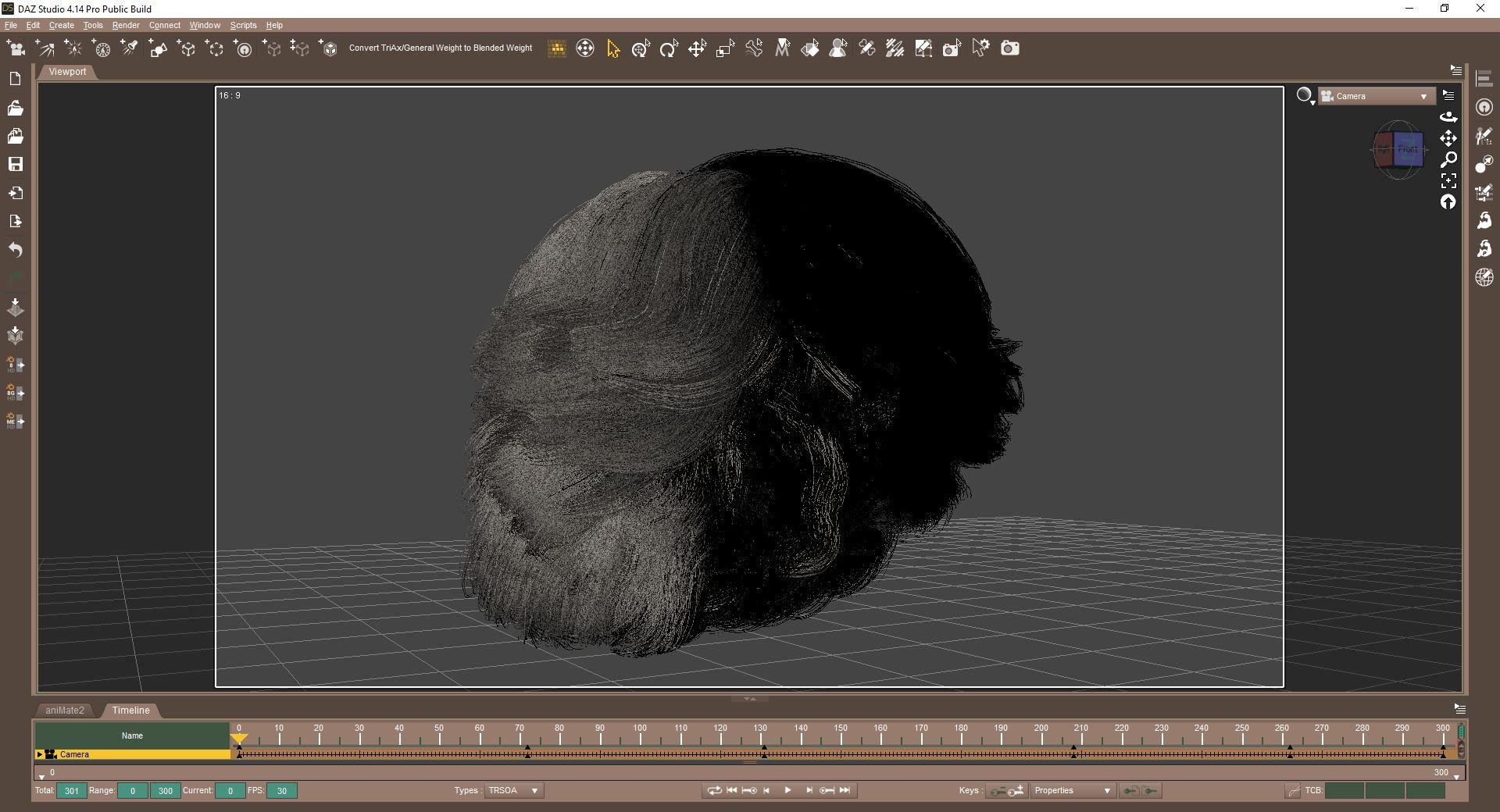
One can always make the transmapped hairs into mesh in Blender
this SAV GoodOboys hair took several hours to convert from a particle hair made mesh to curves afterwards and extruded ended up as a 1.3GB obj
filament with a texture but think no UV and waay too shiny, I need to tweak that hence just a Facebook link
https://www.facebook.com/1653360584/videos/10222344615438259/
update it does have UV mapping
New DS Filament Render EngineN.G.S. Anagenessis 2 with tweaking is not bad for filament
Edit ; Filament_1 remove Glossy Reflectivity
Character skin seams.Any chance either of you have Freja or Josephine? And could test sometime?
I don't have either one.
Well thanks for the interesting info re: MipMaps! Maybe somebody else passing by interested in this will also do test and post results. Not really an issue for how I will use filament right now, but still would be nice.
I could try Freja later on
New DS Filament Render Engineit's funny since filament is out there is a series of animation on sale and where it's funny is that the promotion of these animations is made with iray ...
filament is of course a solution for small configurations... although daz released it too early I think, they could have waited to be able to convert the shaders cleanly from iray to filament...
the renderings made by kindred arts are very beautiful for sure but I would like to see a close-up of a face to see ...
Exactly. And I really am tired ot things being rushed out too fast.
Still, if they can get Iray textures to work in Filament, I would immediately rejoice. Iray renders are so freaking slow...
I have an AMD card. :p
Fed up with Iray and looking for alternative (Rant inside)Depending on what you're looking to do, you can get some excellent results with 3DL.
Currently 3DL is my only render engine for that PC but sometimes 3DL is very slow compared to render engine with denoising feature. I am also strugling to mix Filament with hair etc.
I've been playing more and more with reflective surfaces on everything, plus I've been using exclusively Genesis 1, but have been branching out more and more into content for G2 and 3. I've been making scenes more and more complex and the render times go up. My last project, I was rendering images larger than usual, and my render times for those reached 2 hours.
New DS Filament Render Engineit's funny since filament is out there is a series of animation on sale and where it's funny is that the promotion of these animations is made with iray ...
filament is of course a solution for small configurations... although daz released it too early I think, they could have waited to be able to convert the shaders cleanly from iray to filament...
the renderings made by kindred arts are very beautiful for sure but I would like to see a close-up of a face to see ...
Exactly. And I really am tired ot things being rushed out too fast.
Still, if they can get Iray textures to work in Filament, I would immediately rejoice. Iray renders are so freaking slow...
Character skin seams.Any chance either of you have Freja or Josephine? And could test sometime?
I don't have either one.
Well thanks for the interesting info re: MipMaps! Maybe somebody else passing by interested in this will also do test and post results. Not really an issue for how I will use filament right now, but still would be nice.
Daz 3D is part of

Connect
DAZ Productions, Inc.
7533 S Center View Ct #4664
West Jordan, UT 84084Licensing Agreement | Terms of Service | Privacy Policy | EULA
© 2026 Daz Productions Inc. All Rights Reserved.