-
Easy FilaToon [Commercial]
wsterdan said:
vrba79 said:
I too noticed how the presets for this look a LOT like PWtoon presets, and that is a VERY good thing.
Since Mac users only got Filament and Filatoon this week, I wasn't watching the thread "Anime Toons and Filatoon Shader Q&A". I'm reading through it now and see that you were posting about the benefits over pwToon since last year, I'm sorry if I've been preachign to the choir. Thanks for being a good sport and just nodding quietly while I gushed non-stop, much appreciated.
Mac users are finally able to enjoy Filatoon? Welcome to the party!
Daz Studio 2025 ThoughtsFilament is more laggy in 2025 than in 4.23 - guessing this is just Alpha buggy blues so fingers crossed this will also be performant. Texture Shaded is much more performant than in the past, even during animation playback and Puppeteer use - which is nice to see.
Daz Studio 2025 Thoughtsjmtbank said:
Daz Studio 2025 Thoughts
Too crash happy. Not worth the time installing.
It is an alpha, meaning it is not feature complete or fuilly stable. If you have a choice (that is, not a 50x0 owner on WIndows or a mac user wanting Filament) then it probably shouldn't be regarded as a production tool - though the more people give it a try the sooner it is likely to be in beta and then General Release.
Daz Studio 2026 Beta - version 6.25.2026.6423! (Updated March 09, 2026)Weirdly, after playing around the Alpha (both versions,so far) for a couple of days. Everything was (within the parameters of it being an Alpha release) working fine.
Launched the app this morning and Iray won't work in the viewport anymore. It just shows OGL.
Filament works.
Textured works.
But Iray will not appear in the viewport.
Works fine as a full render though.
I've reinstaleld the newest Nvidia drivers, reinstalled the alpha, rebooted, launched the Beta version (which works fine).
No Iray in the viewport for the Alpha, after it worked fine for days.
No clues in the render log either.
-edit-
Okaaay then. It just started working again.
Daz Studio 2026 Beta - version 6.25.2026.6423! (Updated March 09, 2026)Richard Haseltine said:
Masterstroke said:
I wished, DAZ had upgraded the mesh smoothing, beeing able to work with more than one collision Item, which would be helpful for more layers of clothes.
Maybe they will, this is an alpha and therefore no featue complete (which doesn't mean I have seen the to-do list and the feature is on it).
Hopefully, the lights are more accurate now, since with more light sources*, it make it harder to get realistic images.
(*proccedual AND mesh lights.)
Emissive and environment lights still don't show in Texture Shaded.
@Masterstroke, Richard explaned to me (or, rather, unintentionally reminded me) that lighting in non-render modes are limited by the hardware to 8 lights, and from what I have seen, those emissives do not stretch to all corners of a scene, unfortunately. I've also had this problem where I want to look in Cartoon Shaded or other shaded fast-render/quick-motion depictions, and even with a headlamp on the camera, the entire scene is dark or near dark. I then rely on Filament, but then I have to tone-map and increase the exposure value so that I can see what I am doing, and then remember to reset it so that it doesn't render darker than intended.
[Feature request would be something like please keep the tonemappings for different render engines separate, or at least remember them separately, so the back and forth isn't necessary....but that's for another day .]Daz Studio 2026 Beta - version 6.25.2026.6423! (Updated March 09, 2026)X3Z said:
Why viewport fps is very low for me? Feels like 10-20fps in 2025, but 4.23 runs with rock solid 100fps. No matter filament or texture shaded. Low fps even in empty scene.
Win 11 24H2, RTX [email protected]
Yes, it sometimes feels uncomfortably jerky.
Windows 10, RTX 3080 driving the display and render.Daz Studio 2026 Beta - version 6.25.2026.6423! (Updated March 09, 2026)Why viewport fps is very low for me? Feels like 10-20fps in 2025, but 4.23 runs with rock solid 100fps. No matter filament or texture shaded. Low fps even in empty scene.
Win 11 24H2, RTX [email protected]
Daz Studio 2026 Beta - version 6.25.2026.6423! (Updated March 09, 2026)Richard Haseltine said:
barbult said:
Richard Haseltine said:
Filament does share many settings with iray, though that doesn't necessarily mean those all belong.
Any clue about why I get the OpenGL message when rendering Filament? Do you see the same?
Yes, I do - you can of course disable the message.
Thank you. At least I am not alone in seeing this. Yes, I can disable it. It seems "wrong", so I wanted to provide that feedback as part of Alpha testing.
Daz Studio 2026 Beta - version 6.25.2026.6423! (Updated March 09, 2026)https://github.com/google/filament page is beyond my comprehension. I'll have to wait for the TLDR version.
 Is DS working as intended with all those properties and an OpenGL message or not, is what I am trying to find out. If nobody can answer, well, I have reported what I see. Developers can decide whether it needs attention or not.Daz Studio 2026 Beta - version 6.25.2026.6423! (Updated March 09, 2026)
barbult said:
Richard Haseltine said:
Filament does share many settings with iray, though that doesn't necessarily mean those all belong.
Any clue about why I get the OpenGL message when rendering Filament? Do you see the same?
Yes, I do - you can of course disable the message.
Daz Studio 2026 Beta - version 6.25.2026.6423! (Updated March 09, 2026)barbult said:
When my Viewport is in Filament draw style and my Render Settings are set to Viewport, Why do I get an OpenGL warning message?
Why does the Render Settings pane show all sorts of settings that are Iray related in this case?
(This is on Windows 10 with an Nvidia 3080 graphics card and a driver version above the minimum 57X.)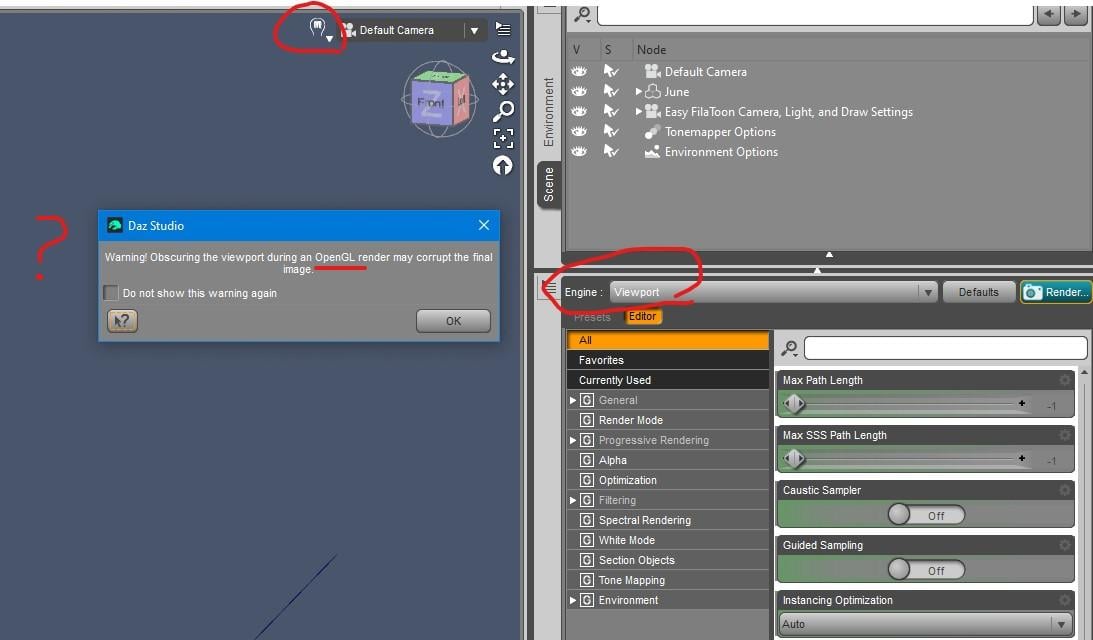
https://github.com/google/filament , among other things, describes the features of Filament and so what properties it needs.
Daz Studio 2026 Beta - version 6.25.2026.6423! (Updated March 09, 2026)Richard Haseltine said:
Filament does share many settings with iray, though that doesn't necessarily mean those all belong.
Any clue about why I get the OpenGL message when rendering Filament? Do you see the same?
Daz Studio 2026 Beta - version 6.25.2026.6423! (Updated March 09, 2026)Filament does share many settings with iray, though that doesn't necessarily mean those all belong.
Daz Studio 2026 Beta - version 6.25.2026.6423! (Updated March 09, 2026)When my Viewport is in Filament draw style and my Render Settings are set to Viewport, Why do I get an OpenGL warning message?
Why does the Render Settings pane show all sorts of settings that are Iray related in this case?
(This is on Windows 10 with an Nvidia 3080 graphics card and a driver version above the minimum 57X.)Easy FilaToon [Commercial]vrba79 said:
I too noticed how the presets for this look a LOT like PWtoon presets, and that is a VERY good thing.
Since Mac users only got Filament and Filatoon this week, I wasn't watching the thread "Anime Toons and Filatoon Shader Q&A". I'm reading through it now and see that you were posting about the benefits over pwToon since last year, I'm sorry if I've been preachign to the choir. Thanks for being a good sport and just nodding quietly while I gushed non-stop, much appreciated.
Daz Studio 2026 Beta - version 6.25.2026.6423! (Updated March 09, 2026)( follow up on View Port in Texture Shaded mode black/nolights with Preview Lights On)
I experienced this and figured out (in my case) there is a change in DS6 where (now) Parameters->Display->'Visible In Viewport', must also be 'On' for the lights to light up a scene in 'Texture Shaded'
In DS4.23, I could have the Visible:On and 'Visible in Viewport':Off so that lights worked and my scene was not filled up (cluttered) displaying all my lights.And I could easily toggle on and off lighting with the 'Visible' setting.
Now in DS6, I have to have both those settings On for the lighting to work.
I think the change was to make the Viewport 'Texture Shaded' work exactly like 'Filament' in DS4.23 where you had to have both settings on for lighting work in 'Filament'.
But I really did like the old DS4.23 way for Texture Shading because I could use lots of lights in a scene and not the the display outlines of them cluttering up things (sometimes it way too much clutter to see anything)
Daz Studio 2026 Beta - version 6.25.2026.6423! (Updated March 09, 2026)Are there actually any improvements for rendering Filament on Windows, regarding some of the issues with lights, especially emissive surfaces and the need to be refreshed? I don't see any mention so I think its not worth testing in my case.
AIUTO...CHI CONOSCE L’ITALIANO? PARTE QUATTORDICIImago said:
E poi ora sono io che chiedo aiuto: Visto che mi hanno sottratto il mio amato 3Delight (nella speranza che rinsaviscano e trovino un modo per tenerlo, nel 2025 è impensabile sentire ancora di "librerie non convertibili", tutto può essere convertito) devo capire come far proiettare a quello scassone di IRay delle ombre decenti come quelle di 3Delight. Ombre serie, non quei leggeri oscuramenti senza definizione sulle superfici che sembrano essere la norma.
Stessa cosa per FIlament, a cui piace mozzarle senza ragione in base alla angolazione della telecamera.
E poi mi sapete dire se dopo otto anni di vita, finalmente IRay è in grado di renderizzare a più di venti centimetri dal centro del mondo?
Io ho la 4.23 come versione e sì, il problema del renderizzare con le camere lontane dal centro è ancora presente. Non sono 20 cm ma in effetti se ti allontani di parecchio si possono creare artifatti, spesso sui capelli che utilizzano scalpi trasparenti.
Per le ombre non ho mai capito il problema che dici: Iray funziona esattamente come nelle fotografia reale. La definzione delle ombre dipende dalle dimensioni della sorgente, se vuoi ombre nette devi usare sorgenti piccole tipo faretto spot, se vuoi ombre diffuse devi usare pannelli luminosi grandi tipo gli ombrelli che si usano in fotografia. Io non uso mai le luci di DAZ Studio ma creo dei pannelli a cui attacco una camera per fcilitarne il posizionamento, dopo di che do al pannello le dimensioni e il colore che mi serve. Per simulare una lampadina uso invece una sfera, di cui anche qui regolo le caratteristiche di emissività nel pannello surfaces.
AIUTO...CHI CONOSCE L’ITALIANO? PARTE QUATTORDICIE poi ora sono io che chiedo aiuto: Visto che mi hanno sottratto il mio amato 3Delight (nella speranza che rinsaviscano e trovino un modo per tenerlo, nel 2025 è impensabile sentire ancora di "librerie non convertibili", tutto può essere convertito) devo capire come far proiettare a quello scassone di IRay delle ombre decenti come quelle di 3Delight. Ombre serie, non quei leggeri oscuramenti senza definizione sulle superfici che sembrano essere la norma.
Stessa cosa per FIlament, a cui piace mozzarle senza ragione in base alla angolazione della telecamera.
E poi mi sapete dire se dopo otto anni di vita, finalmente IRay è in grado di renderizzare a più di venti centimetri dal centro del mondo?
Daz Studio 2025 ThoughtsRichard Haseltine said:
almahiedra said:
All modules for Renderman construction are displayed in Shader Mixer. Of course, if they can no longer be compiled, their utility is null. It would be great if they added an IDE to write our own material files (.mat) and the ability to compile them into custom .filamat files.
bricks show which shader language(s) they are compatible with, and there is a filter option in the brickyard. Bricks (Default) > Functions > Filament > Custom Filament provides access to choosing a custom filamat file. As noted in http://docs.daz3d.com/doku.php/public/software/dazstudio/4/change_log_4_23_0_1#4_22_1_94 it is possible to compile, using ./bin/matc.exe
Thank you very much. I tried to use matc.exe, but it didn't work. If I remember correctly, the response was that it couldn't be found. However, since it has been confirmed to me that it exists and works, it is worth insisting.
Daz 3D is part of

Connect
DAZ Productions, Inc.
7533 S Center View Ct #4664
West Jordan, UT 84084Licensing Agreement | Terms of Service | Privacy Policy | EULA
© 2026 Daz Productions Inc. All Rights Reserved.