-
any news on the hd plugin?? :D
OK, I'll add a duplicate vertices algorithm on Monday (away for the weekend). It will solve the seam issue.
That would be really great. Thank you.
Here is another example. Floyd 8, HD-morph applied and not applied
Quicksave PluginA new plugin can now be downloaded for free on my website - the Quicksave command.
I'm developing the Quicksave plugin to create a means of making an instant backup of large scenes in Carrara, particularly with mulitple figures and lots of key frames. Such scenes can take minutes to save, especially if your system is getting on a bit and you don't have a solid state drive. This cuts into productivity and discourages saving but if there is a crash or power interruption you could loose a lot of work while posing and animating after you have put the objects into the scene.
Quicksave creates a temporary file in your Carrara folder. It doesn't save the objects, vertex models or morph deltas. It only saves the position and key framed information, the morph dials - all the stuff you can see in the Universe section of the Sequencer tray and most of the stuff in the properties tray. Other modeler primitives like the Spline Modeler are not quicksaved. Other such objects and shaders can be dropped into the browser if they are part of a larger scene and you want to make a quick backup of important changes. NLA and Sounds are not saved by the plugin so put them into the clips folder.
If you get a crash you can reload the most recent scene that you were working on and then use the Quickload command to get back all the changes that were made to any objects that were included in the fully saved scene file. Any objects that are added after the full scene save cannot be recovered.
So please try out this plugin when you are positioning, shaping and posing figures and arranging a scene to make a Quicksave of your work in the Assemble room with some peace of mind that any lost work can be recovered.
any news on the hd plugin?? :Dand one really cool thing is you can apply the morph to the original daz puppy !! see one on the right - of course posing it gives minor explosion :)
Once the morph is applied, you can use the dials in the parameters tab, thus changing the character. All my tests show there is no explosion this way. In the other hand, the HD morph will keep the same size. If the difference in size is important, the result may be monstrous.
sorry Philemeno, i wasnt complaining!! just saying i was amazed that it worked from dog 8 to the original daz puppy - which is another figure entirely!!!
Classic Thorne character Acorn Oakenleaf available for purchase?Wow I totally forgot about that one lol. He was made for the poser 3 female actually I think but it's been so long ago I don't remember. Sorry, I no longer have any of those old characters from the Poser 3/4 days.
DAZ pulled the morph addons for the Millennium girls too
I recently bought your Mama Pook for the lovely dress and of course tried the Paradimn morph on Laura without the deltas and unlike the cute images on your site the results were close but had a scary factor to them, the dress autofits nicely on genesis 3 with my Laura clone and for that matter the morph genX’d over but I would not be using it for cute Pooklings
 was more like your Rumplestiltskin Very Useful Daz Products IMHO (Converters, Lights, Utilities, Morphs, VRAM Optimizers, Shaders etc.)
I've heard about Look At My Hair, but I don't need it!
What does Shape Rigger Plus do?
Essentially, if you transfer morphs from another figure or do yourcustom morphs, the product will streamline a very tiring process of rigging and saving the morph. Not to mention, you can rig MULTIPLE morphs on it at once.
This is interesting!
One thing I'm interested in is to use the hidden "G8F" morph on G8M and vice-versa, but when I do strange things happen to the hands etc.
Is this what you're talking about? And so, can that product fix it? Is it easy to use?Sadly this is a very expensive hobby :'(
Oh, I know. I've been at this since 2006. Just migrated from V3/V4 on Poser to Genesis 8 on Studio in the last few months. O_O
I think it was worth it, technology seems to have made HUGE steps since V4!!!
I hope that progress will continue, even if it will mean we won't be able to use our current products anymore, because that way we'll have even better-looking renders!! :DShow Us Your Iray Renders. Part VIISome people wondered about Octiana in male form. A lot of times you can play with geografts and parent them and... play around a bit.
It still took a little of a heal brush to clean up the interface, but hey.
Aguja environment, HFS head morph
Very Useful Daz Products IMHO (Converters, Lights, Utilities, Morphs, VRAM Optimizers, Shaders etc.)Shape Rigger Plus, in cases where you want to make sure the rigging of your tranferred morphs or custom morphs is solid;
https://www.daz3d.com/shape-rigger-plus
Look At my Hair, you want to have fur on your character? Or maybe a custom fur pattern just for them? LAMH might be a little buggy or cumbersome, but it is worth it.I've heard about Look At My Hair, but I don't need it!
What does Shape Rigger Plus do?
Essentially, if you transfer morphs from another figure or do yourcustom morphs, the product will streamline a very tiring process of rigging and saving the morph. Not to mention, you can rig MULTIPLE morphs on it at once.
How to make a JCM that fires only when the specific morph is set to 100Is the JCM,and pose, in effect? Reverse Deformations conmpares the imported mesh with the current shape adn takes the difference, so the dress does need to be in the state that needs tweaking rather than the base.
How can you enable Pose and JCM in this case?
As long as everything is posed as it was when yiou exported the model for fixing that should work, as long as you reverse out the morphs and pose - given the imported morph a new name, not the name of the morph you are correcting.
Gen 8 and CapesMany things made for Genesis 3 can be used fairly well with Genesis 8 by just changing the item's Scene Identification. You can try loading the cape onto the scene and then changing the Cape's Scene Identification to Genesis 8 Male then fit it do G8M and see if that works.
Make sure when you load the cape into the scene nothing in the scene is selected. Then change the cape's scene identification to Genesis 8 Male and then fit it to Genesis 8 Male and see if that helps.
Sickleyield explains here how to change an item's scene identification (fast forward to about 59 seconds in the video to about 1:25):
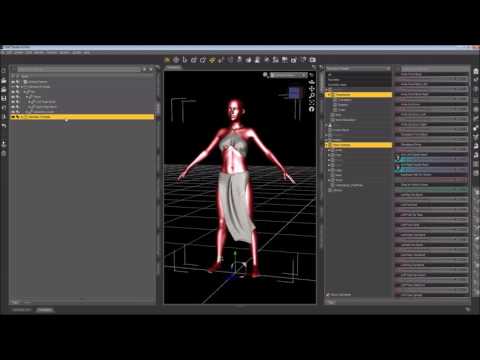
Once you change the item's scene identification to Genesis 8 Male you can try a "fit to" the figure.
That is absolutely astounding. I have been reading stuff about this for years and nobody has ever mentioned this. I bet that is at the root of G8's massive poke-through problem with older autofit clothing.
I went back after this post and JUST reset the scene ID and did nothing else.
Because, when I kept following what she was doing - changing the rigging or whatever, it resulted in disaster.
It destroys the base figures ability to pose, ever again. I also went back and posed him like G3M is at base.
Once I do all that, it appears it makes G8M into cloth or something. Removing the cape has no effect on this.
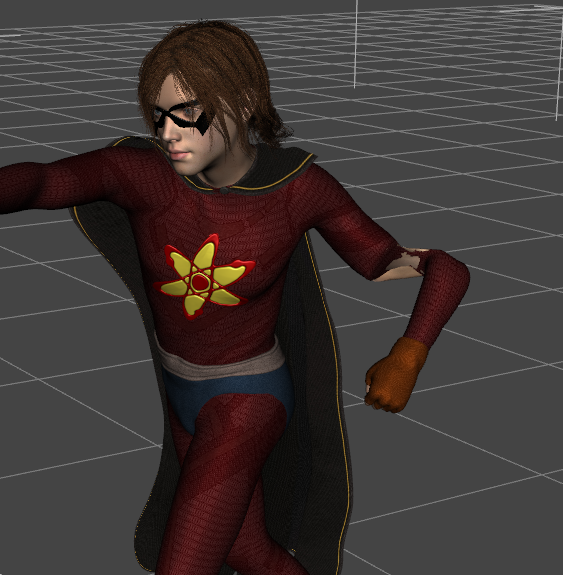
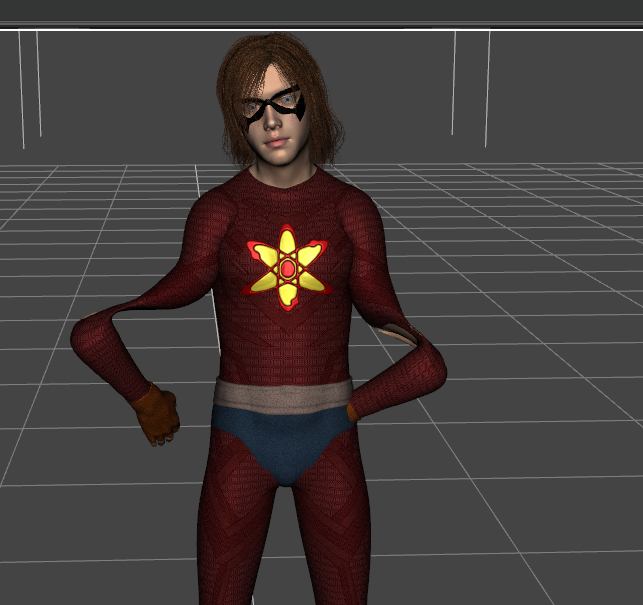
You shouldn't need to do any rigging transfer, that's why I said to watch it just somewhere around 59 - 1:25. And to fit-to after you change the scene identification. :) I've found that the rigging transfer is often not necessary. :)
And yeah, it looks like the rigging you did was from the cape to the figure on accident.
Gen 8 and CapesMy guess is you have transferred rigging from the cape to the character and not from the character to the cape.
I'm guessing then that the ORDER you clicjk on them to 'transfer rigging' is then important?
Yes
Gen 8 and CapesMy guess is you have transferred rigging from the cape to the character and not from the character to the cape.
I'm guessing then that the ORDER you clicjk on them to 'transfer rigging' is then important?
how to make a morph alias from DS ui?only way i see how to do it is copy an existing dsf file and modify it by typing manually?
this solution seems odd. must be a better way??
basically, i just want to call a couple of morphs. part of an erc procedure?
ty
 How to make a JCM that fires only when the specific morph is set to 100
Let's change the question. I would like to fix the broken JCM that can occur when ThighBend when using a morph called BackShape.
Some Poses completely ruin the shape of DAZ Genesis 8 ModelsOK, I've removed every single G3M morph transferred to G8M and the end result is I determined the knees aren't constructed that well in any case. And when exaggerated thigh & calf muscles are added it makes the knees look that much worse. I also removed all G8M morph freebies.
I personally think the knees on G8M need remodeled, it's not an addon morph or a morph transferred from G3M or a G8M freebie morph that is causing the problem. Oddly the G8F knees are so much better.
Thanks for your suggestions. At least this has got me ready to test SingularBlues morph transfer scripts again. It wasn't SingularBlues morph transfer scripts either to clarify that possibility.
What I haven't tried is how does one activate 'Limits' again on a character to restrict the range of motion when a pose is applied?
Thanks.
How to make a JCM that fires only when the specific morph is set to 100Reverse deformation option is it?
I have already checked here during the modification morph import, but is this clearly impossible?
Octiana for G8F [commercial]I’m glad to finally have this, I’ve been looking for something like it for a while. Now I just need a male version!
Wonder what Ursula’s boyfriend look like?
oh how would this look with the baby morph. (I forgot her name)
How to make a JCM that fires only when the specific morph is set to 100I'm not following that. If this is a correction for the JCM then the set up is right, but it should be only the chnages needed for the correction, it should not include the base JCM - you would do that by using the Reverse Deformations option when importing the corrective morph.
WHY Has Studio Started Crashing So Often?Its got to be a morph or JCM. I am thinking back to the pose corrector products, I recall reading you shouldn't install too many because they may compete with each other. I did that once for Genesis 2. You may have something happening, it could be a hidden property. Check the show hidden properties in the parameters tab to see what is getting activated.
I also recall a high heel pose that stayed effective through all poses. It drove me nuts because zeroing the pose did not fix it. It took me a while to realize it was actually a morph, not a pose, and it was well hidden at the very bottom of the parameters list (not the shaping list.) You could have the same thing, but it may be hidden. And that is why uninstalling Genesis does not help.I have no pose corrector products but I'll let you know about removing the mythcons sharecg.com freebies from Genesis 8 (I'm probably the only person that has them transferred to Genesis 8)
+++++
OK, I've removed every single G3M morph transferred to G8M and the end result is I determined the knees aren't constructed that well in any case. And when exaggerated thigh & calf muscles are added it makes the knees look that much worse. I also removed all G8M freebies.
I personally think the knees on G8M need remodeled, it's not an addon morph or a morph transferred from G3M that is causing the problem. Oddly the G8F knees are so much better.
Thanks for your suggestions. At least this has got me ready to test SingularBlues morph transfer scripts again.
How does one activate 'Limits' again on a character?
MirrorMT: Mirror Morphs!!!! It WORKS!I just noticed x: swap is not exactly the same as what this mirrorMT script does.
If you want a single morph that symmetrizes the same shape on both sides I guess you have to dial up the original and the new morph and do a second export to combine the shape on both sides.
[Edit]: No its even easier depending on the morph choose X: Left to Right or X: Right to Left to combine both sides with one import step.
I've leaned this from the youtube video here: New Morph Tools Intro by Josh Darling
How do I know if it’s for dforce only?It’s hard to know since the information or description doesn’t embellish that it can be used without dforce.I just check if the clothing's details lists a dozen or more of the usual shaping morphs. E.g. "Expand This" or "Move That Left" etc etc. If it doesn't, it's probably depending on dForce.
If you really, really like a particular item and it's missing the usual shaping morphs, you may be able to add something like Zev0's Fit Control to adjust it.
Dforce needs some decent hardware to use on a regular basis. It can be really time consuming. It can explode. People may have a variety of reasons to not use dforce.
The bigger concern though is that PAs will start not making shape morphs expecting customers to simulate them.To sort of combine your two points, another reason dForce can't always be used is that it doesn't always drape things the way you want. Maybe a particular pose in combination with the clothing item makes the simulation do something unexpected. Then you might have to start tweaking the simulation parameters, or the dForce settings the PA applied to the clothing, re-run the simulation to see if it works and so on.
Meanwhile you're thinking that if it only had the good old "Move X Left" shaping morph, you could have made the small tweak you want in 2 seconds.
There are several products from new artists over on another site which I have passed over since they are dForce only. I hope that the PA's here continue to realize that, in it's current form, dForce may be a handy tool but it cannot be expected to handle all situations.
Daz 3D is part of

Connect
DAZ Productions, Inc.
7533 S Center View Ct #4664
West Jordan, UT 84084Licensing Agreement | Terms of Service | Privacy Policy | EULA
© 2026 Daz Productions Inc. All Rights Reserved.