-
New DS Filament Render Engine
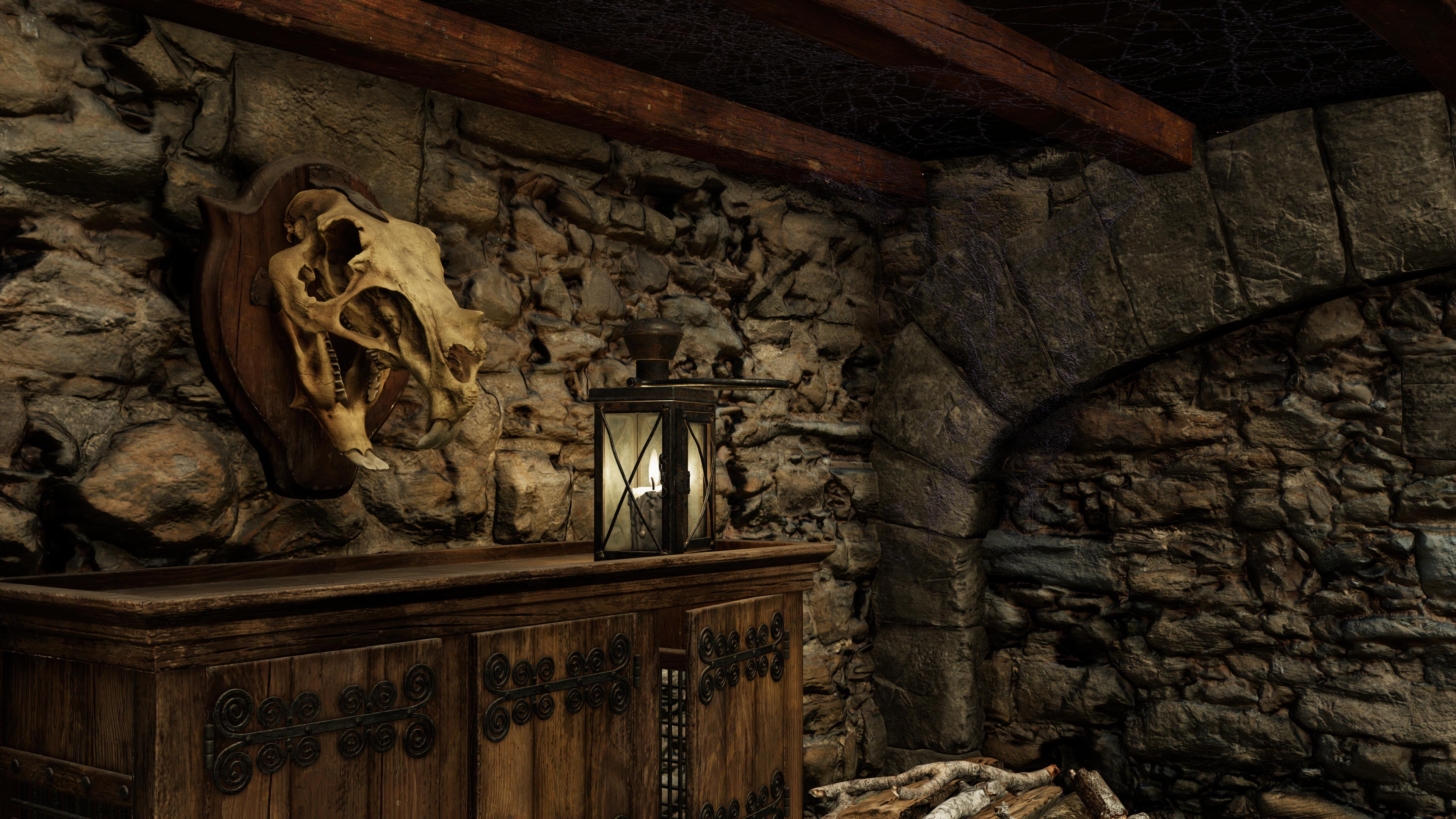
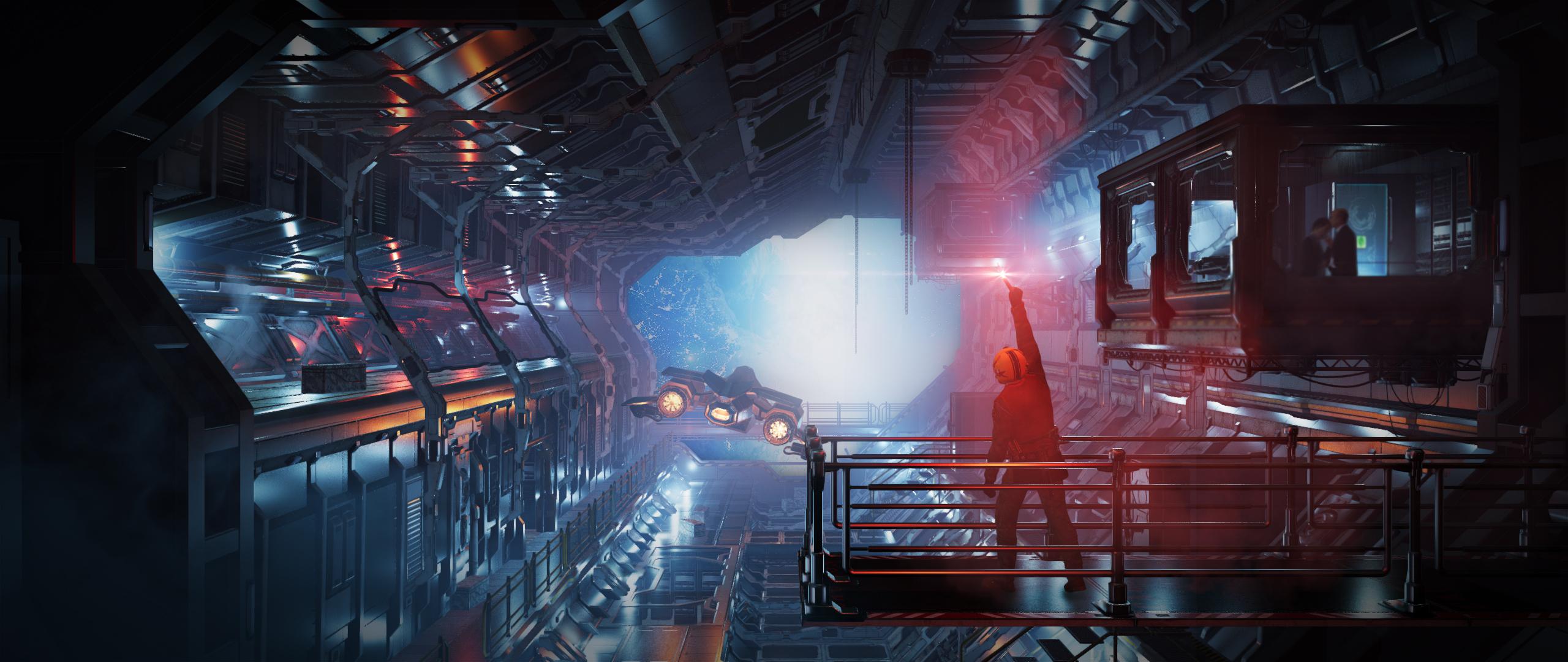
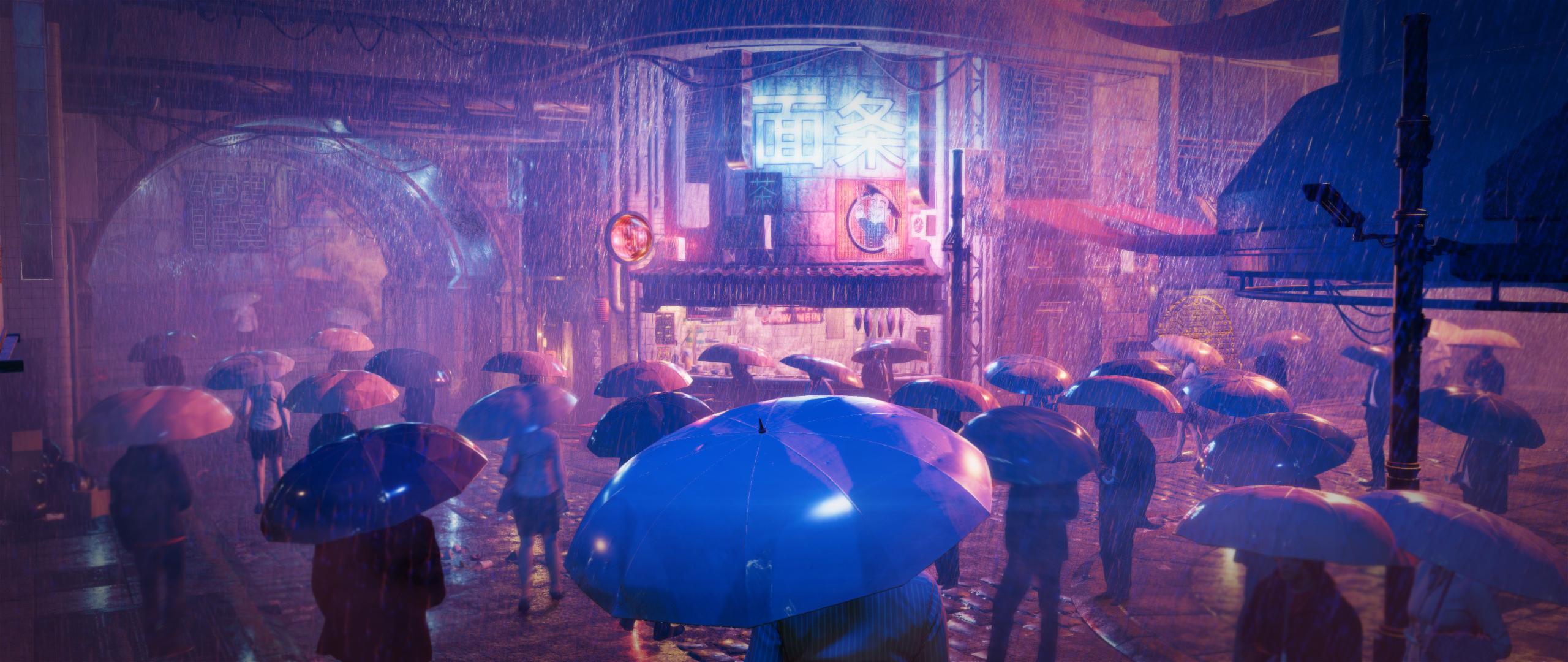
I like the way this Filament render of Red Crow Inn turned out.
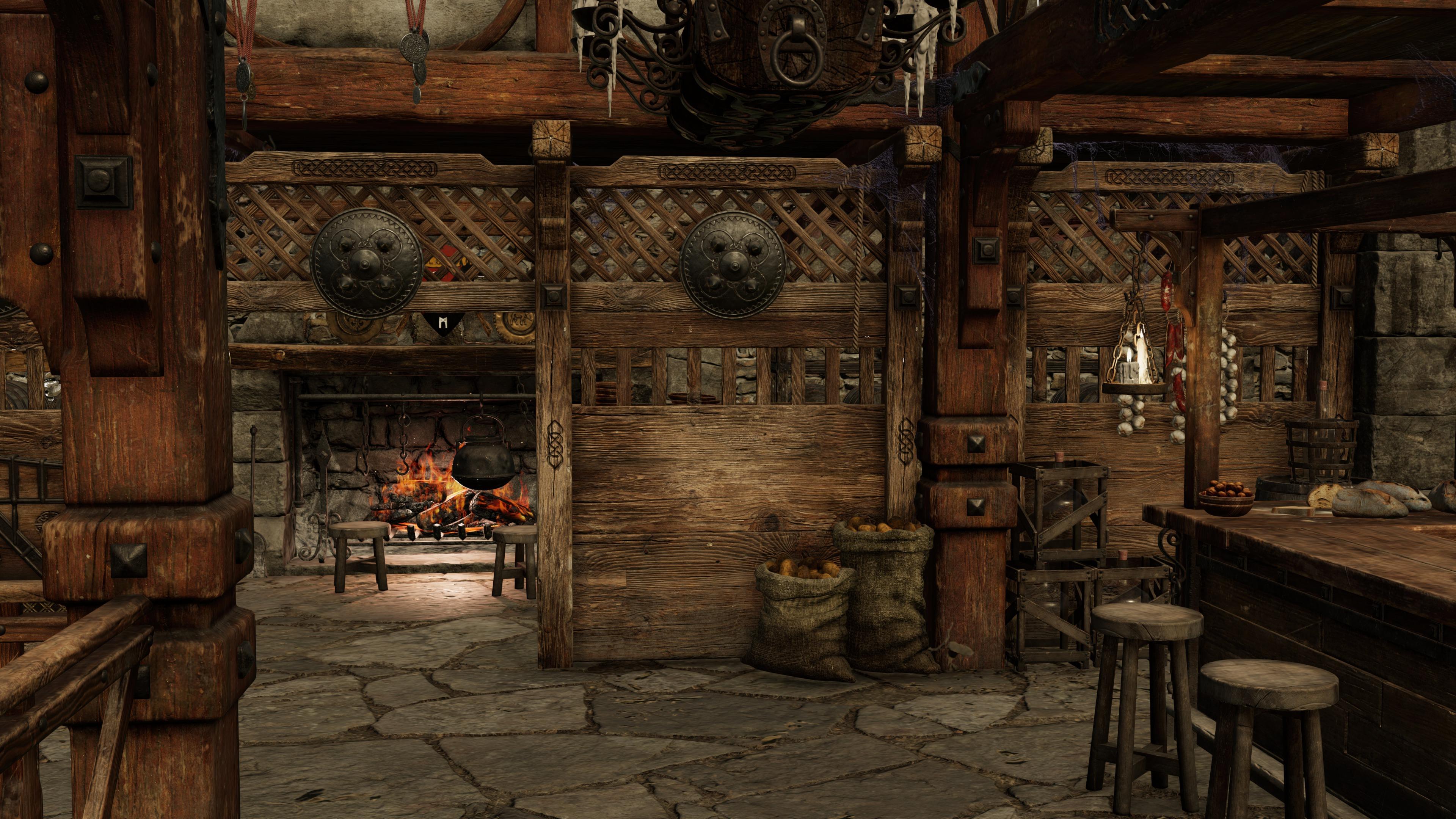
Here is another one.
 New DS Filament Render Engine
@3Diva - thank you for taking the time to share those settings. I'm going to give them a try later today.
Because of a very busy week at work, yesterday was the first time I got to download and try the Filament renderer. After a few hours of playing and experimenting, my conclusion is that it's not quite finished enough yet (the main issue for me was the resolution of the HDRI maps) but it definitely has potential. Until some of the issues are fixed, I think it will be useful for posing characters - especially when they are close together, and as others have said, it will be great for quick renders that are going to be heavily processed afterwards such as for comic panels, or painted-style effects.
It's early days, but what I have seen so far makes me feel that Daz are moving in the right direction, as long as they keep supporting Filament and improving the integration with DS. I'm also going to buy a couple of the new filament lighting products - mainly in the hope that it encourages PAs to make more of them. If anyone is reading this, I'd love some kind of space environment. My use of HDRI for that makes the background look like it just came off an 8-bit machine.
New DS Filament Render EngineI don't know if anyone is interested in these, but here are the Tonemapper, Environment, and Filament Option Nodes that I currently use for Filament Rendering (in the ZIP attached). Unzip it, open the "Content" folder and drop the "Scene Subsets" folder into your My Library (or wherever you have your Daz3D content installed). You should then be able to find the Filament rendering setup under: "Scene Subsets" >> "Filament Nodes and Distant Light - For Filament Rendering B".
The scene subset allows you to load all three draw option nodes with one click: Tonemapper Options Node, Environment Options Node, and Filament Draw Options Node, as well as a Distant Light with Raytraced Shadows enabled. The nodes have been set up for how I *currently* render in Filament. Here's a quick before and after.
Before adding the "Filament Nodes and Distant Light" scene subset:

After adding the "Filament Nodes and Distant Light" scenes subset:

I hope some of you might find it helpful. :) Of course, feel free to tweak it and make changes to suit your own personal tastes and preferences.
Please let me know if I packed it up correctly and if it works ok. :)
Thanks kindly @3Diva
 .
.I was able to save it as a scene subset and then open it up ok - just got a message that it couldn't find daz 3d/dazstudio4 publishing build/shaders/iray/resources/dthdr-ruinsb-500.hdr. But when I choose to locate the file, there it is - no problem.
Weird that it throws up a missing file error but the file is there. Very strange. It's the ruins-b HDRI that comes with Daz Studio so everyone should have it, and I've never moved it. :) You might resave it as a Scene Subset again so that the next time you load it it won't (or shouldn't) give a missing file error anymore. :)
Mine has that file in \Program Files\DAZ 3D\DAZStudio4\shaders\iray\resources
thats the issue the drive or even where on C drive people choose to install can vary
if it were in the Library and DIM stuck it in say general folder it would find it
New DS Filament Render EngineI don't know if anyone is interested in these, but here are the Tonemapper, Environment, and Filament Option Nodes that I currently use for Filament Rendering (in the ZIP attached). Unzip it, open the "Content" folder and drop the "Scene Subsets" folder into your My Library (or wherever you have your Daz3D content installed). You should then be able to find the Filament rendering setup under: "Scene Subsets" >> "Filament Nodes and Distant Light - For Filament Rendering B".
The scene subset allows you to load all three draw option nodes with one click: Tonemapper Options Node, Environment Options Node, and Filament Draw Options Node, as well as a Distant Light with Raytraced Shadows enabled. The nodes have been set up for how I *currently* render in Filament. Here's a quick before and after.
Before adding the "Filament Nodes and Distant Light" scene subset:
After adding the "Filament Nodes and Distant Light" scenes subset:
I hope some of you might find it helpful. :) Of course, feel free to tweak it and make changes to suit your own personal tastes and preferences.
Please let me know if I packed it up correctly and if it works ok. :)
Thanks kindly @3Diva
.I was able to save it as a scene subset and then open it up ok - just got a message that it couldn't find daz 3d/dazstudio4 publishing build/shaders/iray/resources/dthdr-ruinsb-500.hdr. But when I choose to locate the file, there it is - no problem.
Weird that it throws up a missing file error but the file is there. Very strange. It's the ruins-b HDRI that comes with Daz Studio so everyone should have it, and I've never moved it. :) You might resave it as a Scene Subset again so that the next time you load it it won't (or shouldn't) give a missing file error anymore. :)
Mine has that file in \Program Files\DAZ 3D\DAZStudio4\shaders\iray\resources
New DS Filament Render EngineI don't know if anyone is interested in these, but here are the Tonemapper, Environment, and Filament Option Nodes that I currently use for Filament Rendering (in the ZIP attached). Unzip it, open the "Content" folder and drop the "Scene Subsets" folder into your My Library (or wherever you have your Daz3D content installed). You should then be able to find the Filament rendering setup under: "Scene Subsets" >> "Filament Nodes and Distant Light - For Filament Rendering B".
The scene subset allows you to load all three draw option nodes with one click: Tonemapper Options Node, Environment Options Node, and Filament Draw Options Node, as well as a Distant Light with Raytraced Shadows enabled. The nodes have been set up for how I *currently* render in Filament. Here's a quick before and after.
Before adding the "Filament Nodes and Distant Light" scene subset:
After adding the "Filament Nodes and Distant Light" scenes subset:
I hope some of you might find it helpful. :) Of course, feel free to tweak it and make changes to suit your own personal tastes and preferences.
Please let me know if I packed it up correctly and if it works ok. :)
Thanks kindly @3Diva
.I was able to save it as a scene subset and then open it up ok - just got a message that it couldn't find daz 3d/dazstudio4 publishing build/shaders/iray/resources/dthdr-ruinsb-500.hdr. But when I choose to locate the file, there it is - no problem.
Weird that it throws up a missing file error but the file is there. Very strange. It's the ruins-b HDRI that comes with Daz Studio so everyone should have it, and I've never moved it. :) You might resave it as a Scene Subset again so that the next time you load it it won't (or shouldn't) give a missing file error anymore. :)
that happens to me loading dufs between my computers because the program is on my E drive on one
the runtimes etc identical just the HDR gets the error
How to stop using Filament!!Rejecting help from experienced users and forum admins w/o trying the advice is an excellent strategy for future success.
I'm sorry but I wasn't rejecting help from experienced users. Maybe you didn't understand my problem. I upgraded Daz, did a few renders in Iray, then tested filament. When I tried to switch back to Iray was when I had the problem. I reversed what I did to use Filament and the issue persisted. The point is, Iray worked after the upgrade and didn't stop until I used Filament. I only came to the forum to see if anyone had experiended this issue and knew how to fix it. Thanks for the original suggestion, but the snarky follow-up wasn't neccesary. But, hey, nice comment, you put me in my place. The issue turned out to be caused by a pushed update to my Vmware client that came through after I tried out Filament. The issue cleared up once I was able to reboot a day later.
New DS Filament Render EngineI don't know if anyone is interested in these, but here are the Tonemapper, Environment, and Filament Option Nodes that I currently use for Filament Rendering (in the ZIP attached). Unzip it, open the "Content" folder and drop the "Scene Subsets" folder into your My Library (or wherever you have your Daz3D content installed). You should then be able to find the Filament rendering setup under: "Scene Subsets" >> "Filament Nodes and Distant Light - For Filament Rendering B".
The scene subset allows you to load all three draw option nodes with one click: Tonemapper Options Node, Environment Options Node, and Filament Draw Options Node, as well as a Distant Light with Raytraced Shadows enabled. The nodes have been set up for how I *currently* render in Filament. Here's a quick before and after.
Before adding the "Filament Nodes and Distant Light" scene subset:
After adding the "Filament Nodes and Distant Light" scenes subset:
I hope some of you might find it helpful. :) Of course, feel free to tweak it and make changes to suit your own personal tastes and preferences.
Please let me know if I packed it up correctly and if it works ok. :)
Thanks kindly @3Diva
.I was able to save it as a scene subset and then open it up ok - just got a message that it couldn't find daz 3d/dazstudio4 publishing build/shaders/iray/resources/dthdr-ruinsb-500.hdr. But when I choose to locate the file, there it is - no problem.
Weird that it throws up a missing file error but the file is there. Very strange. It's the ruins-b HDRI that comes with Daz Studio so everyone should have it, and I've never moved it. :) You might resave it as a Scene Subset again so that the next time you load it it won't (or shouldn't) give a missing file error anymore. :)
New DS Filament Render EngineI don't know if anyone is interested in these, but here are the Tonemapper, Environment, and Filament Option Nodes that I currently use for Filament Rendering (in the ZIP attached). Unzip it, open the "Content" folder and drop the "Scene Subsets" folder into your My Library (or wherever you have your Daz3D content installed). You should then be able to find the Filament rendering setup under: "Scene Subsets" >> "Filament Nodes and Distant Light - For Filament Rendering B".
The scene subset allows you to load all three draw option nodes with one click: Tonemapper Options Node, Environment Options Node, and Filament Draw Options Node, as well as a Distant Light with Raytraced Shadows enabled. The nodes have been set up for how I *currently* render in Filament. Here's a quick before and after.
Before adding the "Filament Nodes and Distant Light" scene subset:
After adding the "Filament Nodes and Distant Light" scenes subset:
I hope some of you might find it helpful. :) Of course, feel free to tweak it and make changes to suit your own personal tastes and preferences.
Please let me know if I packed it up correctly and if it works ok. :)
Thanks kindly @3Diva
.I was able to save it as a scene subset and then open it up ok - just got a message that it couldn't find daz 3d/dazstudio4 publishing build/shaders/iray/resources/dthdr-ruinsb-500.hdr. But when I choose to locate the file, there it is - no problem.
New DS Filament Render EngineI noticed a couple things today that surprised me:
- Reflective objects in a scene reflect the HDRI dome, even when the Dome is Off.
- The backdrop image or color selected in the Environment pane is evidently ignored by Filament.
Character skin seams.1+ I've got this with Filament too on the current release (previous beta was OK).
Character skin seams.Tried this Filament render with Freja, there were seams where front head meets the back, but turning mipmapping off first, cleared most of the seams, and then reducing the bump from 4 to 1, did the rest.
Oh hey, thanks alot Paintbox! That was very helpful to see what you were getting.
and....finally found a way to make the seams disappear 100% on Freja despite Bump at 4.0 with Mipmaps still "ON".
See 2 screenshots.
Also thank you Barbult for posting in this thread. Thanks to you posting what you did, Richard with access to DAZ-programmers gave us all an insight on how DAZ intents mipmaps to work. Which was nice. Gave me enough info to figure out what to check for after Paintbox showed his result.New DS Filament Render EngineI don't know if anyone is interested in these, but here are the Tonemapper, Environment, and Filament Option Nodes that I currently use for Filament Rendering (in the ZIP attached). Unzip it, open the "Content" folder and drop the "Scene Subsets" folder into your My Library (or wherever you have your Daz3D content installed). You should then be able to find the Filament rendering setup under: "Scene Subsets" >> "Filament Nodes and Distant Light - For Filament Rendering B".
The scene subset allows you to load all three draw option nodes with one click: Tonemapper Options Node, Environment Options Node, and Filament Draw Options Node, as well as a Distant Light with Raytraced Shadows enabled. The nodes have been set up for how I *currently* render in Filament. Here's a quick before and after.
Before adding the "Filament Nodes and Distant Light" scene subset:
After adding the "Filament Nodes and Distant Light" scenes subset:
I hope some of you might find it helpful. :) Of course, feel free to tweak it and make changes to suit your own personal tastes and preferences.
Please let me know if I packed it up correctly and if it works ok. :)
New DS Filament Render EngineAfter working with Filament for three days, I'm going to add my plugged nickel's worth of commentary.
First, my Iray machine melted down about three days before Filament was released. So, I'm currently working on an eight year old laptop, with a Haswell CPU, 16G RAM, and an archaic GTX-940 GPU. It's my old Reality machine. Don't even say the word "Iray" to it or it will have a stroke. The fact that I can render on it using Filament is just pure joy.
Second, I do two types of renders: highly detailed fantasy scenes, and superhero comics. It's always griped me that a panel for a comic takes as long as a detailed standalone action scene. Add to it the fact that a comic page needs four to nine panels and it becomes frustrating. With Filament, I can render faster than I can pose the characters. Meaning, I can make more than one comic page per week. Nice!
Third, for said comics, Filament is good enough. More than good enough, really. Iray looked too darn good! I'm used to comics being hand drawn, with high end pieces either in watercolor, like Alex Ross, or airbrushed, as in Heavy Metal. So, Filament is a major boon in many ways.
Finally, I have been playing with Filament for detailed fantasy images. So far, so good. Yeah, in that type of art, its limitations show. Iray is the better engine for that type of scene. However, I'm getting better results than I did with 3delight (granted, I did not know what I was doing back then ... I didn't even know we had cameras). The transition from Iray to Filament is not near as daunting as 3DL to Reality or Reality to Iray. Sure there's a learning curve, but there was for 3DL, Reality, Iray, and DAZ in general. I'm still learning about Iray for that matter. So, what else is new?
It does have a few missing pieces. The lack of SSS/Translucency leads to flattish looking skin. Ground shadows need to be greatly improved. The mouth of figures looks plastic. Hair is wonky. Learning new lighting techniques takes time because mesh lights don't work. Most of those issues will be resolved either through spending more time with Filament (which I am doing now), and the fact that it's open source and 200 to 300 of us geeks just fell in love with it. It would not surprise me to see Filament develop and improve faster than Iray considering it/we don't have a major corporation that ignores us to contend with (i.e., Nvidia).
Many here are complaining that DAZ "wasted time and resources" on Filament but I say "Good job!" It's another tool in our box of tools we can use for different projects and applications. And really, we can't have enough.
Well said! :D And yeah, this is a boon for animators for sure and for those who own lower-end computers, as well as those who just need to be able to produce fast renders. Even for those not interested in rendering with it, it can be a big help for setting up scenes. The ability to see exactly where the HDRI is, alone, already a big help. I too am glad that Daz3D brought this to Daz Studio. :)
New DS Filament Render EngineHey guys, i thought i'd just throw my 2c in on the conversation here. As i've mentioned elsewhere on the forums, i threw my support behind this endeavor because i coach and train a lot of budding artists and PA's from developing countries where the purchase of high-end Nvidia cards is almost impossible. I wanted broke students to be able to pick this up as a hobby, even if their only available pc is a 10-year-old laptop that's being held together by duct tape. Lowering the bar of entry is good for daz. As it stands right now, you can pick up daz, grab a load of freebies and get started with rendering in filament without spending a dime. If you're lucky enough to be dual-wielding titans and overclocked i9's, then there's still plenty of goodies lined up for you. It's not replacing iray it's just an addition.
I'm also seeing a lot of comparisons to eevee and UE4, which i don't think is a fair comparison. Eevee and UE4's renderers along with Filament *can* look great if you put forth the effort, but none of them are going to do it for you. Whenever you see awesome quality work in eevee or UE4, or any other engine, i guarantee you that there was a seasoned visual effects artist that created it. We have Iray for people with hardware capable of using effectively, we have filament for those who don't have that luxury. Both of them will look terrible if you don't put forth adequate effort. Both will look great if you do.
Early in the port process when FIlament was still crashing regularly and had no documentation, i made these -
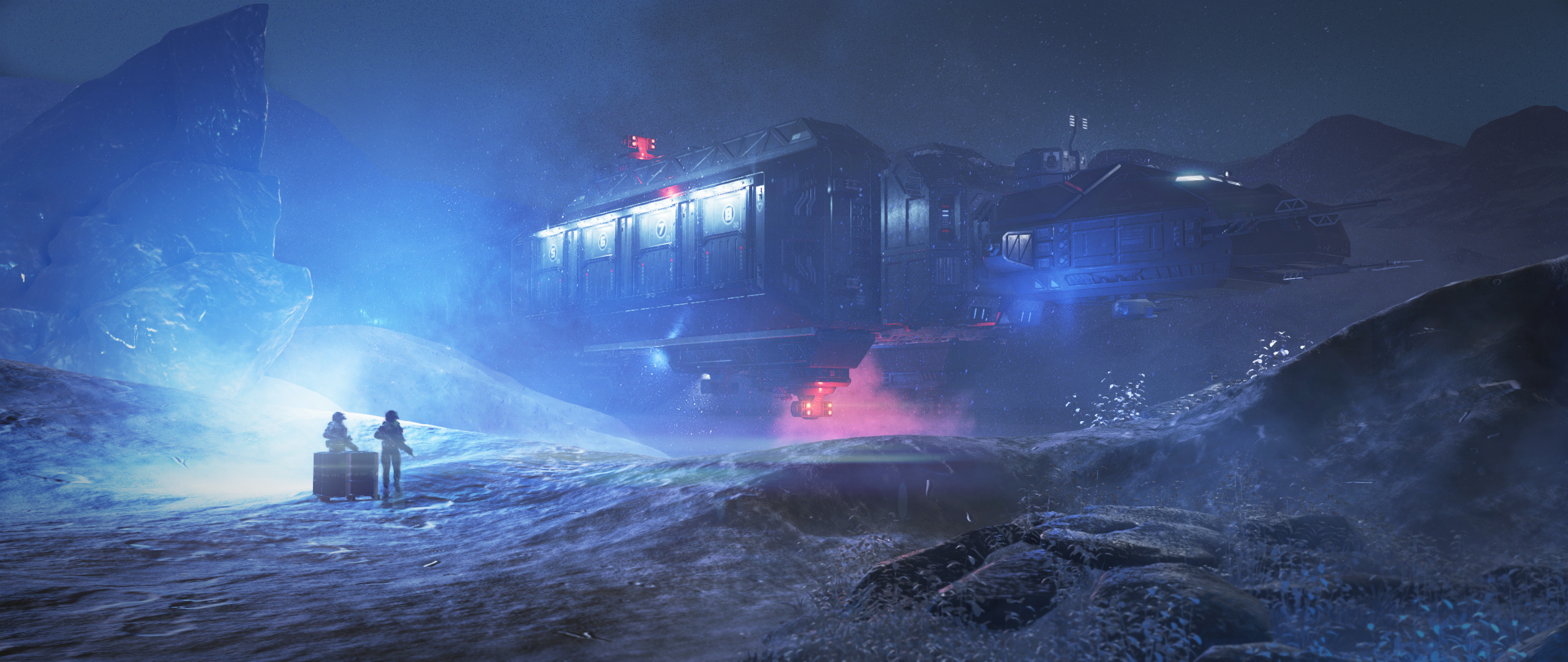

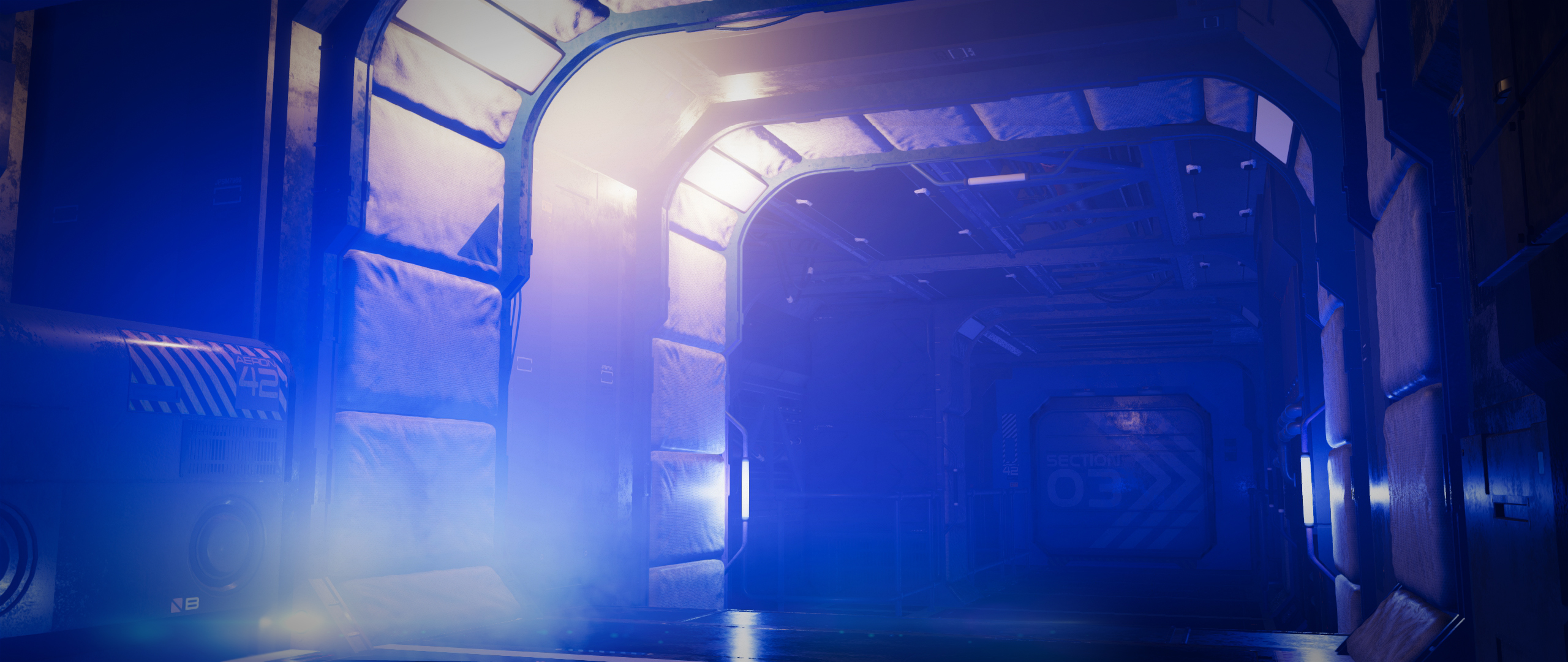
They're certainly not avengers level CG obviously, but if i told people they were made in Iray, i'm pretty sure they'd believe me.
I'm not saying this to cause a flamewar, - i too am looking forward to more high-tier goodies being introduced into daz. The wishlists being presented in this thread are valid, and i'd like to see improvements in a lot of areas too. I'd just like to get my point across that many people will benefit from this, and i hope it will breed a lot of new daz artists who would not have been able to use the software previously. It's the Artist, not the brush, make something awesome.

Thank you.
New DS Filament Render EngineAfter working with Filament for three days, I'm going to add my plugged nickel's worth of commentary.
First, my Iray machine melted down about three days before Filament was released. So, I'm currently working on an eight year old laptop, with a Haswell CPU, 16G RAM, and an archaic GTX-940 GPU. It's my old Reality machine. Don't even say the word "Iray" to it or it will have a stroke. The fact that I can render on it using Filament is just pure joy.
Second, I do two types of renders: highly detailed fantasy scenes, and superhero comics. It's always griped me that a panel for a comic takes as long as a detailed standalone action scene. Add to it the fact that a comic page needs four to nine panels and it becomes frustrating. With Filament, I can render faster than I can pose the characters. Meaning, I can make more than one comic page per week. Nice!
Third, for said comics, Filament is good enough. More than good enough, really. Iray looked too darn good! I'm used to comics being hand drawn, with high end pieces either in watercolor, like Alex Ross, or airbrushed, as in Heavy Metal. So, Filament is a major boon in many ways.
Finally, I have been playing with Filament for detailed fantasy images. So far, so good. Yeah, in that type of art, its limitations show. Iray is the better engine for that type of scene. However, I'm getting better results than I did with 3delight (granted, I did not know what I was doing back then ... I didn't even know we had cameras). The transition from Iray to Filament is not near as daunting as 3DL to Reality or Reality to Iray. Sure there's a learning curve, but there was for 3DL, Reality, Iray, and DAZ in general. I'm still learning about Iray for that matter. So, what else is new?
It does have a few missing pieces. The lack of SSS/Translucency leads to flattish looking skin. Ground shadows need to be greatly improved. The mouth of figures looks plastic. Hair is wonky. Learning new lighting techniques takes time because mesh lights don't work. Most of those issues will be resolved either through spending more time with Filament (which I am doing now), and the fact that it's open source and 200 to 300 of us geeks just fell in love with it. It would not surprise me to see Filament develop and improve faster than Iray considering it/we don't have a major corporation that ignores us to contend with (i.e., Nvidia).
Many here are complaining that DAZ "wasted time and resources" on Filament but I say "Good job!" It's another tool in our box of tools we can use for different projects and applications. And really, we can't have enough.
Daz Studio 4.14 Pro, General Release!Holy Moly you guys!!!
Okay, some of you Daz 3D Devs may know me for the die hard Carrara user that I am - I am. I Love Carrara!
Well I've been incredibly hyped about everything that's been going into Daz Studio over the past years - ever since 4.0, but I never really used it as my animation/render studio - just all of the amazing, incredibly handy and powerful tools it has.
This whole Filament thing along with (I haven't found/figured them out yet) the new Animation tools has really got me jazzed.
When another Carrara user turned me on to the Beta with Filament, I gave it a bit of a try - not much time invested into it - but it was cool enough to get me to start putting a bunch of Daz Studio info on my site so that my readers and myself can learn and grow with this thing.
Well one of my awesome readers sponsored me a gift card, which I used to get a cool Genesis 8 Female character and hair for her just last night so I could install and try the new Daz Studio as soon as my Carrara renders were complete.
Oh Man!!!
Okay, I have a lot of Steph videos to watch so I can wrap my head around where things are. I used Filament just fine for getting an animation put together, but not well enough to run it for the render, so I switched to Iray. OMG!!!

 Little Lara Thorne and her Bronwyn Hair are fricken Spectacular! Dropped in an HDRI for both lighting and an environment and set up Iray for speed - something I just kinda started picking up on how to do... kinda.
Well my animation is rendering at roughly a minute per frame, give or take, and the results look fantastic!
Filament is amazing! Even if I stick with Iray for my final renders, Filament looks gorgeous at its absurdly fast render speed!
I know I saw Steph working in a Graph Editor and some other new animation tools. I have to look into that stuff and see how far this adventure takes me!
Now I need to get my hands on Linday's Classic Long Curly Hair with dForce and I bet I could make a Daz Studio Genesis 8 Female version of my Rosie character (My hero, fashioned after my lovely wife)! Lara makes a stunningly similar Rosie 8 - on the right is Rosie 5, a cross-generation Genesis 1 Female (click the image to see the intro video of her)
Wow. Just... Wow!
Great Job! Thanks Team Daz 3D!!!
...was going to ask about the hair until I watched the video (very nice i may say). So it was generated in Carrara?
Been looking to rebuild my Merida character (who's also quite a "kitbash") and hair like that would be ideal.
I even have a meager system for this stuff -
- Ryzen 2nd Gen 2700 octa-core
- GTX 1660 6GB
- 64GB RAM
So I'm running Iray using both GPU and CPU and it's running great!
I had one crash, but it truly felt like it was my fault, switching from Iray in my viewport to Filament right in the middle of a bunch of setting changes - Iray was busy busy busy.
Installation via DIM went without a hitch, but I just installed the latest nVidia driver to run the Beta. I wonder if that made the difference.
...save for the GPU (Maxwell Titan-X) that meagre system is far more of a beast than than mine: (6 core Westmere Xeon and 24 GB DDR3 1333 memory)
New DS Filament Render EngineThe good news is that it actually renders shadows now, even without the draped-shadow add-on. But without raking back through the whole thread, what are these Filament Draw Options and how does one even apply them?
Does every item in a scene need a Filament Draw Option added to it?
There can be only one - hence the name for these objects, Singletons.
 New DS Filament Render Engine
The good news is that it actually renders shadows now, even without the draped-shadow add-on. But without raking back through the whole thread, what are these Filament Draw Options and how does one even apply them?
Does every item in a scene need a Filament Draw Option added to it?
There can be only one - hence the name for these objects, Singletons.
New DS Filament Render EngineI think those Filament skins are if you intend to use Filament and just Filament. I would imagine if you want to use Iray, you would go back to an Iray skin. You might need to reapply the Iray skin if you wanna go back.
The preset also doesn't look right in the Filament preview.
That's because you need to apply the subsurface scattering shell
That fixed it.
It comes with a PDF tutorial that you should read. There's another step after applying one of the presets - you have to also apply one of the SSS Emulator Shells.
I got around to reading it a few minutes ago. I may read a PDF file again one day.
New DS Filament Render EngineZilvergrafix, they look fantastic! Filament has really got me excited for this new path that this has opened up in DAZ Studio.
Daz 3D is part of

Connect
DAZ Productions, Inc.
7533 S Center View Ct #4664
West Jordan, UT 84084Licensing Agreement | Terms of Service | Privacy Policy | EULA
© 2026 Daz Productions Inc. All Rights Reserved.