-
Algovincian Non-Photorealistic Rendering (NPR) 2019/2020
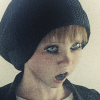
As for the eyes, maybe darkening them would help give the algos something a bit more to work with? *shrug* I'm just making wild suggestions since I don't have a clue how your algos work. lol I just know I'm a big fan of them and the styles of art you've been able to create! :D
Will have to go back and have a look at her eye color in the analysis passes, but you're probably right. The algos may still have trouble drawing a dark circle that small in size, though. They're trying to find lines to draw - not filled in shapes if that makes sense. Like you suggested, they do "try harder" to draw lines in darker areas than lighter areas. In general, it may be nice to be able to render lighter color eyes, but for this style it doesn't matter.
This new style utilizes neural nets to perform a style transfer, which is very popular these days. This is a completely different approach to how the existing algos I've written function. I've looked at this approach in the past (deepart.io was the first I came across years ago), but found it to be hit or miss - definitely not practical for the general case (wide variety of subject matter, scale, etc.).
Since I first played with them years ago, I've come up with a few tweaks of the process in an attempt to address this issue. Rather than starting with a 3D render + a reference style image as the inputs, I started with the output from my algos + a reference style image. This seems to help dramatically, presumably because lines have been drawn already by my algos. I also believe it helps that the input is already skewed towards dark lines with lighter shading (as opposed to a more even distribution like you'd see in a 3D render or photograph).
There is also another added benefit of starting with the output from my algos as the input to the neural nets. It gives me access to all of the analysis passes used, as well as every intermediate image, derivative mask and finished style. It was through using these that the shading on the skin was quickly isolated and changed to something more apprpriate in an automated fashion.
Unfortunately, at the moment I doubt there is any hope of running a batch of any size and getting acceptable results for all cases . . . doh! At least it is now officially in the pipeline, though.
- Greg
AIUTO...CHI CONOSCE L’ITALIANO? PARTE UNDICIYee !!!! Alla fine è stato accettato , direi che non mi posso lamentare : 49 $ = 45,50 € =3,791666666666667 € mese
perfetto , grazie della dritta
Subscription History
Date Action Details 05/07/2019 extend Extended to 2020-05-07 05:03:11 (Order Number xxxxxxxx) 01/30/2014 exit Cancelled on 2014-01-30 22:56:55 for Expired (Manual Adjustment) 09/25/2013 enter Entered Subscription (Order Number xxxxxxxx) nel frattempo vado a bloccare su Paypal il rinnovo automatico
Saluti
Simo
PS
Vediamo ora quando metteranno superscontte le cose serie , tipo i vari morphings di genesis 3 e 8
Mi fa piacere che tu sia riuscito a usarlo! :D
Io purtroppo ho la membership in scadenza fra 10 giorni e non posso usare il coupon...ma non voglio rinnovarla a prezzo pieno! Vedremo...già ho speso troppo in questo periodo tanto.
DAZ sta tentando anche a voi con l'offerta per i character di G8?
Sì è uscita anche a me, ma non ho preso nulla!
L'unico che mi interessava era Zelara, ma non era disponibile.
In genere non ho mai capito perché costino così tanto tutti quei bundle!
Dovrebbero davvero fare qualcosa come su Steam, dove se hai già prodotti di un bundle il prezzo complessivo scende, e anzi c'è magari uno sconto aggiuntivo del 10%.https://www.daz3d.com/all-new-from-rarestone-and-others
Ed ecco come diventa impossibile non spendere! Rarestone è uno dei miei PA preferiti, uno dei pochi in grado di creare morph Anime degni di questo nome!
Quei faccini tondeggianti mi chiamano!

Ci darò un'occhiata!
In generale però cerco di non comprare se non è già qualcosa che ho in wishlist e che non posso ottenere al 90% di sconto xD
Ho già i suoi morph faciali per G8F e M e non sono niente male!
EDIT: visto, prodotti di ottima qualità! Però oggi non prendo niente (tranne quel bel freebie del caffè)!
Anche io uso Daz Deals, ed è fantastico! E' brutto vedere quanto abbiamo speso...almeno mi rassicuro vedendo che lo sconto complessivo che ho ottenuto rispetto al valore totale è del 95%, nonostante siano quasi tutti prodotti utilizzabili e di questa generazione :D
Però forse perdo troppo tempo a cercare le offerte migliori ogni giorno :/AIUTO...CHI CONOSCE L’ITALIANO? PARTE UNDICIhttps://www.daz3d.com/all-new-from-rarestone-and-others
Ed ecco come diventa impossibile non spendere! Rarestone è uno dei miei PA preferiti, uno dei pochi in grado di creare morph Anime degni di questo nome!
Quei faccini tondeggianti mi chiamano!
What hair would you choose?Maybe this? https://www.daz3d.com/shena-hair-for-genesis-3-female-s
There's a "raise bangs" morph, it looks like.
I think the key would be to use the same Hair Shader on both the "up" version and "down" versions. :)
Realistic Neko Ears (Male/Female)Same here.
It might even be something that could be accomplished with just an add-on for Thistle's ears. I don't own Thistle though so I don't actually know what there is to work with there.
Maybe a morph to make them more realistic, add interior details with displacement, realistic textures and a LAMH preset or fiber mesh.
Anatomical ElementsOr just go to renderotica and get a 3rd party option. They usually have more options anyway and look/function better.
you've seen one anotomical, you've seen 'em all - imo 3rd party is not any better in fact even terrible when you it comes to character textures; but 'otica does offer good morph and pose dials for the defualt element
maybe you are talking about the males since I don't use them often, but for the females, the 3rd party addons are far superior and I have no issues with textures matching, it's a simple click.
The 3rd Party male products don't work to well with custom shapes that are scaled. I had looked at making some shapes for some other products but I stopped because the rigging wasn't suitable, and I ran into issues making them work with my shapes. This is why I add these shapes for the DAZ gens to my products in this store.
Anatomical ElementsOr just go to renderotica and get a 3rd party option. They usually have more options anyway and look/function better.
you've seen one anotomical, you've seen 'em all - imo 3rd party is not any better in fact even terrible when you it comes to character textures; but 'otica does offer good morph and pose dials for the defualt element
maybe you are talking about the males since I don't use them often, but for the females, the 3rd party addons are far superior and I have no issues with textures matching, it's a simple click.
Anatomical ElementsOr just go to renderotica and get a 3rd party option. They usually have more options anyway and look/function better.
you've seen one anotomical, you've seen 'em all - imo 3rd party is not any better in fact even terrible when you it comes to character textures; but 'otica does offer good morph and pose dials for the defualt element
G8M Core SurveyI like the male figures but I didn't use these characters yet except 3 of them
1) Ollie 8 (30% Body morph and Normal maps)
2) The Brute 8 (30% Body morph)
3) Darius 8 (Figure)
Texture being stretchedThe "pack islands" function is some automated process that tries to puzzle all or at least the currently selected UV islands into the UV space giving you an instant UV layout. The results are not always desirable, for example often I don't want to have the UV islands rotated. In order to match all UV islands into that space pack islands scales everything evenly so the overall proportion and the difference in "texel density" between the UV islands stays the same. There are better automated solutions for this in Blender like the "UV Packmaster" addon for example UV Packmaster at BlenderArtist.com.
The function "Average Island Scale" found in the same UV menu of the Blender UV-Image Editor does change the texel density to have it evenly distributed. To see better whats going on just apply a checker map texture and see if the pattern on the 3D model is aproximately the same size everywhere. If you apply Average Island Scale on the Genesis 3/8 UVs you will see the face UV island will shrink down to a size that it will fit right on the torso map between the backside of the head. But this is not desirable in most cases, the UV layout was made to balance the details to have high resolution textures on the face for closeup renders so I usualy leave it like this.
Here is another Daz Studio tutorial by me dealing with the UDIM UV design on Genesis 3 and 8 by using the Texture Atlas and Map Transfer.
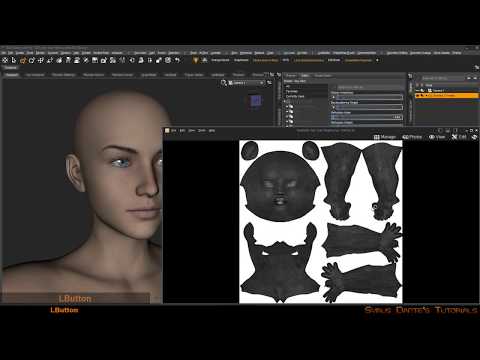
I recommend these Youtube tutorials for Blender UV mapping:
G8M Core SurveyI really can't do them singly as favorite but I can in pairs, you can also know that I own most of the add-on characters for those base characters that are favorites and that availability is part of the reason I like the base characters. Also because it's pretty easy to make toon styles from the G8F/G8M base characters with the DAZ Originals head & body morph packages I list those 1st.
1) G8F & G8M with their respective DAZ Originals head, body, & expression products
2) Ollie 8 & Edie 8
3) The Girl 8 & Toon Dwayne 8 (Toon Dwayne 8 is as close as we're going to get the the Guy 8 I'm pretty sure)
Those are the ones I've actually bought. If I include ones I'd like to buy but haven't been able to afford I'd include Mabel 8, Floyd 8, Mrs Chow 8, Mr Woo 8 in their Pro Bundle forms. Same with 2) & 3) above, as pro bundles as the 'bargain' aspect nearly disappears when you buy single characters individually and also without add-on character in a similar style as a new character the value and utility to create renders other than pin-ups mostly disappears too.
Novica & Forum Members Tips & Product Reviews Pt 12
So kind of you! I am rapidly becoming an IH Kang fan. I got a few real bargains yesterday.Looks very good! You should have done the promos!
The thickness morph is great.
Novica & Forum Members Tips & Product Reviews Pt 12Looks very good! You should have done the promos!
The thickness morph is great.
DON'T MISS OUT! ProblemsIt finally worked for me but OMG Australian dollar is pathetic
IKR - it's working out for me when I'm getting paid from USD, but buying outside Oz ...Gah!
- Victoria 8 Base Victoria 8 Starter Bundle Victoria 8 Pro Bundle
- Olympia 8 Base Olympia 8 Starter Bundle Olympia 8 Pro Bundle
- Michael 8 Base Michael 8 Starter Bundle Michael 8 Pro Bundle
- Teen Josie 8 Base Teen Josie 8 Starter BundleTeen Josie 8 Pro Bundle
- Stephanie 8 Base Stephanie 8 Starter BundleStephanie 8 Pro Bundle
- Charlotte 8 Base Charlotte 8 Starter Bundle Charlotte 8 Pro Bundle
- Aiko 8 Base Aiko 8 Starter Bundle Aiko 8 Pro Bundle
- Ollie 8 Base Ollie 8 Starter Bundle Ollie 8 Pro Bundle
Thanks for the links

Not sure if I need Ollie8 pro ... but very tempting
FWIW, Ollie has one of the coolest bundles in terms of clothes and poses, IMO, and I've had good fun using his head morph and Zackyr's mixed in with G3M characters after back conversion. Zackyr with Edward's skin makes a pretty good Ming the Merciless (Max Von Sydow version).
I have purchased singly 8 of the items in the Ollie 8 Pro bundle... the way the sales go its possible to pick stuff up really cheap ..
DON'T MISS OUT! ProblemsIt finally worked for me but OMG Australian dollar is pathetic
IKR - it's working out for me when I'm getting paid from USD, but buying outside Oz ...Gah!
- Victoria 8 Base Victoria 8 Starter Bundle Victoria 8 Pro Bundle
- Olympia 8 Base Olympia 8 Starter Bundle Olympia 8 Pro Bundle
- Michael 8 Base Michael 8 Starter Bundle Michael 8 Pro Bundle
- Teen Josie 8 Base Teen Josie 8 Starter BundleTeen Josie 8 Pro Bundle
- Stephanie 8 Base Stephanie 8 Starter BundleStephanie 8 Pro Bundle
- Charlotte 8 Base Charlotte 8 Starter Bundle Charlotte 8 Pro Bundle
- Aiko 8 Base Aiko 8 Starter Bundle Aiko 8 Pro Bundle
- Ollie 8 Base Ollie 8 Starter Bundle Ollie 8 Pro Bundle
Thanks for the links
Not sure if I need Ollie8 pro ... but very tempting
FWIW, Ollie has one of the coolest bundles in terms of clothes and poses, IMO, and I've had good fun using his head morph and Zackyr's mixed in with G3M characters after back conversion. Zackyr with Edward's skin makes a pretty good Ming the Merciless (Max Von Sydow version).
Adding Dual Quaternion support to UnrealEngine4 (Images inside)@AlienRenders: I've found out in the meantime, that there are better ways for doing expressions with MakeHuman in Blender, without having to resort to "tricks" like I was doing back then and now everything works just fine.
But I've found another problem, which could have to do with the Dual Quaternion Version of Unreal Engine. Can you have a look into it please and tell me, if those problems could be caused by the Dual Quaternion Version of UE? (it seems as if the lighting/shadows don't match with the Morph Targets and another problem is a Mesh Distortion in the upper arm, that doesn't occur in blender, but in UE4)
any news on the hd plugin?? :DOK, I'll add a duplicate vertices algorithm on Monday (away for the weekend). It will solve the seam issue.
That would be really great. Thank you.
Here is another example. Floyd 8, HD-morph applied and not applied
I've uploaded a new version with an optional seam welding which seems to solve the David 5 problem. Unfortunately, It doesn't with the G8 issue. I'm afraid I have to work a little more on the subject

OK, I found it. It was the way I was computing normals.
I've just uploaded a new version with the bug correction.
Trying to keep two separate copies of Gen 8 Male and Female.I almost finished but for bits and pieces of setting up my new desktop. However my old copy of G8F and 8M are really loaded with additional morphs from Gen 3 and each other. I just did an install on the desktop with them all being clean copies. Is there a way to transfer over my modded copies on my laptop without overwriting the clean copies that are on my new desktop? Would look for a tutorial but have no clue even how to word the search. Thanks for the help.
Could you just load a Gen 8 figure, zero all of the used morphs, save that as a scene. Since the Genesis figures don't inject morphs the way that Poser figures do, the closest you are going to get is zeroed morphs.
No that is not what I mean. -chuckles- The problem is added too many. I have a set core I use and some cases what happened was I transferred over the G3 morphs and then the G8 morphs came out so they are doubled up in the figure. It isn't a case of just zeroing out the dials anymore. Only thing I can possiblely do is just load one hard drive and take out the other. But then I would not be able to use any new stuff on the old. I know there is a way to do it though I am just not sure how.
suggestion: automated 24h test "before buy" systemI would love this! There are so many times I've not purchased something because I would only use them in my webcomic once, this way I could have them for free!
And I could create background images without buying the required products!
And billboards for later use.
Or transfer the downloaded files to my graphics computer which never goes online!
This would save me a ton of money!Okay, okay, I'm kidding. Yeah, I don't see any benefit for DAZ, and lots of possible abuse. I don't think it's a viable idea.
How to Make a Clothes fit and work for Victoria 4?If you want clothing to match the morphs for V4 you have to create each morph individually.
You can have V4 clothes follow morphs like clothes for Genesis line do if you use the “transfer active morphs” feature in DS. You need to use that feature explicitly once you have your morphs setup in your scene though, it won’t do it automatically by default.
Daz 3D is part of

Connect
DAZ Productions, Inc.
7533 S Center View Ct #4664
West Jordan, UT 84084Licensing Agreement | Terms of Service | Privacy Policy | EULA
© 2026 Daz Productions Inc. All Rights Reserved.