-
order of parameters suddenly changed
I've found that (in 4.10) that if I duplicate a node or node hierachy, the duplicated node has all its morph properties in reverse order. Is it possible that you've done that?
EJ Easy Face GeneratorHi EmmaAndJordi :)
Am a really big fan of your art-products
 and own many of them, including your Face and Body morph products. Use them alot out of all the morphing packages, especially the face one.
How would you compare the potential output of this product vs the face-morph product? I tried to understand what the range of morph options are for say the eyes. Have a specific unique look that am after. That look still eludes me a bit even after using your G8F face morphs and a few from other packages, such as rarestone etc.
This product looks easier and more fun to play with! Unlike the other morph sliders were you have to think more about how each small morph contributes to the whole look. But it's very powerful i find. But if this product contains more morph options or different morph options to create more options would love to know this. Guess am trying to figure out how this differs in terms of potential end result vs your existing excellent morphs package, besides the usage which is a big selling feature, and could be very helpful to many who don't want to grind away with loads of of facial sliders.
Thank you for your comments and appreciation Saxa! :)
LOL, should almost start an EJ appreciation thread for alot of your stuff. Not kidding when I say my eyes light up when I see you two released something new again. Just need time which there never seems to be enough of.
And then you can take our morphs or other morph packages that you have, and dial some to get it perfect.
That way it is easier to find a particular look, or may work also as a starting inspiration to get a face.
Thank you alot for explaining that. Helps alot to understand how it would fit into my workflow. Thnks :)
We should do a thread to say how much we thank you all and thanks a lot, your words mean a lot for us! :)
EJ Easy Face GeneratorHi EmmaAndJordi :)
Am a really big fan of your art-products
and own many of them, including your Face and Body morph products. Use them alot out of all the morphing packages, especially the face one.How would you compare the potential output of this product vs the face-morph product? I tried to understand what the range of morph options are for say the eyes. Have a specific unique look that am after. That look still eludes me a bit even after using your G8F face morphs and a few from other packages, such as rarestone etc.
This product looks easier and more fun to play with! Unlike the other morph sliders were you have to think more about how each small morph contributes to the whole look. But it's very powerful i find. But if this product contains more morph options or different morph options to create more options would love to know this. Guess am trying to figure out how this differs in terms of potential end result vs your existing excellent morphs package, besides the usage which is a big selling feature, and could be very helpful to many who don't want to grind away with loads of of facial sliders.
Thank you for your comments and appreciation Saxa! :)
LOL, should almost start an EJ appreciation thread for alot of your stuff. Not kidding when I say my eyes light up when I see you two released something new again. Just need time which there never seems to be enough of.
And then you can take our morphs or other morph packages that you have, and dial some to get it perfect.
That way it is easier to find a particular look, or may work also as a starting inspiration to get a face.
Thank you alot for explaining that. Helps alot to understand how it would fit into my workflow. Thnks :)
EJ Easy Face GeneratorHi EmmaAndJordi :)
Am a really big fan of your art-products
and own many of them, including your Face and Body morph products. Use them alot out of all the morphing packages, especially the face one.How would you compare the potential output of this product vs the face-morph product? I tried to understand what the range of morph options are for say the eyes. Have a specific unique look that am after. That look still eludes me a bit even after using your G8F face morphs and a few from other packages, such as rarestone etc.
This product looks easier and more fun to play with! Unlike the other morph sliders were you have to think more about how each small morph contributes to the whole look. But it's very powerful i find. But if this product contains more morph options or different morph options to create more options would love to know this. Guess am trying to figure out how this differs in terms of potential end result vs your existing excellent morphs package, besides the usage which is a big selling feature, and could be very helpful to many who don't want to grind away with loads of of facial sliders.
Thank you for your comments and appreciation Saxa! :)
The morphs that you have can complement this product or vice versa. Maybe the best is to start with the Face Generator, because you just have to move the adjustments and click the buttons, until you like a part of the face. After that you may get a face that you like, that is very similar to the one you are looking for.
And then you can take our morphs or other morph packages that you have, and dial some to get it perfect.
That way it is easier to find a particular look, or may work also as a starting inspiration to get a face.
EJ Easy Face GeneratorHi EmmaAndJordi :)
Am a really big fan of your art-products
and own many of them, including your Face and Body morph products. Use them alot out of all the morphing packages, especially the face one.How would you compare the potential output of this product vs the face-morph product? I tried to understand what the range of morph options are for say the eyes. Have a specific unique look that am after. That look still eludes me a bit even after using your G8F face morphs and a few from other packages, such as rarestone etc.
This product looks easier and more fun to play with! Unlike the other morph sliders were you have to think more about how each small morph contributes to the whole look. But it's very powerful i find. But if this product contains more morph options or different morph options to create more options would love to know this. Guess am trying to figure out how this differs in terms of potential end result vs your existing excellent morphs package, besides the usage which is a big selling feature, and could be very helpful to many who don't want to grind away with loads of of facial sliders.
weird lip glitchTo me it looks like the teeth have been shifted (you are actually seeing the lower teeth between the lips and the upper teeth poking through above), possibly due to scaling or a morph. You can select the upper/lower teeth and adjust their Y-position. I bet that would fix it.
Ciao
TD
This:)
weird lip glitchI don't want to change her face, so is it possible to deform just the teeth and gums?
I believe so, although it's been a while since I've used dFormers myself. (Personally, I normally export the mesh to Blender, adjust it there, then reimport that into the session file as a custom morph).
dFormers work on the base shape of the mesh rather than its current shape, so while this can make placing the dFormer a bit tricky at times, the fact the surfaces are overlapping in this pose shouldn't be an issue.
You would need to create a dFormer weight node to isolate the teeth, then they can be moved without affecting anything else;)
weird lip glitchTo me it looks like the teeth have been shifted (you are actually seeing the lower teeth between the lips and the upper teeth poking through above), possibly due to scaling or a morph. You can select the upper/lower teeth and adjust their Y-position. I bet that would fix it.
Ciao
TD
weird lip glitchI don't want to change her face, so is it possible to deform just the teeth and gums?
I believe so, although it's been a while since I've used dFormers myself. (Personally, I normally export the mesh to Blender, adjust it there, then reimport that into the session file as a custom morph).
dFormers work on the base shape of the mesh rather than its current shape, so while this can make placing the dFormer a bit tricky at times, the fact the surfaces are overlapping in this pose shouldn't be an issue.
Morphs from G3 to G8Thank you @SingularBlues fir your hard work and dedication in getting this script out to us. I also had the 27% issue and ran through the debugger. I tried using the script to transfer head/body character morphs from g8f to g2f and g3f. Here's what I noticed: The script uses the target clone morphs NuGNXarc for g8f/m only, but it looks for another target clone morph for g1-g3 called GNXALTARC when transferring to a legacy character. The NuGNXarc.dsf files were provided as part of tge distribution for g8f/m (and even g3f/m), but no GNXALTARC.dsf. The method findPropertyByLabel returns null since that property can't be found. There's no error handling for the null so the script hangs. This in the doIt() function. Hope this helps.Morphs from G3 to G8The most likely reason for the current script to freeze at 27% is that you had a previous transfer and didn't clear the scene. If you attempt to do two transfers in a row (whether the first worked or not) it will fail, because the objects it used the first time interfere with the process.
At present, the script doesn't remove those for you because it can be helpful to determine the cause of failure to have those objects available. There are a whole lot of fiddly steps involved in getting this thing to do the thing, and tthere's no way to record the state of those steps except to look at the objects.
Bear in mind, this is not a working product. It's an open source project to reach a working product. If you have an issue that you want me to resolve, that issue needs to be on the Git. Otherwise, I'll assume you want advice from the community, and let them handle it.EJ Easy Face GeneratorHello,
I was wondering if this program was a worthwhile purchase if you already had the character facial morph dials. To me it seems like it is just another randomizer program. I guess I can see if if you don't have any morph controls and need to create a face quickly. But what benefit would it have if you already have facial morphs?
In the above example that Artini posted, I don't see much, if anything going on.
Sexy Space Aliens [commercial]I'm thinking about picking up these two but I just wanted to ask if there might be a G8 version planned. At this stage in the game, I would rather get the newest version possible. If they will remain a G3 exclusive for now, then I'll definitely buy them sooner than later.
As it happens, Lekkulion was the product I decided to use to test Singular Blues' GenNext generation transfer script (because the missing fingers and toes is a particular challenge for morph transfer and thus a good way to test the accuracy of the transfer). I had to do a little tidying up, but after converting HD morphs to a blend of bump map and displacement (which, while not exactly equivalent or as convenient, is generally close enough and isn't locked down in the same way as HD and can thus be edited/transferred by regular users), it is entirely feasible to transfer even a tougher morph like this to G8.
The headtail geografts won't attach completely properly, but if the scene identification is set to G8 before they're fitted, they should retain their rigging and then sit over the existing mesh (as it's not a geograft where the underlying mesh needs to be hidden to stop it being in the way).
This is an early test render of a G8F conversion of "Kate", the gorgon character I built off the morph. (I've since reduced the strength of the "HD" component on the surfaces - I had it too strong in this early test - but it does demonstrate that even a standard user can mostly transfer the product).
 Aiko 4 missing
Only if the Powerloader is set to load A4 when Victoria 4 is loaded, y3kman.
I can't help you with Smart Content, if that is where you are looking for A4, Imposer12, but if you look under the Content Library tab you can find it here:
Poser Formats > "your content library" > Figures > DAZ People > Aiko 4, if you want to load a new V4 with A4 already applied, or
Poser Formats > "your content library" > Pose > DAZ's Victoria 4 > Morph Injections > Aiko 4, if you want to add A4 to an already loaded V4 (you would then follow y3kman's instructions) Note: Unlike the Genesis series, V4 requires that that the Head be selected to access the head morph slider, rather than the root node.
Easy face generator?For one thing, it does it automatically. Click the button and you get a randomly generated shape, as opposed to having to tediously decide which morphs you'll use and fiddle with sliders. What I'm not clear on, however... is how it differs from SimTenero's Randomizer product. If I'm reading it correctly, Easy Face Generator actually generates morphs on the fly, not tied (and thus not limited) to anything in your morph library, whereas Randomizer selects random morphs from among those you own.
It seems... kind of crazy for my theory to be correct, but not impossible. If that is indeed how it works, I'm definitely buying this thing.Morphs from G3 to G8When you say "addon" are meaning there's an add-on to the script or are you referring to the script itself? I've heard the term "addon" bandied about on here a few times as of late and I feel like I'm behind the curve somewhat.
yeah i mean the script, is really hard how to proper call it, normally this type of script i see being called addon or mod in others places then is complicated know what to call him here.
Bummer, I thought I found a solution for a replacement for GenX but the script freezes after %27. Can you please help me?
It's a known issue: https://github.com/ArchitectMCP/GenNext/issues/1
I've not been able to test the new script much, but I THINK it might have something to do with the folder in "data" >> "Architect" >> "GenNext" >> "Holding" >> "Objs" - I think if you remove everything from that folder except the "null.gnxt" that seems to do the trick as far as getting it to go past 27%.
Every morph one tries to transfer puts Objs there and that seems to keep the script from going forward with the next morph transfer. That's just my guess though, as it seemed to work better once I cleared out the Objs from that "Holding >> Objs" folder and just left the null.gnxt file there and nothing else. One would have to clear that folder of everything except for "null.gnxt" after every morph transfer.
@Divamakeup - I saw your tip on Github and tried it, and didn't have any luck :( I've only been able to have it run successfully once or twice for the entire figure (head & body), but mostly it's worked for just the head. I'm really excited at the possibilities though! :)
Saving garment after using transfer utilityThanks for taking the time to reply.
I've tried what you suggested. I can't find it in the library once I've done this.
I've tried following the advice in a different thread on how to use the transfer facility for clothing created in MD. It goes out of synch with the figure.
I've tried following the advice in yet another thread on how to edit the rigging and it moves to the correct space but crumples to half the size in the Z axis.
I've followed your advice, as I say and nothing is viable.
I must be a halfwit or something. I cannot come to grips with Daz. Every time I've opened it over the past couple of years, it just ............. well. There's no point swearing and cursing about it and there's no point getting depressed about it and there's certainly no viability in persisting with it.
The library structure was a nightmare. The upgrade seems more rational but things have literally vanished. Things I spent money on have literally disappeared with the upgrade to Daz 4.10.
If I can't make my own assets and get them to work in Daz..........something as simple as a pair of trousers or a t shirt, then there's really no point.
I'll have to try to do something with Poser or Blender. Hopefully, the money I've spent on Genesis 3 figures won't be a total waste.
Thank you for taking the trouble to respond. Seriously. Thank you.
All the best to you and all of those talented people who can actually use Daz.
Before you go, (pardon my ignorance), can you search your computer for the most recent file when you save as a wearable to learn the path to where you are saving? Once you have the path, you can then decide where you want the wearable to go, create metadata (I can lead you to a tutorial) so that it shows up up in Smart Content, or drill down to find it in the library.
Morphs from G3 to G8When you say "addon" are meaning there's an add-on to the script or are you referring to the script itself? I've heard the term "addon" bandied about on here a few times as of late and I feel like I'm behind the curve somewhat.
yeah i mean the script, is really hard how to proper call it, normally this type of script i see being called addon or mod in others places then is complicated know what to call him here.
Bummer, I thought I found a solution for a replacement for GenX but the script freezes after %27. Can you please help me?
It's a known issue: https://github.com/ArchitectMCP/GenNext/issues/1
I've not been able to test the new script much, but I THINK it might have something to do with the folder in "data" >> "Architect" >> "GenNext" >> "Holding" >> "Objs" - I think if you remove everything from that folder except the "null.gnxt" that seems to do the trick as far as getting it to go past 27%.
Every morph one tries to transfer puts Objs there and that seems to keep the script from going forward with the next morph transfer. That's just my guess though, as it seemed to work better once I cleared out the Objs from that "Holding >> Objs" folder and just left the null.gnxt file there and nothing else. One would have to clear that folder of everything except for "null.gnxt" after every morph transfer.
Saving garment after using transfer utilityThanks for taking the time to reply.
I've tried what you suggested. I can't find it in the library once I've done this.
I've tried following the advice in a different thread on how to use the transfer facility for clothing created in MD. It goes out of synch with the figure.
I've tried following the advice in yet another thread on how to edit the rigging and it moves to the correct space but crumples to half the size in the Z axis.
Maybe I'm being too ambitious in trying to create and fit clothing without knowing the ins and outs of the program.
I think I'd better go and watch some tutes.
Thanks again for trying to help an incompetent newbie.
Morphs from G3 to G8When you say "addon" are meaning there's an add-on to the script or are you referring to the script itself? I've heard the term "addon" bandied about on here a few times as of late and I feel like I'm behind the curve somewhat.
yeah i mean the script, is really hard how to proper call it, normally this type of script i see being called addon or mod in others places then is complicated know what to call him here.
Bummer, I thought I found a solution for a replacement for GenX but the script freezes after %27. Can you please help me?
srry i not tried yet use this script yet, then i can't help for now.
hey guys going back to my "crossgender" talk back, here my first attempt to make a "female reptilian and i can say which it worked really nice:
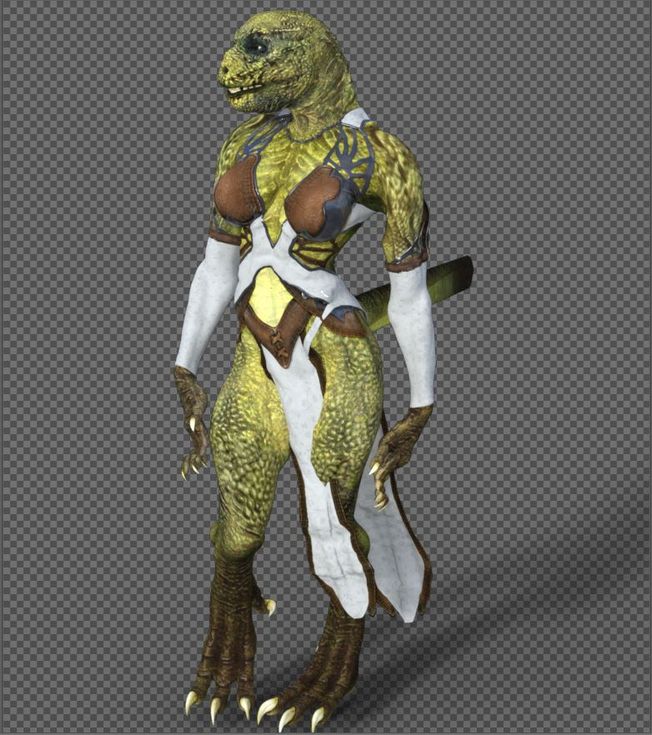
the only issues i get where on the tail, because the tails is a "male acessore" and i used the autofit on it and the other issue i noticed was some poses with the hands, like the fingers streching too much but overal, the transfer was almost a sucess, to make the repitilian "more round and big breast" i've used victoria 6 body as base, but i'm planning to use the true genesis 2 female body as mold base then add the body later, because when i was making the morph for head and body it ended a little bugged because the head also morphed the body a little more due to victoria morph but i'm planning to fix it later, if everything works fine then it's really possible to make a cross gender, even without need to use teh xgen script, i did that following the tutorial video someone posted few pages ago and this is a full female character which can use any "female morph" or cloth for genesis 2, soon i'm fix the lizard i will get my hands on the minotaur to test it too, if everything goes as planned then it can be done with any genesis from 2 to 8, the only issue would be which for the "texture" you would need to use a swap uv addon from here for genesis 3 and 8 characters, genesis 2 looks like don't have that issue since it's seens which both male and female share exactly the same uv form, then you can use a male texutere in female character and the opposite while g3 and 8 would need a addon from here to work(well so far at last the lizard base male texture can be used without any trouble for a female character).
Daz 3D is part of

Connect
DAZ Productions, Inc.
7533 S Center View Ct #4664
West Jordan, UT 84084Licensing Agreement | Terms of Service | Privacy Policy | EULA
© 2026 Daz Productions Inc. All Rights Reserved.