-
Render produces empty png
I just spent a few hours creating a scene and for some reason when I render it I end up with an empty, essentially transparent png.
I tried shutting down and restarting. Then I rebooted.
I pulled up an image I rendered on Saturday. This one was only of one person so it took 2 minutes to render. The Iray preview didn't seem to want to render the scene, so I shut it down and reinstalled the driver to see if that would fix things. I reopened Daz, and it opened up the preview, but would only render if I was in the new filament preview. I pulled up another scene that is related to the one I was working on, and it came up black, again unless I had the filament preview up, then it rendered fine.
I deleted a bunch of stuff out of the scene, put a character into the scene that I put into the other scene, and did a test render, and once again it was all black.
I shut down, restarted, and then it seemed like it was rendering, but it just made a grey image. That confused me the most.
I tried deleting the character I added and did another render, and again grey.
I don't know if this is a glitch since I updated it to 4.14.0.8.
But I closed out of it, again opened up the image I rendered last Saturday, and it renders fine.
New DS Filament Render EngineIf anybody bought https://www.daz3d.com/spring-dynamics-for-daz-studio
could you please share your filament rendering animations.
I would like to know if it looks ok, or shall I still use only Unity for rendering animations.
Thanks in advance.
There is some trial and error to get the parameters right (like I think I have the settings up too high in the following animation as there's quite a bit more breast movement than is necessary there), but all in all it's pretty straight forward and I REALLY like it! It's something I've been wanting to see in Daz Studio for quite some time! I think it will be a game-changer for animators!
A very quick and dirty test of Spring Dynamics rendered with Filament (the animation is full of mistakes, but it's just a super quick test):
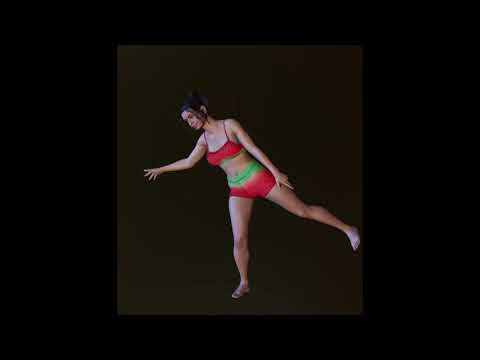
Spring Dynamics were added to the hair "fringe", as well as her Left and Right Pectoral. Again, I think I have the settings up too high, as there's a lot more movement than probably should be. But I do think that Spring Dynamics is pretty awesome and once I get the hang of what settings are best for what types of "bones" it will probably be something I use quite often!
EDIT: You'll want to be quite selective on what bones you use it on -and for goodness sake don't do what I did at first and apply it to like all the bones! lol Nightmare fuel, that was! lol
Is there a discussion on head shaping issues?Sevrin thanks for the help and the link. I will read the topic you suggested.
I think I accidentally used Mesh Grabber on the head a while ago and was unaware. I think I might have been deforming on the wrong object.
Then I had another problem similar.
I loaded a scene with Michael 8 and his eyes were sunken into his face.
Maybe I did something to cause this but I unchecked his head and saved a pose of him. Then I locked the head part with Pose Mixer and reloaded the pose on a new Michael figure.
His eyes were correct then I added hair and Morningstar angel wings and looked and his eyes were sunken in again. His head looked deformed. I had to resize each eye and reposition them manually.
Also I tried to use Filament. I know I set it up correctly but when I brought in a figure, at the crown of its head there is a small white seam circling around the face..
The hair covers it up but it is there. It happened on a few Gen 8 figures, the seam on the head thing.
I need to do more testing work here but I think I am experiencing some geometry errors. Or maybe I am just doing some things wrong.
I will read your thread link.
My Filament thread was closed so I have just been cut off from my own topics i guess.
Not inclined to start another Filament thread.
Daz Studio Iray - Rendering Hardware BenchmarkingAlright, I did a new batch of testing, and I think I can comfortably confirm that the normal/bump maps are at the heart of this new new speed. But there may be a catch that comes with this speed.
I have the general 4.12.0.86 as well as the new 4.14.0.08 beta, so I compared my same test scene from a thread I posted back in July. (Actually, given the timing of this, I cannot help but wonder if my thread got somebody's attention to investigate normal map data usage, but I digress.)
I ran the scene 3 different ways in both versions using Zelara rendered at a 5000 pixel image resolution.
1- Default Zelara, which is subD 2 with normals, no HD morphs applied
2- Increased subD to 3 and added her HD morph, kept normals on.
3- SubD 3 with HD morphs again, but without normals.
In test 1, 4.12 took 6 minutes and 28 seconds to render. But in 4.14 it took only 3 minutes and 30 seconds!
In test 2, 4.12 took 6 minutes 50 seconds. 4.14 took 3 minutes and 50 seconds. In both tests, I saved 3 minutes off the render, the differences are astonishing.
In test 3, it gets interesting. Without normals at subD3, 4.12 took 4 minutes 10 seconds. 4.14 took 3 minutes and 45 seconds.
So you can see that without normal maps, the two versions are much closer in performance. But there's more, this test ran to default convergence. I noticed that 4.12 was also taking more iterations to reach its default value of 95% convergence. While 4.14 was hitting just over 900-950 iterations, 4.12 was over 1000 iterations. It did roughly 50 to 75 more iterations. So when you factor this into test 3, the render times are even closer than they first appear. If I had ran the test with a cap on iterations instead of convergence, they probably would have been a draw. At this point, it becomes quite clear that the way Daz handles normal maps is the prime reason for this new speed in 4.14. In fact, looking at my test, the speed difference is even greater than that of the benchmark scene, which makes sense. All of the spheres lack normal maps. The character in the scene is the only object with normals, her clothes might have some, but the character is not the focus of the scene. My scene has no walls or objects that lack normals. Thus the more your scenes depend on normal maps, the faster 4.14 will be for you!
Also, the difference between turning normal maps off was extremely minor on performance. In 4.14, I only saved a pitiful 5 seconds turning off the normals at HD3! In 4.12, this was not true at all, turning off the normals offered a massive leap in performance, which is exactly what I reported back in July. In fact the numbers I ran today in 4.12 are very very close to the ones I ran back in July.
HOWEVER!!! There is a catch!
It is not all sunshine and rainbows. As nonesuch00 pointed out, I can see some minor differences in the renders between 4.12 and 4.14. I stress they are very minor! But they are there. Basically, what I see is that the normal maps in 4.12 appear to be slightly stronger than in 4.14. This is really not a big deal to me. I had to directly compare the images up close, zoomed in a fair amount to really see these differences, and this was with a 5000 pixel render. Granted this image is a full body, not a close up. But I think all anybody needs to do if they want that is to simply turn up the normal value a bit. Maybe 25-50% higher...that's a guess. In my test without normal maps, the images were identical. So the normals are indeed the difference.
BUT that is not the bad part. It looks like 4.14 is using more VRAM than 4.12. A lot more! My Zelara render used a solid 500MB more in 4.14 than in 4.12 in all three tests. For some people that may not be much, but this a single character taking up an additional half GIG of precious VRAM than it used to. Many of us already battle VRAM in a scene creation. Even the no normal test used 500MB more, so this result is quite shocking to me. I didn't have any other apps open during testing, besides notepad, so no other apps should have been running to skew results. Additionally, I have 2 GPUs, and one is not connected to the display. This means that my second GPU is not effected by any apps, as it only gets used with Daz. So the numbers it reports are pretty accurate. Both of my GPUs used 500MB more in 4.14, so it is clear that this is from 4.14, and not some rouge app taking up resources.
So ultimately this is sort of a mixed bag. There is no doubt that the speed boost is fantastic, as I am sure most of us probably use normal maps. In fact, 4.14 seems to largely negate any performance penalty for using normal maps, as I only gained 5 seconds when I turned them off. This speed boost could translate to many, many hours saved in the long run. But on the flip side the VRAM could be something that catches up to some of us. I am sure that rendering at lower resolutions would not impact it as much, I don't know how many of you render at 5000 pixels, but it is something to be aware of. If you happen to try rendering a larger scene that you previously rendered in 4.12 that was close to your VRAM capacity, there is a possibility that it might not fit your VRAM in 4.14.
But IMO, I believe the speed is worth that trade. If it was a higher amount of VRAM, maybe I would be more hesitant, but I can work around VRAM limits by optimizing if needed. The performance gains I have seen are just too good to pass on. The benchmark scene does not even do it justice! This is where Iray needs to be to compete with growing competition. Though it is quite interesting to see Daz essentially hedge their bets with the addition of Filament, as finding an alternate render engine for animation is also a topic I and others have discussed at length.
[SOLVED] Iray Render Viewport Crashing GPUSo if you add the default G8F to scene does texture shaded and filament work?
On that "heavy" scene, filament works fine, shaded works fine as well but when going to Iray (Render or Viewport it kinda explodes)
And on a regular scene with a G8F loaded, with no background or anything, everything works. Iray, Shaded, Filament, Full Render etc etc...
[SOLVED] Iray Render Viewport Crashing GPUSo if you add the default G8F to scene does texture shaded and filament work?
Test & Speed Review: Spring Dynamic ScriptOh hey that is very nice of you to share your trials as you try to get this working.
You got me cuirous, so just setup a quick 15frame anim with pose 1 at 0 and pose 2 at 15 and timeline does it's interp inbeween. Switched to Filament for quick playback.
Selected both left & right pectoral bones using left ctrl+click, opened scripts and applied and whoa, there is like MONDO breast movement lol. There's potential here lol.
Edit: Posted a quick vid/gif in this thread https://www.daz3d.com/forums/discussion/451181/spring-dynamics-manual#latest
Filament tutorials/shaders/lights?tweaking shaders for each scene and light is a past , here is a new and better way and hopefully it get only better with the time ,
Well, tweaking shaders and lights, being "a thing of the past" like you said got me this beautiful skin shader on Filament...and just playing with parameters because Im not a tech savvy like you.
 AIUTO...CHI CONOSCE L’ITALIANO? PARTE DODICI
Non so se a qualcuno è sfuggitto ma io lo posto ugualmente...
https://www.youtube.com/watch?v=88LuOEpYuSE&ab_channel=TheWPGuru
Piccolo tutorial su Filament e confronto con Iray e OpenGL.
Daz Studio 4.14 Pro, General Release!To me the filament renders look bad. So , I also cannot render Iray with the gpu anymore? Also no 3dl preview render possibility in the preview pane?
I can use GPU on Iray just fine.. Also the Filament looks absolutely amazing for real time scene setup like im doing here. This is light years above Texture Shaded. Sure somethings need work though. Hair standard opacity is currently too opac that almost all the hair look like ghost hair or thinned out hair. But that im currently easily solving by just throwing the opacity map in GIMP and doing some gausian blurs on top of it to thicken it out. Also transparent material as well pop in and out of visibility at certain angles. But this is a major leap from working in Texture Shaded view. If those minor issues get sorted I might be using Filament as primary shaders for my renders. It's giving me tons more use than I got with Iray due to Filament being real time!
 Filament tutorials/shaders/lights?
Don't price the day before the sunset ! you can thank me when it works for you

working on it ! it is gonna be long so I am doing a web page with all the stuff and cards to go with it .
@MEC4D Thank you

Yes Wendy , that is the way .. you see iray can handle things visually differently , because there is global illumination so you don't see the bad effect as often but the engine is as much confused and take extra time to process .
Many hairs has flipped normals so it give also issues no visible in iray and the same for some trees and plants that using alpha maps ( cutout geometry maps) the opacity in the name is confusing people, since it has nothing to do with opacity of the material but geometry, opacity is not accurate material function in pbr engine, transulency is and so index of refraction.
I know we are used to old shaders from the past and transmaps was our best friend to fake something we could not achieve other way, but that is a past. You can still make beautiful hair using Cut out opacity function , but the map need to be made correctly . Like for example the feathers I made on the helmet using strand hair that actually using Cutout opacity maps on the geometry to save some VRAM and rendering time .
The Filament on the left is kinda fuzzy since the test was made with the very early Beta Filament before the function of mipmaps was added to reduce the resolution of the alpha map , it working just perfect without issues
It is this way since 5 years in DS and iray ... Cutout Opacity , is not transparency .. it is alpha channel 2 colors ..
As you say, we have been told this since the beginning of Iray, but PAs contrinue to deliver products using grayscale maps in Cutout Opacity, especially for hair and fabrics.
Ah, so the secret of why so many products I can't get to work how I expect if they use cutout opacity.
it is very obvious in other render engines such as Unreal or iClone too, I am forever changing opacity maps to just black and white in Gimp because they do a similar thing there.
Filament tutorials/shaders/lights?We have a lot of conversations about Cutout Opacity 5 years ago and a lot of explanations why not using it the way many do.
You can use it to cut out the geometry and that's what it is for , with a dress you can create beautiful maps to cut out the threads and make it work like half transparent and still be accurate and proper and render quick .
Same with the hair , many hair I have on my library use glossy values for diamond for no reason , the reflectance of the hair in the iray is not greater than 0.5 unless you go for shiny synthetic wig style .
That includes characters as well with maps that are plugged in for no reason and glossy values beyond this earth, mixed values for both specular and metallicity basic shaders in one shader even if not working together , total chaos ! Specular/glossiness base mix shaders have greater control over the surface than metallicity/roughness in iray and that is a fact so sometimes things in Filament may not look as good as they look in iray. Filament works best at this moment with Metallicity/roughness base mix shader , as that is a very simple shader for a simple render engine like Filament , and less chances of making errors or mistakes .
But when you see Metallicity/roughness shader with a glossy color set up for non reason is wrong , that tells me the creator has no clue what they are doing.
I can go here with a long list of stuff ..but let's stay on the positive side and do better next time !
It is this way since 5 years in DS and iray ... Cutout Opacity , is not transparency .. it is alpha channel 2 colors ..
As you say, we have been told this since the beginning of Iray, but PAs contrinue to deliver products using grayscale maps in Cutout Opacity, especially for hair and fabrics.
Ah, so the secret of why so many products I can't get to work how I expect if they use cutout opacity.
Daz Studio 4.14 Pro, General Release!Guys have the problems been sorted out yet? I wanna update but dont want to disturb my timeline, as it is I am already trying to find an excuse to leave it and start gaming.
Which problems?
Also, have you guys noticed improvements in your iray renders? If so then I believe I would like to update but if you cant spot any with your eyes (no documentation from daz) then it really gives me nothing cuz I dont care about filament and dont particularly need memory optimizations.
The benchmark thread seemed to be seeing a marked improvement although I'm not sure what hardware that applied to - someone else reported a slow-down, however.
Daz Studio 4.14 Pro, General Release!Guys have the problems been sorted out yet? I wanna update but dont want to disturb my timeline, as it is I am already trying to find an excuse to leave it and start gaming.
Also, have you guys noticed improvements in your iray renders? If so then I believe I would like to update but if you cant spot any with your eyes (no documentation from daz) then it really gives me nothing cuz I dont care about filament and dont particularly need memory optimizations.
Filament tutorials/shaders/lights?All new PBR shaders I am working on for some while working the same way across most platforms , as long it support the same workflows, for example metallicity workflow , of course you will get slightly differences in translation as some nodes are linear in one program other quadratic , but that are not that huge differences to complain about.
and I agree on the make art button but a lot of users pay for it so they don't need to sit for months figuring stuff out as that is their personal choice and I can't shame them for doing that as not everyone has time for doing their own stuff.
This thread is more for people that want to do something because they find it interesting and want to learn in the process and share some tips with each other that are helpful and not another complain thread
I tested a lot of shaders that are used in other PBR real-time engines, and it works almost the same way in iray and Filament , if not I would not even bother with Filament at all .
So let's focus on the positive side of it all to make it better and easier for all .
tweaking shaders for each scene and light is a past , here is a new and better way and hopefully it get only better with the time ,
and translating 3DL to Filament or Iray is as good as long you don't use the actual 3DL shader for rendering using these engines as that would be your first mistake and HUGE NO!
You can use many maps created for 3DL shaders , as many of them have built in AO and it will helps in the visual aspect of Filament , like for example many of my old clothing sets for use with 3DL that I have in the store here , it all use PBR maps for specular/gloss base mix long before iray was in D|S , also easy to translate to metallicity/roughness workflow without leaving DS . I guess I was little ahead of time .
now going back to the cards, will upload shortly when I finish it , of course for those that needs it or want to start fresh
Filament is not the culprit of all this, any user importing to another render engine will have the same problem around tweaking shaders, the same applies with all the major leagues, the problem is any new user looking for the "make art" button, Filament btw do at some point nice adaptation of iray and 3delight shaders, in my past you always got a white diffuse figure on a paid and expensive software.
when I saw this new render engine, obviously had issues, instead ranting on all the topics I better did "you want to challenge me, Fila?"
 Daz Studio 4.14 Pro, General Release!
To me the filament renders look bad. So , I also cannot render Iray with the gpu anymore? Also no 3dl preview render possibility in the preview pane?
You can still do either of those.
Daz Studio 4.14 Pro, General Release!To me the filament renders look bad. So , I also cannot render Iray with the gpu anymore? Also no 3dl preview render possibility in the preview pane?
Filament tutorials/shaders/lights?No problem , I can make the guide cards , regarding clothing and hair you need to adjust the shader to the basic possible for Filament for best result , hopefully the skin setting for Filament get some extras in the future , however the big problem is lack of GI
Some very simple cards explaining the basic so it is going to be less frustrated later for many and since Filament run by the same basic principles as Iray.... even better for the newbies
If you are proposing making these simple cards, I'm sure many of us would appreciate the tips. Again, my main complaints about Filament are poor hair (and cloth with opacity maps) and skin rendering. I know Filament is a preview draw style and I understand that some people use it as such. I don't because, for me, the results are so different to IRay that I still have to use the IRay preview anyway. But I would like to use Filament for animation and DAZ seems to be promoting it for that use too. I will not do so if the hair looks like a shiny, solid helmet and clothes that are 90% see-through.
Filament tutorials/shaders/lights?Filament is not the culprit of all this, any user importing to another render engine will have the same problem around tweaking shaders, the same applies with all the major leagues, the problem is any new user looking for the "make art" button, Filament btw do at some point nice adaptation of iray and 3delight shaders, in my past you always got a white diffuse figure on a paid and expensive software.
when I saw this new render engine, obviously had issues, instead ranting on all the topics I better did "you want to challenge me, Fila?"
Filament tutorials/shaders/lights?Some very simple cards explaining the basic so it is going to be less frustrated later for many and since Filament run by the same basic principles as Iray.... even better for the newbies
If you are proposing making these simple cards, I'm sure many of us would appreciate the tips. Again, my main complaints about Filament are poor hair (and cloth with opacity maps) and skin rendering. I know Filament is a preview draw style and I understand that some people use it as such. I don't because, for me, the results are so different to IRay that I still have to use the IRay preview anyway. But I would like to use Filament for animation and DAZ seems to be promoting it for that use too. I will not do so if the hair looks like a shiny, solid helmet and clothes that are 90% see-through.
Daz 3D is part of

Connect
DAZ Productions, Inc.
7533 S Center View Ct #4664
West Jordan, UT 84084Licensing Agreement | Terms of Service | Privacy Policy | EULA
© 2026 Daz Productions Inc. All Rights Reserved.