-
AIUTO...CHI CONOSCE L’ITALIANO? PARTE DODICI
Guarda che una volta che il morph è trasferito non devi rifare tutto, dovrebbe salvare nella cartella di destinazione da cui poi riutilizerai i morph.
A me non va oltre il 27% per cui non posso vedere come funziona del tutto...AIUTO...CHI CONOSCE L’ITALIANO? PARTE DODICITrovata!
Però fa come faceva la prima versione, si blocca al 27%...

A me ha molto deluso.
Pensavo sarebbe stata come GenX per chi fa TG con Genesis 3, invece non si cura proprio di questo aspetto. Per le mie esigenze è assolutamente inutile, ma sono contento per voi.
Come sarebbe, scusa? Sei riuscito a trasferire le figure femminili, no?
Ma è inutilizzabile.
Ci mette 20 secondi a morph, io ne uso migliaia.
Potrei provare a riunirli in un solo slider di volta in volta, ma a che pro?
So when will we get Cat 8?Prime 8
the ape world equivalent of Genesis 8 but with all the monkey and big ape morph sets instead and a crossfigure addon for Genesis 8
I know there has been a lot of discussion on Render freezes, but..."Not repsonding" is a Windows label. Daz might be able to rewrite the code in such a way that it didn't go unresponsive while transferring (or they might not if it's waiting on a driver response), but I can well imagine that would have a serious impact on performance and might open the way to conflicts if a contradictory instruction was issued in mid transfer.
any news on the hd plugin?? :D@Philemo_carrara can this plugin be used in Carrara to import an obj character that you have dial spun in Carrara?
I did try.. dial spun a weird character and exported the obj with morphs then loaded a new Genesis and imported the obj and applied using the plugin.. all good till I went to pose him then he exploded .. lol
looked cool... but can this be done?
did I miss a step?
this would be good rather than saving the whole genesis dial spun character to the tabs.


One question, was the subdivision equals on both systems?
The purpose of that plugin was to get small variations transfered. The problem is that it uses both UV coordinates and geometrical proximity to choose the reference for the HD morph. If the dialed morph is too far, it will choose the wrong reference and it will distort when posed.
I'll make some tests to see if I can implement an UV only reference system.
Carrara Plugin DevelopmentEvery thing you can see under the Instances list of your Scene has an I3DShTreeElement class which has the functions (or methods) such as GetFigureDataComponent(). This 'tree' is usually the starting place for getting down into the animation data, transforms, all the simple parameters and into the master object using the SDK classes. In the case of a figure from there you can get into the Vertex Modeler itself and from there into the morph areas however the IMorphArea class only returns one name and the pose control morphs work the joints and not the actual morphs.
If you look at a figure in DAZ studio and click on the settings for any morph you'll see loads of information and at the top or the dialog the Name: and the Label: Carrara displays the Label but doesn't give the 'internal' Name which is the one that is needed. Click on the settings for a morph in Carrara and there is very little information, only the one name and the range settings. I can only assume that when the figures are loaded into Carrara that information is somehow translated and effectivly hidden from the vertex modeler but controlled with the parameter sliders. I've gone in poking around as deep as I could but haven't found a way to directly link up the Parameters with that internal name or get the internal name from the parameter.
If I had a long loaded or coded in list for all the parameters on all the figures the correct internal name could be found as the exhaustive work around. For example taking the first pose for Genesis 2 ,which is control Arms Front-Back, in Carrara the name is "Arms Front-Back". Look at the morph setting in DAZ Studio and the (internal) Name is "CTRLArmsFrntBck" and the Label is "Arms Front-Back". The duf pose file needs to have "CTRLArmsFrntBck" for that pose control to work.
any news on the hd plugin?? :DHello Rashad, Carrara8.5/Extensions is the right spot for the HDMorph plugin. Script for DAZ Studio goes in DAZ3D/My DAZ 3D Library/Scripts folder
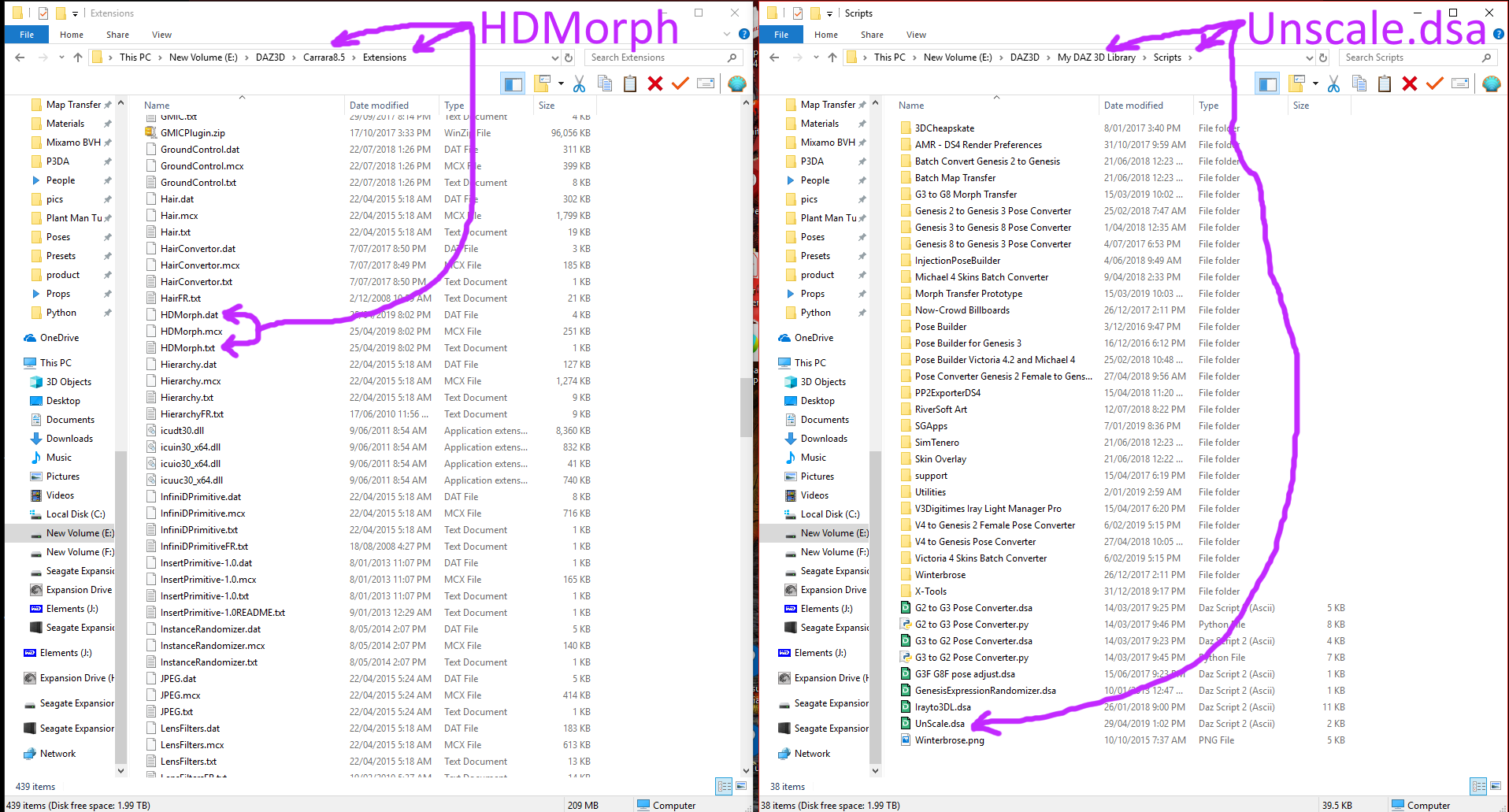
Hi Buny.... What is that Morph Transfer Prototype you have in your list? Just curious! Pls use words of one syllable!

 SIlene
Hi Philemo....Just caught up on the plugin... can't wait to try the HD !
SileneHmmm, words of one syllable - that could be hard !!!
Singular Blues was working on a Morph Transfer of Genesis 3 to Genesis 8 figures, as well as allowing G8 to G3, & male to female/female to male. The development path has had quite a few hurdles with some script releases which were then taken down for various reasons.
Latest:- https://www.daz3d.com/forums/discussion/comment/4640771/#Comment_4640771
Oh darn... thought it was something else. Sigh.....
 SileneWhat "qualify" as your own character?
Only if you make your own morphs, not the ones that come from Daz or Daz PAs. and only if you add your own skin, not the included ones.
If you use someone elses morphs all you can distribute is the "recipe" and the person using it then needs to have bought the relevant morph packages themselves
What "qualify" as your own character?Hello everyone!
I am quite new to daz studio, i have messed around abit for a few weeks now and i really enjoy it.
Instead of buying characters i would really like to create my own. So i was hoping someone here could help me understand what would "qualify" as my own character. I also would like to know how you can sell your own characters and what is required for that. I know it would take a long time learning, i don't plan or expect learning to do this in another week or two. I don't even know if i will ever go that far but i would still like to know.
Here are some examples that im curious about.
If i buy, lets say 10 characters and morph them into a new character, would that then be my "own" character that i can use and sell?
If i start with the genesis 8 female and uses morph and turn it into a character that i think is nice, would that be my "own" character that i can use and sell?
Or do i have to create everything from scratch in another program, where i build the model, sculpt, and everything?
Thank you all for you help!
any news on the hd plugin?? :DHello Rashad, Carrara8.5/Extensions is the right spot for the HDMorph plugin. Script for DAZ Studio goes in DAZ3D/My DAZ 3D Library/Scripts folder
Hi Buny.... What is that Morph Transfer Prototype you have in your list? Just curious! Pls use words of one syllable!
SIleneHi Philemo....Just caught up on the plugin... can't wait to try the HD !
SileneHmmm, words of one syllable - that could be hard !!!
Singular Blues was working on a Morph Transfer of Genesis 3 to Genesis 8 figures, as well as allowing G8 to G3, & male to female/female to male. The development path has had quite a few hurdles with some script releases which were then taken down for various reasons.
Latest:- https://www.daz3d.com/forums/discussion/comment/4640771/#Comment_4640771
any news on the hd plugin?? :DHello Rashad, Carrara8.5/Extensions is the right spot for the HDMorph plugin. Script for DAZ Studio goes in DAZ3D/My DAZ 3D Library/Scripts folder
Hi Buny.... What is that Morph Transfer Prototype you have in your list? Just curious! Pls use words of one syllable!
SIleneHi Philemo....Just caught up on the plugin... can't wait to try the HD !
SileneImport ANIMATED Objects (NOT rigged characters) - Possible?Hello,
While I was searching comments relative to Daz Studio Alembic Exporter, I found this thread and fortunately I recently tested this workflow :
- Marvelous Designer 6.5 : Export of an avatar's animation in Alembic Ogawa Format.
- Blender 2.79b : Import of that animation and export as an OBJ sequence.
- Daz Studio 4.10 : Import of the OBJ sequence with Morph Loader Pro.
- Conversion of the morphs into an animation on Daz TimeLine with the free script "animMorph" ( https://gist.github.com/marcuswilm/c2305cd494d54b9aba80bf5f43d0f7bf ).
(other solution for that purpose : this script : https://sites.google.com/site/mcasualsdazscripts2/mcjobjstomorphingprop )
Carrara Plugin Developmentwould be kewl to quickly save a hand pose with a one or two click.
every bone from the hand down the heirarchy. and swap symmetry between hands.
the fencric swap leg feature doesn't seem to work on genesis. his leg shakes a lil, like he's trying.
one guess is the separating leg twist from leg bend. is actually 2 separate bones nowadays.I had been working on a plugin that saves poses from any selected bone down but hit a big wall when it comes to the pose controls on the Genesis figures (Arms Front-Back etc). I couldn't figure out how to read them in and the duf files need to have these or the pose will come out wrong if pose controls were used. The changes made to Genesis figures were not included in the SDK. There were never any additional header information files for Carrara 8.5. I haven't given up on it yet but I didn't want to use a possible time consuming and clumsy work around.
Guess having a morph saver based on the ACTOR tree (vs NLA deep-sea pose clip diving) in Carrara is too much of an ask? I guess it's some how going to be connected to the process of creating morph content in DS which PA's do for sale, or those who are clever can do for themselves or to share. Of course it's needed for Genesis and you say no SDK support for genesis for Carrara?
 SileneAIUTO...CHI CONOSCE L’ITALIANO? PARTE DODICI
E' un tipo che sta sviluppando un sistema per trasferire qualsiasi morph verso qualsiasi figura, anche della generazione 4. E sembra funzionare alla grande, ho visto un pò di trasferimenti di morph estremi come Mavka che sono perfetti, persino gli occhi non hanno difetti.
Ha dovuto tirare giù tutto e rifare daccapo perchè a quanto ho capito aveva usato dei codici senza aggiungere i crediti al programmatore.
Ora ha messo tutto su GitHub e sta finendo le modifiche. Non so se esiste già una nuova versione scaricabile.AIUTO...CHI CONOSCE L’ITALIANO? PARTE DODICITi sbagli, io non ho tutte quelle figure!
Me ne basta una con tanti morph e faccio tutto. Non vedo l'ora che SingularBlue finisca il suo script per trasferire tutto, ma proprio tutto, su Genesis8Female adesso che funziona per bene, creando così il nuovo Genesis1!
E' una cosa che andava fatta fin dall'inizio!E ci tengo a precisare che mi lamento solo quando c'è un motivo valido. Se qualcosa non va lo dico e basta. Se poi vi riferite ai post sulle nuove figure... I bug stanno ancora là! (┛◉Д◉)┛︵┻━┻
Chi è questo SingularBlue e cosa deve fare?
AIUTO...CHI CONOSCE L’ITALIANO? PARTE DODICITi sbagli, io non ho tutte quelle figure!
Me ne basta una con tanti morph e faccio tutto. Non vedo l'ora che SingularBlue finisca il suo script per trasferire tutto, ma proprio tutto, su Genesis8Female adesso che funziona per bene, creando così il nuovo Genesis1!
E' una cosa che andava fatta fin dall'inizio!E ci tengo a precisare che mi lamento solo quando c'è un motivo valido. Se qualcosa non va lo dico e basta. Se poi vi riferite ai post sulle nuove figure... I bug stanno ancora là! (┛◉Д◉)┛︵┻━┻
Io le uso poco, ma non so resistere quando ci sono sconti pazzeschi...almeno non fumo che ti devo dire xD
Poi difficilmente spendo più di quanto mi dà il Patreon, quindi chissene alla fine ^^Io per la creazione dei personaggi uso Simtenero Randomizer, un po' come "pool genico" vero, dato che ho migliaia e migliaia di morph. Quindi se una figura che mi piace è in sconto l'aggiungo al pool genico.
Inoltre a volte uso le skin come base.
AIUTO...CHI CONOSCE L’ITALIANO? PARTE DODICITi sbagli, io non ho tutte quelle figure!
Me ne basta una con tanti morph e faccio tutto. Non vedo l'ora che SingularBlue finisca il suo script per trasferire tutto, ma proprio tutto, su Genesis8Female adesso che funziona per bene, creando così il nuovo Genesis1!
E' una cosa che andava fatta fin dall'inizio!E ci tengo a precisare che mi lamento solo quando c'è un motivo valido. Se qualcosa non va lo dico e basta. Se poi vi riferite ai post sulle nuove figure... I bug stanno ancora là! (┛◉Д◉)┛︵┻━┻
AIUTO...CHI CONOSCE L’ITALIANO? PARTE DODICI.comuqnue io ste vostre transizioni le trovo sempre strane XD .....ma che combinate co ste povere figure???....cmq spro che vi risolvano sti problemi perchè a me funziona tutto ok...poi leggo ogni volta IMAGO e penso che io sia super fortunato XD
In tutte le mie storie un uomo diventa una donna e qualche volta viceversa xD
Anche io ho la stessa impressione quando leggo i post di Imago xD xD
E' capitato anche a me su Facebook, bisogna dargli i dati e basta :(
Adesso lo fanno con chi ha pagine importanti. Quanti mi piace hai?.comuqnue io ste vostre transizioni le trovo sempre strane XD .....ma che combinate co ste povere figure???....cmq spro che vi risolvano sti problemi perchè a me funziona tutto ok...poi leggo ogni volta IMAGO e penso che io sia super fortunato XD
Non è colpa mia se ad ogni piè sospinto gli sviluppatori fracassano qualcosa. A ringraziare che dopo tre anni hanno sistemato Genesis3/8.
In ogni caso tutto funziona, a parte il Frame Selected. Niente salti di inquadratura, niente slider impazziti, tutti i plugin e script vanno.
Per ora nulla di cui lamentarsi. Sono talmente contento che possono tranquillamente aggiungere un'altra figura base alle sessantasei presenti!
Bello! :D
66, quindi 9 anni, 108 mesi, ne hai presa una ogni 2 mesi.
Io regalo tanti soldi alla Daz xD
Spero che questo trend diminuisca ora che ho comunque una libreria decente
Ora che ci faccio caso, avete visto che orrore qua: https://www.daz3d.com/your-own-custom-face-creator
MAI aggiungerei alla mia libreria morph che danno risultati così penosi, aiuto :ODAZ 4.11 UpdateThank you, L'Adair.
Changing all of my .daz files to .duf is the plan. Challenge? Nah... There is no challenge there -- the challenge has been trying to recreate all that work from scratch -- I still can't get several of my characters to look right, because I don't remember all the months of dial spinning or custom morph target work that went into them. Being able to open them up will be a Godsend.
Do I really need to create a 'My DAZ 3D' Library folder for this to work?
All my Studio folders are in a base 'DAZ 3D' (My Documents on C drive) folder which includes individual folders for each version of (past) Studio; 'Studio' (auto-created by install) folder where completed renders are sent to by default ('Render Library') unless I change to one of my dedicated folders, 'Studio3' (for DS3), Studio4.6 (previous version library [in use]), and 'Studio4.9' (current and contains 'My Library' where everything is saved to).
I despise the 'My DAZ 3D' folder that is sometimes auto-created with install, and have dedicated 'My Library' folders for the Library.
Did you do anything special/specific to get them to work on your D drive, or did they all just start working with the new DS4.11 by default?
I suspect you'll need to use that directory name. My understanding is the .daz files are all binary and not editable so all the paths to the product and supporting files, like materials, will need to be in the path specified by the file. However, you could try creating a folder with another name, like DotDaz Files, or whatever, and install there. See if it works. If not, try renaming the folder to My DAZ 3D Library and see if that works. (Don't forget you need to add any new directory in the appropriate places in the Content Manager, so DS can find them.)
I use the default directory name for Daz products, and I install using DIM. I had to change the path to install content in DIM to my D-drive path, (D:\Daz3D\My DAZ 3D Library.) I also changed the info in Daz Studio Preferences (F2): Preferences->Content->Content Directory Manager… The new directory is under both DAZ Studio Formats and Poser Formats.
Do I really need to create a 'My DAZ 3D' Library folder for this to work?
No, you can use any folder you want as a content folder, as long as you setup preferences properly in DS ( and DIM if you use it) so that it knows where your content is.
I know that is true in general, but is it true for the .daz files? I've read they can't be moved and still work, though I have no experience with it them other than in My DAZ 3D Library.
dForce Hair (as well as strand based hair and the strand based hair editor) in public beta...now I have to hope PAs will release the types of hair I need. Very disappointing.The problem actually is not denying the end user the tool as much as not providing the users with options for every figure and animal unless a PA or DAZ releases one
Could we start something of a community wishlist thread for dForce hair, then?
I don't think it will go anywhere. It looks like DAZ is reating this as a competitive advantage and only releasing the tool to PAs. Just like the HD morph process.
Daz 3D is part of

Connect
DAZ Productions, Inc.
7533 S Center View Ct #4664
West Jordan, UT 84084Licensing Agreement | Terms of Service | Privacy Policy | EULA
© 2026 Daz Productions Inc. All Rights Reserved.