-
Converted clothing does not align with figure correctly
I think I found the cause for the misalignment. Unfortunately, it doesn't lead me to a DIY fix.
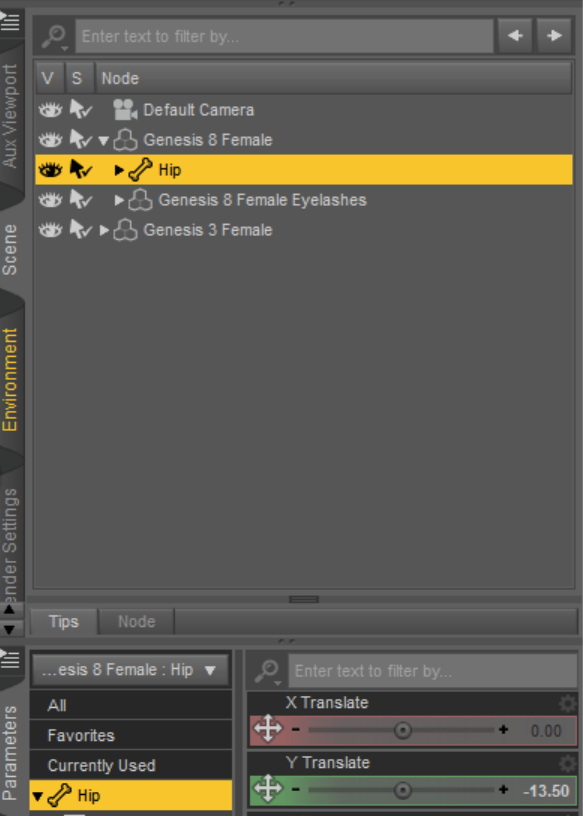
When you use the G8 feemale body morphs height slider, it changes the Y transform for the hip of the character. The image below is from a G8 base set at 100%, so she was shorter. Note that the hip Y transform is now -13.50%. When I set it back to a 0% morph, the hip is back at 0.00%. This hip adjustment does not happen with G3 using the same slider from the G3 version of the morph pack.
If I set the hip to zero, the character floats. Unfortunately, the clothing stays the same. So it looks like some clothing adjusts relative to the hip setting on the character. Likely DAZ is adjusting for the positioning of the hip, which pushes it down (or up) on characters using this slider.
 Anyone knows boots for G8F that can actually pull the zipper down?
If you mean an animation of the zipper being pulled that would be very difficult to do as each step would need it's own morph. I think there may be one or two with up and down states, though.
Converted clothing does not align with figure correctlySome converted (or autofitted) clothing does not align with a character if I use the Genesis 8 Female Body Morphs (https://www.daz3d.com/genesis-8-female-body-morphs) to change the figure's height. The clothing will shift and end up higher (if I make the character taller) or lower (for shorter characters) when I make the adjustments.
In my opinon this is a serious issue that should be either fixed or reported in the asset documentation. Since G8F is supposed to able to wear G1-G3 outfits. The actual page states "known issues: none" ..
Do you have reported this to the DAZ support ?
Do other morph sets such us Growing Up have the same issue ?
http://docs.daz3d.com/doku.php/public/read_me/index/42073/start
known issues: using the height full body morph may break the autofit feature for some G1-G3 outfits.
Good idea. Ticket submitted.
Converted clothing does not align with figure correctlySome converted (or autofitted) clothing does not align with a character if I use the Genesis 8 Female Body Morphs (https://www.daz3d.com/genesis-8-female-body-morphs) to change the figure's height. The clothing will shift and end up higher (if I make the character taller) or lower (for shorter characters) when I make the adjustments.
In my opinon this is a serious issue that should be either fixed or reported in the asset documentation. Since G8F is supposed to able to wear G1-G3 outfits. The actual page states "known issues: none" ..
Do you have reported this to the DAZ support ?
Do other morph sets such us Growing Up have the same issue ?
http://docs.daz3d.com/doku.php/public/read_me/index/42073/start
known issues: using the height full body morph may break the autofit feature for some G1-G3 outfits.
Should Daz3d split its software to Pro and Home additions.The PAs deciding the lifespan of 3DL... not entirely, as retexturing is always an option. Just as the pressure to create your own content to get what you want increases with experience, the willingness to create textures to comply with the renderer of your choice is very similar in nature. Yes, PAs can choose not to support it... that simply won't stop some of us. We will either buy and texture - or not buy at all.
You are correct of course
My primary figure generation is Genesis 2
I model My own clothing ,props and custom morphs for that generationI render in Maxon Cinema4D and replace most of my non-skin textures with CD4 native procedurals and make my own skins with Skinbuilder for G2.
I dont care what the PA's support as I dont financially support them at all

My pipeline is competely& indefinately self sustaining.However I am not the typical Daz studio user
who wont even move an existing morph slider to create there own ethnic diversity.
Those poor souls by and large are completely dependent on the what the PA's are producing and submitting to the store.
Anyone knows boots for G8F that can actually pull the zipper down?Hey guys! I am wondering if there are any boots that can pull the zipper down?
I watched some videoes about editing the models and create morph, but still wondering if there are any products like that :D
Darwins' Schtuff Pt DeuxLong time, no see. Just popping in to catch up. I love Dh'morra. He looks fantastic. I picked up Gage when he came out and he's frustrating the heck out of me. Not him per say, because DM did a fantastic job with him. I think I got a little ambishous with the render and special effects. I'll get it sorted out eventually. I do love him though.
DM, I would buy any morph pack you created. I love your morphs and I can only imagine all the fun I could have creating men with them. Hopefully, it won't cause too much frustration. :)
edit: fixed formatting
Star Trek Builders Unite 8: THE REBOOTAnyone looking for decent Klingon Morph Ghoastman just released these for LaFemme. Can be used individualy or mixed for different looks
Shape transfer eye distortionLooking good so far. BTW you don't have to watch the video if you already understand how to clear deltas from favourits.
Follow up question: If I get the eye into position and save the morph, will the saved morph retain the eye adjustment?
Once you have moved the eyes into position with the universal tool translations (maybe they also need a bit of scaling) you can save those adjustments to the morph slider itself.
To do that first right-click the Parameters pane and switch it to Edit Mode. Next select your morph in PArameters pane, right-click the slider and choose ERC-Freeze from the menu. The ERC-Freeze dialog will show up and in the list there should be only left/right eye trasnlation values showing up (if not unselect the others) that will get saved to the morph once you hit accept. You can see the saved additional adjustments if you click the gear icon on the morph to bring up the Parameter Settings dialog and have a look at the bottom Sub-Comonents tab.
Finaly test your morph and save it to the content library with File>Save As>Support Asset>Morph Asset.
Shape transfer eye distortionI haven't had time to look at the video yet, I will when I have more time. Clearing the deltas does get rid of the distortion, but as you mentioned it no longer fits the eyelid/eye socket position. Genesis 1, 2, and 3 are able to fit without the severe distortion of 8. Attached images show the cleared deltas on Genesis 8, and Genesis 3 with the head invisible. I'll have to try adjusting it as you said.
Follow up question: If I get the eye into position and save the morph, will the saved morph retain the eye adjustment?
Can studio's parameter search/filter accept regex somehow?I was just aiming at doing a bit of dial spinning without having to wade through other morph packs. I'd like to just leave the main Actor > Head section selected, but only see that pack of Rarestone morphs available. Unless there's a way to categorize by morph pack instead of body part?
Transfer UtilitiesThat's what the morphing does, it's scaling the mesh up and down. The original fits 100% on it, I tried it out, With transfer utilities, all works fine, but when I do the morphings and try to make a change, that happens.
Transfer UtilitiesThis is what happens when I load the morphs, using Morph Loader Pro, I tried the other Morph Loader, the results were the same. Only the scale goes up and down.
Mod Edit. Please attach an image using smooth shaded not a nude skin. Thankyou
Looks like the scale you used for the morphed obj is not the same as the one for the original item.
Fit control is working with my supermorpher morphsHmmmm...That should not happen. The script is only designed to remove morphs withing the Fit Control folder once added to clothing. Can I see the clothing item morph list with the supermorpher morphs before and after using Fit Control?
Morphs from G3 to G8@Matt_Castle, there's a bug that was probably introduced while consolidating the various variables that the script uses. It causes the script to attempt to morph properties that aren't morphs, and that causes the script to error and halt. I'll get to it, it's just it has become a rather minor issue. Let's all hold on testing things until the immediate problems are resolved, eh?
@Blood-PawWerewolf, that's not true. More accurately, I have no clue if GenX(2) used Daz shapes (The IP), but if it did it could be sold in the Daz Store. That's the key point to the EULA. You can only sell things that include Daz shapes at Daz. It's not all that different from the rule that you can't link to products that aren't in the Daz store.@Finlaena, I'm literally homeless because I'm afraid of people. Also, the issue here hasn't been one of figuring out how to DazScript for some time.
@Ellessarr, I have no idea. This being on account of the fact that no one has returned a test report on anyof those figures. It does work on extreme shapes,

but others have resulted in artifacts of a non-minor class. Minotaur, I'm uncertain off, because I heard some place that the legs are geografts on at least one itteration of the shape. Obviously, the script can't transfer a geograft. So things with goegrafted parts, like horns, wings tenacles, etc, it will get the shape, but the grafts won't work with the target figure.Pose distorting hairNo, swapping was a bad idea with asymmetric hair geometry. I guess you could also use the Transfer Utility instead of having the JCM autogenerated by fitting the hair after deleting the original JCM. With the Transfer Utility and the JCM(s) set as favourits in the Parameters pane on the genesis figure you can select to only "transfer" Morph Targets in the dialog with the setting "Favourits and Sub-Components" with Source: Genesis Figure, Target: Hair. With the Projection Options like Distance Tolerance on top of the Transfer Utility dialog you can then control how the morphs from the genesis figure marked as Favourits gets projected onto the hair. With this you may get better results than with the autogenerated ones.
OK. I think I'll raise a support ticket first though to see if they can fix it, they're probably better at it than I am.
Thanks!
Morphs from G3 to G8Here is Darwin Genesis on G8M. Only problem : the feet but I believe it should be easy to fix in a modeler. And strange enough to me the lashes need to have the Darwin morph taken out!
Here a quick render of Darwin on G8M base skin. The original had a lamh preset and a M4 UV skin.
 Can studio's parameter search/filter accept regex somehow?
I don't think so. Scripting can, so it depends on what you are wanting to do once you find the moprhs (scripting can also get a morph's product ID if you want to identify those from a given product - I have a script that lists the morphs for a given SKU or SKUs by path, though it's not in shareable state).
Shape transfer eye distortionCorrecting the distortion on the eyes is easy.
Mark Morph(s) as Favourit(s)
Click the heart icon on the morph slider, or for mass editing righ-click the Parameters pane switch to Edit Mode, select multible morphs Ctrl+Click or Shift+Click, then right-click on selected choose Favourits>Mark As Favourits.
Geometry Editor: Clear Selected Deltas from Favourit(s)
Now you need to select both eyes with the Geometry Editor tool, with the Tool Settings pane opened you can just press the plus icon behind the Left/Right Eye Face Group.
Next right-click the Viewport and choose Geometry Selection>Convert Selection>Convert To Vertex Selection. Now the Geometry Editor has switched to vertex selection mode and both eyes should be selected.
Finaly you right-click the Viewport again and choose Morph Editing>Clear Selected Deltas from Favourit(s). That will remove the morphed shape from the eyes but maybe you have to adjust the eye position to fit the eye lids lateon because it will reset the eyes position to default genensis figure shape.
This youtube video explaines the process in detail but a bit more complicated.
Can studio's parameter search/filter accept regex somehow?Trying to display all of a certain morph pack only to avoid digging through the different body parts, in this case we'll go with Rarestone's, which are all prepended with "RS". I've tried simply ^RS and install manager's way using rx::ci::^RS, to no avail (not even sure what the rx::ci:: is for in DIM filters). Does it simply not work in studio or does it need something special?
Daz 3D is part of

Connect
DAZ Productions, Inc.
7533 S Center View Ct #4664
West Jordan, UT 84084Licensing Agreement | Terms of Service | Privacy Policy | EULA
© 2026 Daz Productions Inc. All Rights Reserved.