-
Spring Dynamics! AWESOME!
I added a dForce dress to the animation. Everything went pretty smoothly (other than the dress taking 50 minutes to simulate! lol oy! It rendered really fast with Filament once the simulation was done though.). I haven't tried combining both dForce AND Spring Dynamics on the same object. I'm not sure if it would work or not, one might override the other). I'll have to experiment with it later. :)
(Make sure your audio is low - Youtube added the soundtrack at a pretty loud volume. Next time I think I'll just add audio before uploading.)
I shudda read the bit about turning the audio down before I clicked. I think my upstairs neighbour just tipped his hot coffee into his lap as my speakers momentarilly blasted the apartment block.
I don't quite understand what you are saying here. It looks to me like your animation has both dForce and the Spring thing happening??
New DS Filament Render EngineI decided to try animating in DS for the first time after Filament came out. I have an older graphics card and the idea of waiting three days for an iray render was beyond my level of patience. The results weren't perfect but I felt that at least animation is now a possibility, not an impossibility. I'm posting this, even though the animation needs some work (I didn't use Aniblocks or bvh, just keyframed it myself) in the hope that some questions might be answered:
1. I changed the line widths and gloss settings for the hair material. Dark hair seem to work okay, but the lighter hair shimmers or shows through. Hence the hats on the older gentlemen. Short of making everyone have black hair, is there a workaround for the transparency map issue? What line widths seem to be working for hair surfaces?
2. I need to include a still frame (seen below) at the end and hold it for several seconds. What's the best way to do this? Would it work to overlay the image on a keyframe, or would it be better to make a movie of the image and cut them together?
I'm very excited about the possibilities of Filament and hope that there is a commitment on the part of Daz to making it work within DS.https://youtu.be/4GBgK0_2kyo
That turned out great (the still frame image doesn't show up in your post, but the attachment is working). The still frame is seriously creepy! lol
As for how to get it in your animation - you should be able to add it like a regular frame with your video editor (unless you rendered out the animation as a video?). Most people who do animation in Daz Studio usually render out an Image Sequence (each frame rendered out as a single image) and then put them together in a video editor. This is beneficial for several reasons, one of which is that if DS crashes you don't lose all the work and can just relaunch Daz Studio and continue the rendering from the last frame rendered.
BTW, the boy on the left with his mouth open - totally reminded me of my little brother when he was a kid. You nailed that "I have no idea what's going on, the adults just told me to stand here" expression. lol Excellent work!
3diva,
Thanks for the suggestion about the image sequence. I'll try that when I've fixed some of the animation. And thanks for your comments-I'm glad you liked it.
Spring Dynamics! AWESOME!I added a dForce dress to the animation. Everything went pretty smoothly (other than the dress taking 50 minutes to simulate! lol oy! It rendered really fast with Filament once the simulation was done though.). I haven't tried combining both dForce AND Spring Dynamics on the same object. I'm not sure if it would work or not, one might override the other). I'll have to experiment with it later. :)
(Make sure your audio is low - Youtube added the soundtrack at a pretty loud volume. Next time I think I'll just add audio before uploading.)
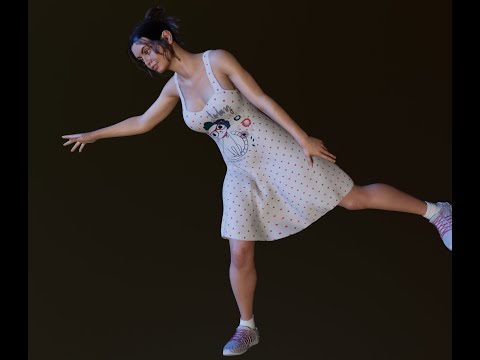
I think I should just chill out and admit that that is pretty cool :) And it just goes to show that there is no platform on earth for which bouncing boobs were not the impetus for having soft body-like physics in the first place.
ROFL!

 Filament tutorials/shaders/lights?
I found a video explaining how to fix the lighting problem with Filament
WP Guru, great channel, I suscribed yesterday viewing all about Decal and Sections Nodes.
New DS Filament Render EngineI decided to try animating in DS for the first time after Filament came out. I have an older graphics card and the idea of waiting three days for an iray render was beyond my level of patience. The results weren't perfect but I felt that at least animation is now a possibility, not an impossibility. I'm posting this, even though the animation needs some work (I didn't use Aniblocks or bvh, just keyframed it myself) in the hope that some questions might be answered:
1. I changed the line widths and gloss settings for the hair material. Dark hair seem to work okay, but the lighter hair shimmers or shows through. Hence the hats on the older gentlemen. Short of making everyone have black hair, is there a workaround for the transparency map issue? What line widths seem to be working for hair surfaces?
2. I need to include a still frame (seen below) at the end and hold it for several seconds. What's the best way to do this? Would it work to overlay the image on a keyframe, or would it be better to make a movie of the image and cut them together?
I'm very excited about the possibilities of Filament and hope that there is a commitment on the part of Daz to making it work within DS.https://youtu.be/4GBgK0_2kyo
That turned out great (the still frame image doesn't show up in your post, but the attachment is working). The still frame is seriously creepy! lol
As for how to get it in your animation - you should be able to add it like a regular frame with your video editor (unless you rendered out the animation as a video?). Most people who do animation in Daz Studio usually render out an Image Sequence (each frame rendered out as a single image) and then put them together in a video editor. This is beneficial for several reasons, one of which is that if DS crashes you don't lose all the work and can just relaunch Daz Studio and continue the rendering from the last frame rendered.
BTW, the boy on the left with his mouth open - totally reminded me of my little brother when he was a kid. You nailed that "I have no idea what's going on, the adults just told me to stand here" expression. lol Excellent work!
Filament tutorials/shaders/lights?I found a video explaining how to fix the lighting problem with Filament
 Filament tutorials/shaders/lights?
I like what you did, looks really nice and natural , in Filament it will be always little lighter since there is no global illumination to create the darker tones and leaves don't reflect light from leaves only from the light sources, I like also the iray version very natural green, I do a lot of photography and for my eyes it looks good
the settings you did are good, I just use 0.58 for glossy roughness and not used maps
Tone mapping in iray compress the colors , check off the Burn Highlights ... so the colors match better Filament
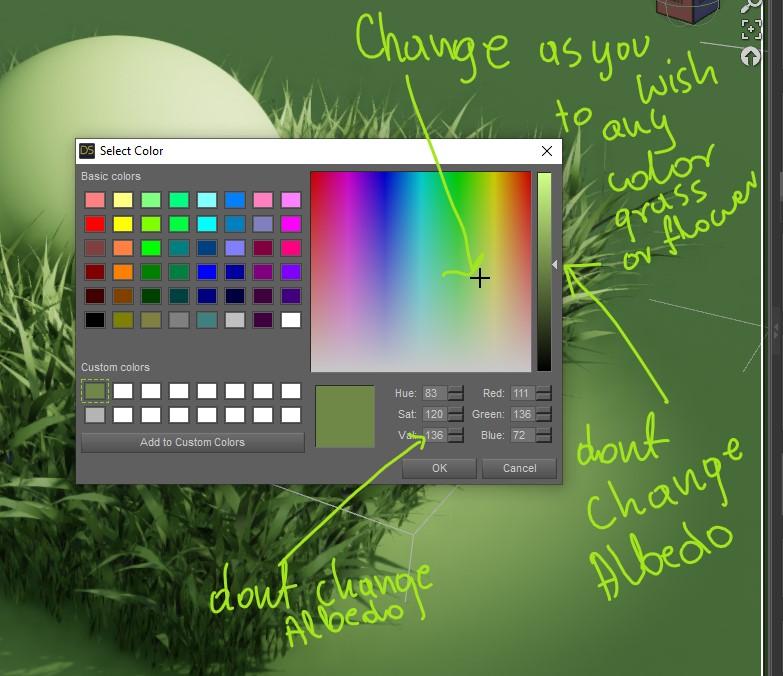
Try this color for Albedo and the same for translucent , it is the same Albedo with slightly different green tone ( for grass) the Albedo is actually the gray scale brightness, the Color is just saturation , so you can change the color all the time , and keep the Albedo intact
 New DS Filament Render Engine
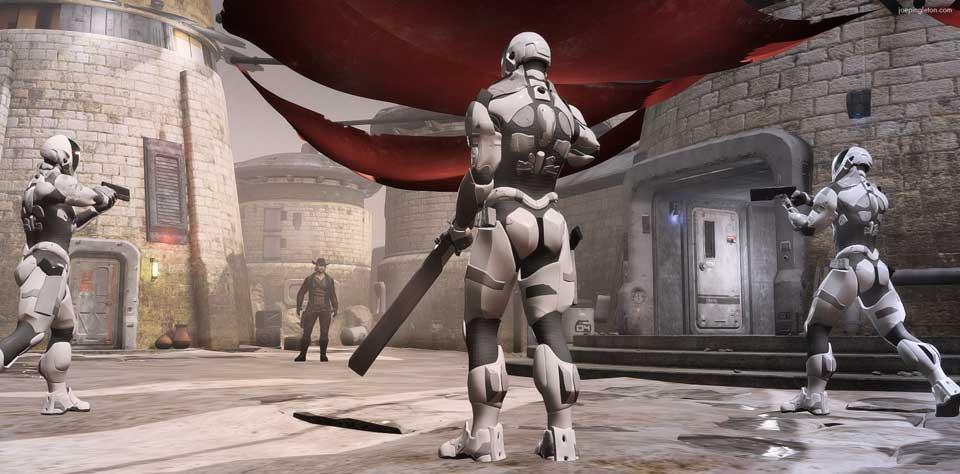
This is a quick test using "Atmosphere for Filament", It only took 1 second to render.
I couldn't get the shadows from the directional light to show up with "Atmosphere for Filament", so I just did two renders (one with it and one without it) and combined them in Photoshop.
Very cool! :D
Filament tutorials/shaders/lights?For the natural looking green plants Color Base Albedo : R: 123, G: 130 B: 78 and Reflectivity not above 0.40 , between 0.36-0.40 in general for all common materials , that why silk plants and flower looks so close to natural as they have almost the same reflectivity values , if you don't know exactly the values using 0.36 is my default for most all dry materials , everything above 0.40 will looks more plastic already or like covered with plastic . Also the roughness will give you the final touch and there are no restrictions , as your eyes pleased
P.S lower Reflectivity values will give your materials darker appearance , like a wet vs dry fabric for that same reason reflectivity of water is lower than dry fabric .
Question: Where do plant materials like leaves and flowers fit into the Glossy reflectivity chart?
Thank you. I don't know how to enter an Albedo value in Daz Studio PBR Metalicity/Roughness. Do I just delete the image map in the Base Color channel and enter the values you specified? I tried that and my leaves look kind of olive green - not as green as your images in the post about the square shadows in Filament. My leaves are also pretty light in Filament and quite a bit darker in Iray. The plants I started with have translucency turned on, so I deleted the image map in that channel also and entered your recommended base color albedo value there, too. I don't know if that is correct - or if anything I did here is correct LOL.
New DS Filament Render EngineI decided to try animating in DS for the first time after Filament came out. I have an older graphics card and the idea of waiting three days for an iray render was beyond my level of patience. The results weren't perfect but I felt that at least animation is now a possibility, not an impossibility. I'm posting this, even though the animation needs some work (I didn't use Aniblocks or bvh, just keyframed it myself) in the hope that some questions might be answered:
1. I changed the line widths and gloss settings for the hair material. Dark hair seem to work okay, but the lighter hair shimmers or shows through. Hence the hats on the older gentlemen. Short of making everyone have black hair, is there a workaround for the transparency map issue? What line widths seem to be working for hair surfaces?
2. I need to include a still frame (seen below) at the end and hold it for several seconds. What's the best way to do this? Would it work to overlay the image on a keyframe, or would it be better to make a movie of the image and cut them together?
I'm very excited about the possibilities of Filament and hope that there is a commitment on the part of Daz to making it work within DS.
Filament tutorials/shaders/lights?I see that the square shadow is moving when I move the scene in Filament like a floating square , cutting sometimes the edges based on the angle of view and how closer the object is to the camera
Distant Light should not act like that and not its shadows .. very bad romance between them two
Filament tutorials/shaders/lights?You going run into problem in Filament with other stuff like for example a simple grass that use one side planes , it will not render correctly the normals on the other side , you will also get issues with shadows like in this preview from Distant Light that render the shadows as one square in place of individual shadows of each grass , where in iray are no issues
sometimes no matter how good the materials are there will be some problems , most transparent hair use single sided planes and that why sometimes it create the issues
I can't fix it here , subdivision helped but the shadows still render as 1 square shadow in Filament .. bug ? or limitations ?
Spring Dynamics! AWESOME!I added a dForce dress to the animation. Everything went pretty smoothly (other than the dress taking 50 minutes to simulate! lol oy! It rendered really fast with Filament once the simulation was done though.). I haven't tried combining both dForce AND Spring Dynamics on the same object. I'm not sure if it would work or not, one might override the other). I'll have to experiment with it later. :)
(Make sure your audio is low - Youtube added the soundtrack at a pretty loud volume. Next time I think I'll just add audio before uploading.)
I think I should just chill out and admit that that is pretty cool :) And it just goes to show that there is no platform on earth for which bouncing boobs were not the impetus for having soft body-like physics in the first place.
Spring Dynamics! AWESOME!Spring Dynamics is fantastic! I think this is a game-changer for people who like to do animations! I've been wanting a product like this in Daz Studio for a long time! This is great! Thank you, 3D Universe, for the amazing product!
Here's a quick animation test with Spring Dynamics (I added it to the hair fringe and the left and right pectoral). Rendered at lighting fast speed with Filament.
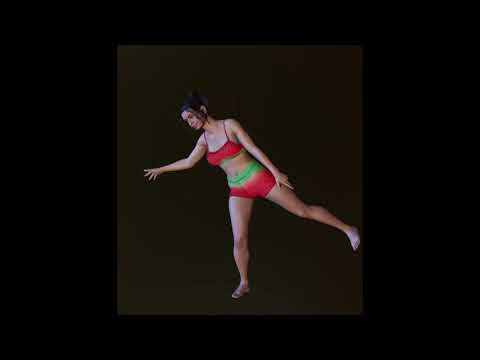
Nice! I haven't installed it yet but looking forward to playing around with it. I love to boob action you had going there. :)
hahah! Thank you, Knittingmommy! I hope you have fun with it (and if you create an animation with it, I'd love to see!). It might be some "trial and error" to get the right settings, but I'm hoping that once it becomes more used people will start posting their "recipes" for what settings work best for what situations.
Render produces empty pngTheMageWilliam said:
Zotac GeForce GTX 1080 w/8 gigs of memory. CPU is turned off. But it has been doing this with practically nothing in the scene and even nothing in the scene.
Did you quit and restart DS between render attempts?
It is still strange that after this first happened when I opened a test scene I couldn't get the Iray preview to work on a single character. After I reinstalled the driver and reopened Daz it was fine. I also don't know why I have had an empty png, a black png, and a grey png.
When it was getting the empty (transparent) png, and the black png, it finished the render in seconds. Although if it's rendering nothing it shouldn't take long.
When I get empty, black, or grey renders that finish within seconds, it's almost always due to running out of VRAM. 99% of the time, turning on CPU rendering (if it's off) or turning it off (if it's on) resolves it. The 1% of the time that doesn't do the trick, quitting and restarting DS does.
Yes, I have shut down, and rebooted, more than once. That's when it shifted to a black image, and then it shifted to a grey one.
But it looks like my issue is back, but I am not at any extreme location. (Z Translate isn't over 10,000.)
I open Daz and it seemed to take longer to load up the image, but the Iray Preview is running at 21% CPU and 76% GPU. Power usage is listed as very high.
Starting the render, and the CPU seems to drop, and the GPU climbed to 89%, and now I have a black image. The Iray Preview is now monochrome and seems stuck.
I switch to the filament preview, and now it's 8% CPU, and 35% memory. Start the render from here, and the CPU jumps, then settles down to 41% and the GPU is at 79%, but everything is now rendering. 2:45 render. This is telling me that I need to render from filament preview, not Iray.
Now I will try rendering from texture. Again CPU jump, GPU memory at 64%, then moves up to 76% as the CPU drops. 40% CPU with 76% memory from a minute on. 2:58 render. Worked fine.
And now I just shut down Daz Studio, and it is still in memory. 20% CPU, 16% memory, and very high power usage. Took over 2 minutes to clear from the memory.
If you couldn't tell I was doing all this as I was typing. But for some reason, I cannot render if the preview is in Iray. People keep saying it renders faster if you start from the Iray preview. (I always wondered if that took into account the time for the Iray Preview to get up to speed.)
I guess as long as I can get it to work, but this does worry me.
Spring Dynamics! AWESOME!I added a dForce dress to the animation. Everything went pretty smoothly (other than the dress taking 50 minutes to simulate! lol oy! It rendered really fast with Filament once the simulation was done though.). I haven't tried combining both dForce AND Spring Dynamics on the same object. I'm not sure if it would work or not, one might override the other). I'll have to experiment with it later. :)
(Make sure your audio is low - Youtube added the soundtrack at a pretty loud volume. Next time I think I'll just add audio before uploading.)
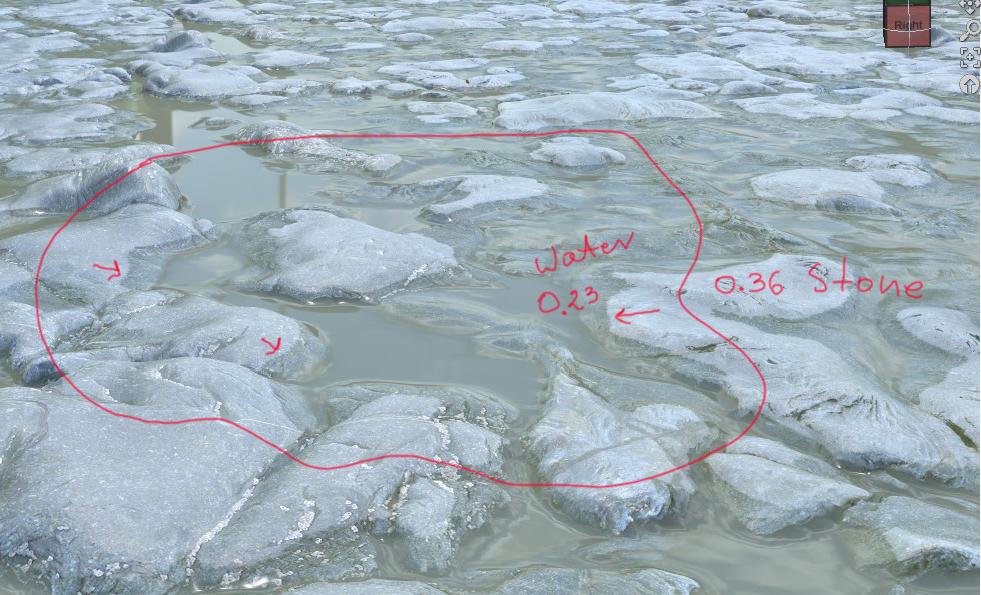
Filament tutorials/shaders/lights?Look on the example below, water reflectance 0.23, stones 0.36 , it give the dry stone nice wet edge just because I changed the Glossy Reflectance value to the water value on the edges only, it made the surface darker and wet looking. And it works as well in Filament as in Iray
there is no water plane , it is just one material with different values representing different materials controlled by grayscale maps plug in under Glossy Reflectivity , or can be plug under Glossy Color when rendering with iray but then Glossy Reflectivity need to be set at value 1.0 as the other channel will control everything . 2 options any of them is OK but only the first option will show correctly under Filament and iray at the same time . That why I am editing all stuff I created months ago to make it works in both at the same time.
 New DS Filament Render Engine
This is a quick test using "Atmosphere for Filament", It only took 1 second to render.
I couldn't get the shadows from the directional light to show up with "Atmosphere for Filament", so I just did two renders (one with it and one without it) and combined them in Photoshop.
Filament tutorials/shaders/lights?The secret of PBR shaders is in Reflectance/Roughness , human skin and nails have the same level of "glossy" reflectance , the only difference is roughness , even if you polish your natural nails it will have still the same glossy value , it looks more shiny because the roughness changed by polishing . Look on a bald head of a person, it is more shiny than the face and body, because of less roughness and not because of higher glossy values unless there is oil on the skin that have little higher values in glossy than skin but not dramatic around 0.36-0.40 max and almost double less than sweat on the skin or tears. All non metal materials reflect at 100% value at the angle , thanks to Fresnel effect that is already build into Glossy reflectivity and you don't need to worry about it under Metallicity/Roughness base mixer.
Metallicity/roughness base mix don't have any glossy , the name there is only so you know what it is about, it is Reflectivity/Reflections and Roughness
if you follow the rules for Reflectance it will helps you not only in Filament but also in iray as it works by the same principles
below little instruction , what you should do and what you should not do for best results .
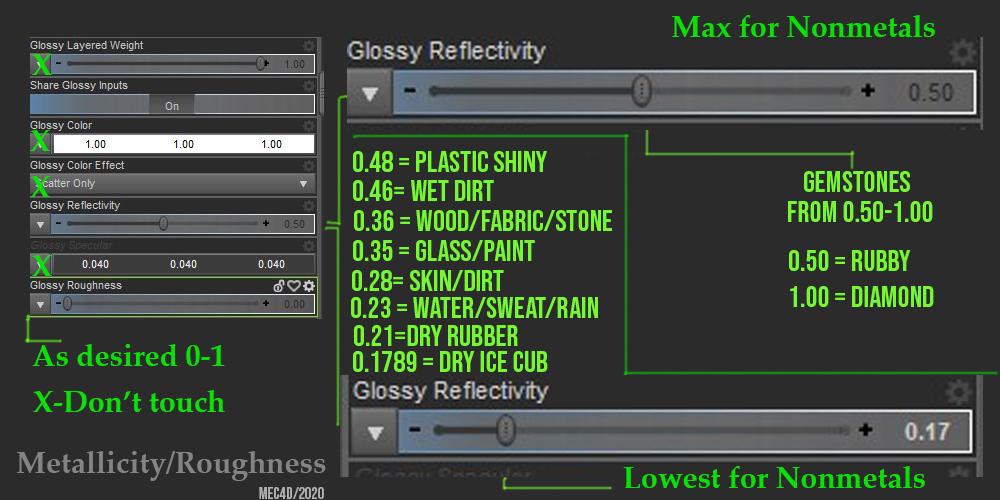
Under Glossy Reflectance , you have a very small range that you can use for all materials that are not metals, that includes also a rusted metal or painted metal since the surface is no more metallic and lands into nonmetal category .
The values are between 0.1789 to max 0.50 ( 0.50 is set by default in D|S) and higher values of Glossy Reflectivity are used only for gemstones like for example value 1.0 for Diamond, anything that falls below 0.1789 are for materials that don't exist in the real world and are pure fantasy and can contribute to slower rendering and poor light distribution in your scene.
You may be thinking why Water is less "glossy" than skin or wood ? well that is true , the only difference is lower roughness that makes it appear more glossy to your eyes, but in reality the material is much darker and reflects less light. Objects with higher gloss and higher roughness values appear much brighter even if you don;t see any glossy on them , for the same reason you need to have a proper albedo brightness for your color diffuse that usually is much darker than you believe it is and never brighter than 240 for RGB , if the nonmetal object is too bright as maximum white 255RGB it have the same color value as the maximum light in your scene , it is like you try to render a bulb with a bulb , make no sense right? reducing the brightness of the albedo color base will allow the light to create shading and make it look 3D and less flat.
When you work on editing skin for Filament where you missing the SSS, it is always better to start with darker color of the skin , set the proper glossy/reflectivity , turn on distance light and slowly increase the skin color brightness to desire effect but never go above the recommended values , if you use a textures for the skin , some are correct some are too bright , you can reduce the brightness by changing the color base and adjust the grayscale color a little bit down , but don't mess up with glossy values anymore , but only with Glossy roughness to get the desired effect.
if you have any question regarding it , or is not clear let me know
I am working on some stuff and presets that will allow you easier to add the right values in DS with a click , until then you can edit it manually and restore the proper settings for use with Filament , however it gonna works as good in iray as in Filament and not need for additional settings , it will works as well with a spot light or HDRI maps and that is the goal, less working editing and more time for creating.
Spring Dynamics! AWESOME!Spring Dynamics is fantastic! I think this is a game-changer for people who like to do animations! I've been wanting a product like this in Daz Studio for a long time! This is great! Thank you, 3D Universe, for the amazing product!
Here's a quick animation test with Spring Dynamics (I added it to the hair fringe and the left and right pectoral). Rendered at lighting fast speed with Filament.
Nice! I haven't installed it yet but looking forward to playing around with it. I love to boob action you had going there. :)
Daz 3D is part of

Connect
DAZ Productions, Inc.
7533 S Center View Ct #4664
West Jordan, UT 84084Licensing Agreement | Terms of Service | Privacy Policy | EULA
© 2026 Daz Productions Inc. All Rights Reserved.