-
Animation Not Exporting Properly
I see the edit morph thing. What is CSV? The thing I saw for adding morphs to it was go find the name, copy it, and paste it.
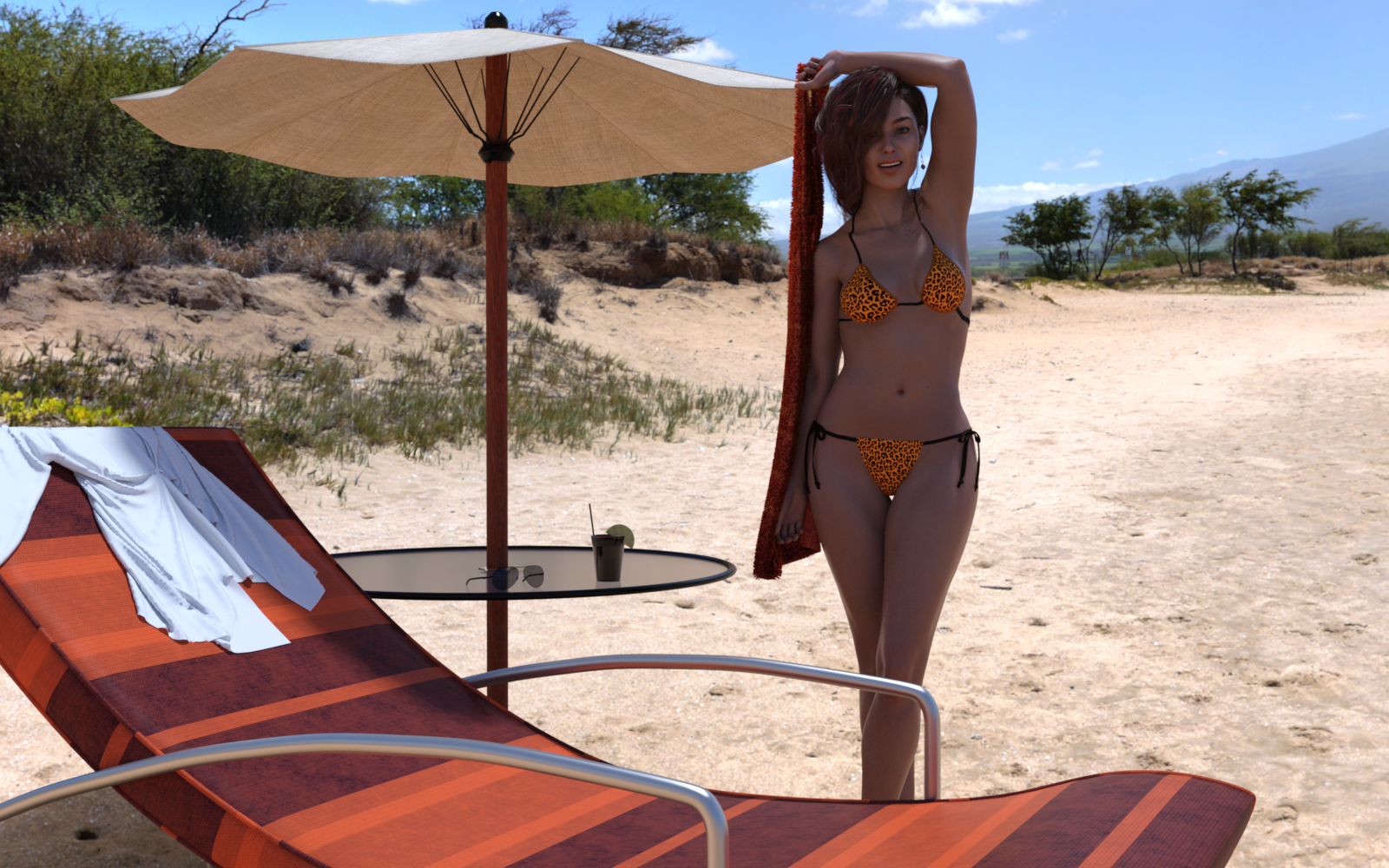
3D Art Freebie Challenge-June 2019-"Summertime Pin-Ups" -Main Thread OnlyFirst time entering one of these.
Freebies:
Jewelry Set by Leilana : https://www.renderosity.com/mod/freestuff/jewelry-set/78314
Freebie: ED's Bends V8 Poses by Edheldil (used pose 07 mirror) : https://www.renderosity.com/mod/freestuff/freebie-eds-bends-v8-poses/79710
Side Swept ROse Hair for Genesis 3 & 8 Females by zoro_d : https://www.renderosity.com/mod/bcs/side-swept-rose-hair-for-genesis-3-8-females/126602
Airforce sunglasses by insane_machine : https://www.renderosity.com/mod/freestuff/?item_id=64123
Genesis 8 female dForce Shirt : https://www.most-digital-creations.com/g8f_shirt.php (requires newsletter email subscription)
11 Free High Resolution Fabric Textures (used fabric 1 for the towel) : http://www.premiumpixels.com/freebies/11-free-high-resolution-fabric-textures/
No Counts:
String Bikini for Victoria 6 (included with Studio 4.x) : https://www.daz3d.com/string-bikini-for-victoria-6
DAZ Studio Iray HDR Outdoor Environments (included with Studio 4.x) : https://www.daz3d.com/daz-studio-iray-hdr-outdoor-environments
Purchased Items:
P3D Mylou for Genesis 8 Female (used her skin) : https://www.daz3d.com/p3d-mylou-for-genesis-8-female
Constanza HD For Genesis 8 Female (used body and head morph) : https://www.daz3d.com/constanza-hd-for-genesis-8-female
Beach Props (was free at some point, used the deck chair and drink) : https://www.daz3d.com/beach-props
Deck Accessories (also got it free sometime, possibly christmas, I used the table with umbrella) : https://www.daz3d.com/deck-accessories
All Links Check Out Plz Move To Entries Thread
3D Art Freebie Challenge-June 2019-"Summertime Pin-Ups" -Main Thread OnlyHi,
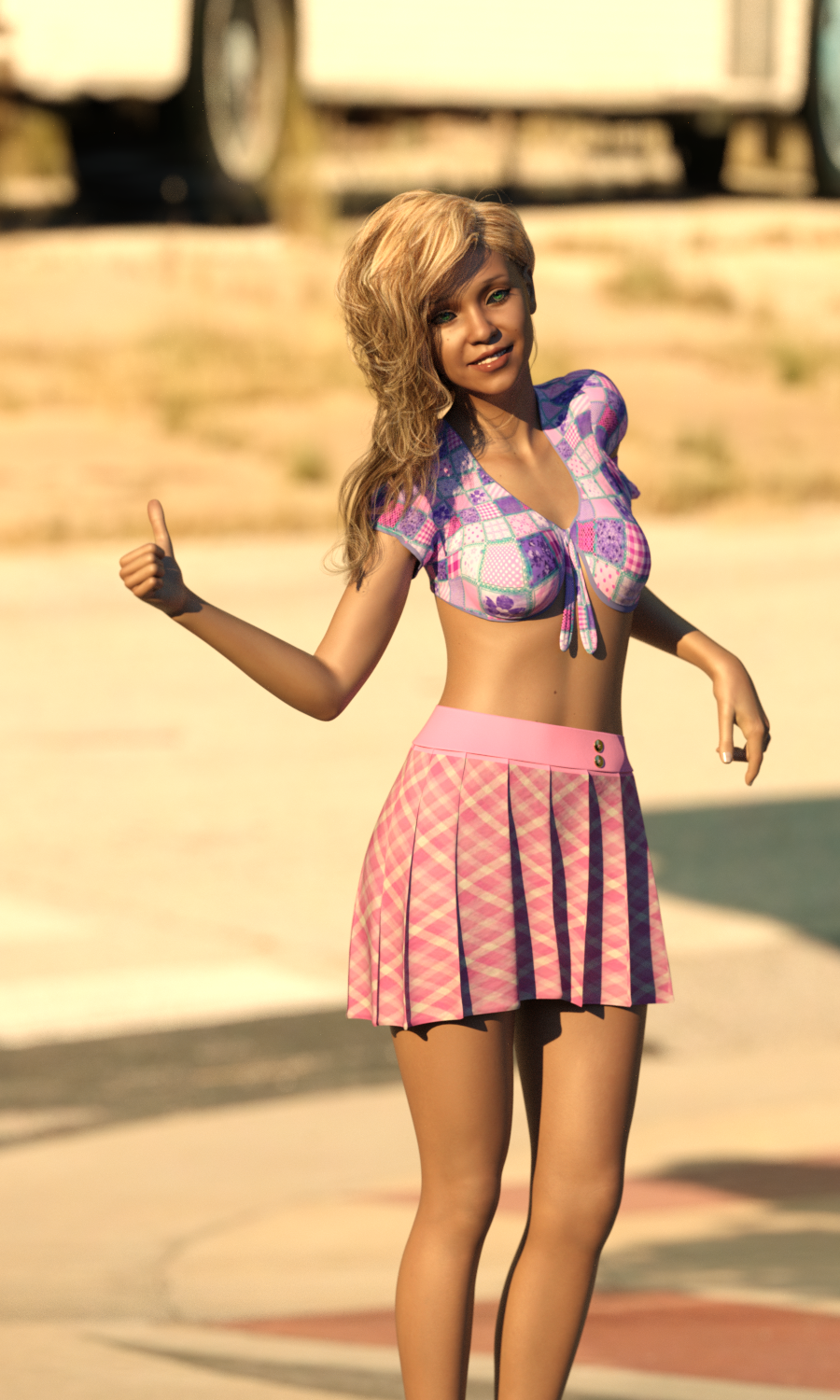
Here my entry (no postwork) :
Freebies :
[Elf Girl Textures for Genesis 8 Female by KnochenKater] https://sharecg.com/v/88556/gallery/21/DAZ-Studio/Elf-Girl-Textures-for-Genesis-8-Female
[Side Swept ROse Hair for Genesis 3 & 8 Females by zoro_d] https://www.renderosity.com/mod/bcs/side-swept-rose-hair-for-genesis-3-8-females/126602
[G2F Shorts & Tied Top (Top only) by Wilmaps] https://www.wilmapsdigitalcreations.co.uk/view_product.php?id=185
[Pleated Skirt for G8F by Digidotz] http://www.digi-dotz.com/index.php/free-poses/daz-clothes/233-free-pleated-skirt-for-daz-g8f
[HDR Evening Sun by Giantcow] https://giantcowfilms.com/2015/12/01/hdr-evening-sun/
[Ajrarn's BackProp by Ajrarn] https://www.renderosity.com/mod/gallery/ajrarns-backprop-available-in-freestuff-/901938/?p
[Background Image by dbWalton] https://www.renderosity.com/mod/freestuff/standing-on-a-corner-in-galena-kansas-hires/82518
Purchased :
[Morph and smile] https://www.daz3d.com/amira-hd--expressions-hd-for-genesis-8-female
No count : G8F
P.S. How do we know everything is ok so we can post in the entry thread?
All Links Check Out Plz Move To Entries Thread
Get Version 4 ! mcjHatsAreTheFashionOfTheDay : Fit Any Hair in Hats Pc/MacAfter playing with the collider and other mcjScripts for some time I found this one by accident. No offence meant but the handling is quite complicated. I read the description more than once. So I added a few (100+) lines of code around mcjHats. The modified version adds - and removes after execution - the collider on its own. It also adds the plane above the ears.
Just added an orbit camera (https://www.daz3d.com/forums/discussion/85971/a-script-to-orbit-camera-around-a-point) so one can check the result and toggle the morph and the plane visibility within the script.I tested it with Win64/DAZ Studio/mcjCollider and I'm happy to share the code with you: https://github.com/godly/daz3d-scripts
Click the 'Clone or Download' / 'Download ZIP' button to fetch a copy and to extract its content folder to your content folder. Select the hair and run the script. That's all. I don't intend to hijack this thread while it would be nice to know whether this simplified version gets used.
PS: The logic to create the morph is mCasuals one, don''t credit me if it fails while I hope that the code I've added is error-free and mCasual will assimilate it. So nearly the same icons are used and you may use either mCasuals' or this version as different installation pathes are used.
How to make a single dial from a mixture of morphs, which then available as an asset?Thanks guys. Couple of followup questions.
1) in the Create New Property popup there is an option at the bottom to "Create As Empty Morph". What is an empty morph and why would I create one?
2) I followed the instructions given by Richard and everything appear to work up to step 6. I then Loaded a new scene with a G8f character and looked for my newly saved master slide but I can't find it anywhere. I assumed that it would now be available for any G8f character in any scene, but I can't see it. What am I not doing?
Animation Not Exporting ProperlyJust under the column of checkboxes on the left there's a button for Edit Morph Export Rules. It does have options to Import and Export CSV files, though i'm not aware of a dedicated tool to create those.
3D Art Freebie Challenge-June 2019-"Summertime Pin-Ups" -Main Thread OnlyFirst time entering one of these.
Freebies:
Jewelry Set by Leilana : https://www.renderosity.com/mod/freestuff/jewelry-set/78314
Freebie: ED's Bends V8 Poses by Edheldil (used pose 07 mirror) : https://www.renderosity.com/mod/freestuff/freebie-eds-bends-v8-poses/79710
Side Swept ROse Hair for Genesis 3 & 8 Females by zoro_d : https://www.renderosity.com/mod/bcs/side-swept-rose-hair-for-genesis-3-8-females/126602
Airforce sunglasses by insane_machine : https://www.renderosity.com/mod/freestuff/?item_id=64123
Genesis 8 female dForce Shirt : https://www.most-digital-creations.com/g8f_shirt.php (requires newsletter email subscription)
11 Free High Resolution Fabric Textures (used fabric 1 for the towel) : http://www.premiumpixels.com/freebies/11-free-high-resolution-fabric-textures/
No Counts:
String Bikini for Victoria 6 (included with Studio 4.x) : https://www.daz3d.com/string-bikini-for-victoria-6
DAZ Studio Iray HDR Outdoor Environments (included with Studio 4.x) : https://www.daz3d.com/daz-studio-iray-hdr-outdoor-environments
Purchased Items:
P3D Mylou for Genesis 8 Female (used her skin) : https://www.daz3d.com/p3d-mylou-for-genesis-8-female
Constanza HD For Genesis 8 Female (used body and head morph) : https://www.daz3d.com/constanza-hd-for-genesis-8-female
Beach Props (was free at some point, used the deck chair and drink) : https://www.daz3d.com/beach-props
Deck Accessories (also got it free sometime, possibly christmas, I used the table with umbrella) : https://www.daz3d.com/deck-accessories
AIUTO...CHI CONOSCE L’ITALIANO? PARTE DODICILenio, sei qui? *agita la mano*
Mi spieghi come fai a far funzionare NextGen? A me si blocca sempre al 27%...

Non sono l'unico, magari tu hai un metodo "maggico" o una installazione particolare.Ciao Imago :D
Sì, ho le notification delle discussioni che ho "bookmarkato" per email. Sembrerà fastidioso, ma ho una mail apposita per la roba dei render, e così evito di girare per i siti ad aggiornare le notifiche. Lascio la finestra aperta e ogni tanto controllo se è successo qualcosa su uno dei mille siti che uso xD
L'unica volta che ho usato lo script ci stava mettendo una vita (perché stavo trasferendo migliaia di morph) e quindi non l'ho nemmeno lasciato finire, mi dispiace :(
3D Art Freebie Challenge-June 2019-"Summertime Pin-Ups" -Main Thread OnlyHi,
Here my entry (no postwork) :
Freebies :
[Elf Girl Textures for Genesis 8 Female by KnochenKater] https://sharecg.com/v/88556/gallery/21/DAZ-Studio/Elf-Girl-Textures-for-Genesis-8-Female
[Side Swept ROse Hair for Genesis 3 & 8 Females by zoro_d] https://www.renderosity.com/mod/bcs/side-swept-rose-hair-for-genesis-3-8-females/126602
[G2F Shorts & Tied Top (Top only) by Wilmaps] https://www.wilmapsdigitalcreations.co.uk/view_product.php?id=185
[Pleated Skirt for G8F by Digidotz] http://www.digi-dotz.com/index.php/free-poses/daz-clothes/233-free-pleated-skirt-for-daz-g8f
[HDR Evening Sun by Giantcow] https://giantcowfilms.com/2015/12/01/hdr-evening-sun/
[Ajrarn's BackProp by Ajrarn] https://www.renderosity.com/mod/gallery/ajrarns-backprop-available-in-freestuff-/901938/?p
[Background Image by dbWalton] https://www.renderosity.com/mod/freestuff/standing-on-a-corner-in-galena-kansas-hires/82518
Purchased :
[Morph and smile] https://www.daz3d.com/amira-hd--expressions-hd-for-genesis-8-female
No count : G8F
P.S. How do we know everything is ok so we can post in the entry thread?
Who's that girl??Things I'm Playing with ........Holy Cats Still making presets for the Randomizer ,basically breaking up morph sets ,but really enjoying how much easier it is to use all the morphs or just a few here is another lovely lady
 Daz to Zbrush
Parent the second character to the first. They will show up together as two subtools via GoZ. When sending back, make the first the active subtool and press GoZ to send the morph back to DAZ. After that select the second subtool in Zbrush and press GoZ again to send the morph for the second character.
Alternatively, export each at base resolution and use Morphloader Pro. Turn on “Reverse Defirmations” on reload if the character was posed before export. Load one morph at a time.
HTH
Daz to ZbrushI don't think you want to do these as morphs as you would want what you're doing to be further modified with the normal bend and twist used for posing. How exactly are you thinking you want to morph and what parts?
Some products QuestionsI don't have those but they look like geografts, which are figure specific, and some of those add-ons like the tails certainly don't have standard bones. I rather doubt they'd convert easily to the opposite gender.
well understand, but as i told i was able to make a "female" reptilian just using the script and some "edited morphs" it worked really perfect here's the exemple:

both leg and tails where only for male i just used the script and it become "unisex and full working then i just needed to do the trick to transform the reptilian body to a "female morph".
both leg and tail bones works perfect for both gender no issue here.
here she relaxing with her "swinsuit" lol

i really loved make that, this was really the most "worth bought ever for me".
WASN'T THERE A FIX FOR WONKY EYES AFTER MAKING A MORPH?Did you check in other groups in the Parameters pane? Is there an error relating to the morph in the log - Help>Troubleshooting>View Log Fle?
Does anyone know if Darius 8 skin texture has a no stubble option?Absolutely, no problems to apply directly*, but Darius 7 has just as much stubble and big pores like Darius 8, and the skin is lighter, so it's more noticeable.
*The eyelashes were part of the base figure maps on Genesis 3 characters, so loading a Genesis 3 material will not change the Genesis 8 eyelashes. Going the other way is a bit more problematic.
Darius 7 has really great skin. He does have stubble, but RawArt (oops,) Hellboy helped us out with that with a free preset in this thread.
Named 7 base figures all have their own UVs, so to use those on G8, you will either need to buy the UVs for G8, (male and/or female,) or use the Map Transfer utility. For a one off, the Map Transfer will work just fine. But if you expect to use more than one Named 7 figure's materials on G8, the UV products are a lot more convenient. (Here's a tutorial I did specifically for this issue. I used V7, but you should be able to follow along using Darius 7 instead.)
If you want to apply any G3 materials to a G8, first select both the figure and the separate eyelashes. Then double-click on the preset that applies everything, and it will also apply the eyelashes and eye moisture at the same time.
Unfortunately, G8 "complete" presets use Hierarchical Materials and only work on G8 directly. The only workaround I've found is loading both a G8 and G3 at the same time, applying to the G8 figure the materials I want to use on G3, then copying the materials via the Surfaces->Editor to the G3 figure. (Female to female; Male to male. Unless you have the UV Swap product.) Also, you'll need to copy the eyelashes material from the separate eyelashes and then apply those to the G3 eyelashes material zone.
Presets for Hierarchical Materials will have an "H.Materials" label in the upper right of the preset icon. You will notice a significant number of material presets for G8 characters that do not include the H in the label. These presets, with just the "Materials" label, will apply directly to either the G8 or G3 figures.
I hope this info helps.
Thanks, I know all about that, but I just didn't want to open that basket of snakes (G8 to G3) since it did seem a little out of scope. But, true, selecting the figure and the eyelashes on G8 when applying the G3 material would set everything. I overlooked the way material settings look for a matching surface name to which to apply.
Sorry. I quoted your post because of the stubble comment, and I wanted to share the link to Hellboy's generous presets. The rest of the post was more of a general response to the various comments in the thread. I like to be thorough for the sake of people who search the forums when they get stuck with one problem or another..
WASN'T THERE A FIX FOR WONKY EYES AFTER MAKING A MORPH?Thanks for the assist, Richard. Greatly appreciated however I will not be able to attempt the fix you gave me as when I opened Daz Studio and loaded genesis 8 female my morph was nowhere to be found. Though a search for the dsf file in windows explorer shows it's where it should be. So I have no idea... But thank you for your time in responding...
Does anyone know if Darius 8 skin texture has a no stubble option?Absolutely, no problems to apply directly*, but Darius 7 has just as much stubble and big pores like Darius 8, and the skin is lighter, so it's more noticeable.
*The eyelashes were part of the base figure maps on Genesis 3 characters, so loading a Genesis 3 material will not change the Genesis 8 eyelashes. Going the other way is a bit more problematic.
Darius 7 has really great skin. He does have stubble, but RawArt (oops,) Hellboy helped us out with that with a free preset in this thread.
Named 7 base figures all have their own UVs, so to use those on G8, you will either need to buy the UVs for G8, (male and/or female,) or use the Map Transfer utility. For a one off, the Map Transfer will work just fine. But if you expect to use more than one Named 7 figure's materials on G8, the UV products are a lot more convenient. (Here's a tutorial I did specifically for this issue. I used V7, but you should be able to follow along using Darius 7 instead.)
If you want to apply any G3 materials to a G8, first select both the figure and the separate eyelashes. Then double-click on the preset that applies everything, and it will also apply the eyelashes and eye moisture at the same time.
Unfortunately, G8 "complete" presets use Hierarchical Materials and only work on G8 directly. The only workaround I've found is loading both a G8 and G3 at the same time, applying to the G8 figure the materials I want to use on G3, then copying the materials via the Surfaces->Editor to the G3 figure. (Female to female; Male to male. Unless you have the UV Swap product.) Also, you'll need to copy the eyelashes material from the separate eyelashes and then apply those to the G3 eyelashes material zone.
Presets for Hierarchical Materials will have an "H.Materials" label in the upper right of the preset icon. You will notice a significant number of material presets for G8 characters that do not include the H in the label. These presets, with just the "Materials" label, will apply directly to either the G8 or G3 figures.
I hope this info helps.
Thanks, I know all about that, but I just didn't want to open that basket of snakes (G8 to G3) since it did seem a little out of scope. But, true, selecting the figure and the eyelashes on G8 when applying the G3 material would set everything. I overlooked the way material settings look for a matching surface name to which to apply.
Does anyone know if Darius 8 skin texture has a no stubble option?Absolutely, no problems to apply directly*, but Darius 7 has just as much stubble and big pores like Darius 8, and the skin is lighter, so it's more noticeable.
*The eyelashes were part of the base figure maps on Genesis 3 characters, so loading a Genesis 3 material will not change the Genesis 8 eyelashes. Going the other way is a bit more problematic.
Darius 7 has really great skin. He does have stubble, but RawArt helped us out with that with a free preset in this thread.
Named 7 base figures all have their own UVs, so to use those on G8, you will either need to buy the UVs for G8, (male and/or female,) or use the Map Transfer utility. For a one off, the Map Transfer will work just fine. But if you expect to use more than one Named 7 figure's materials on G8, the UV products are a lot more convenient. (Here's a tutorial I did specifically for this issue. I used V7, but you should be able to follow along using Darius 7 instead.)
If you want to apply any G3 materials to a G8, first select both the figure and the separate eyelashes. Then double-click on the preset that applies everything, and it will also apply the eyelashes and eye moisture at the same time.
Unfortunately, G8 "complete" presets use Hierarchical Materials and only work on G8 directly. The only workaround I've found is loading both a G8 and G3 at the same time, applying to the G8 figure the materials I want to use on G3, then copying the materials via the Surfaces->Editor to the G3 figure. (Female to female; Male to male. Unless you have the UV Swap product.)
Presets for Hierarchical Materials will have an "H.Materials" label in the upper right of the preset icon. You will notice a significant number of material presets for G8 characters that do not include the H in the label. These presets, with just the "Materials" label, will apply directly to either the G8 or G3 figures.
I hope this info helps.
I think you meant to say Hellboy, not RawArt for fixing the issues with Darius 7 facial hair
Does anyone know if Darius 8 skin texture has a no stubble option?Absolutely, no problems to apply directly*, but Darius 7 has just as much stubble and big pores like Darius 8, and the skin is lighter, so it's more noticeable.
*The eyelashes were part of the base figure maps on Genesis 3 characters, so loading a Genesis 3 material will not change the Genesis 8 eyelashes. Going the other way is a bit more problematic.
Darius 7 has really great skin. He does have stubble, but RawArt (oops,) Hellboy helped us out with that with a free preset in this thread.
Named 7 base figures all have their own UVs, so to use those on G8, you will either need to buy the UVs for G8, (male and/or female,) or use the Map Transfer utility. For a one off, the Map Transfer will work just fine. But if you expect to use more than one Named 7 figure's materials on G8, the UV products are a lot more convenient. (Here's a tutorial I did specifically for this issue. I used V7, but you should be able to follow along using Darius 7 instead.)If you want to apply any G3 materials to a G8, first select both the figure and the separate eyelashes. Then double-click on the preset that applies everything, and it will also apply the eyelashes and eye moisture at the same time.
Unfortunately, G8 "complete" presets use Hierarchical Materials and only work on G8 directly. The only workaround I've found is loading both a G8 and G3 at the same time, applying to the G8 figure the materials I want to use on G3, then copying the materials via the Surfaces->Editor to the G3 figure. (Female to female; Male to male. Unless you have the UV Swap product.) Also, you'll need to copy the eyelashes material from the separate eyelashes and then apply those to the G3 eyelashes material zone.
Presets for Hierarchical Materials will have an "H.Materials" label in the upper right of the preset icon. You will notice a significant number of material presets for G8 characters that do not include the H in the label. These presets, with just the "Materials" label, will apply directly to either the G8 or G3 figures.
I hope this info helps.
Daz 3D is part of

Connect
DAZ Productions, Inc.
7533 S Center View Ct #4664
West Jordan, UT 84084Licensing Agreement | Terms of Service | Privacy Policy | EULA
© 2026 Daz Productions Inc. All Rights Reserved.