-
GenX: Converting G2 to G1
A followup:
Last night I downloaded and installed the GenX add-on for G3 (via DIM) but when I run GenX I don't get the option to transfer morphs to G3, only G1 and G2 as before. Did I miss a step somewhere in the installation/upgrade process?
AIUTO...CHI CONOSCE L’ITALIANO? PARTE DODICIVe lo dicevo io che sn brutti....Ormai ho inziato un progetto elo porto a termine, ma non faccio più nulla per loro...
Muscleman, io dico sempre che sembrano questi:
*cade dalla sedia*
Crios, ma che cosa vai a cercare in giro? (◉ ʖ̯◉)In ogni caso mi stupisco di molti prodotti che stanno uscendo ultimamente sullo store... Programmi rotti, morph indegni, prop improponibili... Che combinano?
Spero che il tuo nuovo prodotto migliori un pochino quei poveri pupetti, Muscleman!E, sempre cercando di mantener il thread nei suoi binari, chiedo nuovamente: A voi l'interfaccia degli script e dei plugin risulta schiacciata?
AIUTO...CHI CONOSCE L’ITALIANO? PARTE DODICISì, credo sia precedente al arrivo di GenX.
Come ti dicevo un paio di post fa, con i cloni si può facilmente fare il trasferimento, il problema vero sono tutte le operazioni di ERC Freeze, adattamento del morph e del rig.
Spero proprio che SingularBlue recuperi la passione e completi lo script, ora come ora lo ha lasciato ai "volenterosi" di lavorarci su...
In effetti nel thread si affrontano anche questi argomenti, come creare un clone, l'ERC Freezee, e cosi via. L'ho usato per un morph da G1 a G2M ed è andato abbastanza bene. Certo gli occhi si dovevano sistemare, e c'era qualche sigolosità qua e la, ma in definitiva è andato bene. E ho provato una capoccia aliena, non una figura umanoide, quindi abbastanza estrema.
Aging a teen character to adult?I need a male character that will be depicted at several ages : adolescent, adult, old age. I own Zevo's "growing up" , but I've been unconvinced by its transformation of adult males into teens. Besides, the character will appear primarily as a teen at first, so I'd rather pick a good teen character and age it than the other way around. I also own Zevo's "aging morphs" (although it seems to me that there was an alternative aging morph product, but I can't find it now), I assume it might work on a teen character to bring him to old age, even though I'm not sure.
On the other hand, it's not intended to be used on a teen character to bring him up to adult age, as far as I can tell. So, how could I make a teen into an adult? I'm interested if there's an adapted product for this, but maybe otherwise in how to use "aging morphs" to get this result, or lacking that, knowing what kind of morphs would be useful to make a teen character appear adult. For instance I would assume that shoulders should be larger, but I'm not sure about the rest, and in particular the face. If it matters, I'll probably use Greg 8 : https://www.daz3d.com/greg-for-genesis-3--8-male as a base.
Basilisk?The store is quite extensive and I've searched but could have missed it. Does anything exist out there for a basilisk? I am not referring to the Harry Potter snake but rather the six or eight legged large lizard. If there is an alligator or dragon model that has a morph for additional legs, that would suffice, but that might be a long shot.
Introduce Yourself, Hello, my name is.....Hello I have a question related to artwork transfer?
Can a friend make artwork then email it to me for rendering? He is making several for our projects that if we both can render would help cut time down.
Thank you
Amandalynn
Only if you also own the assets. He would send you the scene file (duf) which would reference the assets. If you own the assets, it will be able to load them on your computer.
Introduce Yourself, Hello, my name is.....Hello I have a question related to artwork transfer?
Can a friend make artwork then email it to me for rendering? He is making several for our projects that if we both can render would help cut time down.
Thank you
Amandalynn
Introduce Yourself, Hello, my name is.....Hello I have a question related to artwork transfer?
Can a friend make artwork then email it to me for rendering? He is making several for our projects that if we both can render would help cut time down.
Thank you
Amandalynn
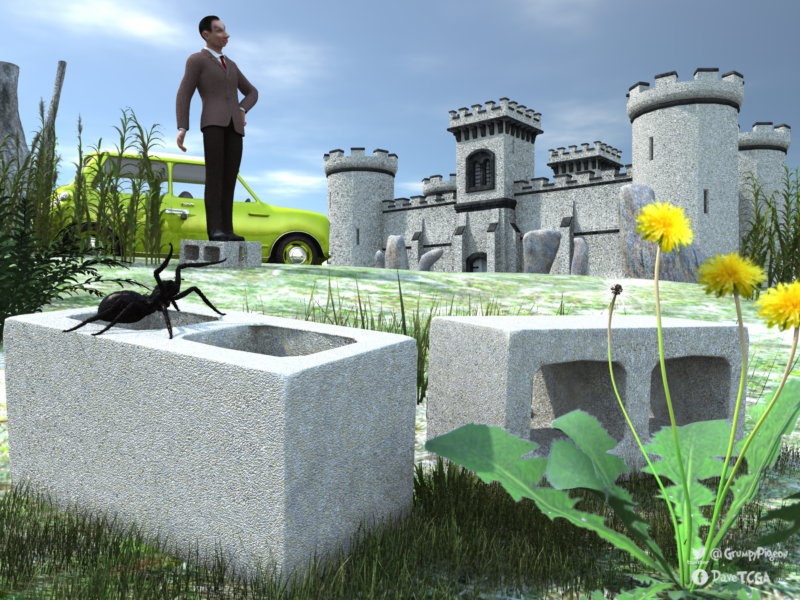
Carrara Challenge #47: Structured/Unstructured - Voting Closed - Thank you everyone!Entry #7
Title: Building Blocks
Artist: Stezza
Links to WIP thread:
https://www.daz3d.com/forums/discussion/comment/4629456/#Comment_4629456
https://www.daz3d.com/forums/discussion/comment/4631611/#Comment_4631611Credits: me ( building blocks, rock formation ), LorenZo bean morph by me, LoRenzo, Spider & Castle here at Daz3d, mini freebie from the interwebs, vegetation from lots of various products.
 The pose sliders always move the bones to the opposite of my wish!
Morph sliders very often do NOT move the mesh in the direction that they are labeled. I consider that a Daz/PA/QA failure. It annoys me. It isn't hard to label the morph to match the direction of movement. They just don't bother, as far as i can tell.
Morphs for open/close and such should be no brainer; if there is a mistake with them it is due to the morph maker. What I cannot understand, are the weird principles according to which the bone sliders are moving - and they are really counter-intuitive.
Many seem to move one way on the left and the opposite way on the right.
AIUTO...CHI CONOSCE L’ITALIANO? PARTE DODICISì, credo sia precedente al arrivo di GenX.
Come ti dicevo un paio di post fa, con i cloni si può facilmente fare il trasferimento, il problema vero sono tutte le operazioni di ERC Freeze, adattamento del morph e del rig.
Spero proprio che SingularBlue recuperi la passione e completi lo script, ora come ora lo ha lasciato ai "volenterosi" di lavorarci su...
The pose sliders always move the bones to the opposite of my wish!Morph sliders very often do NOT move the mesh in the direction that they are labeled. I consider that a Daz/PA/QA failure. It annoys me. It isn't hard to label the morph to match the direction of movement. They just don't bother, as far as i can tell.
Morphs for open/close and such should be no brainer; if there is a mistake with them it is due to the morph maker. What I cannot understand, are the weird principles according to which the bone sliders are moving - and they are really counter-intuitive.
CAT girl G8The renders you all are doing are better than our promo images! I'm loving them! For those curious about the morphs I used in the promos:
The ones by Will were pretty basic just one character morphs like Aiko 8 and Karyssa 8 and Tika 8. Me, I got a little crazy and used all kinds of morph mixtures, but I prepared instruction images, in case you all had some of the same morphs.
The renders came out great, MAB! Thank you so much for sharing the "recipes" with us! :)
AIUTO...CHI CONOSCE L’ITALIANO? PARTE DODICISixus1 non fa pupi brutti, i suoi sono sempre meglio di quelli della DAZ.
A proposito di morph, ma conoscevate questo thread?
The pose sliders always move the bones to the opposite of my wish!Morph sliders very often do NOT move the mesh in the direction that they are labeled. I consider that a Daz/PA/QA failure. It annoys me. It isn't hard to label the morph to match the direction of movement. They just don't bother, as far as i can tell.
CAT girl G8@MAB thank you for all the morph information, it's given me lots of ideas and pointers as to how to use my morph sets on Catgirl.
This is a render of Catgirl using Girl 8 with one of Rarestone's morphs for Girl 8 (unfortunately I can't remember which one I used!). I also applied Colorwerks hair shaders to the hair. I got lots of interesting combinations but decided in the end to pick one that was similar to her overall colour palette as a tabby.
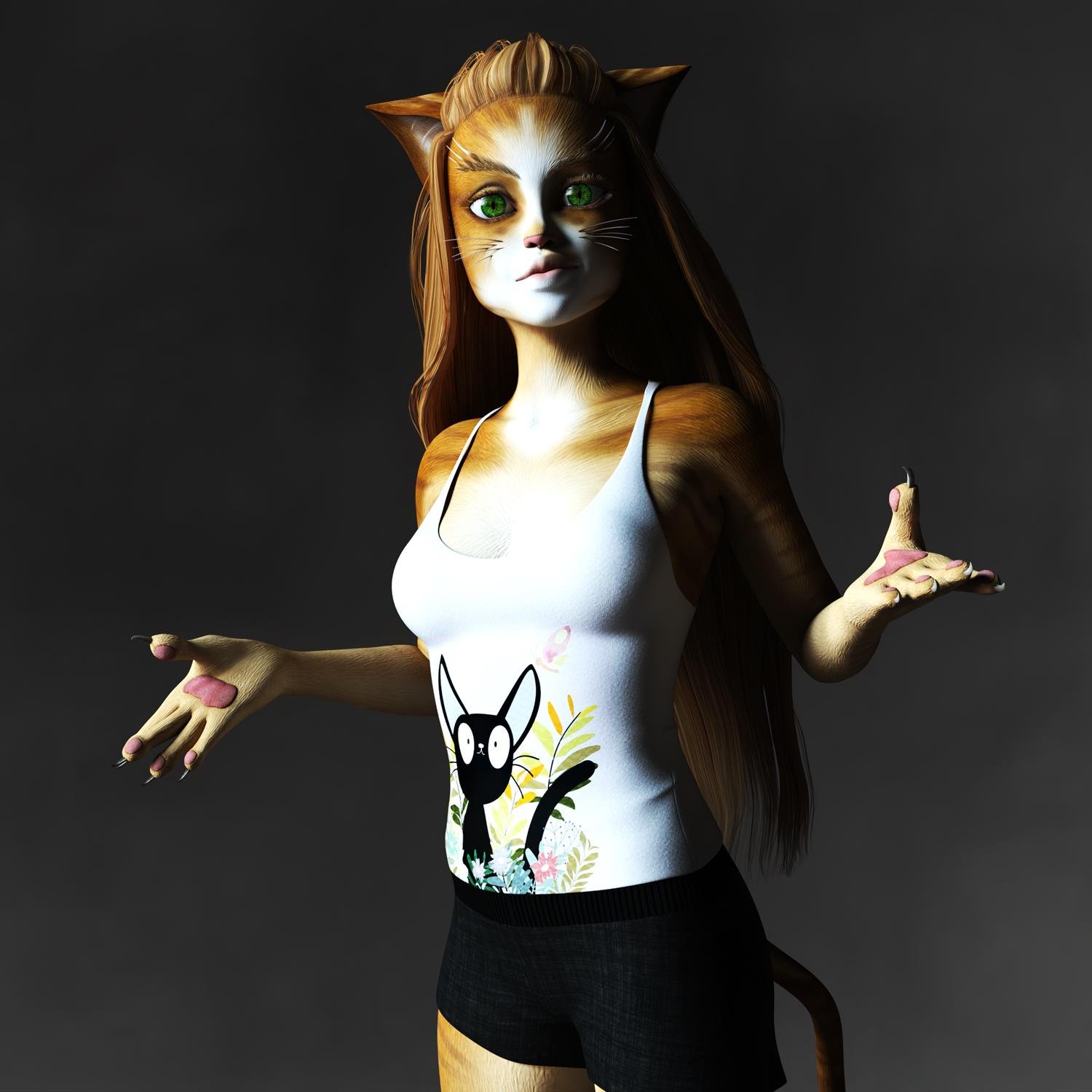 CAT girl G8
RawArt's catworld + a little HFS cat head. Used normal ears since they are morphed into place.
Also moved/scaled the whiskers to fit the morph better
Looks aweseome!
CAT girl G8@Mab , since you're visiting and answering questions, maybe you can shed light upon something I noted earlier when someone asked about morphs.
Why doesn't this set include a simple "cat nose" or "hare lip" morph? Back with the original version of this product for Aiko 3, it wasn't much of an issue.
Another set, the extended morphs for A3 (I think) offered a simple "cat mouth" (hare lip) type morph. But unless I'm mistaken (and I admit I might very well be), I don't recall an equivalent for the Genesis 8 female, at least nothing that is part of a 'DAZ original" set of morphs. Maybe in a vendor's set, but if so, I don't know which one.
Those two lil' morphs would have added so much to this package.
Sincerely,
Bill
We toyed with it, but in the end Catgirl 8 was made in a style similar to Genesis Catgirl only majorly upgraded. So, we didn't include G8F morphs. It's possible we might include a morph like that for Foxy Lady since we did originally include morphs with the Foxy and Wolfie set, so the precedent is already set.
Can this outfit/Geoshell be worn by any G8 Female, or only the character it comes withWell since it is shaped with morphs to look like an android I suspect you are initially stuck with that body shape but can probably add other morph dials
it does at least say separate head and body morphs
no doubt you could dial in smaller hips breasts bigger thighs etc though as you choose but that would be your base to start from
someone with it needs to post as I looked at it a few times too
CAT girl G8RawArt's catworld + a little HFS cat head. Used normal ears since they are morphed into place.
Also moved/scaled the whiskers to fit the morph better
Daz 3D is part of

Connect
DAZ Productions, Inc.
7533 S Center View Ct #4664
West Jordan, UT 84084Licensing Agreement | Terms of Service | Privacy Policy | EULA
© 2026 Daz Productions Inc. All Rights Reserved.