-
ITF Dev Kit G9 Out Now - ITF Freebies Thread
InTheFlesh Merchant Morphs for Genesis 8 Female
This is a free set of morphs which will be updated over time. Primarily consisting of morphs I have created for use during product creation, these are being released as a free merchant resource.
These morphs can be used as a base for your own creations, correcting morph issues with other products or distributed for free or sale. The only restriction is you cannot sell these morphs as part of a morph pack.
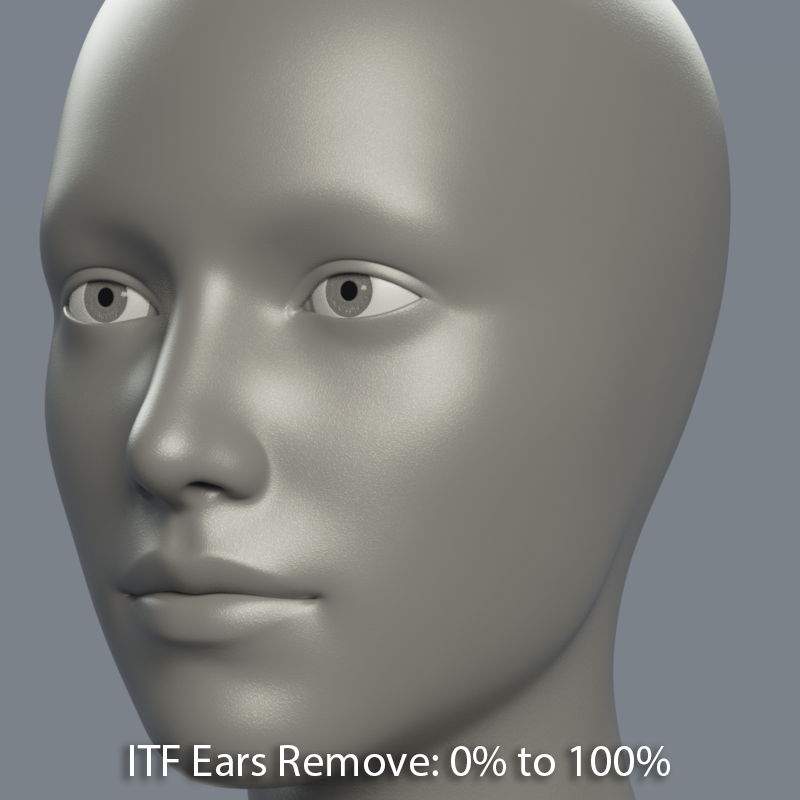
__________________________________
InTheFlesh Merchant Morphs Vol. 1 includes:
- Daz Install Manager (DIM) compatible install.
- ITF Ears Remove: Completely removes Ears, resulting in a smooth flattened surface. Intended as a base for further sculpting, this morph only works well with the default Genesis 8 Female base shape.
- ITF Eyes Remove: Completely removes Eyes, resulting in a smooth flattened surface. Intended as a base for further sculpting, this morph only works well with the default Genesis 8 Female base shape.
- ITF Nose Remove: Completely removes Nose, resulting in a smooth flattened surface. Intended as a base for further sculpting, this morph only works well with the default Genesis 8 Female base shape.
- ITF Cornea EyeMoisture Scale: Enlarge or shrink just the Cornea and EyeMoisture. Useful for correcting instances of the Sclera poking through the EyeMoisture.
- ITF Teeth Scale All: Enlarge or shrink just the Teeth. Useful for correcting morphs that cause the Teeth to shrink.
Morphs are located under Actor/Head, or simply search for ITF Merchant Morphs to find morphs from all current and future volumes.
https://gumroad.com/intheflesh?sort=page_layout&tags=free
https://sharecg.com/v/94074/browse/21/DAZ-Studio/InTheFlesh-Merchant-Morphs-for-G8F-Vol.-1
Hiding Gen8 ears?InTheFlesh Merchant Morphs for G8F Vol. 1 is now available here:
https://sharecg.com/v/94074/browse/21/DAZ-Studio/InTheFlesh-Merchant-Morphs-for-G8F-Vol.-1
Because the morphs are made for the base G8F for character creation, you may get distored results when mixing with other character morphs. You could use X-Morphs to combine the ITF Ears Remove morph with your desired character morph.
combining 2 models: LionTaur-Is there a way to attach/connect the human torso so when posing either half they will stay attached to each other?
If you parent the human figure to the neck bone of the lion, that should keep them more-or-less in place. A fast-and-dirty way to cover the join would be to do two renders, one with lion and man, but with the fur going higher up the torso than where you want the join to be, the other with just the man. Then combine them in post to eliminate the join.
Making a morph to make a smooth junction would be better, but beyond my skills at the moment.
Follow up to Kids 4The last "official child" released by Daz was the basic child morph from Genesis 1.
Maximum GPU RAm for GPU rendering in IrayThanks! Other question, I saw there is a pipeline in existence using iclone to get Daz figures to other software. Could I be using that to get my figures to another application that supports V-Ray? And on a more general note... If I do export out of Daz, what about the SubD, does that transfer alos, or do I loose the SubD levels? My main characters a re always on SubD 4 or 3. I would like to preserve that detail when I export.
You are about to look into a very long rabbit hole, my friend. As for iClone, I don't use it but there is extensive support for Daz figures and there are others on the forum who can tell you more about it. No subD, though. There are also no iRay to Vray presets for Daz figures on any other platform as far as I know. That is why our group has begun solving all these problems ourselves. The best I've found to preserve the details is to export the subD figure from Daz as an .obj and bake normal or displacement maps to apply back to the base figure. It's more efficient that way anyways if you're animating. To be honest, for my purposes, I don't find Daz figure subD details to be that significant and I usually make my own. In fact, I only use Daz Studio for rigging my own custom figures so I don't delve into that problem much but I'm sure there are others who have. Have fun in Wonderland.
In case you missed the addendum to my previous comment, if you wish to take advantage of the VRAM pooling in Vray (or Octane), you will need to buy a pair of gpu's with NVlink connectors.
Maximum GPU RAm for GPU rendering in IrayThanks! Other question, I saw there is a pipeline in existence using iclone to get Daz figures to other software. Could I be using that to get my figures to another application that supports V-Ray? And on a more general note... If I do export out of Daz, what about the SubD, does that transfer alos, or do I loose the SubD levels? My main characters a re always on SubD 4 or 3. I would like to preserve that detail when I export.
Figure prop, rigging anomaly while posing bone rotationsHi, so I'm running into a nagging anomaly when weight painting and rigging some basic movement and intentional distortion on my original figure prop. The issue is that when I pose rotations on the bones I've weight painted, the geometry goes haywire until I stop moving the slider, then it smooths out to whatever the result of my currently painted weights are. Now the result after letting go of the slider is fine, but even if this doesn't mean I'm headed for other problems ( which I think it does) you can imagine buying something from the store and having it blow up like bad dforce every time you pose it, that wouldn't be acceptable.
Here are a couple things to know about what I've already covered:
- Model is clean, even SubD geometry.
- Model was imported at zero worldspace, then posed into place on g8m, exported from daz and reimported using (update base geometry) to adjust the origin.
- Next, I ran the transfer utility to pick up G8m skeleton, and on the prop deleted all but the single shoulder-twist bone, which the prop is intended to follow rigidly.
- Then I created child bones along my prop as I wanted them and painted weights until I was satisfied with the way it deformed
- General weight map is filled 100 percent on the parent bone, and rotation weight maps are painted on the child bones for deformation.
Any ideas where I am going wrong? I'm afraid when everything is done there is going to be some issue with the overall process that will cause me to re-do everything.
Thanks!
Teen Jane 8So many issues with this character;
1. She looks about 40.
2. The makeup is awful, teens watch YouTube these days, the makeup is much better.
3. No young woman plucks their eyebrows like this anymore, over plucked eyebrows are aging.
4. What young woman do you know called Jane?
5. And yes.. yes another Caucasian female, with no real improvements on skin or anything.
However, I will be buying the HD morph lol
Hiding Gen8 ears?I do not know how the catgirl megapack is doing it, but will always be able to apply your own textures. If you select "the missing ears" and look in the surface tab, you can replace the textures with your own, but they must match the UV layout. But my guess is it is just a morph, and if so you can properly use any normal g8f texture.
SWOLE for Genesis 8 Male by SimonWMI wished that the default G3M figure had Hercules HD morphs that actually did make the figure into HD Hercules and not SD Hercules. Does anyone know how to transfer actor "Hercules HD's" true HD morphs to the default G3M figure? I would also like to transfer the true HD morphs to the G3F figure as well. So far, with the GenX tool by Dimension3d, I was able to transfer the G3M's Hercules SD morphs to G3F.Hercules HD should be somewhere in G3M. Unfortunately, I don't have the product; that said, if you type just the word "hercules" (no quotation marks) in the parameters tab search box, it should bring up the HD slider, if it's there. It seems unlikely that it's not, but again, I don't have Hercules.
You can't transfer HD morphs with Studio, whether with GenX or anything else. That function is restricted to Daz and PAs.
SWOLE for Genesis 8 Male by SimonWMI wished that the default G3M figure had Hercules HD morphs that actually did make the figure into HD Hercules and not SD Hercules. Does anyone know how to transfer actor "Hercules HD's" true HD morphs to the default G3M figure? I would also like to transfer the true HD morphs to the G3F figure as well. So far, with the GenX tool by Dimension3d, I was able to transfer the G3M's Hercules SD morphs to G3F.SWOLE for Genesis 8 Male by SimonWM@davebowman1950 Did you load a default G3M figure into your scene and dial the Hercules HD morph to 100%? I had found out by this that these "HD" morphs in default G3M figure's Shaping tab that these "Hercules HD" morphs are actually the Hercules SD morphs.
To find the real HD Hercules, go to Content Manager, select the file where you keep your Daz3d content, then People > Genesis 3 Male > Characters > SimonWM, then pick the "Hercules HD" actor.
That will load a unique G3M figure that has Hercules HD morphs in Shaping that actually does apply the desired HD effects and shape of Hercules HD - the figure that is second to the left in your attached image.
Post Your Renders like it's the year 2020!!!thanks EP..
that is the Hivewire3D Gorilla morph on Dusk...
also you Carrarians did you know it's that time of the year again for the Song Bird Challenge over at HW3d ... wave the Carrara flag and get an entry in ... great prizes on offer.
I've put mine in

 Hiding Gen8 ears?
I got the catgirl megapack which comes with patches for the ears (to hide them completely) but I think you can only use them with the included skins, which is sad, cause the creator thought about giving you utilities for the cat ears and tailbase to use along your own textures.
Any idea how I could either:
a.) get my textures on those ears or
b.) is there some morph around that I can use to get rid of the ears without the patches?
Unreal engine 4 importation problemsRigging does not usually transfer entirely between applications, unfortunately - despite FBX.
Tutorial to work with elf ears@Ukyuu if you open up the 'property heirarchy' tab you can remove the auto-generated ear morph from your chosen hair( the ears will 'poke through' the hair, but the hair wil not be deformed around them).
in the PH tab, type the name of the ear morph/s into the search box at top of tab, then open the the 'parameters' tree of the hair you are using, the ear morph/s will be easily seen, select them and right-click to open a pop-up UI, there will be an option to 'Remove Selected', click on that to remove the unwanted auto-generated morph, no distorted hair :)
hope this helps :)
Plantigrade animal paws for G3/G8!I may be alone in this, but to me the word "paw" kind of implies digitigrade. I had to check the Wikipedia article for plantigrade because the only plantigrade animal I could think of off the top of my head was a bear. Is there something specific you're trying to do?
I have several characters that have these digitigrade paws and legs. I don't have exotic clothes for them and as I have stated before putting pants on a model with digitigrade legs and paws just doesn't look right. Especially if you try to add Sandals. In the case of Raw Art's Cat world for Genesis there is an option to give the model plantigrade legs and feet but it doesn't look good either because they are Human feet, even if you were to make the toe nails long and sharp they're still human feet. If there were some morph that gave the feet paw like toes but leave the rest of the foot plantigrade that would be great.
THIS STUFF IS NOT EASYAnother question. I got Photoshop CC (2019) just to have the functionality to be able to transfer images from DAZ Studio to Photoshop once I reach the stage where I can actually use PS to do touch-up after finishing what I can in DAZ.
However, I get this notice when I try to install the Photoshop 3D Bridge for DAZ Studio, and I have no idea where to go to set this up:
*Install Manager cannot find a required path. The package for "Photoshop 3D Bridge for DAZ Studio 4.11+ (Win 64-bit)" requires that the installed path for "Photoshop CC, CS6, CS5, CS4 (64-bit)" be defined. Make sure that a path for this application is present on the "Applications" page of the "Settings" dialog, then try again.*
Again, any help is appreciated. Thankss in advance.
P.S. - I have Windows10 Home 64 bitAIUTO...CHI CONOSCE L’ITALIANO? PARTE DODICICe ne sono troppi. E nessun gatto decente. Sembra che DAZ voglia fare coi gorilla come HiveWire ha fatto coi cavalli!
Per i gatti la DAZ potrebbe fare come con il cane, un Mill Cat 8, che si trasforma nell'impossibile.....ma naturalmente tu non parli a livello di morph......
Comunque io uso il Mill Cat LE quando devo usare un gatto, se poi dev'essere un micetto c'è un vecchio freebiee, wapico kitten mi pare, molto carino, ma lentissimo da renderizzare.
Si, anche a livello di morph. Per quello che può valere, mi va bene anche che creino un moprh per DAZ Dog 8 (che possiedo, tragico come abbiano impostato i default!) per farlo diventare un bel micio Bombay, un Burmese, un Abissino, un Blu di Russia, uno Scottish Fold, Un Siamese Seal Point, un Sacro di Birmania Cream Point, un Devon Rex, Uno Sphinx Wax... Insomma un bel pò di mici. Con il nuovo sistema di peluria potrebbero anche aprire una nuova nicchia nello store.
AIUTO...CHI CONOSCE L’ITALIANO? PARTE DODICICe ne sono troppi. E nessun gatto decente. Sembra che DAZ voglia fare coi gorilla come HiveWire ha fatto coi cavalli!
Per i gatti la DAZ potrebbe fare come con il cane, un Mill Cat 8, che si trasforma nell'impossibile.....ma naturalmente tu non parli a livello di morph......
Comunque io uso il Mill Cat LE quando devo usare un gatto, se poi dev'essere un micetto c'è un vecchio freebiee, wapico kitten mi pare, molto carino, ma lentissimo da renderizzare.
Daz 3D is part of

Connect
DAZ Productions, Inc.
7533 S Center View Ct #4664
West Jordan, UT 84084Licensing Agreement | Terms of Service | Privacy Policy | EULA
© 2026 Daz Productions Inc. All Rights Reserved.