-
Filament tutorials/shaders/lights?
It is in filament right ?
To me it looks like light refleftions , did you edited proper the reflectance and roughness ? reflectance around 0.36 , check the shader
why? because I see the same thing on top that should be not there , strong reflection
the light will passing through in filament into any objects from HDRI , check the glossy reflectivity settings , that may be the only fix.
With the windows , the refraction in Filament works only partially , the light from Distant Light will no pass through only HDRI light but it do to any objects and surface anyway. There is no volume or caustics in Filament and thing like bending light don't accure , when you use refraction on eyes , only HDRI light will pass through , distance light will causes shadow of the cornea .
Even if you use Cutout opacity at 0 the Distant light still create shadow of the full object and not just what you cut out , that's why trasmapped hair will create full geometry shadows and not just from the hair that are visible
It is Filament, yes. Thank you for the info. I did make an effort to change the glossy settings according to your previous advice, but maybe there are surfaces that I missed. I will check again.
Filament tutorials/shaders/lights?Talking about Cutout Opacity , the shadows will not be accurate with Transmapped hair while using Distant Light or Spot Light at this moment in Filament
The reflections are working proper on the areas that was cut out of the sphere using alpha maps .
So the geometry on top of the hair will create shadow on everything else below that
Filament tutorials/shaders/lights?It is in filament right ?
To me it looks like light refleftions , did you edited proper the reflectance and roughness ? reflectance around 0.36 , check the shader
why? because I see the same thing on top that should be not there , strong reflection
the light will passing through in filament into any objects from HDRI , check the glossy reflectivity settings , that may be the only fix.
With the windows , the refraction in Filament works only partially , the light from Distant Light will no pass through only HDRI light but it do to any objects and surface anyway. There is no volume or caustics in Filament and thing like bending light don't accure , when you use refraction on eyes , only HDRI light will pass through , distance light will causes shadow of the cornea .
Even if you use Cutout opacity at 0 the Distant light still create shadow of the full object and not just what you cut out , that's why trasmapped hair will create full geometry shadows and not just from the hair that are visible
Daz Studio 4.14 Pro, General Release!2 renders 13 seconds and 15 seconds in filament the shadow bug..It comes down to poly's...can be used with green screen for massive enviorments..
Man I should get back on the beta team again..since I was an alpha/beta/developer for Daz Studio from first release...
Daz Studio 4.14 Pro, General Release!2 renders 13 seconds and 15 seconds in filament the shadow bug..It comes down to poly's...can be used with green screen for massive enviorments..
driver updated 4.14 takes 50% longer to renderanother set of tests
---
opened a file made in 412 in 414 rendered in 16m 20s
the saved it and open in 412 ...
interesting because this time it turned the sky dome on when it saved (was not active in the render).
Giving me the second render which I thought was running in filament? Until I discovered the sky dome change
and the third render with skydome turned off
and it was 16m 25s
---
which is right on . in that 414 and 412 took the same time.... with just scene lighting (lava, a ball light with the lave shader burning bright and a small light behind the tank hatch cover.
---
Added the captioned image .. sometimes makes my artwork make sense.
---
itereations converge out at about 800 ... 4k x 2k rendersAIUTO...CHI CONOSCE L’ITALIANO? PARTE DODICIPer la cronaca, a parte che Muscleman sta iniziando a parlare come Cattivik, ma ho provato a installare il plugin di Octane per DAZ, mi ha dato un problema con un DLL. Non ho voglia ne tempo per sfiacchirmi (trad. perderci la testa) per capire il perchè, mi basta gia non usare Iray e Filament, e quindi non ritengo utile installare un altro motore di render che non userò. Quindi il mio flirt con Octane finisce qui.
The "Animators Assemble!" thread for Daz animation WIPs, clips, and tipsI've posted this in the Commons but I thought I'd post it here too. It's an animation I did to test out the new Spring Dynamics product by 3D Universe https://www.daz3d.com/spring-dynamics-for-daz-studio
I ran the Spring Dynamics script on the pectoral bones as well as the bones for the hair fringe. The dress movement is done with dForce simulation. The animation was rendered very quickly with Filament.
(Turn DOWN your volume before watching - since Youtube added the soundtrack at a very high volume. Next time I will be adding the music before I upload to Youtube.)
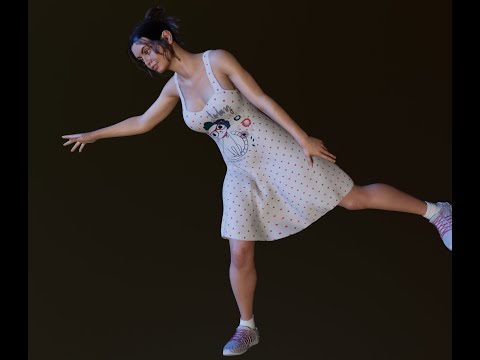
Spring Dynamics is pretty awesome! It DOES take some trial and error to get the settings right, but once you find the settings that work best for what you want you can save it as a preset and load it again later for other objects. It's a great script and can create some really cool movement effects! :) The script works with bones, so anything with bones can have Spring Dynamics added to it. I can see it being pretty useful for people who enjoy creating animations. :) I'll definitely be using it a lot in the future!
Daz Studio crashes on launch on macOS Big Sur beta 9The MacBook arrived yesterday and it had Catalina installed as expected. DS 4.12 runs great on it. Not sure if I have the courage to jump it to 4.14 just yet. LOL.
from what I have figured out by the first few posts of this thread 4.14 isnt meant to work on mac yet. I had it before I upgraded to Big Sur and it worked fine, but it had none of the new features so it wasn't worth the time it took to upgrade. Just saying. If I were you I'd wait a little bit longer before going to 4.14 give them a chance to hopefully get some of the new features working on mac and iron out some of the bugs.
Thanks for the info, Dreams of Reality! Yep, I'm sure I'll stick with 4.12 for a while until 4.14 matures a bit more.
I truly appreciate the feedback. :)
Lee
My pleasure Lee. I'm slowly learning that you need to be slow with upgrades... (I like to get upgrades) I don't know if you use public build, but it's a great way to test things out before updating your main DAZ. So if something goes wackaboo at leasts its not as big a loss. You loose one of two instead of one of one if you know what I mean? You can have both on one machine. That's what I used to do.
I'm still running 4.12.0.86 on the Mac Mini and now the MacBook Pro. I think my 12" Retina MacBook is on 4.12.0.1xx-something. After decades of work in software engineering and being a Mac owner for almost the same length of time, I've learned to not be the first one in the boat. At least not without a life jacket. LOL!
Thanks so much for the advice on running a public build while also keeping a stable release build. I might just try that out when things like Filament for Mac start appearing in the public builds. :)
Lee
I know right? A life jacket is totally needed when being the first in a boat lol! Though will that actualy save you from being burnt? lol. (I'm sorry I have quirky humour and this thread needed a little laugh)...
enjoy!
Daz Studio crashes on launch on macOS Big Sur beta 9The MacBook arrived yesterday and it had Catalina installed as expected. DS 4.12 runs great on it. Not sure if I have the courage to jump it to 4.14 just yet. LOL.
from what I have figured out by the first few posts of this thread 4.14 isnt meant to work on mac yet. I had it before I upgraded to Big Sur and it worked fine, but it had none of the new features so it wasn't worth the time it took to upgrade. Just saying. If I were you I'd wait a little bit longer before going to 4.14 give them a chance to hopefully get some of the new features working on mac and iron out some of the bugs.
Thanks for the info, Dreams of Reality! Yep, I'm sure I'll stick with 4.12 for a while until 4.14 matures a bit more.
I truly appreciate the feedback. :)
Lee
My pleasure Lee. I'm slowly learning that you need to be slow with upgrades... (I like to get upgrades) I don't know if you use public build, but it's a great way to test things out before updating your main DAZ. So if something goes wackaboo at leasts its not as big a loss. You loose one of two instead of one of one if you know what I mean? You can have both on one machine. That's what I used to do.
I'm still running 4.12.0.86 on the Mac Mini and now the MacBook Pro. I think my 12" Retina MacBook is on 4.12.0.1xx-something. After decades of work in software engineering and being a Mac owner for almost the same length of time, I've learned to not be the first one in the boat. At least not without a life jacket. LOL!
Thanks so much for the advice on running a public build while also keeping a stable release build. I might just try that out when things like Filament for Mac start appearing in the public builds. :)
Lee
Filament tutorials/shaders/lights?BTW Michael 4 birthday is in 2 days , November 20 , 12 years old
I converted M4 to Filament and some old clothing, adjusted the albedo and new reflectance settings ,I have so much animations for Animate2 to use with M4 and works so quick in real time
I did not used M4 since Genesis arrived to D|S , and yes it have separate nostrils material zone so it doesn't glow as much
I need to try my old textures for M4 and some morphs since this texture have so low resolution and horrible bump maps that are not usable at all
Filament tutorials/shaders/lights?That's a very good tip, thanks for sharing , I need it yesterday so badly and since spot light is only light right now that have correct shadows even better
I checked all options yesterday but skipped the Display lol
and regarding comments , no your can't get the image URL before you post, I tried but it only give me a thumbnail URL and not the actual one to the image
maybe there is other way but not sure.
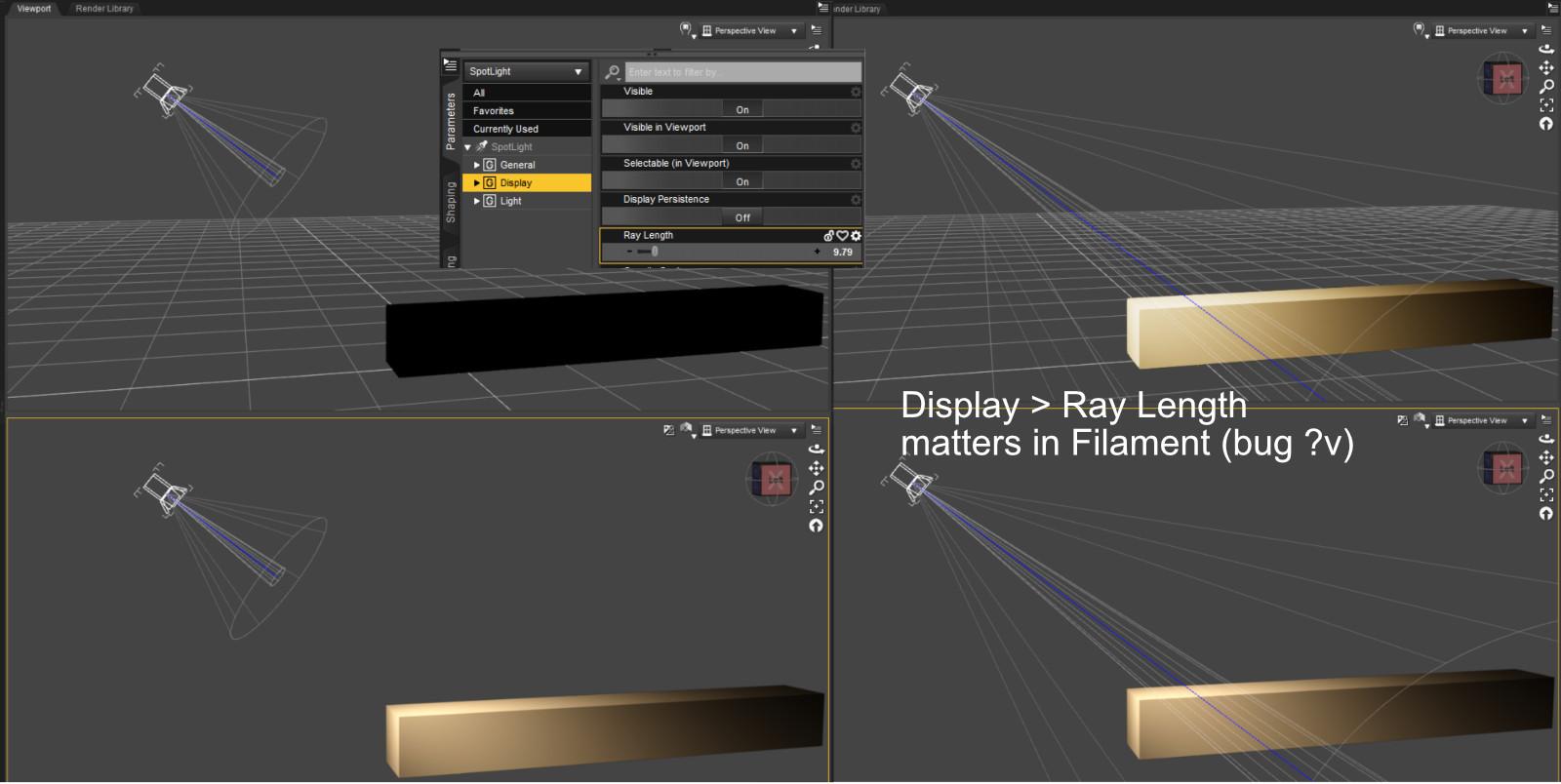
Quick tip since I haven't seen this mentioned elsewhere:
Spotlight properties > Display > Ray Length
This is "display" so it should only be how the cone is drawn in preview. Iray works like that (it does not care about ray length).
In Filament it makes a big difference, though. Light really stops at the end of the cone.
@MEC4D, thanks for your latest card. I've read and understood this before, but this really helps me *remember* it.
P.S. in the post editor, is there a way to get the URL of an attached photo, *before* you save the comment?
Filament! Whats it all about?Thanks so much for the replies both of which tweaked my limited knowledge. First is the fact that I have never involved myself in beta versions because I figured those were for really clever people and for testing the new stuff. It didnt occur to me that I could have both my current version and a beta version installed on my machine. I might have to do a bit of looking to find the beta version though...
The video is really interesting if a little above my pay scale, but it did make me think about how Filament works and also how I Ray works because I hardly ever bothered with that either. I watched the entire video which I dont often do so thats a mark of how valuable I found it...
Thanks very much...
Filament tutorials/shaders/lights?Quick tip since I haven't seen this mentioned elsewhere:
Spotlight properties > Display > Ray Length
This is "display" so it should only be how the cone is drawn in preview. Iray works like that (it does not care about ray length).
In Filament it makes a big difference, though. Light really stops at the end of the cone.
@MEC4D, thanks for your latest card. I've read and understood this before, but this really helps me *remember* it.
P.S. in the post editor, is there a way to get the URL of an attached photo, *before* you save the comment?
This is a very timely post. I ran into this very problem with spotlight ray length a couple days ago. I wonder if it is a bug or if it is an attempt to model fall off or something. Thanks for documenting it here.
Spring Dynamics! AWESOME!I added a dForce dress to the animation. Everything went pretty smoothly (other than the dress taking 50 minutes to simulate! lol oy! It rendered really fast with Filament once the simulation was done though.). I haven't tried combining both dForce AND Spring Dynamics on the same object. I'm not sure if it would work or not, one might override the other). I'll have to experiment with it later. :)
(Make sure your audio is low - Youtube added the soundtrack at a pretty loud volume. Next time I think I'll just add audio before uploading.)
that's *very* cool, 3Diva. wow--
:)
j
lol Thanks, J! :D
Filament tutorials/shaders/lights?Quick tip since I haven't seen this mentioned elsewhere:
Spotlight properties > Display > Ray Length
This is "display" so it should only be how the cone is drawn in preview. Iray works like that (it does not care about ray length).
In Filament it makes a big difference, though. Light really stops at the end of the cone.
@MEC4D, thanks for your latest card. I've read and understood this before, but this really helps me *remember* it.
P.S. in the post editor, is there a way to get the URL of an attached photo, *before* you save the comment?
Filament tutorials/shaders/lights?Very nice for Filament , I like the shadows from the Distant Light created the depth on the right plant , but not as much on the other , I tell you something going on with it
the colors are in harmony with each other , I hate when people put the fake green color plants , it take so much away
If you have an option on a tree or plant where you can add different albedo saturations it is ok to do it , you can use the base albedo to create fall leaves by just changing the HUE as I show you early even for flowers, you can make it slightly darker but not lighter as you already did.
and yes no matter what you do the building will not stop the light from passing through the buildings and it take so much away, the only option is to lowering the HDRI intensity and blast higher the Distant light But there is a risk that the surfaces will become like powdered with a dust , the side effect of spot and distant light in DS
you see in iray, the building reflects, corrects the light and blocks the backlights and creates overall better shading and deeper and finer "AO" than Filament .
I think you made the best of it possible so you should be happy about it .
It is very pleasant result
Spring Dynamics! AWESOME!I added a dForce dress to the animation. Everything went pretty smoothly (other than the dress taking 50 minutes to simulate! lol oy! It rendered really fast with Filament once the simulation was done though.). I haven't tried combining both dForce AND Spring Dynamics on the same object. I'm not sure if it would work or not, one might override the other). I'll have to experiment with it later. :)
(Make sure your audio is low - Youtube added the soundtrack at a pretty loud volume. Next time I think I'll just add audio before uploading.)
that's *very* cool, 3Diva. wow--
:)
j
AIUTO...CHI CONOSCE L’ITALIANO? PARTE DODICI
ma infatti ci stavo pensando seriamente a ùn pc Windows già da un po....me lo vorrei fare con l anno nuovo, casomai porto il mac al sistema operativo di Fabrica ci vado avanti un altro paio di mesi... e poi tanti saluti...buongiorno, dopo il regalino fatto dalla daz agli utenti mac sono arrivato al punto di prendere una decisione, ma vorrei un consiglio ....secondo voi per ripristinare Daz sarebbe piu opportuno passare a windows e quindi proprio ad un altro pc, o forse è piu conveniente per ora fare un semplice rollback del sistema operativo precedente. ma se facessi un rollback come faccio a salvare tutta la mia libreris di Daz?
Penso che i problemi di compatibilità siano dovuti al fatto che Daz 4.14 adesso supporta un nuovo motore di rendering, chiamato Filament!
Non ne capisco nulla di Mac, ma se vuoi farti un Windows sono felice di aiutare.
In quel caso gli basta cancella il DLL del nuovo viewport... Può provare, magari gli riesce di farlo partire... Ah, no... Dimenticavo che sul mec non puoi cancellare un singolo file di un programma perchè stanno tutti impacchettati un uno solo, enorme e inacessible. Se si corrompe un bit saluti tutta la suit.

Comunque, se vuoi un PC Windows, sono qui per consigliarti. Se hai dimestichezza con i componenti, ordinali da Amazon e assembla tu la macchina, altrimenti puoi optare per un preassemblato. HP offre degli ottimi PC pronti, se poi scegli un modello OMEN... beh, sei a posto!

Origin offre un "assemblatore" online dove puoi scegliere i componenti e loro ti inviano tutto montato e pronto all'uso, hanno una vasta gamma di scelte.
Filament! Whats it all about?I found this video intro to be very helpful for understanding Filament;
I especially like how it will help with lighting easier than now where I switch view between Texture and IRay.
I really think I'll be using it a lot. It keeps crashing on my TangoAlpha products where it would probably be most useful to me.
Daz 3D is part of

Connect
DAZ Productions, Inc.
7533 S Center View Ct #4664
West Jordan, UT 84084Licensing Agreement | Terms of Service | Privacy Policy | EULA
© 2026 Daz Productions Inc. All Rights Reserved.