-
best way to remove this clothing problem?
Also right clicking on the clothing brings up a menu where you can transfer active morphs, the shaping morphs for v4 will be transfered to the clothing, which might fix the problem.
DS Takes 7 minutes to load a sceneYeah that's a long time. What about clearing the scene first, or from a fresh start up? Just to take that out of the equation.If I clear the scene first then I have to add the time it take to accomplish that.
Note that the scene file size is not related to how much there is in the scene when loaded. There's a lot that isn't included in the scene files — texture files, object mesh files, morph data and more; all these are stored as separate files. The only thing you'll always find in the scene file are parameter settings for all the scene objects, and the file can be compressed, which shrinks it even more.
There does seem to be something off about those times, though; I used to have longish load times, but that was several program versions and a good few years ago. Just how big and complicated is the scene you're trying to load? That does affect load times, but I've not seen even complex scenes take as long as a minute to load, usually a lot less.
Have you updated to the new D|S4.11 that came out recently? Some people have reported Weird Stuff™ happening in comparison to the previous version 4.10.
I am running 4.11 and in this scene there are 3 genesis 2 characters, 1 genesis 8 female, and 1 genesis 3 male. The set has been converted to IRAY textures and I have reduced the texture size of he scene to a medium resolution. There are 4 emissive light and I am using an IRAY light prope to light the areas that are in shadow. Knowing that the scene file has a lot of pointers in it to various chaachters and textures would make the file smaller.
July, 2019 - Daz 3D New User Challenge - Portrait RenderingI have her more head on in a few of the drafts I'll try and transfer one to post but the lower lip bite seems best in profile the effect gets lost as the face is more forward towards the camera
I hadn't really caught the lip bite. I've tried that several times with no real success. I look forward to seeing what you do with it.
this is an earlier draft before adding some of the set pieces she's more facing the cam even this far sideways the overbite kind of gets blended in it only shows less the further her face turns towards the camera
DS Takes 7 minutes to load a sceneNote that the scene file size is not related to how much there is in the scene when loaded. There's a lot that isn't included in the scene files — texture files, object mesh files, morph data and more; all these are stored as separate files. The only thing you'll always find in the scene file are parameter settings for all the scene objects, and the file can be compressed, which shrinks it even more.
There does seem to be something off about those times, though; I used to have longish load times, but that was several program versions and a good few years ago. Just how big and complicated is the scene you're trying to load? That does affect load times, but I've not seen even complex scenes take as long as a minute to load, usually a lot less.
Have you updated to the new D|S4.11 that came out recently? Some people have reported Weird Stuff™ happening in comparison to the previous version 4.10.
is ancient anubis a head morph or geografts?says its a full body hd morph
is ancient anubis a head morph or geografts?The head is a morph "full body" includes the head in my book ;)
July, 2019 - Daz 3D New User Challenge - Portrait RenderingAs a result of the kind suggestions made by Kismet2012 and Ariochsnowpaw, I have updated the two renders, as attached.
The 'Contemplating the Ruins' image went reasonably well. The cornea bulge worked well. I softened the shadows by changing the sun size from 4 to 16, and tweaked the drape of the figure's hair. I kept the sun as sun rather than mesh because, well, I can understand its positioning more easily. I like the soft, low angle of the sun at high latitudes, so dial in a date of 21 June, latitude 80 to 85 degrees north, 10 pm local time, then spin the dome to get the light from the right direction. If I want less yellow light, I simply change the time closer to mid-day.
The 'To the Wok Festival' was a bit more of a problem. The clothes were for G3F, the hair was for G3F, so, as the character base had G3 & G8 options, I originally made it G3F. G3F has no cornea bulge morph. So, I put in a tiny spotlight pointing at each eye with a luminance of 15 lux, and made the eye surface as reflective as I could. The figure's right eye reflection was out of shot for the camera. The left eye, well, it's not quite right. The iris rather than the cornea is doing the reflection. Consequently there is no reflection at the pupil. I will have to try to correct this, and when I do so, I must remember to hide the other figure. Her hair adds 3 minutes to the computer's time thinking about starting a spot render. For interest, I added a full colour rendered version, which confirms my belief that a monochrome render was the best option for this scene. I stopped the render at 38%, by which time it gives a good idea of the finished render.
Regards,
Richard
Duplicate Formulas & extra Morphs installed and in characters - how to clean up?I started getting the "Duplicate Formulas found in files" error, and it's killing me because scenes take forever to load, and the killer that the pop-up breaks batch rendering.
Looking in the logs I see the source of the error is this particular Genesis 3 Morph directory.
I think at one point I messed up installing or saving a freebie character morph. It duplicated ALL the Genesis 3 morphs and is over 1 GB in size.
I want to clean this up, but am scratching my head how to do it. If I delete the directory, I see which morphs fail to load. I put the files back, and copied the values from those morphs. I deleted the files again, then dialed the morphs back (except fbmvictoria7hdlv4, I couldn't figure out which one that was).
Loading the character after deleting the files. The offending morph directory is below, p3d tara:
data/daz 3d/genesis 3/female/morphs/p3design/p3d tara/2 move side2side opposite.dsf
data/daz 3d/genesis 3/female/morphs/p3design/p3d tara/beauty toe hd.dsf
data/daz 3d/genesis 3/female/morphs/p3design/p3d tara/beauty toe.dsf
data/daz 3d/genesis 3/female/morphs/p3design/p3d tara/bodythin.dsf
data/daz 3d/genesis 3/female/morphs/p3design/p3d tara/fbmthin.dsf
data/daz 3d/genesis 3/female/morphs/p3design/p3d tara/fbmvictoria7hdlv4.dsf
data/daz 3d/genesis 3/female/morphs/p3design/p3d tara/pbmlunenailssquare.dsf
data/daz 3d/genesis 3/female/morphs/p3design/p3d tara/pbmwaistwidth.dsf
I saved it (in the state with offending morph files gone), loaded up on the other computer and still get the same error.
Then with the offending files back I tried saving the character uncompressed so I could look at the dsf file in notepad. I don't see the morph file names in there at all.
How can I clean this out of my characters so I can nuke the files and then hopefully get rid of the error too?
ETA: Thinking about it, I did leave Daz Studio open when deleting/restoring the offending Morph files. Only opened/closed the character file. That seems like a mistake.
is ancient anubis a head morph or geografts?it says full body morph but doesn't mention the kitteh head.
thanks

https://www.daz3d.com/ancient-anubis-for-genesis-8-male
 Lara Croft face morph for G3F/G8F?
I really wanted to ask if anyone skilled or experienced could take the time to have a go at sculpting a Lara Croft face morph when they have some free time which is NOT the Angelina Jolie version but the older version from Lara's games exactly in the picture shown with this post (I asked the same request years ago too for V4) only this time I am wanting it for G3F/G8F I mean G8F mainly but for both would be greatly appreciated. I had a go myself but I am not much good at it generally speaking :( I found it hard to get the way I wanted it to.
Animated / Rigged SubD exportcire992_5c76c5ca30 I have been unable to replicate your steps. 3DS Max crashes when I tried to import the HD genesis mesh. I am a little unclear on Stage 1:
Using the transfer tool, what is the source and what is the target? I have tried this method then result is that the imported object after the transfer is all kinds of messed up.
Why, after all this time, does GoZ still not work properly in DS?GoZ, the DAZ3d plugin for sending objects from DS to the professional modelling program ZBrush, has been part of DS for a very long time. So why is it that GoZ still does not work properly?
I'm using DS4.11.0.383 and whenever I send an object or figure from DS to ZB using GoZ, I have to check that it will correctly return any shape changes as a morph. I make no changes to the topology. Frequently, GoZ decides not to return the change in shape back to DS; instead it does nothing. Once that happens, the only way I have found of fixing the problem is to uninstall DS, delete the DS package in DIM and then download it again and reinstall it. This always works, it restores GoZ's ability to interact properly between DS and ZB. However, this situation often does not last long and GoZ soon fails again requiring DS to be uninstalled and reinstalled again.
This bug has been reported many times by various people, over a long period of time. It seems like something in DS is being corrupted and requires a fresh install. So, why haven't DAZ3d fixed the problem?
If anyone knows a better fix than the one I'm using, I'd be happy to know.
My stystem FYI; APCI x64 based PC, Win 10, 64 bit, i7-8700K CPU @ 3.7GHz, dual Nvidia GeForce GTX 1080 Ti video cards, 32 GB DDR4 RAM.
This GoZ problem existed in my previous systems as well.
How do you perserve/maintain volume when rotating a rigged tube/cord?So long as your weight mapping is optimal, it sounds like this is where Joint Controlled Morphs (JCMs) come into play. As is reasonably clear from the name, they are morphs that are controlled by the rotation of a joint. So you create a morph that fixes the mesh with the joint bent at the maximum angle, and then configure it to be applied proportionately as the joint goes from no bend to fully bent. There are some resources online, including if I recall some Youtube videos by someone from Daz called Josh Darling. Sorry, I don't have any links to hand. There are many JCMs on products you buy in the store and on the free base figures which can be useful to study how they should look when set up correctly. In the Parameters pane, choose to Show Hidden Properties and then enter '*JCM*' in the search field to see a long list. In the Parameter Settings, under Controllers you can see what the morph is controlled by as 'ERC' (enhanced remote control?) links. Some are also only applied when a certain other morph is also applied e.g. a full body morph.
I have made a handful but don't have the process at my fingertips. If you are familiar with Blender, they are conceptually pretty much like shape keys controlled by a driver.
July, 2019 - Daz 3D New User Challenge - Portrait RenderingI have her more head on in a few of the drafts I'll try and transfer one to post but the lower lip bite seems best in profile the effect gets lost as the face is more forward towards the camera
I hadn't really caught the lip bite. I've tried that several times with no real success. I look forward to seeing what you do with it.
July, 2019 - Daz 3D New User Challenge - Portrait RenderingI haven't been as helpful as I would like to be the last couple months but I promised myself I would really try to come up with useful or at least alternative suggestions this month.
I've benefited so much from all of yours.
I had no idea this would get so huge so quickly. But it did.
So....I just spent hours going through all the entries with a fine tooth comb and racking my brain for suggestion I might make (many of which might not be good)
Very long post cuz you guys are over achievers.
Ok, on to looking more closely at submissions.
@Dragoneyes002 - That is such a sweet image. I want to leave it alone and just enjoy it but I’m supposed to try to give helpful criticism. A slight rotation of the camera would give us a little more of her face OR moving the flowers slightly to the fore gourd an having her twist slightly at the waist would accomplish the same thing. It would give a little more dynamic. The 2 hairballs at the from are a bit wispy. If you go to your surfaces tab and select just those two you can increase the cutout opacity just a tiny bit (probably set to 1.0 and I’d try 1.15) will make them a little stronger.
You guys are killing me here. It has only been 6 days in this challenge and I promised that because I was busy with work last month that I’d try to be more helpful this month. But this is a lot of stuff and it’s all really good! I Don’t envy Kismet right now.
@Visulmag - In image 2 it would be better if the pupils were visible. I love the peach fuzz. I want that kind of realistic bump mapping for the pros on my characters. It really looks photographic. I like the angle and the lighting on the second image the most. I don’t really have anything to offer.
I really think there are so many great submissions this challenge.
BEST
FORUM
EVER!!!!!
I have her more head on in a few of the drafts I'll try and transfer one to post but the lower lip bite seems best in profile the effect gets lost as the face is more forward towards the camera
Replacing computer - Moving DAZ, install manager, etc - Hoping for instructions or how-to tutorial?Hi
I'm finally repacing my old 16GB Win8.1 desktop computer with a new 96GB Win 10 desktop. I've set up the 11TB of hard drives with partitions, drive letters, and drive names identical to the old one. I have restored all files to every drive in exactly the same location as on the old computer. Except for Drive C. All my DS progs, files, assets, etc are now restored on drive P exactly as the old one. What con fig files, folders, etc, do I need to transfer from the old C: backup to the new C: drive for DS and Install Manager, etc, all to retain the same configurations, setups, folder locations, etc. I don't want to have to re-config IM, particularly, as I dfon't want to have to re-install my thousands of purchased DS assets all over again.
My questions is, what DAZ-associated folders and files are installed and maintained by DAZ on the C: drive that I will need to copy over to the same locations on the new C: drive so all DAZ programs will continue to function as previously without actually re-installing?
dForce Hair (as well as strand based hair and the strand based hair editor) in public betaThank you! lol Sadly though I built them on Base Genesis 8 Female and I think in order to sell them I'd have to start from scratch and build them onto a skullcap. I don't think there is a way to transfer them to a skullcap so I'll probably have to start over and redo them all from scratch if I want to sell them.
I converted a Strand-Based Hair to a figure, and after that I was able to autofit it onto a different character. If I remember correctly, I built it on a G8M, and it autofit perfectly onto a G8F.
Omg diva please sell these or let us know the settings I’m dying for more Afro hair styles!!
I can offer you some pointers:
1) In the Style Curve Options, lower segment length (I usually go as low as possible). Also lower the interpolation segment length to taste.

2) Using the Curl Curves tool, curl the hair as far as you can in either direction. This will cause the hair to curl back in on itself.
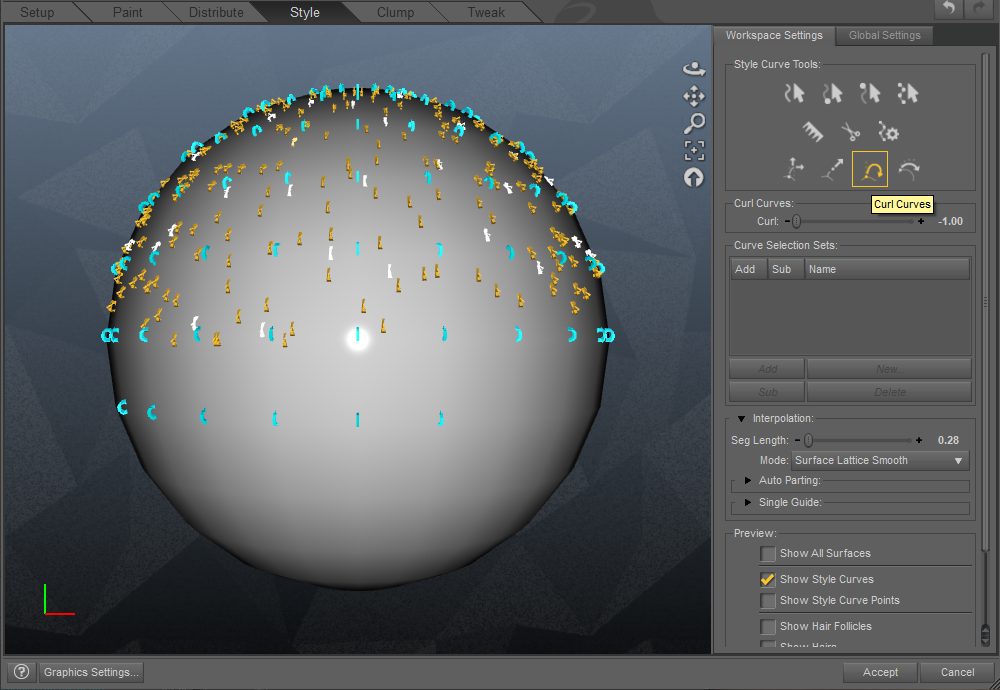
3) Using the Surface Attract Curves tool, pull the hair out slightly. This stands the hairs up without removing all their curl.
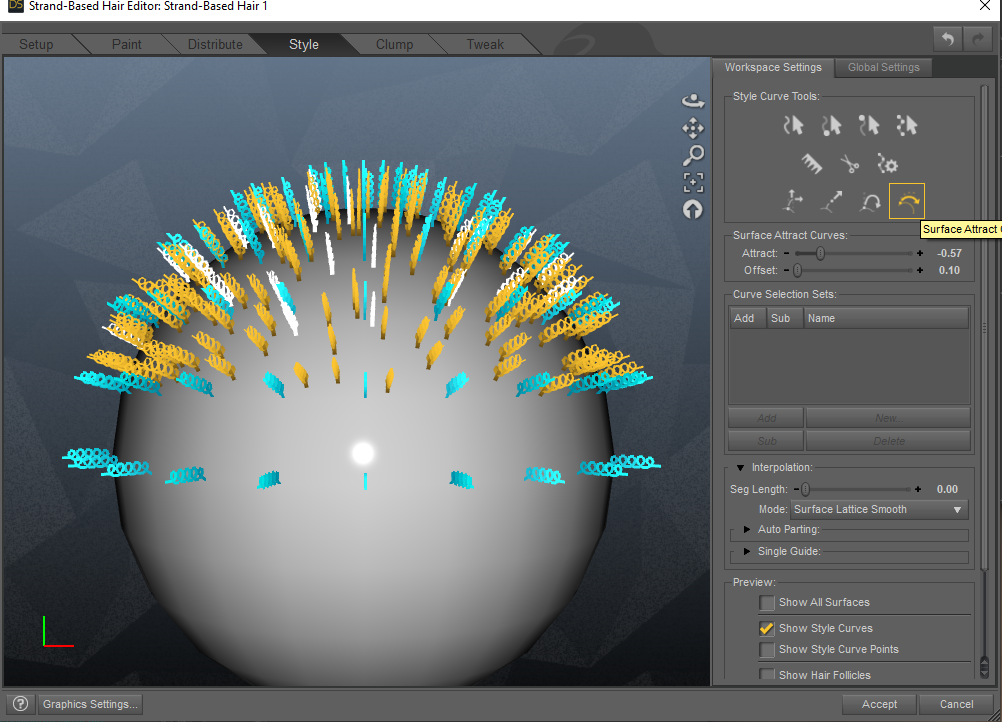
You can repeat steps 2 and 3 if you like. After that, I recommend keeping clumping fairly low (unless the particular style demands it), and add a very, VERY small amount of frizz for more body.
Favourite Genesis 2 CharactersMichael 6, Lee 6, Girl 6
They polish up really well for Iray, imo. :) Here's Michael 6 with some minor body shape adjustments and some skin settings tweaks.
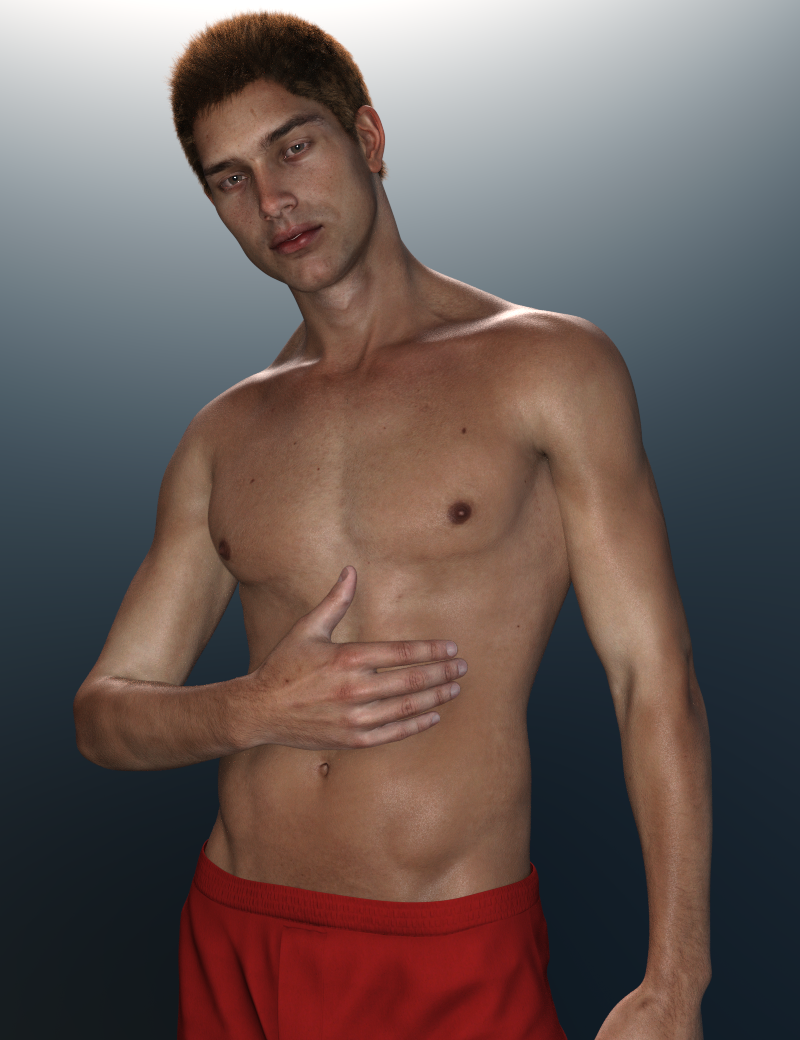
His skin textures and morph are really quite good. Once the skin settings are updated with some Iray tweaks, I think he looks great!

Lee 6 also looks outstanding! And Girl 6 is quite adorable. So I think those are my top three Genesis 2 characters.
dForce Hair (as well as strand based hair and the strand based hair editor) in public betaAgreed. Diva, honey child.. you need to put these in the store!
Thank you! lol Sadly though I built them on Base Genesis 8 Female and I think in order to sell them I'd have to start from scratch and build them onto a skullcap. I don't think there is a way to transfer them to a skullcap so I'll probably have to start over and redo them all from scratch if I want to sell them.
Exporting a rigged prop from Daz to Blender and backGlad you solved your problem. I hadn't thought about using the Transfer Utility in that way. I suspect that the Daz Studio FBX importer does not understand the way a mesh is 'bound' to the armature in Blender via tha armature modifier, which I guess can't be exported like the others can be.
Daz 3D is part of

Connect
DAZ Productions, Inc.
7533 S Center View Ct #4664
West Jordan, UT 84084Licensing Agreement | Terms of Service | Privacy Policy | EULA
© 2026 Daz Productions Inc. All Rights Reserved.