-
Lara Croft face morph for G3F/G8F?
I really wanted to ask if anyone skilled or experienced could take the time to have a go at sculpting a Lara Croft face morph when they have some free time which is NOT the Angelina Jolie version but the older version from Lara's games exactly in the picture shown with this post (I asked the same request years ago too for V4) only this time I am wanting it for G3F/G8F I mean G8F mainly but for both would be greatly appreciated. I had a go myself but I am not much good at it generally speaking :( I found it hard to get the way I wanted it to.
Hi , I'm working on a Lara Croft character, That looks like what you want, head and body, but she is going to be Called Laura for Copyright reasons obviously, she is going to be out maybe next month


 Genetics as morphs? (Morphs as genetics??)
So I have a little project I'd like to do. Essentially, I want to model a family tree for a broad-sweeping Game of Thrones-style story I've been writing, and I was hoping to use Daz to do it. The thing is, I'm not content to merely generate some characters, give them appropriate hair and eye colors, and call it a day. I want them to, you know, resemble one another. To that end, here's the topic I'd like to raise for discussion:
On the matter of modeling genetics from one character to another, does anyone have any particular suggestions? My initial thought was to copy the morphs from one figure to the next and tweak them slightly, but the thing is, that doesn't account for the opposite gender parent's genes. It's fine for G8F to G8F or G8M to G8M, but I can't think of an easy way to transfer morph targets between the figures. In other words, short of a product that does this (which I'm about 99.99999% sure doesn't exist), does anyone with more in-depth Daz experience than myself have any suggestions for ways I might go about this without burning out my eyes scrolling through dozens of active morphs and finding them on the next model?Renderosity owns Poser?The free will dial script does this 80% compatibility already. So why are you people not using that solution?

Bloody Lovely!! Assuming that you dont care for the FREE will dial script,
Willdial did a remarkable job developing a workaround that does succeed in transferring the Genesis 3 / 8 figure into Poser 11 (although you can try it with Poser 2014, there are numerous issues with the expressions not working correctly.)
But the workaround is not as simple as running a script. It's a long, detailed process that requires quite a bit of work and fiddling around with .NET versions and finding the right version of DSON, as well as requiring you to install Daz Studio on your computer so you can export the various meshes and their companion files. Suffice to say, I have gone through this process to use Genesis 3 in Poser Pro 11 and I confidently say that it doesn't provide anywhere near 80% compatibility/functionality in Poser. More like 50% or so.
Plus, every time you want to use clothing, you have to export it from Daz Studio. One. Item. At. A. Time. And even then there's no guarantee that DSON will transfer the clothing correctly (shoes and hair are notorious for having problems).
So, I will summarize by answering your question: A lot of us don't use Willdial's transfer process because it's complicated and doesn't always work. Plus, once you have moved the G3/8 figure into Poser you still don't have any clothes, poses or expressions to use with it. So, although it is a remarkable workaround (and he is a top-notch guy for creating it and offering it for free), it is just not the same thing as being able to load the figure and the clothing/pose/expression assets directly from the Poser library.
As I've said before, CONTENT IS KING. For future versions of Poser to succeed, the software needs to let us Poser users access the vast library of content out there that has been developed for the various Genesis figures.
Morphing Genesis to fit an .obj mesh
I really need a help on how to rig a morph, pls help if you can.Yes, you'd use Morph Loader pro or the GoZ bridge (File>Send to ZBrush) to load the mesh as a morph - but make sure that you set the resolution to Base before exporting the OBJ from DS, and that you either don't divide the mesh in ZBrush or that you reset the division to 0 before going back to DS (if you do divide the mesh in ZBrush make sure you set the SMT button to off or things like the fingers and teeth will be distorted).
You may, depending on the morph, need to adjust the bones to the shape to get it to pose nicely. Set your new morph to 1 and try posing the figure - especially the areas that have had their "along the bone" dimension changed or the origin of the bone moved (for example, there's a fair chance the legs will be shorter than default). If there are problems, still with the morph set to 1, go to Edit>Figure>Rigging>Adjust Rigging to Shape. If that fixes the issue you will want to link the changes in the rigging to the morph, so they are triggered automatically. Remove any posing, leaving just the morph and the rigging changes (Edit>Figure>Zero>Zero Figure Pose), then in the Parameters pane right-click and select Edit Mode (if it isn't already checked), then right-click on the slider for your morph and select ERC Freeze.... In the dialogue that opens the morph should be listed at the top as the controller, and in the scrolling list at the bottom there should be a longish list of joint centres (if there's anything else, uncheck it). Assuming all is well click Accept, which will rest the base rigging and link the changes to the morph. Make sure everything works, then zero your morph and save it as a morph asset (File>Save as>Support Assets>Morph Asset)
Hylas' corner
Don't love how one boob catches the light and the other not, but I don't have the patience to fix it XD
Do love how her skin and make-up came out!Freebie credits:
Morph by bu_es: https://www.renderosity.com/mod/freestuff/aminata-for-g8f-monique-8/79842
Circlet by squarepog3d: https://www.renderosity.com/mod/freestuff/fantasy-amazon-bundle-for-g8f---100-free/79046
Shawl by anjeli93: https://www.renderosity.com/mod/freestuff/shawl-for-a93-dforce-salwar-kameez-also-standalone-/80789
Petals by Sannzi: http://sanzisannzi.web.fc2.com/sub3.html
Pose converter by Agent Unawares: https://www.deviantart.com/agentunawares/art/G3F-to-G8F-World-s-Greatest-Pose-Converter-709591348Creating Face Morphs from Existing OBJAhoy,
I've been messing around with a machine learning project called PRNet (https://github.com/YadiraF/PRNet) that can create 3d models from photos of people's faces. This seems like a great tool for creating Daz characters, especially likenesses. So here's a quick example.
Take this picture of Alison Brie: http://sfwallpaper.com/images/alison-brie-wallpaper-12.jpg
Feed it into the project and you get an OBJ file that looks like this: https://www.daz3d.com/forums/uploads/FileUpload/89/506115981453a8421ff8e9fc0ecaf1.png
It's essentially a mask (like the kind you'd wear to an halloween party) that has the broad geometric characteristics of the face in the source image. Great! And while it's pretty low res and kinda bumpy, it's actually really easy to apply a Blender smoothing modifier, then subsurf the whole thing to make it pretty reasonable looking.It even outputs a face texture that's not stellar, but could provide a userful starting place if the lighting in the original shot is fairly even.
My question is, what's the best way to bring this model into Daz and use it to morph a character's face? Would I need ZBrush or something like it to accomplish this task?
Thanks.
How do you perserve/maintain volume when rotating a rigged tube/cord?Without something like dual quaternion skinning that can maintain mesh volume better than linear skinning, the best bet (probably fastest) is to simply pose your asset and create a correction morph after you have it in its final pose. Of course this assumes access to Blender (get 2.8) or Zbrush or some other external application where you can edit the mesh directly.
Strange offset when fitting a rigged attachment in Genesis 3Teen Josie et al are shapes/morphs - any bones that match the base Genesis 3 female will inherit the adjustments from the base figure but custom bones won't and will need to be adjusted (and their centres moved and possibly their alignment) to match, then have the changes linked to the morph slider for the shape in the same way as the adjustments on the base figure.
Breast movement...Yeah, I have lots and lots of similar morphs and have been buying them again for each successive generation. I'm guessing that the inclusion of soft body dynamics would make such morph packages redundant
But trust me for still image morphs nothing will soon replace custom sculpting in a modeling package.
Zev0 can rest easy then. :)
Breast movement...Yeah, I have lots and lots of similar morphs and have been buying them again for each successive generation. I'm guessing that the inclusion of soft body dynamics would make such morph packages redundant
No not really, because the majority of Daz users Do not render animations and will balk at having to run a soft body dynamic simulation for still render, when you can just dial in a "belly hang" or "Love handle" morph to depict some character in a poor state of fitness etc,or a "buttocks squish" morph for a person sitting on a bench in a bikini.
Also some people may prefer a quick "breast flatten" morph to depict a character in a very tight shirt.
I doubt they would be pleased to learn they will have to lay the figure on its back and wait for gravity and dynamics to flatten the breasts.
because we could just animate a figure with applied physics and save individual scene frames as character presets or similar?I have been using rigid body soft body and fluid solves for over a decade ,in other packages, they are great for animated effects
but not so much for creating a specific static state as there is too much trial an error to capture the mesh in a specific shapePoser has had soft body dynamics for several years.
But trust me for still image morphs nothing will soon replace custom sculpting in a modeling package.
Renderosity owns Poser?wolf got it complete wrong on why content developers are using DAZ Studio, the figures facilitated the switch over, but really it's the ease of use in developing content is the main point
Terrence... buddy.. in this we are in complete agreement.Perhaps you missed my comment back on page 5 of the thread where I wrote:
"Now they need Flagship NATIVE poser figures, of high quality, and the poser equivalent of the DS transfer utility
,for easy clothing rigging ,and other UNIFORM STANDARDS for poser native content creation
to attract Developers."Not the same thing, standards aren't the same as ease of use.
Renderosity owns Poser?wolf got it complete wrong on why content developers are using DAZ Studio, the figures facilitated the switch over, but really it's the ease of use in developing content is the main point
Terrence... buddy.. in this we are in complete agreement.Perhaps you missed my comment back on page 5 of the thread where I wrote:
"Now they need Flagship NATIVE poser figures, of high quality, and the poser equivalent of the DS transfer utility
,for easy clothing rigging ,and other UNIFORM STANDARDS for poser native content creation
to attract Developers."Breast movement...Even more disturbing is the fact that I have just bought a product and now two of you are telling me that it doesn't work.
It still adds another level of complexity when the ideal would be to have soft body physics as part of DAZ Studio ... let us pray for that day
Could be sooner than you think as the foundation is already present in Daz studio with attenuated weight maps for Dforce clothing
The ability to paint an attenuated weightmap to define the parts of the mesh affect by the physics engine is how the soft bodies work for us in Iclone, Lightwave and C4D.Still until Daz studio gets true Soft body physics, faking it with animated morphs is the only option and Cycler makes it easier
than setting key frame for the over 120 morphs I have for the G2 female's Chest area aloneYeah, I have lots and lots of similar morphs and have been buying them again for each successive generation. I'm guessing that the inclusion of soft body dynamics would make such morph packages redundant because we could just animate a figure with applied physics and save individual scene frames as character presets or similar? I'm sure that Zev0 would find more opportunities arising from the new features, however.
Animating Stage CurtainsWendy, are you talking about doing that in Dforce? If so does it need to be are DForce specific product. Like I said above I have many stage curtain products such as Asian rustic theater and a few others, but I know they came out before DForce was introduced.
well if you have one that has a parting morph thats ideal
just grab the geometry editor to isolate the top for the pinned bit create a new surface
yes Dforce
Animating Stage Curtainsif you make the top bit a separate surface it can have simulation dialed to zero in the surface and just open via a morph while the bottom part gathers, folds and sways with the simulation
Identify Character in Promo please.I'm pretty sure the texture is Hollie, and I also think the morph is hers, just slightly modified. Eyes also seem to be from a different character. Here's a comparison:
...Looks like her to me.
Breast movement...So I don't see any gravity effects on the soft body or bounce damping, etc. - the things that made the freebie Breast Bounce script so realistic and what I was hoping for from the BreastJig script from Rendo.
Right.. I only used ONE Default Sine wave trigonometric
function( out of 15) of the basic included pectoral up & down morph in that brief preview at the end of my facial animation tutorial.Cycler accesses every morph installed for auto animation.
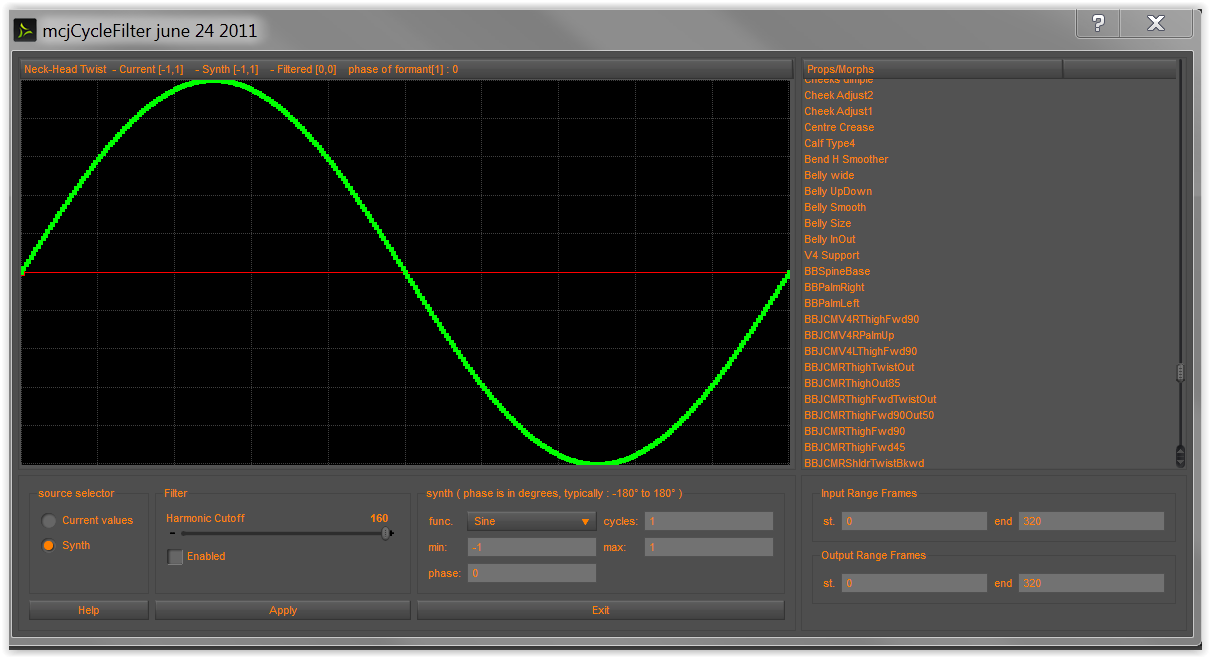
Those scripts, you speak of ,are NOT calculating physics/gravity because AFAIK the only thing that truly does that in Daz studio is D-force,based on weight maps.
Like we have in Maxon C4D's jiggle deformer
(sorry ladies)

When I create my full Cycler tutorial, I be will using my many
natural gravity&Squish morphs not only on "Boobs" but bellies and love handles,jowls, cheek trembling as well as hair and clothing peices that have movement &wind morphs .
What good are bouncing boobs if the hair is as stiff as wraught iron or fiber mesh based that takes forever to render.??
Also cycler can be used to auto rotate Fan blades ,vehicle wheels and other prop parametersas well as visual effects like a person phasing between morphed states from ORC to human or minotaur to elf etc etc.BTW I too have the Breast jig script from rendo, and it does not work for me with G1,2,3,8 either
 so buyer beware.Issues with morphs projected on to geografts
The option to keep both the bones of the Source and the Target figure is called Merge Hierarchies. Remove Unused Bones will remove those that have no Weight Map I think, sometimes refered to as ghost bones.
But you propably don't want to have all bones of the source figure.
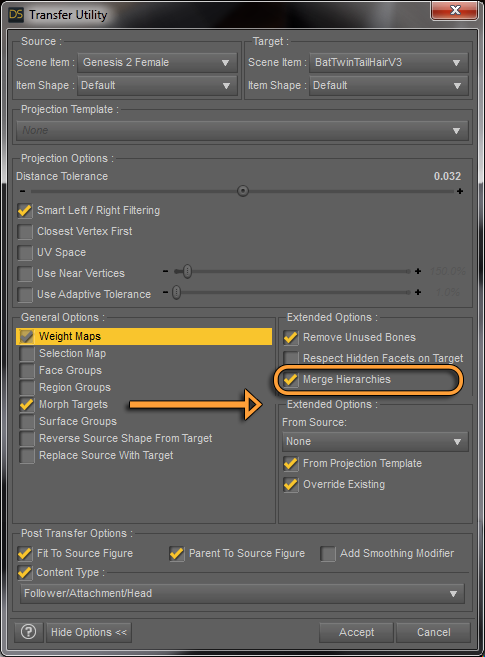
In my post here: Easiest way to rig a new character
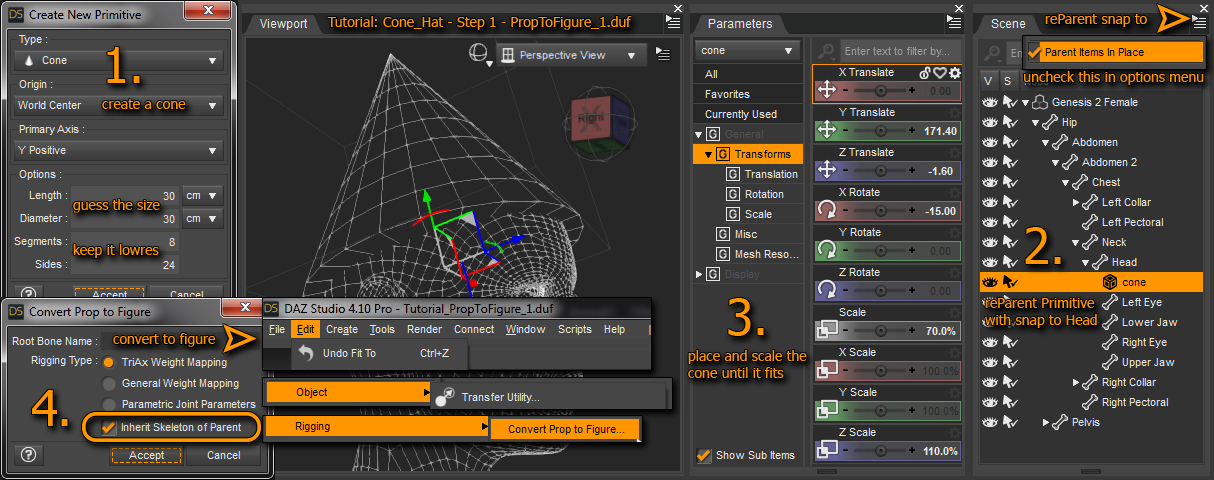
I was showing the Convert Prop To Figure trick by parenting the prop to a figure bone and in the dialog you can choose Inherit Skeleton of Parent to create all bones neseccary starting from the hip.
You could use a simple primitive, parent it to the hand left or right, then go to Edit>Object>Rigging>Convert Prop To Figure and you have your rigging. Now you could combine this with the Transfer Utility with Merge Hierarchies with your rigged robot hand figure. With this you would have the genesis figure rigging and your robot hand rigging in the same figure. Next in the Joint Editor you can re-parent the robot hand rigging to the Forearm Twist bone then it should follow all movements correctly.
For demonstration purposes I once made this simple hand hook prosthesis. It is technicaly a GeoGraft but not merged to the figure. I'm only hiding the hand by the Auto-Hide group of the geograft.
In the attached screenshot you can see the hand hook prosthesis figure hierarchy attatches to the Right Forearm Twist bone and even got extra rigging so I can scale, position, and bend those few hook segements.
As I tested further by turning up Height and Heavy on the G3M figure to make hiom fat and short I saw the issues you may also have. The shape got distorted and the additional bones in the prosthesis moved away from the arm to the right somehow.
I tried to fix it with various methods: in the Geometry Editor I assigned almost all of the prosthesis to the Rigid group. I also added a edge-loop as References. In Vertex Selection mode I also opened up the the Rigidity Editor and added the Right Forearm Twist bone as Reference and Transform Bone.
Then I added the Height morph as Favourit, selected all geometry and used Cleared Selected Deltas from Favourits to get rid of the mesh moving in random directions.
Next I also made a Rigid Weight Map in the Node Weight Map Editor, unfitted the geograft, Edit>Figure>Clear Generated Morphs and fit the geograft again to get new morphs generated.
Finaly I also tried with the geograft unfitted and the Height morph dialed up Adjust Rigging to Shape in the Joint Editor, this wasn't working eigther. So I went to the Hierarchy Editor and deleted all Bone Adjustments from the Sub-Components, but still no luck. My only idea to make this work is to position the prosthesis bones with the universial tool and "bake" the position into the Height morph. This would be an unsatisfying workaround becasue I thought conforming figures would follow the rigging of the conformer figure even if the height does change.
Animating Stage CurtainsEbergerly, I actually want the effect that the curtains open uniformly as the morph would provide, but I just want the curtains to behave like cloth as they are being opened. I know that VWD has an "Animate by host setting" so that portions of the cloth can be left alone in VWD but I just don't know how to set it up.
Strange offset when fitting a rigged attachment in Genesis 3Your images aren 'tshowing, but I would guess that you need to adjust the joint centres on some customn bones (i.e. bones not in the base figure) and link that to the morph
It's not a morph, it's a pose preset. Also, I was really careful to align each bone perfectly within its face group.
Images are showing for me, but I'll attach them here.
Daz 3D is part of

Connect
DAZ Productions, Inc.
7533 S Center View Ct #4664
West Jordan, UT 84084Licensing Agreement | Terms of Service | Privacy Policy | EULA
© 2026 Daz Productions Inc. All Rights Reserved.