-
July, 2019 - Daz 3D New User Challenge - Portrait Rendering
OK, since I like portraits and I love lights, I present a second submission - if organizators allows -
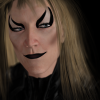
Little Devil
This is the same character than my previous submission, but with a different ligthing; I wanted a high contrast / low light with a bright-ish simple background.
Again, character is G8M - many many morph packs - Growing Up - Altern8 with Luca Skin . Lights is a custom setup made by me on hexagon + emissives.
Hope you enjoy, thanks for watching!
can i convert genesis 2 model to genesis 8 modelI'm working on a morph using Lord of the Bears Transformed HD for Genesis 2 Male byGhostofMacbeth
is there a way to convert genesis 2 model to genesis 8 model
How to remove a piece of geometry from a prop?There's something I use when I need to edit complex props or elements that are inside figures and I can't delete the mesh because it has a bone or morph linked to it:
On gemometry editor, select the part of the mesh you don't want, right click, Geometry assignment, create surface from selected, name the new texture as transparent, go to the surfaces tab and just let it transparent.I use this rendering on 3Delight, I'm not sure if it works the same on iRay.
How can I load a head onto a character without distorting the neck?-Thank you both! (=
Richard, it worked like a charm after I adjusted the height in DAZ, then saving the morph like you said.
-I even tried adjusting the morph in Blender, and it worked fine too! -thanks again ^^Trying to understand namespretty well
Genesis 8 F is base figure model for that generation of genesis female
She then has quite a few main characters,- Victoria 8
- Olympia 8
- Stephanie 8
- Monique 8
- Teen Josie 8
- Charlotte 8
- Sakura 8
- Karyssa 8
- Alexandra 8
- Aiko 8 to name just a few. these are all different purpose built shapes exploring different ethnicities, body shapes and variations etc which are released at roughhly monthly intervals. On release days you will find a base character, a starter bundle and a pro bundle, which include other products. If you want you character to be "Anatomically correct" then you need to buy the pro bundle for at least one of the adult characters (M&F) as genitalia are only released in the adult pro bundles.
there are also morph packs, these enable you to dial in differences to either the base figure or the characters, and desighn your own unique look
Then there are named extension packs such as https://www.daz3d.com/ry-tessa-for-victoria-8 ; which is optimised to be used with V8 but can actually be used on the base figure but won't look exactly the same.
Have I confused you?
Not at all! Thank you so much! :D I'm mostly insterested in working the models and not full 3D scenes so this is perfect advice.
One more quick question though... I found Victoria and Karysa but only because I had seen them before in tutorials. If I want to search for characters is here an easier way? I say this because Karyssa for example is not on the "figure" list in filters... :)
And if you want only the main characters with bundles: https://www.daz3d.com/genesis-8-core-figures
Trying to understand namespretty well
Genesis 8 F is base figure model for that generation of genesis female
She then has quite a few main characters,- Victoria 8
- Olympia 8
- Stephanie 8
- Monique 8
- Teen Josie 8
- Charlotte 8
- Sakura 8
- Karyssa 8
- Alexandra 8
- Aiko 8 to name just a few. these are all different purpose built shapes exploring different ethnicities, body shapes and variations etc which are released at roughhly monthly intervals. On release days you will find a base character, a starter bundle and a pro bundle, which include other products. If you want you character to be "Anatomically correct" then you need to buy the pro bundle for at least one of the adult characters (M&F) as genitalia are only released in the adult pro bundles.
there are also morph packs, these enable you to dial in differences to either the base figure or the characters, and desighn your own unique look
Then there are named extension packs such as https://www.daz3d.com/ry-tessa-for-victoria-8 ; which is optimised to be used with V8 but can actually be used on the base figure but won't look exactly the same.
Have I confused you?
Not at all! Thank you so much! :D I'm mostly insterested in working the models and not full 3D scenes so this is perfect advice.
One more quick question though... I found Victoria and Karysa but only because I had seen them before in tutorials. If I want to search for characters is here an easier way? I say this because Karyssa for example is not on the "figure" list in filters... :)
Trying to understand namesG8F would be the base, and everything else would be morphs& extra skins (a.k.a. "characters"). There are morph packs without skins, that usually add extra shapes to individualize your figure.
The Victoria ( etc that chohole mentioned above) are "official" characaters/owned by DAZ3D, while characters owned by the PAs might need specific morph packages or an official character to reach the look that you see in the promos. There are also characters that just need the base character, like G8F.
Thank you for your help! :)
A RECENT David Tennant likeness morph????Hey y'alls. Anyone seen a RECENT David Tennant likeness morph, like from Genesis 1+??? I've seen M3 and M4 freebie versions, but I'm hoping for something less symmetrical and more up-to-date. Thanks.
--Needing to make some Good Omens fanart,
MW
Attention Published Artists that support Genesis 8Bodybuilder controller links to two separate morphs. You need to support each morph separately, I think. There is Bodybuilder Size and Bodybuilder Details.
Darwins' Schtuff Pt DeuxOk! SO, thank you to everyone who made the first morph collection I've done a success; I'm very glad it was well recieved. As stated before, I will definitely be making another-but probably not for another month or so. The next character, however, from the challenge list below will be chosen!
The All-My-Tee Randomizer chose: Sam Elliott
Not to be greedy or anything, but is there any possibility "Elyot" will include "a dial preset for Zev0's Aging Morphs for Genesis 8 Male(s) to give him a more aged appearance" like you did for Liam. Sam Elliott was a handsome man in his youth, as well as in his maturity. It would be wonderful to have both the young and the old as presets.
I'll buy him regardless, of course…
How can I load a head onto a character without distorting the neck?It happens because the positions of the vertices in the imported OBJ are used for the morph, which includes any height change. Check to see if the shape is using any scaling, if it is zero it. Otherwise, use an unmorphed verion of the figure as a guide to move the morphed one up or down until the head is aligned, export that (with everything but the morphed figure hidden or deleted), and load that as your new, split morph.
Trying to understand namesG8F would be the base, and everything else would be morphs& extra skins (a.k.a. "characters"). There are morph packs without skins, that usually add extra shapes to individualize your figure.
The Victoria ( etc that chohole mentioned above) are "official" characaters/owned by DAZ3D, while characters owned by the PAs might need specific morph packages or an official character to reach the look that you see in the promos. There are also characters that just need the base character, like G8F.
Trying to understand namespretty well
Genesis 8 F is base figure model for that generation of genesis female
She then has quite a few main characters,- Victoria 8
- Olympia 8
- Stephanie 8
- Monique 8
- Teen Josie 8
- Charlotte 8
- Sakura 8
- Karyssa 8
- Alexandra 8
- Aiko 8 to name just a few. these are all different purpose built shapes exploring different ethnicities, body shapes and variations etc which are released at roughhly monthly intervals. On release days you will find a base character, a starter bundle and a pro bundle, which include other products. If you want you character to be "Anatomically correct" then you need to buy the pro bundle for at least one of the adult characters (M&F) as genitalia are only released in the adult pro bundles.
there are also morph packs, these enable you to dial in differences to either the base figure or the characters, and desighn your own unique look
Then there are named extension packs such as https://www.daz3d.com/ry-tessa-for-victoria-8 ; which is optimised to be used with V8 but can actually be used on the base figure but won't look exactly the same.
Have I confused you?
Not at all! Thank you so much! :D I'm mostly insterested in working the models and not full 3D scenes so this is perfect advice.
One more quick question though... I found Victoria and Karysa but only because I had seen them before in tutorials. If I want to search for characters is here an easier way? I say this because Karyssa for example is not on the "figure" list in filters... :)
Official Release of Carrara 8.5 **Update - 8.5.1.19**Rigging - I might be wrong, but...
Carrara's native skeleton/rigging tools relate each vertex to each joint once, and only once. So, if you have an armpit vertex, and a shoulder joint, the influence of the shoulder joint on the armpit vertex has a single value. No matter which direction you rotate the joint, that vertex will be inluenced by the same percentage, although direction changes with the direction of rotation. You can augment this limitation with a morph.
The legacy Poser rigging related the mesh around a joint to the joint in three ways, once for each of X, Y, Z direction of rotation. That was the stretched/spherical/capsules that could be edited with Poser's figure tools. This style of rigging is also Victoria 1-4. The joint bend results can be augmented with morphs. This works in Carrara.
I don't know enough about dual quarereon-whatever to give details, except to say that it is not the same as Carrara's native skeleton/rigging tools.
Thanks.
those armpits dohh
I luv Terai Yuki2, but her arm pits make me crazy lol
Custom morph Additive instead of Full ChangeLet me see if i can clarify here to make sure we're on the same page.
You want to have, say, the hips wider, but not the base character morph applied to the clothing?
right path or way off?
Trying to understand namespretty well
Genesis 8 F is base figure model for that generation of genesis female
She then has quite a few main characters,- Victoria 8
- Olympia 8
- Stephanie 8
- Monique 8
- Teen Josie 8
- Charlotte 8
- Sakura 8
- Karyssa 8
- Alexandra 8
- Aiko 8 to name just a few. these are all different purpose built shapes exploring different ethnicities, body shapes and variations etc which are released at roughhly monthly intervals. On release days you will find a base character, a starter bundle and a pro bundle, which include other products. If you want you character to be "Anatomically correct" then you need to buy the pro bundle for at least one of the adult characters (M&F) as genitalia are only released in the adult pro bundles.
there are also morph packs, these enable you to dial in differences to either the base figure or the characters, and desighn your own unique look
Then there are named extension packs such as https://www.daz3d.com/ry-tessa-for-victoria-8 ; which is optimised to be used with V8 but can actually be used on the base figure but won't look exactly the same.
Have I confused you?
Custom morph Additive instead of Full ChangeIs there a way to make a morph an additive to other morphs instead of changing the entire thing? I mean there are moments where you want your cloth to just add a morph to it instead of the cloth changing entirely. If that makes sense. When I use morphs say on a character to fix clothing issues it just changes everything to that morph when I just want it to add to the others. Pretty sure I probably just skipped by an option without noticing probably but I am going to make sure just in case.
How can I load a head onto a character without distorting the neck?Hi! -I hope this is an easy one (=
When I use HeadSplit Dformer Utility, and then load a head from a character onto the current figure in Morph Loader Pro.
If the 'Donor' figure, the one whos head I am loading via Morph Loader Pro, is taller or shorter than my target figure.
The neck will be longer, or the opposite the head will sink into the chest =/
Why does this happen, and is there a smooth way to just load a head-mesh onto a body, that would adjust to where the current head is positioned and not distort the neck?
I would appreciate the help (=
Cheers!
Official Release of Carrara 8.5 **Update - 8.5.1.19**Rigging - I might be wrong, but...
Carrara's native skeleton/rigging tools relate each vertex to each joint once, and only once. So, if you have an armpit vertex, and a shoulder joint, the influence of the shoulder joint on the armpit vertex has a single value. No matter which direction you rotate the joint, that vertex will be inluenced by the same percentage, although direction changes with the direction of rotation. You can augment this limitation with a morph.
The legacy Poser rigging related the mesh around a joint to the joint in three ways, once for each of X, Y, Z direction of rotation. That was the stretched/spherical/capsules that could be edited with Poser's figure tools. This style of rigging is also Victoria 1-4. The joint bend results can be augmented with morphs. This works in Carrara.
I don't know enough about dual quarereon-whatever to give details, except to say that it is not the same as Carrara's native skeleton/rigging tools.
General GPU/testing discussion from benchmark threadFWIW, I think “VRAM pooling” is another one of those highly complex tech issues which, unfortunately, can get vastly oversimplified in the broader internet tech community, and that leads to lots of confusion and misunderstanding. There are many components and levels to VRAM pooling, and in fact the term “VRAM pooling” can mean many things.
As I posted previously last year, in its simplest form VRAM pooling is very easy to implement, and in fact I wrote some CUDA code last year to pool the VRAM in my two GPU’s. NVIDIA released CUDA 6 (?), many years ago, and since then it’s become much easier. We now have “unified memory”, which provides a simple way to allocate all system RAM and GPU VRAM's into one, easily accessible chunk of memory. You merely ask the OS for a “handle” to your GPU’s, then ask the OS to allocate (using “cudaMallocManaged”) the needed “managed” memory, and that’s about it. Well, not really, but that's the basic idea.
However, since your GPU’s and CPU and system RAM are connected via a PCI bus it is likely a much lower speed than your RAM. So if the problem you’re solving in that big chunk of memory requires “Peer to peer” communication between those physically separate memory components then, while it may still work as pooled memory, it might be extremely slow.
For example, let’s say you have a simple matrix/array of 2 million elements, and all you want to do is multiply each element by 3. In this case, the peer-to-peer hardware speed limitations are somewhat irrelevent. That’s because each multiplication doesn’t rely at all on the other multiplications going on with the remaining 1,999,999 elements, so there doesn’t need to be any communication between GPU’s. It’s what’s called “embarrasingly parallel”, and it’s where GPU’s really shine. You take half the array (1 million elements) and store it in GPU1’s VRAM, and the other half in the other VRAM, and do all the multiplications simultaneously, with no need for peer-to-peer hardware communication between GPU’s. One problem split between the VRAM of 2 GPU’s, aka “VRAM pooling”.
But raytracing is different.
With raytracing you also want to break your scene in half, and store half the scene in one GPU and the other half in the other GPU. The problem comes when you send a ray into the scene on GPU 1, it hits an object, then bounces into the part of the scene that’s in the other GPU’s VRAM. Suddenly you need some extremely high speed, bi-directional communication between GPU’s, and some software to manage all of that. “Hey, GPU2, there’s a ray coming into your half of the scene, so you need to calculate if it hits something in your scene and send it back into the other GPU’s scene to figure out the next bounce”. And this has to be done with a high speed that matches the VRAM speed so you don’t slow anything down, and it has to be done in both directions. Hence the need for something like a fast, bi-directional communications link like NVLINK.
In contrast, what we have today with multi-GPU’s and no high speed peer-to-peer is that the entire scene resides on both GPU’s. And especially with path tracers like Iray (which are computationally intense and take a long time to render), the relatively slow speed of the PCI bus may be somewhat irrelevant. You share calculations across the PCI bus, but compared to overall render time the slow PCI transfer rates are relatively minor and may not affect render times significantly. Of course this depends upon the renderer…
So clearly, NVLINK does NOT equal VRAM pooling. It’s merely the hardware mechanism to allow you to do software stuff like VRAM pooling with high speed IF the problem you’re trying to solve requires that. And in some cases, for some problems, that high speed is not even necessary. You can pool VRAM and never need NVLINK.
But most importantly the software and API’s, etc., must be built to manage all of those inter-GPU communications needed for raytracing. Especially since you also need to have some “master” information that keeps track of what objects are in what part of the scene in which GPU and so on. (BTW, that's partly why you don't necessarily just add all of the GPU VRAM gigabytes to get double or triple or whatever the amount of VRAM with VRAM pooling. As with anything to do with computers, there's overhead to consider). So having NVLINK enabled is pretty much irrelevant without all that software implementation.
I suspect for most of us the real question is whether, and to what extent, Iray developers have gone the extra mile to fully integrate high speed, bi-directional, NVLINK-based VRAM pooling, and can it be accessed/implemented with the latest Studio/Iray and the RTX cards.
Has anyone actually tried that yet, and verified that NVLINK/SLI is enabled, and verified the actual memory usage (using reliable data) across GPU’s?
Daz 3D is part of

Connect
DAZ Productions, Inc.
7533 S Center View Ct #4664
West Jordan, UT 84084Licensing Agreement | Terms of Service | Privacy Policy | EULA
© 2026 Daz Productions Inc. All Rights Reserved.