-
"There's Always Another Sale™" Sales thread: Report Issues Here
I just now recieved an email announcment of Studio 4.14 with Filament. I've been using it for over a week...
That's fine, though. A lot of people don't visit the site daily.
"There's Always Another Sale™" Sales thread: Report Issues Here
I thought maybe there was a new 4.14 update today, but I don't see oneI just now recieved an email announcment of Studio 4.14 with Filament. I've been using it for over a week...
"There's Always Another Sale™" Sales thread: Report Issues HereI just now recieved an email announcment of Studio 4.14 with Filament. I've been using it for over a week...
Filament tutorials/shaders/lights?
My husband has an RTX 2060. I'll try it on his computer sometime when he is not using it.It may be, I see GTX users have Distant Light issue and RTX spot light changing intensity when zoom in and out , there is a pattern and definitely a bug .
2 builds ago I did not had this issue .
That is the issue with Distant Light and shadows , They already looking into this issue as I just reported , that the reason for my issues too with Distant Light
What card you use for Filament ?
I thought I found the culprit for the rural chateau reflections. Some surface had top coat on. So I set that to 0 for all surfaces. It really made no discernable difference. I verified that the glossy settings were correct. So, I created a simple scene. I made a primitive cube and deleted some polygons to allow light in. I put my camera inside the cube. I set the cube surface glossy settings as you described in your card. I set the environment light scale to 0 and added a pink distant light with ray traced shadows. There are unexpected stray pink reflections or light leaks all over the place.
I am attaching my scene. It has an animation that rotates the pink distant light.
I am attaching a screenshot showing the distant light rotation at frame 0.
My graphics card is GTX 980ti. Does it make a difference?
Where do I download updates without Daz Connect?I see in the FAQ that I do not need DazConnect to update but no where can I find where to download newer version with Filament included?
I am almost certain DC will totally break my multi machine render setup using a central server for assets therefor I will not download or install DAZ connect. I do NOT use the database for the same reason. I uninstalled it when I set up DS because it will not work for three machines over network.
Can someone direct me to the location of the update or clean install of the latest DS but NOT Daz Connect which their info says is not required?
-
Does Daz Studio 4.9 require me to use Daz Connect?
No, you are not required to use Daz Connect services in Daz Studio.
MEC4D's celebration ( with freebies ) [commercial]I think you render with CPU, iray needs Cuda cores to render and Nvidia card .
Filament works with all cards
I'm not sure I'm understanding everyone correctly, do I have to have an Nvidia card to use filament in the new Daz? My computer is about 10 yrs old and not sure when I can afford to get a new one, though hoping for next year. My graphics card is an ATI Radeon HD 3400 series, it's takes Iray to do a render in half an hour on default settings, so I avoid Iray like the plague. For what I do with regards to art I don't need Iray anyway. That filament might be useful for lighting to be better though.
Filament tutorials/shaders/lights?It may be, I see GTX users have Distant Light issue and RTX spot light changing intensity when zoom in and out , there is a pattern and definitely a bug .
2 builds ago I did not had this issue .
That is the issue with Distant Light and shadows , They already looking into this issue as I just reported , that the reason for my issues too with Distant Light
What card you use for Filament ?
I thought I found the culprit for the rural chateau reflections. Some surface had top coat on. So I set that to 0 for all surfaces. It really made no discernable difference. I verified that the glossy settings were correct. So, I created a simple scene. I made a primitive cube and deleted some polygons to allow light in. I put my camera inside the cube. I set the cube surface glossy settings as you described in your card. I set the environment light scale to 0 and added a pink distant light with ray traced shadows. There are unexpected stray pink reflections or light leaks all over the place.
I am attaching my scene. It has an animation that rotates the pink distant light.
I am attaching a screenshot showing the distant light rotation at frame 0.
My graphics card is GTX 980ti. Does it make a difference?
Filament tutorials/shaders/lights?That is the issue with Distant Light and shadows , They already looking into this issue as I just reported , that the reason for my issues too with Distant Light
What card you use for Filament ?
I thought I found the culprit for the rural chateau reflections. Some surface had top coat on. So I set that to 0 for all surfaces. It really made no discernable difference. I verified that the glossy settings were correct. So, I created a simple scene. I made a primitive cube and deleted some polygons to allow light in. I put my camera inside the cube. I set the cube surface glossy settings as you described in your card. I set the environment light scale to 0 and added a pink distant light with ray traced shadows. There are unexpected stray pink reflections or light leaks all over the place.
I am attaching my scene. It has an animation that rotates the pink distant light.
I am attaching a screenshot showing the distant light rotation at frame 0.
My graphics card is GTX 980ti. Does it make a difference?
MEC4D's celebration ( with freebies ) [commercial]I'm not sure I'm understanding everyone correctly, do I have to have an Nvidia card to use filament in the new Daz? My computer is about 10 yrs old and not sure when I can afford to get a new one, though hoping for next year. My graphics card is an ATI Radeon HD 3400 series, it's takes Iray to do a render in half an hour on default settings, so I avoid Iray like the plague. For what I do with regards to art I don't need Iray anyway. That filament might be useful for lighting to be better though.
New DS Filament Render EngineThis is another quick animation experiment with the new DS Filament Render Engine in DAZ Studio. This time I played with "Atmosphere for Filament" as well as using multiple figures and aniblocks. It only took 1 second per frame to render. The stock music is from https://www.free-stock-music.com/alexander-nakarada-metal.html
 Filament tutorials/shaders/lights?
That is the issue with Distant Light and shadows , They already looking into this issue as I just reported , that the reason for my issues too with Distant Light
What card you use for Filament ?
I thought I found the culprit for the rural chateau reflections. Some surface had top coat on. So I set that to 0 for all surfaces. It really made no discernable difference. I verified that the glossy settings were correct. So, I created a simple scene. I made a primitive cube and deleted some polygons to allow light in. I put my camera inside the cube. I set the cube surface glossy settings as you described in your card. I set the environment light scale to 0 and added a pink distant light with ray traced shadows. There are unexpected stray pink reflections or light leaks all over the place.
I am attaching my scene. It has an animation that rotates the pink distant light.
I am attaching a screenshot showing the distant light rotation at frame 0.
Does 4.12.1.16 allow multiple instances of Studio?Multiple versions at the same time is definitely possible, and I run multiple instances of the same version all the time. Sometimes users aren't great at admitting mistakes, either.
You mean creating a separate shortcut? It's not the same. Not even close. I should always keep in mind that the program should be run from the second shortcut. What if I need to run the program 3 or even 4 times? (This happens) Create a separate shortcut for each one? Is it convenient?
If there is a way to run version 4.14 several times using the same shortcut, please tell us how. Because I didn't find a solution, and crutches with multiple shortcuts look pretty pathetic for a normal program.dazstudio.exe -instanceName #The magic is "#" - when DAZStudio runs it replaces it by a unique number, starting at "1" instead of immediately exiting.
Presumably other stuff could be put in there, for instance the action for "open" of a .duf file could be changed to use "-instanceName %file%" (or whatever the correct Windows syntax is), rather than the current extraordinarily annoying behavior where it closes the scene you were working on at the time. This would make it much faster to open scene files because it would not be necessary to wait the interminable time while DAZStudio closes the old one. I haven't tried any of this stuff, too much other stuff to work out (such as how to fix Iray shaders to work with Filament.)
A couple of words of warning; while at first sight DAZStudio behaves like a correctly written SDI application there are some weirdnesses. For example while "recent files" seems to be handled correctly; merged back to the global DAZStudio AppData, the directory of the last opened scene appears to be stuck forever at whatever you used DAZStudio without -instanceName last. Each instance has its own AppData directory, but I haven't determined yet whether that gets cleared when a given instance number is started or whether the instance mysteriously picks up settings from some other random previous instance. I also note that dForce kernels are recompiled once for each new instance; I don't know if that is a bug in 4.14 or if it is specific to using -instanceName.
[Released] Render Doctor [Commercial]I'm trying to use Render Doctor to render with Filament, but I'm having a problem with it not waiting for the purple textures to clear up.
(Did you get my email, or is Google causing us trouble again?)
I am sorry @Barbult! I got your email, but I have been slammed this week. I have not used Filament yet and do not have time until this weekend to investigate.
No problem. Take your time. Filament has a lot of limitations but is fun to play with.
[Released] Render Doctor [Commercial]I'm trying to use Render Doctor to render with Filament, but I'm having a problem with it not waiting for the purple textures to clear up.
(Did you get my email, or is Google causing us trouble again?)
I am sorry @Barbult! I got your email, but I have been slammed this week. I have not used Filament yet and do not have time until this weekend to investigate.
MEC4D's celebration ( with freebies ) [commercial]it will be on my free set for the Orangery and also part of New shaders for Iray
Filament changed my plans so I am redoing everything so it looks great in both .
P.S the shader here have only base color and 3D normals .. very quick in rendering
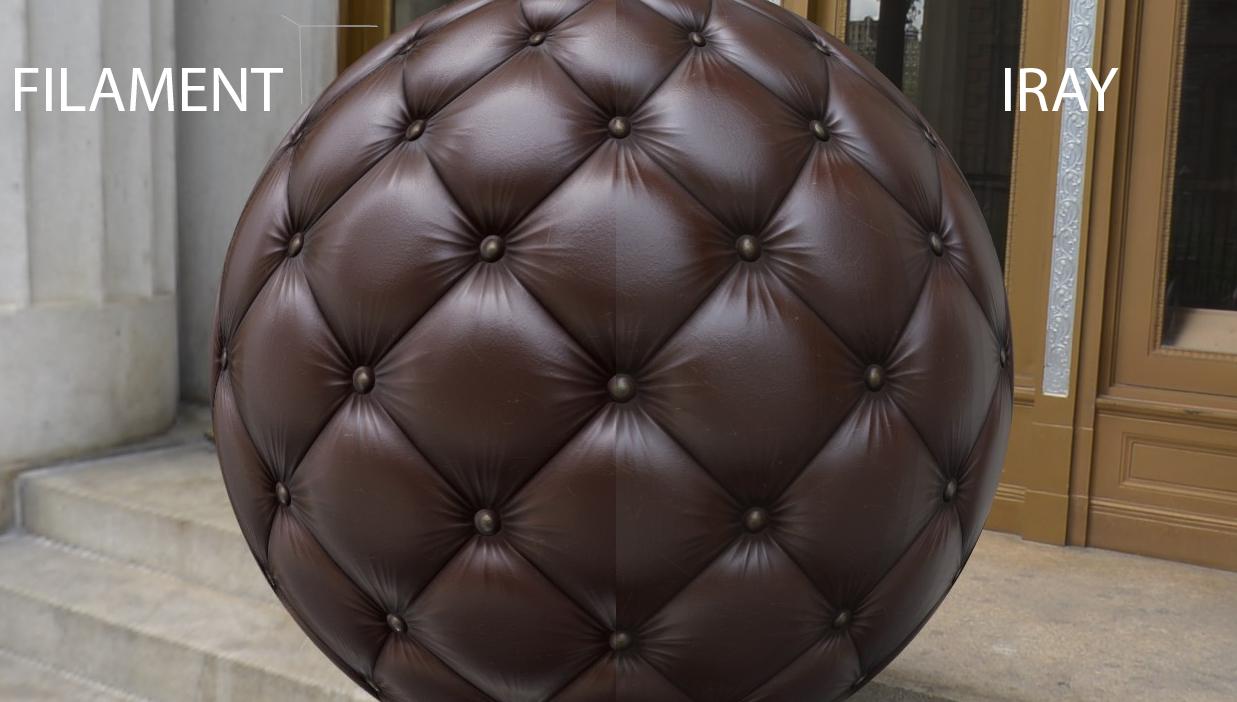
See here little test of Dielectric material (nonmetallic)
it looks the way it should ( not that is the best representation since the material is all painted for the test with world values), of course Filament viewport will not reflect materials from itself on the surface or other objects so there will be always a slightly difference but overall it is what I wanted to see
The whole concept of PBR in DS is to load your materials without the need of adjusting it for each different scene and lighting to look better
You got new tool, have fun with it
With the store\forum upgrades, I stopped getting notifications about post updates!
Now if you can create a couch\sofa using that leather mat, I'd buy it instantly
 MEC4D's celebration ( with freebies ) [commercial]
See here little test of Dielectric material (nonmetallic)
it looks the way it should ( not that is the best representation since the material is all painted for the test with world values), of course Filament viewport will not reflect materials from itself on the surface or other objects so there will be always a slightly difference but overall it is what I wanted to see
The whole concept of PBR in DS is to load your materials without the need of adjusting it for each different scene and lighting to look better
You got new tool, have fun with it
With the store\forum upgrades, I stopped getting notifications about post updates!
Now if you can create a couch\sofa using that leather mat, I'd buy it instantly
[Released] Render Doctor [Commercial]I'm trying to use Render Doctor to render with Filament, but I'm having a problem with it not waiting for the purple textures to clear up.
(Did you get my email, or is Google causing us trouble again?)
Render produces empty pngYes, I go to YouTube. There are different levels of skill there, and some are better than others, and it usually requires sifting through the . I usually try to find more than one until I seem to find someone who knows what they are talking about, or at least seems like they are.
Also "people" in quotes? So they really aren't really people?
Okay sorry, I will get serious.
I do believe the initial render did pop up quicker, but other than that I really wasn't sure it really sped up anything, but I can't say I found any reduction in performance either. I always planned on testing if it really helped, or was a resource hit by timing a few renders, but never really got around to it.
All throughout this issue I haven't really noticed one way or the other.
Okay, I am rendering an image that really hasn't caused me any issues. A single character with an infinity cove behind her, and with Iray in preview it took 1:11 to render. From Filament it took 1:20. From Texture, it took 1:21. Going down to Lit Wireframe, it took 1:23. 1:23 for Solid Bounding box.
Interesting, and I redid the Iray preview while rendering, and got 1:10 that time. But this is only a very short render, and it is possible that there is a performance hit, but a benefit in the short term.
I tried to go back and render the image I had before, but again it will not render. I deleted 4 people out of the scene, and the pier, and yet it still is giving me a black image. (Rendered in 12 seconds.)
Restarted, but out of time, so will finish this post later.
Filament tutorials/shaders/lights?What make the sphere half gray? when using Cutout opacity as Transparency slider
Pure white and black is what you use in the Cutout Opacity map , most important is to have pure black color background in the map, if the value is less it will flipp and create bad effect
the half shadow you see from the sphere is the Distant Light shadow that I have issues with , on some angles of the camera it cut off the shadows , it may be a bug
Pure white in RGB is 255 for each color Red: 255 Green: 255 Blue: 255 when you create maps for Cutout opacity , the maps need to have the pure white value for the surfaces on the object you want to be visible and the pure black for the background where you want the surface to be invisible . In short pure black color will cut out the model surface and make it invisible .
Check the shaders of the interior , I am almost 100% sure it is the glossy settings , remove the HDRI or turn it off , and check with the distant light only , if you still see the light then it is other issue than glossy
Talking about Cutout Opacity , the shadows will not be accurate with Transmapped hair while using Distant Light or Spot Light at this moment in Filament
The reflections are working proper on the areas that was cut out of the sphere using alpha maps .
So the geometry on top of the hair will create shadow on everything else below that
I don't understand what is demonstrated in the first image. What makes part of the sphere gray? Is it cut out but still reflecting the gray environment? What does "no pure RGB 255" mean? It looks like the shadow only shows part of the sphere, but in the other two image examples, the shadow is the full sphere. What made the first image have only a cutoff shadow?
Filament tutorials/shaders/lights?Talking about Cutout Opacity , the shadows will not be accurate with Transmapped hair while using Distant Light or Spot Light at this moment in Filament
The reflections are working proper on the areas that was cut out of the sphere using alpha maps .
So the geometry on top of the hair will create shadow on everything else below that
I don't understand what is demonstrated in the first image. What makes part of the sphere gray? Is it cut out but still reflecting the gray environment? What does "no pure RGB 255" mean? It looks like the shadow only shows part of the sphere, but in the other two image examples, the shadow is the full sphere. What made the first image have only a cutoff shadow?
Daz 3D is part of

Connect
DAZ Productions, Inc.
7533 S Center View Ct #4664
West Jordan, UT 84084Licensing Agreement | Terms of Service | Privacy Policy | EULA
© 2026 Daz Productions Inc. All Rights Reserved.