-
bridge does not work anymore
davegv said:
just thought i would throw in the update i am installing from install manager and daz central is dated jan 28 so i am assumng it is the update?
Unfortunately, it is still 4.25 only we will get it updated as soon as we can. That information was added by mistake.
bridge does not work anymorejust thought i would throw in the update i am installing from install manager and daz central is dated jan 28 so i am assumng it is the update?
bridge does not work anymoreTsuba said:
The plugin in Daz central is meant for Unreal 4.25. It doesn't work with 4.26 (yet).
It was just updated and says now works with 4.26 refer to my above post
bridge does not work anymoreThe plugin in Daz central is meant for Unreal 4.25. It doesn't work with 4.26 (yet).
bridge does not work anymoreSame here after installing with daz central the plugin does not show up in Unreal 4.26 which the update was intended....
I also installed with install Manager and also does not show up in unreal.
UPDATE
in the daz central i had the correct directory mapped ( IE - Unreal 4.26 ) however the plug in did not go to the plugin folder - it went to the root folder I did not think it had to specificially map to the plugin folder.( because in the past it was not a problem and it got installed correctly ) so after moving the files to the correct folder it is now showing up in Unreal 4.26
OK after much confusion daz central shows a new version 4 which is supposed to be compatable with 4.26 but daz central is still installing the 4.25 version so I am not sure what is correct anymore - I am just going to buy the version on the unreal market place that currently supports 4.26 and let daz play catchup when and if they do
This is from the daz plugin update page:
Daz to Unreal Update
- Environment Support
- Fix Bone Rotations
- Basic Support for Genesis 8.1
- Basic PBRSkin Material
- Fixed the morph list when exporting clothing items separate from the character. This is done by generating the morph list from the character down, rather than just from the clothing item.
- Support for 4.26
- View full list in FAQ
- FAQ:
- 1. Environment Support -Daz to Unreal Environment Transfer
2. Added a new animation blueprint to deal with conversion from Quaternion to Euler rotations.
3. Fix Bone Rotations -Daz to 4. Unreal Fix Bone Rotations
5. Basic Support for Genesis 8.1
6. Basic PBRSkin Material
7. Fixed the morph list when exporting clothing items separate from the character. This is done by generating the morph list from the character down, rather than just from the clothing item.
8. Support for 4.26
9. Fix morph preset in Daz Exporter
10. Allow morph curves to be exported in animations
ProblemAnd that folks is why I don't use Daz Central!
How do I get all my Daz Content?Daz Central is the trike and DIM is the racing bike. Quickly:
Daz Central limits where things install; DIM lets you install where you want
Daz Central has minimal customization; DIM is highly customizable
DIM is wonderful for offline installations: download a manual zip, place it in DIM's download folder and install...
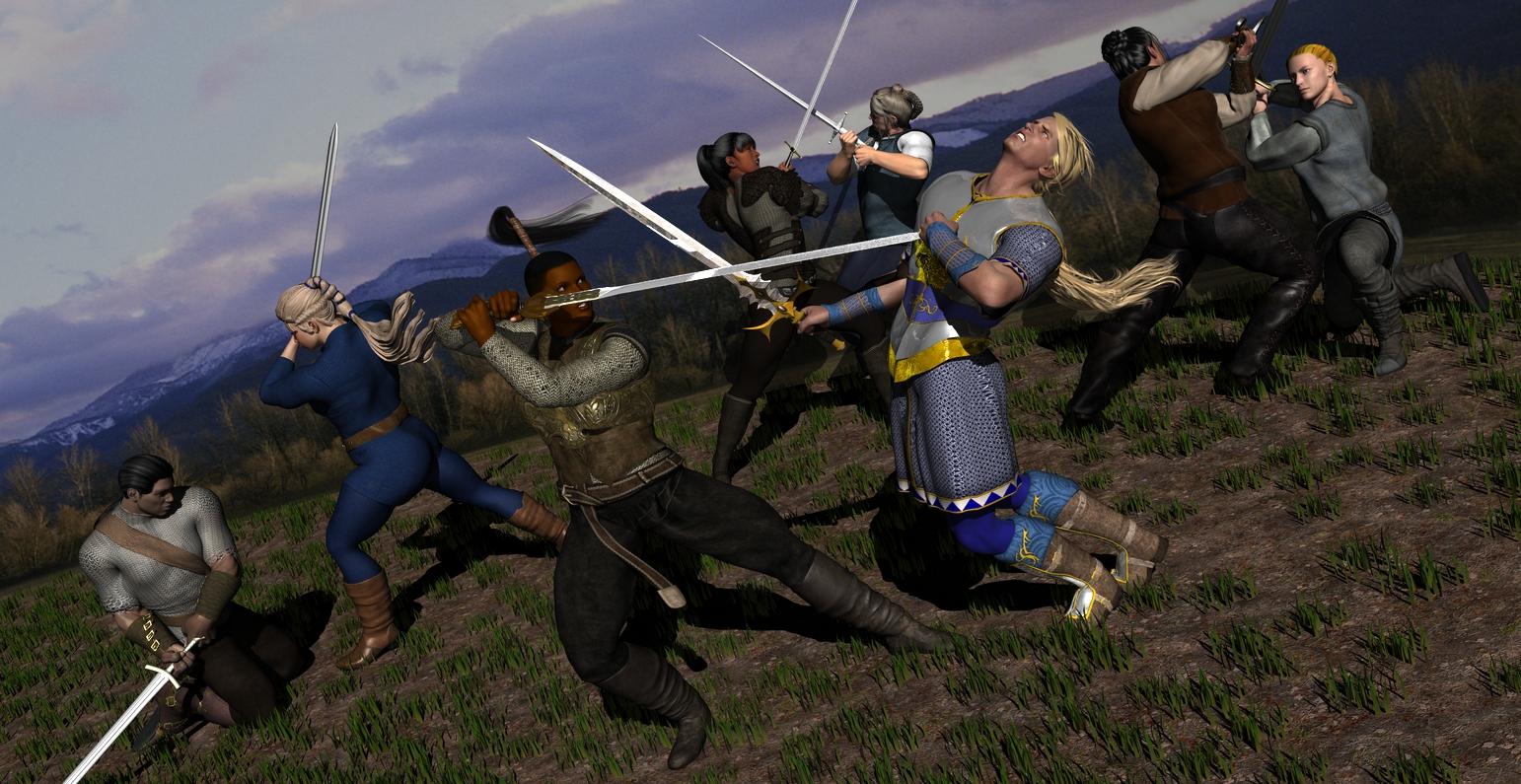
Genesis: The Early YearsBy the way, to give you an idea of how versatile G1 is, the central female figure's outfit is kitbashed from 3 Genesis outfits (Wolf King, Caput Caseum, and Alruna), and her hair is two freebies combined, 3Dream's Boy Hair for V4 and AprilYSH's Horsetail for V4; the central male is wearing Luthbel's High Elves for M3 and IIRC V5 Elite Ponytail. Several of the other figures are wearing V3 and V4 hair, and one of them is wearing the thoroughly modern Jersey Dress Outfit by Dogz, retextured to fit in. The skins are a mix of Genesis, V4 and M4 skins; the morphs are a lot of Evolution Muscularity, with some Measure Metrics, Creature Creator, Young Teen Julie, and Olivia. The metal objects are retextured with DzFire's Real Metals.
 How do I get all my Daz Content?
Daz Central is DIM with most of the options stripped away for simplicity. DIM can uninstall anything installed with Daz Central, and can queue multiple items for uninstall/download/install. In DS you can go to Database Maintenance and reset the database.
How do I get all my Daz Content?I see people rooting for DIM, but isn't that the same installation method as Daz Central with a different skin?
Downloading 100s of Gigabytes over and over is no fun, but I guess that's where this is going.
1. How do I uninstall everything installed by Central?
2. Just to be safe, I'd like to completely wipe any metadata, detabese, indexing whatever DS is doing to keep it's content in check. Like if I've never had anything Daz related. How do I do that?
DAZ Studio 4 Installation Guide WindowsI uninstalled Daz IM, I went into the registry and cleaned out all Daz files. When I reinstall Daz Im it still hold all of my previous settings. Daz Control central is useless in tems of installing the application. It gets to 86% and quits. Absolutely useless.
Back to IM. No matter which path I choose to install Daz 4.x I get an install failed error.
I want to install Daz 4.x on my C: drive put I want my content on an external drive because it is eating my 2TB drive alive.
This would be so simple if I could uninstall DIM which I can via the Control panel but where is it getting the install paths? I can't get rid of them. driving me crazy.
How do I get all my Daz Content?PerttiA said:
If you are using DAZ Connect and DAZ Central or DIM, you are asking for trouble, since DAZ Connect installs everything to non-standard locations, so you will end up having the same content installed multiple times => Problems.
If there is a Connect install any DIM/Daz Central files for the same product will be ignored.
How do I get all my Daz Content?Another vote for DIM, its as easy as downloading it, logging in and selecting what you want to install. Sofar it's the best way to do it, since Central and Connect can be lackluster with their results.
How do I get all my Daz Content?If you are using DAZ Connect and DAZ Central or DIM, you are asking for trouble, since DAZ Connect installs everything to non-standard locations, so you will end up having the same content installed multiple times => Problems.
How do I get all my Daz Content?Daz has the Central only for those looking for an easier way. I still use DIM and Daz is still supporting it.
Daz Studio 4.16[.0.x] Pro, General Release! (*UPDATED*)jbowler said:
Mine is dated 1/6/2021 (US format; month first). If you are using DIM you can deinstall and reinstall the general release package. That should fix problems with missing files in Program Files.
Smart clue! thanks. I find it.
I installed DS by DIM. Since 4.14 Beta, my DStudio is no more in Program Files in hard disk C, however (useless) folders remain. It used the old folder for daz central to install 4.14 beta and of course 4.15 general release. The weird thing is that I had uninstalled DAZ (nightmare) Central because was a pain. Now DazStudio 4.15 resources lives in external disk U in \Applications\64-bit\DAZ 3D\DAZStudio4\resources\, the old and abandoned custom folder for my erased daz central.
Case closed.
How do I get all my Daz Content?May I suggest that you use DIMif Daz Central isn't serving your needs: https://www.daz3d.com/install-manager-info/ DIM does install V4 and her content. Install it from the official link. Open the program, configure where things should download and go by clicking on the gear and choosing locations. Login as you would for the DAZ3d site, and download and install your content. There is a button to tell it to delete installers when it is done. You can also manually install using it by going to the order/ account pages of your acount, downloading the manual install zips, place them in the folder, Install Manager > Downloads, and opening DIM, trigger the little Refresh pinwheel near the top, and hit install.
How do I get all my Daz Content?Pre DS 4.15 I was using only Daz Connect (the build in thing in Daz Stuido) to install all my assets. I know it can't install V4 but whatever. Problem was there were some packages that just won't install correctly even after multiple re-installations. So that and V4 I couldn't get my entire library installed.
Come DS 4.15, Daz has been pushing us to use Daz Central, I don't like it, I don't get the point of it since installing things from inside DS is way more convenient, but I thought they've been pushing this for a while, probably have some long term plan for it, might aswell jump on the wagon. So I uninstalled everything from Daz Connect and Started over with Daz Central.
Frist terror - there's no install all, I had to individually click "Install" for 2000+ packages. Don't ask.
Finally done, everything installed with Daz Central, open Daz Studio about 350 packages are marked grey. Double check with Central, they're installed, check files on HDD - Yep, present. DS just won't recognize them as installed. Let it scan for content and what not. Same thing. Fine, install the "missing" ones via Daz Connect.
Start doing stuff with DS, I notice some files show errors...
So my question is how (after 4 installation methods) do I properly install all my content, without duplicate and busted files. I really would love it to work as intended.
G8F 8.1 library folder chaos"As far as I have understood, PA:s have nothing to do with Metadata, that's done by DAZ."
Okay, but metadata problems generated by Daz itself are just as bad, or maybe worse, than if the PAs make the mistakes and Daz either fails to notice and correct them, or just doesn't care about them. The central point is that the end user gets a product with problems that should have been detected with minor QC efforts, and those problems should be corrected for the item goes on sale.
Z Natural Form Breast Shape and SquishesThe Brig said:
Consider yourselves lucky to even have that. I've tried installing through DIM and Daz Central and I can't find it anywhere, even using the paths HoMart's shown.
I've you install through DIM just go to the "installed" tab and let it display the installed files to see their location on your system.
Daz 3D is part of

Connect
DAZ Productions, Inc.
7533 S Center View Ct #4664
West Jordan, UT 84084Licensing Agreement | Terms of Service | Privacy Policy | EULA
© 2026 Daz Productions Inc. All Rights Reserved.