-
Send In The Clones and Send In The Clones Pro Now for DS4.5 [Commercial]Andrey Pestryakov said:DraagonStorm said:
I see you selecting the file in the Windows explorer, but I don't see you opening the file. You need to click on open. (or whatever the equivalent is in the language of your windows. The screen should look like the below screen shot before you start doing things in the other tabs.
Double click = open file. I can click the "Open" button, but it will be the same.
In my video shows how to load object in the scene (scene tab - bottom left), but the first window of the script does not change.What product is that you are trying to load? I'll purchase it and see if I can see what the problem may be.
Send In The Clones and Send In The Clones Pro Now for DS4.5 [Commercial]Andrey Pestryakov said:DraagonStorm said:Andrey Pestryakov said:I bought the pro version. Now I have nothing at all to clone :(
Which version of DS 4.5.x are you using? I use 4.5.0.114.Not sure what you mean by nothing to clone.
You may need to view the youtube demo: http://www.youtube.com/watch?v=QcLZKBKG2q0&feature=plcp
You don't load the prop or figure into the scene first with Pro. You select it from the windows browser (or whatever it's called on a Mac)
I recorded a video of work with SITC scripts.
http://www.youtube.com/watch?v=5-ouZim-2KMI see you selecting the file in the Windows explorer, but I don't see you opening the file. You need to click on open. (or whatever the equivalent is in the language of your windows. The screen should look like the below screen shot before you start doing things in the other tabs.
Send In The Clones and Send In The Clones Pro Now for DS4.5 [Commercial]DraagonStorm said:Andrey Pestryakov said:I bought the pro version. Now I have nothing at all to clone :(
Which version of DS 4.5.x are you using? I use 4.5.0.114.Not sure what you mean by nothing to clone.
You may need to view the youtube demo: http://www.youtube.com/watch?v=QcLZKBKG2q0&feature=plcp
You don't load the prop or figure into the scene first with Pro. You select it from the windows browser (or whatever it's called on a Mac)
I recorded a video of work with SITC scripts.
http://www.youtube.com/watch?v=5-ouZim-2KMSend In The Clones and Send In The Clones Pro Now for DS4.5 [Commercial]Andrey Pestryakov said:I bought the pro version. Now I have nothing at all to clone :(
Which version of DS 4.5.x are you using? I use 4.5.0.114.Not sure what you mean by nothing to clone.
You may need to view the youtube demo: http://www.youtube.com/watch?v=QcLZKBKG2q0&feature=plcp
You don't load the prop or figure into the scene first with Pro. You select it from the windows browser (or whatever it's called on a Mac)
Send In The Clones and Send In The Clones Pro Now for DS4.5 [Commercial]Andrey Pestryakov said:DraagonStorm said:Andrey Pestryakov said:By the screenshots of the interface, I do not understand, is it possible to change morphs the cloned object after cloning.
So I asked to take a screenshot (cloned props object with morphs option after cloning with Pro version) for clarity.
After cloning, I need more adjustment morphs to objects. So for me it is important that morphs preserved in new cloned object.If I'm reading your question right.. Yes, in the Pro version if you do not click on the instances obtion.
Please make a screenshot. If I'll see that the morphs are stored in the clone objects, which can be adjusted after the cloning, then I'll buy the pro version.
It took a little to find props with morphs... The props I found are old....
(Not sure what order these are going to be in, preview does not show) ~~ looks like I loaded the images in the opposite order then what I should have.. still getting use to the new forum.
Send In The Clones and Send In The Clones Pro Now for DS4.5 [Commercial]DraagonStorm said:Andrey Pestryakov said:By the screenshots of the interface, I do not understand, is it possible to change morphs the cloned object after cloning.
So I asked to take a screenshot (cloned props object with morphs option after cloning with Pro version) for clarity.
After cloning, I need more adjustment morphs to objects. So for me it is important that morphs preserved in new cloned object.If I'm reading your question right.. Yes, in the Pro version if you do not click on the instances obtion.
Please make a screenshot. If I'll see that the morphs are stored in the clone objects, which can be adjusted after the cloning, then I'll buy the pro version.
Send In The Clones and Send In The Clones Pro Now for DS4.5 [Commercial]Andrey Pestryakov said:By the screenshots of the interface, I do not understand, is it possible to change morphs the cloned object after cloning.
So I asked to take a screenshot (cloned props object with morphs option after cloning with Pro version) for clarity.
After cloning, I need more adjustment morphs to objects. So for me it is important that morphs preserved in new cloned object.If I'm reading your question right.. Yes, in the Pro version if you do not click on the instances obtion.
Send In The Clones and Send In The Clones Pro Now for DS4.5 [Commercial]Andrey Pestryakov said:DraagonStorm said:Andrey Pestryakov said:In brief:
- Cloned objects have no morphs :((
- It would be very nice if the script to support save of user settings!I see why I didn't understand your issue. You are using the standard version. This version only clones props, and is not capable of changing textures or morphs.
Send In The Clones DS4 Pro will do what you want.
Please show two screenshots:
- original props object with morphs option;
- and cloned props object with morphs option after cloning with Pro version.
Can I save the settings in the Pro version?If you mean load in all of the options you selected before cloning, no I did not create a 'Save Settings'.
Not sure what screenshots you want... If it is screen shots from the script itself here's a link to the user's guide that has screen shots of the scripts windows (The screen shots are from the DS3 version, but the screens only change was version # at the bottom left.. All the other changes we're 'internal' :) )
You'll see in the user's guide, that when you clone props you have the option to clone them as instances. If you select that option, you will be cloning them like you clone in the standard version. All of the cloned props share the same textures and morph.
If you do not select that option, you then can select different mat and morph files to be applied, and you will see that the morphs in each prop are now available to you.
Send In The Clones and Send In The Clones Pro Now for DS4.5 [Commercial]DraagonStorm said:Andrey Pestryakov said:In brief:
- Cloned objects have no morphs :((
- It would be very nice if the script to support save of user settings!I see why I didn't understand your issue. You are using the standard version. This version only clones props, and is not capable of changing textures or morphs.
Send In The Clones DS4 Pro will do what you want.
Please show two screenshots:
- original props object with morphs option;
- and cloned props object with morphs option after cloning with Pro version.
Can I save the settings in the Pro version?Send In The Clones and Send In The Clones Pro Now for DS4.5 [Commercial]Andrey Pestryakov said:In brief:
- Cloned objects have no morphs :((
- It would be very nice if the script to support save of user settings!I see why I didn't understand your issue. You are using the standard version. This version only clones props, and is not capable of changing textures or morphs.
Send In The Clones DS4 Pro will do what you want.
Send In The Clones and Send In The Clones Pro Now for DS4.5 [Commercial]DraagonStorm said:Andrey Pestryakov said:Andrey Pestryakov said:I bought a version of "Send In The Clones DS4". I made a clone props object with use random select type of cloning, but in the new objects morphs were not available. :(
Just as hard without saving presets settings. Quite a lot of options, and always fill them is not fun.
Could you make a saving morphs in the cloned objects and support presets?
Please, what about my question?I haven't answered because I'm not to sure what you mean, and I trying to figure out what you asking. Can you post step by step what you are doing, the prop involved, and what you expected. I'm more a visual person... Screen Shots help.
Send In The Clones and Send In The Clones Pro Now for DS4.5 [Commercial]Andrey Pestryakov said:Andrey Pestryakov said:I bought a version of "Send In The Clones DS4". I made a clone props object with use random select type of cloning, but in the new objects morphs were not available. :(
Just as hard without saving presets settings. Quite a lot of options, and always fill them is not fun.
Could you make a saving morphs in the cloned objects and support presets?
Please, what about my question?I haven't answered because I'm not to sure what you mean, and I trying to figure out what you asking. Can you post step by step what you are doing, the prop involved, and what you expected. I'm more a visual person... Screen Shots help.
Send In The Clones and Send In The Clones Pro Now for DS4.5 [Commercial]Andrey Pestryakov said:I bought a version of "Send In The Clones DS4". I made a clone props object with use random select type of cloning, but in the new objects morphs were not available. :(
Just as hard without saving presets settings. Quite a lot of options, and always fill them is not fun.
Could you make a saving morphs in the cloned objects and support presets?
Please, what about my question?Andrey Pestryakov - Forest and single TreesAndrey Pestryakov said:cosmo71 said:Andrey Pestryakov said:With fog looks great!I have a question to "Forest superior"
the bushes and trees and also the stumps and roots, are these preset sets like the branches from the forest?
Or can I use just one single bush for another scene for example, means, can I use just one bush from "Forest superior" for my canyon scene or is it like the branches from "the forest" and you have not single branches but a preset that loads more than needed? I just wanted to use some branches for my canyon but I can load one single branch and pose it, just the whole branch preset.
So, would be great if the bushes would be single items not only presets sets.
In the Forest and Forest Superior all the elements merged in large groups. These products do not have the individual elements.
In the following addition I would add individual elements for all trees, bush, branches, rocks, roots, etc.That is a really good idea :) you can count on me, I will bye that addition for sure :)
Andrey Pestryakov - Forest and single Treescosmo71 said:Andrey Pestryakov said:With fog looks great!I have a question to "Forest superior"
the bushes and trees and also the stumps and roots, are these preset sets like the branches from the forest?
Or can I use just one single bush for another scene for example, means, can I use just one bush from "Forest superior" for my canyon scene or is it like the branches from "the forest" and you have not single branches but a preset that loads more than needed? I just wanted to use some branches for my canyon but I can load one single branch and pose it, just the whole branch preset.
So, would be great if the bushes would be single items not only presets sets.
In the Forest and Forest Superior all the elements merged in large groups. These products do not have the individual elements.
In the following addition I would add individual elements for all trees, bush, branches, rocks, roots, etc.Andrey Pestryakov - Forest and single TreesAndrey Pestryakov said:With fog looks great!I have a question to "Forest superior"
the bushes and trees and also the stumps and roots, are these preset sets like the branches from the forest?
Or can I use just one single bush for another scene for example, means, can I use just one bush from "Forest superior" for my canyon scene or is it like the branches from "the forest" and you have not single branches but a preset that loads more than needed? I just wanted to use some branches for my canyon but I can load one single branch and pose it, just the whole branch preset.
So, would be great if the bushes would be single items not only presets sets.
Andrey Pestryakov - Forest and single TreesAndrey Pestryakov said:With fog looks great!and that is very less fog, I have used the Age of Amour Athmosphere camera with fog and very low intensity for that image :)
JACK TOMALIN APPRECIATION SOCIETY [JAS III]cosmo71 said:hello folks how are you?haven`t written here a for time but I am a bit busy, work work work and I have also some other galleries at other sites, other thing is, I am busy with creating my own landscapes with stuff from my content. Had some things to learn about d-formers and had to fix textures and so.
And here are some results, sorry Jack, this is pure nature and no item made by you is used, but I want to know what you think because you are some of the best artists around, known for detailed accuracy :)
the following images containing:
trees by Andrey Pestryakov and Predatron
bushes by Lisa
stones and rocks from various sets I have
backroundwall from rocks`n`drops by Pedatron (reworked by me with some deformers)
ground by Flink (Renderosity) (some different ground planes with fixed texture of this set)textures for backroundwall, rocks and stones from the rocks`n`drops set but reworked and fixed by me so I was able to use it on all stony surfaces with some tilling adjustment here and there.
clothes on Dixie by 3D-Age (Renderosity) (this artist have some of the best clothes for V4 I know but this is just my opinion and no rating on others that are also good)
by the way, I have a really huge gallery at renderosity under cosmo71 so if someone is interested go there and have fun :)
and know here are the images:
Nice work Cosmo!
Nice to hear you're off on your journey of 3D art too.. easy to see where the time goes now isn't it?
Keep up the good work :)
JACK TOMALIN APPRECIATION SOCIETY [JAS III]hello folks how are you?
haven`t written here a for time but I am a bit busy, work work work and I have also some other galleries at other sites, other thing is, I am busy with creating my own landscapes with stuff from my content. Had some things to learn about d-formers and had to fix textures and so.
And here are some results, sorry Jack, this is pure nature and no item made by you is used, but I want to know what you think because you are some of the best artists around, known for detailed accuracy :)
the following images containing:
trees by Andrey Pestryakov and Predatron
bushes by Lisa
stones and rocks from various sets I have
backroundwall from rocks`n`drops by Pedatron (reworked by me with some deformers)
ground by Flink (Renderosity) (some different ground planes with fixed texture of this set)textures for backroundwall, rocks and stones from the rocks`n`drops set but reworked and fixed by me so I was able to use it on all stony surfaces with some tilling adjustment here and there.
clothes on Dixie by 3D-Age (Renderosity) (this artist have some of the best clothes for V4 I know but this is just my opinion and no rating on others that are also good)
by the way, I have a really huge gallery at renderosity under cosmo71 so if someone is interested go there and have fun :)
and know here are the images:
Andrey Pestryakov - Forest and single TreesAndrey Pestryakov said:cosmo71 said:Hello,I just want to make a tribute to Andrey Pestryakov and his products, they are great. Most I like the single trees he has, the tall pine tree for example.
I am just building me an own wooded canyon landscape and use these trees but there is one thing, if you Andrey Pestryakov read this, please take it as a suggestion for your next products.
1. one more tall pine tree that is different than this one in the shop right now and maybe one standing tall pine just with less needles in generell or one without needles, like the fallen ones, the problem with the fallen ones are to position them right in the scene as standing pines.
Of course right now it is possible to hide the needles of the tall pine but it is recource eating because if you use a lot of these pines because of all the needles (hidden or not)
2. single different brenches for the ground
3. a broken pine tree (fallen)
4. a bróken pine tree (standing)
5. just a stump of a pine treeall these as single items for single use not as preset sets
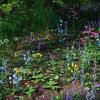
here are some examples of what I am building right now :)
Great images!We are preparing now release Forest Autumn. Next I plan to add another supplement to Forest and Forest Suprior.
In this addition, I would like better to break the scene so that work with the camera has become even more convenient. Also in this addition, I plan to do some separate props objects for trees, fern, bushes, rocks, roots, grass and etc.. So that users can set them as desired. True, they will not be presented as a figure, and resizing the foliage will be impossible.Thank you :) you have great products :)
I have made myself an autumn landscape :) and here it is :)
Daz 3D is part of

Connect
DAZ Productions, Inc.
7533 S Center View Ct #4664
West Jordan, UT 84084Licensing Agreement | Terms of Service | Privacy Policy | EULA
© 2026 Daz Productions Inc. All Rights Reserved.