-
Kanade 8
Well with all the cute renders here (and actually good Daz official renders!) and the 20% off coupon, I decided to go for it. This has some Cartoonized added and a few morph tweaks. I think she's adorable but hard to get expressions to look decent. Kind of reminds me of old Aiko 3. Had to add a smoothing modifier to Kanade hair, it's so jaggedy! Also DS 4.11 is so slow for me! This is a screenshot because I became impatient, only 50% after 20 minutes for a simple headshot on a 1080 ti. Anyway, I think she's cute and will add to the gene pool.
 Shape Splitter - Divide, Combine and Save (The new version is already available. 1.2.1)[Commercial]
When you run SpawnMorph it creates a new morph based on the shape of the current figure(Tyris). And it sets the new morph to 100%(Tyris_Spawn) and the "Zero Figure Shape" command is automatically executed so that all morphs are set to zero. If for some reason some morph is not set to zero after spawn, in this case Tyris, it will distort the figure by the double effect (Duplicate) of the morph..
The image shows how the nose is distorted when both the previous morph (Tyris) is applied with the new morph (Tyris_Spawn).There are times when executing "Zero Figure Shape" not all morphs are set to zero, so you should manually set all morphs.
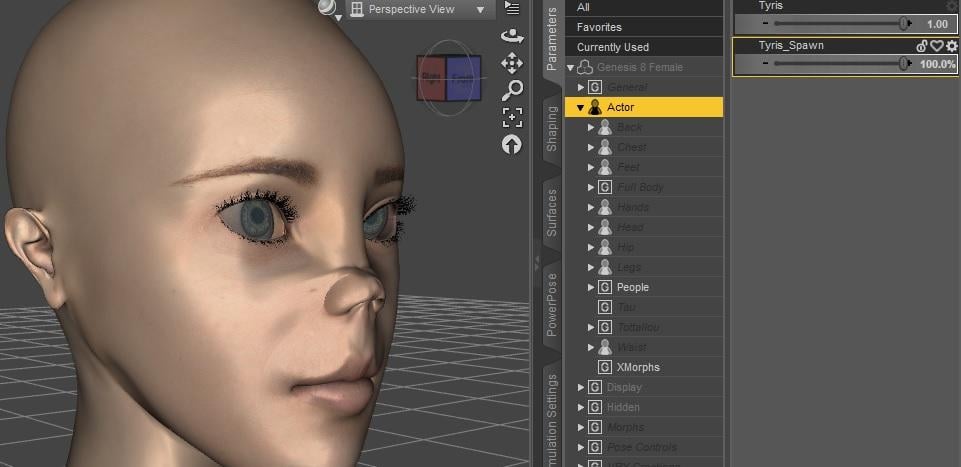
An easy way to see the morphs that are still present and that can cause distortions is in Parameters - Currently Used.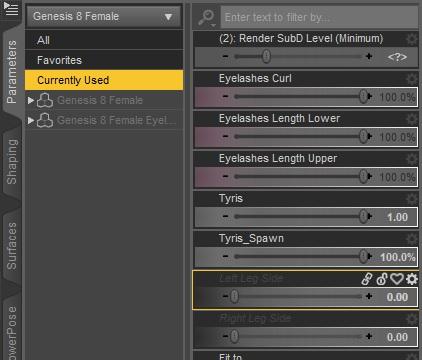
That is, once you did SpawnMorph, go to check "Currently Used" that the morph values (control) are set to zero.
[Released] Character Converter from Genesis 3 Female to Genesis 8 Female(Now Conv JCMs) [Commercial]If you going to do older-gen I would like to see gen 2 to gen 8 forget v4 that is old and busted plus poser format bleh.
Er... the whole point of a convertor is to move those older shapes to the newer figure so you don't have to deal with poser cr2. Just to be clear, as someone who owns over 300 commecially produced G2F characters I'm eagerly looking forward to a G2F to G8F convertor, BUT, and this is a Brute 8 sized butt, as anyone who's used GenX will tell you, converting the morphs is only half of the process of converting a character. You have to be able to transfer the textures accurately as well, and currently there is no easy way to transfer the textures for a large number of the G2F characters out there to G8F. This is because of a weird obsession that DAZ had at the time of creating new custom UVs for each new major figure release as they came out rather than simply reusing the base G2F UVs or the custom ones created for Victoria 6. To date, those two UV sets are the only ones for which a "plug and play" texture conversion option exists, so if you want to use any product texture that uses the UVs from any of the following base figures, you're going to have to create a conversion yourself:
Aiko 6
Ninive 6
Callie 6
Monique 6
Keiko 6
Belle 6
Mei Lin 6
Lilith 6
Giselle 6
Stephanie 6
Teen Josie 6
Olympia 6
Gia 6
edit - added The Girl 6Fortunately, about halfway through the G2 run a lot of the vendors realized how limiting the custom UVs were (as a charater made with a custom UV could only be used by someone who'd already bought the corresponding base figure, thereby automatically dooming it to lower sales) and by the end of the G2 run most PAs had stopped producing characters that used anything other than the base G2F UVs. What it does mean, unfortunately, is that a good chunk of the approximately 700 G2F characters that were commercially produced, including all of the iconic characters except V6, can't be replicated easily in G8... At least, not unless someone creates ready to go UV convertors for those UVs.
Baking textures to another uv isn't all that difficult, but it is time consuming, and doing it for multiple figures would be tedious and take a long time. I can see Cybersox' point for sure.
Laurie
If you going to do older-gen I would like to see gen 2 to gen 8 forget v4 that is old and busted plus poser format bleh.
Er... the whole point of a convertor is to move those older shapes to the newer figure so you don't have to deal with poser cr2. Just to be clear, as someone who owns over 300 commecially produced G2F characters I'm eagerly looking forward to a G2F to G8F convertor, BUT, and this is a Brute 8 sized butt, as anyone who's used GenX will tell you, converting the morphs is only half of the process of converting a character. You have to be able to transfer the textures accurately as well, and currently there is no easy way to transfer the textures for a large number of the G2F characters out there to G8F. This is because of a weird obsession that DAZ had at the time of creating new custom UVs for each new major figure release as they came out rather than simply reusing the base G2F UVs or the custom ones created for Victoria 6. To date, those two UV sets are the only ones for which a "plug and play" texture conversion option exists, so if you want to use any product texture that uses the UVs from any of the following base figures, you're going to have to create a conversion yourself:
Aiko 6
Ninive 6
Callie 6
Monique 6
Keiko 6
Belle 6
Mei Lin 6
Lilith 6
Giselle 6
Stephanie 6
Teen Josie 6
Olympia 6
Gia 6Fortunately, about halfway through the G2 run a lot of the vendors realized how limiting the custom UVs were (as a charater made with a custom UV could only be used by someone who'd already bought the corresonding base figure, thereby automatically dooming it to lower sales) and by the end of the G2 run most PAs had stopped producing characters that used anything other than the base G2F UVs. What it does mean, unfortunately, is that a good chunk of the approximately 700 G2F characters that were commercially produced, including all of the iconic characters except V6, can't be replicated easily in G8... At least, not unless someone creates ready to go UV convertors for those UVs.
Ding! The exact reason I didn't invest in GenX. I had been testing with SingularBlue and learned the hard reality of have the shape but no texture. Ribbet for Genesis and others stayed where they are.

Sounds like textures are the big challenge and may make older generations conversions difficult if not possible. I have no idea how to convert UV maps and whether it could be scripted. I would first have to find a good online tutorial.
I Forgot What My Complaint Was - Complaint ThreadI'm almost certain that any attempt I make in Blender to make a morph would be a disaster.
Quite possibly comical... but horrifying. :)
I Forgot What My Complaint Was - Complaint ThreadHmm... Wonder if I have enough face morphs to make a character look like someone I know... Would that be creepy?
I have Zbrush and Blender so in theory I could make any morph I want.
[Released] Character Converter from Genesis 3 Female to Genesis 8 Female(Now Conv JCMs) [Commercial]If you going to do older-gen I would like to see gen 2 to gen 8 forget v4 that is old and busted plus poser format bleh.
Er... the whole point of a convertor is to move those older shapes to the newer figure so you don't have to deal with poser cr2. Just to be clear, as someone who owns over 300 commecially produced G2F characters I'm eagerly looking forward to a G2F to G8F convertor, BUT, and this is a Brute 8 sized butt, as anyone who's used GenX will tell you, converting the morphs is only half of the process of converting a character. You have to be able to transfer the textures accurately as well, and currently there is no easy way to transfer the textures for a large number of the G2F characters out there to G8F. This is because of a weird obsession that DAZ had at the time of creating new custom UVs for each new major figure release as they came out rather than simply reusing the base G2F UVs or the custom ones created for Victoria 6. To date, those two UV sets are the only ones for which a "plug and play" texture conversion option exists, so if you want to use any product texture that uses the UVs from any of the following base figures, you're going to have to create a conversion yourself:
Aiko 6
Ninive 6
Callie 6
Monique 6
Keiko 6
Belle 6
Mei Lin 6
Lilith 6
Giselle 6
Stephanie 6
Teen Josie 6
Olympia 6
Gia 6Fortunately, about halfway through the G2 run a lot of the vendors realized how limiting the custom UVs were (as a charater made with a custom UV could only be used by someone who'd already bought the corresonding base figure, thereby automatically dooming it to lower sales) and by the end of the G2 run most PAs had stopped producing characters that used anything other than the base G2F UVs. What it does mean, unfortunately, is that a good chunk of the approximately 700 G2F characters that were commercially produced, including all of the iconic characters except V6, can't be replicated easily in G8... At least, not unless someone creates ready to go UV convertors for those UVs.
Ding! The exact reason I didn't invest in GenX. I had been testing with SingularBlue and learned the hard reality of have the shape but no texture. Ribbet for Genesis and others stayed where they are.
Fbx export deformitiesEdit your morph export rules
Set these to "ignore"
"rForearm","Ignore"
"rShldr","Ignore"
"lForearm","Ignore"
"lShldr","Ignore"
"rThigh","Ignore"
"lThigh","Ignore"[Released] Character Converter from Genesis 3 Female to Genesis 8 Female(Now Conv JCMs) [Commercial]If you going to do older-gen I would like to see gen 2 to gen 8 forget v4 that is old and busted plus poser format bleh.
Er... the whole point of a convertor is to move those older shapes to the newer figure so you don't have to deal with poser cr2. Just to be clear, as someone who owns over 300 commecially produced G2F characters I'm eagerly looking forward to a G2F to G8F convertor, BUT, and this is a Brute 8 sized butt, as anyone who's used GenX will tell you, converting the morphs is only half of the process of converting a character. You have to be able to transfer the textures accurately as well, and currently there is no easy way to transfer the textures for a large number of the G2F characters out there to G8F. This is because of a weird obsession that DAZ had at the time of creating new custom UVs for each new major figure release as they came out rather than simply reusing the base G2F UVs or the custom ones created for Victoria 6. To date, those two UV sets are the only ones for which a "plug and play" texture conversion option exists, so if you want to use any product texture that uses the UVs from any of the following base figures, you're going to have to create a conversion yourself:
Aiko 6
Ninive 6
Callie 6
Monique 6
Keiko 6
Belle 6
Mei Lin 6
Lilith 6
Giselle 6
Stephanie 6
Teen Josie 6
Olympia 6
Gia 6
edit - added The Girl 6Fortunately, about halfway through the G2 run a lot of the vendors realized how limiting the custom UVs were (as a charater made with a custom UV could only be used by someone who'd already bought the corresponding base figure, thereby automatically dooming it to lower sales) and by the end of the G2 run most PAs had stopped producing characters that used anything other than the base G2F UVs. What it does mean, unfortunately, is that a good chunk of the approximately 700 G2F characters that were commercially produced, including all of the iconic characters except V6, can't be replicated easily in G8... At least, not unless someone creates ready to go UV convertors for those UVs.
Problem with Maia HD for Ellithia 8Still not working after the update!
The update was confirmed by QA and I tested it too. The morph value is 0 now.
You must have the older file around.
its working now, thanks!
Shape Splitter - Divide, Combine and Save (The new version is already available. 1.2.1)[Commercial]Thanks for replying. I'm not understanding "Another way is to block the desired morphs " etc.. I'd appreciate it if you would re-state this approach and include why a morph could be duplicated. Thanks
I'm lookning for a morph for G3F in this picture.Identifying morphs that aren't full face morphs is almost impossible (and even then, face morphs can be exceptionally difficult if they're not just a single morph, or *maybe* a cross with one of the main Daz base figures).
It's entirely possible that they're part of one of the character morphs used, part of any number of different shaping products, enhanced by HD morphs, displacement maps (or even normal maps or bump maps in some cases), something the artist themselves came up with, or any possible combination of the above.
I can say as much as the basic body morphs pack includes muscle definition and abdomen shaping morphs, with things like Shape Shift adding more options, but I'll be surprised if anyone except the original artist can definitively answer the question.
I'm lookning for a morph for G3F in this picture.
The abs of the left woman in this picture looks good.
Which product includes this morph?
All my G8F Characters faces have changed.If it's affecting all of your G8F characters, you can select the character then go to the Shaping Tab and scroll down the list of morphs to identify which ones are dialled in that shouldn't be. Once you identify which morphs are in there at a setting other than 0% that shouldn't be you can choose what to do from there - either just dial out the "wrong" morphs, or if it's a morph you purchased you can uninstall the character/morph. If it's a purchased character and the "Default" in the character's "Parameters Settings" is set to something other than 0 it will load up with G8F automatically. If that's the case I recommend putting in a support ticket for the character.
Is the new DAZ CAT finally here???!!!I recall an old freebie kitten morph fot the MilCat. (Probably on ShareCg), but I don't know whether it would transfer to the updated cat.
Diao's kitten morph seems to work fine on the updated cat
Link to Daio's free kitten morph: http://www.renderosity.com/mod/rrfilelock/download.php?fileid=42301&key=2124
All my G8F Characters faces have changed.I think people misunderstood the issue. I created a custom character with portions of other characters — 60% of person A, 25% of person B, 15% of person C, etc.
after saving the character, all those percentages were set to 100% EACH. this either happened during the save or the load back in.
I never had this happen before.
Wait... are you the OP? Your names/avatars are different.
But either way... did you save a character preset or a figure? Did you do an erc freeze and save the morph asset? Did you load in a base G8F to do your work on, or did you load in a character? Basically, what steps did you take to help us help you troubleshoot :DProblem with Maia HD for Ellithia 8Still not working after the update!
The update was confirmed by QA and I tested it too. The morph value is 0 now.
You must have the older file around.
G8 Cross-Figure Resources and Geografts?How does this resource work? I tried selecting the Genesis 8 male figure and click on "Cross-Figure Setup" from the Scripts section, but I get an error message "You must select a follower with an active XID morph to run this tool." Same happens if I select the clothes from Genesis 8 female. What does it mean by a "follower"? Is there more to this than just selecting the figure and clicking on the script?
G8 Cross-Figure Resources and Geografts?From the ReadMe:
Unlike with Genesis 2, this process does not work well on Geo-Grafted items because Genesis 8 Male and Female have different geometry so it is unable to Geo-Graft.
Bizzare that the ReadMe would directly contradict the description. I guess the readme is written by someone that "knows" whereas the marketing description is written by someone that "hopes" for such things, but really has no clue.
I know the geografts did not transfer with the G3 Cross figure product, which made it little more than an alternative autofit, which mostly worked little better than the normal autofit. Without the geograft transfer, I see little reason to buy this product.
Transfer Utility causes knitter and other strange thingsWhat you see is the morph.
Thank you for the in-depth explanation. I will try that.
Is the new DAZ CAT finally here???!!!...scratch that last request. Looks like it's only MilCat with dForce fur and in .duf format that no longer loads in with the size of a doberman.
Gosh golly gee, was hoping it was finally Cat 8 as we need a cat that bends like a real life cat (eg. has weight mapping and it's own Fluidos settings).
Anyway, my bank balance is 60¢ shy even with the Cat-20 coupie, and I don't bother with dForce as I have an older system.
So, since the early Daz days, we've had...
...three Dragons (and that "subdragon" critter)...
...two Horses...
...two Dogs...
...two Big Cats...
...two Cows (the latter, a morph of Horse 2)...
...but only one basic cat with 16 year old rigging and no weight mapping.
We need Cat 8
Daz 3D is part of

Connect
DAZ Productions, Inc.
7533 S Center View Ct #4664
West Jordan, UT 84084Licensing Agreement | Terms of Service | Privacy Policy | EULA
© 2026 Daz Productions Inc. All Rights Reserved.