-
Genesis 8 Cross-Figure Resource Kit - No Instructions?
Read Step 5 carefully. You are saving a Morph Asset for an existing item, you are not creating a new item. From the Content Library, load the original, say, a Genesis 8 Male item, and, if it doesn't Fit To Genesis 8 Female automatically, you can right-click on it to get the Fit To... popup, and select Genesis 8 Female. I haven't installed the Genesis 8 version yet, but I assume it works the same as the Genesis 2 and 3 version. As to Smart Content, that depends on the metadata, which I don't think is changed by this utility. You would have to add that yourself, which is another world of its own. One step at a time...
[Released] Character Converter from Genesis 3 Female to Genesis 8 Female(Now Conv JCMs) [Commercial]It looks like the figure you are converting has HD morphs? Those cannot be converted over at HD. Try to convert a character with normal morphs.
(BTW, yes the Ctrl-Click is CMD-Click for Mac Users)
Rather a lot of the aging morphs, it turns out. As well as some NoSuit morphs. Okay I went back and zeroed out anything that was labled HD and will give it another try.
I have the Aging morphs for G8, so if the transfer works I can load both versions into a scene side by side and duplicate the settings on the G8 version.
Will post the image once it finishes chewing on it.
Great! I look forward to your post!
EDIT: You may want to delete the converted morphs OUTSIDE of DS (in your first content directory, under Data/DAZ 3D/Genesis 8/Female/Morphs/VENDOR/PRODUCT) and then restart DS. Overwriting morphs is slow in DS.
Oh, I'll be deleting the morphs all right.
If anything the 2nd attempt went even worse than the first.
I select the G8F character and look at 'Currently Used' in the parameters, and it claims that the body morphs are there. But they quite obviously aren't. The G8F character isn't shaped anything like the G3F character. There is not the slightest hint of the G3 Toon Generations in the transfer, and that was at something like 30%.The face does have similarities, but it is clearly not the same face. And the warping of the mesh in the right arm, legs and skull are even worse.
Nope, nope, nope. It might work for characters that are pretty much straight out of the box, but it does not appear to work on these. The only ones in my library which are based on character morphs which are pretty much as they came, are ones based on GenX ports from gen4.
I'm afraid this one is going back to where I got it. Sorry.
[Released] Character Converter from Genesis 3 Female to Genesis 8 Female(Now Conv JCMs) [Commercial]Hi, all...I just bought this and am getting an error that I didn't see mentioned in the entire thread--I try to load a folder or a single DUF file and I get "No Character Files Detected" error as seen in the screengrab attache. Can someone let me know what I'm doing wrong here?
Check the log. More than likely you will see messages like
2019-08-01 17:20:38.214 DEBUG: SKIPPING "Actor" file: D:/Documents/My DAZ 3D Library/People/Genesis 3 Female/Characters/Chara Centaur.duf
2019-08-01 17:20:38.095 DEBUG: SKIPPING "Preset/Materials" file: D:/Documents/My DAZ 3D Library/People/Genesis 3 Female/Characters/Xolani/Materials/Xolani Translucency Medium.duf
2019-08-01 17:20:38.096 DEBUG: SKIPPING "Preset/Morph/Apply/Head" file: D:/Documents/My DAZ 3D Library/People/Genesis 3 Female/Characters/Xolani/Xolani 1 Head.duf
2019-08-01 17:20:38.095 DEBUG: SKIPPING "" file: D:/Documents/My DAZ 3D Library/People/Genesis 3 Female/Characters/Xolani/Materials/Xolani Translucency Medium.duf
The quotes after the "SKIPPING" keyword should contain the metadata that Daz Studio thinks a file is. If it is blank, "", then no metadata is found. Some users, for whatever reason, have Daz Studio get corrupted and it reports "" for files that it should be reporting as
2019-08-01 17:20:35.791 DEBUG: Adding "Actor/Character" file: D:/Documents/My DAZ 3D Library/People/Genesis 3 Female/Characters/Skinchangers/Skinchangers Wolves.duf
If you KNOW that a certain file is a character, you need to uncheck "Check Content Type" option and use the Add Files button to add the file manually.
[Released] Character Converter from Genesis 3 Female to Genesis 8 Female(Now Conv JCMs) [Commercial]It looks like the figure you are converting has HD morphs? Those cannot be converted over at HD. Try to convert a character with normal morphs.
(BTW, yes the Ctrl-Click is CMD-Click for Mac Users)
Rather a lot of the aging morphs, it turns out. As well as some NoSuit morphs. Okay I went back and zeroed out anything that was labled HD and will give it another try.
I have the Aging morphs for G8, so if the transfer works I can load both versions into a scene side by side and duplicate the settings on the G8 version.
Will post the image once it finishes chewing on it.
Great! I look forward to your post!
EDIT: You may want to delete the converted morphs OUTSIDE of DS (in your first content directory, under Data/DAZ 3D/Genesis 8/Female/Morphs/VENDOR/PRODUCT) and then restart DS. Overwriting morphs is slow in DS.
[Released] Character Converter from Genesis 3 Female to Genesis 8 Female(Now Conv JCMs) [Commercial]Yeah, no way am I going to uninstall G3. I have Victoria 7 and the majority of her Daz-O sisters converted to G8, but HD morphs cannot be converted. Plus some morphs cannot be moved over, such as all the options for Aarki's Lady Rune for G3. I'm not converting everything to G8 and I have way too much invested in G3 to simply cast it aside. I like having them all, right where they are waiting to be used. ;-)
This is nothing like what Artini has been sharing with us, but the image here is of my first character I converted with the Scene Converter. She has a full Victoria 4 GenX figure dialed in. While she's pretty basic, and nothing extreme at all, the GenX morph converted perfectly and I've had no problems fitting clothes to her nor any issues with any poses I've tried.
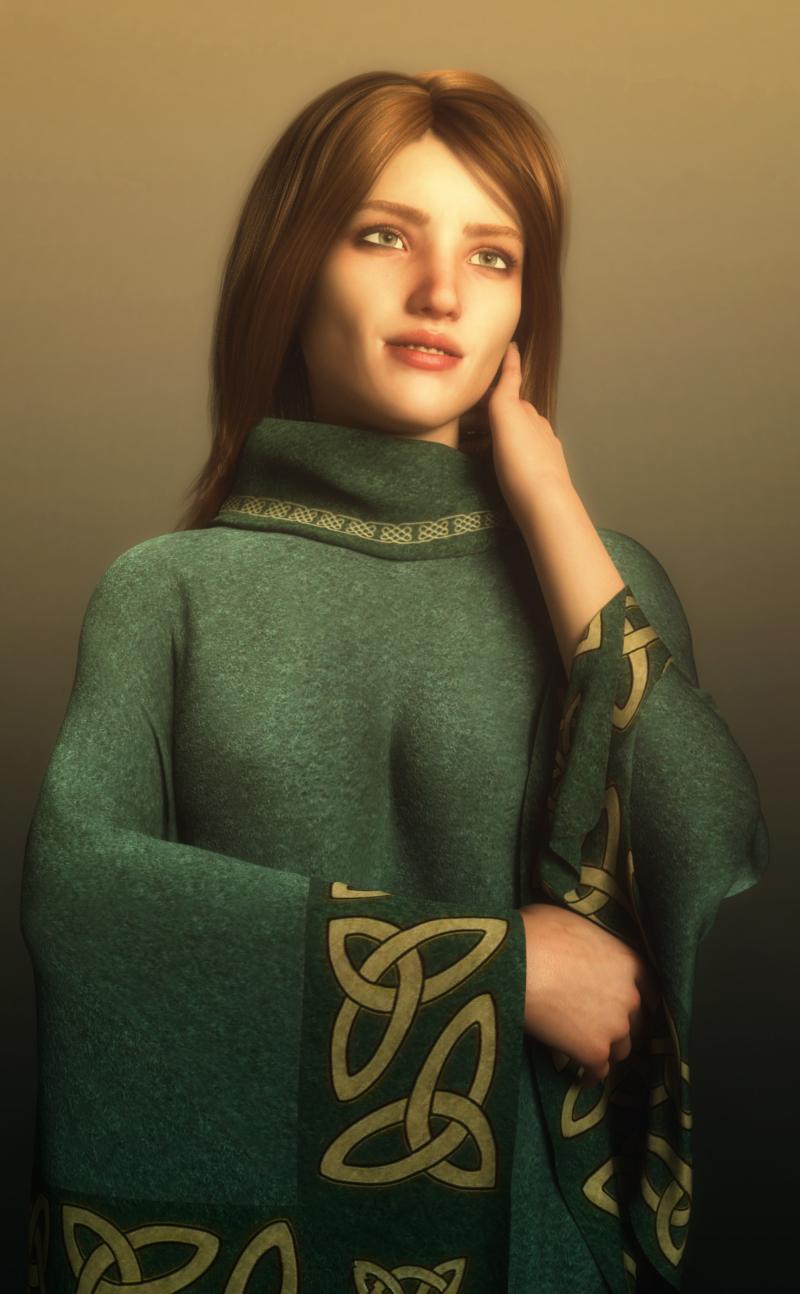
Well that seemed to work well! Incidentally what is that outfit she's wearing, I don;t recognise it at all?
https://www.renderosity.com/mod/bcs/dforce-classic-poncho-for-genesis-8-females/135117/
Thank you for the info - it looks so different with that texture set from the main promo picture!
[Released] Character Converter from Genesis 3 Female to Genesis 8 Female(Now Conv JCMs) [Commercial]It looks like the figure you are converting has HD morphs? Those cannot be converted over at HD. Try to convert a character with normal morphs.
(BTW, yes the Ctrl-Click is CMD-Click for Mac Users)
Rather a lot of the aging morphs, it turns out. As well as some NoSuit morphs. Okay I went back and zeroed out anything that was labled HD and will give it another try.
I have the Aging morphs for G8, so if the transfer works I can load both versions into a scene side by side and duplicate the settings on the G8 version.
Will post the image once it finishes chewing on it.
Genesis 8 Cross-Figure Resource Kit - No Instructions?That answers how to do it, but I'm not seeing how to make it available through smart content and/or reuse the morph asset?
[Released] Character Converter from Genesis 3 Female to Genesis 8 Female(Now Conv JCMs) [Commercial]Have installed and am waiting to see what I get. I suspect that it may take a while.
Since what I'm trying to convert is a heavily dial-spun character I figured that I probably ought to do the scene conversion method to port it over. People seem to be having fewer issues with that one.
First off; I'm on a Mac. Control-click doesn't select the second figure in the scene. On a Mac that's Command-click. IF, that is, what is supposed to be used. At this point I'm not at all sure.
Second; the first thing it did was to remove all of the dial-spun morphs from the G3F character, and make it duplicate the plain-vanilla G8F figure, complete with the G8F default 'A' pose. The next thing it dd was to move the G8F figure into the zeroed position.
Every few minutes it drops down a progress bar as it completes some function (calculating mean weight values) behind the scenes. But there has been no visible change to the G8F figure so far. And my G3F figure has effectively been destroyed.
This is a scene specifically for transfers, so there's no loss of the saved scene file where the character actually lives. But this was not at all what I expected.
ETA: am now seeing some visible effects on the G8F figure. It is being crumpled and generally warped. Transfer is not yet complete, however.
ETA2: Well, it finished. I think this is going to be returned.
Original character on the left. Center figure is what the script makes of my original character, i.e., destroys it. Allegedly transfered character on the right.
It did make an attempt to transfer the face. But it still isn't the same face. I left everything at the default settings so there may be distortion around the eyes which could probably be better, but it didn't seem to even try to make a workmanlike attempt at transfering the body morphs. The original may have had some scaling, but it wasn't all scaling by any means. Plus you can see the warping of both legs and the right arm.
Just. Not acceptable. I concede that this is a heavily modified character. But most of the characters that I want to move up to G8 *are* heavily modified. And the ones that I want to move up from G1 tend to be as bad or worse.
It was worth making the attempt. But, not even a near miss.
It looks like the figure you are converting has HD morphs? Those cannot be converted over at HD. Try to convert a character with normal morphs.
(BTW, yes the Ctrl-Click is CMD-Click for Mac Users)
[Released] Character Converter from Genesis 3 Female to Genesis 8 Female(Now Conv JCMs) [Commercial]Have installed and am waiting to see what I get. I suspect that it may take a while.
Since what I'm trying to convert is a heavily dial-spun character I figured that I probably ought to do the scene conversion method to port it over. People seem to be having fewer issues with that one.
First off; I'm on a Mac. Control-click doesn't select the second figure in the scene. On a Mac that's Command-click. IF, that is, what is supposed to be used. At this point I'm not at all sure.
Second; the first thing it did was to remove all of the dial-spun morphs from the G3F character, and make it duplicate the plain-vanilla G8F figure, complete with the G8F default 'A' pose. The next thing it dd was to move the G8F figure into the zeroed position.
Every few minutes it drops down a progress bar as it completes some function (calculating mean weight values) behind the scenes. But there has been no visible change to the G8F figure so far. And my G3F figure has effectively been destroyed.
This is a scene specifically for transfers, so there's no loss of the saved scene file where the character actually lives. But this was not at all what I expected.
ETA: am now seeing some visible effects on the G8F figure. It is being crumpled and generally warped. Transfer is not yet complete, however.
ETA2: Well, it finished. I think this is going to be returned.
Original character on the left. Center figure is what the script makes of my original character, i.e., destroys it. Allegedly transfered character on the right.
It did make an attempt to transfer the face. But it still isn't the same face. I left everything at the default settings so there may be distortion around the eyes which could probably be better, but it didn't seem to even try to make a workmanlike attempt at transfering the body morphs. The original may have had some scaling, but it wasn't all scaling by any means. Plus you can see the warping of both legs and the right arm.
Just. Not acceptable. I concede that this is a heavily modified character. But most of the characters that I want to move up to G8 *are* heavily modified. And the ones that I want to move up from G1 tend to be as bad or worse.
It was worth making the attempt. But, not even a near miss.
Feet HD Detail (Or Lack Thereof)Siciliano1969! Those soles are fantastic and so realistic! Do you intend to make this morph available???
Hey mlominy, I just might! Keep you posted!
Orangutan!!!
Wouldn't the old G3 apes or for that matter most any G3 character with the new morph converter to G8.This is Ape World re-imagined for Genesis 8. They've always been like a cross between apes and humans. They're great for fantasy or sci-fi renders. I wasn't expecting lifelike from this set but they do look realistic in their details. I definitely want all three.
We've been told there is another orangutan by Alessandro_AM being worked on that will surely be more lifelike. Hopefully the wait for that one isn't too long for those who are holding out for that.
Any good latina figures out there?Tasha 8 does indeed have some of these features. I wonder what she'd look like with the Macarena skin. For now I think I will pick up Macarena when it goes on a sale below $6 again, so that I can just use my plat voucher to get her, as she's a daz original. Dial her a bit. If that is not enough, then maybe Tasha or Benita. Ideally I'd like to do it cheap, so Macarena will be perfect if I can dial her to fit the requirements.
Clara, Sunny, Alexus and Emaile look more Mexico than Brazil, though they might work with some adjustments.
This is Tasha 8 with Benita's skin & brows and Macarena's skin & brows. (I did these renders more for a skin comparison on the same but different shape.)
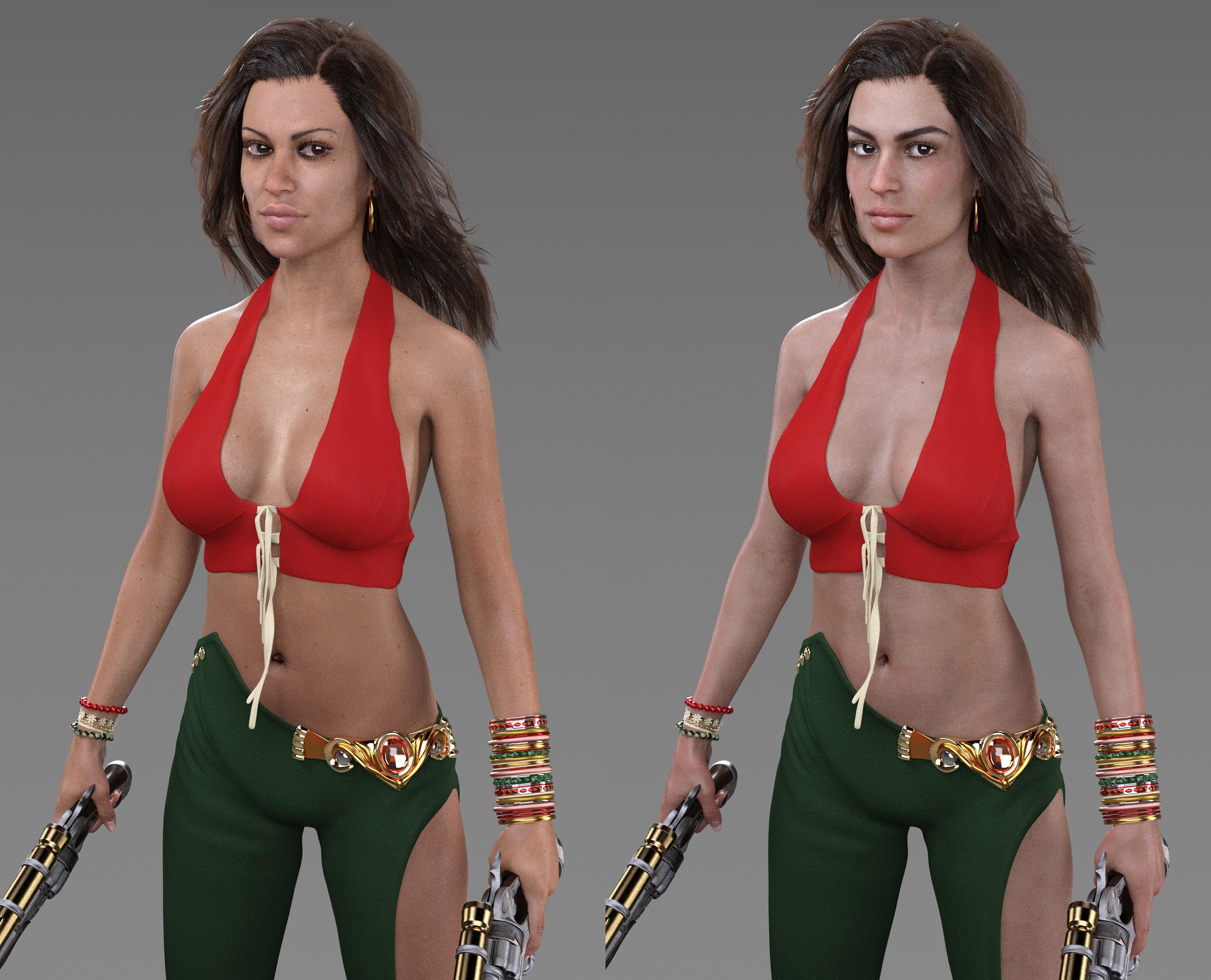
In terms of cheapness, Macarena is a good value. She comes with her own separate HD morphs (head and body) that you can use on other characters. And she comes with her thicker brows. Benita doesn't come with HD, but she comes with her own custom iris concave morph, fibermesh brows, and vellus hair. Her skin quality is excellent, as seen in Quixotry's renders. Then Tasha 8, is like many of the other "core" characters; has her own eyebrows, vampire fangs, and claws. Tasha 8's HD is separate. (I don't have it.)
Babyfication on Gorilla 8 not workingHello, I am applying the babyfication shaping morph in Daz3d and it's not working, the head just changes a little and that's all, the body remains the same.... What can I do?
Tobyn is installed btw...
Babyfication on Gorilla 8 not workingHello, I am applying the babyfication shaping morph in Daz3d and it's not working, the head just changes a little and that's all, the body remains the same.... What can I do?
New PC can't find Genesis 8 dsf (Solved)So... as the title says, I installed Studio on a new PC and am having a bit of trouble. Whenever I load any Gen 8 female I get a warning about not being able to find "studio/my library/people/genesis 8 female/characters/genesis8female.dsf", even though they load in fine and are fully functional.
From my understanding there shouldn't even be a dsf file in the characters folder, those are in the data folder, as the actual morphs, right?
I tried copying that dsf file into genesis 8 female/characters and still get the error.
Not sure if it's because I have daz pointing to a different location for my assets, which I've done on my PCs, and not had this issue, in fact, shouldn't she not even be able to load correctly if she didn't have the morph?
Time for a clean install maybe?
[Released] Character Converter from Genesis 3 Female to Genesis 8 Female(Now Conv JCMs) [Commercial]Yeah, no way am I going to uninstall G3. I have Victoria 7 and the majority of her Daz-O sisters converted to G8, but HD morphs cannot be converted. Plus some morphs cannot be moved over, such as all the options for Aarki's Lady Rune for G3. I'm not converting everything to G8 and I have way too much invested in G3 to simply cast it aside. I like having them all, right where they are waiting to be used. ;-)
This is nothing like what Artini has been sharing with us, but the image here is of my first character I converted with the Scene Converter. She has a full Victoria 4 GenX figure dialed in. While she's pretty basic, and nothing extreme at all, the GenX morph converted perfectly and I've had no problems fitting clothes to her nor any issues with any poses I've tried.
Well that seemed to work well! Incidentally what is that outfit she's wearing, I don;t recognise it at all?
https://www.renderosity.com/mod/bcs/dforce-classic-poncho-for-genesis-8-females/135117/
Genesis 8 Male has become corruptedUninstall is one option, and report it to the artist (or to Daz Technical Support if it comes from here). You can also open the Parameter Settings (gear icon on the slider) and set the default value to 0, then File>Save As>Support Assets>Morph Asset and save the modified morph with the same valeus for Author and product as the original (you can get those from the folder names in /Data/Daz 3D/Genesis 8/Male/Morphs in the zip) - make sure you have overwritten the original .dsf file for the morph.
Could GANs (deepfake technology) be used to create morphs?Absolutely, but it would be handled very differently to deepfakes, in that the user shouldn't be training the networks themselves.
AI learning is incredibly computing intensive (we're talking days, weeks, even months to train a system well), and we're looking at a much simpler problem. The reason deepfakes generally require the user to carry out the AI learning themselves is because the problem of "turn an image of any person into any other person, regardless of expression, camera angle, perspective, lighting, etc" is far too complicated to be able to train one network to do that for any combination of people, so we have to train an individual algorithm for each specific pair of people.
In comparison, the problem of "create a morph that resembles these photos that have fairly neutral expression and lighting (and then let the render engine worry about specific expression, angle and lighting)" is a far simpler process, so one network could theoretically be trained with a wide enough array of training data to work for anyone. (Essentially, swapping the wildcard in the problem from "one person under any circumstance" to "any person under one circumstance").
By the time it was on your computer, such a system should be a very complex, but ultimately dumb, algorithm - the user wouldn't actually be carrying out the machine learning process themselves.
[Released] Character Converter from Genesis 3 Female to Genesis 8 Female(Now Conv JCMs) [Commercial]Yeah, no way am I going to uninstall G3. I have Victoria 7 and the majority of her Daz-O sisters converted to G8, but HD morphs cannot be converted. Plus some morphs cannot be moved over, such as all the options for Aarki's Lady Rune for G3. I'm not converting everything to G8 and I have way too much invested in G3 to simply cast it aside. I like having them all, right where they are waiting to be used. ;-)
This is nothing like what Artini has been sharing with us, but the image here is of my first character I converted with the Scene Converter. She has a full Victoria 4 GenX figure dialed in. While she's pretty basic, and nothing extreme at all, the GenX morph converted perfectly and I've had no problems fitting clothes to her nor any issues with any poses I've tried.
Well that seemed to work well! Incidentally what is that outfit she's wearing, I don;t recognise it at all?
Carrara Plugin DevelopmentI've put up a beta version of the Pose Export command into my Laboratory which you can download to try out. There is some more explanation in my Laboratory Notes on how to use the plugin. It saves figure poses in .duf format which you can then use in your Carrara content folder in the browser. You can save arm, leg or hand poses by selecting those specific parts. Otherwise select the figure parent group for a full body pose. It saves a .png icon using the current rendering camera view.
I had planned to make this a much better plugin and release it through DAZ but I've hit so many brick walls that may never happen. Better to share something that might be useful rather than nothing. As discussed above I can't get into the pose control information with the SDK - nor the morphs either to do expressions. It works with the Genesis 1 and 2 figures that are supported in Carrara 8.5 and should work with most of the earlier DAZ human figures. I hard coded in the bone names which can vary from one figure to the next but are consistently named in the pose files. If other figures have bone names that I missed they could be added. This was a similar issue to the 'internal' morph names but with bones it was easy to make a translation table.
I was able to add in a list of detected runtime folders to make it quicker to get to your content but this didn't work on the Mac version.
Daz 3D is part of

Connect
DAZ Productions, Inc.
7533 S Center View Ct #4664
West Jordan, UT 84084Licensing Agreement | Terms of Service | Privacy Policy | EULA
© 2026 Daz Productions Inc. All Rights Reserved.