-
off topic thread
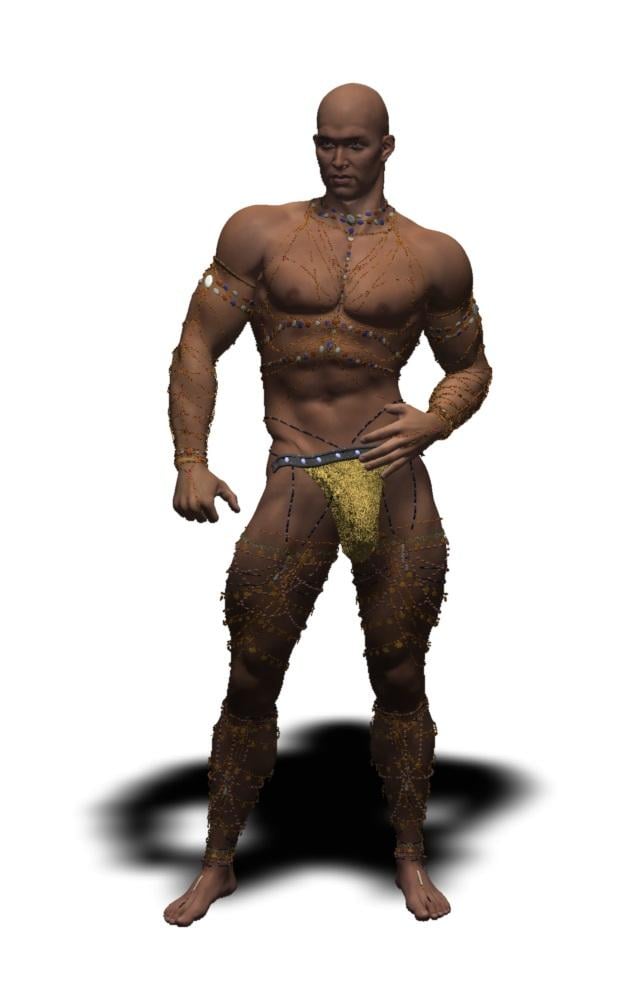
bought those body and leg chains, converted to general weight in the Carrara plugin called DAZ studio and autofitted them to Genesis 2 male
too many to save as support assets but a scene subset did load and project morphs on Gianni 6 in Carrara after an hour!
but now getting the dreaded error has occured trying to load a mimic wav or clicking in timeline etc
it will need massive pruning with Alberto's morph eraser too to save
hours later gotten this far
 Auto fit of v4 costumes to G3F doesn't work well with daz 4.11.
Autofit has a problem with skin tight outfits, on a bodysuit they would be the armpits, the butt crack and on females the area under the bust. Adding a smoothing modifier should take care of the armpits and the bust, however dealing with polygons that are being pushed through each other in the butt crack requires a modeling program.
You also have the problem that all of the bodysuits original V4 shaped morphs are still in there, they may be interfering with G3F's morphs as they get pushed into the bodysuit.
If you don't have the skills to manually fit the suit to G3F in a modeling program, then my suggestion would to autofit to G3F, add a smoothing modifier (leave it default), hide G3F with her eyeball in the scene tab, export the bodysuit as a OBJ, unhide G3F and delete the bodysuit, import the OBJ you just made and use the Transfer Utility to fit it to G3F, then save it with "Support Assets > Figure/Prop Assets".
Can't fix the butt crack like this, but you will now have a clean bodysuit with no V4 morphs to get in the way, if you are still having the same issues as in your last pic then we can rule out it being the old morphs.
suggestions for Genesis 9More compatibility with other software has to be a consideration if talking about the figures not the program.
Having all the features only work in DAZ studio is not going to sell content to people not using DAZ studio, they have indeed addressed some of this selling FBX dressed versions with game licenses but I need to ask why not a Poser compatible range too for example?
Yes I know all the history etc but I am certain they would sell even if not the main market the Premier Artists want to make a living of off, DAZ could possibly squeeze a few more bucks out of it with Poser versions of the base figures and a morph loading facility to add any other characters maybe convert JCMs etc a script utility not needing DAZ studio.
Renderosity owns Poser now and they are happily making content for DAZ studio so DAZ could grab some reciprocal profit back making stuff for Poser I thought.
As for Carrara, yeah sadly not a huge fix but one they are not willing to do for some reason.
[Released] Character Converter from Genesis 3 Female to Genesis 8 Female(Now Conv JCMs) [Commercial]Still trying to get caught up on the posts in this thread, but I have a few questions/comments.
1) Is there a video tutorial showing how to use this product?
Not yet. I am working on it.
2) Any idea when the g3m to g8m will be released? I need that way more than the female version, although I'm still very happy to pick it up.
I am close to submitting. Then it is usually 3-4 weeks.
3) I agree that the g2 generation is still awesome and well loved, having the ability to transfer their morphs/figures to newer generations would be useful.
Thank you for the info!
Ice Dragon Art A Glimpse Into My WorldSteampunk wings.
Oooh! Those are cool! I hope the guy is efficient at flapping them in case he fall off at that height, though!

This is just a body/face morph but I just really really like her.
Yeah, she's really gorgeous! I especially like her eyes, and how she looks ready to paw-swipe at the next person who comes too close.
How to get Morph data?Hi everyone, I've been making progress, but I'm stuck again. I'm successfully exporting vertex/face data because I can dump the received objects in obj format and they seem to look right. But the morhphs are ignored and I'm getting the base G8 character.
I'm using this to get to the geometry (error checking removed):
auto object = node->getObject();<br /> auto shape = object->getCurrentShape();<br /> auto geometry = shape->getGeometry();<br /> auto facetMesh = dynamic_cast<DzFacetMesh *>(geometry);Is there a call that returns the baked geometry as it is rendered? Please tell me that I don't have to apply all morphs myself :)
Thanks,
Donald
FBM Fitness and JMCThank you both very much!
As I understand now, when I played with 'Fitness' it was giving me my morph twice.I only write this for future reference if someone has the same problem.
Like barbult said, for fixing Fitness we need to replace the Fitness Size and Fitness Details ONLY.
My mistake was that I also replaced the Fitness with my custom morph and so I was getting it twice, meaning on 200% .
To fix this simply go and delete the CTRLFitness from your data folder (in case you have saved your project) and everything will be fixed. :)Thank you guys, it's the first time I make these stuff and I am a bit dizzy, since I've been doing fbms and jcms the whole day! lol
FBM Fitness and JMCDoes your morph match the basic shape of Fitness, or dose it match several effects combined?
FBM Fitness and JMCI apologize if this covers things you already know. I'm not sure what is already working for you and where the problem occurred in your process.
To handle the "Fitness" control in your clothing, you have to create separate custom clothing morphs for Fitness Details and Fitness Size. You do not create anything for the "Fitness" control itself. If you create your custom morphs by exporting an OBJ, editing the OBJ, and creating the morph from the OBJ with with Morph Loader Pro, be sure that ONLY one morph at a time is dialed in to your character when you export the OBJ. Manually dial in Fitness Details (or Fitness Size) BY ITSELF. Do not dial in Fitness, which activates both morphs. Be sure that your character is at 100% scale and Base Resolution before export.
When you save your custom clothing morph (File/Save As/Support Asset/Morph Asset), make sure that you save it with exactly the same name as the corresponding morph on the character. Note that this is the morph name, not the morph label. For example, Fitness Details is the morph label; FBMFitnessDetails is the morph name. Your clothing morph needs to be named FBMFitnessDetails. (In the Parameters pane, you can click the gear icon on any morph and select Parameter Settings to see the morph name and label. Copy the morph name, so you save yours with the correct name.)
After saving your morphs, delete your clothing item and load it again. (Sometimes it seems like you have to close Daz Studio and reopen it, especially if you are running an old version.) Dial in Fitness on the character (not your clothing). Select Show Hidden Properties in the Parameters context menu. Select your clothing item and look at Currently Used in the Parameters pane. You should see the Fitness Details and Fitness Size if you saved custom morphs for both of them. Click on the gear icon on each one and Select Parameter Settings. It should show that the morph is Modifier Shape now.
MimicMolly's Renders & WIPs
@Hylas Thank you. For regular human characters, loading up the original and dial-spining the G8 to match is still the best, hassle-free method. It's tedious and you have to probably plan out a day to focus on it. (Doesn't bother me because it's like in-game character customization.) But Emily has the rounded V4/G1/G2F face that we don't see much of anymore. I think her teeth got deformed a bit on this transfer, but regular people don't have such perfect teeth, so I left that alone. XDGreat job on the Emily transfer! Transferring characters can be so frustrating, but also fun. I'm still getting the hang of it.
Ice Dragon Art A Glimpse Into My WorldNova by MaxMax available at Renderhub. This one may be my new favorite render at the moment. This is just a body/face morph but I just really really like her. And the new hair and headgear ( Mistress Malefica Hair) by IgnusSerpentus is outstanding.
 FBM Fitness and JMC
Thank you very much for explaining this, but still I'd love it if you could tell me the steps to tell DAZ to show MY custom morph when 'Fitness' is
on. Even if I understand what you say, I dont have the knowledge to understand how to do it.
I have replaced the Fitness Size and Fitness Details with my morphs but the Fitness parameter is still the auto generated.
Do you think you could just be more specific, for exaple 'do this', I will understand better. :DMimicMolly's Renders & WIPsGreat job on the Emily transfer! Transferring characters can be so frustrating, but also fun. I'm still getting the hang of it.
[Released] Character Converter from Genesis 3 Female to Genesis 8 Female(Now Conv JCMs) [Commercial]Still trying to get caught up on the posts in this thread, but I have a few questions/comments.
1) Is there a video tutorial showing how to use this product?
2) Any idea when the g3m to g8m will be released? I need that way more than the female version, although I'm still very happy to pick it up.
3) I agree that the g2 generation is still awesome and well loved, having the ability to transfer their morphs/figures to newer generations would be useful.
Cut a hairstyle to make it shorter?I bought Layered Fringe Hair (SKU 56271) because I really like how it looks from the neck up. The only issue I have is with the length of the hair. Unfortunately, the morph sliders for this hairstyle don't allow me to shorten the hair very much.
I've looked at shorter prefab hairstyles, and none of them have the look I want above the neck, so my only option is to take this long hairstyle and cut off everything below the neck. Does anyone know how I can do this and make it look half-decent?
[Released] Character Converter from Genesis 3 Female to Genesis 8 Female(Now Conv JCMs) [Commercial]So, I really was surprised to see this one. Ever since the tragic passing of Dimension3D the morph convertor-happy users like myself have been pretty much left on our own. Sure, there have been different techniques provided to us in tutorial threads us both on and off the forums, and even one of us have dedicated their time and effort to try and make a sufficient enough script to fill-in that gap, shout-out to SingularBlues. But this is the first time since the discontinuation of GenX that we're finally getting a solid, in-store PA product addressing this.
Thank you SO much for this, RiverSoftArt! :DYou are very welcome! I knew from spelunking through the forums that there were user efforts (though I never tried them, way too busy). After 2 years though, it didn't seem like there were any official products, and Sickleyield convinced me to try and make one. I had no idea if there would be a market for this. I was afraid the the "morph converter-happy" users would have already done all they needed to with home-grown techniques.

Oh no, trust me. We warmly welcome ANYTHING that lets us do these things in the least amount of steps possible. :D
That reminds me why I tell people I am a good programmer. I am so lazy that I program things to be as simple as possible. So I work really, really hard to be lazy  FBM Fitness and JMC
A property starting with CTRL is a controller - not, usually, a morph in its own right but driving another morph. When creating morphs you should match the actual morphs on the original figure rather than the CTRL morph as DS doesn't know to skip the actual morph - it sees it set on the base and not supported in the fitted item, so it generates a new morph which gets applied in addition to your custom morph.
Breast bounce script for DAZ Studio 4.5Here is the updated download link for these scripts.
https://sites.google.com/site/vibrationphysics0606/
Breast Physics for G8F v1.01
Breast Physics for G3F v1.02
Breast Physics for G2F v1.02
Breast Physics for Genesis v0.65
All these scripts require the following breast control morphs for each figure.
- Breast Control Genesis 8 Female(s)
(https://www.daz3d.com/breast-control-genesis-8-female-s)- Breast Control Genesis 3 Female(s)
(https://www.daz3d.com/breast-control-for-genesis-3-female-s)- Breast Control Genesis 2 Female(s)
(https://www.daz3d.com/breast-control-for-genesis-2-female-s)- Glute and Breast Movement for Genesis
(https://www.daz3d.com/glute-and-breast-movement-for-genesis)
My script calculates the force applied on the figure’s breasts in each frame in each of xyz axis, simulates the vibration based on the technique called seismic response analysis, and then assigns morph values that represent the vibration. If the body moves in a complex way, the breasts vibration will equally be complex as is the case with a real human being.
You can set various parameters to change how the breasts vibrate, and these parameters are explained in detail in the accompanying readme file.
Enjoy! Don’t forget to share your video if you create a good one!
Hello everyone, how can I get privileges for downloading these files? It won't open if I just click on it :/
FBM Fitness and JMCI solved my second issue by making a JCM,I found a great tutorial and it's not that difficult as I thought. :)
Please someone reply for the CTRFitness morph and also how do I hind the JMCs now, so they are not in the Morphs List.
Where should I list them?[Released] Character Converter from Genesis 3 Female to Genesis 8 Female(Now Conv JCMs) [Commercial]So, I really was surprised to see this one. Ever since the tragic passing of Dimension3D the morph convertor-happy users like myself have been pretty much left on our own. Sure, there have been different techniques provided to us in tutorial threads us both on and off the forums, and even one of us have dedicated their time and effort to try and make a sufficient enough script to fill-in that gap, shout-out to SingularBlues. But this is the first time since the discontinuation of GenX that we're finally getting a solid, in-store PA product addressing this.
Thank you SO much for this, RiverSoftArt! :DYou are very welcome! I knew from spelunking through the forums that there were user efforts (though I never tried them, way too busy). After 2 years though, it didn't seem like there were any official products, and Sickleyield convinced me to try and make one. I had no idea if there would be a market for this. I was afraid the the "morph converter-happy" users would have already done all they needed to with home-grown techniques.
Oh no, trust me. We warmly welcome ANYTHING that lets us do these things in the least amount of steps possible. :D
Daz 3D is part of

Connect
DAZ Productions, Inc.
7533 S Center View Ct #4664
West Jordan, UT 84084Licensing Agreement | Terms of Service | Privacy Policy | EULA
© 2026 Daz Productions Inc. All Rights Reserved.