-
Figure Metrics and GF8 Height
I feel like we are talking past each other. You can see from my screen shot that I was able to type your desired value directly. No sliders, no sliders working backwards etc. Is there some reason that doesn't work for you?
The Configuration tab is where you map the measurements to properties that will adjust them.
First thank you for continuing to try to help! :)
I have some screenshots at home of what my issue has been. I'll add those to this thread along with some results of the testing for my new theory that the "Height" parameter/morph on GF8 is just too limited for what I was trying to do.
Question about exporting morphs of a custom beard in DAZ 4.11I don’t know of any plugin which would do that, no.
I’m not sure if simply trying to re-save the automatically generated morph as a morph asset with the right name would work as I never tried.
If it doesn’t, the way to do it would be this:
- Export the various morphs as obj:
- Apply one morph to the figure wearing the beard
- Export the morphed version of the beard as obj
- Remove the morph you used
- Repeat for each morph you want in your beard
- Load only the beard in DS, then for each morph:
- Set all morphs to 0 on beard
- use Morph Loader to create a morph from one of the obj
- save it as a morph asset with the same name as the corresponding figure morph so it replaces the automatic one
But yes, that would take a lot of time
Ponytail Hair in image for H&C School Uniform?Now, I'd like to ask a question about something else. What is the name of the face morph used in the main image to the Vertigo Ponytail hair?
I have to admit, the Vertigo ponytail hair is the prettiest for a 3D figure I have ever seen.
Question about exporting morphs of a custom beard in DAZ 4.11Thank you Leana for the info!
I know the process of creating morph shapes inside traditional modeling software like Maya. It is quite time consuming, especially when it has to fit to an underlying sets of morphs from the face.
Is it possible to create the morphs in DAZ in a somewhat generic way? (eg. pull up slider smile-left, save morph, pull up slider smile-right, save morph, and so on..)
Do you know of any plugin that might help me in that regard?
[Released] Character Converter from Genesis 3 Female to Genesis 8 Female(Now Conv JCMs) [Commercial]That to me looks like an issueof texture try applying G8's eye textureoops my bad you already did that ....well fudge.....
Yeah, I noticed someone else a couple pages back converted Ophelia 7 and I saw the same thing with the eyes, and come to think of it, it also shows the same wonky pupil shape in the script's .pdf guide...so I'm beginning to think it's a limitation that I either have to accept or just stay with these characters on G3.
It is a limitation of the conversion. I wish the conversions were perfect, but aside from pushing the tolerance extremely low and the textures (both of which you have already done), there is not much more to do. And please return it if this is a deal breaker for you.
Thank you for confirming, so I know I'm not doing something wrong!
Here's the funny thing - I did try converting the same character via Sickleyield's manual process (the one on DeviantArt)...and her face came out looking pretty much the same as when I used your script...short of the eyes. The irises stayed round. But the body was all sorts of wonky. I wonder if I can combine the two processes and have your script handle the body and the manual steps handle the head, each separated using X-Tools. It sounds really roundabout and tedious, but it's something to try.
Hmmm. That is strange. SY's process was a lot of what I do. Did you use her process when she used the "transfer eyeballs sideways" method or after she switched to using the tolerance?
I'm not sure, lol. It was this one - https://www.deviantart.com/sickleyield/journal/Tutorial-Transferring-Character-Morphs-G1G2G3G8-409437916 *edit* Oh, that was before she added the 2019 update part, so it was before using the tolerance function. But the body didn't transfer right, so I used X-Tools to separate and use just the head.
Ok, I *think* I figured out the old method that SY did. However, it does not do as well as I hoped. It makes rounder eyes except for one area, but it does seem to depend on the tolerance. I might add it as an option. What do you think?
Tolerance Only (0.06)
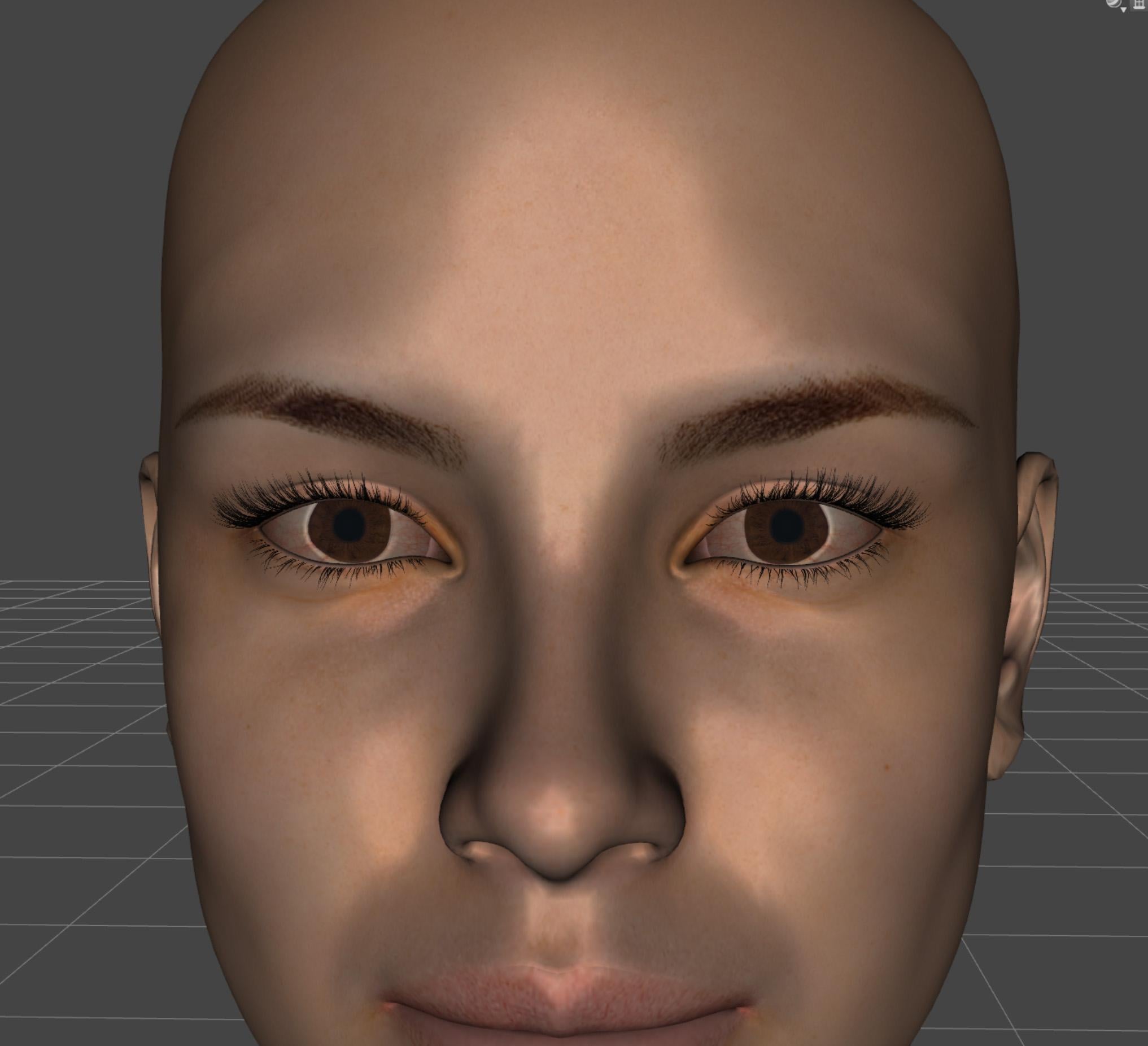
Eyes Translation, Tolerance is 0.0005
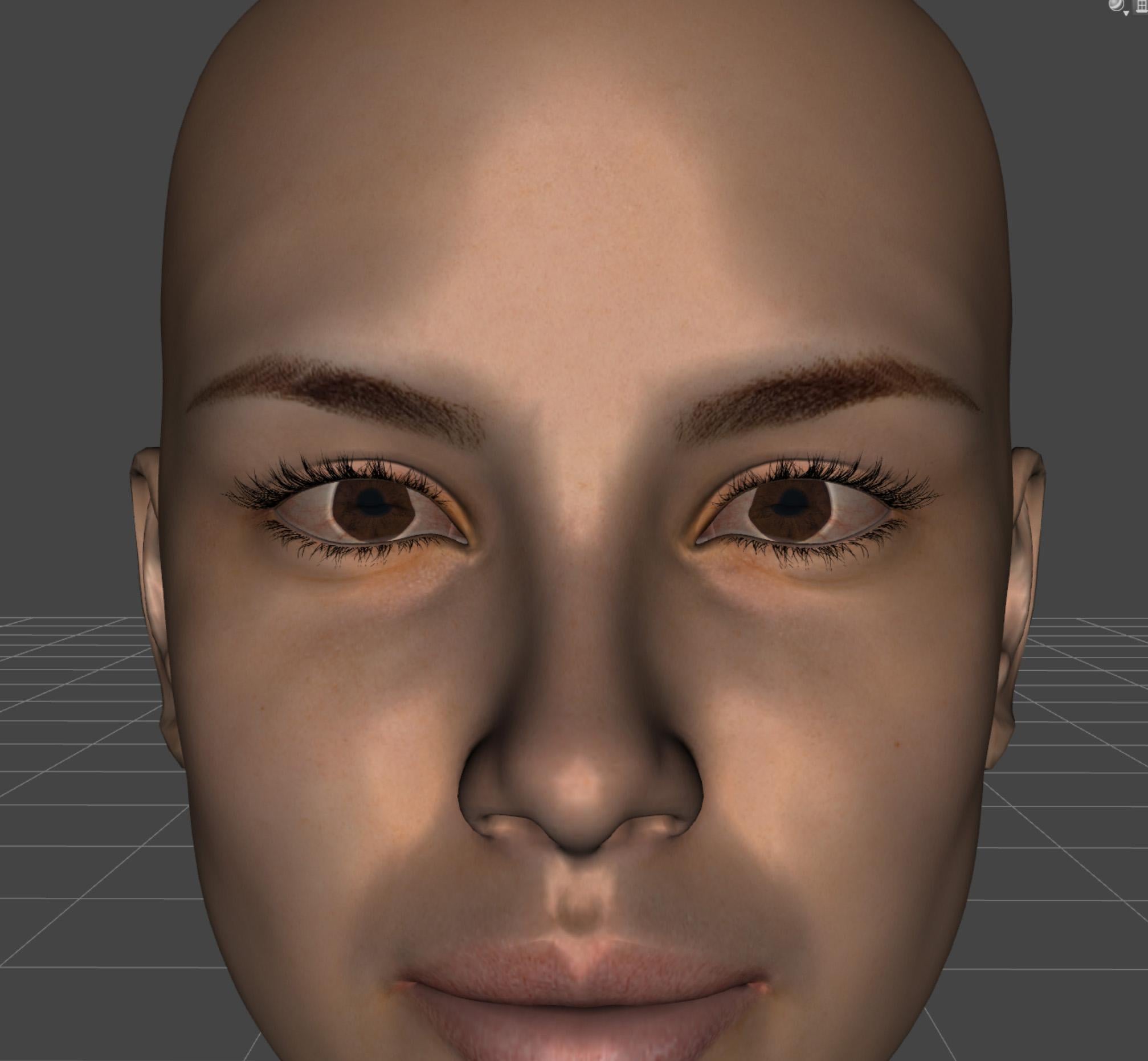
Eyes Translation, Tolerance is 0.06
Can't Find Genesis Expressions Morph DialsI don't have this product to check, but I seem to recall some of the older products had expression packs that only had presets, no dials.
I'll be back as soon as DIM finishes loading. I want to check something…
Okay. Looking at the list of installed files for a G2F expressions pack show only .duf files, which would be presets. They are installed under /People/Genesis 2 Female/Expressions/[productname]. It's all or nothing with those, (unless you change the facial bones manually, of course.)
Looking at an expressions pack for Ivan 7, I'm seeing dsf files loaded in the data directory. For example:
/data/DAZ 3D/Genesis 3/Male/Morphs/Zeddicuss/Z_Barbarian_Expressions_Ivan_7/Z BE 24.dsfYou can use DIM to view the installed files of your Genesis Expression pack. Just locate it by typing the name into the filter field in the upper right, and clicking on the Installed tab. It should be isolated. Right-click on the small arrow icon to the right of the product name and select "Show Installed Files…" from the menu. The resulting popup window will list all the files, and you'll be able to verify that this product uses presets only by the lack of any paths beginning with /data/
Hello,
Thank you for the reply, but I have since found out that the morph dials are under the 'head' parameter section and not the main full body/head parameter. I guess this was the way they did it for expressions back in the Genesis days. I normally don't use Genesis, but I find their lower polygon counts makes for great background characters. Setting the Sub-Level down all the way certainly reduces the rendering overhead. While they are not as easy on the system as billboard people (flats), it still helps.
Thanks!
Geo
XTransfer Module 1- Genesis 3 to Genesis 8 Morph Converter (Commercial)No Idea..... We ran into a serious issue where the morph deltas sometimes refused to stick when you opened a new Genesis 8. So when you dialled up the morph slider the figure didn't change. It's a bug in studio but we busy on a work around because we cannot wait for a studio update just to address this problem. We will get our sales when the time comes lol...hopefully
 Question about exporting morphs of a custom beard in DAZ 4.11
Hello there
I'm currently working on a VR movie using DAZ characters with the iClone animation pipeline. Great stuff!
I got stuck with the following problem, hoping for someone to point me the way.I imported and transferred a low-poly custom beard (bought from a 3d marketplace) to the facial rig inside DAZ.
I saved the beard as FigurePropSupportAsset, and can i apply it to any Genesis8 character and instantly use all available morphs.
If i move any shape slider on my character Genesis8 character, the beard nicely matches every facial deformation.When i export the character including beard from DAZ as fbx and import it to Character Creator using Transformer, the morphs on the beard get lost.
When i import the fbx to Modo, there are morphs on the character as expected, but not a single morph shape on the beard.
So obviously, the problem is that DAZ doesn't export any morphs on my beard.
What am I not seeing here?
I'm using DAZ Studio 4.11 Pro with Genesis8.
Any help is greatly appreciated!
Thanks
Andy
EDIT: Image links did not work
Anyone used the G2M Gargoyle?the wings and the horns are part of the succubus addon, so you will need it.
Actually just the wings are from the succubus...the horns are a morph
Black Is Beautiful II
Loving my new OOT Rasta Tails Hair!
Freebie credits:
Fire by SquarePeg3D: https://www.renderosity.com/mod/freestuff/morphing-flame-for-iray---100-free/76201
Morph by RenderGuyNY: https://sharecg.com/v/90309/gallery/21/DAZ-Studio/Genesis-8-Female-Faces
Eyes by Shadoweagle: https://www.sharecg.com/v/89913/browse/21/DAZ-Studio/SIRINE-for-G8F
Pose by SquarePeg3D: https://www.renderosity.com/mod/freestuff/fantasy-amazon-bundle-for-g8f---100-free/79046
Pose by Servus Venandi: https://www.deviantart.com/syndicatewars/art/Bondage-Poses-1-for-Genesis-8-Female-Free-743345829Hylas' cornerI wanted to try out the OOT Rasta Tails Hair which I snatched yesterday at a good discount. It reminded me a bit of how Logan Browning's character wears her hair in Dear White People, so I made my character a light skinned black woman with hazel eyes. I quite like how she came out! Sparks and smoke are done in post, but the fireballs are props in the scene.
Freebie credits:
Fire by SquarePeg3D: https://www.renderosity.com/mod/freestuff/morphing-flame-for-iray---100-free/76201
Morph by RenderGuyNY: https://sharecg.com/v/90309/gallery/21/DAZ-Studio/Genesis-8-Female-Faces
Eyes by Shadoweagle: https://www.sharecg.com/v/89913/browse/21/DAZ-Studio/SIRINE-for-G8F
Pose by SquarePeg3D: https://www.renderosity.com/mod/freestuff/fantasy-amazon-bundle-for-g8f---100-free/79046
Pose by Servus Venandi: https://www.deviantart.com/syndicatewars/art/Bondage-Poses-1-for-Genesis-8-Female-Free-743345829ETA: It seems that again, the image in the gallery is of a lower quality than the image I uploaded
 Last time that happened it reverted back to the proper version after a while, so fingers crossed.AIUTO...CHI CONOSCE L’ITALIANO? PARTE DODICI
Sembra molto interessante, finito in wishlist immediatamente. Chiaramente aspetto di vedere le reazioni degli altri "sbadati" che comprano al Day-One!

Per ovviare al problema dello spazio sto progettando di costruirmi una "Torre DAZ Semovente" tutta in acciaio, ottone e legno.
@ Muscleman:
Ragazzoneeeeeh! Ci sei?!

Aiuta il povero vecchio Zio Imago, su!
Ciao Imago. se non ricordo male...non dovresti trasferire "lo scheletro" di genesis 8 sulla maschera? Come si fa con i vestiti? E' da tanto che non faccio una cosa del genere ma dovresti usare il rigging della faccia per trrasferirolo sulla maschera ( che spero sia basato sulla stessa figura) come si fa con i vestiti
Mannaggia, non mi sono spiegato bene...
Oltre al rog, dovrei trasferire anche il movimento dei morph come i sorrisi, le sopracciglia, le palpebre, la bocca che si apre e si chiude... Tutto quello che "muove" il volto insomma.
Come dicevo l'ho fatto anni fa ma non ricordo come avevo fatto. Il Transfer utility anche se impostato per traferire tutti i morph, poi una volta che applico la maschera al personaggio, questi non seguono i movimenti della faccia, per esempio se muovo le sopracciglia, la faccia si muove ma la maschera sebbene abbia il morph giusto non segue il movimento.
E poi parlo di morph proprio non di rig.
Mi pare fosse relativo ai link dei morph o robe simili... Tu ne hai idea?
SereneNight's Sci-Fi Fun Thread 2Yeah, I have a pose converter that does a pretty good job on most poses though a few need adjustments. It's the expressions I'm talking about that don't always go so well when used on a G3 instead of a G8. But it's not just yours, many of the Daz O and PA packs are the same way. Was hoping for better results but it looks like some of the morphs that are in G8's face are not in G3's. Ah well, G8 looks so much better.
I don't think it's just the morphs, although there's that. (Most of the Daz-O expression morphs are HD, and most of the ones for G3 aren't; because the actual morph names are different, presets can't find the right thing to hook into to work.) As I recall, the face is actually structured a bit differently -- either more bones or renamed bones or something like that. G3 expressions can work -- incompletely -- on G8, but G8 expressions frequently don't have enough to work with to work on G3.
Trying to make long legged woman (Answered)To clarify:
Michael's referring to this or a similar product (there are differnt versions for each generation) https://www.daz3d.com/genesis-8-female-body-morphs
Also included in this set is a height morph, which may also be of use.
Can't Find Genesis Expressions Morph DialsHello All,
I just purchased the Genesis Evolution: Expressions pack here:
https://www.daz3d.com/genesis-evolution-expressions
The odd thing is that I can't find the facial morph dials anywhere. Usaully they are under the parameters tab and listed with the other morphs there, but they were not there. I tried to find them under the shaping tab and even the posing tab, but alas they are not there. And yes I have checked the Install Manager and it says the package has been installed. Any assistance would be appreciated.
Thank you
Marie Loo by Elianeck no longer available?I've seen this happen before (not on this site) when a character is later interpreted as being to young looking to have seperate anatomical elements textures included. I don't have this character so I can't confirm if this was the case. And if so, one would think it would have been sorted out during the vetting process before going live.
Pretty sure Elianeck doesn't include anatomical element textures, even when the character is obviously adult.
Good to know so I can avoid any character purchases from her.

Personally, I think that's really only a reject reason if you are doing 'soft photography' - if you are doing 'hard photography' you'll be using something the standard daz anatomy mat won't be any help with anyway. As long as I've got a morph for a little light topography so she doesn't look like barbie (or worse, action man) I'm content enough.
Same can't be said for male characters though.
What happened to dForce hair?When I made a scalp object for G8F (so that I could create Strand-Based Hair on it), I started with a sphere, deleted some polygons, shaped the sphere to fit close to her head, and used transfer utility to fit it to G8F. I did not start with the G8F mesh to make my scalp object. The way I did it is just like creating clothing for G8F and fitting it to her. It is not her mesh, it just conforms to her shape. I believe that is OK according to the EULA, because it does not use G8F mesh.
Help! Writer Needs Aliens!!I'm a science fiction writer. Most of my book covers are unfinished because of my basic problem. I can't figure out how to get my custom hands/feet on a model. Any model.
I've tried Dariofish's wonderful HFS products. He doesn't include a two-fingered morph or thumbless morph.
I tried modifying David 8 with the correct body shape for my Zheien race. The HFS version shows what I got with David 8. Here's my Zheien hands/feet model. It should be tapered on both fingers, but that's the last version I did before I got sick. I'm disabled. Every time I get sick, I have to start over with the Blender tutorials. At this rate I will be dead before I get a Zheien model. Dariofish, could you add morphs to HFS for two fingers, thumbless, heelless, and smooth joints? My Zheien has silicone-based bones that bend slightly. He doesn't have elbows, wrists, or finger joints though the four-fingered bone structure is there for posing. I also need a flattening morph for fingers/toes and a rectangular option for soft corners. Zheien don't have fingernails. They have tiny claws in the corners. So I need a fingernail-less morph also.
Or, could someone simply taper my other finger/toe and attach the hands/feet to a David 8? Or show me how so I can do book covers with my Zheien fella? My entire book series is waiting for covers, so I simply have a landscape for all my books with the title. I've been trying to model a Zheien since 2009 without success. I'm so close!! I have tried to do postwork and give my Zheien the right hands, but it just looks cartoonish, like all my drawings/paintings. I started out with Poser and am switching over to DAZ because the Genesis 8 models look great, and because I can use Dreamlight's lighting sets. Things are coming together more and more for me.
All I need is a Zheien so I can get these book covers done. Help!!
Remember that the amazon thumbnail is the first thing anyone will see of your cover, and the second thing is a mid-sized version of the cover art on the amazon sale page. Full length image of characters, human or alien, doing complicated stuff are not ideal in that format, especially since you need to leave room for the title, your name etc. My advice would be to do a shoulders-up portrait of your Zheien (maybe with a major human character for contrast), with whatever science fictional background image you had in mind, and let the alienness of the face do the work for you. The Michael Whelan-esque Alien Biology Special Edition can wait until the technology or your modeling skills have caught up, or until your books become bestsellers and you can afford to commission the work done.
Aaargh! rant about eyelashes in Genesis 8There is already a developer version of the Genesis 8 figures, set up ready for morph creation, includd in the Starter Essentials.
Help! Writer Needs Aliens!!I'm a science fiction writer. Most of my book covers are unfinished because of my basic problem. I can't figure out how to get my custom hands/feet on a model. Any model.
I've tried Dariofish's wonderful HFS products. He doesn't include a two-fingered morph or thumbless morph.
I tried modifying David 8 with the correct body shape for my Zheien race. The HFS version shows what I got with David 8. Here's my Zheien hands/feet model. It should be tapered on both fingers, but that's the last version I did before I got sick. I'm disabled. Every time I get sick, I have to start over with the Blender tutorials. At this rate I will be dead before I get a Zheien model. Dariofish, could you add morphs to HFS for two fingers, thumbless, heelless, and smooth joints? My Zheien has silicone-based bones that bend slightly. He doesn't have elbows, wrists, or finger joints though the four-fingered bone structure is there for posing. I also need a flattening morph for fingers/toes and a rectangular option for soft corners. Zheien don't have fingernails. They have tiny claws in the corners. So I need a fingernail-less morph also.
Or, could someone simply taper my other finger/toe and attach the hands/feet to a David 8? Or show me how so I can do book covers with my Zheien fella? My entire book series is waiting for covers, so I simply have a landscape for all my books with the title. I've been trying to model a Zheien since 2009 without success. I'm so close!! I have tried to do postwork and give my Zheien the right hands, but it just looks cartoonish, like all my drawings/paintings. I started out with Poser and am switching over to DAZ because the Genesis 8 models look great, and because I can use Dreamlight's lighting sets. Things are coming together more and more for me.
All I need is a Zheien so I can get these book covers done. Help!!
Did you ever resolve this?
And, by the way, for the hands, did you ever consider just hiding the digits in question? Yes, that would leave a hole there, but you could either:
- Clean it up in Photoshop later
- Make a small, flesh-colored sphere and place it in the holes to plug them up. Yes, you would probably get a seam, but that would be very easy to clean up in Photoshop.
Or you could hire someone to modify the base figure geometry so that, in effect, you have a custom figure. Probably would cost more than $200 or so.
Daz 3D is part of

Connect
DAZ Productions, Inc.
7533 S Center View Ct #4664
West Jordan, UT 84084Licensing Agreement | Terms of Service | Privacy Policy | EULA
© 2026 Daz Productions Inc. All Rights Reserved.