-
Advice on GPU upgrade, please? :)
No, Iray will not use virtual memory. Whoever told you that is wrong.
the video cards use virtual memory which is part of server rendering and being able to create hollywood movie's, you normally need a nividia titan or amd vega card for, you can download HWINFO and watch the realtime virtual memory use when rendering with iray, I don't know about other card's, but the 1070 uses virtual memory, while physical RAM does'nt get used to much
you can just buy a PCI-E 4.0 motherboard and drive and save $2000 not having to buy physical RAM
Other GPU based render engines may make use of main system RAM for rendering, but Iray does not work that way.
GPU rendering is limited to physical VRAM on the card.
CPU rendering uses system RAM
There is no cross over while rendering (except over NVlink connections).
virtual memory is the commited virtual memory when your computer is sitting idle on your desktop and displayed as the shared system memory in the display adaptor properties panel, in the attachment image which gives the 1070 a total of 16GB of VRAM
when you start rendering, and virtual memory is set to system managed, the virtual memory use and size when rendering with IRAY will keep increasing until your render is complete or you run out of drive space, and IRAY crashes
When Iray activates a compatible GPU for rendering, it loads all of the required assets for the render job into the GPU's physical VRAM.
If the GPU has enough available physical VRAM to fit the scene, it renders the scene.
If the GPU does not have enough available physical VRAM to fit the scene, it does not render the scene and it is notated in the Daz Studio log file.On another note. The Iray scene does not increase in size as the render progresses, all of the needed VRAM space for the render is reserved at the start of the job.
If your are seeing your virtual memory increase in size during Iray, that may be that you do not have enough system RAM while preparing the job for transfer over to the GPU. This could also be happening because you have the CPU set as a render device (The CPU Iray renderer can use all of the virtual memory that it needss for the job).
it will render the scene, when there isn't enough physical VRAM available, as virtual memory will be used
it is todo with CUDA and unified memory > https://devblogs.nvidia.com/unified-memory-in-cuda-6/ which normally requires an enterprise card for supercomputing, my guess without going back to all the nvidia conferences, is that is was added to geforce 10 cards
Help! Writer Needs Aliens!!From your description, I'm not sure any morph would be sufficient. It seems like what you need is entirely new figures, geografted to the hands and feet.
Studio > Hexagon MorphsUpon further experimentation, it appears the object/figure sent to Hex and back is being resized before the morph is applied.
I believe this is a problem when saving morphs as an .obj and the scaling is different.
I don't use .obj as a mid-step, the Hex bridge has always worked, till 4.11
Thanks again
Help! Writer Needs Aliens!!I'm a science fiction writer. Most of my book covers are unfinished because of my basic problem. I can't figure out how to get my custom hands/feet on a model. Any model.
I've tried Dariofish's wonderful HFS products. He doesn't include a two-fingered morph or thumbless morph.
I tried modifying David 8 with the correct body shape for my Zheien race. The HFS version shows what I got with David 8. Here's my Zheien hands/feet model. It should be tapered on both fingers, but that's the last version I did before I got sick. I'm disabled. Every time I get sick, I have to start over with the Blender tutorials. At this rate I will be dead before I get a Zheien model. Dariofish, could you add morphs to HFS for two fingers, thumbless, heelless, and smooth joints? My Zheien has silicone-based bones that bend slightly. He doesn't have elbows, wrists, or finger joints though the four-fingered bone structure is there for posing. I also need a flattening morph for fingers/toes and a rectangular option for soft corners. Zheien don't have fingernails. They have tiny claws in the corners. So I need a fingernail-less morph also.
Or, could someone simply taper my other finger/toe and attach the hands/feet to a David 8? Or show me how so I can do book covers with my Zheien fella? My entire book series is waiting for covers, so I simply have a landscape for all my books with the title. I've been trying to model a Zheien since 2009 without success. I'm so close!! I have tried to do postwork and give my Zheien the right hands, but it just looks cartoonish, like all my drawings/paintings. I started out with Poser and am switching over to DAZ because the Genesis 8 models look great, and because I can use Dreamlight's lighting sets. Things are coming together more and more for me.
All I need is a Zheien so I can get these book covers done. Help!!
Arissa DressPoser dynamics are usually modelled correctly to take dforce without exploding or falling apart. Pose the Genesis figure of your choice as close to the V4 default pose as you can on frame 1 of your animated timeline. You may need to bend the elbows slightly or dial the arms longer with whatever morph dials you have for that. The net effect should be that the Genesis character is posed inside the dress. Set up a plane primitive with a fair number of divisions (I want to say like 50-100) underneath your figure, and set up your final pose on frame 30 of your animated timeline. Select all surfaces of the dress/drapey things, with the possible exception of the bracelet bits, making sure that your character is not selected at this point. Go to Edit->Geometry->Add Dforce (I forget the exact command name, but I think it's the bottom and most generic of the 3 or so dforce options you are given). Your Poser dynamic is now dforce. Go to the Simulation tab, turn off "Memorized pose" and turn on "animated simulation, whole timeline". Run simulation.
Advice on GPU upgrade, please? :)No, Iray will not use virtual memory. Whoever told you that is wrong.
the video cards use virtual memory which is part of server rendering and being able to create hollywood movie's, you normally need a nividia titan or amd vega card for, you can download HWINFO and watch the realtime virtual memory use when rendering with iray, I don't know about other card's, but the 1070 uses virtual memory, while physical RAM does'nt get used to much
you can just buy a PCI-E 4.0 motherboard and drive and save $2000 not having to buy physical RAM
Other GPU based render engines may make use of main system RAM for rendering, but Iray does not work that way.
GPU rendering is limited to physical VRAM on the card.
CPU rendering uses system RAM
There is no cross over while rendering (except over NVlink connections).
virtual memory is the commited virtual memory when your computer is sitting idle on your desktop and displayed as the shared system memory in the display adaptor properties panel, in the attachment image which gives the 1070 a total of 16GB of VRAM
when you start rendering, and virtual memory is set to system managed, the virtual memory use and size when rendering with IRAY will keep increasing until your render is complete or you run out of drive space, and IRAY crashes
When Iray activates a compatible GPU for rendering, it loads all of the required assets for the render job into the GPU's physical VRAM.
If the GPU has enough available physical VRAM to fit the scene, it renders the scene.
If the GPU does not have enough available physical VRAM to fit the scene, it does not render the scene and it is notated in the Daz Studio log file.On another note. The Iray scene does not increase in size as the render progresses, all of the needed VRAM space for the render is reserved at the start of the job.
If your are seeing your virtual memory increase in size during Iray, that may be that you do not have enough system RAM while preparing the job for transfer over to the GPU. This could also be happening because you have the CPU set as a render device (The CPU Iray renderer can use all of the virtual memory that it needss for the job).
Feet HD Detail (Or Lack Thereof)Kristinka Vlasova, there's a morph in ghd somebody morphs for g8f that shortens toenails.
dialed in at -42%, it clips liloo's nails pretty well. dialing the morph in much higher exposes the figure's nailbeds.
(if anyone's wondering: no, these renders don't show liloo's default skin.)


j
Feet HD Detail (Or Lack Thereof)There is nothing wrong with long toenails in my opinion. There are also some products out there to adjust their length.
Thanks for feedback so far, I think I'll give Liloo a try for the foot shape morph. ;-)
amelia hair and goZ in 4.12 betaCan someone that has https://www.daz3d.com/amelia-hair-for-genesis-8-females and goz do a little test for me please? GoZ it in, use the push brush to change shape, then GoZ back to daz studio, see if it works? Having a hell of a time making a morph, keeps telling me topology changed, and it shouldn't have just using the push brush. Using the beta, as I was trying in 4.10 first and it was just crashing studio lol.
Studio > Hexagon MorphsOK .. I have been using the Daz > Hexagon bridge to create custom morphs - for characters as well as clothing and fixed props.
Since Studio 4.11, this function seems to be broken. Every morph I try and create results in warping/expanding or contracting the entire character/outfit.
Just retested on my old computer with Studio 4.10, windows 7 machine, and the hex morphs work fine.
Any one else having similar problems??
Any new setting I am missing??
Should I report a bug?
I've tried 4.12, same results.
Also uninstalled and re-installed Hex.
If already answered - please give me a link to the page.
Thanks
More Non-photorealisitic Renders (NPR II)Amazing NPR images guys! Here few plain renders using G1 and pwToon for use as shoot guide/simple commercials storyboard And since my creative boss much more skilled in manual inking and retouching areas, she'll be in charge to make these plain render much better.
;)These are very nicely done. I'd love to know more about the project for which you are doing these storyboards. (What language is that? It doesn't sound familiar to me.)
BTW, if you are interested in creating strong line art and want to minimize the amount of hand inking that needs to be done, I suggest you take a look at Poser. Its ability to output line art is really unparalleled. Following that, Cararra has a pretty good plug-in that outputs strong line art. Those apps do have a bit of a learning curve, and out of the box the Poser settings are pure rubbish. To get anything good out of it, you do need to tweak the settings. I'm trying to get Poser's new owners to change the default settings for the next release (here's hoping).
Thanks for comments and nice words guys. Apreciate that . I `ve learn a lot from all of you !
Thats Indonesian`s language. Shoot Guide/Storyboard commisioned by small estate company who specialized selling low cost house for newly weed couples .
And about Poser, actually we ( read : our small graphic studio) bought it several months ago just for realtime line preview render feature.
But I still have no idea how to synchronize camera between DAZ and Poser, so I can keep get Toon Shade from PwToon ( because in my opinion thats the easiest toon shade I`ve ever used and render so fast even in low spec machines ) and use line art from Poser render . For quick preview especially for making BG and building look like toon render , Poser seems right soultion .But for now we avoid one software/app solves everything paradigm .
Our next test will be incorporating Blender - Freestyle since 2.8 and Eevee look promising for helping us to reach another niche ( 2D Animation for Commercials ) .
There are couple good and easy to use Blender 2.8 Toon shaders out there although getting freestyle lineart still need render first method instead realtime .We`ll see if these low cost 3D pipeline better or offer much more flexibilities than another solution via Realilusion Cartoon Animator 4 (which also we`ve intensively testing until this day)
We know doing animation will be give us another challenges than stills but we think its possible via combining right toolsets . Thats the fun part right ?
Ah, that's why I didn't recognize the language. It's not one I've seen much of. Whereas I can differentiate between Korean, Vietnamese, Japanese and Chinese by looking at the text, but I am not as accurate as when it comes to many of the other languages.
Ahhhh, Poser Cameras. Now there is a subject that could start a long discussion (and probably a heated one, at that). Daz and Poser handle cameras in completely different ways and I am not aware of any way to completely transfer camera settings between the two apps. However, I could be wrong, so I'm going to look into that over at the R'osity forums. If I find a way to pass them back and forth (or synchronize them) I will share the knowledge here.
Good luck on your projects!
Custom Poses change after restartBummer. I guess I'll stick with 4.9 a bit longer.
In fairness, I don't know if it's the Studio version. It may be a morph that's causing it. For example, in this set: https://www.daz3d.com/girls-for-genesis-8-female the Full Body morphs cause the Pivot Point to move about -5.70 on the Y-axis. This then causes the character to move down that much when moving them with the pose tool (the dials don't exhibit this behavior). I doubt the Studio version would change anything.
Morph Loader Pro HelpOk so first if it's a CTRL morph it means it's a controller for several other morphs, and so you need to create matching morphs for those morphs, not the CTRL one. They're called "Bodybuilder size" and Bodybuilder details"
Second, no, it should be called exactly like the morph name, so "CTRLBodybuilder" not "Pant CTRLBodybuilder" in your example.
Here's a thread about how to support the fitness morph, which also has a CTRL silder: https://www.daz3d.com/forums/discussion/comment/4800781/#Comment_4800781
Morph Loader Pro HelpOk, my Genesis Bodybuilder is the classic:
Name : CTRLBodybuilder
Label : Bodybuilder
Path : Actor/Full Body/Real World
The name morph of my bodybuilder pants should be called: Pant CTRLBodybuilder ?
Morph Loader Pro HelpSecond thing, giving the morph a name which includes “bodybuilder” is not enough to make it follow the bodybuilder FBM automatically. If you want it to replace the “automatic bodybuilder morph” generated by DS then you will need to give your morph the same name (not the label, the internal name) as the bodybuilder morph. Eg if the name of the bodybuilder morph is FBMBodybuilder you need to give yours the same name. You can see the name of the morph if you open the properties of the morph slider.
You only talk about the pants, not about the character?
Right - the morph in the pants has to match the name of the morph applied to the figure. If your bodybuilder is a mix of several morphs you need to create a custom morph matching each in isolation, at 100%.
[Released] Character Converter from Genesis 3 Female to Genesis 8 Female(Now Conv JCMs) [Commercial]That to me looks like an issueof texture try applying G8's eye textureoops my bad you already did that ....well fudge.....
Yeah, I noticed someone else a couple pages back converted Ophelia 7 and I saw the same thing with the eyes, and come to think of it, it also shows the same wonky pupil shape in the script's .pdf guide...so I'm beginning to think it's a limitation that I either have to accept or just stay with these characters on G3.
It is a limitation of the conversion. I wish the conversions were perfect, but aside from pushing the tolerance extremely low and the textures (both of which you have already done), there is not much more to do. And please return it if this is a deal breaker for you.
Thank you for confirming, so I know I'm not doing something wrong!
Here's the funny thing - I did try converting the same character via Sickleyield's manual process (the one on DeviantArt)...and her face came out looking pretty much the same as when I used your script...short of the eyes. The irises stayed round. But the body was all sorts of wonky. I wonder if I can combine the two processes and have your script handle the body and the manual steps handle the head, each separated using X-Tools. It sounds really roundabout and tedious, but it's something to try.
Hmmm. That is strange. SY's process was a lot of what I do. Did you use her process when she used the "transfer eyeballs sideways" method or after she switched to using the tolerance?
I'm not sure, lol. It was this one - https://www.deviantart.com/sickleyield/journal/Tutorial-Transferring-Character-Morphs-G1G2G3G8-409437916 *edit* Oh, that was before she added the 2019 update part, so it was before using the tolerance function. But the body didn't transfer right, so I used X-Tools to separate and use just the head.
Hi, RiverSoftArt.
I have another idea for the script related to what you have done with the character converter.
In Unity I can produce a very natural looking head from the photo of the person.
The problem is, that the resulting mesh is not Genesis 8 and that it is only the head and neck mesh with the nice textures.
Do you think that one can make such head mesh projected on Genesis 8 to get the whole character?
I know, that there will be still problem with the materials for Genesis 8 body to match the head materials,
but it will be the first step to have the complete character.
Below is the iray DS render of one of my attempts, made by hiding seem on the neck and the head on Genesis 8 Male.
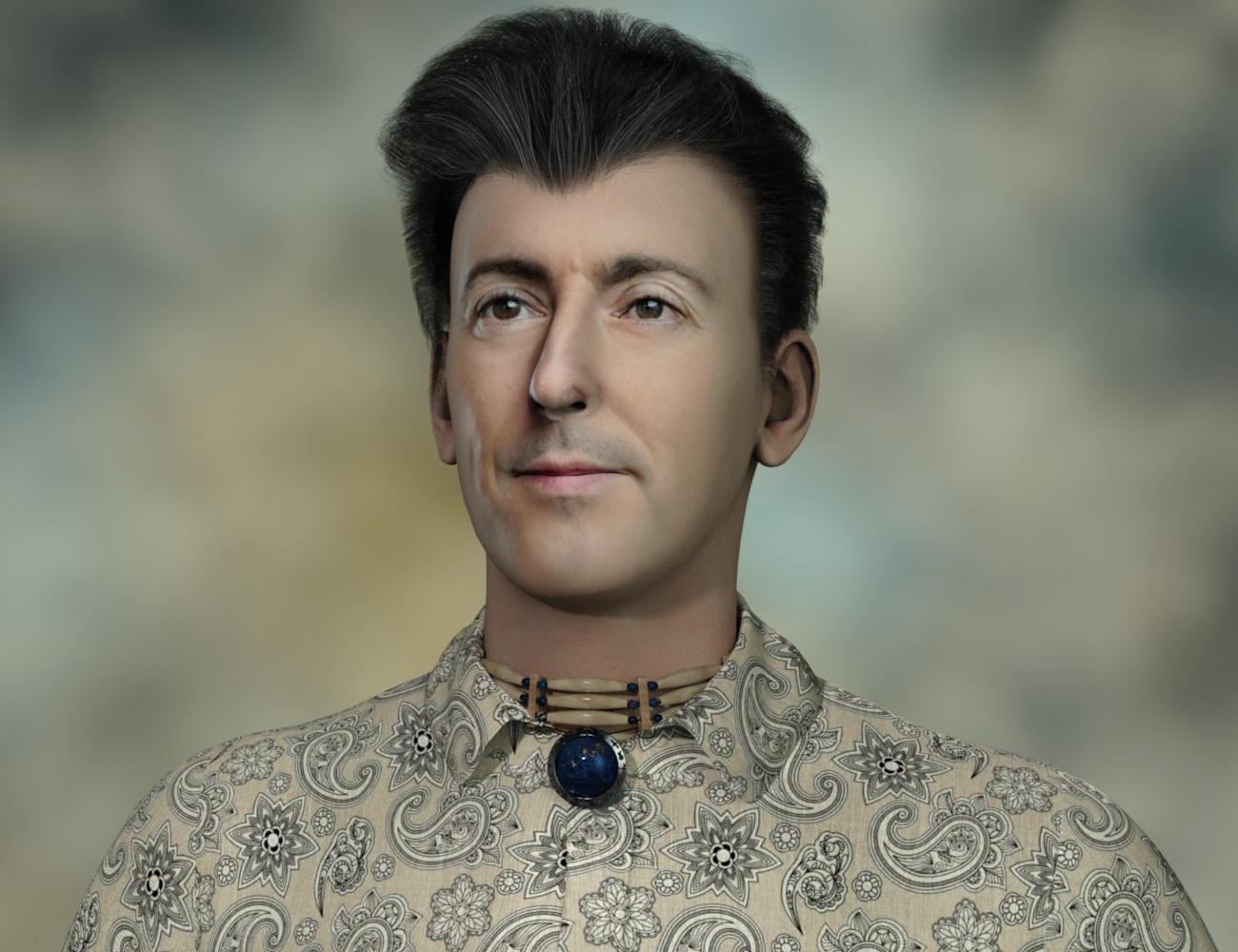
Hmmm. I don't know. I have not studied something like that. What I am good at is automating steps in DS. If you can figure out the manual steps, I usually can automate it. I don't know if this one would make *economic* sense, i.e., how many users would want such a thing and would use Unity as well.
Morph Loader Pro HelpSecond thing, giving the morph a name which includes “bodybuilder” is not enough to make it follow the bodybuilder FBM automatically. If you want it to replace the “automatic bodybuilder morph” generated by DS then you will need to give your morph the same name (not the label, the internal name) as the bodybuilder morph. Eg if the name of the bodybuilder morph is FBMBodybuilder you need to give yours the same name. You can see the name of the morph if you open the properties of the morph slider.
You only talk about the pants, not about the character?
Morph Loader Pro HelpThank you for your answers.
Is that what you wanted or did you want to replace the “automatic bodybuilder morph”?
What I want is when I transform my character into Bodybuilder ... That the pants is transformed automatically without having to play with the cursor.
If I come back to Genesis Basic, then the pants resume their basic basic formMorph Loader Pro HelpFirst thing, if you imported the morph when the bodybuilder morph was set and use “reverse deformation” then your morph will only include the delta between the “automatic bodybuilder morph” generated by DS and your final shape. Is that what you wanted or did you want to replace the “automatic bodybuilder morph”?
Second thing, giving the morph a name which includes “bodybuilder” is not enough to make it follow the bodybuilder FBM automatically. If you want it to replace the “automatic bodybuilder morph” generated by DS then you will need to give your morph the same name (not the label, the internal name) as the bodybuilder morph. Eg if the name of the bodybuilder morph is FBMBodybuilder you need to give yours the same name. You can see the name of the morph if you open the properties of the morph slider.
Morph Loader Pro Helpcan't answer the question but no need to apologize for bad english... to speak a second language badly means just that it's a second langauge and a lot of english speakers don't speak good english and a ton of major websites have stuff written by people who don't know the rules of writing and/or spelling.
---
So, congrats on speaking an extra lanquage.
---
I think that you do have to use the slider, I've done a couple morphs to roll up window shades etc and they all end as a morph with a slider.Daz 3D is part of

Connect
DAZ Productions, Inc.
7533 S Center View Ct #4664
West Jordan, UT 84084Licensing Agreement | Terms of Service | Privacy Policy | EULA
© 2026 Daz Productions Inc. All Rights Reserved.