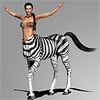
-
Issues with morphs projected on to geografts
I would also try to save the geograft as Figure/Prop asset to the content library. You can have multible test versions I save those assets in the same Product folder but count up a number in the item name. Then restarting DS and load the saved geograft asset from the content library into the scene maybe this makes a difference in getting the conforming geograft settings applied correctly.
Otherwise my test initialy showed that parts of the geograft actualy follow the figure height/heavy morphs correctly see HandHook_Prosthesis_Right_Screenshot002.png where the hook cap fits the forearm.
The auto-generated height morph seems to simply add morph deltas to move the geometry verticaly to the correct height rather than adding bone translation adjustments into the Sub-Components of the morphs as some may think. By trying different things I've deleted those deltas with Cleared Selected Deltas from Favourits. The weird thing with the height morph was that the cap moved down while the unconnected hook moved up the same time but maybe this was casued by the fact that I've modeled the hook orentation in the wrong way and rotated the hook lateron.
Anyway to me it looks like a bug with DS that the additionaly rigging and the unconnected geometry parts of the attached geograft does not follow the rest of the rigging by changing the figure shape.
[Released] RSSY Hair Converter from Victoria 4 to Genesis 8 Female [Commercial]Do you have show hidden properties checked?
Thanks carrie58 ! That did the trick. At least for 2 out of 3 hair files I have tested.
It seems like not all morphs are transferred. I also think they shouldn't be in the "hidden" section at all.. My old eyes hate reading grey on grey.
The authorship information is alright.
It's a pity as I am a big fan of the RSSY converters and I was really waiting for this one... sigh...
The script is telling the Transfer Utility to transfer ALL morphs so I am unsure what I can do about this one.
Don't know if it is related but I was using M4 Midnight Hunter the other night and I found I had to turn off limits and really yank up the numbers before seeing any movement in the back flap of the trench coat - or any of the transfered morphs. Maybe the morphs need to be x10 or x100 strength to see the movement that the original has? And maybe the morphs are there but only appear to be not working. (Don't like the Grey on Grey either but nothig you can do about that)
I don't know.
 @zzspriest, which item are you not seeing the morphs?
It is the Christine Hair, a DAZ Original.
Darn, I don't have that one. I have wishlisted it to get it when it is on sale and test it.
Did some research. Looks like whether the morphs are converted properly or not depends on where they are placed in the original file.
For example :
- Laurel hair or Reby hair : Morphs are located under "head" - this converts perfect, the morphs are visible under "head" in the converted file. And work great.
- Christine hair, Melody hair : Morphs are located under "neck". They appear in the converted file as "hidden property"..
- any hr2 hair : No original morphs are transferred at all. Only the converter morphs are there.
I have not checked my whole library but for the ones I tried followed the above.
The new Centaur 'n stuff thread - reloadedThe problem is, that the morph files only work on the poser format. On the duf file I get a "Vertex count mismatch in Morph Loader". I tested morph loader advanced and pro in base and high resolution, the meshes of poser and studio version look identical.
So it will work in Daz but under the poser content tab?
No, the poser pmd file won't inject in DAZ and the other method doesn't work on the poser model. I will not do the process of morphing again on what appears to be the same mesh. I cannot see any difference and am pretty frustrated at the moment.
Edit:Maybe I found a way, will check it tomorrow.The new Centaur 'n stuff thread - reloadedOh and do this on the duf file not the Poser format
The problem is, that the morph files only work on the poser format. On the duf file I get a "Vertex count mismatch in Morph Loader". I tested morph loader advanced and pro in base and high resolution, the meshes of poser and studio version look identical.
Oh dear now then I can’t help
More Male Content pleaseskimpwear for mans. with the brock morph.
budgie smugglers. not a single speedo found.
The new Centaur 'n stuff thread - reloadedThe problem is, that the morph files only work on the poser format. On the duf file I get a "Vertex count mismatch in Morph Loader". I tested morph loader advanced and pro in base and high resolution, the meshes of poser and studio version look identical.
So it will work in Daz but under the poser content tab?
The new Centaur 'n stuff thread - reloadedOh and do this on the duf file not the Poser format
The problem is, that the morph files only work on the poser format. On the duf file I get a "Vertex count mismatch in Morph Loader". I tested morph loader advanced and pro in base and high resolution, the meshes of poser and studio version look identical.
Genetics as morphs? (Morphs as genetics??)My impression is that the core facial morph dial kits (as in the main Daz Original set, and Dogz's 200 Morphs) have identical naming conventions between the male and female figures. This wouldn't help you if, say, you've "cast" Alexandra as your Cat Stark analogue, and you want your Rob Stark analogue to look like his mother, but if you've come up with a purely dialspun face (for G8F let's say) with no named characters involved, you could try saving it as a shaping preset and see if G8M would accept the shaping preset.
Genetics as morphs? (Morphs as genetics??)This is an interesting question. I don't know if you can transfer morphs from female to male or the other way round, but I also doubt that the results would look good even if it were possible.
any suggestions for ways I might go about this without burning out my eyes scrolling through dozens of active morphs and finding them on the next model?
If they have the same names, you can select one figure, press Ctrl-C and paste the values to the second figure with Ctrl-V. That will transfer the values. Of course, if the names are different that won't work.
Btw. you can also type a few letters of the morph name in the search field in the parameters tab. To avoid scrolling, I mean.
dForce hair doesn't want to renderFor some reason it didn't attach the log file, here are its contents:
2019-07-11 17:32:57.553 *** Scene Cleared ***2019-07-11 17:33:33.078 WARNING: ..\..\..\..\..\src\sdksource\cloud\dzcloudtasknotifier.cpp(178): Could not adjust thumbnail path from support path: /Runtime/Support/DAZ_3D_17109_Carrara_Hair_Caps_for_Genesis_and_Genesis_2.dsx2019-07-11 17:33:43.113 *** Scene Cleared ***2019-07-11 17:33:43.236 WARNING: ..\..\..\..\..\src\sdksource\fileinput\dzassetdaz.cpp(4679): Could not find node parent.2019-07-11 17:33:43.239 WARNING: ..\..\..\..\..\src\sdksource\fileinput\dzassetdaz.cpp(4679): Could not find node parent.2019-07-11 17:33:43.434 Iray INFO - module:category(SCENE:IO): 1.0 SCENE io info : Loading module "::daz_3d::dual_lobe_hair" from "D:\Program Files\DAZ 3D\DAZStudio4\shaders\iray\daz_3d\dual_lobe_hair.mdl".2019-07-11 17:33:43.607 WARNING: ..\..\..\..\..\src\sdksource\fileinput\dzassetdaz.cpp(1770): Failed to follow node.2019-07-11 17:33:43.607 File loaded in 0 min 0.5 sec.2019-07-11 17:33:43.608 Loaded file: longdrape hair for g8f.duf2019-07-11 17:33:43.856 Loaded Morph Deltas in 0 min 0.0 sec.2019-07-11 17:33:43.857 Loaded file: Behind Right Shoulder.dsf2019-07-11 17:33:44.002 Loaded image Haircap Trans.png2019-07-11 17:35:00.240 WARNING: ..\..\..\..\..\src\sdksource\cloud\dzcloudtasknotifier.cpp(178): peer performed orderly shutdown errno=02019-07-11 17:35:19.849 Rendering image2019-07-11 17:35:19.931 Iray INFO - module:category(IMAGE:IO): 1.0 IMAGE io info : Loading image "D:\My DAZ 3D Library\Runtime\Textures\PhilW\Strand Based Hair Shaders\Haircap Trans.png", pixel type "Rgb", 2048x2048x1 pixels, 1 miplevel.2019-07-11 17:35:19.964 Iray INFO - module:category(IMAGE:IO): 1.0 IMAGE io info : Loading image "D:\Program Files\DAZ 3D\DAZStudio4\shaders\iray\resources\DTHDR-RuinsB-500.hdr", pixel type "Rgb_fp", 512x256x1 pixels, 1 miplevel.2019-07-11 17:35:20.094 Iray INFO - module:category(IRAY:RENDER): 1.0 IRAY rend info : Updating geometry.2019-07-11 17:35:20.115 Iray INFO - module:category(IRAY:RENDER): 1.0 IRAY rend info : Using OptiX Prime ray tracing (5.0.1).2019-07-11 17:35:20.116 Iray INFO - module:category(IRAY:RENDER): 1.0 IRAY rend info : Importing scene graph.2019-07-11 17:35:20.118 Iray INFO - module:category(IRAY:RENDER): 1.0 IRAY rend info : Auto instancing compression ratio 1.00 (Full instancing compression ratio 1.00)2019-07-11 17:35:20.132 Iray INFO - module:category(IRAY:RENDER): 1.0 IRAY rend info : Importing geometry for motion time 02019-07-11 17:35:20.134 Iray INFO - module:category(IRAY:RENDER): 1.0 IRAY rend info : Geometry import (1 object with 4704 triangles, 1 instance yielding 4704 triangles) took 0.0024822019-07-11 17:35:20.134 Iray INFO - module:category(IRAY:RENDER): 1.0 IRAY rend info : Updating materials.2019-07-11 17:35:20.137 Iray INFO - module:category(MATCNV:RENDER): 1.0 MATCNV rend info : found 3 textures, 0 lambdas (0 unique)2019-07-11 17:35:20.150 Iray INFO - module:category(IRAY:RENDER): 1.0 IRAY rend info : Updating environment.2019-07-11 17:35:20.168 Iray INFO - module:category(IRAY:RENDER): 1.0 IRAY rend info : Updating backplate.2019-07-11 17:35:20.171 Iray INFO - module:category(IRAY:RENDER): 1.0 IRAY rend info : Updating lens.2019-07-11 17:35:20.171 Iray INFO - module:category(IRAY:RENDER): 1.0 IRAY rend info : Updating lights.2019-07-11 17:35:20.171 Iray INFO - module:category(IRAY:RENDER): 1.0 IRAY rend info : Updating object flags.2019-07-11 17:35:20.186 Iray INFO - module:category(IRAY:RENDER): 1.0 IRAY rend info : Updating caustic portals.2019-07-11 17:35:20.186 Iray INFO - module:category(IRAY:RENDER): 1.0 IRAY rend info : Updating decals.2019-07-11 17:35:20.209 Iray INFO - module:category(IRAY:RENDER): 1.0 IRAY rend info : Allocating 1-layer frame buffer2019-07-11 17:35:20.211 Iray INFO - module:category(IRAY:RENDER): 1.0 IRAY rend info : Using batch scheduling, caustic sampler disabled2019-07-11 17:35:20.211 Iray INFO - module:category(IRAY:RENDER): 1.0 IRAY rend info : Initializing local rendering.2019-07-11 17:35:20.257 Iray INFO - module:category(IRAY:RENDER): 1.0 IRAY rend info : CPU: using 11 cores for rendering2019-07-11 17:35:20.262 Iray INFO - module:category(IRAY:RENDER): 1.0 IRAY rend info : Rendering with 2 device(s):2019-07-11 17:35:20.262 Iray INFO - module:category(IRAY:RENDER): 1.0 IRAY rend info : CUDA device 0 (GeForce GTX 1050 Ti)2019-07-11 17:35:20.262 Iray INFO - module:category(IRAY:RENDER): 1.0 IRAY rend info : CPU2019-07-11 17:35:20.262 Iray INFO - module:category(IRAY:RENDER): 1.0 IRAY rend info : Rendering...2019-07-11 17:35:20.272 Iray VERBOSE - module:category(IRAY:RENDER): 1.2 IRAY rend progr: CUDA device 0 (GeForce GTX 1050 Ti): Processing scene...2019-07-11 17:35:20.273 Iray INFO - module:category(IRAY:RENDER): 1.9 IRAY rend info : Using device 0 to build data for host2019-07-11 17:35:20.275 Iray VERBOSE - module:category(IRAY:RENDER): 1.6 IRAY rend progr: CPU: Processing scene...2019-07-11 17:35:20.282 Iray VERBOSE - module:category(IRAY:RENDER): 1.5 IRAY rend stat : Geometry memory consumption: 133.438 KiB (device 0), 0 B (host)2019-07-11 17:35:20.727 Iray INFO - module:category(IRAY:RENDER): 1.9 IRAY rend info : Importing lights for motion time 02019-07-11 17:35:20.727 Iray INFO - module:category(IRAY:RENDER): 1.9 IRAY rend info : Initializing light hierarchy.2019-07-11 17:35:20.727 Iray INFO - module:category(IRAY:RENDER): 1.9 IRAY rend info : Light hierarchy initialization took 0.00s2019-07-11 17:35:20.731 Iray VERBOSE - module:category(IRAY:RENDER): 1.5 IRAY rend stat : Texture memory consumption: 5.25 MiB for 2 bitmaps (device 0)2019-07-11 17:35:20.744 Iray VERBOSE - module:category(IRAY:RENDER): 1.5 IRAY rend stat : Material measurement memory consumption: 0 B (GPU)2019-07-11 17:35:20.744 Iray VERBOSE - module:category(IRAY:RENDER): 1.9 IRAY rend stat : Native CPU code generated in 1.4e-06s2019-07-11 17:35:20.744 Iray VERBOSE - module:category(IRAY:RENDER): 1.5 IRAY rend stat : Materials memory consumption: 20.6172 KiB (GPU)2019-07-11 17:35:20.747 Iray VERBOSE - module:category(IRAY:RENDER): 1.5 IRAY rend stat : Lights memory consumption: 196 B (device 0)2019-07-11 17:35:20.820 Iray INFO - module:category(IRAY:RENDER): 1.6 IRAY rend info : CPU: Scene processed in 0.550s2019-07-11 17:35:20.822 Iray INFO - module:category(IRAY:RENDER): 1.6 IRAY rend info : CPU: Allocated 2.96654 MiB for frame buffer2019-07-11 17:35:20.851 Iray INFO - module:category(IRAY:RENDER): 1.6 IRAY rend info : Allocating 1-layer frame buffer2019-07-11 17:35:20.854 Iray INFO - module:category(IRAY:RENDER): 1.0 IRAY rend info : Received update to 00001 iterations after 0.584s.2019-07-11 17:35:20.892 Iray INFO - module:category(IRAY:RENDER): 1.0 IRAY rend info : Received update to 00002 iterations after 0.621s.2019-07-11 17:35:20.964 Iray INFO - module:category(IRAY:RENDER): 1.0 IRAY rend info : Received update to 00004 iterations after 0.693s.2019-07-11 17:35:21.099 Iray INFO - module:category(IRAY:RENDER): 1.2 IRAY rend info : CUDA device 0 (GeForce GTX 1050 Ti): Scene processed in 0.829s2019-07-11 17:35:21.102 Iray INFO - module:category(IRAY:RENDER): 1.2 IRAY rend info : CUDA device 0 (GeForce GTX 1050 Ti): Allocated 2.96654 MiB for frame buffer2019-07-11 17:35:21.132 Iray INFO - module:category(IRAY:RENDER): 1.0 IRAY rend info : Received update to 00008 iterations after 0.839s.2019-07-11 17:35:21.146 Iray INFO - module:category(IRAY:RENDER): 1.0 IRAY rend info : Received update to 00009 iterations after 0.876s.2019-07-11 17:35:21.163 Iray INFO - module:category(IRAY:RENDER): 1.0 IRAY rend info : Received update to 00010 iterations after 0.893s.2019-07-11 17:35:21.301 Iray INFO - module:category(IRAY:RENDER): 1.2 IRAY rend info : CUDA device 0 (GeForce GTX 1050 Ti): Allocated 1.6875 GiB of work space (2048k active samples in 0.140s)2019-07-11 17:35:21.370 Iray INFO - module:category(IRAY:RENDER): 1.0 IRAY rend info : Received update to 00012 iterations after 1.099s.2019-07-11 17:35:21.397 Iray INFO - module:category(IRAY:RENDER): 1.0 IRAY rend info : Received update to 00016 iterations after 1.127s.2019-07-11 17:35:21.421 Iray INFO - module:category(IRAY:RENDER): 1.0 IRAY rend info : Received update to 00024 iterations after 1.151s.2019-07-11 17:35:21.487 Iray VERBOSE - module:category(IRAY:RENDER): 1.0 IRAY rend progr: 62.70% of image converged2019-07-11 17:35:21.532 Iray INFO - module:category(IRAY:RENDER): 1.0 IRAY rend info : Received update to 00032 iterations after 1.262s.2019-07-11 17:35:21.534 Iray INFO - module:category(IRAY:RENDER): 1.0 IRAY rend info : Received update to 00048 iterations after 1.264s.2019-07-11 17:35:21.644 Iray INFO - module:category(IRAY:RENDER): 1.0 IRAY rend info : Received update to 00053 iterations after 1.374s.2019-07-11 17:35:21.774 Iray VERBOSE - module:category(IRAY:RENDER): 1.0 IRAY rend progr: 81.39% of image converged2019-07-11 17:35:21.791 Iray INFO - module:category(IRAY:RENDER): 1.0 IRAY rend info : Received update to 00085 iterations after 1.521s.2019-07-11 17:35:21.799 Iray INFO - module:category(IRAY:RENDER): 1.0 IRAY rend info : Received update to 00089 iterations after 1.529s.2019-07-11 17:35:21.974 Iray VERBOSE - module:category(IRAY:RENDER): 1.0 IRAY rend progr: 86.74% of image converged2019-07-11 17:35:21.974 Iray INFO - module:category(IRAY:RENDER): 1.0 IRAY rend info : Received update to 00123 iterations after 1.703s.2019-07-11 17:35:22.017 Iray INFO - module:category(IRAY:RENDER): 1.0 IRAY rend info : Received update to 00128 iterations after 1.747s.2019-07-11 17:35:22.154 Iray VERBOSE - module:category(IRAY:RENDER): 1.0 IRAY rend progr: 90.09% of image converged2019-07-11 17:35:22.154 Iray INFO - module:category(IRAY:RENDER): 1.0 IRAY rend info : Received update to 00164 iterations after 1.884s.2019-07-11 17:35:22.185 Iray INFO - module:category(IRAY:RENDER): 1.0 IRAY rend info : Received update to 00168 iterations after 1.914s.2019-07-11 17:35:22.340 Iray VERBOSE - module:category(IRAY:RENDER): 1.0 IRAY rend progr: 92.20% of image converged2019-07-11 17:35:22.340 Iray INFO - module:category(IRAY:RENDER): 1.0 IRAY rend info : Received update to 00206 iterations after 2.070s.2019-07-11 17:35:22.349 Iray INFO - module:category(IRAY:RENDER): 1.0 IRAY rend info : Received update to 00211 iterations after 2.079s.2019-07-11 17:35:22.523 Iray VERBOSE - module:category(IRAY:RENDER): 1.0 IRAY rend progr: 94.02% of image converged2019-07-11 17:35:22.537 Iray INFO - module:category(IRAY:RENDER): 1.0 IRAY rend info : Received update to 00250 iterations after 2.266s.2019-07-11 17:35:22.546 Iray INFO - module:category(IRAY:RENDER): 1.0 IRAY rend info : Received update to 00255 iterations after 2.275s.2019-07-11 17:35:22.723 Iray VERBOSE - module:category(IRAY:RENDER): 1.0 IRAY rend progr: 95.26% of image converged2019-07-11 17:35:22.723 Iray INFO - module:category(IRAY:RENDER): 1.0 IRAY rend info : Received update to 00298 iterations after 2.452s.2019-07-11 17:35:22.763 Iray INFO - module:category(IRAY:RENDER): 1.0 IRAY rend info : Convergence threshold reached.2019-07-11 17:35:22.903 Saved image: C:\Users\theel\AppData\Roaming\DAZ 3D\Studio4\temp\render\r.png2019-07-11 17:35:22.906 Finished Rendering2019-07-11 17:35:22.968 Total Rendering Time: 3.26 seconds2019-07-11 17:35:22.969 Loaded image r.png2019-07-11 17:35:22.985 Saved image: C:\Users\theel\AppData\Roaming\DAZ 3D\Studio4\temp\RenderAlbumTmp\Render 11.jpg2019-07-11 17:35:24.892 Iray INFO - module:category(IRAY:RENDER): 1.0 IRAY rend info : Device statistics:2019-07-11 17:35:24.906 Iray INFO - module:category(IRAY:RENDER): 1.0 IRAY rend info : CUDA device 0 (GeForce GTX 1050 Ti): 298 iterations, 1.138s init, 1.480s render2019-07-11 17:35:24.906 Iray INFO - module:category(IRAY:RENDER): 1.0 IRAY rend info : CPU: 49 iterations, 0.553s init, 1.890s render2019-07-11 17:38:59.032 WARNING: ..\..\..\..\..\src\sdksource\cloud\dzcloudtasknotifier.cpp(178): peer performed orderly shutdown errno=02019-07-11 17:39:01.084 WARNING: Object::disconnect: Unexpected null parameter2019-07-11 17:39:01.093 WARNING: QCoreApplication::postEvent: Unexpected null receiver2019-07-11 17:39:01.297 WARNING: ..\..\..\..\..\src\sdksource\cloud\dzcloudtasknotifier.cpp(178): Tcp shutdown called on a Tcp connection without a shutdown2019-07-11 17:39:02.727 Iray INFO - module:category(IRT:RENDER): 1.1 IRT rend info : Shutting down irt render plugin.2019-07-11 17:39:03.781 *** Scene Cleared ***2019-07-11 17:39:04.545 DEBUG: End DAZ Studio to Hexagon Bridge log...2019-07-11 17:39:05.452 --------------- DAZ Studio 4.11.0.383 exited ------------------2019-07-11 17:39:05.467 ~any news on the hd plugin?? :DAlright, finally managed to write a decent news post at Carrara Cafe for the new HD morph plugin, with the new Wordpress tool.
I think that I managed to compress all relevant info into one page, though I had to cheat with a PDF of Philemos tutorial.
But feel free to correct me.https://carraracafe.com/hd-morph-plugin-for-carrara-by-philemo-released/
Any comments, additions or new renders to add, please post here.
thanks, is very nice to find the how to in one spot.
 Issues with morphs projected on to geografts
@Syrus_Dante, thanks for all that information. It will take me a while to understand this issue again and I don't have time or motivation to do that immediately, but I will come back to digest what you say here when I do.
I cannot get round the feeling that the bones of the graft, parented to the Right Forearm Twist bone, surely should follow the parent bone when it moves down as I apply the Height morph to G3F. All the bones in the figure parented to the hip bone follow the hip in this way. And yet the graft bones do not follow the Right Forearm Twist. I can see that it does happen with products I have bought from the store. Though these are all joined to the figure at or around hip level, the principle should still be the same. So what extra step(s) or techniques are required to get that to happen?
Teen Jane 8..so about Sarah, do you need Teen Jane or will she work with just G8F. She has a much more "mid teens" look and I love those freckles particularly with ginger hair.
Both of the images I posted above (links down below) are Sara without the Teen Jane morphs loaded in because I didn't buy Teen Jane yet. You can definitely use her without Teen Jane. Just realize she isn't going to look exactly like she would if she had the Teen Jane added in which @dkgoose said was dialed in at 100% when he answered my question. I still think she's rather cute and teen-looking without Teen Jane.
https://www.daz3d.com/forums/discussion/comment/4719431/#Comment_4719431
https://www.daz3d.com/forums/discussion/comment/4720461/#Comment_4720461
...I do have the Growing Up morphs.
I think you would need those morphs on Jane anyway, she does not look like a teenager. And with Growing Up morphs, you can make pretty much any character look like a teen.
Personally, I would recommend Jane to people who like a generic character that they can tweak and make their own. I don’t think she even adds much to the gene pool, but she’s really easy to morph into whatever you want her to be. Rendering Aleena now (addon) and she’s very pretty but in no way looks like a teen!
..yeah I see your point. I have been creating teen and even tween characters since the Gen4 days when we had none without specialised utilities such as the Growing Up Morphs. Used to be a lot of work back in the day. With Growing Up and the plethora of teen characters since the introduction of Genesis, I feel like i'm cheating.
Not to hijack the thread but here is the latest rebuild of my signature character (post hard drive crash) Using G3F, a mix of Molly, Tween Julie, and Zahara (the latter via GenX) with the Growing up Morphs and skin created in SBP3. This would have taken weeks in the Gen4 days as opposed to a couple evenings today.
She is super cute! Love the simple but elegant scene. 2 questions--what dress is that, and what is SBP3?
The new Centaur 'n stuff thread - reloadedWUse Morphloader to import obj
Under edit adjust rigging to figure shape
rightclick the obscure little hamburger menu icon in parameters choose edit mode select the morph
under that menu pick and run ERC freeze
save as asset morph and find it in the list tree that pops up and tick it
you can share the dsf file created in the data folder under your name
Morphloader Pro or Advanced? If the scaling is ok for Poser, will it be ok for Studio? I exported with factor 100 from Poser und imported with 0.01 from Hexagon (damn scaling bug!).
I will try it later, thank you!
Doesn’t matter but yes choose Poser scale if obj is
The new Centaur 'n stuff thread - reloadedUse Morphloader to import obj
Under edit adjust rigging to figure shape
rightclick the obscure little hamburger menu icon in parameters choose edit mode select the morph
under that menu pick and run ERC freeze
save as asset morph and find it in the list tree that pops up and tick it
you can share the dsf file created in the data folder under your name
Morphloader Pro or Advanced? If the scaling is ok for Poser, will it be ok for Studio? I exported with factor 100 from Poser und imported with 0.01 from Hexagon (damn scaling bug!).
I will try it later, thank you!
The new Centaur 'n stuff thread - reloadedI have the morphed body parts (neck2, neck, chest2, chest, lshldr, rshldr) of the Hivewire horse as obj. In Poser the can be used to create the morphs. Creating an INJ pose using the. pmd file is possible. How would this be done in Studio to legally distribute the morph?Use Morphloader to import obj
Under edit adjust rigging to figure shape
rightclick the obscure little hamburger menu icon in parameters choose edit mode select the morph
under that menu pick and run ERC freeze
save as asset morph and find it in the list tree that pops up and tick it
you can share the dsf file created in the data folder under your name
The new Centaur 'n stuff thread - reloadedI have the morphed body parts (neck2, neck, chest2, chest, lshldr, rshldr) of the Hivewire horse as obj. In Poser the can be used to create the morphs. Creating an INJ pose using the. pmd file is possible. How would this be done in Studio to legally distribute the morph?Lara Croft face morph for G3F/G8F?I really wanted to ask if anyone skilled or experienced could take the time to have a go at sculpting a Lara Croft face morph when they have some free time which is NOT the Angelina Jolie version but the older version from Lara's games exactly in the picture shown with this post (I asked the same request years ago too for V4) only this time I am wanting it for G3F/G8F I mean G8F mainly but for both would be greatly appreciated. I had a go myself but I am not much good at it generally speaking :( I found it hard to get the way I wanted it to.
Hi , I'm working on a Lara Croft character, That looks like what you want, head and body, but she is going to be Called Laura for Copyright reasons obviously, she is going to be out maybe next month


 Genetics as morphs? (Morphs as genetics??)
So I have a little project I'd like to do. Essentially, I want to model a family tree for a broad-sweeping Game of Thrones-style story I've been writing, and I was hoping to use Daz to do it. The thing is, I'm not content to merely generate some characters, give them appropriate hair and eye colors, and call it a day. I want them to, you know, resemble one another. To that end, here's the topic I'd like to raise for discussion:
On the matter of modeling genetics from one character to another, does anyone have any particular suggestions? My initial thought was to copy the morphs from one figure to the next and tweak them slightly, but the thing is, that doesn't account for the opposite gender parent's genes. It's fine for G8F to G8F or G8M to G8M, but I can't think of an easy way to transfer morph targets between the figures. In other words, short of a product that does this (which I'm about 99.99999% sure doesn't exist), does anyone with more in-depth Daz experience than myself have any suggestions for ways I might go about this without burning out my eyes scrolling through dozens of active morphs and finding them on the next model?Renderosity owns Poser?The free will dial script does this 80% compatibility already. So why are you people not using that solution?

Bloody Lovely!! Assuming that you dont care for the FREE will dial script,
Willdial did a remarkable job developing a workaround that does succeed in transferring the Genesis 3 / 8 figure into Poser 11 (although you can try it with Poser 2014, there are numerous issues with the expressions not working correctly.)
But the workaround is not as simple as running a script. It's a long, detailed process that requires quite a bit of work and fiddling around with .NET versions and finding the right version of DSON, as well as requiring you to install Daz Studio on your computer so you can export the various meshes and their companion files. Suffice to say, I have gone through this process to use Genesis 3 in Poser Pro 11 and I confidently say that it doesn't provide anywhere near 80% compatibility/functionality in Poser. More like 50% or so.
Plus, every time you want to use clothing, you have to export it from Daz Studio. One. Item. At. A. Time. And even then there's no guarantee that DSON will transfer the clothing correctly (shoes and hair are notorious for having problems).
So, I will summarize by answering your question: A lot of us don't use Willdial's transfer process because it's complicated and doesn't always work. Plus, once you have moved the G3/8 figure into Poser you still don't have any clothes, poses or expressions to use with it. So, although it is a remarkable workaround (and he is a top-notch guy for creating it and offering it for free), it is just not the same thing as being able to load the figure and the clothing/pose/expression assets directly from the Poser library.
As I've said before, CONTENT IS KING. For future versions of Poser to succeed, the software needs to let us Poser users access the vast library of content out there that has been developed for the various Genesis figures.
Daz 3D is part of

Connect
DAZ Productions, Inc.
7533 S Center View Ct #4664
West Jordan, UT 84084Licensing Agreement | Terms of Service | Privacy Policy | EULA
© 2026 Daz Productions Inc. All Rights Reserved.