-
EULA Update & Editorial Licenses Coming to Daz
Richard Haseltine said:
Most of the Flipped Normals content already has a non-commercial use clause, stated oin the product page. The old Anne Marie Goddard Digital Clone for Victoria 3 had some limitations, also stated on the product page.
So one vendor and one product from fifteen years ago... ?
That wasn't confusing... one vendor and one product to avoid.
DAZ is going to screw up so many new users with this.
All for the glory of the acronym that shan't be mentioned.
Edited to add:
The Anne Marie Goddard Digital Clone for Victoria 3 is long gone and the Flipped Normals stuff (which includes content models) is mostly instructional materials and the notification for it having any sort of different license is a link to the Flipped Normals website which just explains the difference between commercial licenses and personal/non-commercial license, and is not an actual EULA which I'm assuming only shows with purchase of the product, which the user must read to realize whether or not any content or models included is for commercial or private use.
So, not be picky or critical of the reply, but those are not necessarily the best examples, because if DAZ expects everyone to pick through an EULA to figure out what's the dealio, that's just gonna eff up lots of people.
Also Edited to remove an incorrect reference because I mistakenly confused Flipped Normals with a different vendor.
EULA Update & Editorial Licenses Coming to DazMost of the Flipped Normals content already has a non-commercial use clause, stated oin the product page. The old Anne Marie Goddard Digital Clone for Victoria 3 had some limitations, also stated on the product page.
AIUTO...CHI CONOSCE L’ITALIANO? PARTE TREDICI@Cornelius
Innanzitutto benvenuto.
Ribadisco anche io cosa ti ha detto @Imago... dipende da cosa vuoi farci.
La 3060 avendo 12GB immagazzina più asset in memoria (modelli e texture) e dunque permette di gestire scene "enormi" ma renderizza più lenta rispetto la TI (che ha invece più processori) che avendo meno memoria può contenere scene meno pesanti.Dipende da cosa usi di solito della libreria DAZ: se usi personaggi come Victoria/Michael 4, Genesis 1/2/3 e relativi vestiti/accessori puoi usare la TI perchè i modelli e le texture non sono così pesanti e dunque 8 GB ti bastano (a meno che non fai render di quartieri), inoltre la TI ti fa renderizzare il tutto più velocemente con Iray.
Se invece usi i Genesis 8/8.1 con i morph HD (che moltiplicano di 4 o anche 16 volte il numero di facce) e poi usi i vestiti con Dforce e ambientazioni con texture da 8-16k dovresti usare una scheda video in grado di contenere questi GB anche se renderizzerai ad una velocità minore. Ricordati che puoi sempre spezzare il render in più parti e poi ricomporlo con Photoshop (personaggio + sfondo) o puoi usare plugin per ridurre le texture e il numero di poligoni (Decimator della DAZ).
Infine usi Iray in versione interattiva (real time)? Se si la TI velocizza l'anteprima.
Come vedi entrambe hanno vantaggi e svantaggi.. ma sta a te sceglierla in base all'uso che ne farai.V4 skull cap with other character appliedetbord_91e6043f5b said:
There use to be a skull cap included with V4.0 and I believe V4.1 I don't know why it wasn't included with V4.2. I would really like to know why all the maps are 1024 square and the face map is only 512 square? The current maps for Victoria 8 are 4000 square. Their are figures for V4. that have 4000 maps for every body part. Also Why is the face separate of the skull? IJS.
I missed the start of V4, but one of my friends still has all of the installers for V4, V4.1 as well as V4.2.
V4 was setup like Aiko 3, if you bought the base all you got was the OBJ and a CR2 with some preloaded morphs, if you also bought the Morphs pack then you got a second CR2 (no mesh), this one was preloaded with all of the morphs. If you wanted textures then that was another purchase, as they came in SD (3K) or HD (4K) sets.
V4.1 and V4.2 are basically the same as V4.2 was just bug fixes for V4.1. This was the start of the EXP morph system, there was also a few major changes to V4, she got an eyebrow bone (that very few vendors ever used), her JCMs were changed to magnets, and she also got some textures included, these however were low res samples.
There isn't a skull cap in any of those installers.
Anyone figure out a way to make PBR SSS look very close to UBER SSS?I keep hoping a PA will create a PBR to Uber shader converter. I really hate the PBR skin shader dry plaster look and desperately want a way to switch it back to Uber. Maybe @Sicleyield could do it? I’m not going to buy any more characters that don’t have an Uber option. The DAZ original characters are the worst now. I stopped buying them unless they’re in a bundle I really like. Victoria is OK but most are just awful! They do really need a scatter & transmit option. The only way I can think of is deleting all the materials, putting the skin materials on from an Uber character, then manually replacing the skin textures one by one. Does anyone know of a better way?
V4 skull cap with other character appliedThere use to be a skull cap included with V4.0 and I believe V4.1 I don't know why it wasn't included with V4.2. I would really like to know why all the maps are 1024 square and the face map is only 512 square? The current maps for Victoria 8 are 4000 square. Their are figures for V4. that have 4000 maps for every body part. Also Why is the face separate of the skull? IJS.
Show Us Your Bryce Renders Part 12The buildings are Walled City by Stonemason, the persons: two Victoria (2 and 3), two Aiko 3 LE and one Michael. 17 radials light up the tunnels and the inside of the buildings. The tree consists of four Bryce trees. Sky and ambient light by the Gasclouds_A2 HDRI (unpublished), the key light by the sun.
 Backing up DS customisation
Richard,
- The Content Cluster is the database, …
OK. Weekly, I backup my AppData/Roaming/DAZ 3D folder which contains the cms folder in which the ContentCluster folder is located.
- … not metadata (metadata is read from the database on export and imported to the database on import).
Does metadata export/import have to be done manually (and if so, where does one start the process?) or is it done automatically upon opening and closing Daz Studio (and if so, where is it stored?)?
- The /Runtime/Support folder has the product metadata and the exported userdata. The Userdata_Daz3d_Product name files do seem to be the modified vesions, I wasn't aware that it did that.
My Daz Studio Runtime/Support folder has product metadata files but it does not contain any exported user data files.
For example, my Daz Studio Runtime/Support folder contains the three expected files for Victoria 8 (see first image) whereas my exported user data contains one file for Victoria 8 (see second image).
The dsx files from the Daz Studio Runtime/Support folder contain different information than the much smaller dsx file from the exported user data. Many of the exported user data dsx files contain almost no information whereas the corresponding file in the Daz Studio Runtime/Support folder contains all of the expected information. Some of the larger exported user data dsx files contain more information but it’s different than what is in the corresponding dsx file in the Daz Studio Runtime/Support folder. An exported user data dsx file is always smaller in size than its corresponding dsx file in the Daz Studio Runtime/Support folder. Attached are the dsx files for Victoria 8 which was installed via DIM.
Should I export UserData periodically and copy the files to the Daz Studio Runtime/Support folder?
NEW Pricing for 30x0 Series Sub $1000 3090 Sighting!kwerkx said:
Sevrin said:
It mostly depends on your current hardware. Upgrading to 30x0 from a 10/16x0 is a huge improvement. Upgrading from say a 2080ti to anything but a 3090 would have been less dramatic, and even then unless you are rendering huge scenes, it's probably worth holding out. For folks who skipped the 30x0 cards, the 40x0 generation will be a more substantial upgrade, for about the same money.
Good point and nice implied point about skipping GPU generations. Statistically, I love the idea of 24GB of VRAM; but it can wait till I need a 50x0 to render Victoria 10 with heartbeat and breathing dynamics in 5D
 .
.....I've skipped the last two..
Can anyone help identify this figure?Not a lot to go on @mattinkhabir this is essentially a face identification.. Going by the Eyes, Nose, and lips.. Victoria 8 is close; but her eyebrows don't match and the tip of Victoria 8's nose is a little rounder. Recommend checking the bottom of https://www.daz3d.com/victoria-8 for an add-on match. Also consider https://www.daz3d.com/genesis-8-female-head-morphs if you want to try modifying a Genesis 8 or Victoria 8 female head to match this model. Hope this helps.
NEW Pricing for 30x0 Series Sub $1000 3090 Sighting!Sevrin said:
It mostly depends on your current hardware. Upgrading to 30x0 from a 10/16x0 is a huge improvement. Upgrading from say a 2080ti to anything but a 3090 would have been less dramatic, and even then unless you are rendering huge scenes, it's probably worth holding out. For folks who skipped the 30x0 cards, the 40x0 generation will be a more substantial upgrade, for about the same money.
Good point and nice implied point about skipping GPU generations. Statistically, I love the idea of 24GB of VRAM; but it can wait till I need a 50x0 to render Victoria 10 with heartbeat and breathing dynamics in 5D
.Converting items and clothing from 8 to 8.1?sarahbeeblebrx said:
Thanks for the reply! So I figured out shortly after posting this that I was being a dimwit, and I did actually manage to get them onto my charachter, but they dont fit quite right. They look fine at the front, but as the contour of the mouth moves around, they sort of sink into the teeth. But its barely noticable and I guess I can fix that with a quick trip to Blender.
Are these "Z Braces Are Cool"? They are not conformng figures, merely props that fit the base figures and Victoria 8 / Michael 8. Any morphs that shape the teeth will likely mess up the fit. But no need for back and forth with Blender. Just scale and/or translate them along different axes, maybe helped with the Studio built-in D-Former (or Mesh Grabber).
[Released] Bone Minion for Genesis Poses [Commercial]RiverSoftArt said:
rhye_7b205b2b74 said:
Not sure what I bought originally 'Bone Minion for Generation 4 Poses Bundle SKU:86319 ' and now this has appeared 'Bone Minion for Genesis Poses Bundle SKU:86513 ' and you have to pay for it all over again?
What is the difference, the product page albeit the main picture is the same, I have not even got around to using it and now it is updated as a new bundle that I have to pay for all over again?
They are 2 different products.
- Bone Minion for Generation 4 Poses converts Michael 4 and Victoria 4 poses to other generations.
- Bone Minion for Genesis Poses converts Genesis poses to other generations.
Thanks for the prompt reply, I can see the difference!
[Released] Bone Minion for Genesis Poses [Commercial]rhye_7b205b2b74 said:
Not sure what I bought originally 'Bone Minion for Generation 4 Poses Bundle SKU:86319 ' and now this has appeared 'Bone Minion for Genesis Poses Bundle SKU:86513 ' and you have to pay for it all over again?
What is the difference, the product page albeit the main picture is the same, I have not even got around to using it and now it is updated as a new bundle that I have to pay for all over again?
They are 2 different products.
- Bone Minion for Generation 4 Poses converts Michael 4 and Victoria 4 poses to other generations.
- Bone Minion for Genesis Poses converts Genesis poses to other generations.
Some items will have their discounts disabled when added to the cart.hello. It's only been a few days since I knew Daz, but I'm fascinated by the amazing software.
I tried to buy "Victoria8" because it was on sale for -60%,
but when I added it to my cart the discount was not applied.
Is this a store bug? Or is the sale closed?
・https://www.daz3d.com/victoria-8
In addition, the same phenomenon occurred with the following products.
・https://www.daz3d.com/nadae-bun-hair-set-for-genesis-3-and-8-females
I'm planning to buy Victoria8, so I'd be happy if anyone could check it.
Thenk you!
[Released] Character Converter from Genesis 8 Female to Genesis 3 Female - Conv JCMs too[Commercial]Nekura2000 said:
RiverSoftArt said:
Nekura2000 said:
RiverSoftArt said:
Nekura2000 said:
RiverSoftArt said:
Nekura2000 said:
RiverSoftArt said:
Nekura2000 said:
RiverSoftArt said:
Nekura2000 said:
RiverSoftArt said:
Nekura2000 said:
RiverSoftArt said:
Nekura2000 said:
RiverSoftArt said:
Nekura2000 said:
RiverSoftArt said:
Nekura2000 said:
I had to get a new hard drive so I reinstalled Daz Studio. When trying to convert my Generation 7 female characters to Generation 8, I'm getting a distorted face. I've uninstalled and reinstalled the program, even deleted the RSCloneGenesis3Female.obj file from the folder C:\Users\nekur\AppData\Roaming\DAZ 3D\Studio4\CharacterConverterMorphs, with no change. The Generation 7 character as well as Genesis 8 load without a flaw. Here's what I'm getting, attached or from https://www.deviantart.com/wow-creations/art/Converted-920761392. ; I just looked at the parameters for the character I converted, which was Agnes. It isn't showing an Agnes head or body for 8, just Agnes itself.
The clone is for a different Character Converter. Maybe it is pulling in the converted morphs twice? From your previous conversion on the old hard drive and a new conversion? What directories are specified in the content manager? You should check all the currently used morphs on the character and find the morphs. The Parameter Settings show the Asset File Path of the morph (and the [...] button shows the full path of the morph). Make sure the morphs are coming from where you think they should be coming.
I use two different drives when using software. I have the OS drive which I replaced and the data drive. I renamed the original Daz drive as “Daz 3D2 Old”, before installing the Daz Studio. When installing Daz Studio, I allowed it to keep the “Daz 3D” folder, but also use the new “My DAZ 3D Library” folder. I just remember to look at the Error Log when loading Agnes Genesis 8 and this is what I’m getting:
2022-06-29 07:16:21.449 [WARNING] :: ..\..\..\..\..\src\sdksource\fileinput\dzassetdaz.cpp(6903): Formula output property not found: Genesis8Female:/data/Daz%203D/Genesis%208/Female/Morphs/XTransfer/3D%20Universe/ToonGenerations2/Base/XT_CTRL3duToonGenerations2_AdjustAge.dsf#XTIDCTRL3duToonGenerations2_AdjustAge?value - in file: /data/Daz%203D/Genesis%208/Female/Morphs/Zev0/Shape%20Shift/Arm%20Length.dsf
2022-06-29 07:16:21.506 [WARNING] :: ..\..\..\..\..\src\sdksource\fileinput\dzassetdaz.cpp(6903): Formula output property not found: Genesis8Female:/data/DAZ%203D/Genesis%208/Female/Morphs/DAZ%203D/Head/Old/PHMEyesIrisSize.dsf#PHMEyesIrisSize?value - in file: /data/Daz%203D/Genesis%208/Female/Morphs/vyktohria/Meredith/VYK%20Meredith%20Head.dsf
2022-06-29 07:16:22.060 [WARNING] :: ..\..\..\..\..\src\sdksource\fileinput\dzassetdaz.cpp(6903): Formula output property not found: Genesis8Female:/data/DAZ%203D/Genesis%208/Female/Morphs/SickleYield2017/UniversalBreastHelper/PBMSYUBHGiantAll_proj.dsf#PBMSYUBHGiantAll_proj?value - in file: /data/Daz%203D/Genesis%208/Female/Morphs/SickleYield2017/UniversalBreastHelper/PBMSYUBHGiantAll.dsf
2022-06-29 07:16:22.125 [WARNING] :: ..\..\..\..\..\src\sdksource\fileinput\dzassetdaz.cpp(7134): Unsupported formula: /data/Daz%203D/Genesis%208/Female/Morphs/RiverSoft%20Art/Javeria%20for%20Victoria%207%20and%20Genesis%203/pJCMRSG3FVictoria7ThighBndFwdHDR.dsf
2022-06-29 07:16:22.155 [WARNING] :: ..\..\..\..\..\src\sdksource\fileinput\dzassetdaz.cpp(7134): Unsupported formula: /data/Daz%203D/Genesis%208/Female/Morphs/RiverSoft%20Art/Javeria%20for%20Victoria%207%20and%20Genesis%203/pJCMRSG3FVictoria7ThighBndFwdHDL.dsf
2022-06-29 07:16:22.628 [WARNING] :: ..\..\..\..\..\src\sdksource\fileinput\dzassetdaz.cpp(7134): Unsupported formula: /data/Daz%203D/Genesis%208/Female/Morphs/RiverSoft%20Art/FWSA%20Caterina%20for%20Victoria%207%20and%20Genesis%203/pJCMRSG3FVictoria7ShoulderBndFwd_110_R.dsf
2022-06-29 07:16:22.665 [WARNING] :: ..\..\..\..\..\src\sdksource\fileinput\dzassetdaz.cpp(7134): Unsupported formula: /data/Daz%203D/Genesis%208/Female/Morphs/RiverSoft%20Art/FWSA%20Caterina%20for%20Victoria%207%20and%20Genesis%203/pJCMRSG3FVictoria7ShoulderBndFwd_110_L.dsf
2022-06-29 07:16:22.769 [WARNING] :: ..\..\..\..\..\src\sdksource\fileinput\dzassetdaz.cpp(7134): Unsupported formula: /data/Daz%203D/Genesis%208/Female/Morphs/RiverSoft%20Art/FWSA%20Caterina%20for%20Victoria%207%20and%20Genesis%203/pJCMRSG3FVictoria7ShinBndBck_145_R.dsf
2022-06-29 07:16:22.806 [WARNING] :: ..\..\..\..\..\src\sdksource\fileinput\dzassetdaz.cpp(7134): Unsupported formula: /data/Daz%203D/Genesis%208/Female/Morphs/RiverSoft%20Art/FWSA%20Caterina%20for%20Victoria%207%20and%20Genesis%203/pJCMRSG3FVictoria7ShinBndBck_145_L.dsf
2022-06-29 07:16:22.895 [WARNING] :: ..\..\..\..\..\src\sdksource\fileinput\dzassetdaz.cpp(7134): Unsupported formula: /data/Daz%203D/Genesis%208/Female/Morphs/RiverSoft%20Art/FWSA%20Caterina%20for%20Victoria%207%20and%20Genesis%203/pJCMRSG3FVictoria7ForearmBnd_135_R.dsf
2022-06-29 07:16:22.935 [WARNING] :: ..\..\..\..\..\src\sdksource\fileinput\dzassetdaz.cpp(7134): Unsupported formula: /data/Daz%203D/Genesis%208/Female/Morphs/RiverSoft%20Art/FWSA%20Caterina%20for%20Victoria%207%20and%20Genesis%203/pJCMRSG3FVictoria7ForearmBnd_135_L.dsf
2022-06-29 07:16:31.020 [WARNING] :: ..\..\..\..\..\src\sdksource\fileinput\dzassetdaz.cpp(6903): Formula output property not found: Genesis8Female:/data/DAZ%203D/Genesis%208/Female/Morphs/DAZ%20Originals/data/DAZ%203D/Genesis%208/Female/Morphs/Fred%20Winkler%20Art%2CSabby%2CDAZ%20Originals/FW%20Frankie%20HD%20for%20Victoria%207/CTRL-RSC-Frankie.dsfCFred%20Winkler%20Art/data/DAZ%203D/Genesis%208/Female/Morphs/Fred%20Winkler%20Art%2CSabby%2CDAZ%20Originals/FW%20Frankie%20HD%20for%20Victoria%207/CTRL-RSC-Frankie.dsfCSabby/FWSA%20Agnes%20HD%20for%20Lilith%207/PHMMouthRealismHD.dsf#PHMMouthRealismHD?value - in file: /data/DAZ%203D/Genesis%208/Female/Morphs/Fred%20Winkler%20Art%2CSabby%2CDAZ%20Originals/FW%20Frankie%20HD%20for%20Victoria%207/CTRL-RSC-Frankie.dsf
2022-06-29 07:16:31.020 [WARNING] :: ..\..\..\..\..\src\sdksource\fileinput\dzassetdaz.cpp(6903): Formula output property not found: Genesis8Female:/data/DAZ%203D/Genesis%208/Female/Morphs/DAZ%20Originals/data/DAZ%203D/Genesis%208/Female/Morphs/Fred%20Winkler%20Art%2CSabby%2CDAZ%20Originals/FW%20Frankie%20HD%20for%20Victoria%207/CTRL-RSC-Frankie.dsfCFred%20Winkler%20Art/FW%20Brooke%20HD%20for%20Victoria%207/FHMVictoria7.dsf#FHMVictoria7?value - in file: /data/DAZ%203D/Genesis%208/Female/Morphs/Fred%20Winkler%20Art%2CSabby%2CDAZ%20Originals/FW%20Frankie%20HD%20for%20Victoria%207/CTRL-RSC-Frankie.dsf
2022-06-29 07:16:31.021 [WARNING] :: ..\..\..\..\..\src\sdksource\fileinput\dzassetdaz.cpp(6903): Formula output property not found: Genesis8Female:/data/DAZ%203D/Genesis%208/Female/Morphs/DAZ%20Originals/data/DAZ%203D/Genesis%208/Female/Morphs/Fred%20Winkler%20Art%2CSabby%2CDAZ%20Originals/FW%20Frankie%20HD%20for%20Victoria%207/CTRL-RSC-Frankie.dsfCFred%20Winkler%20Art/FW%20Brooke%20HD%20for%20Victoria%207/FBMVictoria7.dsf#FBMVictoria7?value - in file: /data/DAZ%203D/Genesis%208/Female/Morphs/Fred%20Winkler%20Art%2CSabby%2CDAZ%20Originals/FW%20Frankie%20HD%20for%20Victoria%207/CTRL-RSC-Frankie.dsf
2022-06-29 07:16:32.694 [WARNING] :: ..\..\..\..\..\src\sdksource\fileinput\dzassetdaz.cpp(6969): Formula target property not found: Genesis8Female:/data/DAZ%203D/Genesis%208/Female/Morphs/DAZ%203D/Olympia%208/FBMOlympia8.dsf#FBMOlympia8_Test?value - in file: /data/Daz%203D/Genesis%208/Female/Morphs/fabiana/KillerLegsG8/1FK-Olympia8BaseFix.dsf
2022-06-29 07:16:40.096 [WARNING] :: ..\..\..\..\..\src\sdksource\fileinput\dzassetdaz.cpp(7134): Unsupported formula: /data/Daz%203D/Genesis%208/Female/Morphs/DAZ%203D%2CHeysun%20Oh/Olympia%207%20HD%20Add-On/pJCMRSG3FOlympia7ForeArmBndHD_n100L.dsf
2022-06-29 07:16:40.261 [WARNING] :: ..\..\..\..\..\src\sdksource\fileinput\dzassetdaz.cpp(7134): Unsupported formula: /data/Daz%203D/Genesis%208/Female/Morphs/DAZ%203D%2CHeysun%20Oh/Olympia%207%20HD%20Add-On/pJCMRSG3FOlympia7ForeArmBndHD_100R.dsf
2022-06-29 07:16:40.986 [WARNING] :: ..\..\..\..\..\src\sdksource\fileinput\dzassetdaz.cpp(7134): Unsupported formula: /data/Daz%203D/Genesis%208/Female/Morphs/DAZ%203D%2CHeysun%20Oh/Mei%20Lin%207%20HD%20Add-On/pJCMRSG3FMeiLin7ShinBndBck_95R.dsf
2022-06-29 07:16:41.152 [WARNING] :: ..\..\..\..\..\src\sdksource\fileinput\dzassetdaz.cpp(7134): Unsupported formula: /data/Daz%203D/Genesis%208/Female/Morphs/DAZ%203D%2CHeysun%20Oh/Mei%20Lin%207%20HD%20Add-On/pJCMRSG3FMeiLin7ShinBndBck_95L.dsf
2022-06-29 07:16:41.322 [WARNING] :: ..\..\..\..\..\src\sdksource\fileinput\dzassetdaz.cpp(7134): Unsupported formula: /data/Daz%203D/Genesis%208/Female/Morphs/DAZ%203D%2CHeysun%20Oh/Mei%20Lin%207%20HD%20Add-On/pJCMRSG3FMeiLin7ShinBndBckR.dsf
2022-06-29 07:16:41.494 [WARNING] :: ..\..\..\..\..\src\sdksource\fileinput\dzassetdaz.cpp(7134): Unsupported formula: /data/Daz%203D/Genesis%208/Female/Morphs/DAZ%203D%2CHeysun%20Oh/Mei%20Lin%207%20HD%20Add-On/pJCMRSG3FMeiLin7ShinBndBckL.dsf
2022-06-29 07:16:43.828 [WARNING] :: ..\..\..\..\..\src\sdksource\fileinput\dzassetdaz.cpp(7134): Unsupported formula: /data/Daz%203D/Genesis%208/Female/Morphs/DAZ%203D%2CHeysun%20Oh/Karen%207%20HD%20Add-On/pJCMRSG3FKaren7ShldrFwd_n90L.dsf
2022-06-29 07:16:44.007 [WARNING] :: ..\..\..\..\..\src\sdksource\fileinput\dzassetdaz.cpp(7134): Unsupported formula: /data/Daz%203D/Genesis%208/Female/Morphs/DAZ%203D%2CHeysun%20Oh/Karen%207%20HD%20Add-On/pJCMRSG3FKaren7ShldrFwd_90R.dsf
2022-06-29 07:16:44.191 [WARNING] :: ..\..\..\..\..\src\sdksource\fileinput\dzassetdaz.cpp(7134): Unsupported formula: /data/Daz%203D/Genesis%208/Female/Morphs/DAZ%203D%2CHeysun%20Oh/Karen%207%20HD%20Add-On/pJCMRSG3FKaren7ShinBndBck_90R.dsf
2022-06-29 07:16:44.369 [WARNING] :: ..\..\..\..\..\src\sdksource\fileinput\dzassetdaz.cpp(7134): Unsupported formula: /data/Daz%203D/Genesis%208/Female/Morphs/DAZ%203D%2CHeysun%20Oh/Karen%207%20HD%20Add-On/pJCMRSG3FKaren7ShinBndBck_90L.dsf
2022-06-29 07:16:44.669 [WARNING] :: ..\..\..\..\..\src\sdksource\fileinput\dzassetdaz.cpp(7134): Unsupported formula: /data/Daz%203D/Genesis%208/Female/Morphs/DAZ%203D%2CHeysun%20Oh/Karen%207%20HD%20Add-On/pJCMRSG3FKaren7ForearmBnd_n85L.dsf
2022-06-29 07:16:44.910 [WARNING] :: ..\..\..\..\..\src\sdksource\fileinput\dzassetdaz.cpp(7134): Unsupported formula: /data/Daz%203D/Genesis%208/Female/Morphs/DAZ%203D%2CHeysun%20Oh/Karen%207%20HD%20Add-On/pJCMRSG3FKaren7ForearmBnd_85R.dsf
2022-06-29 07:16:56.769 [WARNING] :: ..\..\..\..\..\src\sdksource\fileinput\dzassetdaz.cpp(7134): Unsupported formula: /data/Daz%203D/Genesis%208/Female/Morphs/-Yannek-%2CDAZ%203D%2CHeysun%20Oh/Gia%207/pJCMRSG3FGia7ForeArmBnd_n135L.dsf
2022-06-29 07:16:57.067 [WARNING] :: ..\..\..\..\..\src\sdksource\fileinput\dzassetdaz.cpp(7134): Unsupported formula: /data/Daz%203D/Genesis%208/Female/Morphs/-Yannek-%2CDAZ%203D%2CHeysun%20Oh/Gia%207/pJCMRSG3FGia7ForeArmBnd_135R.dsf
2022-06-29 07:17:00.107 [WARNING] :: ..\..\..\..\..\src\sdksource\fileinput\dzassetdaz.cpp(7134): Unsupported formula: /data/Daz%203D/Genesis%208/Female/Morphs/-Yannek-%2CDAZ%203D%2CHeysun%20Oh/Arabella%207%20HD%20Add-On/pJCMRSG3FArabella7ForeArmBnd_n135L.dsf
2022-06-29 07:17:00.418 [WARNING] :: ..\..\..\..\..\src\sdksource\fileinput\dzassetdaz.cpp(7134): Unsupported formula: /data/Daz%203D/Genesis%208/Female/Morphs/-Yannek-%2CDAZ%203D%2CHeysun%20Oh/Arabella%207%20HD%20Add-On/pJCMRSG3FArabella7ForeArmBnd_135R.dsf
2022-06-29 07:17:02.981 [WARNING] :: ..\..\..\..\..\src\sdksource\fileinput\dzassetdaz.cpp(5962): Parent for modifier not found: TMLI Lashes 06.
2022-06-29 07:17:02.981 [WARNING] :: ..\..\..\..\..\src\sdksource\fileinput\dzassetdaz.cpp(1712): Modifier not prepared: TMLI Lashes 06!
2022-06-29 07:17:02.981 [WARNING] :: ..\..\..\..\..\src\sdksource\fileinput\dzassetdaz.cpp(1729): Modifier not created: TMLI Lashes 06!
Here’s an image of my Content Directory Manager.
What looks bad in your Content Directory is that you have no user library in the Daz Studio Formats. That means the character converter would be writing morphs (and possibly deleting morphs if the overwrite option is checked) in the Daz content folder. You will get bad/weird results from that. I am afraid you might have hosed your morphs folder at this point. You need something a user content folder as the first folder in the Daz Studio Formats section. Then, this folder would be used to write out morphs from the conversions and would not overwrite your Daz content library.
I'm sorry, but from what I can see I have a Content Directory in the Daz Studio Format. Could you give a step by step solution in solving this problem. I've used Daz Studio for several years, along with Character Converter, but I think I'm missing something based on what you're seeing and I'm trying to interpret.
Usually what you will see in Daz Studio Formats is something like this:
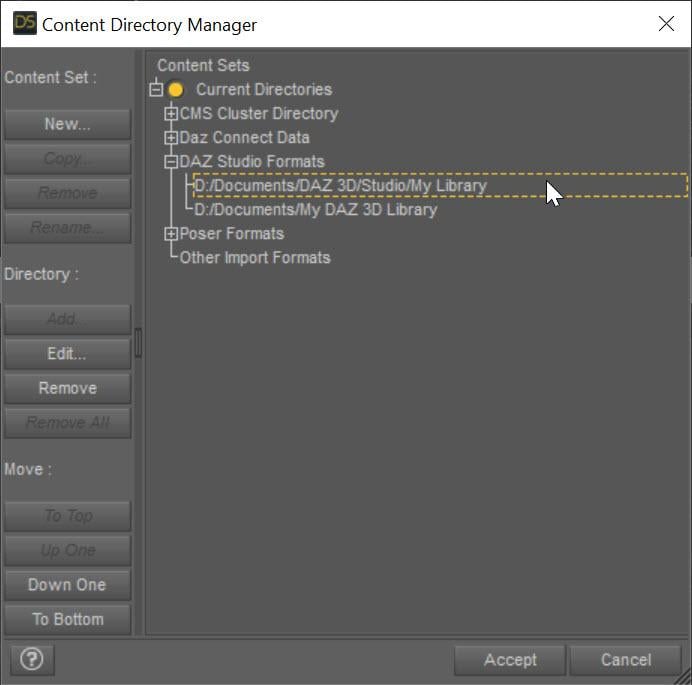
The SECOND entry points to My Daz 3D Library which has all of your installed content. The FIRST entry points to all of YOUR content, whether stuff you create or is created for you by converters. This ensures that everything you create never overwrites the installed content causing problems. Mostly, Daz Studio treats these two content directories as one big content directory, for example the morphs in D:\Documents\My Daz 3D Library\data\DAZ 3D\Genesis 8\Female\Morphs AND in D:\Documents\DAZ 3D\Studio\My Library\data\DAZ 3D\Genesis 8\Female\Morphs are both loaded and available as morphs for Genesis 8 Females. However, Daz Studio saves all the morphs and other data ONLY in the FIRST directory when a conversion occurs, ensuring that converted morphs do not overwrite installed content morphs. However, you are missing that first entry and your converters have been saving into the installed content folder, more than likely corrupting installed content.
I fixed my Daz Studio folders like the image. I even manually downloaded the converter program and copied the files into my "My Daz 3D Library" folder. However, I'm still getting the same result, however the male converter program is working fine. Any other ideas?
What do you mean that you copied the files into "My Daz 3D Library" folder? What files? None of the converted morphs should go in there. I would uninstall and reinstall Essentials so you get back the original morphs from Daz. Load a figure and make sure it is fixed. Then with the Daz Studio folders fixed, re-convert and make sure the morphs are showing up in your "My Library" folder and not "My Daz 3D library" folder.
This may or may not be important, I use the Daz Install Manager. I uninstalled the Genesis 3 and 8 Essentials, converter 3 to 8 female, along with Victoria 7. I then reinstalled them . Before I tried the conversion on Victoria 7, I removed the morph folder in the "M:\NZXT Storage\Documents\DAZ 3D\My Library\data\DAZ 3D\Genesis 8\Female\Morphs" folder for Victoria 7. I also made certain to remove the folder that was created by the converter for Victoria 7 from the "M:\NZXT Storage\Documents\My DAZ 3D Library\data\DAZ 3D\Genesis 8\Female\Morphs" folder, from my previous conversions. However, I'm still getting the same problem. The morphs are going into the "M:\NZXT Storage\Documents\DAZ 3D\My Library\data\DAZ 3D\Genesis 8\Female\Morphs" folder. I reset the settings on the converter and I've verified that they are the same for the female as the male (which is working), but I'm still getting the same problem. It's making me wonder if there are another set of files that need to be deleted, to make this thing work.
When the converter converts something, its morphs will go in M:\NZXT Storage\Documents\DAZ 3D\My Library\data\DAZ 3D\Genesis 8\Female\Morphs. However, BEFORE you converted anything, was the vanilla G8F correct? If not, there are some bad morphs in your installed morphs folder: M:\NZXT Storage\Documents\My DAZ 3D Library\data\DAZ 3D\Genesis 8\Female\Morphs
I uninstalled everything from "M:\NZXT Storage\Documents\DAZ 3D\My Library\" and "M:\NZXT Storage\Documents\My DAZ 3D Library\", even uninstalled the Daz Program. I deleted folders that weren't needed. However, after reinstalling everything, I'm getting the same problem. In fact, the converter program remembered the old settings. There's a setting in the system that didn't get deleted when I uninstalled everything that I could think of. I even deleted the files in username/appdata/ that belonged to Daz Studio. The only thing I didn't deleted were settings for the Daz Install Manager.
The script remembers its SETTINGs because those are in the registry (but the morphs, which are the problem should be gone if you uninstalled and deleted properly). If you are comfortable with RegEdit, you can remove the settings (just search for the script name in the registry).
There are morphs corrupted somewhere or being pulled in when they shouldn't be. Clear your scene. Load in your generic Genesis 8 Female figure (that contains the distortion). View the Daz Log (Help->Troubleshooting...->View Daz Log. Look for
2022-07-11 07:08:46.257 [INFO] :: Begin asset load (open): /People/Genesis 8 Female/Genesis 8 Basic Female.duf
[...LOTS OF MESSAGES HERE]
2022-07-11 07:08:50.243 [INFO] :: Finished asset load (open): 0m 3.986s - /People/Genesis 8 Female/Genesis 8 Basic Female.duf
Somewhere in there is probably a message about loading something it shouldn't (look for .dsf). If not, it is the /People/Genesis 8 Female/Genesis 8 Basic Female.duf that is corrupted I think. You *might* (because it is a relative path and could have been installed via DIM or Daz Connect) multiple versions of that file. One of them is the problem.
Just so we're on the same page, here's what I did to bring things back to normal. I used Daz Install Manager, so I used it to uninstall everything, including Daz Studio. I changed the "My DAZ 3D Library" to "My DAZ 3D Library - Broke" and created the new folder "My DAZ 3D Library". I even did the same to the "DAZ 3D" folder. I went into the "C:\Program Files\DAZ 3D" folder and removed everything accept the "DAZ3DIM1" folder. I went into the "C:\Users\nekur\AppData\Roaming" folder and copied the "DAZ 3D" folder to "DAZ 3D - Broke". I then deled the "cms", "dson", and "Studio4" folders in "DAZ 3D". Once that was all done, I reinstalled Daz Studio and then loaded all the rest. However, when I load Genesis 8, I'm getting the following errors:
2022-07-11 07:09:24.445 [WARNING] :: ..\..\..\..\..\src\sdksource\fileinput\dzassetdaz.cpp(6903): Formula output property not found: Genesis8Female:/data/Daz 3D/Genesis 8/Female/Morphs/XTransfer/3D Universe/ToonGenerations2/Base/XT_CTRL3duToonGenerations2_AdjustAge.dsf#XTIDCTRL3duToonGenerations2_AdjustAge?value - in file: /data/Daz 3D/Genesis 8/Female/Morphs/Zev0/Shape Shift/Arm Length.dsf
2022-07-11 07:09:24.502 [WARNING] :: ..\..\..\..\..\src\sdksource\fileinput\dzassetdaz.cpp(6903): Formula output property not found: Genesis8Female:/data/DAZ 3D/Genesis 8/Female/Morphs/DAZ 3D/Head/Old/PHMEyesIrisSize.dsf#PHMEyesIrisSize?value - in file: /data/Daz 3D/Genesis 8/Female/Morphs/vyktohria/Meredith/VYK Meredith Head.dsf
2022-07-11 07:09:24.792 [WARNING] :: ..\..\..\..\..\src\sdksource\fileinput\dzassetdaz.cpp(6903): Formula output property not found: Genesis8Female:/data/DAZ 3D/Genesis 8/Female/Morphs/SickleYield2017/UniversalBreastHelper/PBMSYUBHGiantAll_proj.dsf#PBMSYUBHGiantAll_proj?value - in file: /data/Daz 3D/Genesis 8/Female/Morphs/SickleYield2017/UniversalBreastHelper/PBMSYUBHGiantAll.dsf
2022-07-11 07:09:29.047 [WARNING] :: ..\..\..\..\..\src\sdksource\fileinput\dzassetdaz.cpp(7134): Unsupported formula: /data/Daz 3D/Genesis 8/Female/Morphs/DAZ 3D%2CHeysun Oh%2CYannek/Victoria 7/pJCMRSG3FVictoria7ShoulderBndFwd_110_R.dsf
2022-07-11 07:09:29.128 [WARNING] :: ..\..\..\..\..\src\sdksource\fileinput\dzassetdaz.cpp(7134): Unsupported formula: /data/Daz 3D/Genesis 8/Female/Morphs/DAZ 3D%2CHeysun Oh%2CYannek/Victoria 7/pJCMRSG3FVictoria7ShoulderBndFwd_110_L.dsf
2022-07-11 07:09:29.321 [WARNING] :: ..\..\..\..\..\src\sdksource\fileinput\dzassetdaz.cpp(7134): Unsupported formula: /data/Daz 3D/Genesis 8/Female/Morphs/DAZ 3D%2CHeysun Oh%2CYannek/Victoria 7/pJCMRSG3FVictoria7ShinBndBck_145_R.dsf
2022-07-11 07:09:29.403 [WARNING] :: ..\..\..\..\..\src\sdksource\fileinput\dzassetdaz.cpp(7134): Unsupported formula: /data/Daz 3D/Genesis 8/Female/Morphs/DAZ 3D%2CHeysun Oh%2CYannek/Victoria 7/pJCMRSG3FVictoria7ShinBndBck_145_L.dsf
2022-07-11 07:09:29.571 [WARNING] :: ..\..\..\..\..\src\sdksource\fileinput\dzassetdaz.cpp(7134): Unsupported formula: /data/Daz 3D/Genesis 8/Female/Morphs/DAZ 3D%2CHeysun Oh%2CYannek/Victoria 7/pJCMRSG3FVictoria7ForearmBnd_135_R.dsf
2022-07-11 07:09:29.657 [WARNING] :: ..\..\..\..\..\src\sdksource\fileinput\dzassetdaz.cpp(7134): Unsupported formula: /data/Daz 3D/Genesis 8/Female/Morphs/DAZ 3D%2CHeysun Oh%2CYannek/Victoria 7/pJCMRSG3FVictoria7ForearmBnd_135_L.dsf
2022-07-11 07:09:31.130 [WARNING] :: ..\..\..\..\..\src\sdksource\fileinput\dzassetdaz.cpp(5962): Parent for modifier not found: TMLI Lashes 06.
2022-07-11 07:09:31.130 [WARNING] :: ..\..\..\..\..\src\sdksource\fileinput\dzassetdaz.cpp(1712): Modifier not prepared: TMLI Lashes 06!
2022-07-11 07:09:31.130 [WARNING] :: ..\..\..\..\..\src\sdksource\fileinput\dzassetdaz.cpp(1729): Modifier not created: TMLI Lashes 06!
Have you ever seen anything like this that might help solve the problem? I got rid of one of the errors I'm not showing after buying Olympia 8. However, I can't find any of these files in my previous version of Daz Studio entitled "Daz 3D2 Old" or in the Genesis 8 female zip file I downloaded from the Product Library. I even tried to copy the Genesis 8 file from "Daz 3D2 Old", but with no luck.
Usually, you will get some errors like "Formula output property not found" and such. When vendors save some morphs, they could have unintentionally pulled in other morphs that are on their system but not on your system. If you are not having problems, you can ignore these. They slow down loading figures because of all the log messages but don't affect stuff otherwise.
I would warn you if you ever do this again to make sure the Daz Connect folder had been nuked too. It is easy, even if you think you always use DIM, for some stuff to be installed by Daz Connect and end up there.
But it sounds like things are working now?
No, I'm still having the same problem. I've done just about everything I can think of to get Daz back to square one, so I'd get a good conversion. I've even tried copying the older conversions I did, with not success.
Nuking everything definitely would make it so the standard G8F loads properly. You are not nuking something. As I mentioned, the Daz Connect directory (under the Daz Connect Data node in the Content Directory Manager dialog) should be nuked as well. That is the only thing I can think you missed. You need to make sure ALL the directories pointed to in the Content Directory Manager do not have corrupted data.
What exactly do you mean by nuking the Daz Content Data. My Daz Content Data is located in "M:\NZXT Storage\Documents\DAZ 3D\Studio\My Daz Connect Library". After I uninstalled everything, I left the "M:\NZXT Storage\Documents\DAZ 3D" empty.
Ok, that sounds like you emptied it as well. Unfortunately, I don't know how to help you. If you had a clean install, DS would be loading a uncorrupted G8F, but since it IS corrupted, some old data is being pulled in somewhere. This is a DS installation problem.
Cool. Thanks for everything.
Sorry, I could not help more.
[Released] Character Converter from Genesis 8 Female to Genesis 3 Female - Conv JCMs too[Commercial]RiverSoftArt said:
Nekura2000 said:
RiverSoftArt said:
Nekura2000 said:
RiverSoftArt said:
Nekura2000 said:
RiverSoftArt said:
Nekura2000 said:
RiverSoftArt said:
Nekura2000 said:
RiverSoftArt said:
Nekura2000 said:
RiverSoftArt said:
Nekura2000 said:
RiverSoftArt said:
Nekura2000 said:
RiverSoftArt said:
Nekura2000 said:
I had to get a new hard drive so I reinstalled Daz Studio. When trying to convert my Generation 7 female characters to Generation 8, I'm getting a distorted face. I've uninstalled and reinstalled the program, even deleted the RSCloneGenesis3Female.obj file from the folder C:\Users\nekur\AppData\Roaming\DAZ 3D\Studio4\CharacterConverterMorphs, with no change. The Generation 7 character as well as Genesis 8 load without a flaw. Here's what I'm getting, attached or from https://www.deviantart.com/wow-creations/art/Converted-920761392. ; I just looked at the parameters for the character I converted, which was Agnes. It isn't showing an Agnes head or body for 8, just Agnes itself.
The clone is for a different Character Converter. Maybe it is pulling in the converted morphs twice? From your previous conversion on the old hard drive and a new conversion? What directories are specified in the content manager? You should check all the currently used morphs on the character and find the morphs. The Parameter Settings show the Asset File Path of the morph (and the [...] button shows the full path of the morph). Make sure the morphs are coming from where you think they should be coming.
I use two different drives when using software. I have the OS drive which I replaced and the data drive. I renamed the original Daz drive as “Daz 3D2 Old”, before installing the Daz Studio. When installing Daz Studio, I allowed it to keep the “Daz 3D” folder, but also use the new “My DAZ 3D Library” folder. I just remember to look at the Error Log when loading Agnes Genesis 8 and this is what I’m getting:
2022-06-29 07:16:21.449 [WARNING] :: ..\..\..\..\..\src\sdksource\fileinput\dzassetdaz.cpp(6903): Formula output property not found: Genesis8Female:/data/Daz%203D/Genesis%208/Female/Morphs/XTransfer/3D%20Universe/ToonGenerations2/Base/XT_CTRL3duToonGenerations2_AdjustAge.dsf#XTIDCTRL3duToonGenerations2_AdjustAge?value - in file: /data/Daz%203D/Genesis%208/Female/Morphs/Zev0/Shape%20Shift/Arm%20Length.dsf
2022-06-29 07:16:21.506 [WARNING] :: ..\..\..\..\..\src\sdksource\fileinput\dzassetdaz.cpp(6903): Formula output property not found: Genesis8Female:/data/DAZ%203D/Genesis%208/Female/Morphs/DAZ%203D/Head/Old/PHMEyesIrisSize.dsf#PHMEyesIrisSize?value - in file: /data/Daz%203D/Genesis%208/Female/Morphs/vyktohria/Meredith/VYK%20Meredith%20Head.dsf
2022-06-29 07:16:22.060 [WARNING] :: ..\..\..\..\..\src\sdksource\fileinput\dzassetdaz.cpp(6903): Formula output property not found: Genesis8Female:/data/DAZ%203D/Genesis%208/Female/Morphs/SickleYield2017/UniversalBreastHelper/PBMSYUBHGiantAll_proj.dsf#PBMSYUBHGiantAll_proj?value - in file: /data/Daz%203D/Genesis%208/Female/Morphs/SickleYield2017/UniversalBreastHelper/PBMSYUBHGiantAll.dsf
2022-06-29 07:16:22.125 [WARNING] :: ..\..\..\..\..\src\sdksource\fileinput\dzassetdaz.cpp(7134): Unsupported formula: /data/Daz%203D/Genesis%208/Female/Morphs/RiverSoft%20Art/Javeria%20for%20Victoria%207%20and%20Genesis%203/pJCMRSG3FVictoria7ThighBndFwdHDR.dsf
2022-06-29 07:16:22.155 [WARNING] :: ..\..\..\..\..\src\sdksource\fileinput\dzassetdaz.cpp(7134): Unsupported formula: /data/Daz%203D/Genesis%208/Female/Morphs/RiverSoft%20Art/Javeria%20for%20Victoria%207%20and%20Genesis%203/pJCMRSG3FVictoria7ThighBndFwdHDL.dsf
2022-06-29 07:16:22.628 [WARNING] :: ..\..\..\..\..\src\sdksource\fileinput\dzassetdaz.cpp(7134): Unsupported formula: /data/Daz%203D/Genesis%208/Female/Morphs/RiverSoft%20Art/FWSA%20Caterina%20for%20Victoria%207%20and%20Genesis%203/pJCMRSG3FVictoria7ShoulderBndFwd_110_R.dsf
2022-06-29 07:16:22.665 [WARNING] :: ..\..\..\..\..\src\sdksource\fileinput\dzassetdaz.cpp(7134): Unsupported formula: /data/Daz%203D/Genesis%208/Female/Morphs/RiverSoft%20Art/FWSA%20Caterina%20for%20Victoria%207%20and%20Genesis%203/pJCMRSG3FVictoria7ShoulderBndFwd_110_L.dsf
2022-06-29 07:16:22.769 [WARNING] :: ..\..\..\..\..\src\sdksource\fileinput\dzassetdaz.cpp(7134): Unsupported formula: /data/Daz%203D/Genesis%208/Female/Morphs/RiverSoft%20Art/FWSA%20Caterina%20for%20Victoria%207%20and%20Genesis%203/pJCMRSG3FVictoria7ShinBndBck_145_R.dsf
2022-06-29 07:16:22.806 [WARNING] :: ..\..\..\..\..\src\sdksource\fileinput\dzassetdaz.cpp(7134): Unsupported formula: /data/Daz%203D/Genesis%208/Female/Morphs/RiverSoft%20Art/FWSA%20Caterina%20for%20Victoria%207%20and%20Genesis%203/pJCMRSG3FVictoria7ShinBndBck_145_L.dsf
2022-06-29 07:16:22.895 [WARNING] :: ..\..\..\..\..\src\sdksource\fileinput\dzassetdaz.cpp(7134): Unsupported formula: /data/Daz%203D/Genesis%208/Female/Morphs/RiverSoft%20Art/FWSA%20Caterina%20for%20Victoria%207%20and%20Genesis%203/pJCMRSG3FVictoria7ForearmBnd_135_R.dsf
2022-06-29 07:16:22.935 [WARNING] :: ..\..\..\..\..\src\sdksource\fileinput\dzassetdaz.cpp(7134): Unsupported formula: /data/Daz%203D/Genesis%208/Female/Morphs/RiverSoft%20Art/FWSA%20Caterina%20for%20Victoria%207%20and%20Genesis%203/pJCMRSG3FVictoria7ForearmBnd_135_L.dsf
2022-06-29 07:16:31.020 [WARNING] :: ..\..\..\..\..\src\sdksource\fileinput\dzassetdaz.cpp(6903): Formula output property not found: Genesis8Female:/data/DAZ%203D/Genesis%208/Female/Morphs/DAZ%20Originals/data/DAZ%203D/Genesis%208/Female/Morphs/Fred%20Winkler%20Art%2CSabby%2CDAZ%20Originals/FW%20Frankie%20HD%20for%20Victoria%207/CTRL-RSC-Frankie.dsfCFred%20Winkler%20Art/data/DAZ%203D/Genesis%208/Female/Morphs/Fred%20Winkler%20Art%2CSabby%2CDAZ%20Originals/FW%20Frankie%20HD%20for%20Victoria%207/CTRL-RSC-Frankie.dsfCSabby/FWSA%20Agnes%20HD%20for%20Lilith%207/PHMMouthRealismHD.dsf#PHMMouthRealismHD?value - in file: /data/DAZ%203D/Genesis%208/Female/Morphs/Fred%20Winkler%20Art%2CSabby%2CDAZ%20Originals/FW%20Frankie%20HD%20for%20Victoria%207/CTRL-RSC-Frankie.dsf
2022-06-29 07:16:31.020 [WARNING] :: ..\..\..\..\..\src\sdksource\fileinput\dzassetdaz.cpp(6903): Formula output property not found: Genesis8Female:/data/DAZ%203D/Genesis%208/Female/Morphs/DAZ%20Originals/data/DAZ%203D/Genesis%208/Female/Morphs/Fred%20Winkler%20Art%2CSabby%2CDAZ%20Originals/FW%20Frankie%20HD%20for%20Victoria%207/CTRL-RSC-Frankie.dsfCFred%20Winkler%20Art/FW%20Brooke%20HD%20for%20Victoria%207/FHMVictoria7.dsf#FHMVictoria7?value - in file: /data/DAZ%203D/Genesis%208/Female/Morphs/Fred%20Winkler%20Art%2CSabby%2CDAZ%20Originals/FW%20Frankie%20HD%20for%20Victoria%207/CTRL-RSC-Frankie.dsf
2022-06-29 07:16:31.021 [WARNING] :: ..\..\..\..\..\src\sdksource\fileinput\dzassetdaz.cpp(6903): Formula output property not found: Genesis8Female:/data/DAZ%203D/Genesis%208/Female/Morphs/DAZ%20Originals/data/DAZ%203D/Genesis%208/Female/Morphs/Fred%20Winkler%20Art%2CSabby%2CDAZ%20Originals/FW%20Frankie%20HD%20for%20Victoria%207/CTRL-RSC-Frankie.dsfCFred%20Winkler%20Art/FW%20Brooke%20HD%20for%20Victoria%207/FBMVictoria7.dsf#FBMVictoria7?value - in file: /data/DAZ%203D/Genesis%208/Female/Morphs/Fred%20Winkler%20Art%2CSabby%2CDAZ%20Originals/FW%20Frankie%20HD%20for%20Victoria%207/CTRL-RSC-Frankie.dsf
2022-06-29 07:16:32.694 [WARNING] :: ..\..\..\..\..\src\sdksource\fileinput\dzassetdaz.cpp(6969): Formula target property not found: Genesis8Female:/data/DAZ%203D/Genesis%208/Female/Morphs/DAZ%203D/Olympia%208/FBMOlympia8.dsf#FBMOlympia8_Test?value - in file: /data/Daz%203D/Genesis%208/Female/Morphs/fabiana/KillerLegsG8/1FK-Olympia8BaseFix.dsf
2022-06-29 07:16:40.096 [WARNING] :: ..\..\..\..\..\src\sdksource\fileinput\dzassetdaz.cpp(7134): Unsupported formula: /data/Daz%203D/Genesis%208/Female/Morphs/DAZ%203D%2CHeysun%20Oh/Olympia%207%20HD%20Add-On/pJCMRSG3FOlympia7ForeArmBndHD_n100L.dsf
2022-06-29 07:16:40.261 [WARNING] :: ..\..\..\..\..\src\sdksource\fileinput\dzassetdaz.cpp(7134): Unsupported formula: /data/Daz%203D/Genesis%208/Female/Morphs/DAZ%203D%2CHeysun%20Oh/Olympia%207%20HD%20Add-On/pJCMRSG3FOlympia7ForeArmBndHD_100R.dsf
2022-06-29 07:16:40.986 [WARNING] :: ..\..\..\..\..\src\sdksource\fileinput\dzassetdaz.cpp(7134): Unsupported formula: /data/Daz%203D/Genesis%208/Female/Morphs/DAZ%203D%2CHeysun%20Oh/Mei%20Lin%207%20HD%20Add-On/pJCMRSG3FMeiLin7ShinBndBck_95R.dsf
2022-06-29 07:16:41.152 [WARNING] :: ..\..\..\..\..\src\sdksource\fileinput\dzassetdaz.cpp(7134): Unsupported formula: /data/Daz%203D/Genesis%208/Female/Morphs/DAZ%203D%2CHeysun%20Oh/Mei%20Lin%207%20HD%20Add-On/pJCMRSG3FMeiLin7ShinBndBck_95L.dsf
2022-06-29 07:16:41.322 [WARNING] :: ..\..\..\..\..\src\sdksource\fileinput\dzassetdaz.cpp(7134): Unsupported formula: /data/Daz%203D/Genesis%208/Female/Morphs/DAZ%203D%2CHeysun%20Oh/Mei%20Lin%207%20HD%20Add-On/pJCMRSG3FMeiLin7ShinBndBckR.dsf
2022-06-29 07:16:41.494 [WARNING] :: ..\..\..\..\..\src\sdksource\fileinput\dzassetdaz.cpp(7134): Unsupported formula: /data/Daz%203D/Genesis%208/Female/Morphs/DAZ%203D%2CHeysun%20Oh/Mei%20Lin%207%20HD%20Add-On/pJCMRSG3FMeiLin7ShinBndBckL.dsf
2022-06-29 07:16:43.828 [WARNING] :: ..\..\..\..\..\src\sdksource\fileinput\dzassetdaz.cpp(7134): Unsupported formula: /data/Daz%203D/Genesis%208/Female/Morphs/DAZ%203D%2CHeysun%20Oh/Karen%207%20HD%20Add-On/pJCMRSG3FKaren7ShldrFwd_n90L.dsf
2022-06-29 07:16:44.007 [WARNING] :: ..\..\..\..\..\src\sdksource\fileinput\dzassetdaz.cpp(7134): Unsupported formula: /data/Daz%203D/Genesis%208/Female/Morphs/DAZ%203D%2CHeysun%20Oh/Karen%207%20HD%20Add-On/pJCMRSG3FKaren7ShldrFwd_90R.dsf
2022-06-29 07:16:44.191 [WARNING] :: ..\..\..\..\..\src\sdksource\fileinput\dzassetdaz.cpp(7134): Unsupported formula: /data/Daz%203D/Genesis%208/Female/Morphs/DAZ%203D%2CHeysun%20Oh/Karen%207%20HD%20Add-On/pJCMRSG3FKaren7ShinBndBck_90R.dsf
2022-06-29 07:16:44.369 [WARNING] :: ..\..\..\..\..\src\sdksource\fileinput\dzassetdaz.cpp(7134): Unsupported formula: /data/Daz%203D/Genesis%208/Female/Morphs/DAZ%203D%2CHeysun%20Oh/Karen%207%20HD%20Add-On/pJCMRSG3FKaren7ShinBndBck_90L.dsf
2022-06-29 07:16:44.669 [WARNING] :: ..\..\..\..\..\src\sdksource\fileinput\dzassetdaz.cpp(7134): Unsupported formula: /data/Daz%203D/Genesis%208/Female/Morphs/DAZ%203D%2CHeysun%20Oh/Karen%207%20HD%20Add-On/pJCMRSG3FKaren7ForearmBnd_n85L.dsf
2022-06-29 07:16:44.910 [WARNING] :: ..\..\..\..\..\src\sdksource\fileinput\dzassetdaz.cpp(7134): Unsupported formula: /data/Daz%203D/Genesis%208/Female/Morphs/DAZ%203D%2CHeysun%20Oh/Karen%207%20HD%20Add-On/pJCMRSG3FKaren7ForearmBnd_85R.dsf
2022-06-29 07:16:56.769 [WARNING] :: ..\..\..\..\..\src\sdksource\fileinput\dzassetdaz.cpp(7134): Unsupported formula: /data/Daz%203D/Genesis%208/Female/Morphs/-Yannek-%2CDAZ%203D%2CHeysun%20Oh/Gia%207/pJCMRSG3FGia7ForeArmBnd_n135L.dsf
2022-06-29 07:16:57.067 [WARNING] :: ..\..\..\..\..\src\sdksource\fileinput\dzassetdaz.cpp(7134): Unsupported formula: /data/Daz%203D/Genesis%208/Female/Morphs/-Yannek-%2CDAZ%203D%2CHeysun%20Oh/Gia%207/pJCMRSG3FGia7ForeArmBnd_135R.dsf
2022-06-29 07:17:00.107 [WARNING] :: ..\..\..\..\..\src\sdksource\fileinput\dzassetdaz.cpp(7134): Unsupported formula: /data/Daz%203D/Genesis%208/Female/Morphs/-Yannek-%2CDAZ%203D%2CHeysun%20Oh/Arabella%207%20HD%20Add-On/pJCMRSG3FArabella7ForeArmBnd_n135L.dsf
2022-06-29 07:17:00.418 [WARNING] :: ..\..\..\..\..\src\sdksource\fileinput\dzassetdaz.cpp(7134): Unsupported formula: /data/Daz%203D/Genesis%208/Female/Morphs/-Yannek-%2CDAZ%203D%2CHeysun%20Oh/Arabella%207%20HD%20Add-On/pJCMRSG3FArabella7ForeArmBnd_135R.dsf
2022-06-29 07:17:02.981 [WARNING] :: ..\..\..\..\..\src\sdksource\fileinput\dzassetdaz.cpp(5962): Parent for modifier not found: TMLI Lashes 06.
2022-06-29 07:17:02.981 [WARNING] :: ..\..\..\..\..\src\sdksource\fileinput\dzassetdaz.cpp(1712): Modifier not prepared: TMLI Lashes 06!
2022-06-29 07:17:02.981 [WARNING] :: ..\..\..\..\..\src\sdksource\fileinput\dzassetdaz.cpp(1729): Modifier not created: TMLI Lashes 06!
Here’s an image of my Content Directory Manager.
What looks bad in your Content Directory is that you have no user library in the Daz Studio Formats. That means the character converter would be writing morphs (and possibly deleting morphs if the overwrite option is checked) in the Daz content folder. You will get bad/weird results from that. I am afraid you might have hosed your morphs folder at this point. You need something a user content folder as the first folder in the Daz Studio Formats section. Then, this folder would be used to write out morphs from the conversions and would not overwrite your Daz content library.
I'm sorry, but from what I can see I have a Content Directory in the Daz Studio Format. Could you give a step by step solution in solving this problem. I've used Daz Studio for several years, along with Character Converter, but I think I'm missing something based on what you're seeing and I'm trying to interpret.
Usually what you will see in Daz Studio Formats is something like this:
The SECOND entry points to My Daz 3D Library which has all of your installed content. The FIRST entry points to all of YOUR content, whether stuff you create or is created for you by converters. This ensures that everything you create never overwrites the installed content causing problems. Mostly, Daz Studio treats these two content directories as one big content directory, for example the morphs in D:\Documents\My Daz 3D Library\data\DAZ 3D\Genesis 8\Female\Morphs AND in D:\Documents\DAZ 3D\Studio\My Library\data\DAZ 3D\Genesis 8\Female\Morphs are both loaded and available as morphs for Genesis 8 Females. However, Daz Studio saves all the morphs and other data ONLY in the FIRST directory when a conversion occurs, ensuring that converted morphs do not overwrite installed content morphs. However, you are missing that first entry and your converters have been saving into the installed content folder, more than likely corrupting installed content.
I fixed my Daz Studio folders like the image. I even manually downloaded the converter program and copied the files into my "My Daz 3D Library" folder. However, I'm still getting the same result, however the male converter program is working fine. Any other ideas?
What do you mean that you copied the files into "My Daz 3D Library" folder? What files? None of the converted morphs should go in there. I would uninstall and reinstall Essentials so you get back the original morphs from Daz. Load a figure and make sure it is fixed. Then with the Daz Studio folders fixed, re-convert and make sure the morphs are showing up in your "My Library" folder and not "My Daz 3D library" folder.
This may or may not be important, I use the Daz Install Manager. I uninstalled the Genesis 3 and 8 Essentials, converter 3 to 8 female, along with Victoria 7. I then reinstalled them . Before I tried the conversion on Victoria 7, I removed the morph folder in the "M:\NZXT Storage\Documents\DAZ 3D\My Library\data\DAZ 3D\Genesis 8\Female\Morphs" folder for Victoria 7. I also made certain to remove the folder that was created by the converter for Victoria 7 from the "M:\NZXT Storage\Documents\My DAZ 3D Library\data\DAZ 3D\Genesis 8\Female\Morphs" folder, from my previous conversions. However, I'm still getting the same problem. The morphs are going into the "M:\NZXT Storage\Documents\DAZ 3D\My Library\data\DAZ 3D\Genesis 8\Female\Morphs" folder. I reset the settings on the converter and I've verified that they are the same for the female as the male (which is working), but I'm still getting the same problem. It's making me wonder if there are another set of files that need to be deleted, to make this thing work.
When the converter converts something, its morphs will go in M:\NZXT Storage\Documents\DAZ 3D\My Library\data\DAZ 3D\Genesis 8\Female\Morphs. However, BEFORE you converted anything, was the vanilla G8F correct? If not, there are some bad morphs in your installed morphs folder: M:\NZXT Storage\Documents\My DAZ 3D Library\data\DAZ 3D\Genesis 8\Female\Morphs
I uninstalled everything from "M:\NZXT Storage\Documents\DAZ 3D\My Library\" and "M:\NZXT Storage\Documents\My DAZ 3D Library\", even uninstalled the Daz Program. I deleted folders that weren't needed. However, after reinstalling everything, I'm getting the same problem. In fact, the converter program remembered the old settings. There's a setting in the system that didn't get deleted when I uninstalled everything that I could think of. I even deleted the files in username/appdata/ that belonged to Daz Studio. The only thing I didn't deleted were settings for the Daz Install Manager.
The script remembers its SETTINGs because those are in the registry (but the morphs, which are the problem should be gone if you uninstalled and deleted properly). If you are comfortable with RegEdit, you can remove the settings (just search for the script name in the registry).
There are morphs corrupted somewhere or being pulled in when they shouldn't be. Clear your scene. Load in your generic Genesis 8 Female figure (that contains the distortion). View the Daz Log (Help->Troubleshooting...->View Daz Log. Look for
2022-07-11 07:08:46.257 [INFO] :: Begin asset load (open): /People/Genesis 8 Female/Genesis 8 Basic Female.duf
[...LOTS OF MESSAGES HERE]
2022-07-11 07:08:50.243 [INFO] :: Finished asset load (open): 0m 3.986s - /People/Genesis 8 Female/Genesis 8 Basic Female.duf
Somewhere in there is probably a message about loading something it shouldn't (look for .dsf). If not, it is the /People/Genesis 8 Female/Genesis 8 Basic Female.duf that is corrupted I think. You *might* (because it is a relative path and could have been installed via DIM or Daz Connect) multiple versions of that file. One of them is the problem.
Just so we're on the same page, here's what I did to bring things back to normal. I used Daz Install Manager, so I used it to uninstall everything, including Daz Studio. I changed the "My DAZ 3D Library" to "My DAZ 3D Library - Broke" and created the new folder "My DAZ 3D Library". I even did the same to the "DAZ 3D" folder. I went into the "C:\Program Files\DAZ 3D" folder and removed everything accept the "DAZ3DIM1" folder. I went into the "C:\Users\nekur\AppData\Roaming" folder and copied the "DAZ 3D" folder to "DAZ 3D - Broke". I then deled the "cms", "dson", and "Studio4" folders in "DAZ 3D". Once that was all done, I reinstalled Daz Studio and then loaded all the rest. However, when I load Genesis 8, I'm getting the following errors:
2022-07-11 07:09:24.445 [WARNING] :: ..\..\..\..\..\src\sdksource\fileinput\dzassetdaz.cpp(6903): Formula output property not found: Genesis8Female:/data/Daz 3D/Genesis 8/Female/Morphs/XTransfer/3D Universe/ToonGenerations2/Base/XT_CTRL3duToonGenerations2_AdjustAge.dsf#XTIDCTRL3duToonGenerations2_AdjustAge?value - in file: /data/Daz 3D/Genesis 8/Female/Morphs/Zev0/Shape Shift/Arm Length.dsf
2022-07-11 07:09:24.502 [WARNING] :: ..\..\..\..\..\src\sdksource\fileinput\dzassetdaz.cpp(6903): Formula output property not found: Genesis8Female:/data/DAZ 3D/Genesis 8/Female/Morphs/DAZ 3D/Head/Old/PHMEyesIrisSize.dsf#PHMEyesIrisSize?value - in file: /data/Daz 3D/Genesis 8/Female/Morphs/vyktohria/Meredith/VYK Meredith Head.dsf
2022-07-11 07:09:24.792 [WARNING] :: ..\..\..\..\..\src\sdksource\fileinput\dzassetdaz.cpp(6903): Formula output property not found: Genesis8Female:/data/DAZ 3D/Genesis 8/Female/Morphs/SickleYield2017/UniversalBreastHelper/PBMSYUBHGiantAll_proj.dsf#PBMSYUBHGiantAll_proj?value - in file: /data/Daz 3D/Genesis 8/Female/Morphs/SickleYield2017/UniversalBreastHelper/PBMSYUBHGiantAll.dsf
2022-07-11 07:09:29.047 [WARNING] :: ..\..\..\..\..\src\sdksource\fileinput\dzassetdaz.cpp(7134): Unsupported formula: /data/Daz 3D/Genesis 8/Female/Morphs/DAZ 3D%2CHeysun Oh%2CYannek/Victoria 7/pJCMRSG3FVictoria7ShoulderBndFwd_110_R.dsf
2022-07-11 07:09:29.128 [WARNING] :: ..\..\..\..\..\src\sdksource\fileinput\dzassetdaz.cpp(7134): Unsupported formula: /data/Daz 3D/Genesis 8/Female/Morphs/DAZ 3D%2CHeysun Oh%2CYannek/Victoria 7/pJCMRSG3FVictoria7ShoulderBndFwd_110_L.dsf
2022-07-11 07:09:29.321 [WARNING] :: ..\..\..\..\..\src\sdksource\fileinput\dzassetdaz.cpp(7134): Unsupported formula: /data/Daz 3D/Genesis 8/Female/Morphs/DAZ 3D%2CHeysun Oh%2CYannek/Victoria 7/pJCMRSG3FVictoria7ShinBndBck_145_R.dsf
2022-07-11 07:09:29.403 [WARNING] :: ..\..\..\..\..\src\sdksource\fileinput\dzassetdaz.cpp(7134): Unsupported formula: /data/Daz 3D/Genesis 8/Female/Morphs/DAZ 3D%2CHeysun Oh%2CYannek/Victoria 7/pJCMRSG3FVictoria7ShinBndBck_145_L.dsf
2022-07-11 07:09:29.571 [WARNING] :: ..\..\..\..\..\src\sdksource\fileinput\dzassetdaz.cpp(7134): Unsupported formula: /data/Daz 3D/Genesis 8/Female/Morphs/DAZ 3D%2CHeysun Oh%2CYannek/Victoria 7/pJCMRSG3FVictoria7ForearmBnd_135_R.dsf
2022-07-11 07:09:29.657 [WARNING] :: ..\..\..\..\..\src\sdksource\fileinput\dzassetdaz.cpp(7134): Unsupported formula: /data/Daz 3D/Genesis 8/Female/Morphs/DAZ 3D%2CHeysun Oh%2CYannek/Victoria 7/pJCMRSG3FVictoria7ForearmBnd_135_L.dsf
2022-07-11 07:09:31.130 [WARNING] :: ..\..\..\..\..\src\sdksource\fileinput\dzassetdaz.cpp(5962): Parent for modifier not found: TMLI Lashes 06.
2022-07-11 07:09:31.130 [WARNING] :: ..\..\..\..\..\src\sdksource\fileinput\dzassetdaz.cpp(1712): Modifier not prepared: TMLI Lashes 06!
2022-07-11 07:09:31.130 [WARNING] :: ..\..\..\..\..\src\sdksource\fileinput\dzassetdaz.cpp(1729): Modifier not created: TMLI Lashes 06!
Have you ever seen anything like this that might help solve the problem? I got rid of one of the errors I'm not showing after buying Olympia 8. However, I can't find any of these files in my previous version of Daz Studio entitled "Daz 3D2 Old" or in the Genesis 8 female zip file I downloaded from the Product Library. I even tried to copy the Genesis 8 file from "Daz 3D2 Old", but with no luck.
Usually, you will get some errors like "Formula output property not found" and such. When vendors save some morphs, they could have unintentionally pulled in other morphs that are on their system but not on your system. If you are not having problems, you can ignore these. They slow down loading figures because of all the log messages but don't affect stuff otherwise.
I would warn you if you ever do this again to make sure the Daz Connect folder had been nuked too. It is easy, even if you think you always use DIM, for some stuff to be installed by Daz Connect and end up there.
But it sounds like things are working now?
No, I'm still having the same problem. I've done just about everything I can think of to get Daz back to square one, so I'd get a good conversion. I've even tried copying the older conversions I did, with not success.
Nuking everything definitely would make it so the standard G8F loads properly. You are not nuking something. As I mentioned, the Daz Connect directory (under the Daz Connect Data node in the Content Directory Manager dialog) should be nuked as well. That is the only thing I can think you missed. You need to make sure ALL the directories pointed to in the Content Directory Manager do not have corrupted data.
What exactly do you mean by nuking the Daz Content Data. My Daz Content Data is located in "M:\NZXT Storage\Documents\DAZ 3D\Studio\My Daz Connect Library". After I uninstalled everything, I left the "M:\NZXT Storage\Documents\DAZ 3D" empty.
Ok, that sounds like you emptied it as well. Unfortunately, I don't know how to help you. If you had a clean install, DS would be loading a uncorrupted G8F, but since it IS corrupted, some old data is being pulled in somewhere. This is a DS installation problem.
Cool. Thanks for everything.
[Released] Character Converter from Genesis 8 Female to Genesis 3 Female - Conv JCMs too[Commercial]Nekura2000 said:
RiverSoftArt said:
Nekura2000 said:
RiverSoftArt said:
Nekura2000 said:
RiverSoftArt said:
Nekura2000 said:
RiverSoftArt said:
Nekura2000 said:
RiverSoftArt said:
Nekura2000 said:
RiverSoftArt said:
Nekura2000 said:
RiverSoftArt said:
Nekura2000 said:
RiverSoftArt said:
Nekura2000 said:
I had to get a new hard drive so I reinstalled Daz Studio. When trying to convert my Generation 7 female characters to Generation 8, I'm getting a distorted face. I've uninstalled and reinstalled the program, even deleted the RSCloneGenesis3Female.obj file from the folder C:\Users\nekur\AppData\Roaming\DAZ 3D\Studio4\CharacterConverterMorphs, with no change. The Generation 7 character as well as Genesis 8 load without a flaw. Here's what I'm getting, attached or from https://www.deviantart.com/wow-creations/art/Converted-920761392. ; I just looked at the parameters for the character I converted, which was Agnes. It isn't showing an Agnes head or body for 8, just Agnes itself.
The clone is for a different Character Converter. Maybe it is pulling in the converted morphs twice? From your previous conversion on the old hard drive and a new conversion? What directories are specified in the content manager? You should check all the currently used morphs on the character and find the morphs. The Parameter Settings show the Asset File Path of the morph (and the [...] button shows the full path of the morph). Make sure the morphs are coming from where you think they should be coming.
I use two different drives when using software. I have the OS drive which I replaced and the data drive. I renamed the original Daz drive as “Daz 3D2 Old”, before installing the Daz Studio. When installing Daz Studio, I allowed it to keep the “Daz 3D” folder, but also use the new “My DAZ 3D Library” folder. I just remember to look at the Error Log when loading Agnes Genesis 8 and this is what I’m getting:
2022-06-29 07:16:21.449 [WARNING] :: ..\..\..\..\..\src\sdksource\fileinput\dzassetdaz.cpp(6903): Formula output property not found: Genesis8Female:/data/Daz%203D/Genesis%208/Female/Morphs/XTransfer/3D%20Universe/ToonGenerations2/Base/XT_CTRL3duToonGenerations2_AdjustAge.dsf#XTIDCTRL3duToonGenerations2_AdjustAge?value - in file: /data/Daz%203D/Genesis%208/Female/Morphs/Zev0/Shape%20Shift/Arm%20Length.dsf
2022-06-29 07:16:21.506 [WARNING] :: ..\..\..\..\..\src\sdksource\fileinput\dzassetdaz.cpp(6903): Formula output property not found: Genesis8Female:/data/DAZ%203D/Genesis%208/Female/Morphs/DAZ%203D/Head/Old/PHMEyesIrisSize.dsf#PHMEyesIrisSize?value - in file: /data/Daz%203D/Genesis%208/Female/Morphs/vyktohria/Meredith/VYK%20Meredith%20Head.dsf
2022-06-29 07:16:22.060 [WARNING] :: ..\..\..\..\..\src\sdksource\fileinput\dzassetdaz.cpp(6903): Formula output property not found: Genesis8Female:/data/DAZ%203D/Genesis%208/Female/Morphs/SickleYield2017/UniversalBreastHelper/PBMSYUBHGiantAll_proj.dsf#PBMSYUBHGiantAll_proj?value - in file: /data/Daz%203D/Genesis%208/Female/Morphs/SickleYield2017/UniversalBreastHelper/PBMSYUBHGiantAll.dsf
2022-06-29 07:16:22.125 [WARNING] :: ..\..\..\..\..\src\sdksource\fileinput\dzassetdaz.cpp(7134): Unsupported formula: /data/Daz%203D/Genesis%208/Female/Morphs/RiverSoft%20Art/Javeria%20for%20Victoria%207%20and%20Genesis%203/pJCMRSG3FVictoria7ThighBndFwdHDR.dsf
2022-06-29 07:16:22.155 [WARNING] :: ..\..\..\..\..\src\sdksource\fileinput\dzassetdaz.cpp(7134): Unsupported formula: /data/Daz%203D/Genesis%208/Female/Morphs/RiverSoft%20Art/Javeria%20for%20Victoria%207%20and%20Genesis%203/pJCMRSG3FVictoria7ThighBndFwdHDL.dsf
2022-06-29 07:16:22.628 [WARNING] :: ..\..\..\..\..\src\sdksource\fileinput\dzassetdaz.cpp(7134): Unsupported formula: /data/Daz%203D/Genesis%208/Female/Morphs/RiverSoft%20Art/FWSA%20Caterina%20for%20Victoria%207%20and%20Genesis%203/pJCMRSG3FVictoria7ShoulderBndFwd_110_R.dsf
2022-06-29 07:16:22.665 [WARNING] :: ..\..\..\..\..\src\sdksource\fileinput\dzassetdaz.cpp(7134): Unsupported formula: /data/Daz%203D/Genesis%208/Female/Morphs/RiverSoft%20Art/FWSA%20Caterina%20for%20Victoria%207%20and%20Genesis%203/pJCMRSG3FVictoria7ShoulderBndFwd_110_L.dsf
2022-06-29 07:16:22.769 [WARNING] :: ..\..\..\..\..\src\sdksource\fileinput\dzassetdaz.cpp(7134): Unsupported formula: /data/Daz%203D/Genesis%208/Female/Morphs/RiverSoft%20Art/FWSA%20Caterina%20for%20Victoria%207%20and%20Genesis%203/pJCMRSG3FVictoria7ShinBndBck_145_R.dsf
2022-06-29 07:16:22.806 [WARNING] :: ..\..\..\..\..\src\sdksource\fileinput\dzassetdaz.cpp(7134): Unsupported formula: /data/Daz%203D/Genesis%208/Female/Morphs/RiverSoft%20Art/FWSA%20Caterina%20for%20Victoria%207%20and%20Genesis%203/pJCMRSG3FVictoria7ShinBndBck_145_L.dsf
2022-06-29 07:16:22.895 [WARNING] :: ..\..\..\..\..\src\sdksource\fileinput\dzassetdaz.cpp(7134): Unsupported formula: /data/Daz%203D/Genesis%208/Female/Morphs/RiverSoft%20Art/FWSA%20Caterina%20for%20Victoria%207%20and%20Genesis%203/pJCMRSG3FVictoria7ForearmBnd_135_R.dsf
2022-06-29 07:16:22.935 [WARNING] :: ..\..\..\..\..\src\sdksource\fileinput\dzassetdaz.cpp(7134): Unsupported formula: /data/Daz%203D/Genesis%208/Female/Morphs/RiverSoft%20Art/FWSA%20Caterina%20for%20Victoria%207%20and%20Genesis%203/pJCMRSG3FVictoria7ForearmBnd_135_L.dsf
2022-06-29 07:16:31.020 [WARNING] :: ..\..\..\..\..\src\sdksource\fileinput\dzassetdaz.cpp(6903): Formula output property not found: Genesis8Female:/data/DAZ%203D/Genesis%208/Female/Morphs/DAZ%20Originals/data/DAZ%203D/Genesis%208/Female/Morphs/Fred%20Winkler%20Art%2CSabby%2CDAZ%20Originals/FW%20Frankie%20HD%20for%20Victoria%207/CTRL-RSC-Frankie.dsfCFred%20Winkler%20Art/data/DAZ%203D/Genesis%208/Female/Morphs/Fred%20Winkler%20Art%2CSabby%2CDAZ%20Originals/FW%20Frankie%20HD%20for%20Victoria%207/CTRL-RSC-Frankie.dsfCSabby/FWSA%20Agnes%20HD%20for%20Lilith%207/PHMMouthRealismHD.dsf#PHMMouthRealismHD?value - in file: /data/DAZ%203D/Genesis%208/Female/Morphs/Fred%20Winkler%20Art%2CSabby%2CDAZ%20Originals/FW%20Frankie%20HD%20for%20Victoria%207/CTRL-RSC-Frankie.dsf
2022-06-29 07:16:31.020 [WARNING] :: ..\..\..\..\..\src\sdksource\fileinput\dzassetdaz.cpp(6903): Formula output property not found: Genesis8Female:/data/DAZ%203D/Genesis%208/Female/Morphs/DAZ%20Originals/data/DAZ%203D/Genesis%208/Female/Morphs/Fred%20Winkler%20Art%2CSabby%2CDAZ%20Originals/FW%20Frankie%20HD%20for%20Victoria%207/CTRL-RSC-Frankie.dsfCFred%20Winkler%20Art/FW%20Brooke%20HD%20for%20Victoria%207/FHMVictoria7.dsf#FHMVictoria7?value - in file: /data/DAZ%203D/Genesis%208/Female/Morphs/Fred%20Winkler%20Art%2CSabby%2CDAZ%20Originals/FW%20Frankie%20HD%20for%20Victoria%207/CTRL-RSC-Frankie.dsf
2022-06-29 07:16:31.021 [WARNING] :: ..\..\..\..\..\src\sdksource\fileinput\dzassetdaz.cpp(6903): Formula output property not found: Genesis8Female:/data/DAZ%203D/Genesis%208/Female/Morphs/DAZ%20Originals/data/DAZ%203D/Genesis%208/Female/Morphs/Fred%20Winkler%20Art%2CSabby%2CDAZ%20Originals/FW%20Frankie%20HD%20for%20Victoria%207/CTRL-RSC-Frankie.dsfCFred%20Winkler%20Art/FW%20Brooke%20HD%20for%20Victoria%207/FBMVictoria7.dsf#FBMVictoria7?value - in file: /data/DAZ%203D/Genesis%208/Female/Morphs/Fred%20Winkler%20Art%2CSabby%2CDAZ%20Originals/FW%20Frankie%20HD%20for%20Victoria%207/CTRL-RSC-Frankie.dsf
2022-06-29 07:16:32.694 [WARNING] :: ..\..\..\..\..\src\sdksource\fileinput\dzassetdaz.cpp(6969): Formula target property not found: Genesis8Female:/data/DAZ%203D/Genesis%208/Female/Morphs/DAZ%203D/Olympia%208/FBMOlympia8.dsf#FBMOlympia8_Test?value - in file: /data/Daz%203D/Genesis%208/Female/Morphs/fabiana/KillerLegsG8/1FK-Olympia8BaseFix.dsf
2022-06-29 07:16:40.096 [WARNING] :: ..\..\..\..\..\src\sdksource\fileinput\dzassetdaz.cpp(7134): Unsupported formula: /data/Daz%203D/Genesis%208/Female/Morphs/DAZ%203D%2CHeysun%20Oh/Olympia%207%20HD%20Add-On/pJCMRSG3FOlympia7ForeArmBndHD_n100L.dsf
2022-06-29 07:16:40.261 [WARNING] :: ..\..\..\..\..\src\sdksource\fileinput\dzassetdaz.cpp(7134): Unsupported formula: /data/Daz%203D/Genesis%208/Female/Morphs/DAZ%203D%2CHeysun%20Oh/Olympia%207%20HD%20Add-On/pJCMRSG3FOlympia7ForeArmBndHD_100R.dsf
2022-06-29 07:16:40.986 [WARNING] :: ..\..\..\..\..\src\sdksource\fileinput\dzassetdaz.cpp(7134): Unsupported formula: /data/Daz%203D/Genesis%208/Female/Morphs/DAZ%203D%2CHeysun%20Oh/Mei%20Lin%207%20HD%20Add-On/pJCMRSG3FMeiLin7ShinBndBck_95R.dsf
2022-06-29 07:16:41.152 [WARNING] :: ..\..\..\..\..\src\sdksource\fileinput\dzassetdaz.cpp(7134): Unsupported formula: /data/Daz%203D/Genesis%208/Female/Morphs/DAZ%203D%2CHeysun%20Oh/Mei%20Lin%207%20HD%20Add-On/pJCMRSG3FMeiLin7ShinBndBck_95L.dsf
2022-06-29 07:16:41.322 [WARNING] :: ..\..\..\..\..\src\sdksource\fileinput\dzassetdaz.cpp(7134): Unsupported formula: /data/Daz%203D/Genesis%208/Female/Morphs/DAZ%203D%2CHeysun%20Oh/Mei%20Lin%207%20HD%20Add-On/pJCMRSG3FMeiLin7ShinBndBckR.dsf
2022-06-29 07:16:41.494 [WARNING] :: ..\..\..\..\..\src\sdksource\fileinput\dzassetdaz.cpp(7134): Unsupported formula: /data/Daz%203D/Genesis%208/Female/Morphs/DAZ%203D%2CHeysun%20Oh/Mei%20Lin%207%20HD%20Add-On/pJCMRSG3FMeiLin7ShinBndBckL.dsf
2022-06-29 07:16:43.828 [WARNING] :: ..\..\..\..\..\src\sdksource\fileinput\dzassetdaz.cpp(7134): Unsupported formula: /data/Daz%203D/Genesis%208/Female/Morphs/DAZ%203D%2CHeysun%20Oh/Karen%207%20HD%20Add-On/pJCMRSG3FKaren7ShldrFwd_n90L.dsf
2022-06-29 07:16:44.007 [WARNING] :: ..\..\..\..\..\src\sdksource\fileinput\dzassetdaz.cpp(7134): Unsupported formula: /data/Daz%203D/Genesis%208/Female/Morphs/DAZ%203D%2CHeysun%20Oh/Karen%207%20HD%20Add-On/pJCMRSG3FKaren7ShldrFwd_90R.dsf
2022-06-29 07:16:44.191 [WARNING] :: ..\..\..\..\..\src\sdksource\fileinput\dzassetdaz.cpp(7134): Unsupported formula: /data/Daz%203D/Genesis%208/Female/Morphs/DAZ%203D%2CHeysun%20Oh/Karen%207%20HD%20Add-On/pJCMRSG3FKaren7ShinBndBck_90R.dsf
2022-06-29 07:16:44.369 [WARNING] :: ..\..\..\..\..\src\sdksource\fileinput\dzassetdaz.cpp(7134): Unsupported formula: /data/Daz%203D/Genesis%208/Female/Morphs/DAZ%203D%2CHeysun%20Oh/Karen%207%20HD%20Add-On/pJCMRSG3FKaren7ShinBndBck_90L.dsf
2022-06-29 07:16:44.669 [WARNING] :: ..\..\..\..\..\src\sdksource\fileinput\dzassetdaz.cpp(7134): Unsupported formula: /data/Daz%203D/Genesis%208/Female/Morphs/DAZ%203D%2CHeysun%20Oh/Karen%207%20HD%20Add-On/pJCMRSG3FKaren7ForearmBnd_n85L.dsf
2022-06-29 07:16:44.910 [WARNING] :: ..\..\..\..\..\src\sdksource\fileinput\dzassetdaz.cpp(7134): Unsupported formula: /data/Daz%203D/Genesis%208/Female/Morphs/DAZ%203D%2CHeysun%20Oh/Karen%207%20HD%20Add-On/pJCMRSG3FKaren7ForearmBnd_85R.dsf
2022-06-29 07:16:56.769 [WARNING] :: ..\..\..\..\..\src\sdksource\fileinput\dzassetdaz.cpp(7134): Unsupported formula: /data/Daz%203D/Genesis%208/Female/Morphs/-Yannek-%2CDAZ%203D%2CHeysun%20Oh/Gia%207/pJCMRSG3FGia7ForeArmBnd_n135L.dsf
2022-06-29 07:16:57.067 [WARNING] :: ..\..\..\..\..\src\sdksource\fileinput\dzassetdaz.cpp(7134): Unsupported formula: /data/Daz%203D/Genesis%208/Female/Morphs/-Yannek-%2CDAZ%203D%2CHeysun%20Oh/Gia%207/pJCMRSG3FGia7ForeArmBnd_135R.dsf
2022-06-29 07:17:00.107 [WARNING] :: ..\..\..\..\..\src\sdksource\fileinput\dzassetdaz.cpp(7134): Unsupported formula: /data/Daz%203D/Genesis%208/Female/Morphs/-Yannek-%2CDAZ%203D%2CHeysun%20Oh/Arabella%207%20HD%20Add-On/pJCMRSG3FArabella7ForeArmBnd_n135L.dsf
2022-06-29 07:17:00.418 [WARNING] :: ..\..\..\..\..\src\sdksource\fileinput\dzassetdaz.cpp(7134): Unsupported formula: /data/Daz%203D/Genesis%208/Female/Morphs/-Yannek-%2CDAZ%203D%2CHeysun%20Oh/Arabella%207%20HD%20Add-On/pJCMRSG3FArabella7ForeArmBnd_135R.dsf
2022-06-29 07:17:02.981 [WARNING] :: ..\..\..\..\..\src\sdksource\fileinput\dzassetdaz.cpp(5962): Parent for modifier not found: TMLI Lashes 06.
2022-06-29 07:17:02.981 [WARNING] :: ..\..\..\..\..\src\sdksource\fileinput\dzassetdaz.cpp(1712): Modifier not prepared: TMLI Lashes 06!
2022-06-29 07:17:02.981 [WARNING] :: ..\..\..\..\..\src\sdksource\fileinput\dzassetdaz.cpp(1729): Modifier not created: TMLI Lashes 06!
Here’s an image of my Content Directory Manager.
What looks bad in your Content Directory is that you have no user library in the Daz Studio Formats. That means the character converter would be writing morphs (and possibly deleting morphs if the overwrite option is checked) in the Daz content folder. You will get bad/weird results from that. I am afraid you might have hosed your morphs folder at this point. You need something a user content folder as the first folder in the Daz Studio Formats section. Then, this folder would be used to write out morphs from the conversions and would not overwrite your Daz content library.
I'm sorry, but from what I can see I have a Content Directory in the Daz Studio Format. Could you give a step by step solution in solving this problem. I've used Daz Studio for several years, along with Character Converter, but I think I'm missing something based on what you're seeing and I'm trying to interpret.
Usually what you will see in Daz Studio Formats is something like this:
The SECOND entry points to My Daz 3D Library which has all of your installed content. The FIRST entry points to all of YOUR content, whether stuff you create or is created for you by converters. This ensures that everything you create never overwrites the installed content causing problems. Mostly, Daz Studio treats these two content directories as one big content directory, for example the morphs in D:\Documents\My Daz 3D Library\data\DAZ 3D\Genesis 8\Female\Morphs AND in D:\Documents\DAZ 3D\Studio\My Library\data\DAZ 3D\Genesis 8\Female\Morphs are both loaded and available as morphs for Genesis 8 Females. However, Daz Studio saves all the morphs and other data ONLY in the FIRST directory when a conversion occurs, ensuring that converted morphs do not overwrite installed content morphs. However, you are missing that first entry and your converters have been saving into the installed content folder, more than likely corrupting installed content.
I fixed my Daz Studio folders like the image. I even manually downloaded the converter program and copied the files into my "My Daz 3D Library" folder. However, I'm still getting the same result, however the male converter program is working fine. Any other ideas?
What do you mean that you copied the files into "My Daz 3D Library" folder? What files? None of the converted morphs should go in there. I would uninstall and reinstall Essentials so you get back the original morphs from Daz. Load a figure and make sure it is fixed. Then with the Daz Studio folders fixed, re-convert and make sure the morphs are showing up in your "My Library" folder and not "My Daz 3D library" folder.
This may or may not be important, I use the Daz Install Manager. I uninstalled the Genesis 3 and 8 Essentials, converter 3 to 8 female, along with Victoria 7. I then reinstalled them . Before I tried the conversion on Victoria 7, I removed the morph folder in the "M:\NZXT Storage\Documents\DAZ 3D\My Library\data\DAZ 3D\Genesis 8\Female\Morphs" folder for Victoria 7. I also made certain to remove the folder that was created by the converter for Victoria 7 from the "M:\NZXT Storage\Documents\My DAZ 3D Library\data\DAZ 3D\Genesis 8\Female\Morphs" folder, from my previous conversions. However, I'm still getting the same problem. The morphs are going into the "M:\NZXT Storage\Documents\DAZ 3D\My Library\data\DAZ 3D\Genesis 8\Female\Morphs" folder. I reset the settings on the converter and I've verified that they are the same for the female as the male (which is working), but I'm still getting the same problem. It's making me wonder if there are another set of files that need to be deleted, to make this thing work.
When the converter converts something, its morphs will go in M:\NZXT Storage\Documents\DAZ 3D\My Library\data\DAZ 3D\Genesis 8\Female\Morphs. However, BEFORE you converted anything, was the vanilla G8F correct? If not, there are some bad morphs in your installed morphs folder: M:\NZXT Storage\Documents\My DAZ 3D Library\data\DAZ 3D\Genesis 8\Female\Morphs
I uninstalled everything from "M:\NZXT Storage\Documents\DAZ 3D\My Library\" and "M:\NZXT Storage\Documents\My DAZ 3D Library\", even uninstalled the Daz Program. I deleted folders that weren't needed. However, after reinstalling everything, I'm getting the same problem. In fact, the converter program remembered the old settings. There's a setting in the system that didn't get deleted when I uninstalled everything that I could think of. I even deleted the files in username/appdata/ that belonged to Daz Studio. The only thing I didn't deleted were settings for the Daz Install Manager.
The script remembers its SETTINGs because those are in the registry (but the morphs, which are the problem should be gone if you uninstalled and deleted properly). If you are comfortable with RegEdit, you can remove the settings (just search for the script name in the registry).
There are morphs corrupted somewhere or being pulled in when they shouldn't be. Clear your scene. Load in your generic Genesis 8 Female figure (that contains the distortion). View the Daz Log (Help->Troubleshooting...->View Daz Log. Look for
2022-07-11 07:08:46.257 [INFO] :: Begin asset load (open): /People/Genesis 8 Female/Genesis 8 Basic Female.duf
[...LOTS OF MESSAGES HERE]
2022-07-11 07:08:50.243 [INFO] :: Finished asset load (open): 0m 3.986s - /People/Genesis 8 Female/Genesis 8 Basic Female.duf
Somewhere in there is probably a message about loading something it shouldn't (look for .dsf). If not, it is the /People/Genesis 8 Female/Genesis 8 Basic Female.duf that is corrupted I think. You *might* (because it is a relative path and could have been installed via DIM or Daz Connect) multiple versions of that file. One of them is the problem.
Just so we're on the same page, here's what I did to bring things back to normal. I used Daz Install Manager, so I used it to uninstall everything, including Daz Studio. I changed the "My DAZ 3D Library" to "My DAZ 3D Library - Broke" and created the new folder "My DAZ 3D Library". I even did the same to the "DAZ 3D" folder. I went into the "C:\Program Files\DAZ 3D" folder and removed everything accept the "DAZ3DIM1" folder. I went into the "C:\Users\nekur\AppData\Roaming" folder and copied the "DAZ 3D" folder to "DAZ 3D - Broke". I then deled the "cms", "dson", and "Studio4" folders in "DAZ 3D". Once that was all done, I reinstalled Daz Studio and then loaded all the rest. However, when I load Genesis 8, I'm getting the following errors:
2022-07-11 07:09:24.445 [WARNING] :: ..\..\..\..\..\src\sdksource\fileinput\dzassetdaz.cpp(6903): Formula output property not found: Genesis8Female:/data/Daz 3D/Genesis 8/Female/Morphs/XTransfer/3D Universe/ToonGenerations2/Base/XT_CTRL3duToonGenerations2_AdjustAge.dsf#XTIDCTRL3duToonGenerations2_AdjustAge?value - in file: /data/Daz 3D/Genesis 8/Female/Morphs/Zev0/Shape Shift/Arm Length.dsf
2022-07-11 07:09:24.502 [WARNING] :: ..\..\..\..\..\src\sdksource\fileinput\dzassetdaz.cpp(6903): Formula output property not found: Genesis8Female:/data/DAZ 3D/Genesis 8/Female/Morphs/DAZ 3D/Head/Old/PHMEyesIrisSize.dsf#PHMEyesIrisSize?value - in file: /data/Daz 3D/Genesis 8/Female/Morphs/vyktohria/Meredith/VYK Meredith Head.dsf
2022-07-11 07:09:24.792 [WARNING] :: ..\..\..\..\..\src\sdksource\fileinput\dzassetdaz.cpp(6903): Formula output property not found: Genesis8Female:/data/DAZ 3D/Genesis 8/Female/Morphs/SickleYield2017/UniversalBreastHelper/PBMSYUBHGiantAll_proj.dsf#PBMSYUBHGiantAll_proj?value - in file: /data/Daz 3D/Genesis 8/Female/Morphs/SickleYield2017/UniversalBreastHelper/PBMSYUBHGiantAll.dsf
2022-07-11 07:09:29.047 [WARNING] :: ..\..\..\..\..\src\sdksource\fileinput\dzassetdaz.cpp(7134): Unsupported formula: /data/Daz 3D/Genesis 8/Female/Morphs/DAZ 3D%2CHeysun Oh%2CYannek/Victoria 7/pJCMRSG3FVictoria7ShoulderBndFwd_110_R.dsf
2022-07-11 07:09:29.128 [WARNING] :: ..\..\..\..\..\src\sdksource\fileinput\dzassetdaz.cpp(7134): Unsupported formula: /data/Daz 3D/Genesis 8/Female/Morphs/DAZ 3D%2CHeysun Oh%2CYannek/Victoria 7/pJCMRSG3FVictoria7ShoulderBndFwd_110_L.dsf
2022-07-11 07:09:29.321 [WARNING] :: ..\..\..\..\..\src\sdksource\fileinput\dzassetdaz.cpp(7134): Unsupported formula: /data/Daz 3D/Genesis 8/Female/Morphs/DAZ 3D%2CHeysun Oh%2CYannek/Victoria 7/pJCMRSG3FVictoria7ShinBndBck_145_R.dsf
2022-07-11 07:09:29.403 [WARNING] :: ..\..\..\..\..\src\sdksource\fileinput\dzassetdaz.cpp(7134): Unsupported formula: /data/Daz 3D/Genesis 8/Female/Morphs/DAZ 3D%2CHeysun Oh%2CYannek/Victoria 7/pJCMRSG3FVictoria7ShinBndBck_145_L.dsf
2022-07-11 07:09:29.571 [WARNING] :: ..\..\..\..\..\src\sdksource\fileinput\dzassetdaz.cpp(7134): Unsupported formula: /data/Daz 3D/Genesis 8/Female/Morphs/DAZ 3D%2CHeysun Oh%2CYannek/Victoria 7/pJCMRSG3FVictoria7ForearmBnd_135_R.dsf
2022-07-11 07:09:29.657 [WARNING] :: ..\..\..\..\..\src\sdksource\fileinput\dzassetdaz.cpp(7134): Unsupported formula: /data/Daz 3D/Genesis 8/Female/Morphs/DAZ 3D%2CHeysun Oh%2CYannek/Victoria 7/pJCMRSG3FVictoria7ForearmBnd_135_L.dsf
2022-07-11 07:09:31.130 [WARNING] :: ..\..\..\..\..\src\sdksource\fileinput\dzassetdaz.cpp(5962): Parent for modifier not found: TMLI Lashes 06.
2022-07-11 07:09:31.130 [WARNING] :: ..\..\..\..\..\src\sdksource\fileinput\dzassetdaz.cpp(1712): Modifier not prepared: TMLI Lashes 06!
2022-07-11 07:09:31.130 [WARNING] :: ..\..\..\..\..\src\sdksource\fileinput\dzassetdaz.cpp(1729): Modifier not created: TMLI Lashes 06!
Have you ever seen anything like this that might help solve the problem? I got rid of one of the errors I'm not showing after buying Olympia 8. However, I can't find any of these files in my previous version of Daz Studio entitled "Daz 3D2 Old" or in the Genesis 8 female zip file I downloaded from the Product Library. I even tried to copy the Genesis 8 file from "Daz 3D2 Old", but with no luck.
Usually, you will get some errors like "Formula output property not found" and such. When vendors save some morphs, they could have unintentionally pulled in other morphs that are on their system but not on your system. If you are not having problems, you can ignore these. They slow down loading figures because of all the log messages but don't affect stuff otherwise.
I would warn you if you ever do this again to make sure the Daz Connect folder had been nuked too. It is easy, even if you think you always use DIM, for some stuff to be installed by Daz Connect and end up there.
But it sounds like things are working now?
No, I'm still having the same problem. I've done just about everything I can think of to get Daz back to square one, so I'd get a good conversion. I've even tried copying the older conversions I did, with not success.
Nuking everything definitely would make it so the standard G8F loads properly. You are not nuking something. As I mentioned, the Daz Connect directory (under the Daz Connect Data node in the Content Directory Manager dialog) should be nuked as well. That is the only thing I can think you missed. You need to make sure ALL the directories pointed to in the Content Directory Manager do not have corrupted data.
What exactly do you mean by nuking the Daz Content Data. My Daz Content Data is located in "M:\NZXT Storage\Documents\DAZ 3D\Studio\My Daz Connect Library". After I uninstalled everything, I left the "M:\NZXT Storage\Documents\DAZ 3D" empty.
Ok, that sounds like you emptied it as well. Unfortunately, I don't know how to help you. If you had a clean install, DS would be loading a uncorrupted G8F, but since it IS corrupted, some old data is being pulled in somewhere. This is a DS installation problem.
[Released] Character Converter from Genesis 8 Female to Genesis 3 Female - Conv JCMs too[Commercial]RiverSoftArt said:
Nekura2000 said:
RiverSoftArt said:
Nekura2000 said:
RiverSoftArt said:
Nekura2000 said:
RiverSoftArt said:
Nekura2000 said:
RiverSoftArt said:
Nekura2000 said:
RiverSoftArt said:
Nekura2000 said:
RiverSoftArt said:
Nekura2000 said:
RiverSoftArt said:
Nekura2000 said:
I had to get a new hard drive so I reinstalled Daz Studio. When trying to convert my Generation 7 female characters to Generation 8, I'm getting a distorted face. I've uninstalled and reinstalled the program, even deleted the RSCloneGenesis3Female.obj file from the folder C:\Users\nekur\AppData\Roaming\DAZ 3D\Studio4\CharacterConverterMorphs, with no change. The Generation 7 character as well as Genesis 8 load without a flaw. Here's what I'm getting, attached or from https://www.deviantart.com/wow-creations/art/Converted-920761392. ; I just looked at the parameters for the character I converted, which was Agnes. It isn't showing an Agnes head or body for 8, just Agnes itself.
The clone is for a different Character Converter. Maybe it is pulling in the converted morphs twice? From your previous conversion on the old hard drive and a new conversion? What directories are specified in the content manager? You should check all the currently used morphs on the character and find the morphs. The Parameter Settings show the Asset File Path of the morph (and the [...] button shows the full path of the morph). Make sure the morphs are coming from where you think they should be coming.
I use two different drives when using software. I have the OS drive which I replaced and the data drive. I renamed the original Daz drive as “Daz 3D2 Old”, before installing the Daz Studio. When installing Daz Studio, I allowed it to keep the “Daz 3D” folder, but also use the new “My DAZ 3D Library” folder. I just remember to look at the Error Log when loading Agnes Genesis 8 and this is what I’m getting:
2022-06-29 07:16:21.449 [WARNING] :: ..\..\..\..\..\src\sdksource\fileinput\dzassetdaz.cpp(6903): Formula output property not found: Genesis8Female:/data/Daz%203D/Genesis%208/Female/Morphs/XTransfer/3D%20Universe/ToonGenerations2/Base/XT_CTRL3duToonGenerations2_AdjustAge.dsf#XTIDCTRL3duToonGenerations2_AdjustAge?value - in file: /data/Daz%203D/Genesis%208/Female/Morphs/Zev0/Shape%20Shift/Arm%20Length.dsf
2022-06-29 07:16:21.506 [WARNING] :: ..\..\..\..\..\src\sdksource\fileinput\dzassetdaz.cpp(6903): Formula output property not found: Genesis8Female:/data/DAZ%203D/Genesis%208/Female/Morphs/DAZ%203D/Head/Old/PHMEyesIrisSize.dsf#PHMEyesIrisSize?value - in file: /data/Daz%203D/Genesis%208/Female/Morphs/vyktohria/Meredith/VYK%20Meredith%20Head.dsf
2022-06-29 07:16:22.060 [WARNING] :: ..\..\..\..\..\src\sdksource\fileinput\dzassetdaz.cpp(6903): Formula output property not found: Genesis8Female:/data/DAZ%203D/Genesis%208/Female/Morphs/SickleYield2017/UniversalBreastHelper/PBMSYUBHGiantAll_proj.dsf#PBMSYUBHGiantAll_proj?value - in file: /data/Daz%203D/Genesis%208/Female/Morphs/SickleYield2017/UniversalBreastHelper/PBMSYUBHGiantAll.dsf
2022-06-29 07:16:22.125 [WARNING] :: ..\..\..\..\..\src\sdksource\fileinput\dzassetdaz.cpp(7134): Unsupported formula: /data/Daz%203D/Genesis%208/Female/Morphs/RiverSoft%20Art/Javeria%20for%20Victoria%207%20and%20Genesis%203/pJCMRSG3FVictoria7ThighBndFwdHDR.dsf
2022-06-29 07:16:22.155 [WARNING] :: ..\..\..\..\..\src\sdksource\fileinput\dzassetdaz.cpp(7134): Unsupported formula: /data/Daz%203D/Genesis%208/Female/Morphs/RiverSoft%20Art/Javeria%20for%20Victoria%207%20and%20Genesis%203/pJCMRSG3FVictoria7ThighBndFwdHDL.dsf
2022-06-29 07:16:22.628 [WARNING] :: ..\..\..\..\..\src\sdksource\fileinput\dzassetdaz.cpp(7134): Unsupported formula: /data/Daz%203D/Genesis%208/Female/Morphs/RiverSoft%20Art/FWSA%20Caterina%20for%20Victoria%207%20and%20Genesis%203/pJCMRSG3FVictoria7ShoulderBndFwd_110_R.dsf
2022-06-29 07:16:22.665 [WARNING] :: ..\..\..\..\..\src\sdksource\fileinput\dzassetdaz.cpp(7134): Unsupported formula: /data/Daz%203D/Genesis%208/Female/Morphs/RiverSoft%20Art/FWSA%20Caterina%20for%20Victoria%207%20and%20Genesis%203/pJCMRSG3FVictoria7ShoulderBndFwd_110_L.dsf
2022-06-29 07:16:22.769 [WARNING] :: ..\..\..\..\..\src\sdksource\fileinput\dzassetdaz.cpp(7134): Unsupported formula: /data/Daz%203D/Genesis%208/Female/Morphs/RiverSoft%20Art/FWSA%20Caterina%20for%20Victoria%207%20and%20Genesis%203/pJCMRSG3FVictoria7ShinBndBck_145_R.dsf
2022-06-29 07:16:22.806 [WARNING] :: ..\..\..\..\..\src\sdksource\fileinput\dzassetdaz.cpp(7134): Unsupported formula: /data/Daz%203D/Genesis%208/Female/Morphs/RiverSoft%20Art/FWSA%20Caterina%20for%20Victoria%207%20and%20Genesis%203/pJCMRSG3FVictoria7ShinBndBck_145_L.dsf
2022-06-29 07:16:22.895 [WARNING] :: ..\..\..\..\..\src\sdksource\fileinput\dzassetdaz.cpp(7134): Unsupported formula: /data/Daz%203D/Genesis%208/Female/Morphs/RiverSoft%20Art/FWSA%20Caterina%20for%20Victoria%207%20and%20Genesis%203/pJCMRSG3FVictoria7ForearmBnd_135_R.dsf
2022-06-29 07:16:22.935 [WARNING] :: ..\..\..\..\..\src\sdksource\fileinput\dzassetdaz.cpp(7134): Unsupported formula: /data/Daz%203D/Genesis%208/Female/Morphs/RiverSoft%20Art/FWSA%20Caterina%20for%20Victoria%207%20and%20Genesis%203/pJCMRSG3FVictoria7ForearmBnd_135_L.dsf
2022-06-29 07:16:31.020 [WARNING] :: ..\..\..\..\..\src\sdksource\fileinput\dzassetdaz.cpp(6903): Formula output property not found: Genesis8Female:/data/DAZ%203D/Genesis%208/Female/Morphs/DAZ%20Originals/data/DAZ%203D/Genesis%208/Female/Morphs/Fred%20Winkler%20Art%2CSabby%2CDAZ%20Originals/FW%20Frankie%20HD%20for%20Victoria%207/CTRL-RSC-Frankie.dsfCFred%20Winkler%20Art/data/DAZ%203D/Genesis%208/Female/Morphs/Fred%20Winkler%20Art%2CSabby%2CDAZ%20Originals/FW%20Frankie%20HD%20for%20Victoria%207/CTRL-RSC-Frankie.dsfCSabby/FWSA%20Agnes%20HD%20for%20Lilith%207/PHMMouthRealismHD.dsf#PHMMouthRealismHD?value - in file: /data/DAZ%203D/Genesis%208/Female/Morphs/Fred%20Winkler%20Art%2CSabby%2CDAZ%20Originals/FW%20Frankie%20HD%20for%20Victoria%207/CTRL-RSC-Frankie.dsf
2022-06-29 07:16:31.020 [WARNING] :: ..\..\..\..\..\src\sdksource\fileinput\dzassetdaz.cpp(6903): Formula output property not found: Genesis8Female:/data/DAZ%203D/Genesis%208/Female/Morphs/DAZ%20Originals/data/DAZ%203D/Genesis%208/Female/Morphs/Fred%20Winkler%20Art%2CSabby%2CDAZ%20Originals/FW%20Frankie%20HD%20for%20Victoria%207/CTRL-RSC-Frankie.dsfCFred%20Winkler%20Art/FW%20Brooke%20HD%20for%20Victoria%207/FHMVictoria7.dsf#FHMVictoria7?value - in file: /data/DAZ%203D/Genesis%208/Female/Morphs/Fred%20Winkler%20Art%2CSabby%2CDAZ%20Originals/FW%20Frankie%20HD%20for%20Victoria%207/CTRL-RSC-Frankie.dsf
2022-06-29 07:16:31.021 [WARNING] :: ..\..\..\..\..\src\sdksource\fileinput\dzassetdaz.cpp(6903): Formula output property not found: Genesis8Female:/data/DAZ%203D/Genesis%208/Female/Morphs/DAZ%20Originals/data/DAZ%203D/Genesis%208/Female/Morphs/Fred%20Winkler%20Art%2CSabby%2CDAZ%20Originals/FW%20Frankie%20HD%20for%20Victoria%207/CTRL-RSC-Frankie.dsfCFred%20Winkler%20Art/FW%20Brooke%20HD%20for%20Victoria%207/FBMVictoria7.dsf#FBMVictoria7?value - in file: /data/DAZ%203D/Genesis%208/Female/Morphs/Fred%20Winkler%20Art%2CSabby%2CDAZ%20Originals/FW%20Frankie%20HD%20for%20Victoria%207/CTRL-RSC-Frankie.dsf
2022-06-29 07:16:32.694 [WARNING] :: ..\..\..\..\..\src\sdksource\fileinput\dzassetdaz.cpp(6969): Formula target property not found: Genesis8Female:/data/DAZ%203D/Genesis%208/Female/Morphs/DAZ%203D/Olympia%208/FBMOlympia8.dsf#FBMOlympia8_Test?value - in file: /data/Daz%203D/Genesis%208/Female/Morphs/fabiana/KillerLegsG8/1FK-Olympia8BaseFix.dsf
2022-06-29 07:16:40.096 [WARNING] :: ..\..\..\..\..\src\sdksource\fileinput\dzassetdaz.cpp(7134): Unsupported formula: /data/Daz%203D/Genesis%208/Female/Morphs/DAZ%203D%2CHeysun%20Oh/Olympia%207%20HD%20Add-On/pJCMRSG3FOlympia7ForeArmBndHD_n100L.dsf
2022-06-29 07:16:40.261 [WARNING] :: ..\..\..\..\..\src\sdksource\fileinput\dzassetdaz.cpp(7134): Unsupported formula: /data/Daz%203D/Genesis%208/Female/Morphs/DAZ%203D%2CHeysun%20Oh/Olympia%207%20HD%20Add-On/pJCMRSG3FOlympia7ForeArmBndHD_100R.dsf
2022-06-29 07:16:40.986 [WARNING] :: ..\..\..\..\..\src\sdksource\fileinput\dzassetdaz.cpp(7134): Unsupported formula: /data/Daz%203D/Genesis%208/Female/Morphs/DAZ%203D%2CHeysun%20Oh/Mei%20Lin%207%20HD%20Add-On/pJCMRSG3FMeiLin7ShinBndBck_95R.dsf
2022-06-29 07:16:41.152 [WARNING] :: ..\..\..\..\..\src\sdksource\fileinput\dzassetdaz.cpp(7134): Unsupported formula: /data/Daz%203D/Genesis%208/Female/Morphs/DAZ%203D%2CHeysun%20Oh/Mei%20Lin%207%20HD%20Add-On/pJCMRSG3FMeiLin7ShinBndBck_95L.dsf
2022-06-29 07:16:41.322 [WARNING] :: ..\..\..\..\..\src\sdksource\fileinput\dzassetdaz.cpp(7134): Unsupported formula: /data/Daz%203D/Genesis%208/Female/Morphs/DAZ%203D%2CHeysun%20Oh/Mei%20Lin%207%20HD%20Add-On/pJCMRSG3FMeiLin7ShinBndBckR.dsf
2022-06-29 07:16:41.494 [WARNING] :: ..\..\..\..\..\src\sdksource\fileinput\dzassetdaz.cpp(7134): Unsupported formula: /data/Daz%203D/Genesis%208/Female/Morphs/DAZ%203D%2CHeysun%20Oh/Mei%20Lin%207%20HD%20Add-On/pJCMRSG3FMeiLin7ShinBndBckL.dsf
2022-06-29 07:16:43.828 [WARNING] :: ..\..\..\..\..\src\sdksource\fileinput\dzassetdaz.cpp(7134): Unsupported formula: /data/Daz%203D/Genesis%208/Female/Morphs/DAZ%203D%2CHeysun%20Oh/Karen%207%20HD%20Add-On/pJCMRSG3FKaren7ShldrFwd_n90L.dsf
2022-06-29 07:16:44.007 [WARNING] :: ..\..\..\..\..\src\sdksource\fileinput\dzassetdaz.cpp(7134): Unsupported formula: /data/Daz%203D/Genesis%208/Female/Morphs/DAZ%203D%2CHeysun%20Oh/Karen%207%20HD%20Add-On/pJCMRSG3FKaren7ShldrFwd_90R.dsf
2022-06-29 07:16:44.191 [WARNING] :: ..\..\..\..\..\src\sdksource\fileinput\dzassetdaz.cpp(7134): Unsupported formula: /data/Daz%203D/Genesis%208/Female/Morphs/DAZ%203D%2CHeysun%20Oh/Karen%207%20HD%20Add-On/pJCMRSG3FKaren7ShinBndBck_90R.dsf
2022-06-29 07:16:44.369 [WARNING] :: ..\..\..\..\..\src\sdksource\fileinput\dzassetdaz.cpp(7134): Unsupported formula: /data/Daz%203D/Genesis%208/Female/Morphs/DAZ%203D%2CHeysun%20Oh/Karen%207%20HD%20Add-On/pJCMRSG3FKaren7ShinBndBck_90L.dsf
2022-06-29 07:16:44.669 [WARNING] :: ..\..\..\..\..\src\sdksource\fileinput\dzassetdaz.cpp(7134): Unsupported formula: /data/Daz%203D/Genesis%208/Female/Morphs/DAZ%203D%2CHeysun%20Oh/Karen%207%20HD%20Add-On/pJCMRSG3FKaren7ForearmBnd_n85L.dsf
2022-06-29 07:16:44.910 [WARNING] :: ..\..\..\..\..\src\sdksource\fileinput\dzassetdaz.cpp(7134): Unsupported formula: /data/Daz%203D/Genesis%208/Female/Morphs/DAZ%203D%2CHeysun%20Oh/Karen%207%20HD%20Add-On/pJCMRSG3FKaren7ForearmBnd_85R.dsf
2022-06-29 07:16:56.769 [WARNING] :: ..\..\..\..\..\src\sdksource\fileinput\dzassetdaz.cpp(7134): Unsupported formula: /data/Daz%203D/Genesis%208/Female/Morphs/-Yannek-%2CDAZ%203D%2CHeysun%20Oh/Gia%207/pJCMRSG3FGia7ForeArmBnd_n135L.dsf
2022-06-29 07:16:57.067 [WARNING] :: ..\..\..\..\..\src\sdksource\fileinput\dzassetdaz.cpp(7134): Unsupported formula: /data/Daz%203D/Genesis%208/Female/Morphs/-Yannek-%2CDAZ%203D%2CHeysun%20Oh/Gia%207/pJCMRSG3FGia7ForeArmBnd_135R.dsf
2022-06-29 07:17:00.107 [WARNING] :: ..\..\..\..\..\src\sdksource\fileinput\dzassetdaz.cpp(7134): Unsupported formula: /data/Daz%203D/Genesis%208/Female/Morphs/-Yannek-%2CDAZ%203D%2CHeysun%20Oh/Arabella%207%20HD%20Add-On/pJCMRSG3FArabella7ForeArmBnd_n135L.dsf
2022-06-29 07:17:00.418 [WARNING] :: ..\..\..\..\..\src\sdksource\fileinput\dzassetdaz.cpp(7134): Unsupported formula: /data/Daz%203D/Genesis%208/Female/Morphs/-Yannek-%2CDAZ%203D%2CHeysun%20Oh/Arabella%207%20HD%20Add-On/pJCMRSG3FArabella7ForeArmBnd_135R.dsf
2022-06-29 07:17:02.981 [WARNING] :: ..\..\..\..\..\src\sdksource\fileinput\dzassetdaz.cpp(5962): Parent for modifier not found: TMLI Lashes 06.
2022-06-29 07:17:02.981 [WARNING] :: ..\..\..\..\..\src\sdksource\fileinput\dzassetdaz.cpp(1712): Modifier not prepared: TMLI Lashes 06!
2022-06-29 07:17:02.981 [WARNING] :: ..\..\..\..\..\src\sdksource\fileinput\dzassetdaz.cpp(1729): Modifier not created: TMLI Lashes 06!
Here’s an image of my Content Directory Manager.
What looks bad in your Content Directory is that you have no user library in the Daz Studio Formats. That means the character converter would be writing morphs (and possibly deleting morphs if the overwrite option is checked) in the Daz content folder. You will get bad/weird results from that. I am afraid you might have hosed your morphs folder at this point. You need something a user content folder as the first folder in the Daz Studio Formats section. Then, this folder would be used to write out morphs from the conversions and would not overwrite your Daz content library.
I'm sorry, but from what I can see I have a Content Directory in the Daz Studio Format. Could you give a step by step solution in solving this problem. I've used Daz Studio for several years, along with Character Converter, but I think I'm missing something based on what you're seeing and I'm trying to interpret.
Usually what you will see in Daz Studio Formats is something like this:
The SECOND entry points to My Daz 3D Library which has all of your installed content. The FIRST entry points to all of YOUR content, whether stuff you create or is created for you by converters. This ensures that everything you create never overwrites the installed content causing problems. Mostly, Daz Studio treats these two content directories as one big content directory, for example the morphs in D:\Documents\My Daz 3D Library\data\DAZ 3D\Genesis 8\Female\Morphs AND in D:\Documents\DAZ 3D\Studio\My Library\data\DAZ 3D\Genesis 8\Female\Morphs are both loaded and available as morphs for Genesis 8 Females. However, Daz Studio saves all the morphs and other data ONLY in the FIRST directory when a conversion occurs, ensuring that converted morphs do not overwrite installed content morphs. However, you are missing that first entry and your converters have been saving into the installed content folder, more than likely corrupting installed content.
I fixed my Daz Studio folders like the image. I even manually downloaded the converter program and copied the files into my "My Daz 3D Library" folder. However, I'm still getting the same result, however the male converter program is working fine. Any other ideas?
What do you mean that you copied the files into "My Daz 3D Library" folder? What files? None of the converted morphs should go in there. I would uninstall and reinstall Essentials so you get back the original morphs from Daz. Load a figure and make sure it is fixed. Then with the Daz Studio folders fixed, re-convert and make sure the morphs are showing up in your "My Library" folder and not "My Daz 3D library" folder.
This may or may not be important, I use the Daz Install Manager. I uninstalled the Genesis 3 and 8 Essentials, converter 3 to 8 female, along with Victoria 7. I then reinstalled them . Before I tried the conversion on Victoria 7, I removed the morph folder in the "M:\NZXT Storage\Documents\DAZ 3D\My Library\data\DAZ 3D\Genesis 8\Female\Morphs" folder for Victoria 7. I also made certain to remove the folder that was created by the converter for Victoria 7 from the "M:\NZXT Storage\Documents\My DAZ 3D Library\data\DAZ 3D\Genesis 8\Female\Morphs" folder, from my previous conversions. However, I'm still getting the same problem. The morphs are going into the "M:\NZXT Storage\Documents\DAZ 3D\My Library\data\DAZ 3D\Genesis 8\Female\Morphs" folder. I reset the settings on the converter and I've verified that they are the same for the female as the male (which is working), but I'm still getting the same problem. It's making me wonder if there are another set of files that need to be deleted, to make this thing work.
When the converter converts something, its morphs will go in M:\NZXT Storage\Documents\DAZ 3D\My Library\data\DAZ 3D\Genesis 8\Female\Morphs. However, BEFORE you converted anything, was the vanilla G8F correct? If not, there are some bad morphs in your installed morphs folder: M:\NZXT Storage\Documents\My DAZ 3D Library\data\DAZ 3D\Genesis 8\Female\Morphs
I uninstalled everything from "M:\NZXT Storage\Documents\DAZ 3D\My Library\" and "M:\NZXT Storage\Documents\My DAZ 3D Library\", even uninstalled the Daz Program. I deleted folders that weren't needed. However, after reinstalling everything, I'm getting the same problem. In fact, the converter program remembered the old settings. There's a setting in the system that didn't get deleted when I uninstalled everything that I could think of. I even deleted the files in username/appdata/ that belonged to Daz Studio. The only thing I didn't deleted were settings for the Daz Install Manager.
The script remembers its SETTINGs because those are in the registry (but the morphs, which are the problem should be gone if you uninstalled and deleted properly). If you are comfortable with RegEdit, you can remove the settings (just search for the script name in the registry).
There are morphs corrupted somewhere or being pulled in when they shouldn't be. Clear your scene. Load in your generic Genesis 8 Female figure (that contains the distortion). View the Daz Log (Help->Troubleshooting...->View Daz Log. Look for
2022-07-11 07:08:46.257 [INFO] :: Begin asset load (open): /People/Genesis 8 Female/Genesis 8 Basic Female.duf
[...LOTS OF MESSAGES HERE]
2022-07-11 07:08:50.243 [INFO] :: Finished asset load (open): 0m 3.986s - /People/Genesis 8 Female/Genesis 8 Basic Female.duf
Somewhere in there is probably a message about loading something it shouldn't (look for .dsf). If not, it is the /People/Genesis 8 Female/Genesis 8 Basic Female.duf that is corrupted I think. You *might* (because it is a relative path and could have been installed via DIM or Daz Connect) multiple versions of that file. One of them is the problem.
Just so we're on the same page, here's what I did to bring things back to normal. I used Daz Install Manager, so I used it to uninstall everything, including Daz Studio. I changed the "My DAZ 3D Library" to "My DAZ 3D Library - Broke" and created the new folder "My DAZ 3D Library". I even did the same to the "DAZ 3D" folder. I went into the "C:\Program Files\DAZ 3D" folder and removed everything accept the "DAZ3DIM1" folder. I went into the "C:\Users\nekur\AppData\Roaming" folder and copied the "DAZ 3D" folder to "DAZ 3D - Broke". I then deled the "cms", "dson", and "Studio4" folders in "DAZ 3D". Once that was all done, I reinstalled Daz Studio and then loaded all the rest. However, when I load Genesis 8, I'm getting the following errors:
2022-07-11 07:09:24.445 [WARNING] :: ..\..\..\..\..\src\sdksource\fileinput\dzassetdaz.cpp(6903): Formula output property not found: Genesis8Female:/data/Daz 3D/Genesis 8/Female/Morphs/XTransfer/3D Universe/ToonGenerations2/Base/XT_CTRL3duToonGenerations2_AdjustAge.dsf#XTIDCTRL3duToonGenerations2_AdjustAge?value - in file: /data/Daz 3D/Genesis 8/Female/Morphs/Zev0/Shape Shift/Arm Length.dsf
2022-07-11 07:09:24.502 [WARNING] :: ..\..\..\..\..\src\sdksource\fileinput\dzassetdaz.cpp(6903): Formula output property not found: Genesis8Female:/data/DAZ 3D/Genesis 8/Female/Morphs/DAZ 3D/Head/Old/PHMEyesIrisSize.dsf#PHMEyesIrisSize?value - in file: /data/Daz 3D/Genesis 8/Female/Morphs/vyktohria/Meredith/VYK Meredith Head.dsf
2022-07-11 07:09:24.792 [WARNING] :: ..\..\..\..\..\src\sdksource\fileinput\dzassetdaz.cpp(6903): Formula output property not found: Genesis8Female:/data/DAZ 3D/Genesis 8/Female/Morphs/SickleYield2017/UniversalBreastHelper/PBMSYUBHGiantAll_proj.dsf#PBMSYUBHGiantAll_proj?value - in file: /data/Daz 3D/Genesis 8/Female/Morphs/SickleYield2017/UniversalBreastHelper/PBMSYUBHGiantAll.dsf
2022-07-11 07:09:29.047 [WARNING] :: ..\..\..\..\..\src\sdksource\fileinput\dzassetdaz.cpp(7134): Unsupported formula: /data/Daz 3D/Genesis 8/Female/Morphs/DAZ 3D%2CHeysun Oh%2CYannek/Victoria 7/pJCMRSG3FVictoria7ShoulderBndFwd_110_R.dsf
2022-07-11 07:09:29.128 [WARNING] :: ..\..\..\..\..\src\sdksource\fileinput\dzassetdaz.cpp(7134): Unsupported formula: /data/Daz 3D/Genesis 8/Female/Morphs/DAZ 3D%2CHeysun Oh%2CYannek/Victoria 7/pJCMRSG3FVictoria7ShoulderBndFwd_110_L.dsf
2022-07-11 07:09:29.321 [WARNING] :: ..\..\..\..\..\src\sdksource\fileinput\dzassetdaz.cpp(7134): Unsupported formula: /data/Daz 3D/Genesis 8/Female/Morphs/DAZ 3D%2CHeysun Oh%2CYannek/Victoria 7/pJCMRSG3FVictoria7ShinBndBck_145_R.dsf
2022-07-11 07:09:29.403 [WARNING] :: ..\..\..\..\..\src\sdksource\fileinput\dzassetdaz.cpp(7134): Unsupported formula: /data/Daz 3D/Genesis 8/Female/Morphs/DAZ 3D%2CHeysun Oh%2CYannek/Victoria 7/pJCMRSG3FVictoria7ShinBndBck_145_L.dsf
2022-07-11 07:09:29.571 [WARNING] :: ..\..\..\..\..\src\sdksource\fileinput\dzassetdaz.cpp(7134): Unsupported formula: /data/Daz 3D/Genesis 8/Female/Morphs/DAZ 3D%2CHeysun Oh%2CYannek/Victoria 7/pJCMRSG3FVictoria7ForearmBnd_135_R.dsf
2022-07-11 07:09:29.657 [WARNING] :: ..\..\..\..\..\src\sdksource\fileinput\dzassetdaz.cpp(7134): Unsupported formula: /data/Daz 3D/Genesis 8/Female/Morphs/DAZ 3D%2CHeysun Oh%2CYannek/Victoria 7/pJCMRSG3FVictoria7ForearmBnd_135_L.dsf
2022-07-11 07:09:31.130 [WARNING] :: ..\..\..\..\..\src\sdksource\fileinput\dzassetdaz.cpp(5962): Parent for modifier not found: TMLI Lashes 06.
2022-07-11 07:09:31.130 [WARNING] :: ..\..\..\..\..\src\sdksource\fileinput\dzassetdaz.cpp(1712): Modifier not prepared: TMLI Lashes 06!
2022-07-11 07:09:31.130 [WARNING] :: ..\..\..\..\..\src\sdksource\fileinput\dzassetdaz.cpp(1729): Modifier not created: TMLI Lashes 06!
Have you ever seen anything like this that might help solve the problem? I got rid of one of the errors I'm not showing after buying Olympia 8. However, I can't find any of these files in my previous version of Daz Studio entitled "Daz 3D2 Old" or in the Genesis 8 female zip file I downloaded from the Product Library. I even tried to copy the Genesis 8 file from "Daz 3D2 Old", but with no luck.
Usually, you will get some errors like "Formula output property not found" and such. When vendors save some morphs, they could have unintentionally pulled in other morphs that are on their system but not on your system. If you are not having problems, you can ignore these. They slow down loading figures because of all the log messages but don't affect stuff otherwise.
I would warn you if you ever do this again to make sure the Daz Connect folder had been nuked too. It is easy, even if you think you always use DIM, for some stuff to be installed by Daz Connect and end up there.
But it sounds like things are working now?
No, I'm still having the same problem. I've done just about everything I can think of to get Daz back to square one, so I'd get a good conversion. I've even tried copying the older conversions I did, with not success.
Nuking everything definitely would make it so the standard G8F loads properly. You are not nuking something. As I mentioned, the Daz Connect directory (under the Daz Connect Data node in the Content Directory Manager dialog) should be nuked as well. That is the only thing I can think you missed. You need to make sure ALL the directories pointed to in the Content Directory Manager do not have corrupted data.
What exactly do you mean by nuking the Daz Content Data. My Daz Content Data is located in "M:\NZXT Storage\Documents\DAZ 3D\Studio\My Daz Connect Library". After I uninstalled everything, I left the "M:\NZXT Storage\Documents\DAZ 3D" empty.
[Released] Character Converter from Genesis 8 Female to Genesis 3 Female - Conv JCMs too[Commercial]Nekura2000 said:
RiverSoftArt said:
Nekura2000 said:
RiverSoftArt said:
Nekura2000 said:
RiverSoftArt said:
Nekura2000 said:
RiverSoftArt said:
Nekura2000 said:
RiverSoftArt said:
Nekura2000 said:
RiverSoftArt said:
Nekura2000 said:
RiverSoftArt said:
Nekura2000 said:
I had to get a new hard drive so I reinstalled Daz Studio. When trying to convert my Generation 7 female characters to Generation 8, I'm getting a distorted face. I've uninstalled and reinstalled the program, even deleted the RSCloneGenesis3Female.obj file from the folder C:\Users\nekur\AppData\Roaming\DAZ 3D\Studio4\CharacterConverterMorphs, with no change. The Generation 7 character as well as Genesis 8 load without a flaw. Here's what I'm getting, attached or from https://www.deviantart.com/wow-creations/art/Converted-920761392. ; I just looked at the parameters for the character I converted, which was Agnes. It isn't showing an Agnes head or body for 8, just Agnes itself.
The clone is for a different Character Converter. Maybe it is pulling in the converted morphs twice? From your previous conversion on the old hard drive and a new conversion? What directories are specified in the content manager? You should check all the currently used morphs on the character and find the morphs. The Parameter Settings show the Asset File Path of the morph (and the [...] button shows the full path of the morph). Make sure the morphs are coming from where you think they should be coming.
I use two different drives when using software. I have the OS drive which I replaced and the data drive. I renamed the original Daz drive as “Daz 3D2 Old”, before installing the Daz Studio. When installing Daz Studio, I allowed it to keep the “Daz 3D” folder, but also use the new “My DAZ 3D Library” folder. I just remember to look at the Error Log when loading Agnes Genesis 8 and this is what I’m getting:
2022-06-29 07:16:21.449 [WARNING] :: ..\..\..\..\..\src\sdksource\fileinput\dzassetdaz.cpp(6903): Formula output property not found: Genesis8Female:/data/Daz%203D/Genesis%208/Female/Morphs/XTransfer/3D%20Universe/ToonGenerations2/Base/XT_CTRL3duToonGenerations2_AdjustAge.dsf#XTIDCTRL3duToonGenerations2_AdjustAge?value - in file: /data/Daz%203D/Genesis%208/Female/Morphs/Zev0/Shape%20Shift/Arm%20Length.dsf
2022-06-29 07:16:21.506 [WARNING] :: ..\..\..\..\..\src\sdksource\fileinput\dzassetdaz.cpp(6903): Formula output property not found: Genesis8Female:/data/DAZ%203D/Genesis%208/Female/Morphs/DAZ%203D/Head/Old/PHMEyesIrisSize.dsf#PHMEyesIrisSize?value - in file: /data/Daz%203D/Genesis%208/Female/Morphs/vyktohria/Meredith/VYK%20Meredith%20Head.dsf
2022-06-29 07:16:22.060 [WARNING] :: ..\..\..\..\..\src\sdksource\fileinput\dzassetdaz.cpp(6903): Formula output property not found: Genesis8Female:/data/DAZ%203D/Genesis%208/Female/Morphs/SickleYield2017/UniversalBreastHelper/PBMSYUBHGiantAll_proj.dsf#PBMSYUBHGiantAll_proj?value - in file: /data/Daz%203D/Genesis%208/Female/Morphs/SickleYield2017/UniversalBreastHelper/PBMSYUBHGiantAll.dsf
2022-06-29 07:16:22.125 [WARNING] :: ..\..\..\..\..\src\sdksource\fileinput\dzassetdaz.cpp(7134): Unsupported formula: /data/Daz%203D/Genesis%208/Female/Morphs/RiverSoft%20Art/Javeria%20for%20Victoria%207%20and%20Genesis%203/pJCMRSG3FVictoria7ThighBndFwdHDR.dsf
2022-06-29 07:16:22.155 [WARNING] :: ..\..\..\..\..\src\sdksource\fileinput\dzassetdaz.cpp(7134): Unsupported formula: /data/Daz%203D/Genesis%208/Female/Morphs/RiverSoft%20Art/Javeria%20for%20Victoria%207%20and%20Genesis%203/pJCMRSG3FVictoria7ThighBndFwdHDL.dsf
2022-06-29 07:16:22.628 [WARNING] :: ..\..\..\..\..\src\sdksource\fileinput\dzassetdaz.cpp(7134): Unsupported formula: /data/Daz%203D/Genesis%208/Female/Morphs/RiverSoft%20Art/FWSA%20Caterina%20for%20Victoria%207%20and%20Genesis%203/pJCMRSG3FVictoria7ShoulderBndFwd_110_R.dsf
2022-06-29 07:16:22.665 [WARNING] :: ..\..\..\..\..\src\sdksource\fileinput\dzassetdaz.cpp(7134): Unsupported formula: /data/Daz%203D/Genesis%208/Female/Morphs/RiverSoft%20Art/FWSA%20Caterina%20for%20Victoria%207%20and%20Genesis%203/pJCMRSG3FVictoria7ShoulderBndFwd_110_L.dsf
2022-06-29 07:16:22.769 [WARNING] :: ..\..\..\..\..\src\sdksource\fileinput\dzassetdaz.cpp(7134): Unsupported formula: /data/Daz%203D/Genesis%208/Female/Morphs/RiverSoft%20Art/FWSA%20Caterina%20for%20Victoria%207%20and%20Genesis%203/pJCMRSG3FVictoria7ShinBndBck_145_R.dsf
2022-06-29 07:16:22.806 [WARNING] :: ..\..\..\..\..\src\sdksource\fileinput\dzassetdaz.cpp(7134): Unsupported formula: /data/Daz%203D/Genesis%208/Female/Morphs/RiverSoft%20Art/FWSA%20Caterina%20for%20Victoria%207%20and%20Genesis%203/pJCMRSG3FVictoria7ShinBndBck_145_L.dsf
2022-06-29 07:16:22.895 [WARNING] :: ..\..\..\..\..\src\sdksource\fileinput\dzassetdaz.cpp(7134): Unsupported formula: /data/Daz%203D/Genesis%208/Female/Morphs/RiverSoft%20Art/FWSA%20Caterina%20for%20Victoria%207%20and%20Genesis%203/pJCMRSG3FVictoria7ForearmBnd_135_R.dsf
2022-06-29 07:16:22.935 [WARNING] :: ..\..\..\..\..\src\sdksource\fileinput\dzassetdaz.cpp(7134): Unsupported formula: /data/Daz%203D/Genesis%208/Female/Morphs/RiverSoft%20Art/FWSA%20Caterina%20for%20Victoria%207%20and%20Genesis%203/pJCMRSG3FVictoria7ForearmBnd_135_L.dsf
2022-06-29 07:16:31.020 [WARNING] :: ..\..\..\..\..\src\sdksource\fileinput\dzassetdaz.cpp(6903): Formula output property not found: Genesis8Female:/data/DAZ%203D/Genesis%208/Female/Morphs/DAZ%20Originals/data/DAZ%203D/Genesis%208/Female/Morphs/Fred%20Winkler%20Art%2CSabby%2CDAZ%20Originals/FW%20Frankie%20HD%20for%20Victoria%207/CTRL-RSC-Frankie.dsfCFred%20Winkler%20Art/data/DAZ%203D/Genesis%208/Female/Morphs/Fred%20Winkler%20Art%2CSabby%2CDAZ%20Originals/FW%20Frankie%20HD%20for%20Victoria%207/CTRL-RSC-Frankie.dsfCSabby/FWSA%20Agnes%20HD%20for%20Lilith%207/PHMMouthRealismHD.dsf#PHMMouthRealismHD?value - in file: /data/DAZ%203D/Genesis%208/Female/Morphs/Fred%20Winkler%20Art%2CSabby%2CDAZ%20Originals/FW%20Frankie%20HD%20for%20Victoria%207/CTRL-RSC-Frankie.dsf
2022-06-29 07:16:31.020 [WARNING] :: ..\..\..\..\..\src\sdksource\fileinput\dzassetdaz.cpp(6903): Formula output property not found: Genesis8Female:/data/DAZ%203D/Genesis%208/Female/Morphs/DAZ%20Originals/data/DAZ%203D/Genesis%208/Female/Morphs/Fred%20Winkler%20Art%2CSabby%2CDAZ%20Originals/FW%20Frankie%20HD%20for%20Victoria%207/CTRL-RSC-Frankie.dsfCFred%20Winkler%20Art/FW%20Brooke%20HD%20for%20Victoria%207/FHMVictoria7.dsf#FHMVictoria7?value - in file: /data/DAZ%203D/Genesis%208/Female/Morphs/Fred%20Winkler%20Art%2CSabby%2CDAZ%20Originals/FW%20Frankie%20HD%20for%20Victoria%207/CTRL-RSC-Frankie.dsf
2022-06-29 07:16:31.021 [WARNING] :: ..\..\..\..\..\src\sdksource\fileinput\dzassetdaz.cpp(6903): Formula output property not found: Genesis8Female:/data/DAZ%203D/Genesis%208/Female/Morphs/DAZ%20Originals/data/DAZ%203D/Genesis%208/Female/Morphs/Fred%20Winkler%20Art%2CSabby%2CDAZ%20Originals/FW%20Frankie%20HD%20for%20Victoria%207/CTRL-RSC-Frankie.dsfCFred%20Winkler%20Art/FW%20Brooke%20HD%20for%20Victoria%207/FBMVictoria7.dsf#FBMVictoria7?value - in file: /data/DAZ%203D/Genesis%208/Female/Morphs/Fred%20Winkler%20Art%2CSabby%2CDAZ%20Originals/FW%20Frankie%20HD%20for%20Victoria%207/CTRL-RSC-Frankie.dsf
2022-06-29 07:16:32.694 [WARNING] :: ..\..\..\..\..\src\sdksource\fileinput\dzassetdaz.cpp(6969): Formula target property not found: Genesis8Female:/data/DAZ%203D/Genesis%208/Female/Morphs/DAZ%203D/Olympia%208/FBMOlympia8.dsf#FBMOlympia8_Test?value - in file: /data/Daz%203D/Genesis%208/Female/Morphs/fabiana/KillerLegsG8/1FK-Olympia8BaseFix.dsf
2022-06-29 07:16:40.096 [WARNING] :: ..\..\..\..\..\src\sdksource\fileinput\dzassetdaz.cpp(7134): Unsupported formula: /data/Daz%203D/Genesis%208/Female/Morphs/DAZ%203D%2CHeysun%20Oh/Olympia%207%20HD%20Add-On/pJCMRSG3FOlympia7ForeArmBndHD_n100L.dsf
2022-06-29 07:16:40.261 [WARNING] :: ..\..\..\..\..\src\sdksource\fileinput\dzassetdaz.cpp(7134): Unsupported formula: /data/Daz%203D/Genesis%208/Female/Morphs/DAZ%203D%2CHeysun%20Oh/Olympia%207%20HD%20Add-On/pJCMRSG3FOlympia7ForeArmBndHD_100R.dsf
2022-06-29 07:16:40.986 [WARNING] :: ..\..\..\..\..\src\sdksource\fileinput\dzassetdaz.cpp(7134): Unsupported formula: /data/Daz%203D/Genesis%208/Female/Morphs/DAZ%203D%2CHeysun%20Oh/Mei%20Lin%207%20HD%20Add-On/pJCMRSG3FMeiLin7ShinBndBck_95R.dsf
2022-06-29 07:16:41.152 [WARNING] :: ..\..\..\..\..\src\sdksource\fileinput\dzassetdaz.cpp(7134): Unsupported formula: /data/Daz%203D/Genesis%208/Female/Morphs/DAZ%203D%2CHeysun%20Oh/Mei%20Lin%207%20HD%20Add-On/pJCMRSG3FMeiLin7ShinBndBck_95L.dsf
2022-06-29 07:16:41.322 [WARNING] :: ..\..\..\..\..\src\sdksource\fileinput\dzassetdaz.cpp(7134): Unsupported formula: /data/Daz%203D/Genesis%208/Female/Morphs/DAZ%203D%2CHeysun%20Oh/Mei%20Lin%207%20HD%20Add-On/pJCMRSG3FMeiLin7ShinBndBckR.dsf
2022-06-29 07:16:41.494 [WARNING] :: ..\..\..\..\..\src\sdksource\fileinput\dzassetdaz.cpp(7134): Unsupported formula: /data/Daz%203D/Genesis%208/Female/Morphs/DAZ%203D%2CHeysun%20Oh/Mei%20Lin%207%20HD%20Add-On/pJCMRSG3FMeiLin7ShinBndBckL.dsf
2022-06-29 07:16:43.828 [WARNING] :: ..\..\..\..\..\src\sdksource\fileinput\dzassetdaz.cpp(7134): Unsupported formula: /data/Daz%203D/Genesis%208/Female/Morphs/DAZ%203D%2CHeysun%20Oh/Karen%207%20HD%20Add-On/pJCMRSG3FKaren7ShldrFwd_n90L.dsf
2022-06-29 07:16:44.007 [WARNING] :: ..\..\..\..\..\src\sdksource\fileinput\dzassetdaz.cpp(7134): Unsupported formula: /data/Daz%203D/Genesis%208/Female/Morphs/DAZ%203D%2CHeysun%20Oh/Karen%207%20HD%20Add-On/pJCMRSG3FKaren7ShldrFwd_90R.dsf
2022-06-29 07:16:44.191 [WARNING] :: ..\..\..\..\..\src\sdksource\fileinput\dzassetdaz.cpp(7134): Unsupported formula: /data/Daz%203D/Genesis%208/Female/Morphs/DAZ%203D%2CHeysun%20Oh/Karen%207%20HD%20Add-On/pJCMRSG3FKaren7ShinBndBck_90R.dsf
2022-06-29 07:16:44.369 [WARNING] :: ..\..\..\..\..\src\sdksource\fileinput\dzassetdaz.cpp(7134): Unsupported formula: /data/Daz%203D/Genesis%208/Female/Morphs/DAZ%203D%2CHeysun%20Oh/Karen%207%20HD%20Add-On/pJCMRSG3FKaren7ShinBndBck_90L.dsf
2022-06-29 07:16:44.669 [WARNING] :: ..\..\..\..\..\src\sdksource\fileinput\dzassetdaz.cpp(7134): Unsupported formula: /data/Daz%203D/Genesis%208/Female/Morphs/DAZ%203D%2CHeysun%20Oh/Karen%207%20HD%20Add-On/pJCMRSG3FKaren7ForearmBnd_n85L.dsf
2022-06-29 07:16:44.910 [WARNING] :: ..\..\..\..\..\src\sdksource\fileinput\dzassetdaz.cpp(7134): Unsupported formula: /data/Daz%203D/Genesis%208/Female/Morphs/DAZ%203D%2CHeysun%20Oh/Karen%207%20HD%20Add-On/pJCMRSG3FKaren7ForearmBnd_85R.dsf
2022-06-29 07:16:56.769 [WARNING] :: ..\..\..\..\..\src\sdksource\fileinput\dzassetdaz.cpp(7134): Unsupported formula: /data/Daz%203D/Genesis%208/Female/Morphs/-Yannek-%2CDAZ%203D%2CHeysun%20Oh/Gia%207/pJCMRSG3FGia7ForeArmBnd_n135L.dsf
2022-06-29 07:16:57.067 [WARNING] :: ..\..\..\..\..\src\sdksource\fileinput\dzassetdaz.cpp(7134): Unsupported formula: /data/Daz%203D/Genesis%208/Female/Morphs/-Yannek-%2CDAZ%203D%2CHeysun%20Oh/Gia%207/pJCMRSG3FGia7ForeArmBnd_135R.dsf
2022-06-29 07:17:00.107 [WARNING] :: ..\..\..\..\..\src\sdksource\fileinput\dzassetdaz.cpp(7134): Unsupported formula: /data/Daz%203D/Genesis%208/Female/Morphs/-Yannek-%2CDAZ%203D%2CHeysun%20Oh/Arabella%207%20HD%20Add-On/pJCMRSG3FArabella7ForeArmBnd_n135L.dsf
2022-06-29 07:17:00.418 [WARNING] :: ..\..\..\..\..\src\sdksource\fileinput\dzassetdaz.cpp(7134): Unsupported formula: /data/Daz%203D/Genesis%208/Female/Morphs/-Yannek-%2CDAZ%203D%2CHeysun%20Oh/Arabella%207%20HD%20Add-On/pJCMRSG3FArabella7ForeArmBnd_135R.dsf
2022-06-29 07:17:02.981 [WARNING] :: ..\..\..\..\..\src\sdksource\fileinput\dzassetdaz.cpp(5962): Parent for modifier not found: TMLI Lashes 06.
2022-06-29 07:17:02.981 [WARNING] :: ..\..\..\..\..\src\sdksource\fileinput\dzassetdaz.cpp(1712): Modifier not prepared: TMLI Lashes 06!
2022-06-29 07:17:02.981 [WARNING] :: ..\..\..\..\..\src\sdksource\fileinput\dzassetdaz.cpp(1729): Modifier not created: TMLI Lashes 06!
Here’s an image of my Content Directory Manager.
What looks bad in your Content Directory is that you have no user library in the Daz Studio Formats. That means the character converter would be writing morphs (and possibly deleting morphs if the overwrite option is checked) in the Daz content folder. You will get bad/weird results from that. I am afraid you might have hosed your morphs folder at this point. You need something a user content folder as the first folder in the Daz Studio Formats section. Then, this folder would be used to write out morphs from the conversions and would not overwrite your Daz content library.
I'm sorry, but from what I can see I have a Content Directory in the Daz Studio Format. Could you give a step by step solution in solving this problem. I've used Daz Studio for several years, along with Character Converter, but I think I'm missing something based on what you're seeing and I'm trying to interpret.
Usually what you will see in Daz Studio Formats is something like this:
The SECOND entry points to My Daz 3D Library which has all of your installed content. The FIRST entry points to all of YOUR content, whether stuff you create or is created for you by converters. This ensures that everything you create never overwrites the installed content causing problems. Mostly, Daz Studio treats these two content directories as one big content directory, for example the morphs in D:\Documents\My Daz 3D Library\data\DAZ 3D\Genesis 8\Female\Morphs AND in D:\Documents\DAZ 3D\Studio\My Library\data\DAZ 3D\Genesis 8\Female\Morphs are both loaded and available as morphs for Genesis 8 Females. However, Daz Studio saves all the morphs and other data ONLY in the FIRST directory when a conversion occurs, ensuring that converted morphs do not overwrite installed content morphs. However, you are missing that first entry and your converters have been saving into the installed content folder, more than likely corrupting installed content.
I fixed my Daz Studio folders like the image. I even manually downloaded the converter program and copied the files into my "My Daz 3D Library" folder. However, I'm still getting the same result, however the male converter program is working fine. Any other ideas?
What do you mean that you copied the files into "My Daz 3D Library" folder? What files? None of the converted morphs should go in there. I would uninstall and reinstall Essentials so you get back the original morphs from Daz. Load a figure and make sure it is fixed. Then with the Daz Studio folders fixed, re-convert and make sure the morphs are showing up in your "My Library" folder and not "My Daz 3D library" folder.
This may or may not be important, I use the Daz Install Manager. I uninstalled the Genesis 3 and 8 Essentials, converter 3 to 8 female, along with Victoria 7. I then reinstalled them . Before I tried the conversion on Victoria 7, I removed the morph folder in the "M:\NZXT Storage\Documents\DAZ 3D\My Library\data\DAZ 3D\Genesis 8\Female\Morphs" folder for Victoria 7. I also made certain to remove the folder that was created by the converter for Victoria 7 from the "M:\NZXT Storage\Documents\My DAZ 3D Library\data\DAZ 3D\Genesis 8\Female\Morphs" folder, from my previous conversions. However, I'm still getting the same problem. The morphs are going into the "M:\NZXT Storage\Documents\DAZ 3D\My Library\data\DAZ 3D\Genesis 8\Female\Morphs" folder. I reset the settings on the converter and I've verified that they are the same for the female as the male (which is working), but I'm still getting the same problem. It's making me wonder if there are another set of files that need to be deleted, to make this thing work.
When the converter converts something, its morphs will go in M:\NZXT Storage\Documents\DAZ 3D\My Library\data\DAZ 3D\Genesis 8\Female\Morphs. However, BEFORE you converted anything, was the vanilla G8F correct? If not, there are some bad morphs in your installed morphs folder: M:\NZXT Storage\Documents\My DAZ 3D Library\data\DAZ 3D\Genesis 8\Female\Morphs
I uninstalled everything from "M:\NZXT Storage\Documents\DAZ 3D\My Library\" and "M:\NZXT Storage\Documents\My DAZ 3D Library\", even uninstalled the Daz Program. I deleted folders that weren't needed. However, after reinstalling everything, I'm getting the same problem. In fact, the converter program remembered the old settings. There's a setting in the system that didn't get deleted when I uninstalled everything that I could think of. I even deleted the files in username/appdata/ that belonged to Daz Studio. The only thing I didn't deleted were settings for the Daz Install Manager.
The script remembers its SETTINGs because those are in the registry (but the morphs, which are the problem should be gone if you uninstalled and deleted properly). If you are comfortable with RegEdit, you can remove the settings (just search for the script name in the registry).
There are morphs corrupted somewhere or being pulled in when they shouldn't be. Clear your scene. Load in your generic Genesis 8 Female figure (that contains the distortion). View the Daz Log (Help->Troubleshooting...->View Daz Log. Look for
2022-07-11 07:08:46.257 [INFO] :: Begin asset load (open): /People/Genesis 8 Female/Genesis 8 Basic Female.duf
[...LOTS OF MESSAGES HERE]
2022-07-11 07:08:50.243 [INFO] :: Finished asset load (open): 0m 3.986s - /People/Genesis 8 Female/Genesis 8 Basic Female.duf
Somewhere in there is probably a message about loading something it shouldn't (look for .dsf). If not, it is the /People/Genesis 8 Female/Genesis 8 Basic Female.duf that is corrupted I think. You *might* (because it is a relative path and could have been installed via DIM or Daz Connect) multiple versions of that file. One of them is the problem.
Just so we're on the same page, here's what I did to bring things back to normal. I used Daz Install Manager, so I used it to uninstall everything, including Daz Studio. I changed the "My DAZ 3D Library" to "My DAZ 3D Library - Broke" and created the new folder "My DAZ 3D Library". I even did the same to the "DAZ 3D" folder. I went into the "C:\Program Files\DAZ 3D" folder and removed everything accept the "DAZ3DIM1" folder. I went into the "C:\Users\nekur\AppData\Roaming" folder and copied the "DAZ 3D" folder to "DAZ 3D - Broke". I then deled the "cms", "dson", and "Studio4" folders in "DAZ 3D". Once that was all done, I reinstalled Daz Studio and then loaded all the rest. However, when I load Genesis 8, I'm getting the following errors:
2022-07-11 07:09:24.445 [WARNING] :: ..\..\..\..\..\src\sdksource\fileinput\dzassetdaz.cpp(6903): Formula output property not found: Genesis8Female:/data/Daz 3D/Genesis 8/Female/Morphs/XTransfer/3D Universe/ToonGenerations2/Base/XT_CTRL3duToonGenerations2_AdjustAge.dsf#XTIDCTRL3duToonGenerations2_AdjustAge?value - in file: /data/Daz 3D/Genesis 8/Female/Morphs/Zev0/Shape Shift/Arm Length.dsf
2022-07-11 07:09:24.502 [WARNING] :: ..\..\..\..\..\src\sdksource\fileinput\dzassetdaz.cpp(6903): Formula output property not found: Genesis8Female:/data/DAZ 3D/Genesis 8/Female/Morphs/DAZ 3D/Head/Old/PHMEyesIrisSize.dsf#PHMEyesIrisSize?value - in file: /data/Daz 3D/Genesis 8/Female/Morphs/vyktohria/Meredith/VYK Meredith Head.dsf
2022-07-11 07:09:24.792 [WARNING] :: ..\..\..\..\..\src\sdksource\fileinput\dzassetdaz.cpp(6903): Formula output property not found: Genesis8Female:/data/DAZ 3D/Genesis 8/Female/Morphs/SickleYield2017/UniversalBreastHelper/PBMSYUBHGiantAll_proj.dsf#PBMSYUBHGiantAll_proj?value - in file: /data/Daz 3D/Genesis 8/Female/Morphs/SickleYield2017/UniversalBreastHelper/PBMSYUBHGiantAll.dsf
2022-07-11 07:09:29.047 [WARNING] :: ..\..\..\..\..\src\sdksource\fileinput\dzassetdaz.cpp(7134): Unsupported formula: /data/Daz 3D/Genesis 8/Female/Morphs/DAZ 3D%2CHeysun Oh%2CYannek/Victoria 7/pJCMRSG3FVictoria7ShoulderBndFwd_110_R.dsf
2022-07-11 07:09:29.128 [WARNING] :: ..\..\..\..\..\src\sdksource\fileinput\dzassetdaz.cpp(7134): Unsupported formula: /data/Daz 3D/Genesis 8/Female/Morphs/DAZ 3D%2CHeysun Oh%2CYannek/Victoria 7/pJCMRSG3FVictoria7ShoulderBndFwd_110_L.dsf
2022-07-11 07:09:29.321 [WARNING] :: ..\..\..\..\..\src\sdksource\fileinput\dzassetdaz.cpp(7134): Unsupported formula: /data/Daz 3D/Genesis 8/Female/Morphs/DAZ 3D%2CHeysun Oh%2CYannek/Victoria 7/pJCMRSG3FVictoria7ShinBndBck_145_R.dsf
2022-07-11 07:09:29.403 [WARNING] :: ..\..\..\..\..\src\sdksource\fileinput\dzassetdaz.cpp(7134): Unsupported formula: /data/Daz 3D/Genesis 8/Female/Morphs/DAZ 3D%2CHeysun Oh%2CYannek/Victoria 7/pJCMRSG3FVictoria7ShinBndBck_145_L.dsf
2022-07-11 07:09:29.571 [WARNING] :: ..\..\..\..\..\src\sdksource\fileinput\dzassetdaz.cpp(7134): Unsupported formula: /data/Daz 3D/Genesis 8/Female/Morphs/DAZ 3D%2CHeysun Oh%2CYannek/Victoria 7/pJCMRSG3FVictoria7ForearmBnd_135_R.dsf
2022-07-11 07:09:29.657 [WARNING] :: ..\..\..\..\..\src\sdksource\fileinput\dzassetdaz.cpp(7134): Unsupported formula: /data/Daz 3D/Genesis 8/Female/Morphs/DAZ 3D%2CHeysun Oh%2CYannek/Victoria 7/pJCMRSG3FVictoria7ForearmBnd_135_L.dsf
2022-07-11 07:09:31.130 [WARNING] :: ..\..\..\..\..\src\sdksource\fileinput\dzassetdaz.cpp(5962): Parent for modifier not found: TMLI Lashes 06.
2022-07-11 07:09:31.130 [WARNING] :: ..\..\..\..\..\src\sdksource\fileinput\dzassetdaz.cpp(1712): Modifier not prepared: TMLI Lashes 06!
2022-07-11 07:09:31.130 [WARNING] :: ..\..\..\..\..\src\sdksource\fileinput\dzassetdaz.cpp(1729): Modifier not created: TMLI Lashes 06!
Have you ever seen anything like this that might help solve the problem? I got rid of one of the errors I'm not showing after buying Olympia 8. However, I can't find any of these files in my previous version of Daz Studio entitled "Daz 3D2 Old" or in the Genesis 8 female zip file I downloaded from the Product Library. I even tried to copy the Genesis 8 file from "Daz 3D2 Old", but with no luck.
Usually, you will get some errors like "Formula output property not found" and such. When vendors save some morphs, they could have unintentionally pulled in other morphs that are on their system but not on your system. If you are not having problems, you can ignore these. They slow down loading figures because of all the log messages but don't affect stuff otherwise.
I would warn you if you ever do this again to make sure the Daz Connect folder had been nuked too. It is easy, even if you think you always use DIM, for some stuff to be installed by Daz Connect and end up there.
But it sounds like things are working now?
No, I'm still having the same problem. I've done just about everything I can think of to get Daz back to square one, so I'd get a good conversion. I've even tried copying the older conversions I did, with not success.
Nuking everything definitely would make it so the standard G8F loads properly. You are not nuking something. As I mentioned, the Daz Connect directory (under the Daz Connect Data node in the Content Directory Manager dialog) should be nuked as well. That is the only thing I can think you missed. You need to make sure ALL the directories pointed to in the Content Directory Manager do not have corrupted data.
Daz 3D is part of

Connect
DAZ Productions, Inc.
7533 S Center View Ct #4664
West Jordan, UT 84084Licensing Agreement | Terms of Service | Privacy Policy | EULA
© 2026 Daz Productions Inc. All Rights Reserved.