-
Breathing in and out, pulling belly in, flexing muscles...
You'll need "Shape Shift" Add-on for that. Select your model, then in :
Shaping / yourmodel / Waist
Use the Search filter to look for InOut
This will isolate morph controls for the abdomen and belly to simulate a breathing.
What other renderers besides Iray are worth looking into?Of the options listed here so far, Cycles is the stand-out as the one that's easy to try out. This is because Blender is free and Cycles uses a PBR pipeline with HDRI lighting support, so it's relatively straightforward to transfer Iray settings to (though still very time consuming).
MentalRay is discontinued, so probably not worth pursuing dead tech. Octane is a PBR renderer, but its focus is real-time and near-realtime rendering for interactive applications, it's not really optimized for long, non-realtime rendering.
For all the renderers listed, you're also comitting to purchasing and learning some other 3D modeling and rendering software environment. For character art and animation, Maya is the industry go-to right now. Maya supports Maxwell, VRay, Arnold, Iray, 3Delight, RenderMan and others, but most of them (apart from Arnold) are a separate install and often a separate, non-negligible expense. And Maya isn't cheap either.
Blender 2.8 has the Eevee renderer, but this is not a competitor to Iray. Eevee is a real-time renderer akin to what you'd get in a game engine like Unity or Unreal; it does not do actual raytracing of shadows, reflection, refraction, AO, and is not generally suitable for final non-realtime renders. But... if you have good GPU hardware--which you'll want for Iray or Cycles anyways--Eevee is nothing short of amazing as a realtime preview renderer. If you're currently working in Daz Studio or Blender 2.7x using OpenGL rendering (Texture Shaded mode is DS) when you model and animation, you're going to find yourself short of breath when you experience Eevee.
One more thing worth noting: There are some comparisons floating around from the early days of Blender 2.8 beta, that claim to show head-to-head comparisons of Iray, Cycles, and other renderers. In many cases, the Cycles results shown are flawed or using non-final (beta) code that does not reflect the current performance. I recall in particular seeing a side-by-side with a Han Solo mini figure where the tester clearly got some normal map settings wrong in his Cycles shader nodes (either forgetting to set the image to non-color data, omitting the mapping to tangent space, or some other easy-to-make error). So take comparisons with a grain of salt.
Diego 8Did anyone buy JP Roderick? It's asking for a Darwin's Mishap eyelash morph when I click to load the character.

FYI, I have Jeroyn, so I uninstalled him using DIM and with a clean boot of DS, loaded Roderick. I'm not getting this error. I tried with both the 4.11 release and the 4.12.0.47 beta. The log file doesn't look any different loading Roderick whether or not Jeroyn is installed.
What is the beautiful hair used in this promo on Daz3d today?I've had good results with this product: https://www.daz3d.com/hair-converter-from-genesis-3-female-to-genesis-8-female
But you're right, if I use DAZ's built in "converter" it doesn't work as I lose a lot of the morph functionality. With the above product, though, I've found that it retains most morphs (even with ponytails and pigtails).
Can't find resource and it's driving me crazy!That particular morph (PHMEyesIrisSize) is in the "data/DAZ 3D/Genesis 8/Female/Morphs/DAZ 3D/Head" folder. It is probably an error in the Meredith product where another folder was used during development and was overlooked.
I've reinstalled Meredith to no change.
The Meredith product has to be modified, specifically, the file that calls that morph (/data/DAZ 3D/Genesis 8/Female/Morphs/vyktohria/Meredith/VYK Meredith Head.dsf) needs to be edited to remove the "/Old" from the path. Best to write a support ticket to get it done officially so that everyone can benefit. Meanwhile, you can do it yourself to correct the error and see if it works properly. You can re-install again if you make a mess of things...
 Can't find resource and it's driving me crazy!
That particular morph (PHMEyesIrisSize) is in the "data/DAZ 3D/Genesis 8/Female/Morphs/DAZ 3D/Head" folder. It is probably an error in the Meredith product where another folder was used during development and was overlooked.
I've reinstalled Meredith to no change.
Klingon Head morphs?You'd have to take a lot of artistic license to make this a product for sale, as Klingons are not public domain, the Star Trek brand is wholely owned by CBS. You're probably better off trying to make (or get someone to make) a morph for your personal use only.
Can't find resource and it's driving me crazy!That particular morph (PHMEyesIrisSize) is in the "data/DAZ 3D/Genesis 8/Female/Morphs/DAZ 3D/Head" folder. It is probably an error in the Meredith product where another folder was used during development and was overlooked.
Can we have a post of links to long-form graphic novels, comics and series created using daz studio?Mikel Janin and Mike Deodato both trace poser/daz heavily, so go pick up a current issue of Batman or Thanos.
There's another guy, I think his name is Aco. His Robin looks pretty familiar to me... the hair just doesn't have the style morph dialed in.

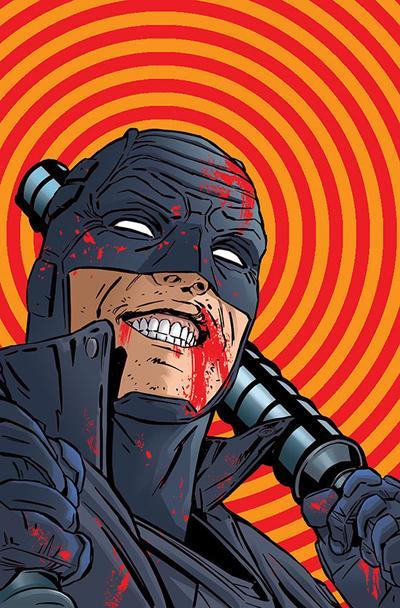
I sent Deodato an email about my M4 Despot model appearing in one of his issues of Avengers, he was nice enough to mail me a sketch and a thank you note.
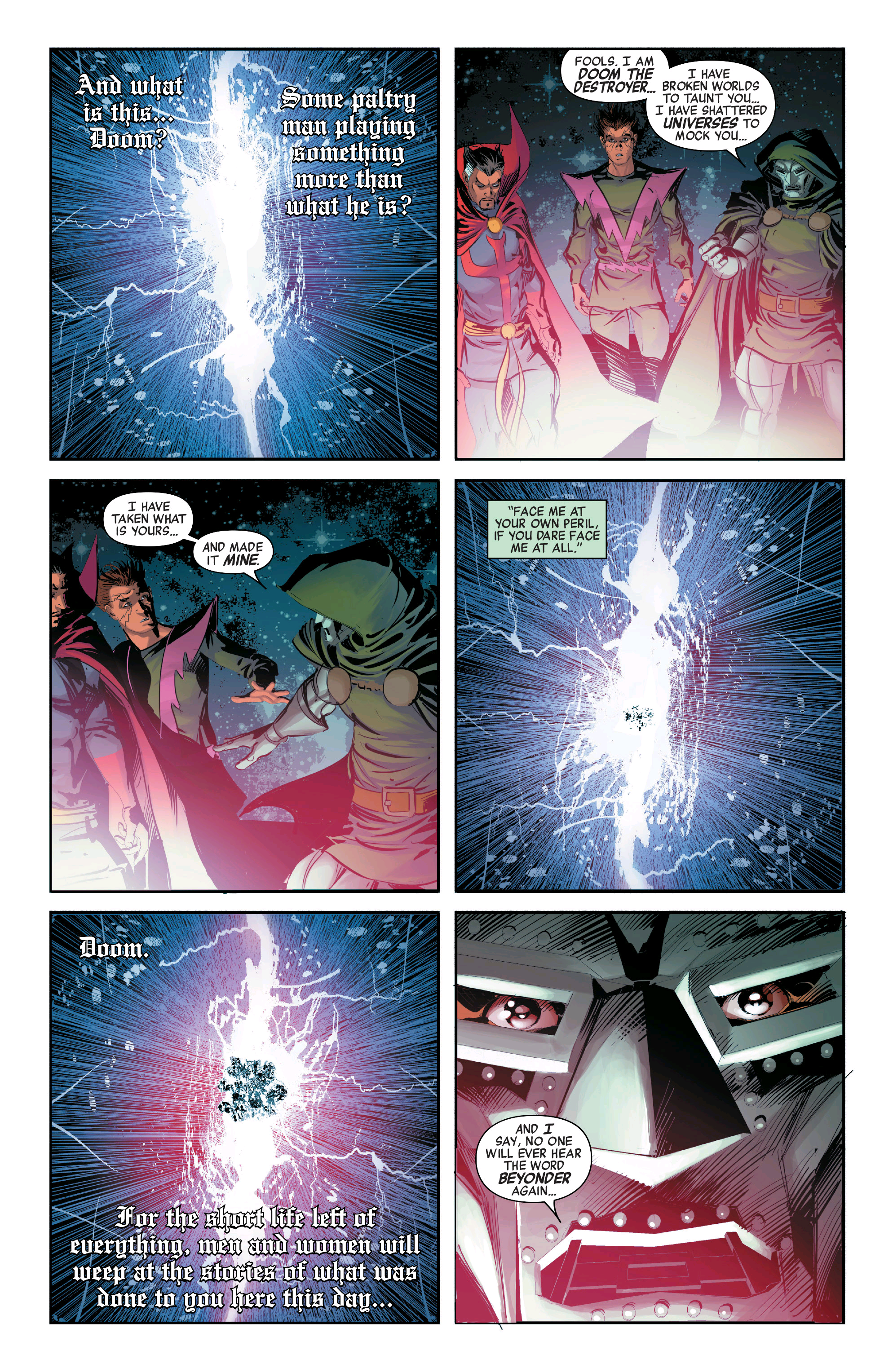
That's pretty interesting, those comics authors using DAZ and Poser, isn't a stupid idea, I can see something DAZ-Poser on the style, those artists are clever they used graphic tablet like WACOM to add some "colored" texture (Gum's effect); That's the big problem with DAZ oriented comics vast majority lacks of color and above all poor postwork, with postwork DAZ's render can be converted to Artwork.
In the other hand we can see specific comic's camera angle and blank render used on those panels, really pro and nice.
Diego 8Hi KevinH:
What I meant is ther error I get, is related to Jeroyn. Looks like an eyelash morph was inadvertatly included in the character preset. If you have Jeroyn you won't get the error I have.
Sorry about those errors, you are getting. I seem to not be having that issue... Something else entirely.
[Released] RSSY Hair Converter from Victoria 4 to Genesis 8 Female [Commercial]There is an update live in the store. Here are the list of changes:
- Added morph to move the hair up the head when it loads too low on G8
- Added option to apply smoothing modifier or not
- Added Do not add duplicates option
- Added Directory Limit option (to keep the dialog from loading too many items and crashing DS)
- Fixed label of converted hair to use the original hair label
- Fixed conversion to convert props to figure
- Added convert hair props to figure hints and text to dialog
BTW, @missuskisses and @zzspriest, the converting props to figure item fixes the missing morphs issue on my system.
OMG thank you thank you thank you! And really looking forward to the M4 version.
Edited to add: This is why you can't go wrong buying Riversoft products. I always know that if there are any issues, they will be addressed!
You're welcome! Please let me know if the issue is fixed on your system as well.
So far, so good--looks like the issue is fixed for me! What is the morph name for the:
- Added morph to move the hair up the head when it loads too low on G8
And/or where can I find this morph?
Thank you again!
Great! I am glad it seems to be fixed.
The morph name is Head Size Correction
[Released] RSSY Hair Converter from Victoria 4 to Genesis 8 Female [Commercial]There is an update live in the store. Here are the list of changes:
- Added morph to move the hair up the head when it loads too low on G8
- Added option to apply smoothing modifier or not
- Added Do not add duplicates option
- Added Directory Limit option (to keep the dialog from loading too many items and crashing DS)
- Fixed label of converted hair to use the original hair label
- Fixed conversion to convert props to figure
- Added convert hair props to figure hints and text to dialog
BTW, @missuskisses and @zzspriest, the converting props to figure item fixes the missing morphs issue on my system.
OMG thank you thank you thank you! And really looking forward to the M4 version.
Edited to add: This is why you can't go wrong buying Riversoft products. I always know that if there are any issues, they will be addressed!
You're welcome! Please let me know if the issue is fixed on your system as well.
So far, so good--looks like the issue is fixed for me! What is the morph name for the:
- Added morph to move the hair up the head when it loads too low on G8
And/or where can I find this morph?
Thank you again!
Can't find resource and it's driving me crazy!Strange, maybe try to re-download the morph on DAZ install manager.
I don't know which one it is. I tried searching online.
Can't find resource and it's driving me crazy!I am getting these errors. When I navigate to /Female/Morphs/DAZ 3D/Head/ there is no /Old/ folder. I've looked at everything else and I can't find out what product has this folder in it.
2019-08-25 08:31:20.900 WARNING: ..\..\..\..\..\src\sdksource\fileinput\dzassetdaz.cpp(5759): Could not find output property for formula: Genesis8Female:/data/DAZ%203D/Genesis%208/Female/Morphs/DAZ%203D/Head/Old/PHMEyesIrisSize.dsf#PHMEyesIrisSize?value in file : /data/DAZ%203D/Genesis%208/Female/Morphs/vyktohria/Meredith/VYK%20Meredith%20Head.dsf
2019-08-25 08:31:20.900 WARNING: ..\..\..\..\..\src\sdksource\fileinput\dzassetdaz.cpp(5759): Could not find output property for formula: Genesis8Female:/data/DAZ%203D/Genesis%208/Female/Morphs/DAZ%203D/Head/Old/PHMEyesIrisSize.dsf#PHMEyesIrisSize?value in file : /data/DAZ%203D/Genesis%208/Female/Morphs/vyktohria/Heaven/VYK%20Heaven%20Head.dsf
2019-08-25 08:31:20.916 WARNING: ..\..\..\..\..\src\sdksource\fileinput\dzassetdaz.cpp(5759): Could not find output property for formula: Genesis8Female:/data/DAZ%203D/Genesis%208/Female/Morphs/DAZ%203D/Head/Old/PHMEyesIrisSize.dsf#PHMEyesIrisSize?value in file : /data/DAZ%203D/Genesis%208/Female/Morphs/vyktohria/Dolly%20Mine/VYK%20Dolly%20Mine.dsStrange, maybe try to re-download the morph on DAZ install manager.
Diego 8Did anyone buy JP Roderick? It's asking for a Darwin's Mishap eyelash morph when I click to load the character.
I tried loading JP Roderick. I didn't get the screens you did, but it said at the end that there were errors and to see the logs. But it did load a figure that was muscular. I looked at the log and it said it couldn't find like 20 morphs and a couple other things, but I can't remember what they were.
Do you have the character Jeroyn? If so you won’t get the error.
The product page says that I own all the required products.This is the error message that shows in the log. I cleared the log first, so it should all apply to loading JP Roderick. I have a character called Jeroyn.
2019-08-25 11:47:29.297 Z:/Daz Content/My Daz Connect Library/data/cloud/1_59089/data/daz 3d/genesis 8/male/morphs/dark elf/mesmerising/fbm_demhbalonbody.dsf (1,1): Syntax error - expected '{' or '['
2019-08-25 11:47:29.303 Z:/Daz Content/My Daz Connect Library/data/cloud/1_59089/data/daz 3d/genesis 8/male/morphs/dark elf/mesmerising/fbm_demhbcrixbody.dsf (1,1): Syntax error - expected '{' or '['
2019-08-25 11:47:29.309 Z:/Daz Content/My Daz Connect Library/data/cloud/1_59089/data/daz 3d/genesis 8/male/morphs/dark elf/mesmerising/fbm_demhbdeclanbody.dsf (1,1): Syntax error - expected '{' or '['
2019-08-25 11:47:29.321 Z:/Daz Content/My Daz Connect Library/data/cloud/1_59089/data/daz 3d/genesis 8/male/morphs/dark elf/mesmerising/fbm_demhbericbody.dsf (1,1): Syntax error - expected '{' or '['
2019-08-25 11:47:29.335 Z:/Daz Content/My Daz Connect Library/data/cloud/1_59089/data/daz 3d/genesis 8/male/morphs/dark elf/mesmerising/fbm_demhbfrankbody.dsf (1,1): Syntax error - expected '{' or '['
2019-08-25 11:47:29.345 Z:/Daz Content/My Daz Connect Library/data/cloud/1_59089/data/daz 3d/genesis 8/male/morphs/dark elf/mesmerising/fbm_demhbgideonbody.dsf (1,1): Syntax error - expected '{' or '['
2019-08-25 11:47:29.352 Z:/Daz Content/My Daz Connect Library/data/cloud/1_59089/data/daz 3d/genesis 8/male/morphs/dark elf/mesmerising/fhm_demhbalonhead.dsf (1,1): Syntax error - expected '{' or '['
2019-08-25 11:47:29.366 Z:/Daz Content/My Daz Connect Library/data/cloud/1_59089/data/daz 3d/genesis 8/male/morphs/dark elf/mesmerising/fhm_demhbcrixhead.dsf (1,1): Syntax error - expected '{' or '['
2019-08-25 11:47:29.389 Z:/Daz Content/My Daz Connect Library/data/cloud/1_59089/data/daz 3d/genesis 8/male/morphs/dark elf/mesmerising/fhm_demhbdeclanhead.dsf (1,1): Syntax error - expected '{' or '['
2019-08-25 11:47:29.400 Z:/Daz Content/My Daz Connect Library/data/cloud/1_59089/data/daz 3d/genesis 8/male/morphs/dark elf/mesmerising/fhm_demhberichead.dsf (1,1): Syntax error - expected '{' or '['
2019-08-25 11:47:29.413 Z:/Daz Content/My Daz Connect Library/data/cloud/1_59089/data/daz 3d/genesis 8/male/morphs/dark elf/mesmerising/fhm_demhbfrankhead.dsf (1,1): Syntax error - expected '{' or '['
2019-08-25 11:47:29.445 Z:/Daz Content/My Daz Connect Library/data/cloud/1_59089/data/daz 3d/genesis 8/male/morphs/dark elf/mesmerising/fhm_demhbgideonhead.dsf (1,1): Syntax error - expected '{' or '['
2019-08-25 11:47:29.469 Z:/Daz Content/My Daz Connect Library/data/cloud/1_59089/data/daz 3d/genesis 8/male/morphs/dark elf/mesmerising/pbm_demhbarmsshorten.dsf (1,1): Syntax error - expected '{' or '['
2019-08-25 11:47:30.291 Json Parser (24,101): Syntax Error - expected ':'
2019-08-25 11:47:47.947 Z:/Daz Content/My Daz Connect Library/data/cloud/1_61601/data/daz 3d/genesis 8/male/morphs/pedrofurtadoarts/alistair/alistair hd.dsf (1,1): Syntax error - expected '{' or '['
2019-08-25 11:47:47.961 Z:/Daz Content/My Daz Connect Library/data/cloud/1_61601/data/daz 3d/genesis 8/male/morphs/pedrofurtadoarts/alistair/alistair head.dsf (1,1): Syntax error - expected '{' or '['
2019-08-25 11:47:47.978 Z:/Daz Content/My Daz Connect Library/data/cloud/1_61601/data/daz 3d/genesis 8/male/morphs/pedrofurtadoarts/alistair/alistair left thigh up corrective.dsf (1,1): Syntax error - expected '{' or '['
2019-08-25 11:47:48.016 Z:/Daz Content/My Daz Connect Library/data/cloud/1_61601/data/daz 3d/genesis 8/male/morphs/pedrofurtadoarts/alistair/alistair right thigh up corrective.dsf (1,1): Syntax error - expected '{' or '['
2019-08-25 11:47:51.248 Z:/Daz Content/My Daz Connect Library/data/cloud/1_50627/data/daz 3d/genesis 8/male/morphs/valandar/arcwarcybernetics/male cyberleg left full fit.dsf (1,1): Syntax error - expected '{' or '['
2019-08-25 11:47:51.262 Z:/Daz Content/My Daz Connect Library/data/cloud/1_50627/data/daz 3d/genesis 8/male/morphs/valandar/arcwarcybernetics/male cyberleg left lower fit.dsf (1,1): Syntax error - expected '{' or '['
2019-08-25 11:47:51.280 Z:/Daz Content/My Daz Connect Library/data/cloud/1_50627/data/daz 3d/genesis 8/male/morphs/valandar/arcwarcybernetics/male cyberleg right full fit.dsf (1,1): Syntax error - expected '{' or '['
2019-08-25 11:47:51.292 Z:/Daz Content/My Daz Connect Library/data/cloud/1_50627/data/daz 3d/genesis 8/male/morphs/valandar/arcwarcybernetics/male cyberleg right lower fit.dsf (1,1): Syntax error - expected '{' or '['
2019-08-25 11:47:57.932 Z:/Daz Content/Daz Studio DIM/data/DAZ 3D/Genesis 8/Male/Morphs/Meipex/Stereo Love/SL_Glutes Inflate Bottom Back.dsf (25,4): Syntax Error - expected ',' or ']'
2019-08-25 11:47:57.945 Z:/Daz Content/Daz Studio DIM/data/DAZ 3D/Genesis 8/Male/Morphs/Meipex/Stereo Love/SL_Hips Bend Spandex More.dsf (25,4): Syntax Error - expected ',' or ']'
2019-08-25 11:47:58.691 WARNING: ..\..\..\..\..\src\sdksource\cloud\dzcloudtasknotifier.cpp(178): peer performed orderly shutdown errno=0
2019-08-25 11:48:00.244 WARNING: ..\..\..\..\..\src\sdksource\fileinput\dzassetdaz.cpp(5759): Could not find output property for formula: Genesis8Male:/data/DAZ%203D/Genesis%208/Male/Morphs/Meipex/Stereo%20Love/SL_Glutes%20Inflate%20Bottom%20Back.dsf#SL_Glutes%20Inflate%20Bottom%20Back?value in file : /data/DAZ%203D/Genesis%208/Male/Morphs/Meipex/Stereo%20Love/Presets/SL_Wide%202.dsf
2019-08-25 11:48:00.244 WARNING: ..\..\..\..\..\src\sdksource\fileinput\dzassetdaz.cpp(5759): Could not find output property for formula: Genesis8Male:/data/DAZ%203D/Genesis%208/Male/Morphs/Meipex/Stereo%20Love/SL_Glutes%20Inflate%20Bottom%20Back.dsf#SL_Glutes%20Inflate%20Bottom%20Back?value in file : /data/DAZ%203D/Genesis%208/Male/Morphs/Meipex/Stereo%20Love/Presets/SL_V-Shape.dsf
2019-08-25 11:48:00.245 WARNING: ..\..\..\..\..\src\sdksource\fileinput\dzassetdaz.cpp(5759): Could not find output property for formula: Genesis8Male:/data/DAZ%203D/Genesis%208/Male/Morphs/Meipex/Stereo%20Love/SL_Glutes%20Inflate%20Bottom%20Back.dsf#SL_Glutes%20Inflate%20Bottom%20Back?value in file : /data/DAZ%203D/Genesis%208/Male/Morphs/Meipex/Stereo%20Love/Presets/SL_Muscular%202.dsf
2019-08-25 11:48:00.245 WARNING: ..\..\..\..\..\src\sdksource\fileinput\dzassetdaz.cpp(5759): Could not find output property for formula: Genesis8Male:/data/DAZ%203D/Genesis%208/Male/Morphs/Meipex/Stereo%20Love/SL_Glutes%20Inflate%20Bottom%20Back.dsf#SL_Glutes%20Inflate%20Bottom%20Back?value in file : /data/DAZ%203D/Genesis%208/Male/Morphs/Meipex/Stereo%20Love/Presets/SL_Muscular%201.dsf
2019-08-25 11:48:00.245 WARNING: ..\..\..\..\..\src\sdksource\fileinput\dzassetdaz.cpp(5759): Could not find output property for formula: Genesis8Male:/data/DAZ%203D/Genesis%208/Male/Morphs/Meipex/Stereo%20Love/SL_Glutes%20Inflate%20Bottom%20Back.dsf#SL_Glutes%20Inflate%20Bottom%20Back?value in file : /data/DAZ%203D/Genesis%208/Male/Morphs/Meipex/Stereo%20Love/Presets/SL_Flat%202.dsf
2019-08-25 11:48:00.246 WARNING: ..\..\..\..\..\src\sdksource\fileinput\dzassetdaz.cpp(5759): Could not find output property for formula: Genesis8Male:/data/DAZ%203D/Genesis%208/Male/Morphs/Meipex/Stereo%20Love/SL_Hips%20Bend%20Spandex%20More.dsf#SL_Hips%20Bend%20Spandex%20More?value in file : /data/DAZ%203D/Genesis%208/Male/Morphs/Meipex/Stereo%20Love/Presets/SL_Female.dsf
2019-08-25 11:48:00.246 WARNING: ..\..\..\..\..\src\sdksource\fileinput\dzassetdaz.cpp(5759): Could not find output property for formula: Genesis8Male:/data/DAZ%203D/Genesis%208/Male/Morphs/Meipex/Stereo%20Love/SL_Glutes%20Inflate%20Bottom%20Back.dsf#SL_Glutes%20Inflate%20Bottom%20Back?value in file : /data/DAZ%203D/Genesis%208/Male/Morphs/Meipex/Stereo%20Love/Presets/SL_Apple%202.dsf
2019-08-25 11:48:00.246 WARNING: ..\..\..\..\..\src\sdksource\fileinput\dzassetdaz.cpp(5759): Could not find output property for formula: Genesis8Male:/data/DAZ%203D/Genesis%208/Male/Morphs/Meipex/Stereo%20Love/SL_Glutes%20Inflate%20Bottom%20Back.dsf#SL_Glutes%20Inflate%20Bottom%20Back?value in file : /data/DAZ%203D/Genesis%208/Male/Morphs/Meipex/Stereo%20Love/Presets/SL_Apple%201.dsf
2019-08-25 11:48:03.351 WARNING: ..\..\..\..\..\src\sdksource\fileinput\dzassetdaz.cpp(5759): Could not find output property for formula: Genesis8Male:/data/DAZ%203D/Genesis%208/Male/Morphs/Mechasar/Tobyn%20HD/CTRLTobyn%20HD.dsf#CTRLMillennium%20Baby%208?value in file : /data/DAZ%203D/Genesis%208/Male/Morphs/PedroFurtadoArts/Babyfication/Babyfication.dsf
2019-08-25 11:48:03.377 WARNING: ..\..\..\..\..\src\sdksource\fileinput\dzassetdaz.cpp(5759): Could not find output property for formula: Genesis8Male:/data/DAZ%203D/Genesis%208/Male/Morphs/Mechasar/Tobyn%20HD/CTRLTobyn%20HD.dsf#CTRLMillennium%20Baby%208?value in file : /data/DAZ%203D/Genesis%208/Male/Morphs/PedroFurtadoArts/Babyfication/Babyfication%202.dsf
2019-08-25 11:48:03.377 WARNING: ..\..\..\..\..\src\sdksource\fileinput\dzassetdaz.cpp(5759): Could not find output property for formula: Genesis8Male:/data/DAZ%203D/Genesis%208/Male/Morphs/PedroFurtadoArts/Alistair/Alistair%20Head.dsf#Alistair%20Head?value in file : /data/DAZ%203D/Genesis%208/Male/Morphs/PedroFurtadoArts/Alistair/Alistair.dsf
2019-08-25 11:48:03.378 WARNING: ..\..\..\..\..\src\sdksource\fileinput\dzassetdaz.cpp(5818): Could not find target property for formula: Genesis8Male:/data/DAZ%203D/Genesis%208/Male/Morphs/PedroFurtadoArts/Alistair/Alistair%20Chin%20Correction.dsf#Alistair%20Head?value in file : /data/DAZ%203D/Genesis%208/Male/Morphs/PedroFurtadoArts/Alistair/Alistair%20Chin%20Correction.dsf
2019-08-25 11:48:04.197 WARNING: ..\..\..\..\..\src\sdksource\fileinput\dzassetdaz.cpp(5818): Could not find target property for formula: abdomenLower:/data/DAZ%203D/Genesis%208/Male/Morphs/Male_M3dia/M3D%20Igor%20for%20Vladimir%208/abdomenLower_CTRLMD_M3DIgorAbsTWTRN_YRotate_n15.dsf#CTRLMD_N_YRotate_n15?value in file : /data/DAZ%203D/Genesis%208/Male/Morphs/Male_M3dia/M3D%20Igor%20for%20Vladimir%208/pJCMM3DIgorBaseBodyAbsUpLowerTwistR.dsf
2019-08-25 11:48:04.197 WARNING: ..\..\..\..\..\src\sdksource\fileinput\dzassetdaz.cpp(5818): Could not find target property for formula: abdomenLower:/data/DAZ%203D/Genesis%208/Male/Morphs/Male_M3dia/M3D%20Igor%20for%20Vladimir%208/abdomenLower_CTRLMD_M3DIgorABSTWTLN_YRotate_15.dsf#CTRLMD_N_YRotate_15?value in file : /data/DAZ%203D/Genesis%208/Male/Morphs/Male_M3dia/M3D%20Igor%20for%20Vladimir%208/pJCMM3DIgorBaseBodyAbsUpLowerTwistL.dsf
2019-08-25 11:48:18.004 WARNING: ..\..\..\..\..\src\sdksource\fileinput\dzassetdaz.cpp(5818): Could not find target property for formula: Genesis8Male:/data/DAZ%203D/Genesis%208/Male/Morphs/PedroFurtadoArts/Alistair/Alistair%20Head.dsf#Alistair%20Head?value in file : /data/DAZ%203D/Genesis%208/Male/Morphs/PedroFurtadoArts/Alistair/HD%20Smile%20Open%20Alistair%20Corrective.dsf
2019-08-25 11:48:18.004 WARNING: ..\..\..\..\..\src\sdksource\fileinput\dzassetdaz.cpp(5818): Could not find target property for formula: Genesis8Male:/data/DAZ%203D/Genesis%208/Male/Morphs/PedroFurtadoArts/Alistair/Alistair%20Smile%20Full%20Face%20HD%20Corrective.dsf#Alistair%20Head?value in file : /data/DAZ%203D/Genesis%208/Male/Morphs/PedroFurtadoArts/Alistair/Alistair%20Smile%20Full%20Face%20HD%20Corrective.dsf
2019-08-25 11:48:18.004 WARNING: ..\..\..\..\..\src\sdksource\fileinput\dzassetdaz.cpp(5818): Could not find target property for formula: Genesis8Male:/data/DAZ%203D/Genesis%208/Male/Morphs/PedroFurtadoArts/Alistair/Alistair%20Head.dsf#Alistair%20Head?value in file : /data/DAZ%203D/Genesis%208/Male/Morphs/PedroFurtadoArts/Alistair/Alistair%20Right%20Closed%20Eye%20Corrective.dsf
2019-08-25 11:48:18.004 WARNING: ..\..\..\..\..\src\sdksource\fileinput\dzassetdaz.cpp(5818): Could not find target property for formula: Genesis8Male:/data/DAZ%203D/Genesis%208/Male/Morphs/PedroFurtadoArts/Alistair/Alistair%20Mouth%20Smile%20Open%20Corective.dsf#Alistair%20Head?value in file : /data/DAZ%203D/Genesis%208/Male/Morphs/PedroFurtadoArts/Alistair/Alistair%20Mouth%20Smile%20Open%20Corective.dsf
2019-08-25 11:48:18.004 WARNING: ..\..\..\..\..\src\sdksource\fileinput\dzassetdaz.cpp(5818): Could not find target property for formula: Genesis8Male:/data/DAZ%203D/Genesis%208/Male/Morphs/PedroFurtadoArts/Alistair/Alistair%20Head.dsf#Alistair%20Head?value in file : /data/DAZ%203D/Genesis%208/Male/Morphs/PedroFurtadoArts/Alistair/Alistair%20Mouth%20Open%20Corrective.dsf
2019-08-25 11:48:18.005 WARNING: ..\..\..\..\..\src\sdksource\fileinput\dzassetdaz.cpp(5818): Could not find target property for formula: Genesis8Male:/data/DAZ%203D/Genesis%208/Male/Morphs/PedroFurtadoArts/Alistair/Alistair%20Head.dsf#Alistair%20Head?value in file : /data/DAZ%203D/Genesis%208/Male/Morphs/PedroFurtadoArts/Alistair/Alistair%20Mout%20hSmile%20HDL%20v1.dsf
2019-08-25 11:48:18.005 WARNING: ..\..\..\..\..\src\sdksource\fileinput\dzassetdaz.cpp(5818): Could not find target property for formula: Genesis8Male:/data/DAZ%203D/Genesis%208/Male/Morphs/PedroFurtadoArts/Alistair/Alistair%20Head.dsf#Alistair%20Head?value in file : /data/DAZ%203D/Genesis%208/Male/Morphs/PedroFurtadoArts/Alistair/Alistair%20Left%20Closed%20Eye%20Corrective.dsf
2019-08-25 11:48:18.005 WARNING: ..\..\..\..\..\src\sdksource\fileinput\dzassetdaz.cpp(5818): Could not find target property for formula: Genesis8Male:/data/DAZ%203D/Genesis%208/Male/Morphs/PedroFurtadoArts/Alistair/Alistair%20Head.dsf#Alistair%20Head?value in file : /data/DAZ%203D/Genesis%208/Male/Morphs/PedroFurtadoArts/Alistair/Alistair%20Eyelids%20Upper%20Down%20R%20Corrective.dsf
2019-08-25 11:48:18.005 WARNING: ..\..\..\..\..\src\sdksource\fileinput\dzassetdaz.cpp(5818): Could not find target property for formula: Genesis8Male:/data/DAZ%203D/Genesis%208/Male/Morphs/PedroFurtadoArts/Alistair/Alistair%20Head.dsf#Alistair%20Head?value in file : /data/DAZ%203D/Genesis%208/Male/Morphs/PedroFurtadoArts/Alistair/Alistair%20Eyelids%20Upper%20Down%20L%20Corrective.dsf
2019-08-25 11:48:18.005 WARNING: ..\..\..\..\..\src\sdksource\fileinput\dzassetdaz.cpp(5818): Could not find target property for formula: Genesis8Male:/data/DAZ%203D/Genesis%208/Male/Morphs/PedroFurtadoArts/Alistair/Alistair%20Head.dsf#Alistair%20Head?value in file : /data/DAZ%203D/Genesis%208/Male/Morphs/PedroFurtadoArts/Alistair/Alistair%20Eyelids%20Lowe%20Up%20R%20Corrective.dsf
2019-08-25 11:48:18.005 WARNING: ..\..\..\..\..\src\sdksource\fileinput\dzassetdaz.cpp(5818): Could not find target property for formula: Genesis8Male:/data/DAZ%203D/Genesis%208/Male/Morphs/PedroFurtadoArts/Alistair/Alistair%20Head.dsf#Alistair%20Head?value in file : /data/DAZ%203D/Genesis%208/Male/Morphs/PedroFurtadoArts/Alistair/Alistair%20Eyelids%20Lowe%20Up%20L%20Corrective.dsf
2019-08-25 11:48:18.005 WARNING: ..\..\..\..\..\src\sdksource\fileinput\dzassetdaz.cpp(5818): Could not find target property for formula: Genesis8Male:/data/DAZ%203D/Genesis%208/Male/Morphs/PedroFurtadoArts/Alistair/Alistair%20Brow%20Squeeze%20Right.dsf#Alistair%20Head?value in file : /data/DAZ%203D/Genesis%208/Male/Morphs/PedroFurtadoArts/Alistair/Alistair%20Brow%20Squeeze%20Right.dsf
2019-08-25 11:48:18.005 WARNING: ..\..\..\..\..\src\sdksource\fileinput\dzassetdaz.cpp(5818): Could not find target property for formula: Genesis8Male:/data/DAZ%203D/Genesis%208/Male/Morphs/PedroFurtadoArts/Alistair/Alistair%20Brow%20Squeeze%20Left.dsf#Alistair%20Head?value in file : /data/DAZ%203D/Genesis%208/Male/Morphs/PedroFurtadoArts/Alistair/Alistair%20Brow%20Squeeze%20Left.dsf
2019-08-25 11:48:18.006 WARNING: ..\..\..\..\..\src\sdksource\fileinput\dzassetdaz.cpp(5818): Could not find target property for formula: Genesis8Male:/data/DAZ%203D/Genesis%208/Male/Morphs/PedroFurtadoArts/Alistair/Alistair%20Head.dsf#Alistair%20Head?value in file : /data/DAZ%203D/Genesis%208/Male/Morphs/PedroFurtadoArts/Alistair/Alistair%20Brow%20Outer%20Up%20Rigth%20Corrective.dsf
2019-08-25 11:48:18.006 WARNING: ..\..\..\..\..\src\sdksource\fileinput\dzassetdaz.cpp(5818): Could not find target property for formula: Genesis8Male:/data/DAZ%203D/Genesis%208/Male/Morphs/PedroFurtadoArts/Alistair/Alistair%20Head.dsf#Alistair%20Head?value in file : /data/DAZ%203D/Genesis%208/Male/Morphs/PedroFurtadoArts/Alistair/Alistair%20Brow%20Outer%20Up%20Left%20Corrective.dsf
2019-08-25 11:48:18.006 WARNING: ..\..\..\..\..\src\sdksource\fileinput\dzassetdaz.cpp(5818): Could not find target property for formula: Genesis8Male:/data/DAZ%203D/Genesis%208/Male/Morphs/PedroFurtadoArts/Alistair/Alistair%20Head.dsf#Alistair%20Head?value in file : /data/DAZ%203D/Genesis%208/Male/Morphs/PedroFurtadoArts/Alistair/Alistair%20Brow%20Inner%20Up%20Rigth%20Corrective.dsf
2019-08-25 11:48:18.006 WARNING: ..\..\..\..\..\src\sdksource\fileinput\dzassetdaz.cpp(5818): Could not find target property for formula: Genesis8Male:/data/DAZ%203D/Genesis%208/Male/Morphs/PedroFurtadoArts/Alistair/Alistair%20Head.dsf#Alistair%20Head?value in file : /data/DAZ%203D/Genesis%208/Male/Morphs/PedroFurtadoArts/Alistair/Alistair%20Brow%20Inner%20Up%20Left%20Corrective.dsf
2019-08-25 11:48:18.007 WARNING: ..\..\..\..\..\src\sdksource\fileinput\dzassetdaz.cpp(5818): Could not find target property for formula: rCollar:/data/DAZ%203D/Genesis%208/Male/Morphs/Male_M3dia/M3D%20Teen%208%20for%20Genesis%208%20Male/rCollar_CTRLMD_M3DTeenColShldTwstBendBackUP01RN_YRotate_n17.dsf#CTRLMD_N_YRotate_n17?value in file : /data/DAZ%203D/Genesis%208/Male/Morphs/Male_M3dia/M3D%20Teen%208%20for%20Genesis%208%20Male/pJCMM3DTeen8BaseBodyCollarTwistBackShldUpR.dsf
2019-08-25 11:48:18.007 WARNING: ..\..\..\..\..\src\sdksource\fileinput\dzassetdaz.cpp(5818): Could not find target property for formula: lCollar:/data/DAZ%203D/Genesis%208/Male/Morphs/Male_M3dia/M3D%20Teen%208%20for%20Genesis%208%20Male/lCollar_CTRLMD_M3DTeenColShldTwstBendBackUP01LN_YRotate_17.dsf#CTRLMD_N_YRotate_17?value in file : /data/DAZ%203D/Genesis%208/Male/Morphs/Male_M3dia/M3D%20Teen%208%20for%20Genesis%208%20Male/pJCMM3DTeen8BaseBodyCollarTwistBackShldUpL.dsf
2019-08-25 11:48:18.553 Begin Loading Character Addons...
2019-08-25 11:48:18.701 Z:/Daz Content/My Daz Connect Library/data/cloud/1_61601/data/daz 3d/genesis 8/male eyelashes/tools/script loads/genesis 8 male eyelashes.duf (1,1): Syntax error - expected '{' or '['
2019-08-25 11:48:18.702 Error reading file, see log for more details.
2019-08-25 11:48:23.052 Loaded Morph Deltas in 0 min 0.0 sec.
2019-08-25 11:48:23.052 Loaded file: JP Roderick Face.dsf
2019-08-25 11:48:23.143 Loaded Morph Deltas in 0 min 0.0 sec.
2019-08-25 11:48:23.144 Loaded file: JP Roderick Body.dsf
2019-08-25 11:48:23.351 Loaded Morph Deltas in 0 min 0.0 sec.
2019-08-25 11:48:23.352 Loaded file: FHMDiego8.dsf
2019-08-25 11:48:23.386 Loaded Morph Deltas in 0 min 0.0 sec.
2019-08-25 11:48:23.387 Loaded file: FBMDiego8.dsf
2019-08-25 11:48:23.388 Loaded Morph Deltas in 0 min 0.0 sec.
2019-08-25 11:48:23.388 Loaded file: PHMEyelashesLengthUpper.dsf
2019-08-25 11:48:23.388 Loaded Morph Deltas in 0 min 0.0 sec.
2019-08-25 11:48:23.389 Loaded file: PHMEyelashesLengthLower.dsf
2019-08-25 11:48:23.389 Loaded Morph Deltas in 0 min 0.0 sec.
2019-08-25 11:48:23.389 Loaded file: PHMEyelashesCurl.dsf
2019-08-25 11:48:23.418 DEBUG: Failed to load addon
2019-08-25 11:48:23.420 Finished Loading Character Addons[Released] RSSY Hair Converter from Victoria 4 to Genesis 8 Female [Commercial]There is an update live in the store. Here are the list of changes:
- Added morph to move the hair up the head when it loads too low on G8
- Added option to apply smoothing modifier or not
- Added Do not add duplicates option
- Added Directory Limit option (to keep the dialog from loading too many items and crashing DS)
- Fixed label of converted hair to use the original hair label
- Fixed conversion to convert props to figure
- Added convert hair props to figure hints and text to dialog
BTW, @missuskisses and @zzspriest, the converting props to figure item fixes the missing morphs issue on my system.
OMG thank you thank you thank you! And really looking forward to the M4 version.
Edited to add: This is why you can't go wrong buying Riversoft products. I always know that if there are any issues, they will be addressed!
You're welcome! Please let me know if the issue is fixed on your system as well.
[Released] RSSY Hair Converter from Victoria 4 to Genesis 8 Female [Commercial]There is an update live in the store. Here are the list of changes:
- Added morph to move the hair up the head when it loads too low on G8
- Added option to apply smoothing modifier or not
- Added Do not add duplicates option
- Added Directory Limit option (to keep the dialog from loading too many items and crashing DS)
- Fixed label of converted hair to use the original hair label
- Fixed conversion to convert props to figure
- Added convert hair props to figure hints and text to dialog
BTW, @missuskisses and @zzspriest, the converting props to figure item fixes the missing morphs issue on my system.
OMG thank you thank you thank you! And really looking forward to the M4 version.
Edited to add: This is why you can't go wrong buying Riversoft products. I always know that if there are any issues, they will be addressed!
dog 8 dog 8 woof woof we finally have a dog 8I'll see if there is a width morph to disable limits on, but I don't remember one. How do I scale the bones? Never had cause to learn that before.
Script to import Blender animations to StudioHi all,
I am getting back into 3D stuff after about 20 years (used Vue d'esprit and Poser then). Now I am using Daz Studio and Blender and having fun. I also want to get into scripting and tried a few from mCasual's incredible collection. One I tried is mcjObjsToMorphingProp to import animations from Blender to Studio but somehow it did not work properly, so I decided to write my own.
So I got a very simple script to work (almost by chance since there were a few shots in the dark). It is very short, there is no error checking and no user interface. The actual script is at the end of this post.
The way it works is as follow:
- Export the animation from Blender as a series of OBJ
- Import the first object in Studio
- Import all the objects as morphs using Morph Loader Pro
- Select the object and run the script.I realised that the statement objRef.getModifier(i) makes it easy the access the morphs one by one. So what the script does is loop througout the morphs and set the value of the morph to 100% if the morph's "number" is equal to the frame number, and sets it to 0% for all the other frames.
I made a quick video with 2 scenes:
One using the animated Sapling Tree add-on and one using the Ocean modifier to create a river.
Note that the script rely on the fact that the morphs seems to always be loaded in the correct sequence by Morph Loader Pro. Also the saved Studio scene can get HUGE.
Improvements are very welcome and if you know of a better way to do this please let me know.
Here's the script:
// DAZ Studio version 4.11.0.383 filetype DAZ Scriptvar playRange = Scene.getPlayRange();
print("playRange ", playRange);var Tick = Scene.getTimeStep();
var nTick = Tick.valueOf();
print("tick " , Tick, nTick);var nodex = Scene.getPrimarySelection();
var objRef = nodex.getObject( );
numMods = objRef.getNumModifiers();
print("numMods ", numMods);// main loop
// for each morph
for (i = 0 ; i < numMods ; i++)
{
curMod = objRef.getModifier(i);
print(i, curMod.getName());
if( ! curMod )
print("OK")
var prop = curMod.getValueChannel();
print(prop.valueOf());
for (fr = 0; fr < numMods ; fr++)
{
if (fr == i)
prop.setValue( fr * nTick, 1);
else
prop.setValue( fr * nTick, 0);
}
}// end of script
Manipulate a PrimitiveYou can already do alot with Daz Studio and the DFormers set to weight map influence or a Push Modifier that also can have a weight map influence. Once you have setup a DFormer or a Push Modifier like that you can use the Node Weight Map Brush tool inside Daz Studio like a sculpting brush.
For more info on how to do that here I have a few threads with tutorials:
-
[Tutorial] D-former with Node Weight Map Brush - at Deviantart
-
How to Use a Push Modifier: Creating a Blanket / Adjusting ...
And in this thread I was posting a few screenshots myself:
Morphing brush
You can also "bake" those mesh manipulations you did with DFormers, Push Modifier, Smoothing Modifier into a Morph slider. Just hide everything else in the scene then export an OBJ of your primitive and load it back into the scene, as a new object or a Morph for the primitive with Morph Loader Pro. While using Morph Loader Pro you also have the option to apply the morph just for some area on the primitive mesh painted as Weightmap Influence of another DFormer. The setting in Morph Loader Pro is called Attenuate By I was posting about that in this thread:
Is there a way to make smoothing modifiers more detailed
Daz 3D is part of

Connect
DAZ Productions, Inc.
7533 S Center View Ct #4664
West Jordan, UT 84084Licensing Agreement | Terms of Service | Privacy Policy | EULA
© 2026 Daz Productions Inc. All Rights Reserved.