-
People who make Daz characters (that look too much like their other characters)This is not really a call for people to change, but its just an observation of mine when i was browsing on here and on Rendo for characters that i want to buy.
What makes me wonder is, why people seem to buy so many figures that look the same except for some minor details...
Yeah, sure.. textures... but very often even the textures are just a bunch of "same old, same old"...So.. who needs a dozen cute little fairies, that just look as if they all came from the same litter, when there are morph packs available to buy (or even for free) that could be used to make slight modifications within a couple seconds to make them look at least as different as the sold figures themselves?!?
I rarely buy ANY figure with the idea of using it as-is, the only real exception being stand-alone animals. That said, I've bought a huge number of figures just to use as base starting points, just for the textures and to use as a base on which to add my own morphs rather than dialing everything up from scratch. Which means that most of the the time I'm looking at everything as component parts and not the whole.
On the flip side, a lot of artists just have a cetain style they like and, while there's a lot of variation within that group, the overall stylization tends to make them look really similar to others. 3D Universe's characters are an obvious example here, but I can recognize a P3Design or Second Circle character instantly, As a non-3D analogy, I find that most of the "normal" characters in artwork by the legendary comic artist Jack Kirby all look really similar, especially the females, but that didn't stop him from developing hundreds of different titles over the years.
HU: Poser 10 and up Validationunless DS has a way to convert deformers to morphs?
There might be a more direct method but exporting deformed mesh as obj, then using morph loader to create morph would work....
Window>Panes(Tabs)>dForm has a button for spawning morphs from dForms.
kewl, don't need to install poser on my pristine fresh rebuild
The Official aweSurface Test TrackI'm probably missing something, but when selecting the figure and the surface and doubleclick the Uber to Awe script I get an error message, and nothing else happens. Copied from the log file:
<anonymous>()@/Users/Shared/My DAZ 3D Library/Shader Presets/wowie/AWE ShadingKit/Utility Presets & Scripts/AWE Transfer Uber.dsa:25
2019-46-25 15:46:54.057 Error in script execution: /Users/Shared/My DAZ 3D Library/Shader Presets/wowie/AWE ShadingKit/Utility Presets & Scripts/AWE Transfer Uber.dsaAre you trying to run the script with the iray uber shader applied or after you've applied AWE Surface? The script should be run after applying AWE Surface.
Ah, yes I tried with IRay Uber, I'll have another go, tks:)
Yup it works if you convert to awe first. Tried to find some info on what the script actually does... ahem...simply put, why would I want to use it?

Hmm, the problem with this conversion is the ground, being an mdl shader mixer network with multiple diffuse overlays.
Nothing I can really do about Shader Mixer shaders.
Technically, you can bake them out into a texture, then just plug the resulting output as diffuse map. Or just your own texture map.
Now Andrey Pestryakov was kind and generous to make a 3DL version of it:) So the plan is to use aweSurface for everything but the ground, and illuminate the ground with AoA lights, we'll see how that turns out...
Using any delta lights (spot/point/distant) is going to raise render times considerably. I'd recommend using the freebie point/spot/distant light I made instead, since you can use light linking with them. Basically, set them up so they will not light any AWE Surface applied materials. They will still light Shader Mixer 3delight shaders. Never tried such a scenario though, it's all path traced area lights for me.
Good call, will try that;)
Btw,


Left : Current Hotfix. Right : Next Update.
The original color/spec texture have some noise applied. This is without any diffuse/spec texture. The update is slower, but not by much. In this example it's 4 min 44.93 secs compared to 3 min 59.67 secs. 8x8 pixel samples, 1024 irradiance samples.
Nice, much cleaner loooking
 Mens Suits and a proper Fedora too please!
There is this fedora for $1.99 in the PC+.
Eeesh, Michael 3, I shudder at trying to parent and rig anything from a Pre-Gen 1 figure and trying to make it not look like poo. Buut then again you get what you paid for with some of that older PC + stuff.
You just parent it, place it, strip off the off old rig, transfer the new rig, save as wearable preset. You don't even have to go through and do a lot of poses to make morphs for to avoid poke-through since it's a hat. Of if you have the Wear-Them-All products fit it to G3M or similar & then fit it to G8M or similar.
HU: Poser 10 and up Validationunless DS has a way to convert deformers to morphs?
There might be a more direct method but exporting deformed mesh as obj, then using morph loader to create morph would work....
Window>Panes(Tabs)>dForm has a button for spawning morphs from dForms.
HU: Poser 10 and up ValidationThis was my email discussion with Renderosity Support:
ME:
" Part of the process of moving from Smith Micro to Bondware is the depreciation of SM's licensing system. Starting Sept. 16, if you do not update, your Poser may not work because the licensing system will not be able to complete the over-the-internet check needed to confirm your license key.
That means you must update. If you want to make sure you get updated in time, we are accepting early adopters starting Sept. 2. We will release more information about that soon. "
How and where do I get updated in time? Do I have to pay some kind of transfer fee to convert my Smith Micro Poser Pro 11 license to a Renderosity Poser Pro 11 license?
THEM:
There is no fee if you already have a Poser 11 or Poser Pro 11 license. :) We will notify everyone...this article is one of the ways to do that. And you would go to our download page we will post and download the new files. That is all. You will need to reinstall Poser, but no fee or cumbersome process needed. :)
People who make Daz characters (that look too much like their other characters)This is not really a call for people to change, but its just an observation of mine when i was browsing on here and on Rendo for characters that i want to buy.What makes me wonder is, why people seem to buy so many figures that look the same except for some minor details...
Yeah, sure.. textures... but very often even the textures are just a bunch of "same old, same old"...So.. who needs a dozen cute little fairies, that just look as if they all came from the same litter, when there are morph packs available to buy (or even for free) that could be used to make slight modifications within a couple seconds to make them look at least as different as the sold figures themselves?!?
People who make Daz characters (that look too much like their other characters)In these cases, I'd only buy for the skin textures because the morph is similar to what I have. You could argue that these certain looks are an artist's style, but yeah if it's too repetitive I'm less likely to buy another character from the PAs unless it's different.Which character skin is this?I believe that OOT has a custom character they typically use for their promo pictures.
I'm sure it is a custom morph, I just want to know which skin they've used.
The skin looks like Raiya's Cathy to me, but it might be a different Raiya character. The character shape is probably custom.
I've got Cathy, I'm sure it's not her. It's not any Raiya's character that I have, which rules out most of them, and doesn't appear to be any of the others either.
HU: Poser 10 and up Validationunless DS has a way to convert deformers to morphs?
There might be a more direct method but exporting deformed mesh as obj, then using morph loader to create morph would work....
HU: Poser 10 and up Validationunless DS has a way to convert deformers to morphs?
There might be a more direct method but exporting deformed mesh as obj, then using morph loader to create morph would work....
3D Art Freebie Challenge-August 2019-"Best Friends Forever" -Entries Thread Only
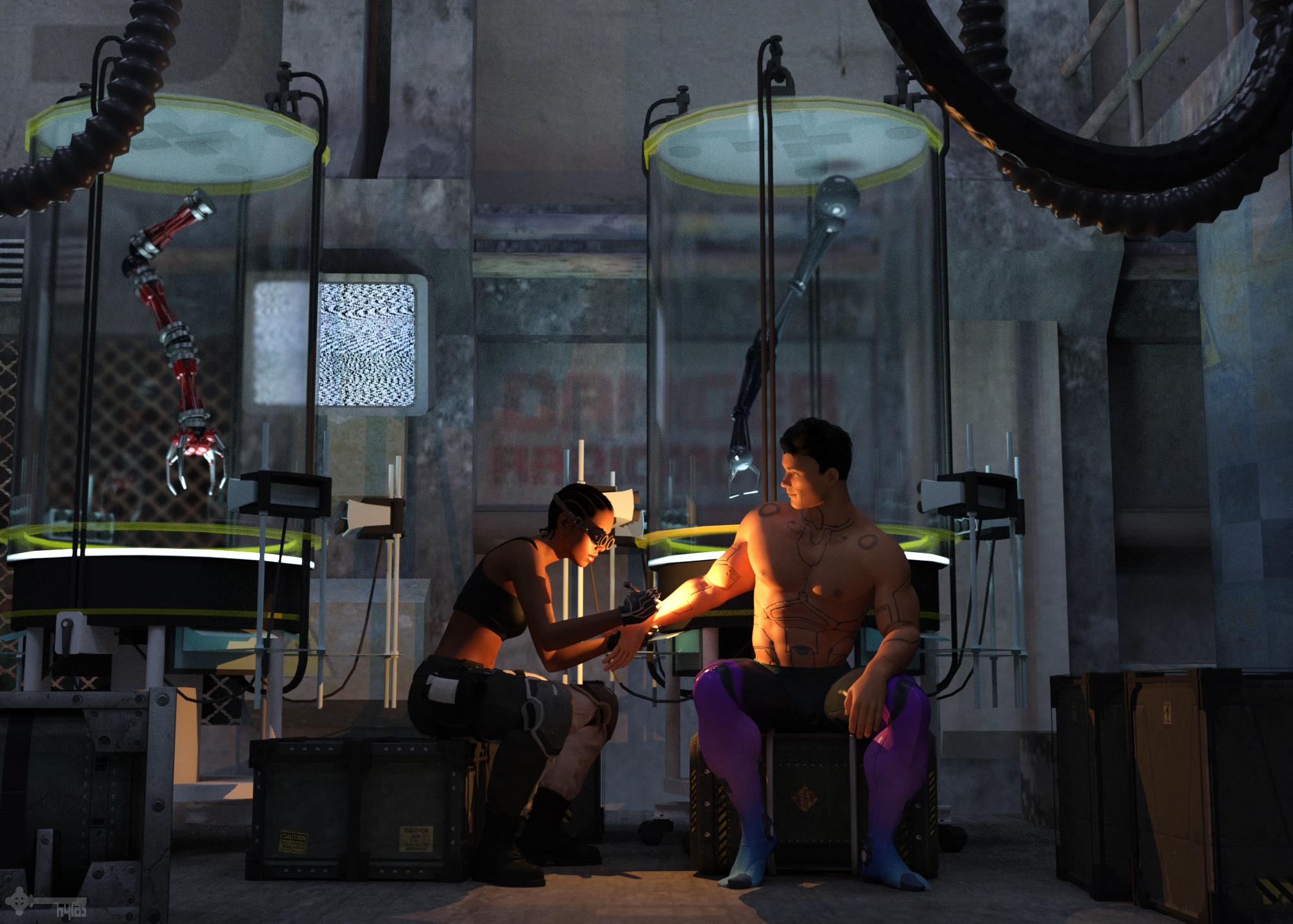
Title: Weld
Version before postwork here.
Freebies:
1) Sci-Fi Room by Mr. Sparky: https://sharecg.com/v/22624/gallery/11/Poser/Alpha-1-The-Reactor
2) Tank by cal: https://www.renderosity.com/mod/freestuff/labtube/31916
3) Robot Arms by Mapps: https://www.renderosity.com/mod/freestuff/sf-military-cyber-arms-and-ammo-can/26192
4) Versatile Tentacle by Tempest: http://www.sharecg.com/v/63819/browse/11/Poser/Versatile-Tentacle-Figure
5) Crates by 3DC: https://www.sharecg.com/v/85903/gallery/11/Poser/Space-Container-Set-01
6) Android Skin by MysticArtDesign: https://www.deviantart.com/mysticartdesign/art/MysticArtDesign-Android-Male-759721929
7) Hair by SquarePeg3D: https://www.patreon.com/posts/hair-big-f-cking-25063694
8) Leggings & Gloves by SquarePeg3D: https://www.renderosity.com/mod/freestuff/hacker-for-genesis-8-female/81206
9) Trousers & Boots by Ultimate Clash: https://www.renderosity.com/mod/freestuff/lt-blade-outfit/82554
10) Face Morph by RenderGuyNY: https://sharecg.com/v/90309/gallery/21/DAZ-Studio/Genesis-8-Female-Faces
11) Welding Tool (repurposed hairpin) by SquarePeg3D: https://www.renderosity.com/mod/freestuff/ameizing-hair-for-g8f/82867
12) Ghost Lights by AndyS: https://sharecg.com/v/87021/browse/7/Material-and-Shader/Simple-iRay-GhostLights-Shader
Purchased:
1) Goggles
2) Cornrows
3) Big Russian Hair comes without textures, so I used the materials of Adriana Hair
4) Lens Flares & Light BeamsNo Counts:
- G8M Head Morphs
- G8M Body Morphs
- G8F Head Morphs
- G8F Body Morphs
- Sports Bra (G8F Basic Wear)3D Art Freebie Challenge-August 2019-"Best Friends Forever" -Main Thread OnlyTitle: Weld
Version before postwork attached below.
I'm also attaching the opacity map I made to transform the opera length gloves of SquarePeg3D's Hacker set into normal length gloves. Feel free to use it without restrictions from my side.Freebies:
1) Sci-Fi Room by Mr. Sparky: https://sharecg.com/v/22624/gallery/11/Poser/Alpha-1-The-Reactor
2) Tank by cal: https://www.renderosity.com/mod/freestuff/labtube/31916
3) Robot Arms by Mapps: https://www.renderosity.com/mod/freestuff/sf-military-cyber-arms-and-ammo-can/26192
4) Versatile Tentacle by Tempest: http://www.sharecg.com/v/63819/browse/11/Poser/Versatile-Tentacle-Figure
5) Crates by 3DC: https://www.sharecg.com/v/85903/gallery/11/Poser/Space-Container-Set-01
6) Android Skin by MysticArtDesign: https://www.deviantart.com/mysticartdesign/art/MysticArtDesign-Android-Male-759721929
7) Hair by SquarePeg3D: https://www.patreon.com/posts/hair-big-f-cking-25063694
8) Leggings & Gloves by SquarePeg3D: https://www.renderosity.com/mod/freestuff/hacker-for-genesis-8-female/81206
9) Trousers & Boots by Ultimate Clash: https://www.renderosity.com/mod/freestuff/lt-blade-outfit/82554
10) Face Morph by RenderGuyNY: https://sharecg.com/v/90309/gallery/21/DAZ-Studio/Genesis-8-Female-Faces
11) Welding Tool (repurposed hairpin) by SquarePeg3D: https://www.renderosity.com/mod/freestuff/ameizing-hair-for-g8f/82867
12) Ghost Lights by AndyS: https://sharecg.com/v/87021/browse/7/Material-and-Shader/Simple-iRay-GhostLights-Shader
Purchased:
1) Goggles
2) Cornrows
3) Big Russian Hair comes without textures, so I used the materials of Adriana Hair
4) Lens Flares & Light BeamsNo Counts:
- G8M Head Morphs
- G8M Body Morphs
- G8F Head Morphs
- G8F Body Morphs
- Sports Bra (G8F Basic Wear)All Links Check Out Plz Move To Entries Thread
Possible to save part of a G8F Face as a morph?Hi!
Anyone know if it possible to save for example, just the nose shape of a face as a separate morph?
I know that if I edit just the nose, and save it as a Morph, it will only save the nose morph, but here the rest of the face is sculpted too.
I have a character where I really like how the nose is shaped, so I wonder if I can save only the nose as a morph, and load it onto the G8F-base figure and then save it as a Morph?
-Maybe if there is a freeze-option I can put on the G8F Base figures face, except for the parts I want to change (like the nose), and then just dial in the whole face-shape or something?
I would be thankful for the help (=
/Cheers!What features would you like to see appear in dazstudio 5?Morph Brush! Morph Brush! Morph Brush! Hexagon just doesn't do it for me! Using something like Poser's morph brush IN Daz - now that's the ticket!
+1
+2
What features would you like to see appear in dazstudio 5?Morph Brush! Morph Brush! Morph Brush! Hexagon just doesn't do it for me! Using something like Poser's morph brush IN Daz - now that's the ticket!
+1
Multi-armed Gen 8 modelsIt would need to be a geoGraft, not a morph (aside from the probablity that there isn't enough detail, even with a manageable level of HD, to add an arm morph the morphed mesh would still have the weights of the original, which would mean weird defomrations, and no way to bend the extra "bones" at all). To be riggable the arms really have to be aranged in a line - they can't all sprout from the shoulders as they tend to in statues and paintings.
3D Art Freebie Challenge-August 2019-"Best Friends Forever" -Main Thread OnlyTitle: Weld
Version before postwork attached below.
I'm also attaching the opacity map I made to transform the opera length gloves of SquarePeg3D's Hacker set into normal length gloves. Feel free to use it without restrictions from my side.Freebies:
1) Sci-Fi Room by Mr. Sparky: https://sharecg.com/v/22624/gallery/11/Poser/Alpha-1-The-Reactor
2) Tank by cal: https://www.renderosity.com/mod/freestuff/labtube/31916
3) Robot Arms by Mapps: https://www.renderosity.com/mod/freestuff/sf-military-cyber-arms-and-ammo-can/26192
4) Versatile Tentacle by Tempest: http://www.sharecg.com/v/63819/browse/11/Poser/Versatile-Tentacle-Figure
5) Crates by 3DC: https://www.sharecg.com/v/85903/gallery/11/Poser/Space-Container-Set-01
6) Android Skin by MysticArtDesign: https://www.deviantart.com/mysticartdesign/art/MysticArtDesign-Android-Male-759721929
7) Hair by SquarePeg3D: https://www.patreon.com/posts/hair-big-f-cking-25063694
8) Leggings & Gloves by SquarePeg3D: https://www.renderosity.com/mod/freestuff/hacker-for-genesis-8-female/81206
9) Trousers & Boots by Ultimate Clash: https://www.renderosity.com/mod/freestuff/lt-blade-outfit/82554
10) Face Morph by RenderGuyNY: https://sharecg.com/v/90309/gallery/21/DAZ-Studio/Genesis-8-Female-Faces
11) Welding Tool (repurposed hairpin) by SquarePeg3D: https://www.renderosity.com/mod/freestuff/ameizing-hair-for-g8f/82867
12) Ghost Lights by AndyS: https://sharecg.com/v/87021/browse/7/Material-and-Shader/Simple-iRay-GhostLights-Shader
Purchased:
1) Goggles
2) Cornrows
3) Big Russian Hair comes without textures, so I used the materials of Adriana Hair
4) Lens Flares & Light BeamsNo Counts:
- G8M Head Morphs
- G8M Body Morphs
- G8F Head Morphs
- G8F Body Morphs
- Sports Bra (G8F Basic Wear)The artist without a name and the new Scene ToolsI looked for a commercial thread and didn't see one. I just watched the video for this. It looks handy. The one thing I really need most is the ability to hide the rigid follow nodes like buttons attached to a shirt. Would the Hide Selected Item button also hide all the attached rigid follow nodes? I think I just asked the same question Artini did, but I'm not sure. Thanks.
If you had the shirt selected, the "Show Only This" button would hide all rigid follow nodes and buttons attached to the shirt leaving only the shirt itself visible. This is ideal when you want to export the shirt to create a morph for example.
Thanks for the reply. That indeed would be useful for exporting the object. What I'm looking for is something that would hide the shirt AND all the buttons in one go. Or more to the point,I was rendering an outfit with a shirt, with RFN buttons, a vest over top of that with RFN buttons, and a jacket, with RFN buttons. I needed to get a render of just the shirt so I had to hide the jacket and track down the 6 buttons, and hide the vest and track down the 5 buttons. And I think that was what Artini was looking for as well. Hide and show the entire hierachy.
Still, what is already included in this first set is worth it anyway. The make all visible in particular, because I never get all of those dang buttons turned back on before the render. Heh.
cheers!
Transfer Utility IssueThe transfer utility started acting up for me today and I can't figure out why. Here are my steps:
Genesis 2 custom chracter with custom morphs -> load facial hair obj -> transfer utility from Gen2 to OBJ -> I only leave checked in the General Options the "Weight Maps", and "Morph Targets" -> under the "Morph Targets" I have both boxes checked and select "All" morphs -> run the TU then it freezes for about 15min with hundreds of the messages below in the log file:
2019-08-28 18:00:54.549 WARNING: general\dzmorphdeltas.cpp(342): Invalid vert count specified in DzMorphDeltas::setTargetVertexCount()
2019-08-28 18:00:55.550 Loaded Morph Deltas in 0 min 0.9 sec.
2019-08-28 18:00:55.550 Loaded file: Jisi v5.duf
2019-08-28 18:00:56.530 Loaded Morph Deltas in 0 min 0.9 sec.
2019-08-28 18:00:56.531 Loaded file: Jisi v5.duf"Jisi v5.duf" is the name of the file.
I have to point out the program does not error, it keeps running and after 15min the task is done but the transfered morphs don't work in unison with the Gen2 figure. What's really strange is that I followed the steps above a day prior and the transfer was done quickly with the morphs conforming as they should. The file I'm using was an old version from yesterday and it has not been modified. It worked one day and suddenly now it's giving me issues and I don't know why.
Daz 3D is part of

Connect
DAZ Productions, Inc.
7533 S Center View Ct #4664
West Jordan, UT 84084Licensing Agreement | Terms of Service | Privacy Policy | EULA
© 2026 Daz Productions Inc. All Rights Reserved.