-
Show Us Your Bryce Renders Part 12
The buildings are Walled City by Stonemason, the persons: two Victoria (2 and 3), two Aiko 3 LE and one Michael. 17 radials light up the tunnels and the inside of the buildings. The tree consists of four Bryce trees. Sky and ambient light by the Gasclouds_A2 HDRI (unpublished), the key light by the sun.
 Backing up DS customisation
Richard,
- The Content Cluster is the database, …
OK. Weekly, I backup my AppData/Roaming/DAZ 3D folder which contains the cms folder in which the ContentCluster folder is located.
- … not metadata (metadata is read from the database on export and imported to the database on import).
Does metadata export/import have to be done manually (and if so, where does one start the process?) or is it done automatically upon opening and closing Daz Studio (and if so, where is it stored?)?
- The /Runtime/Support folder has the product metadata and the exported userdata. The Userdata_Daz3d_Product name files do seem to be the modified vesions, I wasn't aware that it did that.
My Daz Studio Runtime/Support folder has product metadata files but it does not contain any exported user data files.
For example, my Daz Studio Runtime/Support folder contains the three expected files for Victoria 8 (see first image) whereas my exported user data contains one file for Victoria 8 (see second image).
The dsx files from the Daz Studio Runtime/Support folder contain different information than the much smaller dsx file from the exported user data. Many of the exported user data dsx files contain almost no information whereas the corresponding file in the Daz Studio Runtime/Support folder contains all of the expected information. Some of the larger exported user data dsx files contain more information but it’s different than what is in the corresponding dsx file in the Daz Studio Runtime/Support folder. An exported user data dsx file is always smaller in size than its corresponding dsx file in the Daz Studio Runtime/Support folder. Attached are the dsx files for Victoria 8 which was installed via DIM.
Should I export UserData periodically and copy the files to the Daz Studio Runtime/Support folder?
NEW Pricing for 30x0 Series Sub $1000 3090 Sighting!kwerkx said:
Sevrin said:
It mostly depends on your current hardware. Upgrading to 30x0 from a 10/16x0 is a huge improvement. Upgrading from say a 2080ti to anything but a 3090 would have been less dramatic, and even then unless you are rendering huge scenes, it's probably worth holding out. For folks who skipped the 30x0 cards, the 40x0 generation will be a more substantial upgrade, for about the same money.
Good point and nice implied point about skipping GPU generations. Statistically, I love the idea of 24GB of VRAM; but it can wait till I need a 50x0 to render Victoria 10 with heartbeat and breathing dynamics in 5D
 .
.....I've skipped the last two..
Can anyone help identify this figure?Not a lot to go on @mattinkhabir this is essentially a face identification.. Going by the Eyes, Nose, and lips.. Victoria 8 is close; but her eyebrows don't match and the tip of Victoria 8's nose is a little rounder. Recommend checking the bottom of https://www.daz3d.com/victoria-8 for an add-on match. Also consider https://www.daz3d.com/genesis-8-female-head-morphs if you want to try modifying a Genesis 8 or Victoria 8 female head to match this model. Hope this helps.
NEW Pricing for 30x0 Series Sub $1000 3090 Sighting!Sevrin said:
It mostly depends on your current hardware. Upgrading to 30x0 from a 10/16x0 is a huge improvement. Upgrading from say a 2080ti to anything but a 3090 would have been less dramatic, and even then unless you are rendering huge scenes, it's probably worth holding out. For folks who skipped the 30x0 cards, the 40x0 generation will be a more substantial upgrade, for about the same money.
Good point and nice implied point about skipping GPU generations. Statistically, I love the idea of 24GB of VRAM; but it can wait till I need a 50x0 to render Victoria 10 with heartbeat and breathing dynamics in 5D
.Converting items and clothing from 8 to 8.1?sarahbeeblebrx said:
Thanks for the reply! So I figured out shortly after posting this that I was being a dimwit, and I did actually manage to get them onto my charachter, but they dont fit quite right. They look fine at the front, but as the contour of the mouth moves around, they sort of sink into the teeth. But its barely noticable and I guess I can fix that with a quick trip to Blender.
Are these "Z Braces Are Cool"? They are not conformng figures, merely props that fit the base figures and Victoria 8 / Michael 8. Any morphs that shape the teeth will likely mess up the fit. But no need for back and forth with Blender. Just scale and/or translate them along different axes, maybe helped with the Studio built-in D-Former (or Mesh Grabber).
[Released] Bone Minion for Genesis Poses [Commercial]RiverSoftArt said:
rhye_7b205b2b74 said:
Not sure what I bought originally 'Bone Minion for Generation 4 Poses Bundle SKU:86319 ' and now this has appeared 'Bone Minion for Genesis Poses Bundle SKU:86513 ' and you have to pay for it all over again?
What is the difference, the product page albeit the main picture is the same, I have not even got around to using it and now it is updated as a new bundle that I have to pay for all over again?
They are 2 different products.
- Bone Minion for Generation 4 Poses converts Michael 4 and Victoria 4 poses to other generations.
- Bone Minion for Genesis Poses converts Genesis poses to other generations.
Thanks for the prompt reply, I can see the difference!
[Released] Bone Minion for Genesis Poses [Commercial]rhye_7b205b2b74 said:
Not sure what I bought originally 'Bone Minion for Generation 4 Poses Bundle SKU:86319 ' and now this has appeared 'Bone Minion for Genesis Poses Bundle SKU:86513 ' and you have to pay for it all over again?
What is the difference, the product page albeit the main picture is the same, I have not even got around to using it and now it is updated as a new bundle that I have to pay for all over again?
They are 2 different products.
- Bone Minion for Generation 4 Poses converts Michael 4 and Victoria 4 poses to other generations.
- Bone Minion for Genesis Poses converts Genesis poses to other generations.
Some items will have their discounts disabled when added to the cart.hello. It's only been a few days since I knew Daz, but I'm fascinated by the amazing software.
I tried to buy "Victoria8" because it was on sale for -60%,
but when I added it to my cart the discount was not applied.
Is this a store bug? Or is the sale closed?
・https://www.daz3d.com/victoria-8
In addition, the same phenomenon occurred with the following products.
・https://www.daz3d.com/nadae-bun-hair-set-for-genesis-3-and-8-females
I'm planning to buy Victoria8, so I'd be happy if anyone could check it.
Thenk you!
[Released] Character Converter from Genesis 8 Female to Genesis 3 Female - Conv JCMs too[Commercial]Nekura2000 said:
RiverSoftArt said:
Nekura2000 said:
RiverSoftArt said:
Nekura2000 said:
RiverSoftArt said:
Nekura2000 said:
RiverSoftArt said:
Nekura2000 said:
RiverSoftArt said:
Nekura2000 said:
RiverSoftArt said:
Nekura2000 said:
RiverSoftArt said:
Nekura2000 said:
RiverSoftArt said:
Nekura2000 said:
RiverSoftArt said:
Nekura2000 said:
I had to get a new hard drive so I reinstalled Daz Studio. When trying to convert my Generation 7 female characters to Generation 8, I'm getting a distorted face. I've uninstalled and reinstalled the program, even deleted the RSCloneGenesis3Female.obj file from the folder C:\Users\nekur\AppData\Roaming\DAZ 3D\Studio4\CharacterConverterMorphs, with no change. The Generation 7 character as well as Genesis 8 load without a flaw. Here's what I'm getting, attached or from https://www.deviantart.com/wow-creations/art/Converted-920761392. ; I just looked at the parameters for the character I converted, which was Agnes. It isn't showing an Agnes head or body for 8, just Agnes itself.
The clone is for a different Character Converter. Maybe it is pulling in the converted morphs twice? From your previous conversion on the old hard drive and a new conversion? What directories are specified in the content manager? You should check all the currently used morphs on the character and find the morphs. The Parameter Settings show the Asset File Path of the morph (and the [...] button shows the full path of the morph). Make sure the morphs are coming from where you think they should be coming.
I use two different drives when using software. I have the OS drive which I replaced and the data drive. I renamed the original Daz drive as “Daz 3D2 Old”, before installing the Daz Studio. When installing Daz Studio, I allowed it to keep the “Daz 3D” folder, but also use the new “My DAZ 3D Library” folder. I just remember to look at the Error Log when loading Agnes Genesis 8 and this is what I’m getting:
2022-06-29 07:16:21.449 [WARNING] :: ..\..\..\..\..\src\sdksource\fileinput\dzassetdaz.cpp(6903): Formula output property not found: Genesis8Female:/data/Daz%203D/Genesis%208/Female/Morphs/XTransfer/3D%20Universe/ToonGenerations2/Base/XT_CTRL3duToonGenerations2_AdjustAge.dsf#XTIDCTRL3duToonGenerations2_AdjustAge?value - in file: /data/Daz%203D/Genesis%208/Female/Morphs/Zev0/Shape%20Shift/Arm%20Length.dsf
2022-06-29 07:16:21.506 [WARNING] :: ..\..\..\..\..\src\sdksource\fileinput\dzassetdaz.cpp(6903): Formula output property not found: Genesis8Female:/data/DAZ%203D/Genesis%208/Female/Morphs/DAZ%203D/Head/Old/PHMEyesIrisSize.dsf#PHMEyesIrisSize?value - in file: /data/Daz%203D/Genesis%208/Female/Morphs/vyktohria/Meredith/VYK%20Meredith%20Head.dsf
2022-06-29 07:16:22.060 [WARNING] :: ..\..\..\..\..\src\sdksource\fileinput\dzassetdaz.cpp(6903): Formula output property not found: Genesis8Female:/data/DAZ%203D/Genesis%208/Female/Morphs/SickleYield2017/UniversalBreastHelper/PBMSYUBHGiantAll_proj.dsf#PBMSYUBHGiantAll_proj?value - in file: /data/Daz%203D/Genesis%208/Female/Morphs/SickleYield2017/UniversalBreastHelper/PBMSYUBHGiantAll.dsf
2022-06-29 07:16:22.125 [WARNING] :: ..\..\..\..\..\src\sdksource\fileinput\dzassetdaz.cpp(7134): Unsupported formula: /data/Daz%203D/Genesis%208/Female/Morphs/RiverSoft%20Art/Javeria%20for%20Victoria%207%20and%20Genesis%203/pJCMRSG3FVictoria7ThighBndFwdHDR.dsf
2022-06-29 07:16:22.155 [WARNING] :: ..\..\..\..\..\src\sdksource\fileinput\dzassetdaz.cpp(7134): Unsupported formula: /data/Daz%203D/Genesis%208/Female/Morphs/RiverSoft%20Art/Javeria%20for%20Victoria%207%20and%20Genesis%203/pJCMRSG3FVictoria7ThighBndFwdHDL.dsf
2022-06-29 07:16:22.628 [WARNING] :: ..\..\..\..\..\src\sdksource\fileinput\dzassetdaz.cpp(7134): Unsupported formula: /data/Daz%203D/Genesis%208/Female/Morphs/RiverSoft%20Art/FWSA%20Caterina%20for%20Victoria%207%20and%20Genesis%203/pJCMRSG3FVictoria7ShoulderBndFwd_110_R.dsf
2022-06-29 07:16:22.665 [WARNING] :: ..\..\..\..\..\src\sdksource\fileinput\dzassetdaz.cpp(7134): Unsupported formula: /data/Daz%203D/Genesis%208/Female/Morphs/RiverSoft%20Art/FWSA%20Caterina%20for%20Victoria%207%20and%20Genesis%203/pJCMRSG3FVictoria7ShoulderBndFwd_110_L.dsf
2022-06-29 07:16:22.769 [WARNING] :: ..\..\..\..\..\src\sdksource\fileinput\dzassetdaz.cpp(7134): Unsupported formula: /data/Daz%203D/Genesis%208/Female/Morphs/RiverSoft%20Art/FWSA%20Caterina%20for%20Victoria%207%20and%20Genesis%203/pJCMRSG3FVictoria7ShinBndBck_145_R.dsf
2022-06-29 07:16:22.806 [WARNING] :: ..\..\..\..\..\src\sdksource\fileinput\dzassetdaz.cpp(7134): Unsupported formula: /data/Daz%203D/Genesis%208/Female/Morphs/RiverSoft%20Art/FWSA%20Caterina%20for%20Victoria%207%20and%20Genesis%203/pJCMRSG3FVictoria7ShinBndBck_145_L.dsf
2022-06-29 07:16:22.895 [WARNING] :: ..\..\..\..\..\src\sdksource\fileinput\dzassetdaz.cpp(7134): Unsupported formula: /data/Daz%203D/Genesis%208/Female/Morphs/RiverSoft%20Art/FWSA%20Caterina%20for%20Victoria%207%20and%20Genesis%203/pJCMRSG3FVictoria7ForearmBnd_135_R.dsf
2022-06-29 07:16:22.935 [WARNING] :: ..\..\..\..\..\src\sdksource\fileinput\dzassetdaz.cpp(7134): Unsupported formula: /data/Daz%203D/Genesis%208/Female/Morphs/RiverSoft%20Art/FWSA%20Caterina%20for%20Victoria%207%20and%20Genesis%203/pJCMRSG3FVictoria7ForearmBnd_135_L.dsf
2022-06-29 07:16:31.020 [WARNING] :: ..\..\..\..\..\src\sdksource\fileinput\dzassetdaz.cpp(6903): Formula output property not found: Genesis8Female:/data/DAZ%203D/Genesis%208/Female/Morphs/DAZ%20Originals/data/DAZ%203D/Genesis%208/Female/Morphs/Fred%20Winkler%20Art%2CSabby%2CDAZ%20Originals/FW%20Frankie%20HD%20for%20Victoria%207/CTRL-RSC-Frankie.dsfCFred%20Winkler%20Art/data/DAZ%203D/Genesis%208/Female/Morphs/Fred%20Winkler%20Art%2CSabby%2CDAZ%20Originals/FW%20Frankie%20HD%20for%20Victoria%207/CTRL-RSC-Frankie.dsfCSabby/FWSA%20Agnes%20HD%20for%20Lilith%207/PHMMouthRealismHD.dsf#PHMMouthRealismHD?value - in file: /data/DAZ%203D/Genesis%208/Female/Morphs/Fred%20Winkler%20Art%2CSabby%2CDAZ%20Originals/FW%20Frankie%20HD%20for%20Victoria%207/CTRL-RSC-Frankie.dsf
2022-06-29 07:16:31.020 [WARNING] :: ..\..\..\..\..\src\sdksource\fileinput\dzassetdaz.cpp(6903): Formula output property not found: Genesis8Female:/data/DAZ%203D/Genesis%208/Female/Morphs/DAZ%20Originals/data/DAZ%203D/Genesis%208/Female/Morphs/Fred%20Winkler%20Art%2CSabby%2CDAZ%20Originals/FW%20Frankie%20HD%20for%20Victoria%207/CTRL-RSC-Frankie.dsfCFred%20Winkler%20Art/FW%20Brooke%20HD%20for%20Victoria%207/FHMVictoria7.dsf#FHMVictoria7?value - in file: /data/DAZ%203D/Genesis%208/Female/Morphs/Fred%20Winkler%20Art%2CSabby%2CDAZ%20Originals/FW%20Frankie%20HD%20for%20Victoria%207/CTRL-RSC-Frankie.dsf
2022-06-29 07:16:31.021 [WARNING] :: ..\..\..\..\..\src\sdksource\fileinput\dzassetdaz.cpp(6903): Formula output property not found: Genesis8Female:/data/DAZ%203D/Genesis%208/Female/Morphs/DAZ%20Originals/data/DAZ%203D/Genesis%208/Female/Morphs/Fred%20Winkler%20Art%2CSabby%2CDAZ%20Originals/FW%20Frankie%20HD%20for%20Victoria%207/CTRL-RSC-Frankie.dsfCFred%20Winkler%20Art/FW%20Brooke%20HD%20for%20Victoria%207/FBMVictoria7.dsf#FBMVictoria7?value - in file: /data/DAZ%203D/Genesis%208/Female/Morphs/Fred%20Winkler%20Art%2CSabby%2CDAZ%20Originals/FW%20Frankie%20HD%20for%20Victoria%207/CTRL-RSC-Frankie.dsf
2022-06-29 07:16:32.694 [WARNING] :: ..\..\..\..\..\src\sdksource\fileinput\dzassetdaz.cpp(6969): Formula target property not found: Genesis8Female:/data/DAZ%203D/Genesis%208/Female/Morphs/DAZ%203D/Olympia%208/FBMOlympia8.dsf#FBMOlympia8_Test?value - in file: /data/Daz%203D/Genesis%208/Female/Morphs/fabiana/KillerLegsG8/1FK-Olympia8BaseFix.dsf
2022-06-29 07:16:40.096 [WARNING] :: ..\..\..\..\..\src\sdksource\fileinput\dzassetdaz.cpp(7134): Unsupported formula: /data/Daz%203D/Genesis%208/Female/Morphs/DAZ%203D%2CHeysun%20Oh/Olympia%207%20HD%20Add-On/pJCMRSG3FOlympia7ForeArmBndHD_n100L.dsf
2022-06-29 07:16:40.261 [WARNING] :: ..\..\..\..\..\src\sdksource\fileinput\dzassetdaz.cpp(7134): Unsupported formula: /data/Daz%203D/Genesis%208/Female/Morphs/DAZ%203D%2CHeysun%20Oh/Olympia%207%20HD%20Add-On/pJCMRSG3FOlympia7ForeArmBndHD_100R.dsf
2022-06-29 07:16:40.986 [WARNING] :: ..\..\..\..\..\src\sdksource\fileinput\dzassetdaz.cpp(7134): Unsupported formula: /data/Daz%203D/Genesis%208/Female/Morphs/DAZ%203D%2CHeysun%20Oh/Mei%20Lin%207%20HD%20Add-On/pJCMRSG3FMeiLin7ShinBndBck_95R.dsf
2022-06-29 07:16:41.152 [WARNING] :: ..\..\..\..\..\src\sdksource\fileinput\dzassetdaz.cpp(7134): Unsupported formula: /data/Daz%203D/Genesis%208/Female/Morphs/DAZ%203D%2CHeysun%20Oh/Mei%20Lin%207%20HD%20Add-On/pJCMRSG3FMeiLin7ShinBndBck_95L.dsf
2022-06-29 07:16:41.322 [WARNING] :: ..\..\..\..\..\src\sdksource\fileinput\dzassetdaz.cpp(7134): Unsupported formula: /data/Daz%203D/Genesis%208/Female/Morphs/DAZ%203D%2CHeysun%20Oh/Mei%20Lin%207%20HD%20Add-On/pJCMRSG3FMeiLin7ShinBndBckR.dsf
2022-06-29 07:16:41.494 [WARNING] :: ..\..\..\..\..\src\sdksource\fileinput\dzassetdaz.cpp(7134): Unsupported formula: /data/Daz%203D/Genesis%208/Female/Morphs/DAZ%203D%2CHeysun%20Oh/Mei%20Lin%207%20HD%20Add-On/pJCMRSG3FMeiLin7ShinBndBckL.dsf
2022-06-29 07:16:43.828 [WARNING] :: ..\..\..\..\..\src\sdksource\fileinput\dzassetdaz.cpp(7134): Unsupported formula: /data/Daz%203D/Genesis%208/Female/Morphs/DAZ%203D%2CHeysun%20Oh/Karen%207%20HD%20Add-On/pJCMRSG3FKaren7ShldrFwd_n90L.dsf
2022-06-29 07:16:44.007 [WARNING] :: ..\..\..\..\..\src\sdksource\fileinput\dzassetdaz.cpp(7134): Unsupported formula: /data/Daz%203D/Genesis%208/Female/Morphs/DAZ%203D%2CHeysun%20Oh/Karen%207%20HD%20Add-On/pJCMRSG3FKaren7ShldrFwd_90R.dsf
2022-06-29 07:16:44.191 [WARNING] :: ..\..\..\..\..\src\sdksource\fileinput\dzassetdaz.cpp(7134): Unsupported formula: /data/Daz%203D/Genesis%208/Female/Morphs/DAZ%203D%2CHeysun%20Oh/Karen%207%20HD%20Add-On/pJCMRSG3FKaren7ShinBndBck_90R.dsf
2022-06-29 07:16:44.369 [WARNING] :: ..\..\..\..\..\src\sdksource\fileinput\dzassetdaz.cpp(7134): Unsupported formula: /data/Daz%203D/Genesis%208/Female/Morphs/DAZ%203D%2CHeysun%20Oh/Karen%207%20HD%20Add-On/pJCMRSG3FKaren7ShinBndBck_90L.dsf
2022-06-29 07:16:44.669 [WARNING] :: ..\..\..\..\..\src\sdksource\fileinput\dzassetdaz.cpp(7134): Unsupported formula: /data/Daz%203D/Genesis%208/Female/Morphs/DAZ%203D%2CHeysun%20Oh/Karen%207%20HD%20Add-On/pJCMRSG3FKaren7ForearmBnd_n85L.dsf
2022-06-29 07:16:44.910 [WARNING] :: ..\..\..\..\..\src\sdksource\fileinput\dzassetdaz.cpp(7134): Unsupported formula: /data/Daz%203D/Genesis%208/Female/Morphs/DAZ%203D%2CHeysun%20Oh/Karen%207%20HD%20Add-On/pJCMRSG3FKaren7ForearmBnd_85R.dsf
2022-06-29 07:16:56.769 [WARNING] :: ..\..\..\..\..\src\sdksource\fileinput\dzassetdaz.cpp(7134): Unsupported formula: /data/Daz%203D/Genesis%208/Female/Morphs/-Yannek-%2CDAZ%203D%2CHeysun%20Oh/Gia%207/pJCMRSG3FGia7ForeArmBnd_n135L.dsf
2022-06-29 07:16:57.067 [WARNING] :: ..\..\..\..\..\src\sdksource\fileinput\dzassetdaz.cpp(7134): Unsupported formula: /data/Daz%203D/Genesis%208/Female/Morphs/-Yannek-%2CDAZ%203D%2CHeysun%20Oh/Gia%207/pJCMRSG3FGia7ForeArmBnd_135R.dsf
2022-06-29 07:17:00.107 [WARNING] :: ..\..\..\..\..\src\sdksource\fileinput\dzassetdaz.cpp(7134): Unsupported formula: /data/Daz%203D/Genesis%208/Female/Morphs/-Yannek-%2CDAZ%203D%2CHeysun%20Oh/Arabella%207%20HD%20Add-On/pJCMRSG3FArabella7ForeArmBnd_n135L.dsf
2022-06-29 07:17:00.418 [WARNING] :: ..\..\..\..\..\src\sdksource\fileinput\dzassetdaz.cpp(7134): Unsupported formula: /data/Daz%203D/Genesis%208/Female/Morphs/-Yannek-%2CDAZ%203D%2CHeysun%20Oh/Arabella%207%20HD%20Add-On/pJCMRSG3FArabella7ForeArmBnd_135R.dsf
2022-06-29 07:17:02.981 [WARNING] :: ..\..\..\..\..\src\sdksource\fileinput\dzassetdaz.cpp(5962): Parent for modifier not found: TMLI Lashes 06.
2022-06-29 07:17:02.981 [WARNING] :: ..\..\..\..\..\src\sdksource\fileinput\dzassetdaz.cpp(1712): Modifier not prepared: TMLI Lashes 06!
2022-06-29 07:17:02.981 [WARNING] :: ..\..\..\..\..\src\sdksource\fileinput\dzassetdaz.cpp(1729): Modifier not created: TMLI Lashes 06!
Here’s an image of my Content Directory Manager.
What looks bad in your Content Directory is that you have no user library in the Daz Studio Formats. That means the character converter would be writing morphs (and possibly deleting morphs if the overwrite option is checked) in the Daz content folder. You will get bad/weird results from that. I am afraid you might have hosed your morphs folder at this point. You need something a user content folder as the first folder in the Daz Studio Formats section. Then, this folder would be used to write out morphs from the conversions and would not overwrite your Daz content library.
I'm sorry, but from what I can see I have a Content Directory in the Daz Studio Format. Could you give a step by step solution in solving this problem. I've used Daz Studio for several years, along with Character Converter, but I think I'm missing something based on what you're seeing and I'm trying to interpret.
Usually what you will see in Daz Studio Formats is something like this:
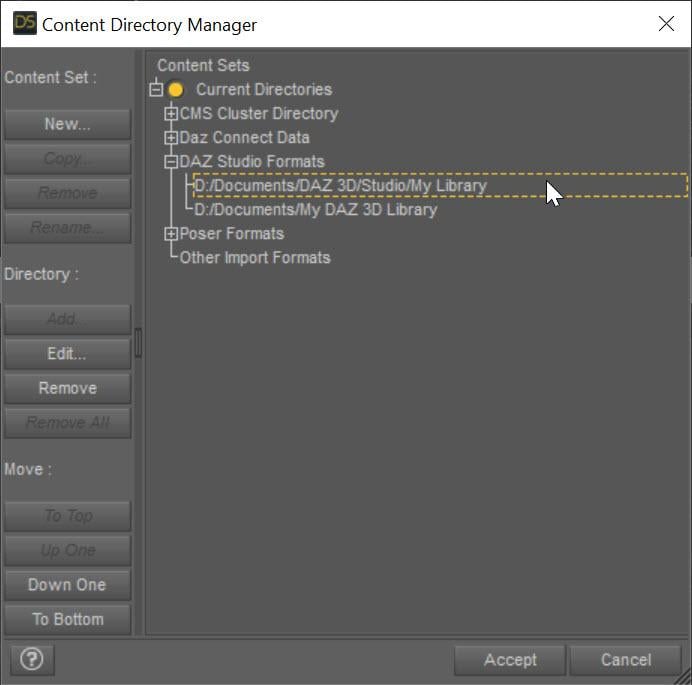
The SECOND entry points to My Daz 3D Library which has all of your installed content. The FIRST entry points to all of YOUR content, whether stuff you create or is created for you by converters. This ensures that everything you create never overwrites the installed content causing problems. Mostly, Daz Studio treats these two content directories as one big content directory, for example the morphs in D:\Documents\My Daz 3D Library\data\DAZ 3D\Genesis 8\Female\Morphs AND in D:\Documents\DAZ 3D\Studio\My Library\data\DAZ 3D\Genesis 8\Female\Morphs are both loaded and available as morphs for Genesis 8 Females. However, Daz Studio saves all the morphs and other data ONLY in the FIRST directory when a conversion occurs, ensuring that converted morphs do not overwrite installed content morphs. However, you are missing that first entry and your converters have been saving into the installed content folder, more than likely corrupting installed content.
I fixed my Daz Studio folders like the image. I even manually downloaded the converter program and copied the files into my "My Daz 3D Library" folder. However, I'm still getting the same result, however the male converter program is working fine. Any other ideas?
What do you mean that you copied the files into "My Daz 3D Library" folder? What files? None of the converted morphs should go in there. I would uninstall and reinstall Essentials so you get back the original morphs from Daz. Load a figure and make sure it is fixed. Then with the Daz Studio folders fixed, re-convert and make sure the morphs are showing up in your "My Library" folder and not "My Daz 3D library" folder.
This may or may not be important, I use the Daz Install Manager. I uninstalled the Genesis 3 and 8 Essentials, converter 3 to 8 female, along with Victoria 7. I then reinstalled them . Before I tried the conversion on Victoria 7, I removed the morph folder in the "M:\NZXT Storage\Documents\DAZ 3D\My Library\data\DAZ 3D\Genesis 8\Female\Morphs" folder for Victoria 7. I also made certain to remove the folder that was created by the converter for Victoria 7 from the "M:\NZXT Storage\Documents\My DAZ 3D Library\data\DAZ 3D\Genesis 8\Female\Morphs" folder, from my previous conversions. However, I'm still getting the same problem. The morphs are going into the "M:\NZXT Storage\Documents\DAZ 3D\My Library\data\DAZ 3D\Genesis 8\Female\Morphs" folder. I reset the settings on the converter and I've verified that they are the same for the female as the male (which is working), but I'm still getting the same problem. It's making me wonder if there are another set of files that need to be deleted, to make this thing work.
When the converter converts something, its morphs will go in M:\NZXT Storage\Documents\DAZ 3D\My Library\data\DAZ 3D\Genesis 8\Female\Morphs. However, BEFORE you converted anything, was the vanilla G8F correct? If not, there are some bad morphs in your installed morphs folder: M:\NZXT Storage\Documents\My DAZ 3D Library\data\DAZ 3D\Genesis 8\Female\Morphs
I uninstalled everything from "M:\NZXT Storage\Documents\DAZ 3D\My Library\" and "M:\NZXT Storage\Documents\My DAZ 3D Library\", even uninstalled the Daz Program. I deleted folders that weren't needed. However, after reinstalling everything, I'm getting the same problem. In fact, the converter program remembered the old settings. There's a setting in the system that didn't get deleted when I uninstalled everything that I could think of. I even deleted the files in username/appdata/ that belonged to Daz Studio. The only thing I didn't deleted were settings for the Daz Install Manager.
The script remembers its SETTINGs because those are in the registry (but the morphs, which are the problem should be gone if you uninstalled and deleted properly). If you are comfortable with RegEdit, you can remove the settings (just search for the script name in the registry).
There are morphs corrupted somewhere or being pulled in when they shouldn't be. Clear your scene. Load in your generic Genesis 8 Female figure (that contains the distortion). View the Daz Log (Help->Troubleshooting...->View Daz Log. Look for
2022-07-11 07:08:46.257 [INFO] :: Begin asset load (open): /People/Genesis 8 Female/Genesis 8 Basic Female.duf
[...LOTS OF MESSAGES HERE]
2022-07-11 07:08:50.243 [INFO] :: Finished asset load (open): 0m 3.986s - /People/Genesis 8 Female/Genesis 8 Basic Female.duf
Somewhere in there is probably a message about loading something it shouldn't (look for .dsf). If not, it is the /People/Genesis 8 Female/Genesis 8 Basic Female.duf that is corrupted I think. You *might* (because it is a relative path and could have been installed via DIM or Daz Connect) multiple versions of that file. One of them is the problem.
Just so we're on the same page, here's what I did to bring things back to normal. I used Daz Install Manager, so I used it to uninstall everything, including Daz Studio. I changed the "My DAZ 3D Library" to "My DAZ 3D Library - Broke" and created the new folder "My DAZ 3D Library". I even did the same to the "DAZ 3D" folder. I went into the "C:\Program Files\DAZ 3D" folder and removed everything accept the "DAZ3DIM1" folder. I went into the "C:\Users\nekur\AppData\Roaming" folder and copied the "DAZ 3D" folder to "DAZ 3D - Broke". I then deled the "cms", "dson", and "Studio4" folders in "DAZ 3D". Once that was all done, I reinstalled Daz Studio and then loaded all the rest. However, when I load Genesis 8, I'm getting the following errors:
2022-07-11 07:09:24.445 [WARNING] :: ..\..\..\..\..\src\sdksource\fileinput\dzassetdaz.cpp(6903): Formula output property not found: Genesis8Female:/data/Daz 3D/Genesis 8/Female/Morphs/XTransfer/3D Universe/ToonGenerations2/Base/XT_CTRL3duToonGenerations2_AdjustAge.dsf#XTIDCTRL3duToonGenerations2_AdjustAge?value - in file: /data/Daz 3D/Genesis 8/Female/Morphs/Zev0/Shape Shift/Arm Length.dsf
2022-07-11 07:09:24.502 [WARNING] :: ..\..\..\..\..\src\sdksource\fileinput\dzassetdaz.cpp(6903): Formula output property not found: Genesis8Female:/data/DAZ 3D/Genesis 8/Female/Morphs/DAZ 3D/Head/Old/PHMEyesIrisSize.dsf#PHMEyesIrisSize?value - in file: /data/Daz 3D/Genesis 8/Female/Morphs/vyktohria/Meredith/VYK Meredith Head.dsf
2022-07-11 07:09:24.792 [WARNING] :: ..\..\..\..\..\src\sdksource\fileinput\dzassetdaz.cpp(6903): Formula output property not found: Genesis8Female:/data/DAZ 3D/Genesis 8/Female/Morphs/SickleYield2017/UniversalBreastHelper/PBMSYUBHGiantAll_proj.dsf#PBMSYUBHGiantAll_proj?value - in file: /data/Daz 3D/Genesis 8/Female/Morphs/SickleYield2017/UniversalBreastHelper/PBMSYUBHGiantAll.dsf
2022-07-11 07:09:29.047 [WARNING] :: ..\..\..\..\..\src\sdksource\fileinput\dzassetdaz.cpp(7134): Unsupported formula: /data/Daz 3D/Genesis 8/Female/Morphs/DAZ 3D%2CHeysun Oh%2CYannek/Victoria 7/pJCMRSG3FVictoria7ShoulderBndFwd_110_R.dsf
2022-07-11 07:09:29.128 [WARNING] :: ..\..\..\..\..\src\sdksource\fileinput\dzassetdaz.cpp(7134): Unsupported formula: /data/Daz 3D/Genesis 8/Female/Morphs/DAZ 3D%2CHeysun Oh%2CYannek/Victoria 7/pJCMRSG3FVictoria7ShoulderBndFwd_110_L.dsf
2022-07-11 07:09:29.321 [WARNING] :: ..\..\..\..\..\src\sdksource\fileinput\dzassetdaz.cpp(7134): Unsupported formula: /data/Daz 3D/Genesis 8/Female/Morphs/DAZ 3D%2CHeysun Oh%2CYannek/Victoria 7/pJCMRSG3FVictoria7ShinBndBck_145_R.dsf
2022-07-11 07:09:29.403 [WARNING] :: ..\..\..\..\..\src\sdksource\fileinput\dzassetdaz.cpp(7134): Unsupported formula: /data/Daz 3D/Genesis 8/Female/Morphs/DAZ 3D%2CHeysun Oh%2CYannek/Victoria 7/pJCMRSG3FVictoria7ShinBndBck_145_L.dsf
2022-07-11 07:09:29.571 [WARNING] :: ..\..\..\..\..\src\sdksource\fileinput\dzassetdaz.cpp(7134): Unsupported formula: /data/Daz 3D/Genesis 8/Female/Morphs/DAZ 3D%2CHeysun Oh%2CYannek/Victoria 7/pJCMRSG3FVictoria7ForearmBnd_135_R.dsf
2022-07-11 07:09:29.657 [WARNING] :: ..\..\..\..\..\src\sdksource\fileinput\dzassetdaz.cpp(7134): Unsupported formula: /data/Daz 3D/Genesis 8/Female/Morphs/DAZ 3D%2CHeysun Oh%2CYannek/Victoria 7/pJCMRSG3FVictoria7ForearmBnd_135_L.dsf
2022-07-11 07:09:31.130 [WARNING] :: ..\..\..\..\..\src\sdksource\fileinput\dzassetdaz.cpp(5962): Parent for modifier not found: TMLI Lashes 06.
2022-07-11 07:09:31.130 [WARNING] :: ..\..\..\..\..\src\sdksource\fileinput\dzassetdaz.cpp(1712): Modifier not prepared: TMLI Lashes 06!
2022-07-11 07:09:31.130 [WARNING] :: ..\..\..\..\..\src\sdksource\fileinput\dzassetdaz.cpp(1729): Modifier not created: TMLI Lashes 06!
Have you ever seen anything like this that might help solve the problem? I got rid of one of the errors I'm not showing after buying Olympia 8. However, I can't find any of these files in my previous version of Daz Studio entitled "Daz 3D2 Old" or in the Genesis 8 female zip file I downloaded from the Product Library. I even tried to copy the Genesis 8 file from "Daz 3D2 Old", but with no luck.
Usually, you will get some errors like "Formula output property not found" and such. When vendors save some morphs, they could have unintentionally pulled in other morphs that are on their system but not on your system. If you are not having problems, you can ignore these. They slow down loading figures because of all the log messages but don't affect stuff otherwise.
I would warn you if you ever do this again to make sure the Daz Connect folder had been nuked too. It is easy, even if you think you always use DIM, for some stuff to be installed by Daz Connect and end up there.
But it sounds like things are working now?
No, I'm still having the same problem. I've done just about everything I can think of to get Daz back to square one, so I'd get a good conversion. I've even tried copying the older conversions I did, with not success.
Nuking everything definitely would make it so the standard G8F loads properly. You are not nuking something. As I mentioned, the Daz Connect directory (under the Daz Connect Data node in the Content Directory Manager dialog) should be nuked as well. That is the only thing I can think you missed. You need to make sure ALL the directories pointed to in the Content Directory Manager do not have corrupted data.
What exactly do you mean by nuking the Daz Content Data. My Daz Content Data is located in "M:\NZXT Storage\Documents\DAZ 3D\Studio\My Daz Connect Library". After I uninstalled everything, I left the "M:\NZXT Storage\Documents\DAZ 3D" empty.
Ok, that sounds like you emptied it as well. Unfortunately, I don't know how to help you. If you had a clean install, DS would be loading a uncorrupted G8F, but since it IS corrupted, some old data is being pulled in somewhere. This is a DS installation problem.
Cool. Thanks for everything.
Sorry, I could not help more.
[Released] Character Converter from Genesis 8 Female to Genesis 3 Female - Conv JCMs too[Commercial]RiverSoftArt said:
Nekura2000 said:
RiverSoftArt said:
Nekura2000 said:
RiverSoftArt said:
Nekura2000 said:
RiverSoftArt said:
Nekura2000 said:
RiverSoftArt said:
Nekura2000 said:
RiverSoftArt said:
Nekura2000 said:
RiverSoftArt said:
Nekura2000 said:
RiverSoftArt said:
Nekura2000 said:
RiverSoftArt said:
Nekura2000 said:
I had to get a new hard drive so I reinstalled Daz Studio. When trying to convert my Generation 7 female characters to Generation 8, I'm getting a distorted face. I've uninstalled and reinstalled the program, even deleted the RSCloneGenesis3Female.obj file from the folder C:\Users\nekur\AppData\Roaming\DAZ 3D\Studio4\CharacterConverterMorphs, with no change. The Generation 7 character as well as Genesis 8 load without a flaw. Here's what I'm getting, attached or from https://www.deviantart.com/wow-creations/art/Converted-920761392. ; I just looked at the parameters for the character I converted, which was Agnes. It isn't showing an Agnes head or body for 8, just Agnes itself.
The clone is for a different Character Converter. Maybe it is pulling in the converted morphs twice? From your previous conversion on the old hard drive and a new conversion? What directories are specified in the content manager? You should check all the currently used morphs on the character and find the morphs. The Parameter Settings show the Asset File Path of the morph (and the [...] button shows the full path of the morph). Make sure the morphs are coming from where you think they should be coming.
I use two different drives when using software. I have the OS drive which I replaced and the data drive. I renamed the original Daz drive as “Daz 3D2 Old”, before installing the Daz Studio. When installing Daz Studio, I allowed it to keep the “Daz 3D” folder, but also use the new “My DAZ 3D Library” folder. I just remember to look at the Error Log when loading Agnes Genesis 8 and this is what I’m getting:
2022-06-29 07:16:21.449 [WARNING] :: ..\..\..\..\..\src\sdksource\fileinput\dzassetdaz.cpp(6903): Formula output property not found: Genesis8Female:/data/Daz%203D/Genesis%208/Female/Morphs/XTransfer/3D%20Universe/ToonGenerations2/Base/XT_CTRL3duToonGenerations2_AdjustAge.dsf#XTIDCTRL3duToonGenerations2_AdjustAge?value - in file: /data/Daz%203D/Genesis%208/Female/Morphs/Zev0/Shape%20Shift/Arm%20Length.dsf
2022-06-29 07:16:21.506 [WARNING] :: ..\..\..\..\..\src\sdksource\fileinput\dzassetdaz.cpp(6903): Formula output property not found: Genesis8Female:/data/DAZ%203D/Genesis%208/Female/Morphs/DAZ%203D/Head/Old/PHMEyesIrisSize.dsf#PHMEyesIrisSize?value - in file: /data/Daz%203D/Genesis%208/Female/Morphs/vyktohria/Meredith/VYK%20Meredith%20Head.dsf
2022-06-29 07:16:22.060 [WARNING] :: ..\..\..\..\..\src\sdksource\fileinput\dzassetdaz.cpp(6903): Formula output property not found: Genesis8Female:/data/DAZ%203D/Genesis%208/Female/Morphs/SickleYield2017/UniversalBreastHelper/PBMSYUBHGiantAll_proj.dsf#PBMSYUBHGiantAll_proj?value - in file: /data/Daz%203D/Genesis%208/Female/Morphs/SickleYield2017/UniversalBreastHelper/PBMSYUBHGiantAll.dsf
2022-06-29 07:16:22.125 [WARNING] :: ..\..\..\..\..\src\sdksource\fileinput\dzassetdaz.cpp(7134): Unsupported formula: /data/Daz%203D/Genesis%208/Female/Morphs/RiverSoft%20Art/Javeria%20for%20Victoria%207%20and%20Genesis%203/pJCMRSG3FVictoria7ThighBndFwdHDR.dsf
2022-06-29 07:16:22.155 [WARNING] :: ..\..\..\..\..\src\sdksource\fileinput\dzassetdaz.cpp(7134): Unsupported formula: /data/Daz%203D/Genesis%208/Female/Morphs/RiverSoft%20Art/Javeria%20for%20Victoria%207%20and%20Genesis%203/pJCMRSG3FVictoria7ThighBndFwdHDL.dsf
2022-06-29 07:16:22.628 [WARNING] :: ..\..\..\..\..\src\sdksource\fileinput\dzassetdaz.cpp(7134): Unsupported formula: /data/Daz%203D/Genesis%208/Female/Morphs/RiverSoft%20Art/FWSA%20Caterina%20for%20Victoria%207%20and%20Genesis%203/pJCMRSG3FVictoria7ShoulderBndFwd_110_R.dsf
2022-06-29 07:16:22.665 [WARNING] :: ..\..\..\..\..\src\sdksource\fileinput\dzassetdaz.cpp(7134): Unsupported formula: /data/Daz%203D/Genesis%208/Female/Morphs/RiverSoft%20Art/FWSA%20Caterina%20for%20Victoria%207%20and%20Genesis%203/pJCMRSG3FVictoria7ShoulderBndFwd_110_L.dsf
2022-06-29 07:16:22.769 [WARNING] :: ..\..\..\..\..\src\sdksource\fileinput\dzassetdaz.cpp(7134): Unsupported formula: /data/Daz%203D/Genesis%208/Female/Morphs/RiverSoft%20Art/FWSA%20Caterina%20for%20Victoria%207%20and%20Genesis%203/pJCMRSG3FVictoria7ShinBndBck_145_R.dsf
2022-06-29 07:16:22.806 [WARNING] :: ..\..\..\..\..\src\sdksource\fileinput\dzassetdaz.cpp(7134): Unsupported formula: /data/Daz%203D/Genesis%208/Female/Morphs/RiverSoft%20Art/FWSA%20Caterina%20for%20Victoria%207%20and%20Genesis%203/pJCMRSG3FVictoria7ShinBndBck_145_L.dsf
2022-06-29 07:16:22.895 [WARNING] :: ..\..\..\..\..\src\sdksource\fileinput\dzassetdaz.cpp(7134): Unsupported formula: /data/Daz%203D/Genesis%208/Female/Morphs/RiverSoft%20Art/FWSA%20Caterina%20for%20Victoria%207%20and%20Genesis%203/pJCMRSG3FVictoria7ForearmBnd_135_R.dsf
2022-06-29 07:16:22.935 [WARNING] :: ..\..\..\..\..\src\sdksource\fileinput\dzassetdaz.cpp(7134): Unsupported formula: /data/Daz%203D/Genesis%208/Female/Morphs/RiverSoft%20Art/FWSA%20Caterina%20for%20Victoria%207%20and%20Genesis%203/pJCMRSG3FVictoria7ForearmBnd_135_L.dsf
2022-06-29 07:16:31.020 [WARNING] :: ..\..\..\..\..\src\sdksource\fileinput\dzassetdaz.cpp(6903): Formula output property not found: Genesis8Female:/data/DAZ%203D/Genesis%208/Female/Morphs/DAZ%20Originals/data/DAZ%203D/Genesis%208/Female/Morphs/Fred%20Winkler%20Art%2CSabby%2CDAZ%20Originals/FW%20Frankie%20HD%20for%20Victoria%207/CTRL-RSC-Frankie.dsfCFred%20Winkler%20Art/data/DAZ%203D/Genesis%208/Female/Morphs/Fred%20Winkler%20Art%2CSabby%2CDAZ%20Originals/FW%20Frankie%20HD%20for%20Victoria%207/CTRL-RSC-Frankie.dsfCSabby/FWSA%20Agnes%20HD%20for%20Lilith%207/PHMMouthRealismHD.dsf#PHMMouthRealismHD?value - in file: /data/DAZ%203D/Genesis%208/Female/Morphs/Fred%20Winkler%20Art%2CSabby%2CDAZ%20Originals/FW%20Frankie%20HD%20for%20Victoria%207/CTRL-RSC-Frankie.dsf
2022-06-29 07:16:31.020 [WARNING] :: ..\..\..\..\..\src\sdksource\fileinput\dzassetdaz.cpp(6903): Formula output property not found: Genesis8Female:/data/DAZ%203D/Genesis%208/Female/Morphs/DAZ%20Originals/data/DAZ%203D/Genesis%208/Female/Morphs/Fred%20Winkler%20Art%2CSabby%2CDAZ%20Originals/FW%20Frankie%20HD%20for%20Victoria%207/CTRL-RSC-Frankie.dsfCFred%20Winkler%20Art/FW%20Brooke%20HD%20for%20Victoria%207/FHMVictoria7.dsf#FHMVictoria7?value - in file: /data/DAZ%203D/Genesis%208/Female/Morphs/Fred%20Winkler%20Art%2CSabby%2CDAZ%20Originals/FW%20Frankie%20HD%20for%20Victoria%207/CTRL-RSC-Frankie.dsf
2022-06-29 07:16:31.021 [WARNING] :: ..\..\..\..\..\src\sdksource\fileinput\dzassetdaz.cpp(6903): Formula output property not found: Genesis8Female:/data/DAZ%203D/Genesis%208/Female/Morphs/DAZ%20Originals/data/DAZ%203D/Genesis%208/Female/Morphs/Fred%20Winkler%20Art%2CSabby%2CDAZ%20Originals/FW%20Frankie%20HD%20for%20Victoria%207/CTRL-RSC-Frankie.dsfCFred%20Winkler%20Art/FW%20Brooke%20HD%20for%20Victoria%207/FBMVictoria7.dsf#FBMVictoria7?value - in file: /data/DAZ%203D/Genesis%208/Female/Morphs/Fred%20Winkler%20Art%2CSabby%2CDAZ%20Originals/FW%20Frankie%20HD%20for%20Victoria%207/CTRL-RSC-Frankie.dsf
2022-06-29 07:16:32.694 [WARNING] :: ..\..\..\..\..\src\sdksource\fileinput\dzassetdaz.cpp(6969): Formula target property not found: Genesis8Female:/data/DAZ%203D/Genesis%208/Female/Morphs/DAZ%203D/Olympia%208/FBMOlympia8.dsf#FBMOlympia8_Test?value - in file: /data/Daz%203D/Genesis%208/Female/Morphs/fabiana/KillerLegsG8/1FK-Olympia8BaseFix.dsf
2022-06-29 07:16:40.096 [WARNING] :: ..\..\..\..\..\src\sdksource\fileinput\dzassetdaz.cpp(7134): Unsupported formula: /data/Daz%203D/Genesis%208/Female/Morphs/DAZ%203D%2CHeysun%20Oh/Olympia%207%20HD%20Add-On/pJCMRSG3FOlympia7ForeArmBndHD_n100L.dsf
2022-06-29 07:16:40.261 [WARNING] :: ..\..\..\..\..\src\sdksource\fileinput\dzassetdaz.cpp(7134): Unsupported formula: /data/Daz%203D/Genesis%208/Female/Morphs/DAZ%203D%2CHeysun%20Oh/Olympia%207%20HD%20Add-On/pJCMRSG3FOlympia7ForeArmBndHD_100R.dsf
2022-06-29 07:16:40.986 [WARNING] :: ..\..\..\..\..\src\sdksource\fileinput\dzassetdaz.cpp(7134): Unsupported formula: /data/Daz%203D/Genesis%208/Female/Morphs/DAZ%203D%2CHeysun%20Oh/Mei%20Lin%207%20HD%20Add-On/pJCMRSG3FMeiLin7ShinBndBck_95R.dsf
2022-06-29 07:16:41.152 [WARNING] :: ..\..\..\..\..\src\sdksource\fileinput\dzassetdaz.cpp(7134): Unsupported formula: /data/Daz%203D/Genesis%208/Female/Morphs/DAZ%203D%2CHeysun%20Oh/Mei%20Lin%207%20HD%20Add-On/pJCMRSG3FMeiLin7ShinBndBck_95L.dsf
2022-06-29 07:16:41.322 [WARNING] :: ..\..\..\..\..\src\sdksource\fileinput\dzassetdaz.cpp(7134): Unsupported formula: /data/Daz%203D/Genesis%208/Female/Morphs/DAZ%203D%2CHeysun%20Oh/Mei%20Lin%207%20HD%20Add-On/pJCMRSG3FMeiLin7ShinBndBckR.dsf
2022-06-29 07:16:41.494 [WARNING] :: ..\..\..\..\..\src\sdksource\fileinput\dzassetdaz.cpp(7134): Unsupported formula: /data/Daz%203D/Genesis%208/Female/Morphs/DAZ%203D%2CHeysun%20Oh/Mei%20Lin%207%20HD%20Add-On/pJCMRSG3FMeiLin7ShinBndBckL.dsf
2022-06-29 07:16:43.828 [WARNING] :: ..\..\..\..\..\src\sdksource\fileinput\dzassetdaz.cpp(7134): Unsupported formula: /data/Daz%203D/Genesis%208/Female/Morphs/DAZ%203D%2CHeysun%20Oh/Karen%207%20HD%20Add-On/pJCMRSG3FKaren7ShldrFwd_n90L.dsf
2022-06-29 07:16:44.007 [WARNING] :: ..\..\..\..\..\src\sdksource\fileinput\dzassetdaz.cpp(7134): Unsupported formula: /data/Daz%203D/Genesis%208/Female/Morphs/DAZ%203D%2CHeysun%20Oh/Karen%207%20HD%20Add-On/pJCMRSG3FKaren7ShldrFwd_90R.dsf
2022-06-29 07:16:44.191 [WARNING] :: ..\..\..\..\..\src\sdksource\fileinput\dzassetdaz.cpp(7134): Unsupported formula: /data/Daz%203D/Genesis%208/Female/Morphs/DAZ%203D%2CHeysun%20Oh/Karen%207%20HD%20Add-On/pJCMRSG3FKaren7ShinBndBck_90R.dsf
2022-06-29 07:16:44.369 [WARNING] :: ..\..\..\..\..\src\sdksource\fileinput\dzassetdaz.cpp(7134): Unsupported formula: /data/Daz%203D/Genesis%208/Female/Morphs/DAZ%203D%2CHeysun%20Oh/Karen%207%20HD%20Add-On/pJCMRSG3FKaren7ShinBndBck_90L.dsf
2022-06-29 07:16:44.669 [WARNING] :: ..\..\..\..\..\src\sdksource\fileinput\dzassetdaz.cpp(7134): Unsupported formula: /data/Daz%203D/Genesis%208/Female/Morphs/DAZ%203D%2CHeysun%20Oh/Karen%207%20HD%20Add-On/pJCMRSG3FKaren7ForearmBnd_n85L.dsf
2022-06-29 07:16:44.910 [WARNING] :: ..\..\..\..\..\src\sdksource\fileinput\dzassetdaz.cpp(7134): Unsupported formula: /data/Daz%203D/Genesis%208/Female/Morphs/DAZ%203D%2CHeysun%20Oh/Karen%207%20HD%20Add-On/pJCMRSG3FKaren7ForearmBnd_85R.dsf
2022-06-29 07:16:56.769 [WARNING] :: ..\..\..\..\..\src\sdksource\fileinput\dzassetdaz.cpp(7134): Unsupported formula: /data/Daz%203D/Genesis%208/Female/Morphs/-Yannek-%2CDAZ%203D%2CHeysun%20Oh/Gia%207/pJCMRSG3FGia7ForeArmBnd_n135L.dsf
2022-06-29 07:16:57.067 [WARNING] :: ..\..\..\..\..\src\sdksource\fileinput\dzassetdaz.cpp(7134): Unsupported formula: /data/Daz%203D/Genesis%208/Female/Morphs/-Yannek-%2CDAZ%203D%2CHeysun%20Oh/Gia%207/pJCMRSG3FGia7ForeArmBnd_135R.dsf
2022-06-29 07:17:00.107 [WARNING] :: ..\..\..\..\..\src\sdksource\fileinput\dzassetdaz.cpp(7134): Unsupported formula: /data/Daz%203D/Genesis%208/Female/Morphs/-Yannek-%2CDAZ%203D%2CHeysun%20Oh/Arabella%207%20HD%20Add-On/pJCMRSG3FArabella7ForeArmBnd_n135L.dsf
2022-06-29 07:17:00.418 [WARNING] :: ..\..\..\..\..\src\sdksource\fileinput\dzassetdaz.cpp(7134): Unsupported formula: /data/Daz%203D/Genesis%208/Female/Morphs/-Yannek-%2CDAZ%203D%2CHeysun%20Oh/Arabella%207%20HD%20Add-On/pJCMRSG3FArabella7ForeArmBnd_135R.dsf
2022-06-29 07:17:02.981 [WARNING] :: ..\..\..\..\..\src\sdksource\fileinput\dzassetdaz.cpp(5962): Parent for modifier not found: TMLI Lashes 06.
2022-06-29 07:17:02.981 [WARNING] :: ..\..\..\..\..\src\sdksource\fileinput\dzassetdaz.cpp(1712): Modifier not prepared: TMLI Lashes 06!
2022-06-29 07:17:02.981 [WARNING] :: ..\..\..\..\..\src\sdksource\fileinput\dzassetdaz.cpp(1729): Modifier not created: TMLI Lashes 06!
Here’s an image of my Content Directory Manager.
What looks bad in your Content Directory is that you have no user library in the Daz Studio Formats. That means the character converter would be writing morphs (and possibly deleting morphs if the overwrite option is checked) in the Daz content folder. You will get bad/weird results from that. I am afraid you might have hosed your morphs folder at this point. You need something a user content folder as the first folder in the Daz Studio Formats section. Then, this folder would be used to write out morphs from the conversions and would not overwrite your Daz content library.
I'm sorry, but from what I can see I have a Content Directory in the Daz Studio Format. Could you give a step by step solution in solving this problem. I've used Daz Studio for several years, along with Character Converter, but I think I'm missing something based on what you're seeing and I'm trying to interpret.
Usually what you will see in Daz Studio Formats is something like this:
The SECOND entry points to My Daz 3D Library which has all of your installed content. The FIRST entry points to all of YOUR content, whether stuff you create or is created for you by converters. This ensures that everything you create never overwrites the installed content causing problems. Mostly, Daz Studio treats these two content directories as one big content directory, for example the morphs in D:\Documents\My Daz 3D Library\data\DAZ 3D\Genesis 8\Female\Morphs AND in D:\Documents\DAZ 3D\Studio\My Library\data\DAZ 3D\Genesis 8\Female\Morphs are both loaded and available as morphs for Genesis 8 Females. However, Daz Studio saves all the morphs and other data ONLY in the FIRST directory when a conversion occurs, ensuring that converted morphs do not overwrite installed content morphs. However, you are missing that first entry and your converters have been saving into the installed content folder, more than likely corrupting installed content.
I fixed my Daz Studio folders like the image. I even manually downloaded the converter program and copied the files into my "My Daz 3D Library" folder. However, I'm still getting the same result, however the male converter program is working fine. Any other ideas?
What do you mean that you copied the files into "My Daz 3D Library" folder? What files? None of the converted morphs should go in there. I would uninstall and reinstall Essentials so you get back the original morphs from Daz. Load a figure and make sure it is fixed. Then with the Daz Studio folders fixed, re-convert and make sure the morphs are showing up in your "My Library" folder and not "My Daz 3D library" folder.
This may or may not be important, I use the Daz Install Manager. I uninstalled the Genesis 3 and 8 Essentials, converter 3 to 8 female, along with Victoria 7. I then reinstalled them . Before I tried the conversion on Victoria 7, I removed the morph folder in the "M:\NZXT Storage\Documents\DAZ 3D\My Library\data\DAZ 3D\Genesis 8\Female\Morphs" folder for Victoria 7. I also made certain to remove the folder that was created by the converter for Victoria 7 from the "M:\NZXT Storage\Documents\My DAZ 3D Library\data\DAZ 3D\Genesis 8\Female\Morphs" folder, from my previous conversions. However, I'm still getting the same problem. The morphs are going into the "M:\NZXT Storage\Documents\DAZ 3D\My Library\data\DAZ 3D\Genesis 8\Female\Morphs" folder. I reset the settings on the converter and I've verified that they are the same for the female as the male (which is working), but I'm still getting the same problem. It's making me wonder if there are another set of files that need to be deleted, to make this thing work.
When the converter converts something, its morphs will go in M:\NZXT Storage\Documents\DAZ 3D\My Library\data\DAZ 3D\Genesis 8\Female\Morphs. However, BEFORE you converted anything, was the vanilla G8F correct? If not, there are some bad morphs in your installed morphs folder: M:\NZXT Storage\Documents\My DAZ 3D Library\data\DAZ 3D\Genesis 8\Female\Morphs
I uninstalled everything from "M:\NZXT Storage\Documents\DAZ 3D\My Library\" and "M:\NZXT Storage\Documents\My DAZ 3D Library\", even uninstalled the Daz Program. I deleted folders that weren't needed. However, after reinstalling everything, I'm getting the same problem. In fact, the converter program remembered the old settings. There's a setting in the system that didn't get deleted when I uninstalled everything that I could think of. I even deleted the files in username/appdata/ that belonged to Daz Studio. The only thing I didn't deleted were settings for the Daz Install Manager.
The script remembers its SETTINGs because those are in the registry (but the morphs, which are the problem should be gone if you uninstalled and deleted properly). If you are comfortable with RegEdit, you can remove the settings (just search for the script name in the registry).
There are morphs corrupted somewhere or being pulled in when they shouldn't be. Clear your scene. Load in your generic Genesis 8 Female figure (that contains the distortion). View the Daz Log (Help->Troubleshooting...->View Daz Log. Look for
2022-07-11 07:08:46.257 [INFO] :: Begin asset load (open): /People/Genesis 8 Female/Genesis 8 Basic Female.duf
[...LOTS OF MESSAGES HERE]
2022-07-11 07:08:50.243 [INFO] :: Finished asset load (open): 0m 3.986s - /People/Genesis 8 Female/Genesis 8 Basic Female.duf
Somewhere in there is probably a message about loading something it shouldn't (look for .dsf). If not, it is the /People/Genesis 8 Female/Genesis 8 Basic Female.duf that is corrupted I think. You *might* (because it is a relative path and could have been installed via DIM or Daz Connect) multiple versions of that file. One of them is the problem.
Just so we're on the same page, here's what I did to bring things back to normal. I used Daz Install Manager, so I used it to uninstall everything, including Daz Studio. I changed the "My DAZ 3D Library" to "My DAZ 3D Library - Broke" and created the new folder "My DAZ 3D Library". I even did the same to the "DAZ 3D" folder. I went into the "C:\Program Files\DAZ 3D" folder and removed everything accept the "DAZ3DIM1" folder. I went into the "C:\Users\nekur\AppData\Roaming" folder and copied the "DAZ 3D" folder to "DAZ 3D - Broke". I then deled the "cms", "dson", and "Studio4" folders in "DAZ 3D". Once that was all done, I reinstalled Daz Studio and then loaded all the rest. However, when I load Genesis 8, I'm getting the following errors:
2022-07-11 07:09:24.445 [WARNING] :: ..\..\..\..\..\src\sdksource\fileinput\dzassetdaz.cpp(6903): Formula output property not found: Genesis8Female:/data/Daz 3D/Genesis 8/Female/Morphs/XTransfer/3D Universe/ToonGenerations2/Base/XT_CTRL3duToonGenerations2_AdjustAge.dsf#XTIDCTRL3duToonGenerations2_AdjustAge?value - in file: /data/Daz 3D/Genesis 8/Female/Morphs/Zev0/Shape Shift/Arm Length.dsf
2022-07-11 07:09:24.502 [WARNING] :: ..\..\..\..\..\src\sdksource\fileinput\dzassetdaz.cpp(6903): Formula output property not found: Genesis8Female:/data/DAZ 3D/Genesis 8/Female/Morphs/DAZ 3D/Head/Old/PHMEyesIrisSize.dsf#PHMEyesIrisSize?value - in file: /data/Daz 3D/Genesis 8/Female/Morphs/vyktohria/Meredith/VYK Meredith Head.dsf
2022-07-11 07:09:24.792 [WARNING] :: ..\..\..\..\..\src\sdksource\fileinput\dzassetdaz.cpp(6903): Formula output property not found: Genesis8Female:/data/DAZ 3D/Genesis 8/Female/Morphs/SickleYield2017/UniversalBreastHelper/PBMSYUBHGiantAll_proj.dsf#PBMSYUBHGiantAll_proj?value - in file: /data/Daz 3D/Genesis 8/Female/Morphs/SickleYield2017/UniversalBreastHelper/PBMSYUBHGiantAll.dsf
2022-07-11 07:09:29.047 [WARNING] :: ..\..\..\..\..\src\sdksource\fileinput\dzassetdaz.cpp(7134): Unsupported formula: /data/Daz 3D/Genesis 8/Female/Morphs/DAZ 3D%2CHeysun Oh%2CYannek/Victoria 7/pJCMRSG3FVictoria7ShoulderBndFwd_110_R.dsf
2022-07-11 07:09:29.128 [WARNING] :: ..\..\..\..\..\src\sdksource\fileinput\dzassetdaz.cpp(7134): Unsupported formula: /data/Daz 3D/Genesis 8/Female/Morphs/DAZ 3D%2CHeysun Oh%2CYannek/Victoria 7/pJCMRSG3FVictoria7ShoulderBndFwd_110_L.dsf
2022-07-11 07:09:29.321 [WARNING] :: ..\..\..\..\..\src\sdksource\fileinput\dzassetdaz.cpp(7134): Unsupported formula: /data/Daz 3D/Genesis 8/Female/Morphs/DAZ 3D%2CHeysun Oh%2CYannek/Victoria 7/pJCMRSG3FVictoria7ShinBndBck_145_R.dsf
2022-07-11 07:09:29.403 [WARNING] :: ..\..\..\..\..\src\sdksource\fileinput\dzassetdaz.cpp(7134): Unsupported formula: /data/Daz 3D/Genesis 8/Female/Morphs/DAZ 3D%2CHeysun Oh%2CYannek/Victoria 7/pJCMRSG3FVictoria7ShinBndBck_145_L.dsf
2022-07-11 07:09:29.571 [WARNING] :: ..\..\..\..\..\src\sdksource\fileinput\dzassetdaz.cpp(7134): Unsupported formula: /data/Daz 3D/Genesis 8/Female/Morphs/DAZ 3D%2CHeysun Oh%2CYannek/Victoria 7/pJCMRSG3FVictoria7ForearmBnd_135_R.dsf
2022-07-11 07:09:29.657 [WARNING] :: ..\..\..\..\..\src\sdksource\fileinput\dzassetdaz.cpp(7134): Unsupported formula: /data/Daz 3D/Genesis 8/Female/Morphs/DAZ 3D%2CHeysun Oh%2CYannek/Victoria 7/pJCMRSG3FVictoria7ForearmBnd_135_L.dsf
2022-07-11 07:09:31.130 [WARNING] :: ..\..\..\..\..\src\sdksource\fileinput\dzassetdaz.cpp(5962): Parent for modifier not found: TMLI Lashes 06.
2022-07-11 07:09:31.130 [WARNING] :: ..\..\..\..\..\src\sdksource\fileinput\dzassetdaz.cpp(1712): Modifier not prepared: TMLI Lashes 06!
2022-07-11 07:09:31.130 [WARNING] :: ..\..\..\..\..\src\sdksource\fileinput\dzassetdaz.cpp(1729): Modifier not created: TMLI Lashes 06!
Have you ever seen anything like this that might help solve the problem? I got rid of one of the errors I'm not showing after buying Olympia 8. However, I can't find any of these files in my previous version of Daz Studio entitled "Daz 3D2 Old" or in the Genesis 8 female zip file I downloaded from the Product Library. I even tried to copy the Genesis 8 file from "Daz 3D2 Old", but with no luck.
Usually, you will get some errors like "Formula output property not found" and such. When vendors save some morphs, they could have unintentionally pulled in other morphs that are on their system but not on your system. If you are not having problems, you can ignore these. They slow down loading figures because of all the log messages but don't affect stuff otherwise.
I would warn you if you ever do this again to make sure the Daz Connect folder had been nuked too. It is easy, even if you think you always use DIM, for some stuff to be installed by Daz Connect and end up there.
But it sounds like things are working now?
No, I'm still having the same problem. I've done just about everything I can think of to get Daz back to square one, so I'd get a good conversion. I've even tried copying the older conversions I did, with not success.
Nuking everything definitely would make it so the standard G8F loads properly. You are not nuking something. As I mentioned, the Daz Connect directory (under the Daz Connect Data node in the Content Directory Manager dialog) should be nuked as well. That is the only thing I can think you missed. You need to make sure ALL the directories pointed to in the Content Directory Manager do not have corrupted data.
What exactly do you mean by nuking the Daz Content Data. My Daz Content Data is located in "M:\NZXT Storage\Documents\DAZ 3D\Studio\My Daz Connect Library". After I uninstalled everything, I left the "M:\NZXT Storage\Documents\DAZ 3D" empty.
Ok, that sounds like you emptied it as well. Unfortunately, I don't know how to help you. If you had a clean install, DS would be loading a uncorrupted G8F, but since it IS corrupted, some old data is being pulled in somewhere. This is a DS installation problem.
Cool. Thanks for everything.
[Released] Character Converter from Genesis 8 Female to Genesis 3 Female - Conv JCMs too[Commercial]Nekura2000 said:
RiverSoftArt said:
Nekura2000 said:
RiverSoftArt said:
Nekura2000 said:
RiverSoftArt said:
Nekura2000 said:
RiverSoftArt said:
Nekura2000 said:
RiverSoftArt said:
Nekura2000 said:
RiverSoftArt said:
Nekura2000 said:
RiverSoftArt said:
Nekura2000 said:
RiverSoftArt said:
Nekura2000 said:
I had to get a new hard drive so I reinstalled Daz Studio. When trying to convert my Generation 7 female characters to Generation 8, I'm getting a distorted face. I've uninstalled and reinstalled the program, even deleted the RSCloneGenesis3Female.obj file from the folder C:\Users\nekur\AppData\Roaming\DAZ 3D\Studio4\CharacterConverterMorphs, with no change. The Generation 7 character as well as Genesis 8 load without a flaw. Here's what I'm getting, attached or from https://www.deviantart.com/wow-creations/art/Converted-920761392. ; I just looked at the parameters for the character I converted, which was Agnes. It isn't showing an Agnes head or body for 8, just Agnes itself.
The clone is for a different Character Converter. Maybe it is pulling in the converted morphs twice? From your previous conversion on the old hard drive and a new conversion? What directories are specified in the content manager? You should check all the currently used morphs on the character and find the morphs. The Parameter Settings show the Asset File Path of the morph (and the [...] button shows the full path of the morph). Make sure the morphs are coming from where you think they should be coming.
I use two different drives when using software. I have the OS drive which I replaced and the data drive. I renamed the original Daz drive as “Daz 3D2 Old”, before installing the Daz Studio. When installing Daz Studio, I allowed it to keep the “Daz 3D” folder, but also use the new “My DAZ 3D Library” folder. I just remember to look at the Error Log when loading Agnes Genesis 8 and this is what I’m getting:
2022-06-29 07:16:21.449 [WARNING] :: ..\..\..\..\..\src\sdksource\fileinput\dzassetdaz.cpp(6903): Formula output property not found: Genesis8Female:/data/Daz%203D/Genesis%208/Female/Morphs/XTransfer/3D%20Universe/ToonGenerations2/Base/XT_CTRL3duToonGenerations2_AdjustAge.dsf#XTIDCTRL3duToonGenerations2_AdjustAge?value - in file: /data/Daz%203D/Genesis%208/Female/Morphs/Zev0/Shape%20Shift/Arm%20Length.dsf
2022-06-29 07:16:21.506 [WARNING] :: ..\..\..\..\..\src\sdksource\fileinput\dzassetdaz.cpp(6903): Formula output property not found: Genesis8Female:/data/DAZ%203D/Genesis%208/Female/Morphs/DAZ%203D/Head/Old/PHMEyesIrisSize.dsf#PHMEyesIrisSize?value - in file: /data/Daz%203D/Genesis%208/Female/Morphs/vyktohria/Meredith/VYK%20Meredith%20Head.dsf
2022-06-29 07:16:22.060 [WARNING] :: ..\..\..\..\..\src\sdksource\fileinput\dzassetdaz.cpp(6903): Formula output property not found: Genesis8Female:/data/DAZ%203D/Genesis%208/Female/Morphs/SickleYield2017/UniversalBreastHelper/PBMSYUBHGiantAll_proj.dsf#PBMSYUBHGiantAll_proj?value - in file: /data/Daz%203D/Genesis%208/Female/Morphs/SickleYield2017/UniversalBreastHelper/PBMSYUBHGiantAll.dsf
2022-06-29 07:16:22.125 [WARNING] :: ..\..\..\..\..\src\sdksource\fileinput\dzassetdaz.cpp(7134): Unsupported formula: /data/Daz%203D/Genesis%208/Female/Morphs/RiverSoft%20Art/Javeria%20for%20Victoria%207%20and%20Genesis%203/pJCMRSG3FVictoria7ThighBndFwdHDR.dsf
2022-06-29 07:16:22.155 [WARNING] :: ..\..\..\..\..\src\sdksource\fileinput\dzassetdaz.cpp(7134): Unsupported formula: /data/Daz%203D/Genesis%208/Female/Morphs/RiverSoft%20Art/Javeria%20for%20Victoria%207%20and%20Genesis%203/pJCMRSG3FVictoria7ThighBndFwdHDL.dsf
2022-06-29 07:16:22.628 [WARNING] :: ..\..\..\..\..\src\sdksource\fileinput\dzassetdaz.cpp(7134): Unsupported formula: /data/Daz%203D/Genesis%208/Female/Morphs/RiverSoft%20Art/FWSA%20Caterina%20for%20Victoria%207%20and%20Genesis%203/pJCMRSG3FVictoria7ShoulderBndFwd_110_R.dsf
2022-06-29 07:16:22.665 [WARNING] :: ..\..\..\..\..\src\sdksource\fileinput\dzassetdaz.cpp(7134): Unsupported formula: /data/Daz%203D/Genesis%208/Female/Morphs/RiverSoft%20Art/FWSA%20Caterina%20for%20Victoria%207%20and%20Genesis%203/pJCMRSG3FVictoria7ShoulderBndFwd_110_L.dsf
2022-06-29 07:16:22.769 [WARNING] :: ..\..\..\..\..\src\sdksource\fileinput\dzassetdaz.cpp(7134): Unsupported formula: /data/Daz%203D/Genesis%208/Female/Morphs/RiverSoft%20Art/FWSA%20Caterina%20for%20Victoria%207%20and%20Genesis%203/pJCMRSG3FVictoria7ShinBndBck_145_R.dsf
2022-06-29 07:16:22.806 [WARNING] :: ..\..\..\..\..\src\sdksource\fileinput\dzassetdaz.cpp(7134): Unsupported formula: /data/Daz%203D/Genesis%208/Female/Morphs/RiverSoft%20Art/FWSA%20Caterina%20for%20Victoria%207%20and%20Genesis%203/pJCMRSG3FVictoria7ShinBndBck_145_L.dsf
2022-06-29 07:16:22.895 [WARNING] :: ..\..\..\..\..\src\sdksource\fileinput\dzassetdaz.cpp(7134): Unsupported formula: /data/Daz%203D/Genesis%208/Female/Morphs/RiverSoft%20Art/FWSA%20Caterina%20for%20Victoria%207%20and%20Genesis%203/pJCMRSG3FVictoria7ForearmBnd_135_R.dsf
2022-06-29 07:16:22.935 [WARNING] :: ..\..\..\..\..\src\sdksource\fileinput\dzassetdaz.cpp(7134): Unsupported formula: /data/Daz%203D/Genesis%208/Female/Morphs/RiverSoft%20Art/FWSA%20Caterina%20for%20Victoria%207%20and%20Genesis%203/pJCMRSG3FVictoria7ForearmBnd_135_L.dsf
2022-06-29 07:16:31.020 [WARNING] :: ..\..\..\..\..\src\sdksource\fileinput\dzassetdaz.cpp(6903): Formula output property not found: Genesis8Female:/data/DAZ%203D/Genesis%208/Female/Morphs/DAZ%20Originals/data/DAZ%203D/Genesis%208/Female/Morphs/Fred%20Winkler%20Art%2CSabby%2CDAZ%20Originals/FW%20Frankie%20HD%20for%20Victoria%207/CTRL-RSC-Frankie.dsfCFred%20Winkler%20Art/data/DAZ%203D/Genesis%208/Female/Morphs/Fred%20Winkler%20Art%2CSabby%2CDAZ%20Originals/FW%20Frankie%20HD%20for%20Victoria%207/CTRL-RSC-Frankie.dsfCSabby/FWSA%20Agnes%20HD%20for%20Lilith%207/PHMMouthRealismHD.dsf#PHMMouthRealismHD?value - in file: /data/DAZ%203D/Genesis%208/Female/Morphs/Fred%20Winkler%20Art%2CSabby%2CDAZ%20Originals/FW%20Frankie%20HD%20for%20Victoria%207/CTRL-RSC-Frankie.dsf
2022-06-29 07:16:31.020 [WARNING] :: ..\..\..\..\..\src\sdksource\fileinput\dzassetdaz.cpp(6903): Formula output property not found: Genesis8Female:/data/DAZ%203D/Genesis%208/Female/Morphs/DAZ%20Originals/data/DAZ%203D/Genesis%208/Female/Morphs/Fred%20Winkler%20Art%2CSabby%2CDAZ%20Originals/FW%20Frankie%20HD%20for%20Victoria%207/CTRL-RSC-Frankie.dsfCFred%20Winkler%20Art/FW%20Brooke%20HD%20for%20Victoria%207/FHMVictoria7.dsf#FHMVictoria7?value - in file: /data/DAZ%203D/Genesis%208/Female/Morphs/Fred%20Winkler%20Art%2CSabby%2CDAZ%20Originals/FW%20Frankie%20HD%20for%20Victoria%207/CTRL-RSC-Frankie.dsf
2022-06-29 07:16:31.021 [WARNING] :: ..\..\..\..\..\src\sdksource\fileinput\dzassetdaz.cpp(6903): Formula output property not found: Genesis8Female:/data/DAZ%203D/Genesis%208/Female/Morphs/DAZ%20Originals/data/DAZ%203D/Genesis%208/Female/Morphs/Fred%20Winkler%20Art%2CSabby%2CDAZ%20Originals/FW%20Frankie%20HD%20for%20Victoria%207/CTRL-RSC-Frankie.dsfCFred%20Winkler%20Art/FW%20Brooke%20HD%20for%20Victoria%207/FBMVictoria7.dsf#FBMVictoria7?value - in file: /data/DAZ%203D/Genesis%208/Female/Morphs/Fred%20Winkler%20Art%2CSabby%2CDAZ%20Originals/FW%20Frankie%20HD%20for%20Victoria%207/CTRL-RSC-Frankie.dsf
2022-06-29 07:16:32.694 [WARNING] :: ..\..\..\..\..\src\sdksource\fileinput\dzassetdaz.cpp(6969): Formula target property not found: Genesis8Female:/data/DAZ%203D/Genesis%208/Female/Morphs/DAZ%203D/Olympia%208/FBMOlympia8.dsf#FBMOlympia8_Test?value - in file: /data/Daz%203D/Genesis%208/Female/Morphs/fabiana/KillerLegsG8/1FK-Olympia8BaseFix.dsf
2022-06-29 07:16:40.096 [WARNING] :: ..\..\..\..\..\src\sdksource\fileinput\dzassetdaz.cpp(7134): Unsupported formula: /data/Daz%203D/Genesis%208/Female/Morphs/DAZ%203D%2CHeysun%20Oh/Olympia%207%20HD%20Add-On/pJCMRSG3FOlympia7ForeArmBndHD_n100L.dsf
2022-06-29 07:16:40.261 [WARNING] :: ..\..\..\..\..\src\sdksource\fileinput\dzassetdaz.cpp(7134): Unsupported formula: /data/Daz%203D/Genesis%208/Female/Morphs/DAZ%203D%2CHeysun%20Oh/Olympia%207%20HD%20Add-On/pJCMRSG3FOlympia7ForeArmBndHD_100R.dsf
2022-06-29 07:16:40.986 [WARNING] :: ..\..\..\..\..\src\sdksource\fileinput\dzassetdaz.cpp(7134): Unsupported formula: /data/Daz%203D/Genesis%208/Female/Morphs/DAZ%203D%2CHeysun%20Oh/Mei%20Lin%207%20HD%20Add-On/pJCMRSG3FMeiLin7ShinBndBck_95R.dsf
2022-06-29 07:16:41.152 [WARNING] :: ..\..\..\..\..\src\sdksource\fileinput\dzassetdaz.cpp(7134): Unsupported formula: /data/Daz%203D/Genesis%208/Female/Morphs/DAZ%203D%2CHeysun%20Oh/Mei%20Lin%207%20HD%20Add-On/pJCMRSG3FMeiLin7ShinBndBck_95L.dsf
2022-06-29 07:16:41.322 [WARNING] :: ..\..\..\..\..\src\sdksource\fileinput\dzassetdaz.cpp(7134): Unsupported formula: /data/Daz%203D/Genesis%208/Female/Morphs/DAZ%203D%2CHeysun%20Oh/Mei%20Lin%207%20HD%20Add-On/pJCMRSG3FMeiLin7ShinBndBckR.dsf
2022-06-29 07:16:41.494 [WARNING] :: ..\..\..\..\..\src\sdksource\fileinput\dzassetdaz.cpp(7134): Unsupported formula: /data/Daz%203D/Genesis%208/Female/Morphs/DAZ%203D%2CHeysun%20Oh/Mei%20Lin%207%20HD%20Add-On/pJCMRSG3FMeiLin7ShinBndBckL.dsf
2022-06-29 07:16:43.828 [WARNING] :: ..\..\..\..\..\src\sdksource\fileinput\dzassetdaz.cpp(7134): Unsupported formula: /data/Daz%203D/Genesis%208/Female/Morphs/DAZ%203D%2CHeysun%20Oh/Karen%207%20HD%20Add-On/pJCMRSG3FKaren7ShldrFwd_n90L.dsf
2022-06-29 07:16:44.007 [WARNING] :: ..\..\..\..\..\src\sdksource\fileinput\dzassetdaz.cpp(7134): Unsupported formula: /data/Daz%203D/Genesis%208/Female/Morphs/DAZ%203D%2CHeysun%20Oh/Karen%207%20HD%20Add-On/pJCMRSG3FKaren7ShldrFwd_90R.dsf
2022-06-29 07:16:44.191 [WARNING] :: ..\..\..\..\..\src\sdksource\fileinput\dzassetdaz.cpp(7134): Unsupported formula: /data/Daz%203D/Genesis%208/Female/Morphs/DAZ%203D%2CHeysun%20Oh/Karen%207%20HD%20Add-On/pJCMRSG3FKaren7ShinBndBck_90R.dsf
2022-06-29 07:16:44.369 [WARNING] :: ..\..\..\..\..\src\sdksource\fileinput\dzassetdaz.cpp(7134): Unsupported formula: /data/Daz%203D/Genesis%208/Female/Morphs/DAZ%203D%2CHeysun%20Oh/Karen%207%20HD%20Add-On/pJCMRSG3FKaren7ShinBndBck_90L.dsf
2022-06-29 07:16:44.669 [WARNING] :: ..\..\..\..\..\src\sdksource\fileinput\dzassetdaz.cpp(7134): Unsupported formula: /data/Daz%203D/Genesis%208/Female/Morphs/DAZ%203D%2CHeysun%20Oh/Karen%207%20HD%20Add-On/pJCMRSG3FKaren7ForearmBnd_n85L.dsf
2022-06-29 07:16:44.910 [WARNING] :: ..\..\..\..\..\src\sdksource\fileinput\dzassetdaz.cpp(7134): Unsupported formula: /data/Daz%203D/Genesis%208/Female/Morphs/DAZ%203D%2CHeysun%20Oh/Karen%207%20HD%20Add-On/pJCMRSG3FKaren7ForearmBnd_85R.dsf
2022-06-29 07:16:56.769 [WARNING] :: ..\..\..\..\..\src\sdksource\fileinput\dzassetdaz.cpp(7134): Unsupported formula: /data/Daz%203D/Genesis%208/Female/Morphs/-Yannek-%2CDAZ%203D%2CHeysun%20Oh/Gia%207/pJCMRSG3FGia7ForeArmBnd_n135L.dsf
2022-06-29 07:16:57.067 [WARNING] :: ..\..\..\..\..\src\sdksource\fileinput\dzassetdaz.cpp(7134): Unsupported formula: /data/Daz%203D/Genesis%208/Female/Morphs/-Yannek-%2CDAZ%203D%2CHeysun%20Oh/Gia%207/pJCMRSG3FGia7ForeArmBnd_135R.dsf
2022-06-29 07:17:00.107 [WARNING] :: ..\..\..\..\..\src\sdksource\fileinput\dzassetdaz.cpp(7134): Unsupported formula: /data/Daz%203D/Genesis%208/Female/Morphs/-Yannek-%2CDAZ%203D%2CHeysun%20Oh/Arabella%207%20HD%20Add-On/pJCMRSG3FArabella7ForeArmBnd_n135L.dsf
2022-06-29 07:17:00.418 [WARNING] :: ..\..\..\..\..\src\sdksource\fileinput\dzassetdaz.cpp(7134): Unsupported formula: /data/Daz%203D/Genesis%208/Female/Morphs/-Yannek-%2CDAZ%203D%2CHeysun%20Oh/Arabella%207%20HD%20Add-On/pJCMRSG3FArabella7ForeArmBnd_135R.dsf
2022-06-29 07:17:02.981 [WARNING] :: ..\..\..\..\..\src\sdksource\fileinput\dzassetdaz.cpp(5962): Parent for modifier not found: TMLI Lashes 06.
2022-06-29 07:17:02.981 [WARNING] :: ..\..\..\..\..\src\sdksource\fileinput\dzassetdaz.cpp(1712): Modifier not prepared: TMLI Lashes 06!
2022-06-29 07:17:02.981 [WARNING] :: ..\..\..\..\..\src\sdksource\fileinput\dzassetdaz.cpp(1729): Modifier not created: TMLI Lashes 06!
Here’s an image of my Content Directory Manager.
What looks bad in your Content Directory is that you have no user library in the Daz Studio Formats. That means the character converter would be writing morphs (and possibly deleting morphs if the overwrite option is checked) in the Daz content folder. You will get bad/weird results from that. I am afraid you might have hosed your morphs folder at this point. You need something a user content folder as the first folder in the Daz Studio Formats section. Then, this folder would be used to write out morphs from the conversions and would not overwrite your Daz content library.
I'm sorry, but from what I can see I have a Content Directory in the Daz Studio Format. Could you give a step by step solution in solving this problem. I've used Daz Studio for several years, along with Character Converter, but I think I'm missing something based on what you're seeing and I'm trying to interpret.
Usually what you will see in Daz Studio Formats is something like this:
The SECOND entry points to My Daz 3D Library which has all of your installed content. The FIRST entry points to all of YOUR content, whether stuff you create or is created for you by converters. This ensures that everything you create never overwrites the installed content causing problems. Mostly, Daz Studio treats these two content directories as one big content directory, for example the morphs in D:\Documents\My Daz 3D Library\data\DAZ 3D\Genesis 8\Female\Morphs AND in D:\Documents\DAZ 3D\Studio\My Library\data\DAZ 3D\Genesis 8\Female\Morphs are both loaded and available as morphs for Genesis 8 Females. However, Daz Studio saves all the morphs and other data ONLY in the FIRST directory when a conversion occurs, ensuring that converted morphs do not overwrite installed content morphs. However, you are missing that first entry and your converters have been saving into the installed content folder, more than likely corrupting installed content.
I fixed my Daz Studio folders like the image. I even manually downloaded the converter program and copied the files into my "My Daz 3D Library" folder. However, I'm still getting the same result, however the male converter program is working fine. Any other ideas?
What do you mean that you copied the files into "My Daz 3D Library" folder? What files? None of the converted morphs should go in there. I would uninstall and reinstall Essentials so you get back the original morphs from Daz. Load a figure and make sure it is fixed. Then with the Daz Studio folders fixed, re-convert and make sure the morphs are showing up in your "My Library" folder and not "My Daz 3D library" folder.
This may or may not be important, I use the Daz Install Manager. I uninstalled the Genesis 3 and 8 Essentials, converter 3 to 8 female, along with Victoria 7. I then reinstalled them . Before I tried the conversion on Victoria 7, I removed the morph folder in the "M:\NZXT Storage\Documents\DAZ 3D\My Library\data\DAZ 3D\Genesis 8\Female\Morphs" folder for Victoria 7. I also made certain to remove the folder that was created by the converter for Victoria 7 from the "M:\NZXT Storage\Documents\My DAZ 3D Library\data\DAZ 3D\Genesis 8\Female\Morphs" folder, from my previous conversions. However, I'm still getting the same problem. The morphs are going into the "M:\NZXT Storage\Documents\DAZ 3D\My Library\data\DAZ 3D\Genesis 8\Female\Morphs" folder. I reset the settings on the converter and I've verified that they are the same for the female as the male (which is working), but I'm still getting the same problem. It's making me wonder if there are another set of files that need to be deleted, to make this thing work.
When the converter converts something, its morphs will go in M:\NZXT Storage\Documents\DAZ 3D\My Library\data\DAZ 3D\Genesis 8\Female\Morphs. However, BEFORE you converted anything, was the vanilla G8F correct? If not, there are some bad morphs in your installed morphs folder: M:\NZXT Storage\Documents\My DAZ 3D Library\data\DAZ 3D\Genesis 8\Female\Morphs
I uninstalled everything from "M:\NZXT Storage\Documents\DAZ 3D\My Library\" and "M:\NZXT Storage\Documents\My DAZ 3D Library\", even uninstalled the Daz Program. I deleted folders that weren't needed. However, after reinstalling everything, I'm getting the same problem. In fact, the converter program remembered the old settings. There's a setting in the system that didn't get deleted when I uninstalled everything that I could think of. I even deleted the files in username/appdata/ that belonged to Daz Studio. The only thing I didn't deleted were settings for the Daz Install Manager.
The script remembers its SETTINGs because those are in the registry (but the morphs, which are the problem should be gone if you uninstalled and deleted properly). If you are comfortable with RegEdit, you can remove the settings (just search for the script name in the registry).
There are morphs corrupted somewhere or being pulled in when they shouldn't be. Clear your scene. Load in your generic Genesis 8 Female figure (that contains the distortion). View the Daz Log (Help->Troubleshooting...->View Daz Log. Look for
2022-07-11 07:08:46.257 [INFO] :: Begin asset load (open): /People/Genesis 8 Female/Genesis 8 Basic Female.duf
[...LOTS OF MESSAGES HERE]
2022-07-11 07:08:50.243 [INFO] :: Finished asset load (open): 0m 3.986s - /People/Genesis 8 Female/Genesis 8 Basic Female.duf
Somewhere in there is probably a message about loading something it shouldn't (look for .dsf). If not, it is the /People/Genesis 8 Female/Genesis 8 Basic Female.duf that is corrupted I think. You *might* (because it is a relative path and could have been installed via DIM or Daz Connect) multiple versions of that file. One of them is the problem.
Just so we're on the same page, here's what I did to bring things back to normal. I used Daz Install Manager, so I used it to uninstall everything, including Daz Studio. I changed the "My DAZ 3D Library" to "My DAZ 3D Library - Broke" and created the new folder "My DAZ 3D Library". I even did the same to the "DAZ 3D" folder. I went into the "C:\Program Files\DAZ 3D" folder and removed everything accept the "DAZ3DIM1" folder. I went into the "C:\Users\nekur\AppData\Roaming" folder and copied the "DAZ 3D" folder to "DAZ 3D - Broke". I then deled the "cms", "dson", and "Studio4" folders in "DAZ 3D". Once that was all done, I reinstalled Daz Studio and then loaded all the rest. However, when I load Genesis 8, I'm getting the following errors:
2022-07-11 07:09:24.445 [WARNING] :: ..\..\..\..\..\src\sdksource\fileinput\dzassetdaz.cpp(6903): Formula output property not found: Genesis8Female:/data/Daz 3D/Genesis 8/Female/Morphs/XTransfer/3D Universe/ToonGenerations2/Base/XT_CTRL3duToonGenerations2_AdjustAge.dsf#XTIDCTRL3duToonGenerations2_AdjustAge?value - in file: /data/Daz 3D/Genesis 8/Female/Morphs/Zev0/Shape Shift/Arm Length.dsf
2022-07-11 07:09:24.502 [WARNING] :: ..\..\..\..\..\src\sdksource\fileinput\dzassetdaz.cpp(6903): Formula output property not found: Genesis8Female:/data/DAZ 3D/Genesis 8/Female/Morphs/DAZ 3D/Head/Old/PHMEyesIrisSize.dsf#PHMEyesIrisSize?value - in file: /data/Daz 3D/Genesis 8/Female/Morphs/vyktohria/Meredith/VYK Meredith Head.dsf
2022-07-11 07:09:24.792 [WARNING] :: ..\..\..\..\..\src\sdksource\fileinput\dzassetdaz.cpp(6903): Formula output property not found: Genesis8Female:/data/DAZ 3D/Genesis 8/Female/Morphs/SickleYield2017/UniversalBreastHelper/PBMSYUBHGiantAll_proj.dsf#PBMSYUBHGiantAll_proj?value - in file: /data/Daz 3D/Genesis 8/Female/Morphs/SickleYield2017/UniversalBreastHelper/PBMSYUBHGiantAll.dsf
2022-07-11 07:09:29.047 [WARNING] :: ..\..\..\..\..\src\sdksource\fileinput\dzassetdaz.cpp(7134): Unsupported formula: /data/Daz 3D/Genesis 8/Female/Morphs/DAZ 3D%2CHeysun Oh%2CYannek/Victoria 7/pJCMRSG3FVictoria7ShoulderBndFwd_110_R.dsf
2022-07-11 07:09:29.128 [WARNING] :: ..\..\..\..\..\src\sdksource\fileinput\dzassetdaz.cpp(7134): Unsupported formula: /data/Daz 3D/Genesis 8/Female/Morphs/DAZ 3D%2CHeysun Oh%2CYannek/Victoria 7/pJCMRSG3FVictoria7ShoulderBndFwd_110_L.dsf
2022-07-11 07:09:29.321 [WARNING] :: ..\..\..\..\..\src\sdksource\fileinput\dzassetdaz.cpp(7134): Unsupported formula: /data/Daz 3D/Genesis 8/Female/Morphs/DAZ 3D%2CHeysun Oh%2CYannek/Victoria 7/pJCMRSG3FVictoria7ShinBndBck_145_R.dsf
2022-07-11 07:09:29.403 [WARNING] :: ..\..\..\..\..\src\sdksource\fileinput\dzassetdaz.cpp(7134): Unsupported formula: /data/Daz 3D/Genesis 8/Female/Morphs/DAZ 3D%2CHeysun Oh%2CYannek/Victoria 7/pJCMRSG3FVictoria7ShinBndBck_145_L.dsf
2022-07-11 07:09:29.571 [WARNING] :: ..\..\..\..\..\src\sdksource\fileinput\dzassetdaz.cpp(7134): Unsupported formula: /data/Daz 3D/Genesis 8/Female/Morphs/DAZ 3D%2CHeysun Oh%2CYannek/Victoria 7/pJCMRSG3FVictoria7ForearmBnd_135_R.dsf
2022-07-11 07:09:29.657 [WARNING] :: ..\..\..\..\..\src\sdksource\fileinput\dzassetdaz.cpp(7134): Unsupported formula: /data/Daz 3D/Genesis 8/Female/Morphs/DAZ 3D%2CHeysun Oh%2CYannek/Victoria 7/pJCMRSG3FVictoria7ForearmBnd_135_L.dsf
2022-07-11 07:09:31.130 [WARNING] :: ..\..\..\..\..\src\sdksource\fileinput\dzassetdaz.cpp(5962): Parent for modifier not found: TMLI Lashes 06.
2022-07-11 07:09:31.130 [WARNING] :: ..\..\..\..\..\src\sdksource\fileinput\dzassetdaz.cpp(1712): Modifier not prepared: TMLI Lashes 06!
2022-07-11 07:09:31.130 [WARNING] :: ..\..\..\..\..\src\sdksource\fileinput\dzassetdaz.cpp(1729): Modifier not created: TMLI Lashes 06!
Have you ever seen anything like this that might help solve the problem? I got rid of one of the errors I'm not showing after buying Olympia 8. However, I can't find any of these files in my previous version of Daz Studio entitled "Daz 3D2 Old" or in the Genesis 8 female zip file I downloaded from the Product Library. I even tried to copy the Genesis 8 file from "Daz 3D2 Old", but with no luck.
Usually, you will get some errors like "Formula output property not found" and such. When vendors save some morphs, they could have unintentionally pulled in other morphs that are on their system but not on your system. If you are not having problems, you can ignore these. They slow down loading figures because of all the log messages but don't affect stuff otherwise.
I would warn you if you ever do this again to make sure the Daz Connect folder had been nuked too. It is easy, even if you think you always use DIM, for some stuff to be installed by Daz Connect and end up there.
But it sounds like things are working now?
No, I'm still having the same problem. I've done just about everything I can think of to get Daz back to square one, so I'd get a good conversion. I've even tried copying the older conversions I did, with not success.
Nuking everything definitely would make it so the standard G8F loads properly. You are not nuking something. As I mentioned, the Daz Connect directory (under the Daz Connect Data node in the Content Directory Manager dialog) should be nuked as well. That is the only thing I can think you missed. You need to make sure ALL the directories pointed to in the Content Directory Manager do not have corrupted data.
What exactly do you mean by nuking the Daz Content Data. My Daz Content Data is located in "M:\NZXT Storage\Documents\DAZ 3D\Studio\My Daz Connect Library". After I uninstalled everything, I left the "M:\NZXT Storage\Documents\DAZ 3D" empty.
Ok, that sounds like you emptied it as well. Unfortunately, I don't know how to help you. If you had a clean install, DS would be loading a uncorrupted G8F, but since it IS corrupted, some old data is being pulled in somewhere. This is a DS installation problem.
[Released] Character Converter from Genesis 8 Female to Genesis 3 Female - Conv JCMs too[Commercial]RiverSoftArt said:
Nekura2000 said:
RiverSoftArt said:
Nekura2000 said:
RiverSoftArt said:
Nekura2000 said:
RiverSoftArt said:
Nekura2000 said:
RiverSoftArt said:
Nekura2000 said:
RiverSoftArt said:
Nekura2000 said:
RiverSoftArt said:
Nekura2000 said:
RiverSoftArt said:
Nekura2000 said:
I had to get a new hard drive so I reinstalled Daz Studio. When trying to convert my Generation 7 female characters to Generation 8, I'm getting a distorted face. I've uninstalled and reinstalled the program, even deleted the RSCloneGenesis3Female.obj file from the folder C:\Users\nekur\AppData\Roaming\DAZ 3D\Studio4\CharacterConverterMorphs, with no change. The Generation 7 character as well as Genesis 8 load without a flaw. Here's what I'm getting, attached or from https://www.deviantart.com/wow-creations/art/Converted-920761392. ; I just looked at the parameters for the character I converted, which was Agnes. It isn't showing an Agnes head or body for 8, just Agnes itself.
The clone is for a different Character Converter. Maybe it is pulling in the converted morphs twice? From your previous conversion on the old hard drive and a new conversion? What directories are specified in the content manager? You should check all the currently used morphs on the character and find the morphs. The Parameter Settings show the Asset File Path of the morph (and the [...] button shows the full path of the morph). Make sure the morphs are coming from where you think they should be coming.
I use two different drives when using software. I have the OS drive which I replaced and the data drive. I renamed the original Daz drive as “Daz 3D2 Old”, before installing the Daz Studio. When installing Daz Studio, I allowed it to keep the “Daz 3D” folder, but also use the new “My DAZ 3D Library” folder. I just remember to look at the Error Log when loading Agnes Genesis 8 and this is what I’m getting:
2022-06-29 07:16:21.449 [WARNING] :: ..\..\..\..\..\src\sdksource\fileinput\dzassetdaz.cpp(6903): Formula output property not found: Genesis8Female:/data/Daz%203D/Genesis%208/Female/Morphs/XTransfer/3D%20Universe/ToonGenerations2/Base/XT_CTRL3duToonGenerations2_AdjustAge.dsf#XTIDCTRL3duToonGenerations2_AdjustAge?value - in file: /data/Daz%203D/Genesis%208/Female/Morphs/Zev0/Shape%20Shift/Arm%20Length.dsf
2022-06-29 07:16:21.506 [WARNING] :: ..\..\..\..\..\src\sdksource\fileinput\dzassetdaz.cpp(6903): Formula output property not found: Genesis8Female:/data/DAZ%203D/Genesis%208/Female/Morphs/DAZ%203D/Head/Old/PHMEyesIrisSize.dsf#PHMEyesIrisSize?value - in file: /data/Daz%203D/Genesis%208/Female/Morphs/vyktohria/Meredith/VYK%20Meredith%20Head.dsf
2022-06-29 07:16:22.060 [WARNING] :: ..\..\..\..\..\src\sdksource\fileinput\dzassetdaz.cpp(6903): Formula output property not found: Genesis8Female:/data/DAZ%203D/Genesis%208/Female/Morphs/SickleYield2017/UniversalBreastHelper/PBMSYUBHGiantAll_proj.dsf#PBMSYUBHGiantAll_proj?value - in file: /data/Daz%203D/Genesis%208/Female/Morphs/SickleYield2017/UniversalBreastHelper/PBMSYUBHGiantAll.dsf
2022-06-29 07:16:22.125 [WARNING] :: ..\..\..\..\..\src\sdksource\fileinput\dzassetdaz.cpp(7134): Unsupported formula: /data/Daz%203D/Genesis%208/Female/Morphs/RiverSoft%20Art/Javeria%20for%20Victoria%207%20and%20Genesis%203/pJCMRSG3FVictoria7ThighBndFwdHDR.dsf
2022-06-29 07:16:22.155 [WARNING] :: ..\..\..\..\..\src\sdksource\fileinput\dzassetdaz.cpp(7134): Unsupported formula: /data/Daz%203D/Genesis%208/Female/Morphs/RiverSoft%20Art/Javeria%20for%20Victoria%207%20and%20Genesis%203/pJCMRSG3FVictoria7ThighBndFwdHDL.dsf
2022-06-29 07:16:22.628 [WARNING] :: ..\..\..\..\..\src\sdksource\fileinput\dzassetdaz.cpp(7134): Unsupported formula: /data/Daz%203D/Genesis%208/Female/Morphs/RiverSoft%20Art/FWSA%20Caterina%20for%20Victoria%207%20and%20Genesis%203/pJCMRSG3FVictoria7ShoulderBndFwd_110_R.dsf
2022-06-29 07:16:22.665 [WARNING] :: ..\..\..\..\..\src\sdksource\fileinput\dzassetdaz.cpp(7134): Unsupported formula: /data/Daz%203D/Genesis%208/Female/Morphs/RiverSoft%20Art/FWSA%20Caterina%20for%20Victoria%207%20and%20Genesis%203/pJCMRSG3FVictoria7ShoulderBndFwd_110_L.dsf
2022-06-29 07:16:22.769 [WARNING] :: ..\..\..\..\..\src\sdksource\fileinput\dzassetdaz.cpp(7134): Unsupported formula: /data/Daz%203D/Genesis%208/Female/Morphs/RiverSoft%20Art/FWSA%20Caterina%20for%20Victoria%207%20and%20Genesis%203/pJCMRSG3FVictoria7ShinBndBck_145_R.dsf
2022-06-29 07:16:22.806 [WARNING] :: ..\..\..\..\..\src\sdksource\fileinput\dzassetdaz.cpp(7134): Unsupported formula: /data/Daz%203D/Genesis%208/Female/Morphs/RiverSoft%20Art/FWSA%20Caterina%20for%20Victoria%207%20and%20Genesis%203/pJCMRSG3FVictoria7ShinBndBck_145_L.dsf
2022-06-29 07:16:22.895 [WARNING] :: ..\..\..\..\..\src\sdksource\fileinput\dzassetdaz.cpp(7134): Unsupported formula: /data/Daz%203D/Genesis%208/Female/Morphs/RiverSoft%20Art/FWSA%20Caterina%20for%20Victoria%207%20and%20Genesis%203/pJCMRSG3FVictoria7ForearmBnd_135_R.dsf
2022-06-29 07:16:22.935 [WARNING] :: ..\..\..\..\..\src\sdksource\fileinput\dzassetdaz.cpp(7134): Unsupported formula: /data/Daz%203D/Genesis%208/Female/Morphs/RiverSoft%20Art/FWSA%20Caterina%20for%20Victoria%207%20and%20Genesis%203/pJCMRSG3FVictoria7ForearmBnd_135_L.dsf
2022-06-29 07:16:31.020 [WARNING] :: ..\..\..\..\..\src\sdksource\fileinput\dzassetdaz.cpp(6903): Formula output property not found: Genesis8Female:/data/DAZ%203D/Genesis%208/Female/Morphs/DAZ%20Originals/data/DAZ%203D/Genesis%208/Female/Morphs/Fred%20Winkler%20Art%2CSabby%2CDAZ%20Originals/FW%20Frankie%20HD%20for%20Victoria%207/CTRL-RSC-Frankie.dsfCFred%20Winkler%20Art/data/DAZ%203D/Genesis%208/Female/Morphs/Fred%20Winkler%20Art%2CSabby%2CDAZ%20Originals/FW%20Frankie%20HD%20for%20Victoria%207/CTRL-RSC-Frankie.dsfCSabby/FWSA%20Agnes%20HD%20for%20Lilith%207/PHMMouthRealismHD.dsf#PHMMouthRealismHD?value - in file: /data/DAZ%203D/Genesis%208/Female/Morphs/Fred%20Winkler%20Art%2CSabby%2CDAZ%20Originals/FW%20Frankie%20HD%20for%20Victoria%207/CTRL-RSC-Frankie.dsf
2022-06-29 07:16:31.020 [WARNING] :: ..\..\..\..\..\src\sdksource\fileinput\dzassetdaz.cpp(6903): Formula output property not found: Genesis8Female:/data/DAZ%203D/Genesis%208/Female/Morphs/DAZ%20Originals/data/DAZ%203D/Genesis%208/Female/Morphs/Fred%20Winkler%20Art%2CSabby%2CDAZ%20Originals/FW%20Frankie%20HD%20for%20Victoria%207/CTRL-RSC-Frankie.dsfCFred%20Winkler%20Art/FW%20Brooke%20HD%20for%20Victoria%207/FHMVictoria7.dsf#FHMVictoria7?value - in file: /data/DAZ%203D/Genesis%208/Female/Morphs/Fred%20Winkler%20Art%2CSabby%2CDAZ%20Originals/FW%20Frankie%20HD%20for%20Victoria%207/CTRL-RSC-Frankie.dsf
2022-06-29 07:16:31.021 [WARNING] :: ..\..\..\..\..\src\sdksource\fileinput\dzassetdaz.cpp(6903): Formula output property not found: Genesis8Female:/data/DAZ%203D/Genesis%208/Female/Morphs/DAZ%20Originals/data/DAZ%203D/Genesis%208/Female/Morphs/Fred%20Winkler%20Art%2CSabby%2CDAZ%20Originals/FW%20Frankie%20HD%20for%20Victoria%207/CTRL-RSC-Frankie.dsfCFred%20Winkler%20Art/FW%20Brooke%20HD%20for%20Victoria%207/FBMVictoria7.dsf#FBMVictoria7?value - in file: /data/DAZ%203D/Genesis%208/Female/Morphs/Fred%20Winkler%20Art%2CSabby%2CDAZ%20Originals/FW%20Frankie%20HD%20for%20Victoria%207/CTRL-RSC-Frankie.dsf
2022-06-29 07:16:32.694 [WARNING] :: ..\..\..\..\..\src\sdksource\fileinput\dzassetdaz.cpp(6969): Formula target property not found: Genesis8Female:/data/DAZ%203D/Genesis%208/Female/Morphs/DAZ%203D/Olympia%208/FBMOlympia8.dsf#FBMOlympia8_Test?value - in file: /data/Daz%203D/Genesis%208/Female/Morphs/fabiana/KillerLegsG8/1FK-Olympia8BaseFix.dsf
2022-06-29 07:16:40.096 [WARNING] :: ..\..\..\..\..\src\sdksource\fileinput\dzassetdaz.cpp(7134): Unsupported formula: /data/Daz%203D/Genesis%208/Female/Morphs/DAZ%203D%2CHeysun%20Oh/Olympia%207%20HD%20Add-On/pJCMRSG3FOlympia7ForeArmBndHD_n100L.dsf
2022-06-29 07:16:40.261 [WARNING] :: ..\..\..\..\..\src\sdksource\fileinput\dzassetdaz.cpp(7134): Unsupported formula: /data/Daz%203D/Genesis%208/Female/Morphs/DAZ%203D%2CHeysun%20Oh/Olympia%207%20HD%20Add-On/pJCMRSG3FOlympia7ForeArmBndHD_100R.dsf
2022-06-29 07:16:40.986 [WARNING] :: ..\..\..\..\..\src\sdksource\fileinput\dzassetdaz.cpp(7134): Unsupported formula: /data/Daz%203D/Genesis%208/Female/Morphs/DAZ%203D%2CHeysun%20Oh/Mei%20Lin%207%20HD%20Add-On/pJCMRSG3FMeiLin7ShinBndBck_95R.dsf
2022-06-29 07:16:41.152 [WARNING] :: ..\..\..\..\..\src\sdksource\fileinput\dzassetdaz.cpp(7134): Unsupported formula: /data/Daz%203D/Genesis%208/Female/Morphs/DAZ%203D%2CHeysun%20Oh/Mei%20Lin%207%20HD%20Add-On/pJCMRSG3FMeiLin7ShinBndBck_95L.dsf
2022-06-29 07:16:41.322 [WARNING] :: ..\..\..\..\..\src\sdksource\fileinput\dzassetdaz.cpp(7134): Unsupported formula: /data/Daz%203D/Genesis%208/Female/Morphs/DAZ%203D%2CHeysun%20Oh/Mei%20Lin%207%20HD%20Add-On/pJCMRSG3FMeiLin7ShinBndBckR.dsf
2022-06-29 07:16:41.494 [WARNING] :: ..\..\..\..\..\src\sdksource\fileinput\dzassetdaz.cpp(7134): Unsupported formula: /data/Daz%203D/Genesis%208/Female/Morphs/DAZ%203D%2CHeysun%20Oh/Mei%20Lin%207%20HD%20Add-On/pJCMRSG3FMeiLin7ShinBndBckL.dsf
2022-06-29 07:16:43.828 [WARNING] :: ..\..\..\..\..\src\sdksource\fileinput\dzassetdaz.cpp(7134): Unsupported formula: /data/Daz%203D/Genesis%208/Female/Morphs/DAZ%203D%2CHeysun%20Oh/Karen%207%20HD%20Add-On/pJCMRSG3FKaren7ShldrFwd_n90L.dsf
2022-06-29 07:16:44.007 [WARNING] :: ..\..\..\..\..\src\sdksource\fileinput\dzassetdaz.cpp(7134): Unsupported formula: /data/Daz%203D/Genesis%208/Female/Morphs/DAZ%203D%2CHeysun%20Oh/Karen%207%20HD%20Add-On/pJCMRSG3FKaren7ShldrFwd_90R.dsf
2022-06-29 07:16:44.191 [WARNING] :: ..\..\..\..\..\src\sdksource\fileinput\dzassetdaz.cpp(7134): Unsupported formula: /data/Daz%203D/Genesis%208/Female/Morphs/DAZ%203D%2CHeysun%20Oh/Karen%207%20HD%20Add-On/pJCMRSG3FKaren7ShinBndBck_90R.dsf
2022-06-29 07:16:44.369 [WARNING] :: ..\..\..\..\..\src\sdksource\fileinput\dzassetdaz.cpp(7134): Unsupported formula: /data/Daz%203D/Genesis%208/Female/Morphs/DAZ%203D%2CHeysun%20Oh/Karen%207%20HD%20Add-On/pJCMRSG3FKaren7ShinBndBck_90L.dsf
2022-06-29 07:16:44.669 [WARNING] :: ..\..\..\..\..\src\sdksource\fileinput\dzassetdaz.cpp(7134): Unsupported formula: /data/Daz%203D/Genesis%208/Female/Morphs/DAZ%203D%2CHeysun%20Oh/Karen%207%20HD%20Add-On/pJCMRSG3FKaren7ForearmBnd_n85L.dsf
2022-06-29 07:16:44.910 [WARNING] :: ..\..\..\..\..\src\sdksource\fileinput\dzassetdaz.cpp(7134): Unsupported formula: /data/Daz%203D/Genesis%208/Female/Morphs/DAZ%203D%2CHeysun%20Oh/Karen%207%20HD%20Add-On/pJCMRSG3FKaren7ForearmBnd_85R.dsf
2022-06-29 07:16:56.769 [WARNING] :: ..\..\..\..\..\src\sdksource\fileinput\dzassetdaz.cpp(7134): Unsupported formula: /data/Daz%203D/Genesis%208/Female/Morphs/-Yannek-%2CDAZ%203D%2CHeysun%20Oh/Gia%207/pJCMRSG3FGia7ForeArmBnd_n135L.dsf
2022-06-29 07:16:57.067 [WARNING] :: ..\..\..\..\..\src\sdksource\fileinput\dzassetdaz.cpp(7134): Unsupported formula: /data/Daz%203D/Genesis%208/Female/Morphs/-Yannek-%2CDAZ%203D%2CHeysun%20Oh/Gia%207/pJCMRSG3FGia7ForeArmBnd_135R.dsf
2022-06-29 07:17:00.107 [WARNING] :: ..\..\..\..\..\src\sdksource\fileinput\dzassetdaz.cpp(7134): Unsupported formula: /data/Daz%203D/Genesis%208/Female/Morphs/-Yannek-%2CDAZ%203D%2CHeysun%20Oh/Arabella%207%20HD%20Add-On/pJCMRSG3FArabella7ForeArmBnd_n135L.dsf
2022-06-29 07:17:00.418 [WARNING] :: ..\..\..\..\..\src\sdksource\fileinput\dzassetdaz.cpp(7134): Unsupported formula: /data/Daz%203D/Genesis%208/Female/Morphs/-Yannek-%2CDAZ%203D%2CHeysun%20Oh/Arabella%207%20HD%20Add-On/pJCMRSG3FArabella7ForeArmBnd_135R.dsf
2022-06-29 07:17:02.981 [WARNING] :: ..\..\..\..\..\src\sdksource\fileinput\dzassetdaz.cpp(5962): Parent for modifier not found: TMLI Lashes 06.
2022-06-29 07:17:02.981 [WARNING] :: ..\..\..\..\..\src\sdksource\fileinput\dzassetdaz.cpp(1712): Modifier not prepared: TMLI Lashes 06!
2022-06-29 07:17:02.981 [WARNING] :: ..\..\..\..\..\src\sdksource\fileinput\dzassetdaz.cpp(1729): Modifier not created: TMLI Lashes 06!
Here’s an image of my Content Directory Manager.
What looks bad in your Content Directory is that you have no user library in the Daz Studio Formats. That means the character converter would be writing morphs (and possibly deleting morphs if the overwrite option is checked) in the Daz content folder. You will get bad/weird results from that. I am afraid you might have hosed your morphs folder at this point. You need something a user content folder as the first folder in the Daz Studio Formats section. Then, this folder would be used to write out morphs from the conversions and would not overwrite your Daz content library.
I'm sorry, but from what I can see I have a Content Directory in the Daz Studio Format. Could you give a step by step solution in solving this problem. I've used Daz Studio for several years, along with Character Converter, but I think I'm missing something based on what you're seeing and I'm trying to interpret.
Usually what you will see in Daz Studio Formats is something like this:
The SECOND entry points to My Daz 3D Library which has all of your installed content. The FIRST entry points to all of YOUR content, whether stuff you create or is created for you by converters. This ensures that everything you create never overwrites the installed content causing problems. Mostly, Daz Studio treats these two content directories as one big content directory, for example the morphs in D:\Documents\My Daz 3D Library\data\DAZ 3D\Genesis 8\Female\Morphs AND in D:\Documents\DAZ 3D\Studio\My Library\data\DAZ 3D\Genesis 8\Female\Morphs are both loaded and available as morphs for Genesis 8 Females. However, Daz Studio saves all the morphs and other data ONLY in the FIRST directory when a conversion occurs, ensuring that converted morphs do not overwrite installed content morphs. However, you are missing that first entry and your converters have been saving into the installed content folder, more than likely corrupting installed content.
I fixed my Daz Studio folders like the image. I even manually downloaded the converter program and copied the files into my "My Daz 3D Library" folder. However, I'm still getting the same result, however the male converter program is working fine. Any other ideas?
What do you mean that you copied the files into "My Daz 3D Library" folder? What files? None of the converted morphs should go in there. I would uninstall and reinstall Essentials so you get back the original morphs from Daz. Load a figure and make sure it is fixed. Then with the Daz Studio folders fixed, re-convert and make sure the morphs are showing up in your "My Library" folder and not "My Daz 3D library" folder.
This may or may not be important, I use the Daz Install Manager. I uninstalled the Genesis 3 and 8 Essentials, converter 3 to 8 female, along with Victoria 7. I then reinstalled them . Before I tried the conversion on Victoria 7, I removed the morph folder in the "M:\NZXT Storage\Documents\DAZ 3D\My Library\data\DAZ 3D\Genesis 8\Female\Morphs" folder for Victoria 7. I also made certain to remove the folder that was created by the converter for Victoria 7 from the "M:\NZXT Storage\Documents\My DAZ 3D Library\data\DAZ 3D\Genesis 8\Female\Morphs" folder, from my previous conversions. However, I'm still getting the same problem. The morphs are going into the "M:\NZXT Storage\Documents\DAZ 3D\My Library\data\DAZ 3D\Genesis 8\Female\Morphs" folder. I reset the settings on the converter and I've verified that they are the same for the female as the male (which is working), but I'm still getting the same problem. It's making me wonder if there are another set of files that need to be deleted, to make this thing work.
When the converter converts something, its morphs will go in M:\NZXT Storage\Documents\DAZ 3D\My Library\data\DAZ 3D\Genesis 8\Female\Morphs. However, BEFORE you converted anything, was the vanilla G8F correct? If not, there are some bad morphs in your installed morphs folder: M:\NZXT Storage\Documents\My DAZ 3D Library\data\DAZ 3D\Genesis 8\Female\Morphs
I uninstalled everything from "M:\NZXT Storage\Documents\DAZ 3D\My Library\" and "M:\NZXT Storage\Documents\My DAZ 3D Library\", even uninstalled the Daz Program. I deleted folders that weren't needed. However, after reinstalling everything, I'm getting the same problem. In fact, the converter program remembered the old settings. There's a setting in the system that didn't get deleted when I uninstalled everything that I could think of. I even deleted the files in username/appdata/ that belonged to Daz Studio. The only thing I didn't deleted were settings for the Daz Install Manager.
The script remembers its SETTINGs because those are in the registry (but the morphs, which are the problem should be gone if you uninstalled and deleted properly). If you are comfortable with RegEdit, you can remove the settings (just search for the script name in the registry).
There are morphs corrupted somewhere or being pulled in when they shouldn't be. Clear your scene. Load in your generic Genesis 8 Female figure (that contains the distortion). View the Daz Log (Help->Troubleshooting...->View Daz Log. Look for
2022-07-11 07:08:46.257 [INFO] :: Begin asset load (open): /People/Genesis 8 Female/Genesis 8 Basic Female.duf
[...LOTS OF MESSAGES HERE]
2022-07-11 07:08:50.243 [INFO] :: Finished asset load (open): 0m 3.986s - /People/Genesis 8 Female/Genesis 8 Basic Female.duf
Somewhere in there is probably a message about loading something it shouldn't (look for .dsf). If not, it is the /People/Genesis 8 Female/Genesis 8 Basic Female.duf that is corrupted I think. You *might* (because it is a relative path and could have been installed via DIM or Daz Connect) multiple versions of that file. One of them is the problem.
Just so we're on the same page, here's what I did to bring things back to normal. I used Daz Install Manager, so I used it to uninstall everything, including Daz Studio. I changed the "My DAZ 3D Library" to "My DAZ 3D Library - Broke" and created the new folder "My DAZ 3D Library". I even did the same to the "DAZ 3D" folder. I went into the "C:\Program Files\DAZ 3D" folder and removed everything accept the "DAZ3DIM1" folder. I went into the "C:\Users\nekur\AppData\Roaming" folder and copied the "DAZ 3D" folder to "DAZ 3D - Broke". I then deled the "cms", "dson", and "Studio4" folders in "DAZ 3D". Once that was all done, I reinstalled Daz Studio and then loaded all the rest. However, when I load Genesis 8, I'm getting the following errors:
2022-07-11 07:09:24.445 [WARNING] :: ..\..\..\..\..\src\sdksource\fileinput\dzassetdaz.cpp(6903): Formula output property not found: Genesis8Female:/data/Daz 3D/Genesis 8/Female/Morphs/XTransfer/3D Universe/ToonGenerations2/Base/XT_CTRL3duToonGenerations2_AdjustAge.dsf#XTIDCTRL3duToonGenerations2_AdjustAge?value - in file: /data/Daz 3D/Genesis 8/Female/Morphs/Zev0/Shape Shift/Arm Length.dsf
2022-07-11 07:09:24.502 [WARNING] :: ..\..\..\..\..\src\sdksource\fileinput\dzassetdaz.cpp(6903): Formula output property not found: Genesis8Female:/data/DAZ 3D/Genesis 8/Female/Morphs/DAZ 3D/Head/Old/PHMEyesIrisSize.dsf#PHMEyesIrisSize?value - in file: /data/Daz 3D/Genesis 8/Female/Morphs/vyktohria/Meredith/VYK Meredith Head.dsf
2022-07-11 07:09:24.792 [WARNING] :: ..\..\..\..\..\src\sdksource\fileinput\dzassetdaz.cpp(6903): Formula output property not found: Genesis8Female:/data/DAZ 3D/Genesis 8/Female/Morphs/SickleYield2017/UniversalBreastHelper/PBMSYUBHGiantAll_proj.dsf#PBMSYUBHGiantAll_proj?value - in file: /data/Daz 3D/Genesis 8/Female/Morphs/SickleYield2017/UniversalBreastHelper/PBMSYUBHGiantAll.dsf
2022-07-11 07:09:29.047 [WARNING] :: ..\..\..\..\..\src\sdksource\fileinput\dzassetdaz.cpp(7134): Unsupported formula: /data/Daz 3D/Genesis 8/Female/Morphs/DAZ 3D%2CHeysun Oh%2CYannek/Victoria 7/pJCMRSG3FVictoria7ShoulderBndFwd_110_R.dsf
2022-07-11 07:09:29.128 [WARNING] :: ..\..\..\..\..\src\sdksource\fileinput\dzassetdaz.cpp(7134): Unsupported formula: /data/Daz 3D/Genesis 8/Female/Morphs/DAZ 3D%2CHeysun Oh%2CYannek/Victoria 7/pJCMRSG3FVictoria7ShoulderBndFwd_110_L.dsf
2022-07-11 07:09:29.321 [WARNING] :: ..\..\..\..\..\src\sdksource\fileinput\dzassetdaz.cpp(7134): Unsupported formula: /data/Daz 3D/Genesis 8/Female/Morphs/DAZ 3D%2CHeysun Oh%2CYannek/Victoria 7/pJCMRSG3FVictoria7ShinBndBck_145_R.dsf
2022-07-11 07:09:29.403 [WARNING] :: ..\..\..\..\..\src\sdksource\fileinput\dzassetdaz.cpp(7134): Unsupported formula: /data/Daz 3D/Genesis 8/Female/Morphs/DAZ 3D%2CHeysun Oh%2CYannek/Victoria 7/pJCMRSG3FVictoria7ShinBndBck_145_L.dsf
2022-07-11 07:09:29.571 [WARNING] :: ..\..\..\..\..\src\sdksource\fileinput\dzassetdaz.cpp(7134): Unsupported formula: /data/Daz 3D/Genesis 8/Female/Morphs/DAZ 3D%2CHeysun Oh%2CYannek/Victoria 7/pJCMRSG3FVictoria7ForearmBnd_135_R.dsf
2022-07-11 07:09:29.657 [WARNING] :: ..\..\..\..\..\src\sdksource\fileinput\dzassetdaz.cpp(7134): Unsupported formula: /data/Daz 3D/Genesis 8/Female/Morphs/DAZ 3D%2CHeysun Oh%2CYannek/Victoria 7/pJCMRSG3FVictoria7ForearmBnd_135_L.dsf
2022-07-11 07:09:31.130 [WARNING] :: ..\..\..\..\..\src\sdksource\fileinput\dzassetdaz.cpp(5962): Parent for modifier not found: TMLI Lashes 06.
2022-07-11 07:09:31.130 [WARNING] :: ..\..\..\..\..\src\sdksource\fileinput\dzassetdaz.cpp(1712): Modifier not prepared: TMLI Lashes 06!
2022-07-11 07:09:31.130 [WARNING] :: ..\..\..\..\..\src\sdksource\fileinput\dzassetdaz.cpp(1729): Modifier not created: TMLI Lashes 06!
Have you ever seen anything like this that might help solve the problem? I got rid of one of the errors I'm not showing after buying Olympia 8. However, I can't find any of these files in my previous version of Daz Studio entitled "Daz 3D2 Old" or in the Genesis 8 female zip file I downloaded from the Product Library. I even tried to copy the Genesis 8 file from "Daz 3D2 Old", but with no luck.
Usually, you will get some errors like "Formula output property not found" and such. When vendors save some morphs, they could have unintentionally pulled in other morphs that are on their system but not on your system. If you are not having problems, you can ignore these. They slow down loading figures because of all the log messages but don't affect stuff otherwise.
I would warn you if you ever do this again to make sure the Daz Connect folder had been nuked too. It is easy, even if you think you always use DIM, for some stuff to be installed by Daz Connect and end up there.
But it sounds like things are working now?
No, I'm still having the same problem. I've done just about everything I can think of to get Daz back to square one, so I'd get a good conversion. I've even tried copying the older conversions I did, with not success.
Nuking everything definitely would make it so the standard G8F loads properly. You are not nuking something. As I mentioned, the Daz Connect directory (under the Daz Connect Data node in the Content Directory Manager dialog) should be nuked as well. That is the only thing I can think you missed. You need to make sure ALL the directories pointed to in the Content Directory Manager do not have corrupted data.
What exactly do you mean by nuking the Daz Content Data. My Daz Content Data is located in "M:\NZXT Storage\Documents\DAZ 3D\Studio\My Daz Connect Library". After I uninstalled everything, I left the "M:\NZXT Storage\Documents\DAZ 3D" empty.
[Released] Character Converter from Genesis 8 Female to Genesis 3 Female - Conv JCMs too[Commercial]Nekura2000 said:
RiverSoftArt said:
Nekura2000 said:
RiverSoftArt said:
Nekura2000 said:
RiverSoftArt said:
Nekura2000 said:
RiverSoftArt said:
Nekura2000 said:
RiverSoftArt said:
Nekura2000 said:
RiverSoftArt said:
Nekura2000 said:
RiverSoftArt said:
Nekura2000 said:
I had to get a new hard drive so I reinstalled Daz Studio. When trying to convert my Generation 7 female characters to Generation 8, I'm getting a distorted face. I've uninstalled and reinstalled the program, even deleted the RSCloneGenesis3Female.obj file from the folder C:\Users\nekur\AppData\Roaming\DAZ 3D\Studio4\CharacterConverterMorphs, with no change. The Generation 7 character as well as Genesis 8 load without a flaw. Here's what I'm getting, attached or from https://www.deviantart.com/wow-creations/art/Converted-920761392. ; I just looked at the parameters for the character I converted, which was Agnes. It isn't showing an Agnes head or body for 8, just Agnes itself.
The clone is for a different Character Converter. Maybe it is pulling in the converted morphs twice? From your previous conversion on the old hard drive and a new conversion? What directories are specified in the content manager? You should check all the currently used morphs on the character and find the morphs. The Parameter Settings show the Asset File Path of the morph (and the [...] button shows the full path of the morph). Make sure the morphs are coming from where you think they should be coming.
I use two different drives when using software. I have the OS drive which I replaced and the data drive. I renamed the original Daz drive as “Daz 3D2 Old”, before installing the Daz Studio. When installing Daz Studio, I allowed it to keep the “Daz 3D” folder, but also use the new “My DAZ 3D Library” folder. I just remember to look at the Error Log when loading Agnes Genesis 8 and this is what I’m getting:
2022-06-29 07:16:21.449 [WARNING] :: ..\..\..\..\..\src\sdksource\fileinput\dzassetdaz.cpp(6903): Formula output property not found: Genesis8Female:/data/Daz%203D/Genesis%208/Female/Morphs/XTransfer/3D%20Universe/ToonGenerations2/Base/XT_CTRL3duToonGenerations2_AdjustAge.dsf#XTIDCTRL3duToonGenerations2_AdjustAge?value - in file: /data/Daz%203D/Genesis%208/Female/Morphs/Zev0/Shape%20Shift/Arm%20Length.dsf
2022-06-29 07:16:21.506 [WARNING] :: ..\..\..\..\..\src\sdksource\fileinput\dzassetdaz.cpp(6903): Formula output property not found: Genesis8Female:/data/DAZ%203D/Genesis%208/Female/Morphs/DAZ%203D/Head/Old/PHMEyesIrisSize.dsf#PHMEyesIrisSize?value - in file: /data/Daz%203D/Genesis%208/Female/Morphs/vyktohria/Meredith/VYK%20Meredith%20Head.dsf
2022-06-29 07:16:22.060 [WARNING] :: ..\..\..\..\..\src\sdksource\fileinput\dzassetdaz.cpp(6903): Formula output property not found: Genesis8Female:/data/DAZ%203D/Genesis%208/Female/Morphs/SickleYield2017/UniversalBreastHelper/PBMSYUBHGiantAll_proj.dsf#PBMSYUBHGiantAll_proj?value - in file: /data/Daz%203D/Genesis%208/Female/Morphs/SickleYield2017/UniversalBreastHelper/PBMSYUBHGiantAll.dsf
2022-06-29 07:16:22.125 [WARNING] :: ..\..\..\..\..\src\sdksource\fileinput\dzassetdaz.cpp(7134): Unsupported formula: /data/Daz%203D/Genesis%208/Female/Morphs/RiverSoft%20Art/Javeria%20for%20Victoria%207%20and%20Genesis%203/pJCMRSG3FVictoria7ThighBndFwdHDR.dsf
2022-06-29 07:16:22.155 [WARNING] :: ..\..\..\..\..\src\sdksource\fileinput\dzassetdaz.cpp(7134): Unsupported formula: /data/Daz%203D/Genesis%208/Female/Morphs/RiverSoft%20Art/Javeria%20for%20Victoria%207%20and%20Genesis%203/pJCMRSG3FVictoria7ThighBndFwdHDL.dsf
2022-06-29 07:16:22.628 [WARNING] :: ..\..\..\..\..\src\sdksource\fileinput\dzassetdaz.cpp(7134): Unsupported formula: /data/Daz%203D/Genesis%208/Female/Morphs/RiverSoft%20Art/FWSA%20Caterina%20for%20Victoria%207%20and%20Genesis%203/pJCMRSG3FVictoria7ShoulderBndFwd_110_R.dsf
2022-06-29 07:16:22.665 [WARNING] :: ..\..\..\..\..\src\sdksource\fileinput\dzassetdaz.cpp(7134): Unsupported formula: /data/Daz%203D/Genesis%208/Female/Morphs/RiverSoft%20Art/FWSA%20Caterina%20for%20Victoria%207%20and%20Genesis%203/pJCMRSG3FVictoria7ShoulderBndFwd_110_L.dsf
2022-06-29 07:16:22.769 [WARNING] :: ..\..\..\..\..\src\sdksource\fileinput\dzassetdaz.cpp(7134): Unsupported formula: /data/Daz%203D/Genesis%208/Female/Morphs/RiverSoft%20Art/FWSA%20Caterina%20for%20Victoria%207%20and%20Genesis%203/pJCMRSG3FVictoria7ShinBndBck_145_R.dsf
2022-06-29 07:16:22.806 [WARNING] :: ..\..\..\..\..\src\sdksource\fileinput\dzassetdaz.cpp(7134): Unsupported formula: /data/Daz%203D/Genesis%208/Female/Morphs/RiverSoft%20Art/FWSA%20Caterina%20for%20Victoria%207%20and%20Genesis%203/pJCMRSG3FVictoria7ShinBndBck_145_L.dsf
2022-06-29 07:16:22.895 [WARNING] :: ..\..\..\..\..\src\sdksource\fileinput\dzassetdaz.cpp(7134): Unsupported formula: /data/Daz%203D/Genesis%208/Female/Morphs/RiverSoft%20Art/FWSA%20Caterina%20for%20Victoria%207%20and%20Genesis%203/pJCMRSG3FVictoria7ForearmBnd_135_R.dsf
2022-06-29 07:16:22.935 [WARNING] :: ..\..\..\..\..\src\sdksource\fileinput\dzassetdaz.cpp(7134): Unsupported formula: /data/Daz%203D/Genesis%208/Female/Morphs/RiverSoft%20Art/FWSA%20Caterina%20for%20Victoria%207%20and%20Genesis%203/pJCMRSG3FVictoria7ForearmBnd_135_L.dsf
2022-06-29 07:16:31.020 [WARNING] :: ..\..\..\..\..\src\sdksource\fileinput\dzassetdaz.cpp(6903): Formula output property not found: Genesis8Female:/data/DAZ%203D/Genesis%208/Female/Morphs/DAZ%20Originals/data/DAZ%203D/Genesis%208/Female/Morphs/Fred%20Winkler%20Art%2CSabby%2CDAZ%20Originals/FW%20Frankie%20HD%20for%20Victoria%207/CTRL-RSC-Frankie.dsfCFred%20Winkler%20Art/data/DAZ%203D/Genesis%208/Female/Morphs/Fred%20Winkler%20Art%2CSabby%2CDAZ%20Originals/FW%20Frankie%20HD%20for%20Victoria%207/CTRL-RSC-Frankie.dsfCSabby/FWSA%20Agnes%20HD%20for%20Lilith%207/PHMMouthRealismHD.dsf#PHMMouthRealismHD?value - in file: /data/DAZ%203D/Genesis%208/Female/Morphs/Fred%20Winkler%20Art%2CSabby%2CDAZ%20Originals/FW%20Frankie%20HD%20for%20Victoria%207/CTRL-RSC-Frankie.dsf
2022-06-29 07:16:31.020 [WARNING] :: ..\..\..\..\..\src\sdksource\fileinput\dzassetdaz.cpp(6903): Formula output property not found: Genesis8Female:/data/DAZ%203D/Genesis%208/Female/Morphs/DAZ%20Originals/data/DAZ%203D/Genesis%208/Female/Morphs/Fred%20Winkler%20Art%2CSabby%2CDAZ%20Originals/FW%20Frankie%20HD%20for%20Victoria%207/CTRL-RSC-Frankie.dsfCFred%20Winkler%20Art/FW%20Brooke%20HD%20for%20Victoria%207/FHMVictoria7.dsf#FHMVictoria7?value - in file: /data/DAZ%203D/Genesis%208/Female/Morphs/Fred%20Winkler%20Art%2CSabby%2CDAZ%20Originals/FW%20Frankie%20HD%20for%20Victoria%207/CTRL-RSC-Frankie.dsf
2022-06-29 07:16:31.021 [WARNING] :: ..\..\..\..\..\src\sdksource\fileinput\dzassetdaz.cpp(6903): Formula output property not found: Genesis8Female:/data/DAZ%203D/Genesis%208/Female/Morphs/DAZ%20Originals/data/DAZ%203D/Genesis%208/Female/Morphs/Fred%20Winkler%20Art%2CSabby%2CDAZ%20Originals/FW%20Frankie%20HD%20for%20Victoria%207/CTRL-RSC-Frankie.dsfCFred%20Winkler%20Art/FW%20Brooke%20HD%20for%20Victoria%207/FBMVictoria7.dsf#FBMVictoria7?value - in file: /data/DAZ%203D/Genesis%208/Female/Morphs/Fred%20Winkler%20Art%2CSabby%2CDAZ%20Originals/FW%20Frankie%20HD%20for%20Victoria%207/CTRL-RSC-Frankie.dsf
2022-06-29 07:16:32.694 [WARNING] :: ..\..\..\..\..\src\sdksource\fileinput\dzassetdaz.cpp(6969): Formula target property not found: Genesis8Female:/data/DAZ%203D/Genesis%208/Female/Morphs/DAZ%203D/Olympia%208/FBMOlympia8.dsf#FBMOlympia8_Test?value - in file: /data/Daz%203D/Genesis%208/Female/Morphs/fabiana/KillerLegsG8/1FK-Olympia8BaseFix.dsf
2022-06-29 07:16:40.096 [WARNING] :: ..\..\..\..\..\src\sdksource\fileinput\dzassetdaz.cpp(7134): Unsupported formula: /data/Daz%203D/Genesis%208/Female/Morphs/DAZ%203D%2CHeysun%20Oh/Olympia%207%20HD%20Add-On/pJCMRSG3FOlympia7ForeArmBndHD_n100L.dsf
2022-06-29 07:16:40.261 [WARNING] :: ..\..\..\..\..\src\sdksource\fileinput\dzassetdaz.cpp(7134): Unsupported formula: /data/Daz%203D/Genesis%208/Female/Morphs/DAZ%203D%2CHeysun%20Oh/Olympia%207%20HD%20Add-On/pJCMRSG3FOlympia7ForeArmBndHD_100R.dsf
2022-06-29 07:16:40.986 [WARNING] :: ..\..\..\..\..\src\sdksource\fileinput\dzassetdaz.cpp(7134): Unsupported formula: /data/Daz%203D/Genesis%208/Female/Morphs/DAZ%203D%2CHeysun%20Oh/Mei%20Lin%207%20HD%20Add-On/pJCMRSG3FMeiLin7ShinBndBck_95R.dsf
2022-06-29 07:16:41.152 [WARNING] :: ..\..\..\..\..\src\sdksource\fileinput\dzassetdaz.cpp(7134): Unsupported formula: /data/Daz%203D/Genesis%208/Female/Morphs/DAZ%203D%2CHeysun%20Oh/Mei%20Lin%207%20HD%20Add-On/pJCMRSG3FMeiLin7ShinBndBck_95L.dsf
2022-06-29 07:16:41.322 [WARNING] :: ..\..\..\..\..\src\sdksource\fileinput\dzassetdaz.cpp(7134): Unsupported formula: /data/Daz%203D/Genesis%208/Female/Morphs/DAZ%203D%2CHeysun%20Oh/Mei%20Lin%207%20HD%20Add-On/pJCMRSG3FMeiLin7ShinBndBckR.dsf
2022-06-29 07:16:41.494 [WARNING] :: ..\..\..\..\..\src\sdksource\fileinput\dzassetdaz.cpp(7134): Unsupported formula: /data/Daz%203D/Genesis%208/Female/Morphs/DAZ%203D%2CHeysun%20Oh/Mei%20Lin%207%20HD%20Add-On/pJCMRSG3FMeiLin7ShinBndBckL.dsf
2022-06-29 07:16:43.828 [WARNING] :: ..\..\..\..\..\src\sdksource\fileinput\dzassetdaz.cpp(7134): Unsupported formula: /data/Daz%203D/Genesis%208/Female/Morphs/DAZ%203D%2CHeysun%20Oh/Karen%207%20HD%20Add-On/pJCMRSG3FKaren7ShldrFwd_n90L.dsf
2022-06-29 07:16:44.007 [WARNING] :: ..\..\..\..\..\src\sdksource\fileinput\dzassetdaz.cpp(7134): Unsupported formula: /data/Daz%203D/Genesis%208/Female/Morphs/DAZ%203D%2CHeysun%20Oh/Karen%207%20HD%20Add-On/pJCMRSG3FKaren7ShldrFwd_90R.dsf
2022-06-29 07:16:44.191 [WARNING] :: ..\..\..\..\..\src\sdksource\fileinput\dzassetdaz.cpp(7134): Unsupported formula: /data/Daz%203D/Genesis%208/Female/Morphs/DAZ%203D%2CHeysun%20Oh/Karen%207%20HD%20Add-On/pJCMRSG3FKaren7ShinBndBck_90R.dsf
2022-06-29 07:16:44.369 [WARNING] :: ..\..\..\..\..\src\sdksource\fileinput\dzassetdaz.cpp(7134): Unsupported formula: /data/Daz%203D/Genesis%208/Female/Morphs/DAZ%203D%2CHeysun%20Oh/Karen%207%20HD%20Add-On/pJCMRSG3FKaren7ShinBndBck_90L.dsf
2022-06-29 07:16:44.669 [WARNING] :: ..\..\..\..\..\src\sdksource\fileinput\dzassetdaz.cpp(7134): Unsupported formula: /data/Daz%203D/Genesis%208/Female/Morphs/DAZ%203D%2CHeysun%20Oh/Karen%207%20HD%20Add-On/pJCMRSG3FKaren7ForearmBnd_n85L.dsf
2022-06-29 07:16:44.910 [WARNING] :: ..\..\..\..\..\src\sdksource\fileinput\dzassetdaz.cpp(7134): Unsupported formula: /data/Daz%203D/Genesis%208/Female/Morphs/DAZ%203D%2CHeysun%20Oh/Karen%207%20HD%20Add-On/pJCMRSG3FKaren7ForearmBnd_85R.dsf
2022-06-29 07:16:56.769 [WARNING] :: ..\..\..\..\..\src\sdksource\fileinput\dzassetdaz.cpp(7134): Unsupported formula: /data/Daz%203D/Genesis%208/Female/Morphs/-Yannek-%2CDAZ%203D%2CHeysun%20Oh/Gia%207/pJCMRSG3FGia7ForeArmBnd_n135L.dsf
2022-06-29 07:16:57.067 [WARNING] :: ..\..\..\..\..\src\sdksource\fileinput\dzassetdaz.cpp(7134): Unsupported formula: /data/Daz%203D/Genesis%208/Female/Morphs/-Yannek-%2CDAZ%203D%2CHeysun%20Oh/Gia%207/pJCMRSG3FGia7ForeArmBnd_135R.dsf
2022-06-29 07:17:00.107 [WARNING] :: ..\..\..\..\..\src\sdksource\fileinput\dzassetdaz.cpp(7134): Unsupported formula: /data/Daz%203D/Genesis%208/Female/Morphs/-Yannek-%2CDAZ%203D%2CHeysun%20Oh/Arabella%207%20HD%20Add-On/pJCMRSG3FArabella7ForeArmBnd_n135L.dsf
2022-06-29 07:17:00.418 [WARNING] :: ..\..\..\..\..\src\sdksource\fileinput\dzassetdaz.cpp(7134): Unsupported formula: /data/Daz%203D/Genesis%208/Female/Morphs/-Yannek-%2CDAZ%203D%2CHeysun%20Oh/Arabella%207%20HD%20Add-On/pJCMRSG3FArabella7ForeArmBnd_135R.dsf
2022-06-29 07:17:02.981 [WARNING] :: ..\..\..\..\..\src\sdksource\fileinput\dzassetdaz.cpp(5962): Parent for modifier not found: TMLI Lashes 06.
2022-06-29 07:17:02.981 [WARNING] :: ..\..\..\..\..\src\sdksource\fileinput\dzassetdaz.cpp(1712): Modifier not prepared: TMLI Lashes 06!
2022-06-29 07:17:02.981 [WARNING] :: ..\..\..\..\..\src\sdksource\fileinput\dzassetdaz.cpp(1729): Modifier not created: TMLI Lashes 06!
Here’s an image of my Content Directory Manager.
What looks bad in your Content Directory is that you have no user library in the Daz Studio Formats. That means the character converter would be writing morphs (and possibly deleting morphs if the overwrite option is checked) in the Daz content folder. You will get bad/weird results from that. I am afraid you might have hosed your morphs folder at this point. You need something a user content folder as the first folder in the Daz Studio Formats section. Then, this folder would be used to write out morphs from the conversions and would not overwrite your Daz content library.
I'm sorry, but from what I can see I have a Content Directory in the Daz Studio Format. Could you give a step by step solution in solving this problem. I've used Daz Studio for several years, along with Character Converter, but I think I'm missing something based on what you're seeing and I'm trying to interpret.
Usually what you will see in Daz Studio Formats is something like this:
The SECOND entry points to My Daz 3D Library which has all of your installed content. The FIRST entry points to all of YOUR content, whether stuff you create or is created for you by converters. This ensures that everything you create never overwrites the installed content causing problems. Mostly, Daz Studio treats these two content directories as one big content directory, for example the morphs in D:\Documents\My Daz 3D Library\data\DAZ 3D\Genesis 8\Female\Morphs AND in D:\Documents\DAZ 3D\Studio\My Library\data\DAZ 3D\Genesis 8\Female\Morphs are both loaded and available as morphs for Genesis 8 Females. However, Daz Studio saves all the morphs and other data ONLY in the FIRST directory when a conversion occurs, ensuring that converted morphs do not overwrite installed content morphs. However, you are missing that first entry and your converters have been saving into the installed content folder, more than likely corrupting installed content.
I fixed my Daz Studio folders like the image. I even manually downloaded the converter program and copied the files into my "My Daz 3D Library" folder. However, I'm still getting the same result, however the male converter program is working fine. Any other ideas?
What do you mean that you copied the files into "My Daz 3D Library" folder? What files? None of the converted morphs should go in there. I would uninstall and reinstall Essentials so you get back the original morphs from Daz. Load a figure and make sure it is fixed. Then with the Daz Studio folders fixed, re-convert and make sure the morphs are showing up in your "My Library" folder and not "My Daz 3D library" folder.
This may or may not be important, I use the Daz Install Manager. I uninstalled the Genesis 3 and 8 Essentials, converter 3 to 8 female, along with Victoria 7. I then reinstalled them . Before I tried the conversion on Victoria 7, I removed the morph folder in the "M:\NZXT Storage\Documents\DAZ 3D\My Library\data\DAZ 3D\Genesis 8\Female\Morphs" folder for Victoria 7. I also made certain to remove the folder that was created by the converter for Victoria 7 from the "M:\NZXT Storage\Documents\My DAZ 3D Library\data\DAZ 3D\Genesis 8\Female\Morphs" folder, from my previous conversions. However, I'm still getting the same problem. The morphs are going into the "M:\NZXT Storage\Documents\DAZ 3D\My Library\data\DAZ 3D\Genesis 8\Female\Morphs" folder. I reset the settings on the converter and I've verified that they are the same for the female as the male (which is working), but I'm still getting the same problem. It's making me wonder if there are another set of files that need to be deleted, to make this thing work.
When the converter converts something, its morphs will go in M:\NZXT Storage\Documents\DAZ 3D\My Library\data\DAZ 3D\Genesis 8\Female\Morphs. However, BEFORE you converted anything, was the vanilla G8F correct? If not, there are some bad morphs in your installed morphs folder: M:\NZXT Storage\Documents\My DAZ 3D Library\data\DAZ 3D\Genesis 8\Female\Morphs
I uninstalled everything from "M:\NZXT Storage\Documents\DAZ 3D\My Library\" and "M:\NZXT Storage\Documents\My DAZ 3D Library\", even uninstalled the Daz Program. I deleted folders that weren't needed. However, after reinstalling everything, I'm getting the same problem. In fact, the converter program remembered the old settings. There's a setting in the system that didn't get deleted when I uninstalled everything that I could think of. I even deleted the files in username/appdata/ that belonged to Daz Studio. The only thing I didn't deleted were settings for the Daz Install Manager.
The script remembers its SETTINGs because those are in the registry (but the morphs, which are the problem should be gone if you uninstalled and deleted properly). If you are comfortable with RegEdit, you can remove the settings (just search for the script name in the registry).
There are morphs corrupted somewhere or being pulled in when they shouldn't be. Clear your scene. Load in your generic Genesis 8 Female figure (that contains the distortion). View the Daz Log (Help->Troubleshooting...->View Daz Log. Look for
2022-07-11 07:08:46.257 [INFO] :: Begin asset load (open): /People/Genesis 8 Female/Genesis 8 Basic Female.duf
[...LOTS OF MESSAGES HERE]
2022-07-11 07:08:50.243 [INFO] :: Finished asset load (open): 0m 3.986s - /People/Genesis 8 Female/Genesis 8 Basic Female.duf
Somewhere in there is probably a message about loading something it shouldn't (look for .dsf). If not, it is the /People/Genesis 8 Female/Genesis 8 Basic Female.duf that is corrupted I think. You *might* (because it is a relative path and could have been installed via DIM or Daz Connect) multiple versions of that file. One of them is the problem.
Just so we're on the same page, here's what I did to bring things back to normal. I used Daz Install Manager, so I used it to uninstall everything, including Daz Studio. I changed the "My DAZ 3D Library" to "My DAZ 3D Library - Broke" and created the new folder "My DAZ 3D Library". I even did the same to the "DAZ 3D" folder. I went into the "C:\Program Files\DAZ 3D" folder and removed everything accept the "DAZ3DIM1" folder. I went into the "C:\Users\nekur\AppData\Roaming" folder and copied the "DAZ 3D" folder to "DAZ 3D - Broke". I then deled the "cms", "dson", and "Studio4" folders in "DAZ 3D". Once that was all done, I reinstalled Daz Studio and then loaded all the rest. However, when I load Genesis 8, I'm getting the following errors:
2022-07-11 07:09:24.445 [WARNING] :: ..\..\..\..\..\src\sdksource\fileinput\dzassetdaz.cpp(6903): Formula output property not found: Genesis8Female:/data/Daz 3D/Genesis 8/Female/Morphs/XTransfer/3D Universe/ToonGenerations2/Base/XT_CTRL3duToonGenerations2_AdjustAge.dsf#XTIDCTRL3duToonGenerations2_AdjustAge?value - in file: /data/Daz 3D/Genesis 8/Female/Morphs/Zev0/Shape Shift/Arm Length.dsf
2022-07-11 07:09:24.502 [WARNING] :: ..\..\..\..\..\src\sdksource\fileinput\dzassetdaz.cpp(6903): Formula output property not found: Genesis8Female:/data/DAZ 3D/Genesis 8/Female/Morphs/DAZ 3D/Head/Old/PHMEyesIrisSize.dsf#PHMEyesIrisSize?value - in file: /data/Daz 3D/Genesis 8/Female/Morphs/vyktohria/Meredith/VYK Meredith Head.dsf
2022-07-11 07:09:24.792 [WARNING] :: ..\..\..\..\..\src\sdksource\fileinput\dzassetdaz.cpp(6903): Formula output property not found: Genesis8Female:/data/DAZ 3D/Genesis 8/Female/Morphs/SickleYield2017/UniversalBreastHelper/PBMSYUBHGiantAll_proj.dsf#PBMSYUBHGiantAll_proj?value - in file: /data/Daz 3D/Genesis 8/Female/Morphs/SickleYield2017/UniversalBreastHelper/PBMSYUBHGiantAll.dsf
2022-07-11 07:09:29.047 [WARNING] :: ..\..\..\..\..\src\sdksource\fileinput\dzassetdaz.cpp(7134): Unsupported formula: /data/Daz 3D/Genesis 8/Female/Morphs/DAZ 3D%2CHeysun Oh%2CYannek/Victoria 7/pJCMRSG3FVictoria7ShoulderBndFwd_110_R.dsf
2022-07-11 07:09:29.128 [WARNING] :: ..\..\..\..\..\src\sdksource\fileinput\dzassetdaz.cpp(7134): Unsupported formula: /data/Daz 3D/Genesis 8/Female/Morphs/DAZ 3D%2CHeysun Oh%2CYannek/Victoria 7/pJCMRSG3FVictoria7ShoulderBndFwd_110_L.dsf
2022-07-11 07:09:29.321 [WARNING] :: ..\..\..\..\..\src\sdksource\fileinput\dzassetdaz.cpp(7134): Unsupported formula: /data/Daz 3D/Genesis 8/Female/Morphs/DAZ 3D%2CHeysun Oh%2CYannek/Victoria 7/pJCMRSG3FVictoria7ShinBndBck_145_R.dsf
2022-07-11 07:09:29.403 [WARNING] :: ..\..\..\..\..\src\sdksource\fileinput\dzassetdaz.cpp(7134): Unsupported formula: /data/Daz 3D/Genesis 8/Female/Morphs/DAZ 3D%2CHeysun Oh%2CYannek/Victoria 7/pJCMRSG3FVictoria7ShinBndBck_145_L.dsf
2022-07-11 07:09:29.571 [WARNING] :: ..\..\..\..\..\src\sdksource\fileinput\dzassetdaz.cpp(7134): Unsupported formula: /data/Daz 3D/Genesis 8/Female/Morphs/DAZ 3D%2CHeysun Oh%2CYannek/Victoria 7/pJCMRSG3FVictoria7ForearmBnd_135_R.dsf
2022-07-11 07:09:29.657 [WARNING] :: ..\..\..\..\..\src\sdksource\fileinput\dzassetdaz.cpp(7134): Unsupported formula: /data/Daz 3D/Genesis 8/Female/Morphs/DAZ 3D%2CHeysun Oh%2CYannek/Victoria 7/pJCMRSG3FVictoria7ForearmBnd_135_L.dsf
2022-07-11 07:09:31.130 [WARNING] :: ..\..\..\..\..\src\sdksource\fileinput\dzassetdaz.cpp(5962): Parent for modifier not found: TMLI Lashes 06.
2022-07-11 07:09:31.130 [WARNING] :: ..\..\..\..\..\src\sdksource\fileinput\dzassetdaz.cpp(1712): Modifier not prepared: TMLI Lashes 06!
2022-07-11 07:09:31.130 [WARNING] :: ..\..\..\..\..\src\sdksource\fileinput\dzassetdaz.cpp(1729): Modifier not created: TMLI Lashes 06!
Have you ever seen anything like this that might help solve the problem? I got rid of one of the errors I'm not showing after buying Olympia 8. However, I can't find any of these files in my previous version of Daz Studio entitled "Daz 3D2 Old" or in the Genesis 8 female zip file I downloaded from the Product Library. I even tried to copy the Genesis 8 file from "Daz 3D2 Old", but with no luck.
Usually, you will get some errors like "Formula output property not found" and such. When vendors save some morphs, they could have unintentionally pulled in other morphs that are on their system but not on your system. If you are not having problems, you can ignore these. They slow down loading figures because of all the log messages but don't affect stuff otherwise.
I would warn you if you ever do this again to make sure the Daz Connect folder had been nuked too. It is easy, even if you think you always use DIM, for some stuff to be installed by Daz Connect and end up there.
But it sounds like things are working now?
No, I'm still having the same problem. I've done just about everything I can think of to get Daz back to square one, so I'd get a good conversion. I've even tried copying the older conversions I did, with not success.
Nuking everything definitely would make it so the standard G8F loads properly. You are not nuking something. As I mentioned, the Daz Connect directory (under the Daz Connect Data node in the Content Directory Manager dialog) should be nuked as well. That is the only thing I can think you missed. You need to make sure ALL the directories pointed to in the Content Directory Manager do not have corrupted data.
[Released] Character Converter from Genesis 8 Female to Genesis 3 Female - Conv JCMs too[Commercial]RiverSoftArt said:
Nekura2000 said:
RiverSoftArt said:
Nekura2000 said:
RiverSoftArt said:
Nekura2000 said:
RiverSoftArt said:
Nekura2000 said:
RiverSoftArt said:
Nekura2000 said:
RiverSoftArt said:
Nekura2000 said:
RiverSoftArt said:
Nekura2000 said:
I had to get a new hard drive so I reinstalled Daz Studio. When trying to convert my Generation 7 female characters to Generation 8, I'm getting a distorted face. I've uninstalled and reinstalled the program, even deleted the RSCloneGenesis3Female.obj file from the folder C:\Users\nekur\AppData\Roaming\DAZ 3D\Studio4\CharacterConverterMorphs, with no change. The Generation 7 character as well as Genesis 8 load without a flaw. Here's what I'm getting, attached or from https://www.deviantart.com/wow-creations/art/Converted-920761392. ; I just looked at the parameters for the character I converted, which was Agnes. It isn't showing an Agnes head or body for 8, just Agnes itself.
The clone is for a different Character Converter. Maybe it is pulling in the converted morphs twice? From your previous conversion on the old hard drive and a new conversion? What directories are specified in the content manager? You should check all the currently used morphs on the character and find the morphs. The Parameter Settings show the Asset File Path of the morph (and the [...] button shows the full path of the morph). Make sure the morphs are coming from where you think they should be coming.
I use two different drives when using software. I have the OS drive which I replaced and the data drive. I renamed the original Daz drive as “Daz 3D2 Old”, before installing the Daz Studio. When installing Daz Studio, I allowed it to keep the “Daz 3D” folder, but also use the new “My DAZ 3D Library” folder. I just remember to look at the Error Log when loading Agnes Genesis 8 and this is what I’m getting:
2022-06-29 07:16:21.449 [WARNING] :: ..\..\..\..\..\src\sdksource\fileinput\dzassetdaz.cpp(6903): Formula output property not found: Genesis8Female:/data/Daz%203D/Genesis%208/Female/Morphs/XTransfer/3D%20Universe/ToonGenerations2/Base/XT_CTRL3duToonGenerations2_AdjustAge.dsf#XTIDCTRL3duToonGenerations2_AdjustAge?value - in file: /data/Daz%203D/Genesis%208/Female/Morphs/Zev0/Shape%20Shift/Arm%20Length.dsf
2022-06-29 07:16:21.506 [WARNING] :: ..\..\..\..\..\src\sdksource\fileinput\dzassetdaz.cpp(6903): Formula output property not found: Genesis8Female:/data/DAZ%203D/Genesis%208/Female/Morphs/DAZ%203D/Head/Old/PHMEyesIrisSize.dsf#PHMEyesIrisSize?value - in file: /data/Daz%203D/Genesis%208/Female/Morphs/vyktohria/Meredith/VYK%20Meredith%20Head.dsf
2022-06-29 07:16:22.060 [WARNING] :: ..\..\..\..\..\src\sdksource\fileinput\dzassetdaz.cpp(6903): Formula output property not found: Genesis8Female:/data/DAZ%203D/Genesis%208/Female/Morphs/SickleYield2017/UniversalBreastHelper/PBMSYUBHGiantAll_proj.dsf#PBMSYUBHGiantAll_proj?value - in file: /data/Daz%203D/Genesis%208/Female/Morphs/SickleYield2017/UniversalBreastHelper/PBMSYUBHGiantAll.dsf
2022-06-29 07:16:22.125 [WARNING] :: ..\..\..\..\..\src\sdksource\fileinput\dzassetdaz.cpp(7134): Unsupported formula: /data/Daz%203D/Genesis%208/Female/Morphs/RiverSoft%20Art/Javeria%20for%20Victoria%207%20and%20Genesis%203/pJCMRSG3FVictoria7ThighBndFwdHDR.dsf
2022-06-29 07:16:22.155 [WARNING] :: ..\..\..\..\..\src\sdksource\fileinput\dzassetdaz.cpp(7134): Unsupported formula: /data/Daz%203D/Genesis%208/Female/Morphs/RiverSoft%20Art/Javeria%20for%20Victoria%207%20and%20Genesis%203/pJCMRSG3FVictoria7ThighBndFwdHDL.dsf
2022-06-29 07:16:22.628 [WARNING] :: ..\..\..\..\..\src\sdksource\fileinput\dzassetdaz.cpp(7134): Unsupported formula: /data/Daz%203D/Genesis%208/Female/Morphs/RiverSoft%20Art/FWSA%20Caterina%20for%20Victoria%207%20and%20Genesis%203/pJCMRSG3FVictoria7ShoulderBndFwd_110_R.dsf
2022-06-29 07:16:22.665 [WARNING] :: ..\..\..\..\..\src\sdksource\fileinput\dzassetdaz.cpp(7134): Unsupported formula: /data/Daz%203D/Genesis%208/Female/Morphs/RiverSoft%20Art/FWSA%20Caterina%20for%20Victoria%207%20and%20Genesis%203/pJCMRSG3FVictoria7ShoulderBndFwd_110_L.dsf
2022-06-29 07:16:22.769 [WARNING] :: ..\..\..\..\..\src\sdksource\fileinput\dzassetdaz.cpp(7134): Unsupported formula: /data/Daz%203D/Genesis%208/Female/Morphs/RiverSoft%20Art/FWSA%20Caterina%20for%20Victoria%207%20and%20Genesis%203/pJCMRSG3FVictoria7ShinBndBck_145_R.dsf
2022-06-29 07:16:22.806 [WARNING] :: ..\..\..\..\..\src\sdksource\fileinput\dzassetdaz.cpp(7134): Unsupported formula: /data/Daz%203D/Genesis%208/Female/Morphs/RiverSoft%20Art/FWSA%20Caterina%20for%20Victoria%207%20and%20Genesis%203/pJCMRSG3FVictoria7ShinBndBck_145_L.dsf
2022-06-29 07:16:22.895 [WARNING] :: ..\..\..\..\..\src\sdksource\fileinput\dzassetdaz.cpp(7134): Unsupported formula: /data/Daz%203D/Genesis%208/Female/Morphs/RiverSoft%20Art/FWSA%20Caterina%20for%20Victoria%207%20and%20Genesis%203/pJCMRSG3FVictoria7ForearmBnd_135_R.dsf
2022-06-29 07:16:22.935 [WARNING] :: ..\..\..\..\..\src\sdksource\fileinput\dzassetdaz.cpp(7134): Unsupported formula: /data/Daz%203D/Genesis%208/Female/Morphs/RiverSoft%20Art/FWSA%20Caterina%20for%20Victoria%207%20and%20Genesis%203/pJCMRSG3FVictoria7ForearmBnd_135_L.dsf
2022-06-29 07:16:31.020 [WARNING] :: ..\..\..\..\..\src\sdksource\fileinput\dzassetdaz.cpp(6903): Formula output property not found: Genesis8Female:/data/DAZ%203D/Genesis%208/Female/Morphs/DAZ%20Originals/data/DAZ%203D/Genesis%208/Female/Morphs/Fred%20Winkler%20Art%2CSabby%2CDAZ%20Originals/FW%20Frankie%20HD%20for%20Victoria%207/CTRL-RSC-Frankie.dsfCFred%20Winkler%20Art/data/DAZ%203D/Genesis%208/Female/Morphs/Fred%20Winkler%20Art%2CSabby%2CDAZ%20Originals/FW%20Frankie%20HD%20for%20Victoria%207/CTRL-RSC-Frankie.dsfCSabby/FWSA%20Agnes%20HD%20for%20Lilith%207/PHMMouthRealismHD.dsf#PHMMouthRealismHD?value - in file: /data/DAZ%203D/Genesis%208/Female/Morphs/Fred%20Winkler%20Art%2CSabby%2CDAZ%20Originals/FW%20Frankie%20HD%20for%20Victoria%207/CTRL-RSC-Frankie.dsf
2022-06-29 07:16:31.020 [WARNING] :: ..\..\..\..\..\src\sdksource\fileinput\dzassetdaz.cpp(6903): Formula output property not found: Genesis8Female:/data/DAZ%203D/Genesis%208/Female/Morphs/DAZ%20Originals/data/DAZ%203D/Genesis%208/Female/Morphs/Fred%20Winkler%20Art%2CSabby%2CDAZ%20Originals/FW%20Frankie%20HD%20for%20Victoria%207/CTRL-RSC-Frankie.dsfCFred%20Winkler%20Art/FW%20Brooke%20HD%20for%20Victoria%207/FHMVictoria7.dsf#FHMVictoria7?value - in file: /data/DAZ%203D/Genesis%208/Female/Morphs/Fred%20Winkler%20Art%2CSabby%2CDAZ%20Originals/FW%20Frankie%20HD%20for%20Victoria%207/CTRL-RSC-Frankie.dsf
2022-06-29 07:16:31.021 [WARNING] :: ..\..\..\..\..\src\sdksource\fileinput\dzassetdaz.cpp(6903): Formula output property not found: Genesis8Female:/data/DAZ%203D/Genesis%208/Female/Morphs/DAZ%20Originals/data/DAZ%203D/Genesis%208/Female/Morphs/Fred%20Winkler%20Art%2CSabby%2CDAZ%20Originals/FW%20Frankie%20HD%20for%20Victoria%207/CTRL-RSC-Frankie.dsfCFred%20Winkler%20Art/FW%20Brooke%20HD%20for%20Victoria%207/FBMVictoria7.dsf#FBMVictoria7?value - in file: /data/DAZ%203D/Genesis%208/Female/Morphs/Fred%20Winkler%20Art%2CSabby%2CDAZ%20Originals/FW%20Frankie%20HD%20for%20Victoria%207/CTRL-RSC-Frankie.dsf
2022-06-29 07:16:32.694 [WARNING] :: ..\..\..\..\..\src\sdksource\fileinput\dzassetdaz.cpp(6969): Formula target property not found: Genesis8Female:/data/DAZ%203D/Genesis%208/Female/Morphs/DAZ%203D/Olympia%208/FBMOlympia8.dsf#FBMOlympia8_Test?value - in file: /data/Daz%203D/Genesis%208/Female/Morphs/fabiana/KillerLegsG8/1FK-Olympia8BaseFix.dsf
2022-06-29 07:16:40.096 [WARNING] :: ..\..\..\..\..\src\sdksource\fileinput\dzassetdaz.cpp(7134): Unsupported formula: /data/Daz%203D/Genesis%208/Female/Morphs/DAZ%203D%2CHeysun%20Oh/Olympia%207%20HD%20Add-On/pJCMRSG3FOlympia7ForeArmBndHD_n100L.dsf
2022-06-29 07:16:40.261 [WARNING] :: ..\..\..\..\..\src\sdksource\fileinput\dzassetdaz.cpp(7134): Unsupported formula: /data/Daz%203D/Genesis%208/Female/Morphs/DAZ%203D%2CHeysun%20Oh/Olympia%207%20HD%20Add-On/pJCMRSG3FOlympia7ForeArmBndHD_100R.dsf
2022-06-29 07:16:40.986 [WARNING] :: ..\..\..\..\..\src\sdksource\fileinput\dzassetdaz.cpp(7134): Unsupported formula: /data/Daz%203D/Genesis%208/Female/Morphs/DAZ%203D%2CHeysun%20Oh/Mei%20Lin%207%20HD%20Add-On/pJCMRSG3FMeiLin7ShinBndBck_95R.dsf
2022-06-29 07:16:41.152 [WARNING] :: ..\..\..\..\..\src\sdksource\fileinput\dzassetdaz.cpp(7134): Unsupported formula: /data/Daz%203D/Genesis%208/Female/Morphs/DAZ%203D%2CHeysun%20Oh/Mei%20Lin%207%20HD%20Add-On/pJCMRSG3FMeiLin7ShinBndBck_95L.dsf
2022-06-29 07:16:41.322 [WARNING] :: ..\..\..\..\..\src\sdksource\fileinput\dzassetdaz.cpp(7134): Unsupported formula: /data/Daz%203D/Genesis%208/Female/Morphs/DAZ%203D%2CHeysun%20Oh/Mei%20Lin%207%20HD%20Add-On/pJCMRSG3FMeiLin7ShinBndBckR.dsf
2022-06-29 07:16:41.494 [WARNING] :: ..\..\..\..\..\src\sdksource\fileinput\dzassetdaz.cpp(7134): Unsupported formula: /data/Daz%203D/Genesis%208/Female/Morphs/DAZ%203D%2CHeysun%20Oh/Mei%20Lin%207%20HD%20Add-On/pJCMRSG3FMeiLin7ShinBndBckL.dsf
2022-06-29 07:16:43.828 [WARNING] :: ..\..\..\..\..\src\sdksource\fileinput\dzassetdaz.cpp(7134): Unsupported formula: /data/Daz%203D/Genesis%208/Female/Morphs/DAZ%203D%2CHeysun%20Oh/Karen%207%20HD%20Add-On/pJCMRSG3FKaren7ShldrFwd_n90L.dsf
2022-06-29 07:16:44.007 [WARNING] :: ..\..\..\..\..\src\sdksource\fileinput\dzassetdaz.cpp(7134): Unsupported formula: /data/Daz%203D/Genesis%208/Female/Morphs/DAZ%203D%2CHeysun%20Oh/Karen%207%20HD%20Add-On/pJCMRSG3FKaren7ShldrFwd_90R.dsf
2022-06-29 07:16:44.191 [WARNING] :: ..\..\..\..\..\src\sdksource\fileinput\dzassetdaz.cpp(7134): Unsupported formula: /data/Daz%203D/Genesis%208/Female/Morphs/DAZ%203D%2CHeysun%20Oh/Karen%207%20HD%20Add-On/pJCMRSG3FKaren7ShinBndBck_90R.dsf
2022-06-29 07:16:44.369 [WARNING] :: ..\..\..\..\..\src\sdksource\fileinput\dzassetdaz.cpp(7134): Unsupported formula: /data/Daz%203D/Genesis%208/Female/Morphs/DAZ%203D%2CHeysun%20Oh/Karen%207%20HD%20Add-On/pJCMRSG3FKaren7ShinBndBck_90L.dsf
2022-06-29 07:16:44.669 [WARNING] :: ..\..\..\..\..\src\sdksource\fileinput\dzassetdaz.cpp(7134): Unsupported formula: /data/Daz%203D/Genesis%208/Female/Morphs/DAZ%203D%2CHeysun%20Oh/Karen%207%20HD%20Add-On/pJCMRSG3FKaren7ForearmBnd_n85L.dsf
2022-06-29 07:16:44.910 [WARNING] :: ..\..\..\..\..\src\sdksource\fileinput\dzassetdaz.cpp(7134): Unsupported formula: /data/Daz%203D/Genesis%208/Female/Morphs/DAZ%203D%2CHeysun%20Oh/Karen%207%20HD%20Add-On/pJCMRSG3FKaren7ForearmBnd_85R.dsf
2022-06-29 07:16:56.769 [WARNING] :: ..\..\..\..\..\src\sdksource\fileinput\dzassetdaz.cpp(7134): Unsupported formula: /data/Daz%203D/Genesis%208/Female/Morphs/-Yannek-%2CDAZ%203D%2CHeysun%20Oh/Gia%207/pJCMRSG3FGia7ForeArmBnd_n135L.dsf
2022-06-29 07:16:57.067 [WARNING] :: ..\..\..\..\..\src\sdksource\fileinput\dzassetdaz.cpp(7134): Unsupported formula: /data/Daz%203D/Genesis%208/Female/Morphs/-Yannek-%2CDAZ%203D%2CHeysun%20Oh/Gia%207/pJCMRSG3FGia7ForeArmBnd_135R.dsf
2022-06-29 07:17:00.107 [WARNING] :: ..\..\..\..\..\src\sdksource\fileinput\dzassetdaz.cpp(7134): Unsupported formula: /data/Daz%203D/Genesis%208/Female/Morphs/-Yannek-%2CDAZ%203D%2CHeysun%20Oh/Arabella%207%20HD%20Add-On/pJCMRSG3FArabella7ForeArmBnd_n135L.dsf
2022-06-29 07:17:00.418 [WARNING] :: ..\..\..\..\..\src\sdksource\fileinput\dzassetdaz.cpp(7134): Unsupported formula: /data/Daz%203D/Genesis%208/Female/Morphs/-Yannek-%2CDAZ%203D%2CHeysun%20Oh/Arabella%207%20HD%20Add-On/pJCMRSG3FArabella7ForeArmBnd_135R.dsf
2022-06-29 07:17:02.981 [WARNING] :: ..\..\..\..\..\src\sdksource\fileinput\dzassetdaz.cpp(5962): Parent for modifier not found: TMLI Lashes 06.
2022-06-29 07:17:02.981 [WARNING] :: ..\..\..\..\..\src\sdksource\fileinput\dzassetdaz.cpp(1712): Modifier not prepared: TMLI Lashes 06!
2022-06-29 07:17:02.981 [WARNING] :: ..\..\..\..\..\src\sdksource\fileinput\dzassetdaz.cpp(1729): Modifier not created: TMLI Lashes 06!
Here’s an image of my Content Directory Manager.
What looks bad in your Content Directory is that you have no user library in the Daz Studio Formats. That means the character converter would be writing morphs (and possibly deleting morphs if the overwrite option is checked) in the Daz content folder. You will get bad/weird results from that. I am afraid you might have hosed your morphs folder at this point. You need something a user content folder as the first folder in the Daz Studio Formats section. Then, this folder would be used to write out morphs from the conversions and would not overwrite your Daz content library.
I'm sorry, but from what I can see I have a Content Directory in the Daz Studio Format. Could you give a step by step solution in solving this problem. I've used Daz Studio for several years, along with Character Converter, but I think I'm missing something based on what you're seeing and I'm trying to interpret.
Usually what you will see in Daz Studio Formats is something like this:
The SECOND entry points to My Daz 3D Library which has all of your installed content. The FIRST entry points to all of YOUR content, whether stuff you create or is created for you by converters. This ensures that everything you create never overwrites the installed content causing problems. Mostly, Daz Studio treats these two content directories as one big content directory, for example the morphs in D:\Documents\My Daz 3D Library\data\DAZ 3D\Genesis 8\Female\Morphs AND in D:\Documents\DAZ 3D\Studio\My Library\data\DAZ 3D\Genesis 8\Female\Morphs are both loaded and available as morphs for Genesis 8 Females. However, Daz Studio saves all the morphs and other data ONLY in the FIRST directory when a conversion occurs, ensuring that converted morphs do not overwrite installed content morphs. However, you are missing that first entry and your converters have been saving into the installed content folder, more than likely corrupting installed content.
I fixed my Daz Studio folders like the image. I even manually downloaded the converter program and copied the files into my "My Daz 3D Library" folder. However, I'm still getting the same result, however the male converter program is working fine. Any other ideas?
What do you mean that you copied the files into "My Daz 3D Library" folder? What files? None of the converted morphs should go in there. I would uninstall and reinstall Essentials so you get back the original morphs from Daz. Load a figure and make sure it is fixed. Then with the Daz Studio folders fixed, re-convert and make sure the morphs are showing up in your "My Library" folder and not "My Daz 3D library" folder.
This may or may not be important, I use the Daz Install Manager. I uninstalled the Genesis 3 and 8 Essentials, converter 3 to 8 female, along with Victoria 7. I then reinstalled them . Before I tried the conversion on Victoria 7, I removed the morph folder in the "M:\NZXT Storage\Documents\DAZ 3D\My Library\data\DAZ 3D\Genesis 8\Female\Morphs" folder for Victoria 7. I also made certain to remove the folder that was created by the converter for Victoria 7 from the "M:\NZXT Storage\Documents\My DAZ 3D Library\data\DAZ 3D\Genesis 8\Female\Morphs" folder, from my previous conversions. However, I'm still getting the same problem. The morphs are going into the "M:\NZXT Storage\Documents\DAZ 3D\My Library\data\DAZ 3D\Genesis 8\Female\Morphs" folder. I reset the settings on the converter and I've verified that they are the same for the female as the male (which is working), but I'm still getting the same problem. It's making me wonder if there are another set of files that need to be deleted, to make this thing work.
When the converter converts something, its morphs will go in M:\NZXT Storage\Documents\DAZ 3D\My Library\data\DAZ 3D\Genesis 8\Female\Morphs. However, BEFORE you converted anything, was the vanilla G8F correct? If not, there are some bad morphs in your installed morphs folder: M:\NZXT Storage\Documents\My DAZ 3D Library\data\DAZ 3D\Genesis 8\Female\Morphs
I uninstalled everything from "M:\NZXT Storage\Documents\DAZ 3D\My Library\" and "M:\NZXT Storage\Documents\My DAZ 3D Library\", even uninstalled the Daz Program. I deleted folders that weren't needed. However, after reinstalling everything, I'm getting the same problem. In fact, the converter program remembered the old settings. There's a setting in the system that didn't get deleted when I uninstalled everything that I could think of. I even deleted the files in username/appdata/ that belonged to Daz Studio. The only thing I didn't deleted were settings for the Daz Install Manager.
The script remembers its SETTINGs because those are in the registry (but the morphs, which are the problem should be gone if you uninstalled and deleted properly). If you are comfortable with RegEdit, you can remove the settings (just search for the script name in the registry).
There are morphs corrupted somewhere or being pulled in when they shouldn't be. Clear your scene. Load in your generic Genesis 8 Female figure (that contains the distortion). View the Daz Log (Help->Troubleshooting...->View Daz Log. Look for
2022-07-11 07:08:46.257 [INFO] :: Begin asset load (open): /People/Genesis 8 Female/Genesis 8 Basic Female.duf
[...LOTS OF MESSAGES HERE]
2022-07-11 07:08:50.243 [INFO] :: Finished asset load (open): 0m 3.986s - /People/Genesis 8 Female/Genesis 8 Basic Female.duf
Somewhere in there is probably a message about loading something it shouldn't (look for .dsf). If not, it is the /People/Genesis 8 Female/Genesis 8 Basic Female.duf that is corrupted I think. You *might* (because it is a relative path and could have been installed via DIM or Daz Connect) multiple versions of that file. One of them is the problem.
Just so we're on the same page, here's what I did to bring things back to normal. I used Daz Install Manager, so I used it to uninstall everything, including Daz Studio. I changed the "My DAZ 3D Library" to "My DAZ 3D Library - Broke" and created the new folder "My DAZ 3D Library". I even did the same to the "DAZ 3D" folder. I went into the "C:\Program Files\DAZ 3D" folder and removed everything accept the "DAZ3DIM1" folder. I went into the "C:\Users\nekur\AppData\Roaming" folder and copied the "DAZ 3D" folder to "DAZ 3D - Broke". I then deled the "cms", "dson", and "Studio4" folders in "DAZ 3D". Once that was all done, I reinstalled Daz Studio and then loaded all the rest. However, when I load Genesis 8, I'm getting the following errors:
2022-07-11 07:09:24.445 [WARNING] :: ..\..\..\..\..\src\sdksource\fileinput\dzassetdaz.cpp(6903): Formula output property not found: Genesis8Female:/data/Daz 3D/Genesis 8/Female/Morphs/XTransfer/3D Universe/ToonGenerations2/Base/XT_CTRL3duToonGenerations2_AdjustAge.dsf#XTIDCTRL3duToonGenerations2_AdjustAge?value - in file: /data/Daz 3D/Genesis 8/Female/Morphs/Zev0/Shape Shift/Arm Length.dsf
2022-07-11 07:09:24.502 [WARNING] :: ..\..\..\..\..\src\sdksource\fileinput\dzassetdaz.cpp(6903): Formula output property not found: Genesis8Female:/data/DAZ 3D/Genesis 8/Female/Morphs/DAZ 3D/Head/Old/PHMEyesIrisSize.dsf#PHMEyesIrisSize?value - in file: /data/Daz 3D/Genesis 8/Female/Morphs/vyktohria/Meredith/VYK Meredith Head.dsf
2022-07-11 07:09:24.792 [WARNING] :: ..\..\..\..\..\src\sdksource\fileinput\dzassetdaz.cpp(6903): Formula output property not found: Genesis8Female:/data/DAZ 3D/Genesis 8/Female/Morphs/SickleYield2017/UniversalBreastHelper/PBMSYUBHGiantAll_proj.dsf#PBMSYUBHGiantAll_proj?value - in file: /data/Daz 3D/Genesis 8/Female/Morphs/SickleYield2017/UniversalBreastHelper/PBMSYUBHGiantAll.dsf
2022-07-11 07:09:29.047 [WARNING] :: ..\..\..\..\..\src\sdksource\fileinput\dzassetdaz.cpp(7134): Unsupported formula: /data/Daz 3D/Genesis 8/Female/Morphs/DAZ 3D%2CHeysun Oh%2CYannek/Victoria 7/pJCMRSG3FVictoria7ShoulderBndFwd_110_R.dsf
2022-07-11 07:09:29.128 [WARNING] :: ..\..\..\..\..\src\sdksource\fileinput\dzassetdaz.cpp(7134): Unsupported formula: /data/Daz 3D/Genesis 8/Female/Morphs/DAZ 3D%2CHeysun Oh%2CYannek/Victoria 7/pJCMRSG3FVictoria7ShoulderBndFwd_110_L.dsf
2022-07-11 07:09:29.321 [WARNING] :: ..\..\..\..\..\src\sdksource\fileinput\dzassetdaz.cpp(7134): Unsupported formula: /data/Daz 3D/Genesis 8/Female/Morphs/DAZ 3D%2CHeysun Oh%2CYannek/Victoria 7/pJCMRSG3FVictoria7ShinBndBck_145_R.dsf
2022-07-11 07:09:29.403 [WARNING] :: ..\..\..\..\..\src\sdksource\fileinput\dzassetdaz.cpp(7134): Unsupported formula: /data/Daz 3D/Genesis 8/Female/Morphs/DAZ 3D%2CHeysun Oh%2CYannek/Victoria 7/pJCMRSG3FVictoria7ShinBndBck_145_L.dsf
2022-07-11 07:09:29.571 [WARNING] :: ..\..\..\..\..\src\sdksource\fileinput\dzassetdaz.cpp(7134): Unsupported formula: /data/Daz 3D/Genesis 8/Female/Morphs/DAZ 3D%2CHeysun Oh%2CYannek/Victoria 7/pJCMRSG3FVictoria7ForearmBnd_135_R.dsf
2022-07-11 07:09:29.657 [WARNING] :: ..\..\..\..\..\src\sdksource\fileinput\dzassetdaz.cpp(7134): Unsupported formula: /data/Daz 3D/Genesis 8/Female/Morphs/DAZ 3D%2CHeysun Oh%2CYannek/Victoria 7/pJCMRSG3FVictoria7ForearmBnd_135_L.dsf
2022-07-11 07:09:31.130 [WARNING] :: ..\..\..\..\..\src\sdksource\fileinput\dzassetdaz.cpp(5962): Parent for modifier not found: TMLI Lashes 06.
2022-07-11 07:09:31.130 [WARNING] :: ..\..\..\..\..\src\sdksource\fileinput\dzassetdaz.cpp(1712): Modifier not prepared: TMLI Lashes 06!
2022-07-11 07:09:31.130 [WARNING] :: ..\..\..\..\..\src\sdksource\fileinput\dzassetdaz.cpp(1729): Modifier not created: TMLI Lashes 06!
Have you ever seen anything like this that might help solve the problem? I got rid of one of the errors I'm not showing after buying Olympia 8. However, I can't find any of these files in my previous version of Daz Studio entitled "Daz 3D2 Old" or in the Genesis 8 female zip file I downloaded from the Product Library. I even tried to copy the Genesis 8 file from "Daz 3D2 Old", but with no luck.
Usually, you will get some errors like "Formula output property not found" and such. When vendors save some morphs, they could have unintentionally pulled in other morphs that are on their system but not on your system. If you are not having problems, you can ignore these. They slow down loading figures because of all the log messages but don't affect stuff otherwise.
I would warn you if you ever do this again to make sure the Daz Connect folder had been nuked too. It is easy, even if you think you always use DIM, for some stuff to be installed by Daz Connect and end up there.
But it sounds like things are working now?
No, I'm still having the same problem. I've done just about everything I can think of to get Daz back to square one, so I'd get a good conversion. I've even tried copying the older conversions I did, with not success.
Aging morphleonardo_3285321d said:
I'm using Victoria 8.1, not sure if the Aging Morphs for Genesis 8 works fine for 8.1
Morphs meant for G8 will work just fine on the G8.1
Aging morphI'm using Victoria 8.1, not sure if the Aging Morphs for Genesis 8 works fine for 8.1
[Released] Character Converter from Genesis 8 Female to Genesis 3 Female - Conv JCMs too[Commercial]Nekura2000 said:
RiverSoftArt said:
Nekura2000 said:
RiverSoftArt said:
Nekura2000 said:
RiverSoftArt said:
Nekura2000 said:
RiverSoftArt said:
Nekura2000 said:
RiverSoftArt said:
Nekura2000 said:
RiverSoftArt said:
Nekura2000 said:
I had to get a new hard drive so I reinstalled Daz Studio. When trying to convert my Generation 7 female characters to Generation 8, I'm getting a distorted face. I've uninstalled and reinstalled the program, even deleted the RSCloneGenesis3Female.obj file from the folder C:\Users\nekur\AppData\Roaming\DAZ 3D\Studio4\CharacterConverterMorphs, with no change. The Generation 7 character as well as Genesis 8 load without a flaw. Here's what I'm getting, attached or from https://www.deviantart.com/wow-creations/art/Converted-920761392. ; I just looked at the parameters for the character I converted, which was Agnes. It isn't showing an Agnes head or body for 8, just Agnes itself.
The clone is for a different Character Converter. Maybe it is pulling in the converted morphs twice? From your previous conversion on the old hard drive and a new conversion? What directories are specified in the content manager? You should check all the currently used morphs on the character and find the morphs. The Parameter Settings show the Asset File Path of the morph (and the [...] button shows the full path of the morph). Make sure the morphs are coming from where you think they should be coming.
I use two different drives when using software. I have the OS drive which I replaced and the data drive. I renamed the original Daz drive as “Daz 3D2 Old”, before installing the Daz Studio. When installing Daz Studio, I allowed it to keep the “Daz 3D” folder, but also use the new “My DAZ 3D Library” folder. I just remember to look at the Error Log when loading Agnes Genesis 8 and this is what I’m getting:
2022-06-29 07:16:21.449 [WARNING] :: ..\..\..\..\..\src\sdksource\fileinput\dzassetdaz.cpp(6903): Formula output property not found: Genesis8Female:/data/Daz%203D/Genesis%208/Female/Morphs/XTransfer/3D%20Universe/ToonGenerations2/Base/XT_CTRL3duToonGenerations2_AdjustAge.dsf#XTIDCTRL3duToonGenerations2_AdjustAge?value - in file: /data/Daz%203D/Genesis%208/Female/Morphs/Zev0/Shape%20Shift/Arm%20Length.dsf
2022-06-29 07:16:21.506 [WARNING] :: ..\..\..\..\..\src\sdksource\fileinput\dzassetdaz.cpp(6903): Formula output property not found: Genesis8Female:/data/DAZ%203D/Genesis%208/Female/Morphs/DAZ%203D/Head/Old/PHMEyesIrisSize.dsf#PHMEyesIrisSize?value - in file: /data/Daz%203D/Genesis%208/Female/Morphs/vyktohria/Meredith/VYK%20Meredith%20Head.dsf
2022-06-29 07:16:22.060 [WARNING] :: ..\..\..\..\..\src\sdksource\fileinput\dzassetdaz.cpp(6903): Formula output property not found: Genesis8Female:/data/DAZ%203D/Genesis%208/Female/Morphs/SickleYield2017/UniversalBreastHelper/PBMSYUBHGiantAll_proj.dsf#PBMSYUBHGiantAll_proj?value - in file: /data/Daz%203D/Genesis%208/Female/Morphs/SickleYield2017/UniversalBreastHelper/PBMSYUBHGiantAll.dsf
2022-06-29 07:16:22.125 [WARNING] :: ..\..\..\..\..\src\sdksource\fileinput\dzassetdaz.cpp(7134): Unsupported formula: /data/Daz%203D/Genesis%208/Female/Morphs/RiverSoft%20Art/Javeria%20for%20Victoria%207%20and%20Genesis%203/pJCMRSG3FVictoria7ThighBndFwdHDR.dsf
2022-06-29 07:16:22.155 [WARNING] :: ..\..\..\..\..\src\sdksource\fileinput\dzassetdaz.cpp(7134): Unsupported formula: /data/Daz%203D/Genesis%208/Female/Morphs/RiverSoft%20Art/Javeria%20for%20Victoria%207%20and%20Genesis%203/pJCMRSG3FVictoria7ThighBndFwdHDL.dsf
2022-06-29 07:16:22.628 [WARNING] :: ..\..\..\..\..\src\sdksource\fileinput\dzassetdaz.cpp(7134): Unsupported formula: /data/Daz%203D/Genesis%208/Female/Morphs/RiverSoft%20Art/FWSA%20Caterina%20for%20Victoria%207%20and%20Genesis%203/pJCMRSG3FVictoria7ShoulderBndFwd_110_R.dsf
2022-06-29 07:16:22.665 [WARNING] :: ..\..\..\..\..\src\sdksource\fileinput\dzassetdaz.cpp(7134): Unsupported formula: /data/Daz%203D/Genesis%208/Female/Morphs/RiverSoft%20Art/FWSA%20Caterina%20for%20Victoria%207%20and%20Genesis%203/pJCMRSG3FVictoria7ShoulderBndFwd_110_L.dsf
2022-06-29 07:16:22.769 [WARNING] :: ..\..\..\..\..\src\sdksource\fileinput\dzassetdaz.cpp(7134): Unsupported formula: /data/Daz%203D/Genesis%208/Female/Morphs/RiverSoft%20Art/FWSA%20Caterina%20for%20Victoria%207%20and%20Genesis%203/pJCMRSG3FVictoria7ShinBndBck_145_R.dsf
2022-06-29 07:16:22.806 [WARNING] :: ..\..\..\..\..\src\sdksource\fileinput\dzassetdaz.cpp(7134): Unsupported formula: /data/Daz%203D/Genesis%208/Female/Morphs/RiverSoft%20Art/FWSA%20Caterina%20for%20Victoria%207%20and%20Genesis%203/pJCMRSG3FVictoria7ShinBndBck_145_L.dsf
2022-06-29 07:16:22.895 [WARNING] :: ..\..\..\..\..\src\sdksource\fileinput\dzassetdaz.cpp(7134): Unsupported formula: /data/Daz%203D/Genesis%208/Female/Morphs/RiverSoft%20Art/FWSA%20Caterina%20for%20Victoria%207%20and%20Genesis%203/pJCMRSG3FVictoria7ForearmBnd_135_R.dsf
2022-06-29 07:16:22.935 [WARNING] :: ..\..\..\..\..\src\sdksource\fileinput\dzassetdaz.cpp(7134): Unsupported formula: /data/Daz%203D/Genesis%208/Female/Morphs/RiverSoft%20Art/FWSA%20Caterina%20for%20Victoria%207%20and%20Genesis%203/pJCMRSG3FVictoria7ForearmBnd_135_L.dsf
2022-06-29 07:16:31.020 [WARNING] :: ..\..\..\..\..\src\sdksource\fileinput\dzassetdaz.cpp(6903): Formula output property not found: Genesis8Female:/data/DAZ%203D/Genesis%208/Female/Morphs/DAZ%20Originals/data/DAZ%203D/Genesis%208/Female/Morphs/Fred%20Winkler%20Art%2CSabby%2CDAZ%20Originals/FW%20Frankie%20HD%20for%20Victoria%207/CTRL-RSC-Frankie.dsfCFred%20Winkler%20Art/data/DAZ%203D/Genesis%208/Female/Morphs/Fred%20Winkler%20Art%2CSabby%2CDAZ%20Originals/FW%20Frankie%20HD%20for%20Victoria%207/CTRL-RSC-Frankie.dsfCSabby/FWSA%20Agnes%20HD%20for%20Lilith%207/PHMMouthRealismHD.dsf#PHMMouthRealismHD?value - in file: /data/DAZ%203D/Genesis%208/Female/Morphs/Fred%20Winkler%20Art%2CSabby%2CDAZ%20Originals/FW%20Frankie%20HD%20for%20Victoria%207/CTRL-RSC-Frankie.dsf
2022-06-29 07:16:31.020 [WARNING] :: ..\..\..\..\..\src\sdksource\fileinput\dzassetdaz.cpp(6903): Formula output property not found: Genesis8Female:/data/DAZ%203D/Genesis%208/Female/Morphs/DAZ%20Originals/data/DAZ%203D/Genesis%208/Female/Morphs/Fred%20Winkler%20Art%2CSabby%2CDAZ%20Originals/FW%20Frankie%20HD%20for%20Victoria%207/CTRL-RSC-Frankie.dsfCFred%20Winkler%20Art/FW%20Brooke%20HD%20for%20Victoria%207/FHMVictoria7.dsf#FHMVictoria7?value - in file: /data/DAZ%203D/Genesis%208/Female/Morphs/Fred%20Winkler%20Art%2CSabby%2CDAZ%20Originals/FW%20Frankie%20HD%20for%20Victoria%207/CTRL-RSC-Frankie.dsf
2022-06-29 07:16:31.021 [WARNING] :: ..\..\..\..\..\src\sdksource\fileinput\dzassetdaz.cpp(6903): Formula output property not found: Genesis8Female:/data/DAZ%203D/Genesis%208/Female/Morphs/DAZ%20Originals/data/DAZ%203D/Genesis%208/Female/Morphs/Fred%20Winkler%20Art%2CSabby%2CDAZ%20Originals/FW%20Frankie%20HD%20for%20Victoria%207/CTRL-RSC-Frankie.dsfCFred%20Winkler%20Art/FW%20Brooke%20HD%20for%20Victoria%207/FBMVictoria7.dsf#FBMVictoria7?value - in file: /data/DAZ%203D/Genesis%208/Female/Morphs/Fred%20Winkler%20Art%2CSabby%2CDAZ%20Originals/FW%20Frankie%20HD%20for%20Victoria%207/CTRL-RSC-Frankie.dsf
2022-06-29 07:16:32.694 [WARNING] :: ..\..\..\..\..\src\sdksource\fileinput\dzassetdaz.cpp(6969): Formula target property not found: Genesis8Female:/data/DAZ%203D/Genesis%208/Female/Morphs/DAZ%203D/Olympia%208/FBMOlympia8.dsf#FBMOlympia8_Test?value - in file: /data/Daz%203D/Genesis%208/Female/Morphs/fabiana/KillerLegsG8/1FK-Olympia8BaseFix.dsf
2022-06-29 07:16:40.096 [WARNING] :: ..\..\..\..\..\src\sdksource\fileinput\dzassetdaz.cpp(7134): Unsupported formula: /data/Daz%203D/Genesis%208/Female/Morphs/DAZ%203D%2CHeysun%20Oh/Olympia%207%20HD%20Add-On/pJCMRSG3FOlympia7ForeArmBndHD_n100L.dsf
2022-06-29 07:16:40.261 [WARNING] :: ..\..\..\..\..\src\sdksource\fileinput\dzassetdaz.cpp(7134): Unsupported formula: /data/Daz%203D/Genesis%208/Female/Morphs/DAZ%203D%2CHeysun%20Oh/Olympia%207%20HD%20Add-On/pJCMRSG3FOlympia7ForeArmBndHD_100R.dsf
2022-06-29 07:16:40.986 [WARNING] :: ..\..\..\..\..\src\sdksource\fileinput\dzassetdaz.cpp(7134): Unsupported formula: /data/Daz%203D/Genesis%208/Female/Morphs/DAZ%203D%2CHeysun%20Oh/Mei%20Lin%207%20HD%20Add-On/pJCMRSG3FMeiLin7ShinBndBck_95R.dsf
2022-06-29 07:16:41.152 [WARNING] :: ..\..\..\..\..\src\sdksource\fileinput\dzassetdaz.cpp(7134): Unsupported formula: /data/Daz%203D/Genesis%208/Female/Morphs/DAZ%203D%2CHeysun%20Oh/Mei%20Lin%207%20HD%20Add-On/pJCMRSG3FMeiLin7ShinBndBck_95L.dsf
2022-06-29 07:16:41.322 [WARNING] :: ..\..\..\..\..\src\sdksource\fileinput\dzassetdaz.cpp(7134): Unsupported formula: /data/Daz%203D/Genesis%208/Female/Morphs/DAZ%203D%2CHeysun%20Oh/Mei%20Lin%207%20HD%20Add-On/pJCMRSG3FMeiLin7ShinBndBckR.dsf
2022-06-29 07:16:41.494 [WARNING] :: ..\..\..\..\..\src\sdksource\fileinput\dzassetdaz.cpp(7134): Unsupported formula: /data/Daz%203D/Genesis%208/Female/Morphs/DAZ%203D%2CHeysun%20Oh/Mei%20Lin%207%20HD%20Add-On/pJCMRSG3FMeiLin7ShinBndBckL.dsf
2022-06-29 07:16:43.828 [WARNING] :: ..\..\..\..\..\src\sdksource\fileinput\dzassetdaz.cpp(7134): Unsupported formula: /data/Daz%203D/Genesis%208/Female/Morphs/DAZ%203D%2CHeysun%20Oh/Karen%207%20HD%20Add-On/pJCMRSG3FKaren7ShldrFwd_n90L.dsf
2022-06-29 07:16:44.007 [WARNING] :: ..\..\..\..\..\src\sdksource\fileinput\dzassetdaz.cpp(7134): Unsupported formula: /data/Daz%203D/Genesis%208/Female/Morphs/DAZ%203D%2CHeysun%20Oh/Karen%207%20HD%20Add-On/pJCMRSG3FKaren7ShldrFwd_90R.dsf
2022-06-29 07:16:44.191 [WARNING] :: ..\..\..\..\..\src\sdksource\fileinput\dzassetdaz.cpp(7134): Unsupported formula: /data/Daz%203D/Genesis%208/Female/Morphs/DAZ%203D%2CHeysun%20Oh/Karen%207%20HD%20Add-On/pJCMRSG3FKaren7ShinBndBck_90R.dsf
2022-06-29 07:16:44.369 [WARNING] :: ..\..\..\..\..\src\sdksource\fileinput\dzassetdaz.cpp(7134): Unsupported formula: /data/Daz%203D/Genesis%208/Female/Morphs/DAZ%203D%2CHeysun%20Oh/Karen%207%20HD%20Add-On/pJCMRSG3FKaren7ShinBndBck_90L.dsf
2022-06-29 07:16:44.669 [WARNING] :: ..\..\..\..\..\src\sdksource\fileinput\dzassetdaz.cpp(7134): Unsupported formula: /data/Daz%203D/Genesis%208/Female/Morphs/DAZ%203D%2CHeysun%20Oh/Karen%207%20HD%20Add-On/pJCMRSG3FKaren7ForearmBnd_n85L.dsf
2022-06-29 07:16:44.910 [WARNING] :: ..\..\..\..\..\src\sdksource\fileinput\dzassetdaz.cpp(7134): Unsupported formula: /data/Daz%203D/Genesis%208/Female/Morphs/DAZ%203D%2CHeysun%20Oh/Karen%207%20HD%20Add-On/pJCMRSG3FKaren7ForearmBnd_85R.dsf
2022-06-29 07:16:56.769 [WARNING] :: ..\..\..\..\..\src\sdksource\fileinput\dzassetdaz.cpp(7134): Unsupported formula: /data/Daz%203D/Genesis%208/Female/Morphs/-Yannek-%2CDAZ%203D%2CHeysun%20Oh/Gia%207/pJCMRSG3FGia7ForeArmBnd_n135L.dsf
2022-06-29 07:16:57.067 [WARNING] :: ..\..\..\..\..\src\sdksource\fileinput\dzassetdaz.cpp(7134): Unsupported formula: /data/Daz%203D/Genesis%208/Female/Morphs/-Yannek-%2CDAZ%203D%2CHeysun%20Oh/Gia%207/pJCMRSG3FGia7ForeArmBnd_135R.dsf
2022-06-29 07:17:00.107 [WARNING] :: ..\..\..\..\..\src\sdksource\fileinput\dzassetdaz.cpp(7134): Unsupported formula: /data/Daz%203D/Genesis%208/Female/Morphs/-Yannek-%2CDAZ%203D%2CHeysun%20Oh/Arabella%207%20HD%20Add-On/pJCMRSG3FArabella7ForeArmBnd_n135L.dsf
2022-06-29 07:17:00.418 [WARNING] :: ..\..\..\..\..\src\sdksource\fileinput\dzassetdaz.cpp(7134): Unsupported formula: /data/Daz%203D/Genesis%208/Female/Morphs/-Yannek-%2CDAZ%203D%2CHeysun%20Oh/Arabella%207%20HD%20Add-On/pJCMRSG3FArabella7ForeArmBnd_135R.dsf
2022-06-29 07:17:02.981 [WARNING] :: ..\..\..\..\..\src\sdksource\fileinput\dzassetdaz.cpp(5962): Parent for modifier not found: TMLI Lashes 06.
2022-06-29 07:17:02.981 [WARNING] :: ..\..\..\..\..\src\sdksource\fileinput\dzassetdaz.cpp(1712): Modifier not prepared: TMLI Lashes 06!
2022-06-29 07:17:02.981 [WARNING] :: ..\..\..\..\..\src\sdksource\fileinput\dzassetdaz.cpp(1729): Modifier not created: TMLI Lashes 06!
Here’s an image of my Content Directory Manager.
What looks bad in your Content Directory is that you have no user library in the Daz Studio Formats. That means the character converter would be writing morphs (and possibly deleting morphs if the overwrite option is checked) in the Daz content folder. You will get bad/weird results from that. I am afraid you might have hosed your morphs folder at this point. You need something a user content folder as the first folder in the Daz Studio Formats section. Then, this folder would be used to write out morphs from the conversions and would not overwrite your Daz content library.
I'm sorry, but from what I can see I have a Content Directory in the Daz Studio Format. Could you give a step by step solution in solving this problem. I've used Daz Studio for several years, along with Character Converter, but I think I'm missing something based on what you're seeing and I'm trying to interpret.
Usually what you will see in Daz Studio Formats is something like this:
The SECOND entry points to My Daz 3D Library which has all of your installed content. The FIRST entry points to all of YOUR content, whether stuff you create or is created for you by converters. This ensures that everything you create never overwrites the installed content causing problems. Mostly, Daz Studio treats these two content directories as one big content directory, for example the morphs in D:\Documents\My Daz 3D Library\data\DAZ 3D\Genesis 8\Female\Morphs AND in D:\Documents\DAZ 3D\Studio\My Library\data\DAZ 3D\Genesis 8\Female\Morphs are both loaded and available as morphs for Genesis 8 Females. However, Daz Studio saves all the morphs and other data ONLY in the FIRST directory when a conversion occurs, ensuring that converted morphs do not overwrite installed content morphs. However, you are missing that first entry and your converters have been saving into the installed content folder, more than likely corrupting installed content.
I fixed my Daz Studio folders like the image. I even manually downloaded the converter program and copied the files into my "My Daz 3D Library" folder. However, I'm still getting the same result, however the male converter program is working fine. Any other ideas?
What do you mean that you copied the files into "My Daz 3D Library" folder? What files? None of the converted morphs should go in there. I would uninstall and reinstall Essentials so you get back the original morphs from Daz. Load a figure and make sure it is fixed. Then with the Daz Studio folders fixed, re-convert and make sure the morphs are showing up in your "My Library" folder and not "My Daz 3D library" folder.
This may or may not be important, I use the Daz Install Manager. I uninstalled the Genesis 3 and 8 Essentials, converter 3 to 8 female, along with Victoria 7. I then reinstalled them . Before I tried the conversion on Victoria 7, I removed the morph folder in the "M:\NZXT Storage\Documents\DAZ 3D\My Library\data\DAZ 3D\Genesis 8\Female\Morphs" folder for Victoria 7. I also made certain to remove the folder that was created by the converter for Victoria 7 from the "M:\NZXT Storage\Documents\My DAZ 3D Library\data\DAZ 3D\Genesis 8\Female\Morphs" folder, from my previous conversions. However, I'm still getting the same problem. The morphs are going into the "M:\NZXT Storage\Documents\DAZ 3D\My Library\data\DAZ 3D\Genesis 8\Female\Morphs" folder. I reset the settings on the converter and I've verified that they are the same for the female as the male (which is working), but I'm still getting the same problem. It's making me wonder if there are another set of files that need to be deleted, to make this thing work.
When the converter converts something, its morphs will go in M:\NZXT Storage\Documents\DAZ 3D\My Library\data\DAZ 3D\Genesis 8\Female\Morphs. However, BEFORE you converted anything, was the vanilla G8F correct? If not, there are some bad morphs in your installed morphs folder: M:\NZXT Storage\Documents\My DAZ 3D Library\data\DAZ 3D\Genesis 8\Female\Morphs
I uninstalled everything from "M:\NZXT Storage\Documents\DAZ 3D\My Library\" and "M:\NZXT Storage\Documents\My DAZ 3D Library\", even uninstalled the Daz Program. I deleted folders that weren't needed. However, after reinstalling everything, I'm getting the same problem. In fact, the converter program remembered the old settings. There's a setting in the system that didn't get deleted when I uninstalled everything that I could think of. I even deleted the files in username/appdata/ that belonged to Daz Studio. The only thing I didn't deleted were settings for the Daz Install Manager.
The script remembers its SETTINGs because those are in the registry (but the morphs, which are the problem should be gone if you uninstalled and deleted properly). If you are comfortable with RegEdit, you can remove the settings (just search for the script name in the registry).
There are morphs corrupted somewhere or being pulled in when they shouldn't be. Clear your scene. Load in your generic Genesis 8 Female figure (that contains the distortion). View the Daz Log (Help->Troubleshooting...->View Daz Log. Look for
2022-07-11 07:08:46.257 [INFO] :: Begin asset load (open): /People/Genesis 8 Female/Genesis 8 Basic Female.duf
[...LOTS OF MESSAGES HERE]
2022-07-11 07:08:50.243 [INFO] :: Finished asset load (open): 0m 3.986s - /People/Genesis 8 Female/Genesis 8 Basic Female.duf
Somewhere in there is probably a message about loading something it shouldn't (look for .dsf). If not, it is the /People/Genesis 8 Female/Genesis 8 Basic Female.duf that is corrupted I think. You *might* (because it is a relative path and could have been installed via DIM or Daz Connect) multiple versions of that file. One of them is the problem.
Just so we're on the same page, here's what I did to bring things back to normal. I used Daz Install Manager, so I used it to uninstall everything, including Daz Studio. I changed the "My DAZ 3D Library" to "My DAZ 3D Library - Broke" and created the new folder "My DAZ 3D Library". I even did the same to the "DAZ 3D" folder. I went into the "C:\Program Files\DAZ 3D" folder and removed everything accept the "DAZ3DIM1" folder. I went into the "C:\Users\nekur\AppData\Roaming" folder and copied the "DAZ 3D" folder to "DAZ 3D - Broke". I then deled the "cms", "dson", and "Studio4" folders in "DAZ 3D". Once that was all done, I reinstalled Daz Studio and then loaded all the rest. However, when I load Genesis 8, I'm getting the following errors:
2022-07-11 07:09:24.445 [WARNING] :: ..\..\..\..\..\src\sdksource\fileinput\dzassetdaz.cpp(6903): Formula output property not found: Genesis8Female:/data/Daz 3D/Genesis 8/Female/Morphs/XTransfer/3D Universe/ToonGenerations2/Base/XT_CTRL3duToonGenerations2_AdjustAge.dsf#XTIDCTRL3duToonGenerations2_AdjustAge?value - in file: /data/Daz 3D/Genesis 8/Female/Morphs/Zev0/Shape Shift/Arm Length.dsf
2022-07-11 07:09:24.502 [WARNING] :: ..\..\..\..\..\src\sdksource\fileinput\dzassetdaz.cpp(6903): Formula output property not found: Genesis8Female:/data/DAZ 3D/Genesis 8/Female/Morphs/DAZ 3D/Head/Old/PHMEyesIrisSize.dsf#PHMEyesIrisSize?value - in file: /data/Daz 3D/Genesis 8/Female/Morphs/vyktohria/Meredith/VYK Meredith Head.dsf
2022-07-11 07:09:24.792 [WARNING] :: ..\..\..\..\..\src\sdksource\fileinput\dzassetdaz.cpp(6903): Formula output property not found: Genesis8Female:/data/DAZ 3D/Genesis 8/Female/Morphs/SickleYield2017/UniversalBreastHelper/PBMSYUBHGiantAll_proj.dsf#PBMSYUBHGiantAll_proj?value - in file: /data/Daz 3D/Genesis 8/Female/Morphs/SickleYield2017/UniversalBreastHelper/PBMSYUBHGiantAll.dsf
2022-07-11 07:09:29.047 [WARNING] :: ..\..\..\..\..\src\sdksource\fileinput\dzassetdaz.cpp(7134): Unsupported formula: /data/Daz 3D/Genesis 8/Female/Morphs/DAZ 3D%2CHeysun Oh%2CYannek/Victoria 7/pJCMRSG3FVictoria7ShoulderBndFwd_110_R.dsf
2022-07-11 07:09:29.128 [WARNING] :: ..\..\..\..\..\src\sdksource\fileinput\dzassetdaz.cpp(7134): Unsupported formula: /data/Daz 3D/Genesis 8/Female/Morphs/DAZ 3D%2CHeysun Oh%2CYannek/Victoria 7/pJCMRSG3FVictoria7ShoulderBndFwd_110_L.dsf
2022-07-11 07:09:29.321 [WARNING] :: ..\..\..\..\..\src\sdksource\fileinput\dzassetdaz.cpp(7134): Unsupported formula: /data/Daz 3D/Genesis 8/Female/Morphs/DAZ 3D%2CHeysun Oh%2CYannek/Victoria 7/pJCMRSG3FVictoria7ShinBndBck_145_R.dsf
2022-07-11 07:09:29.403 [WARNING] :: ..\..\..\..\..\src\sdksource\fileinput\dzassetdaz.cpp(7134): Unsupported formula: /data/Daz 3D/Genesis 8/Female/Morphs/DAZ 3D%2CHeysun Oh%2CYannek/Victoria 7/pJCMRSG3FVictoria7ShinBndBck_145_L.dsf
2022-07-11 07:09:29.571 [WARNING] :: ..\..\..\..\..\src\sdksource\fileinput\dzassetdaz.cpp(7134): Unsupported formula: /data/Daz 3D/Genesis 8/Female/Morphs/DAZ 3D%2CHeysun Oh%2CYannek/Victoria 7/pJCMRSG3FVictoria7ForearmBnd_135_R.dsf
2022-07-11 07:09:29.657 [WARNING] :: ..\..\..\..\..\src\sdksource\fileinput\dzassetdaz.cpp(7134): Unsupported formula: /data/Daz 3D/Genesis 8/Female/Morphs/DAZ 3D%2CHeysun Oh%2CYannek/Victoria 7/pJCMRSG3FVictoria7ForearmBnd_135_L.dsf
2022-07-11 07:09:31.130 [WARNING] :: ..\..\..\..\..\src\sdksource\fileinput\dzassetdaz.cpp(5962): Parent for modifier not found: TMLI Lashes 06.
2022-07-11 07:09:31.130 [WARNING] :: ..\..\..\..\..\src\sdksource\fileinput\dzassetdaz.cpp(1712): Modifier not prepared: TMLI Lashes 06!
2022-07-11 07:09:31.130 [WARNING] :: ..\..\..\..\..\src\sdksource\fileinput\dzassetdaz.cpp(1729): Modifier not created: TMLI Lashes 06!
Have you ever seen anything like this that might help solve the problem? I got rid of one of the errors I'm not showing after buying Olympia 8. However, I can't find any of these files in my previous version of Daz Studio entitled "Daz 3D2 Old" or in the Genesis 8 female zip file I downloaded from the Product Library. I even tried to copy the Genesis 8 file from "Daz 3D2 Old", but with no luck.
Usually, you will get some errors like "Formula output property not found" and such. When vendors save some morphs, they could have unintentionally pulled in other morphs that are on their system but not on your system. If you are not having problems, you can ignore these. They slow down loading figures because of all the log messages but don't affect stuff otherwise.
I would warn you if you ever do this again to make sure the Daz Connect folder had been nuked too. It is easy, even if you think you always use DIM, for some stuff to be installed by Daz Connect and end up there.
But it sounds like things are working now?
[Released] Bone Minion for Genesis Poses [Commercial]Serene Night said:
So I am a bit confused. I was trying to follow directions and load bone minion to use with Michael 4 poses.
I think part of the issue is that in the scripts folder there is only one bone minion and to find the m4 ones I must go into the product library. I kept going into scripts and clicking the one there. But this is wrong. I am not even sure which one that is It would be nice if they were in the same place.
After I used bone minion it seems to work on 2 or 3 poses for m4 and then just remain visible in the main default pose.
it seems to work initially. I only really use genesis 8.1 and 8 and want to use older poses like m4.
First off, to use M4 poses, you need to have bought the Bone Minion for Generation 4 Poses for Genesis 8 and 8.1 (or the bundle). Then you will have a Michael 4 Bone Minion and a Victoria 4 Bone Minion. If you only have a Genesis Bone Minion, you bought the Bone Minion for Genesis Poses.
After a Bone Minion has been applied to your figure, you apply poses to it. ***IF*** they change the hip, they will be transferred to your parent Genesis 8 figure. IF they do not, you need to use the Apply Changes script. With the Bone Minion showing, it is easy to see if the pose changed anything. If the pose doesn't change the hip, the Bone minion will be left in that pose. IF a pose did change the hip, the pose will be transferred and the Bone minion will be change back to the default T Pose.
If you are applying M4 poses to a Genesis Pose
G8F CLOTHES FOR G3F?Hi there!
I made a quick image reference on how to get to the Scene ID to give it a hotkey/keybind and what needs to be changed where in the Scene ID to get the Genesis 8 clothing/hair working on Genesis 8/8.1.A couple of quick caveats!
1. Some bones are different between the two generations, hands for example, so not all items will work like they do on Genesis 3. To get around this you can use Smoothing (Edit/Figure/Add Smoothing Modifier), Push Modifiers (Edit/Figure/Add Push Modifier) and my favorite tool ever Mesh Grabber. Make sure you have the Clothing/Hair selected before adding these!
2. After you have swapped the Clothing/Hair over to Genesis 8 via the scene ID change if you are going to save out the updated Scene ID so you don't have to keep swapping it make sure you save it to a different data folder location and name them accordingly! If you overwrite the existing data folder location the set will not work on Genesis 3 without switching the Scene ID back to the original base figure.
3. For changing the Scene ID's you do not have to do them one at a time you can multi-select. Just make sure what you are selecting is set to fit to Genesis 3 and not one of the other clothing pieces then you can just hit your Scene ID keybind and swap the Preferred Figure from Genesis 3 to Genesis 8
4. Setting the Scene ID for Genesis 8 I would recommend setting the clothing to fit to the Base Genesis 8 figure(s) instead of the 8.1 Bases since all the 8 clothing "should" work on 8.1
Products Used in Image:
Tamara Hair from 3D Universe
Victoria 7 Skins
Dark Storm Outfit from Genesis 3 Starter Essentials
Hope this helps!
Elli
Daz 3D is part of

Connect
DAZ Productions, Inc.
7533 S Center View Ct #4664
West Jordan, UT 84084Licensing Agreement | Terms of Service | Privacy Policy | EULA
© 2026 Daz Productions Inc. All Rights Reserved.