-
Rigging & Weight Map Tutorials?
Hey all,
Can anyone recommend any tutorials (videos or written) on rigging and weight mapping? I've started experimenting with the Transfer Utility tool, and notice that hanging clothing is catching to different bodyparts. I don't know that much about rigging and weight maps, and would like to expand my knowledge.
Thanks in advance!
[Released] Character Converter from Genesis 3 Male to Genesis 8 Male (Now Conv JCMs) [Commercial]*thumbs up* Sounds great. I've had no major issues so far. I was actually able to get a Michael 4 GenX morph (Jepe's Jonah for M4) to carry over although it was trial and error till I finally got it right. ;-). It's not 100% perfect but looks fine to me. I'm not seeing any distortion except around the lower eyelid and it's a very trivial thing. I have to really zoom in to see it. The Genesis 3 men though have all looked perfect to me. Changeling Chick's Cillian on G8 looks flawless.Alright, alright. We need some pics. :) I would LOVE to see the end products! :)
ZDG random Daz Studio discoveries and questions.ok, not dragging my feet anymore. I've reconsidered some of this and come to the stark conclusion that there is just no sugar coating some things. the rest is intended as constructive criticism. Some of this does pain me considerably to say, because I know intimately how difficult things can be when morphs maps and UVing just refuse to cooperate when making something. I'm also not sure if someone at Daz started drinking the Nvidia cool-aid of charging more for less is ok.
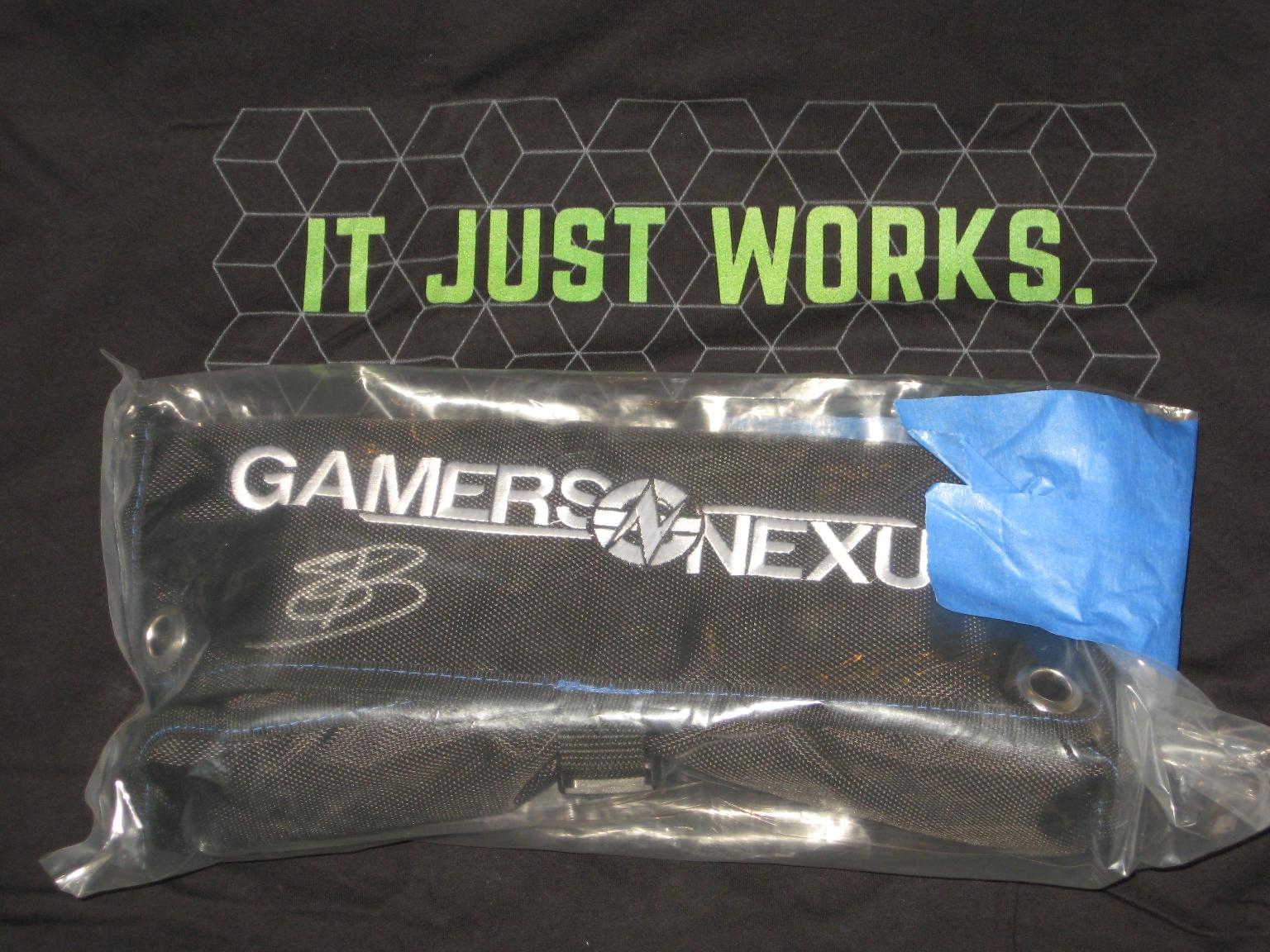
(at least the GN toolkit was worth it. That isn't the elusive GN mod-mat shampoo and Thermal paste conditioner shower kit, lol)
I recall when I had tossed something into a scene to test for Fisty, the fibermesh brows tended to hover a foot over the top of the figure in mid-air with some figure shapes. That was some time ago, and the best I could find retrying the experiment was this combo of Uki with Mika8 dialed in. I can't say that HP did wrong here, the fiber mesh brows do work with Uki as intended, and they were never intended to be used with other figure shapes.

For a tad over a year now, I had simply swapped out Uki's brows with Molly's brows when playing with kitbashing. Great set of brows with lots of adjustments if they detach from the forehead, and they include 3delight presets not just Iray.
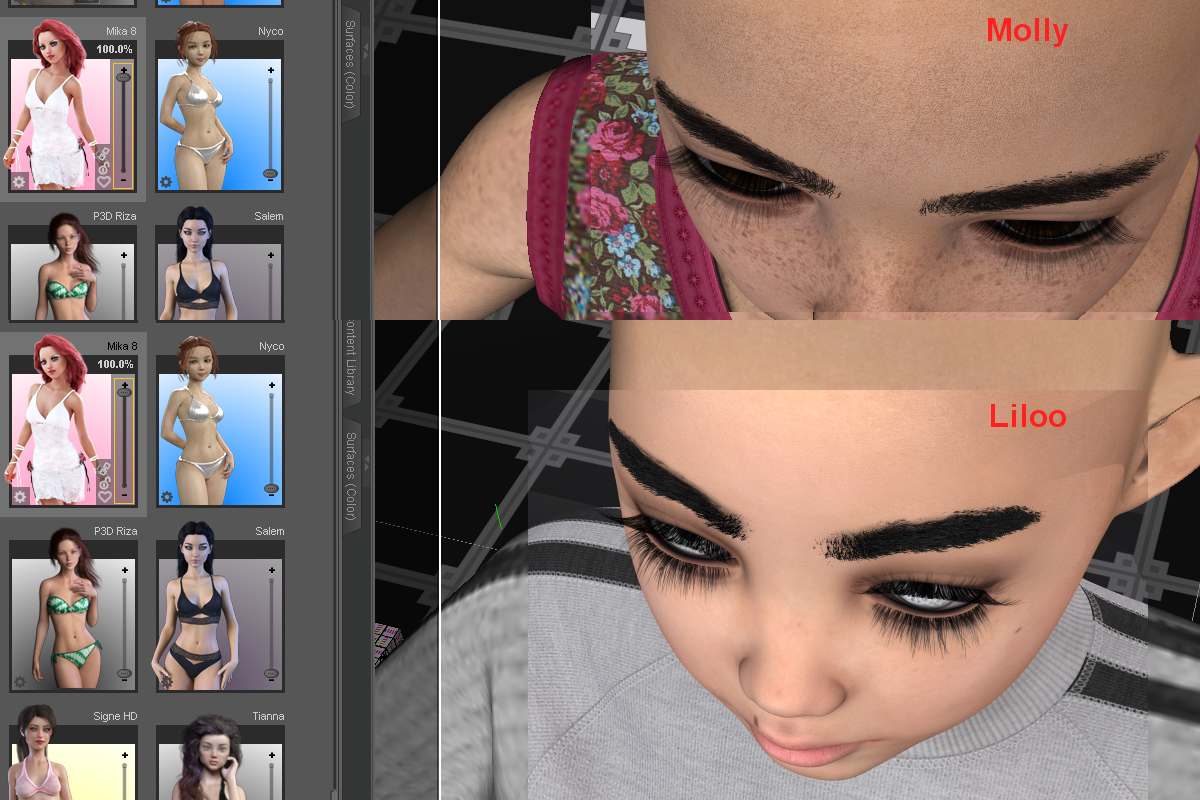
(screeching to a halt sound)
 uh, yeah, I'll get to Liloo in a second. As for Molly, as I was looking through folders triple-checking stuff regarding Liloo, I noticed that Molly also has them cool transparent makeup maps like GA Aryn and others I looked at the past few days. Just drop them into GIMP on top of the diffuse map to make your own makeup combination, I like that.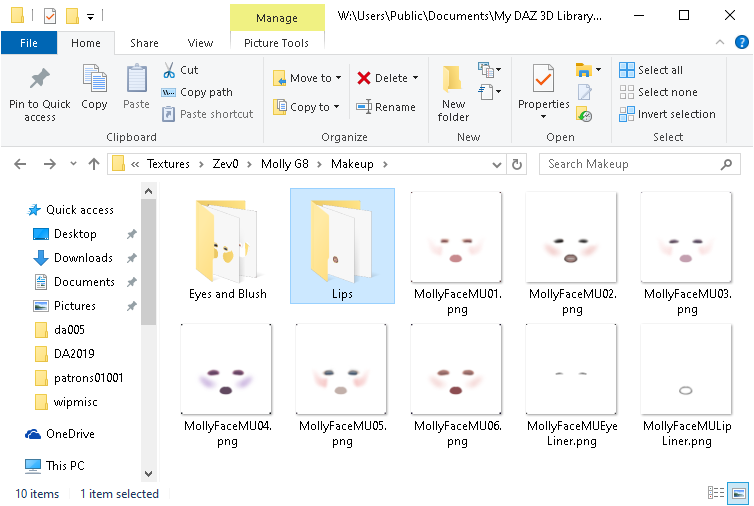
I decided for this, I would annex my use of Khloe's elf ears and diffuse eye map for Molly, and go with my failed attempt of dialing in an RGB value for brown, looks a tad more burgundy to me, oh well, still kind of looks cool. Being able to make ANY eye color I want is growing on me, that is cool.

So, left is Liloo with her only option, no makeup, no lipstick, or anything, just the bare minimum set of maps to do a render. I'm not even sure the color settings are correct because the Iray-to-3DL conversion lost ALL the dial strengths and color info. Right is Molly with her freckle mat option with fibermesh brows. And in the back was the latest purchase I decided to make for a bit of a reality check, Lilly with her only skin option (I didn't even bother doing a 3DL conversion or trying to apply the only 'Flush' makeup option). Liloo was a backburner item due to the lack of a 3DL listing on the product page (same with Lilly), and on the 3rd I decided why not toss some coffee funds Zev0's direction. I expected to have to do a 3DL conversion, however as I was pulling maps out of the folder into the surface tab, I kept looking around the baren folder tree and thinking "how much was this? where is the rest of it?", lol. There is the option of going to one of the other three or four figures I looked at recently that have transparent makeup maps and using them. However, that escalates this to the level of purchasing another 15 to 19 dollar complete figure, to use what wasn't included with a 25 dollar product.
let that sink in for a second. "purchasing another 15 to 19 dollar complete figure, to use what wasn't included with a 25 dollar product." 
 yeah. I did discover within the past few days, that Liloo and Lilly do include a costume foot shape morph dial, it's obscure and hidden. I don't normally think about feet, so I inadvertently overlook that when I was looking for any makeup mascara lipstick or eye color options for Liloo. To be clear, I don't have a problem with what little was included with the product, Liloo and Lilly do look good, they just feel a bit lackluster. And while the Liloo purchase was a bit of a token of thanks for the great work put into Molly, I do have considerable difficulty saying that less is worth more. Ok, said my two Farthings worth on that, not going to dwell, moving on. Hopefully, Zev0 does not 'hate' me for my honest thoughts on the pricing. Onto that Witchykin dress on Lilly.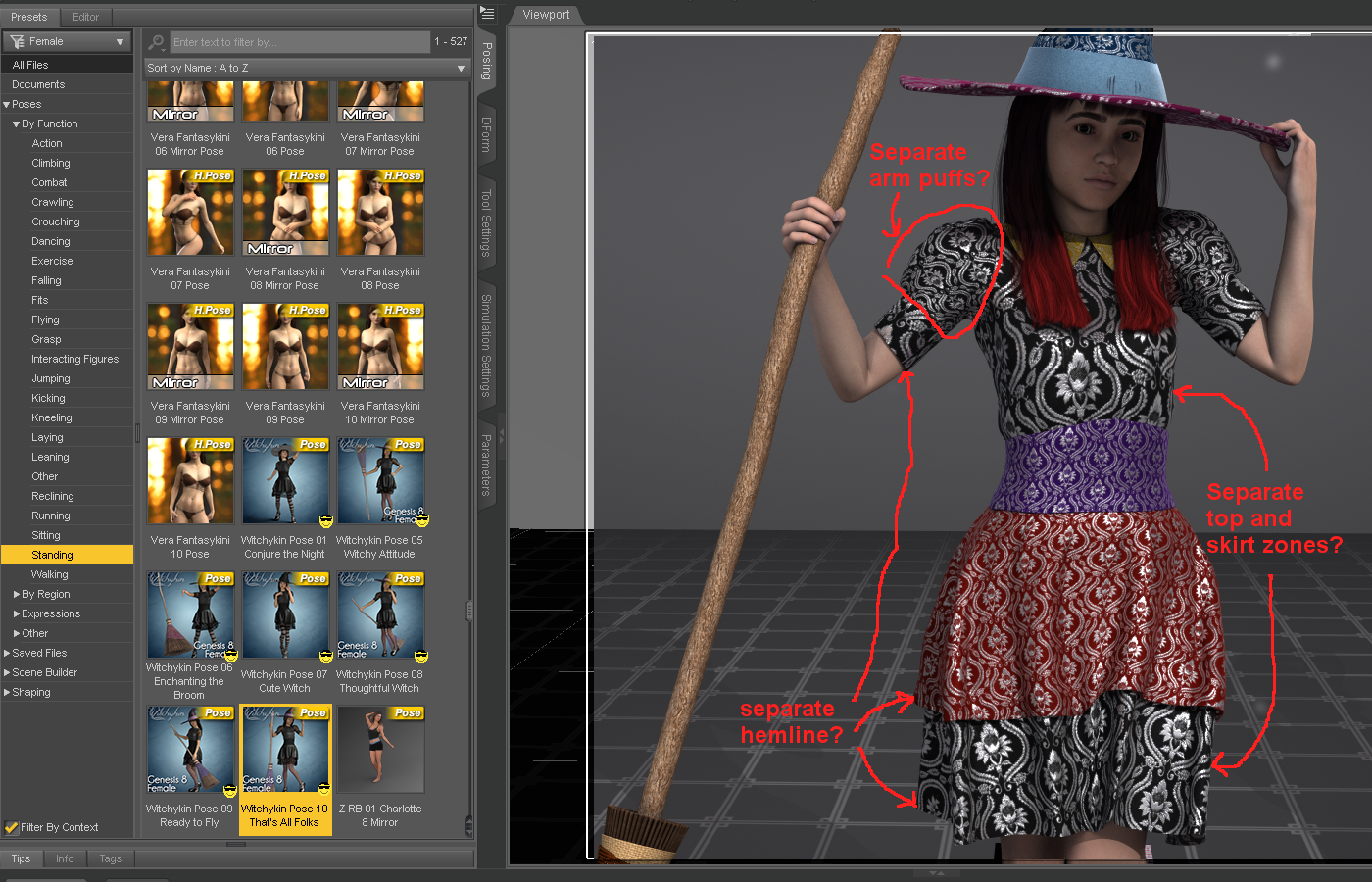
I kind of expected that dress to have a few more surface zone to work with. Because the dress is Iray only, my options are a tad limited. Thanks to Fisty and DestinysGarden I do have a few 3DL cloth shaders to work with, however, I kind of need surface zones to be in good locations to use them properly. The hat is set up well in that regard. As for the leggings not shown, I have some qualms about geo-shell things, because all too often PA's don't include maps for all the figure UVings that exist making them useless for so many things. Me and Fisty have agreed to disagree on the validity of Geo-shell outfit items, and she did have a good point about it being one of a very few ways to keep d-force clothes from snagging on the undergarments. If only PA's would include more than just the one UV set of maps. I was going to try this outfit on Kellyn originally, I still will, and in that circumstance, what's the point of having geo-shell lace underwear if it doesn't work with the equipment UV, because the maps don't exist for the Geo-shell on that UVing, lol.

EJ also has a blue figure that uses a Geo-shell for the blue skin effect (G3F Casiopea), the Geo-shell also doesn't work with equipment or other figure UV's because the Geo-shell maps do not exist for that UVing, lol. Because I don't have a single Geo-shell clothing item that includes maps for the equipment UVing (and they can be too conforming in locations for cloths), I prefer to have nothing to do with them, despite them being one of a very few ways to have d-force cloths work well over them. In any case, back to the witch dress, the Frolic set has leggings and underwear with appropriate zones to do cool stuff, so I may use that in the future with this dress (correction, the Keyhole stockings had the striped zones I was thinking of, Auto-fit to gen8 appears to look ok for them).

The Witchykin shoes, they look ok in passing, however, the disappearing toes, that is a no-no no no NOOOOOOOOOO. Baaaaad geo-grafting, bad bad.

making body parts disappear is a cheat at best this day and age, and it makes trying out outfit combinations a royal pain. There are better ways to tuck toes into shoes, like a foot pose and making sure the shoes actually fit Genesis. It's not all bad, I do like the poses the outfit came with, I've actually been fussing around with them poses a tad. The broom dress and hat do look ok, I do plan to play with them a tad more. (edit, oh, and thanks for making sure the normals are all facing outward so that I can see what I'm doing setting up surfaces on the outfit.)
On to other book-keeping. I have 3 major items that keep win10 from being a viable production OS for making stuff (been using the win7 FX8350 comp for that here).

I am happy to report that I am not nuts and the mouse random spasm behavior really was a problem (some claimed I was making it up), and the 1903 bug, rrrr, update (lol) appears to address that. So hopefully I can start playing with LAMH again on the GN R7 build. Things no longer flake out every other time I click the navigation tools in the top right of the viewport in Daz Studio, and I've yet to notice the entire scene tab getting 'selected' at random when trying to expand bone trees, so hopefully, that is fixed. (edit, one other thing that should be on that list even tho it's more of an annoyance rather than a No-Go show-stopper. Why do the taskbar and app right-click menus not appear half the time, and the rest it takes bloody ages to appear even if I set the "menu show delay" to zero seconds?)
Starfire hair! :) I needs it.Silent Winter: It is a custom head and body morph starting with the base G8F. The texture is just Aiko 8. Note that the image is a 3Delight render, so things would look a little different in Iray. The character is about 5'6" tall, which is why the hair is almost to the ground.
[Released] Character Converter from Genesis 3 Male to Genesis 8 Male (Now Conv JCMs) [Commercial]*thumbs up* Sounds great. I've had no major issues so far. I was actually able to get a Michael 4 GenX morph (Jepe's Jonah for M4) to carry over although it was trial and error till I finally got it right. ;-). It's not 100% perfect but looks fine to me. I'm not seeing any distortion except around the lower eyelid and it's a very trivial thing. I have to really zoom in to see it. The Genesis 3 men though have all looked perfect to me. Changeling Chick's Cillian on G8 looks flawless.Fantastic! Thanks for sharing. I am sure there are people keenly interested.
 This and That
Keller - Prisoner Secured
Robotic female voice - "Transferring call to Colonel Marsh."
"Marsh here, report."
"Prisoner secured sir, I've sent for Bell to pick us up."
"Good job Keller, any problems?"
Keller kept silent for a few beats as he glanced at the two soldiers he had put as guards for the prisoner, neither of them moving yet he could clearly read the concern and shame in their faces and their body language.
"Nothing I couldn't handle sir." A brief smile played on his lips as a memory surfaced.
The other line was silent before a chuckle came through, amusement clear in Marsh's voice as he spoke.
"Those words sure bring back memories" another chuckle were heard before he countinued "Report to me when you are back at base, Marsh out."
"I'll be there, Keller out." Keller half turned to look at the two soldiers, and when he spoke none of the earlier amusement were heard. "Eleven years ago two other soldiers were in a similar situation as you two, they worked it out and went on to make good progress in the unit and climbed the ranks. This is your one and only chance, don't let me down."
The two soldiers looked at eachother for a moment, than back at their current squad leader, before one of them finally asked "Who were those soldiers, sir?"
Keller smirked lightly as he turned around to watch as the pick up squad arrived, his voice deeply amused as he finally replied "Me and Marsh."
Now for some item info :)
The female is Aureska Hol by JoLab1985, the other guard is pure Christian by Darwins Mishaps, and Keller is a morph mix between Giovanni - 20%, Ishimoto - 50% (both by Darwins Mishaps) and Ravi 50% (by RedzStudio) with Ravi's textures
I really like Darwin's guys, though his Christian is so far my favorite of those on his own, I do love mixing some of his boys into characters I morph myself, like with Keller here. Ravi is another one of my favorites, and one I also tend to use a lot :)
Keller - Downtime
Colonel Marsh and his second in command, Commander Keller, is having some food in the cafeteria when two unruly recruits approach them for a brawl. For a moment the two simply look at the recruits, than the eyes of Keller and Marsh meet and with a chuckle from Keller they accept the challenge.
The two recruits have not yet realised whom exactly they have challenged, but they soon find out they are in way over their heads.
Here we have another morph of mine, Marsh is a mix between Liam 65% (Darwins Mishaps), Kyle 20% (Darwins Mishaps), CC Foster 15% (ChangelingChick), Ryker 20% (RedzStudio). Using Liam's textures
Maisie for Teen Jane 8 name conflict fixedI wondered why it was updated, now I know thanks.
BTW, you get the same thing with Leopold and Leopold HD for Genesis 8 Male. They both have the morph named as Leopold. Had a response from Customer Service saying they could duplicate my error but not updated yet.
Novica & Forum Members Tips & Product Reviews Pt 12No one else has an image of Ginevra? Okay, here she is, loaded straight from the character menue, and unmodified except for a slightly asymetric smile (I added a little 'Side to side' morph).
EDIT to add that here I only used the headlamp for lighting.
https://www.daz3d.com/ginevra-hd-for-genesis-8-female
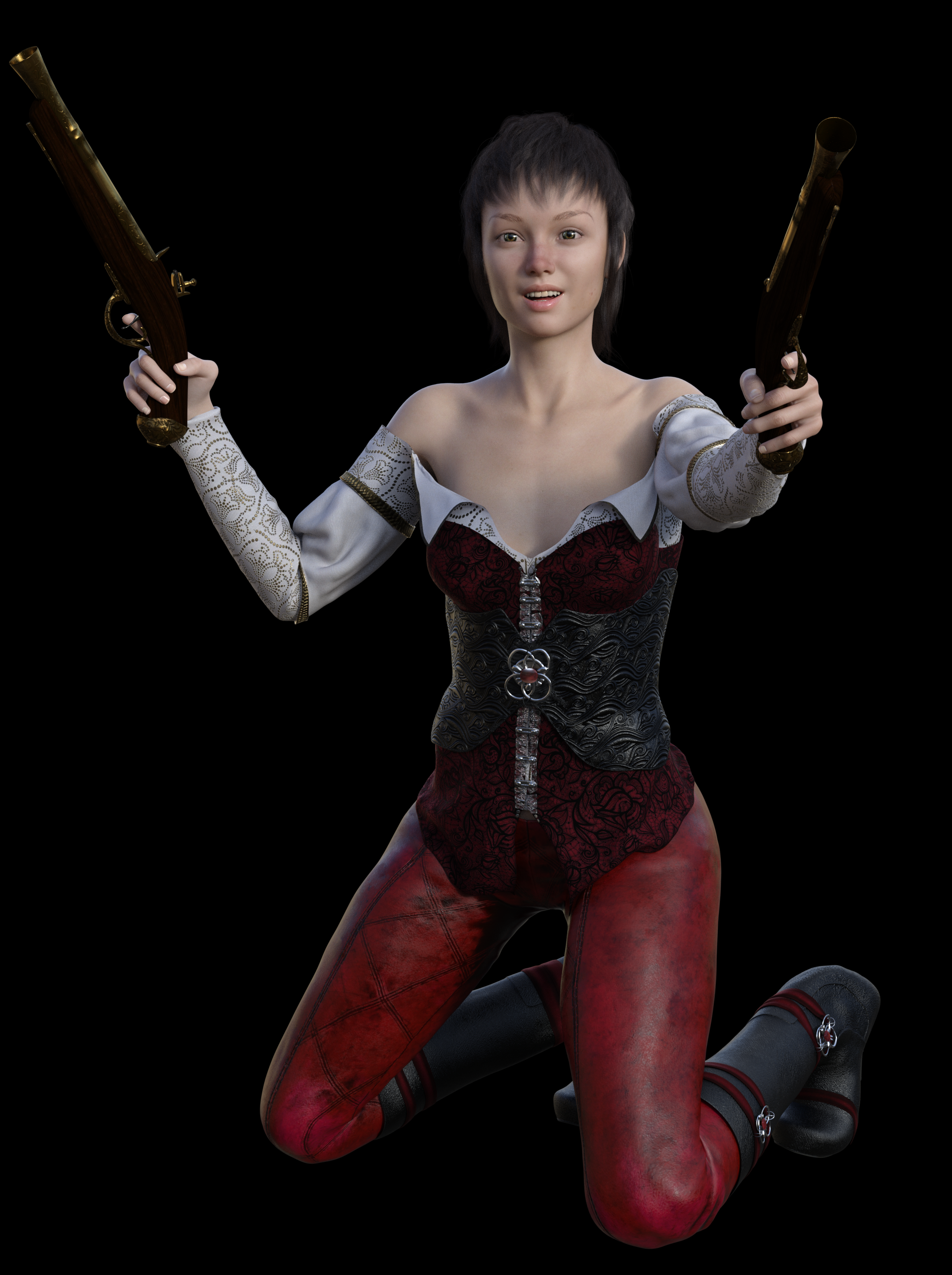
She has a lovely, natural pale skin, with few freckels, 'cos sometimes you don't want freckles

It's really nice to have that no-makeup look too- no blush built in to the natural skin. Thanks for showing her, that simple lighting compliments her perfectly!
LIE Face Bruises for Genesis 3 & 8 [Commercial]May I suggest a few morphs for making a "Mouse" which is a gathering of blood around an area. Boxers often have them lanced at ringside if they are around the eyes and inhibiting vision. Maybe some more massive swelling morphs and some fat lips. Some bloody noses would be great too. :)
You can do a search on Google for "facial damage from boxing and mma" but I MUST WARN YOU., It is VERY graphic and not for the feint of heart.
Oh, I've seen them! To be honest, looking at bruises references was rather depressing with the amount of childrens' photos that came up :(. But I digress, we actually had planned to include a few "swollen" morphs to this pack but my modeller is tied up with our other product. So we decided to move that back so the pack could be sold for both males and females.
Later on we'll do a morph pack which will include swollen areas for both the face and body (or at least that's the plan later down the line).
[Released] Character Converter from Genesis 3 Male to Genesis 8 Male (Now Conv JCMs) [Commercial]*thumbs up* Sounds great. I've had no major issues so far. I was actually able to get a Michael 4 GenX morph (Jepe's Jonah for M4) to carry over although it was trial and error till I finally got it right. ;-). It's not 100% perfect but looks fine to me. I'm not seeing any distortion except around the lower eyelid and it's a very trivial thing. I have to really zoom in to see it. The Genesis 3 men though have all looked perfect to me. Changeling Chick's Cillian on G8 looks flawless.Can I opt out of DAZ Connect and just have the same items through DIM?How easy is it to transfer iems installed via DAZ Connect into standard Content Library? Can someone give me a walk through?
I made the mistake of using connect once, and then when I moved computers, I couldn't transfer the items across. As far as I remember you have to do it one item at a time. It's a really cumbersome process and will keep the items in the connect library. Best just to delete it all and redownload it through DIM.
Exactly.
I erase all in connect folder and download the dim stuff. Connect making useless updates was a boring task, all my groups labels were constantly erased. I have a pretty basic code to make (and remake) my own metadata and I want organize the user folders (I know there are a "file mirror system" for this, but mantaining track for this is too much boring), under connect this is not nicely possible.
Proper Anthro CharactersWhen artists and fans have very different opinions about foot design, ranging from completely plantigrade (flat, human feet) to so extremely digitigrade (standing upon one's toes) that the shin section is maybe a third the length of the thighs and foot arch region (individually) and held in a completely horizontal position, that makes designing and rigging all the more difficult. Any choice made will drive some people to say "It too human looking" while others will argue "It's too animalistic!"
Thankfully, I found the nearly perfect figure (for my needs, anyway, if not somebody elses) years ago, Lady LittleFoxe's "Melody for Aiko 3" and the male counterpart "Micah for Hiro 3". When Beth Capsces released her morph sets "Furries for...", I feel they struck gold.
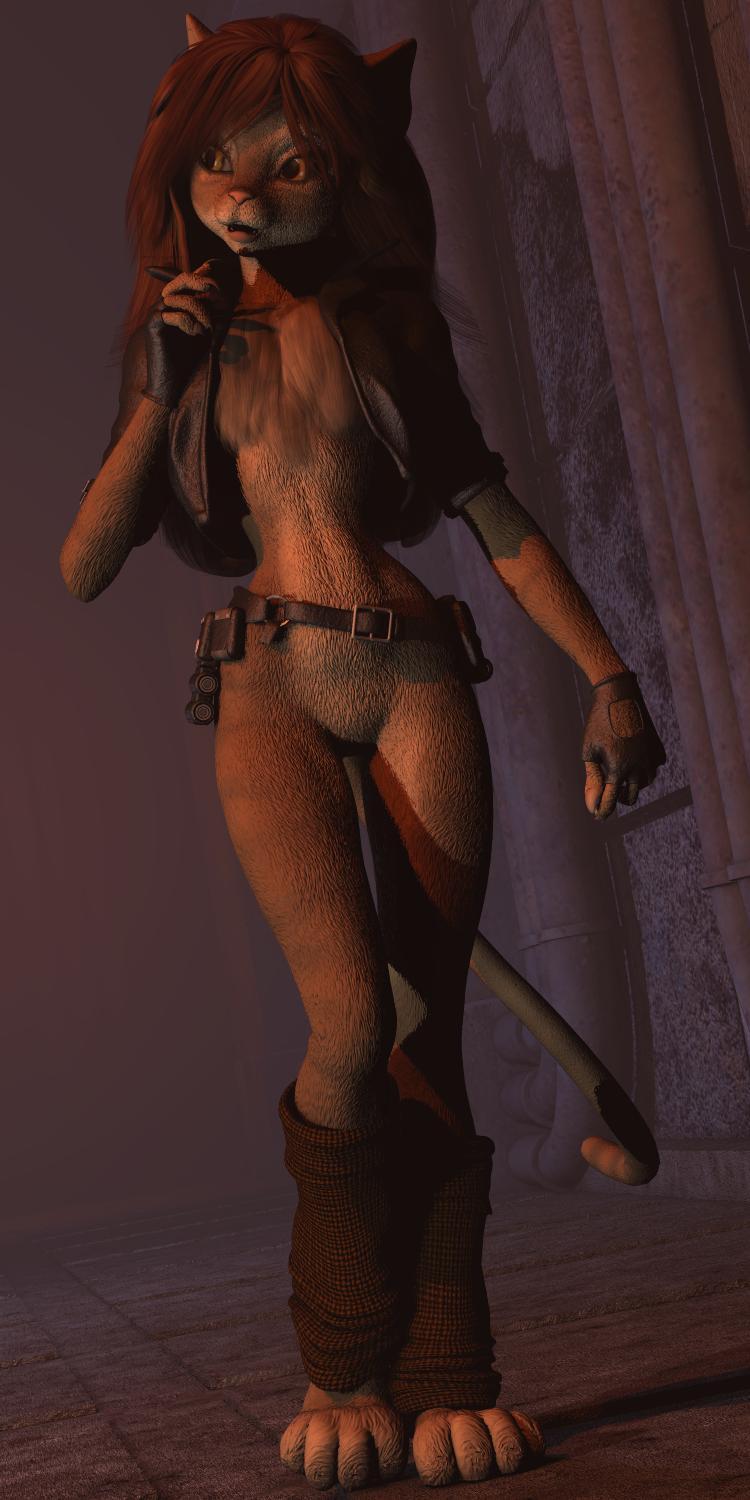
From a purely subjective view, I feel these character meshes have yet to be surpassed.
Sincerely,
Bill
[Released] RSSY Clothing Converter from Genesis 2 Female to Genesis 8 Female [Commercial]I ran into a weird issue with the Shifting Images Fantasy Wrap for G2F: https://www.daz3d.com/fantasy-cloth-wrap-for-genesis-2-female-s
The converter killed every motion morph in every part of the outfit dead. Every single one. It's as though it was sent through Autofit (which also kills the morphs dead). I'm not sure if there's anything I can do to make it work better, or if this is just one of those weird clothing items that doesn't work.
And just to make things weird, the "Ignore previously converted files" is not working when I try to "Add Directory". I wanted to send the Fantasy Cloth Wrap through again to see if maybe picking something other than the Bodysuit conformer might help. Whether "Ignore" is checked or unchecked, I get the "No NEW Clothing detected" popup, and it refuses to add the items to the converter. It does seem to allow it when I add items individually. Is that intended, or is that a bug of some sort?
Hmmm. I don't have that item.
Was the script able to detect the wrap BEFORE it was converted and DOES NOT now? Or did it never detect it?
The script detected all of the wraps just fine the first time. It added them to the queue, ran the converter, everything seemed to go fine, until I realized that all the morphs were dead in every piece of the set. (Kind of surprising, that; you'd think that maybe one or two of the pieces would be OK, but it just killed them all.) When I tried to add them to the converter again to see if maybe reconverting would work, it refused to allow me to add the directory again, but did allow the individual items.
I tried the cape converter on the body wrap the second time. All morphs still dead.
(Incidentally, the G2M hair converter did the same thing to AprilYSH's Milen Hair -- the G2 version of the hair has lots of motion morphs, and every single one of them got killed dead when sent through the G2M-G8M hair converter. Maybe there's something about the G2 generation of stuff that's weird or quirky?)
Hmmm. That is very strange. I wonder what is different about them? Because you are able to convert other clothing and hair items for G2 and not lose morphs, correct?
(BTW, can you post the Daz log for when you try to add them again? I want to figure out what is going on there too)
[Released] Character Converter from Genesis 3 Female to Genesis 8 Female(Now Conv JCMs) [Commercial]Hi Riversoft!
I seem to be able to use the Scene converter, but not the batch converter ("Character Converter"). When I input a directory, it only identifies things like horns - which your wonderful tutorial vid said the check was specifically supposed to avoid. No characters are identified or listed. Any thoughts? I did note that in your vid you say that "preset shapes" aren't handled by the product? Since I use the Content Library almost exclusively, this is what I'm used to applying to characters (preset shapes)..
Apologies if this is a simple mistake on my part!
Yes, for the main script, preset shapes do not work. The script wants to LOAD a character, not change a character already loaded into another shape. When you use Add Dir, does the directory have messages about skipping files that you know are character presets? My guess is your log is full of messages like:
2019-08-01 17:20:38.214 DEBUG: SKIPPING "Actor" file: D:/Documents/My DAZ 3D Library/People/Genesis 3 Female/Characters/Chara Centaur.duf
2019-08-01 17:20:38.095 DEBUG: SKIPPING "Preset/Materials" file: D:/Documents/My DAZ 3D Library/People/Genesis 3 Female/Characters/Xolani/Materials/Xolani Translucency Medium.duf
2019-08-01 17:20:38.096 DEBUG: SKIPPING "Preset/Morph/Apply/Head" file: D:/Documents/My DAZ 3D Library/People/Genesis 3 Female/Characters/Xolani/Xolani 1 Head.duf
2019-08-01 17:20:38.095 DEBUG: SKIPPING "" file: D:/Documents/My DAZ 3D Library/People/Genesis 3 Female/Characters/Xolani/Materials/Xolani Translucency Medium.duf
The quotes after the "SKIPPING" keyword should contain the metadata that Daz Studio thinks a file is. If it is blank, "", then no metadata is found. Some users, for whatever reason, have Daz Studio get corrupted and it reports "" for files that it should be reporting as
2019-08-01 17:20:35.791 DEBUG: Adding "Actor/Character" file: D:/Documents/My DAZ 3D Library/People/Genesis 3 Female/Characters/Skinchangers/Skinchangers Wolves.duf
If so, you are one of the users where Daz Studio is not returning the correct metadata. In that case, you need to uncheck "Check Content Type" option and use Add Files to add those character presets.
Feet HD Detail (Or Lack Thereof)I've seen the new Liloo HD comes with an interesting custom foot morph. Does anyone know, if it can be applied seperately to other characters?
There's a "Liloo feet add/remove" listed on the product page, so there's a good chance.
late to the chat, and I happen to be looking at the somewhat lackluster options for Liloo (compared to the cheaper priced Molly). While there is indeed an on and off preset in the figure content library folder that does do something to the feet. I am unable to locate a foot anything dial anywhere (visible or hidden, shaping or parameters tab) associated with that set of presets. it also doesn't appear to be moving the foot bones to change the shape. I'm not sure what voodoo is at work that lets a duf apply a shape without a shaping dial associated with it, last time I had seen that, was on/off only figure shapes back on generation 6. So, unfortunately, it would appear to be an on or off only setting (no variation of strength available there). ... Late eavning caffeine deprived mistake, Thanks J.
FYI. Lilly also has the on/off (edit, rrrr, hiden dial) foot thing, and she costs a few dollars cheaper than Liloo (and you at least get a face makeup 'flush' option). Molly doesn't appear to have the foot options, only just about everything else the other two lack (shy of eye color options other than gray/hazel. they all lack eye colors. guess you set your own RGB values for that, can be kind of cool).
Novica & Forum Members Tips & Product Reviews Pt 12I don't have DE Elina, Ginevra, or Dragon Empresses. If you folks ever get around to rendering them, feel free to share here. (Or anyone else who wants to render them.)
No one else has an image of Ginevra? Okay, here she is, loaded straight from the character menue, and unmodified except for a slightly asymetric smile (I added a little 'Side to side' morph).
EDIT to add that here I only used the headlamp for lighting.
https://www.daz3d.com/ginevra-hd-for-genesis-8-female
https://www.daz3d.com/riviera-hair-for-genesis-3-and-8
https://www.daz3d.com/dforce-ruby-june-outfit-for-genesis-8-females
https://www.daz3d.com/blunderbuss-and-poses-for-genesis-3-and-8-male-s-and-female-s
NOTE: large image (2390 x 3200)
She has a lovely, natural pale skin, with few freckels, 'cos sometimes you don't want freckles
Character creation/saving... help ?Yes this looks right.
However this sentence in your first post confused me.
saved the morph assets (wish there was an option to just select which dials are in use)
I thought you have somehow remebered which morphs where used for creating your character and you had checked all of them in the Morph Asset SAve dialog. If so you may have already messed up the morph assets.
It took 5 screenshots to make the list, but yes i went through and ticked the 'right' boxes...
Saved the character preset, and still nothing for my character when i load a new Genesis 8 character in. How peeps get this to work when they're making new characters for sale puzzles me
Character creation/saving... help ?Yes this looks right.
However this sentence in your first post confused me.
saved the morph assets (wish there was an option to just select which dials are in use)
I thought you have somehow remebered which morphs where used for creating your character and you had checked all of them in the Morph Asset Save dialog. If so you may have already messed up the Genesis 8 Female morph assets within you Content Library.
Don't worry this is not irreversible becasue Daz Studio does not delete any morph assets you may just have them saved twice (you can check if you get a "duplicate assets found" messages by loading the genesis 8 Female figure). To fix this issue just open your file browser, navigate to the Content Library path you have saved the morph assets in and delete all the DSF files within your Vendor/Product name folder except the one storing Senka 8. Then restart Daz Studio and see if the error messages are gone by loading up Genesis 8 Female.
But if there was an option to select only dials in use you must have been in some other dialog maybe for saving a Character Preset. Most of those preset save dialogs have this option button on the top right to select only currently used morphs but not the Morph Assets Save dialog. The "only select currently used morphs" option is useful if you want to create "non destructive" Shape/Character presets that do not reset all other not in use morphs of the figure to zero if applied.
After reading my first post again I realized what may have confused you and why you asked if you have to save the Morph Asset twice.
After you have saved the Morph Asset, dial up your new Character Control Property (Senka 8) and then you can save out a Character Preset in the Content Library pane on the plus button at the bottom of the pane (the current material settings can be saved along with a character preset). But this time the Character Preset will include the information to dial up your new Character Controller and not all individual morphs this character is made of.
Problem applying morph to rigged prop.Nice I know this video I saw it once years ago but couldn't find it anymore.
Becasue of that I made my own youtube videos. The most viewed is this one
but I also made this video series about rigging a GeoGraft headpice.
Regarding GoZ I did a quick test, loaded the simple rigged cylinder in a posed position send it to ZBrush, had to configure the Daz Studio Path in the Preferences again but after that I was able to hit the GoZ button in ZBrush and I saw the new GoZ import dialog with the Reverse Deformation setting in Daz Studio and everything went fine no deformations the morph showed up on the cylinder as I've sculpted it in ZBrush.
I am using Daz Studio 4.10.0123 and the GoZ plugin version 1.7.0.123 have looked up this in the Daz Studio Help>About Installed Plugins.
[Released] RSSY Clothing Converter from Genesis 2 Female to Genesis 8 Female [Commercial]I ran into a weird issue with the Shifting Images Fantasy Wrap for G2F: https://www.daz3d.com/fantasy-cloth-wrap-for-genesis-2-female-s
The converter killed every motion morph in every part of the outfit dead. Every single one. It's as though it was sent through Autofit (which also kills the morphs dead). I'm not sure if there's anything I can do to make it work better, or if this is just one of those weird clothing items that doesn't work.
And just to make things weird, the "Ignore previously converted files" is not working when I try to "Add Directory". I wanted to send the Fantasy Cloth Wrap through again to see if maybe picking something other than the Bodysuit conformer might help. Whether "Ignore" is checked or unchecked, I get the "No NEW Clothing detected" popup, and it refuses to add the items to the converter. It does seem to allow it when I add items individually. Is that intended, or is that a bug of some sort?
Hmmm. I don't have that item.
Was the script able to detect the wrap BEFORE it was converted and DOES NOT now? Or did it never detect it?
The script detected all of the wraps just fine the first time. It added them to the queue, ran the converter, everything seemed to go fine, until I realized that all the morphs were dead in every piece of the set. (Kind of surprising, that; you'd think that maybe one or two of the pieces would be OK, but it just killed them all.) When I tried to add them to the converter again to see if maybe reconverting would work, it refused to allow me to add the directory again, but did allow the individual items.
I tried the cape converter on the body wrap the second time. All morphs still dead.
(Incidentally, the G2M hair converter did the same thing to AprilYSH's Milen Hair -- the G2 version of the hair has lots of motion morphs, and every single one of them got killed dead when sent through the G2M-G8M hair converter. Maybe there's something about the G2 generation of stuff that's weird or quirky?)
Daz 3D is part of

Connect
DAZ Productions, Inc.
7533 S Center View Ct #4664
West Jordan, UT 84084Licensing Agreement | Terms of Service | Privacy Policy | EULA
© 2026 Daz Productions Inc. All Rights Reserved.