-
Pixeluna cyborg skins help
https://www.daz3d.com/pix-cypher-for-genesis-3-male
Does this cyborg skin texture work on other character morphs, or just with the character morph that comes with the product?
Opinions on Marvelous Designer Video Tutorial?The next tutorial is finished with the following chapters...
- Design Considerations
- Retopology in MD and ZBrush, ZBrush Projections
- MD Exporting, Morphs, ZBrush Normal Map Creation
- MD Morphs, Rigging Daz JCM's, MD Morph Targets
- Daz Rigid Follow Nodes, MD Draping, Creating Character Fittings
Maybe a week or two for video editing and "stuff"

Sorry, but the emphasis on ZBrush takes it out of reach for me. MD was a big hit for my budget, ZBrush is impossible.
Marble, I show you how to do it all inside of MD without going to ZBrush...working inside of ZBrush is an option/choice not a necessity.
 HFS Ultimate Shapes Bundle Question
You might want to double check the Cayman Studios texture utilities. HFS did a package of fantasy races for G1 which included Catfolk, Dwarves, Elves, Fauns, Orcs and some others that I think are from SF. That package included textures, as well. They were 3DL and for G1, but the transfer might work.
Babina 8Anybody know what the straight long hair is for Babina 8 promo with the light blue 2 piece swim suit. Appears to be redish brown hair.
@Siciliano1969 dForce Longdrape Hair for Genesis 3 and 8 Female(s). May I suggest an off-center parted scalp/hair cap to avoid the balding look on those promos IF you can find one that lines up.
@xyer0 how can this be done, with the hair caps? This Dforce long hair is pretty sparse at the scalp

@ALLIEKATBLUE I don't have that hair, but if I did, I would look for a hair with a believable hairline (which unfortunately narrows the choices severely). Comb through (pun intended) any AprilYSH, Mairy, or SAV hairs that you have in order to find a hair that has a part in the same place as the PhilW hair (and also has a hairline height morph). Some Mairy hairs have movable parts or mirrored versions. Once you find a few candidates, pick the most likely, load it, and apply a hair colour close to the one you intend to use on the PhilW hair. Uber convert to Iray if necessary. Go to Surfaces and turn off the Cutoff Opacity on all the surfaces EXCEPT the scalp/hair cap (or whatever it's called on your chosen hair). Now morph it until you get the hairline and part lined up with the PhilW hair. It IS theoretically possible, but you have to find a hair with a part in the right place or morphable.
[Released] Character Converter from Genesis 3 Male to Genesis 8 Male (Now Conv JCMs) [Commercial]*thumbs up* Sounds great. I've had no major issues so far. I was actually able to get a Michael 4 GenX morph (Jepe's Jonah for M4) to carry over although it was trial and error till I finally got it right. ;-). It's not 100% perfect but looks fine to me. I'm not seeing any distortion except around the lower eyelid and it's a very trivial thing. I have to really zoom in to see it. The Genesis 3 men though have all looked perfect to me. Changeling Chick's Cillian on G8 looks flawless.Did you carry it over from M4 to Genesis 1, then to this Character Converter product, or, as I'm guessing, from a higher version of Genesis, such as Genesis 3?
Question on a new Windows laptopSo far I've only been using daz with Macbook and this will be my first Windows machine.Welcome to the Dark Side.
 1. Should Daz content be fine on a Hard drive (SSD is only 250gb compared to 1TB of 7200 rpm on hard drive) or should I get an external SSD?
Should be fine on the SSD, but 250Gb is awfully small, so eventually you'll want to migrate to a larger drive. Might as well do it up front and skip the pain later. Personally, I've got my library on an 5400 rpm external HD, and I don't find the transfer speed to be an issue. YMMV.
3. Do I have to update the NVIDIA drivers (I read somewhere people encountered issues after updating and had to downgrade, a process I am not familiar with at all)?Try it with the installed driver first. If it works, consider leaving it. If you DO decide to update the driver, create a restore point first in case the update borks something. (I upgraded the driver and ran into an issue that DAZ tech support is still trying to help sort out.) NVIDIA builds a clean install capability into their driver installers, so it's easy to downgrade if you do run into a problem with an update, though.
4. Is it okay if I continue using Daz and the content on my old Macbook (the TOS are not specific about that but I thought it's worth checking)? Thanks a lot, I appreciate any advice or any of the questions above.Without taking the time to check the EULA, you'll probably be OK, provided that you're only running one device (Macbook or Windoze) at a time.
Opinions on Marvelous Designer Video Tutorial?The next tutorial is finished with the following chapters...
- Design Considerations
- Retopology in MD and ZBrush, ZBrush Projections
- MD Exporting, Morphs, ZBrush Normal Map Creation
- MD Morphs, Rigging Daz JCM's, MD Morph Targets
- Daz Rigid Follow Nodes, MD Draping, Creating Character Fittings
Maybe a week or two for video editing and "stuff"
Sorry, but the emphasis on ZBrush takes it out of reach for me. MD was a big hit for my budget, ZBrush is impossible.
Please List Items Used In PromosI try to list as much as I can but it really is difficult sometimes. I set something up, change it, discard it, load something else, change that too - really hard to keep track of that, especially with poses.
You also seem to assume that we use things out of the box so we could link to a specific product, but most of us don't. I sometimes make a background prop specially for a promo, or I put a custom texture on something. Or I use one character's skin and a combination of several morphs at low values for the face. Do you really expect me to write down a list of what morph I used at which percentage? For each promo? (I usually use different characters in my clothing promos so the list would be rather long.)
Sometimes I layer hairstyles, hide some parts or add custom morphs to adjust the hair to my needs. With lighting, I usually use a combination of an HDRI or the Iray sun plus manually placed spots or emissive planes. How should I even begin to list that? *scratches head*Setting up a complete How-to-replicate-this-render guide is impossible, giving a list with the main items is time-consuming enough. If you really want to know something and can't find it you can always ask here in the forum.
What is particularly frustrating is when I get inquiries about the stuff I used when it's an item I didn't change and which is clearly listed in the Products Used section. It seems the more products are listed the less willing people are to check out those links. That really makes me ask myself why I even bother...
I'll still do my best to list what I used, though, within the limitations described above.I know that when I save a scene and then afterwards a render of it, I save them both as (here is made up example) G8 TJane Mix V8 skin SB Leni Hair SBC pants H&C Hoodie. SB is Skin Builder. The file names can get long though and for a PA they could have a computer text file or even write down with a pen on a pad what was used for the promo while they are creating it. I don’t think anyone is asking for what was the exact mix was for a custom character but maybe just the main character with “mix” after it or if Daz allows it, just put “custom character, V8 skin with Skin Builder or Custom Skin. Maybe the OP wants to recreate the promo but most of us just want to know if they can buy a product in the Daz store or even if they already own it and forgot lol.
Please List Items Used In PromosI try to list as much as I can but it really is difficult sometimes. I set something up, change it, discard it, load something else, change that too - really hard to keep track of that, especially with poses.
You also seem to assume that we use things out of the box so we could link to a specific product, but most of us don't. I sometimes make a background prop specially for a promo, or I put a custom texture on something. Or I use one character's skin and a combination of several morphs at low values for the face. Do you really expect me to write down a list of what morph I used at which percentage? For each promo? (I usually use different characters in my clothing promos so the list would be rather long.)
Sometimes I layer hairstyles, hide some parts or add custom morphs to adjust the hair to my needs. With lighting, I usually use a combination of an HDRI or the Iray sun plus manually placed spots or emissive planes. How should I even begin to list that? *scratches head*Setting up a complete How-to-replicate-this-render guide is impossible, giving a list with the main items is time-consuming enough. If you really want to know something and can't find it you can always ask here in the forum.
What is particularly frustrating is when I get inquiries about the stuff I used when it's an item I didn't change and which is clearly listed in the Products Used section. It seems the more products are listed the less willing people are to check out those links. That really makes me ask myself why I even bother...
I'll still do my best to list what I used, though, within the limitations described above.Rigging & Weight Map Tutorials?@DarkEdgeDesign is working on a new tutorial : https://www.daz3d.com/forums/discussion/comment/4882106/#Comment_4882106
The next tutorial is finished with the following chapters...
- Design Considerations
- Retopology in MD and ZBrush, ZBrush Projections
- MD Exporting, Morphs, ZBrush Normal Map Creation
- MD Morphs, Rigging Daz JCM's, MD Morph Targets
- Daz Rigid Follow Nodes, MD Draping, Creating Character Fittings
Making your own face morphs for daz figures in external modellerIf you have the ability to freeze, yes. I normally export with surfaces and select the face and lips and then invert and freeze. If working with G8, export at base level and don't export the lashes. Remember when you import through Morph Loader Pro (MLP) you figure must match the same resolution and what's visible as when you exported. Leave in A-Pose. If you are using the base with no other morphs, you can MLP without reverse deformation.
Doncha just love when that happens?I've never tried to model in DAZ Studio but I thought you model your shorts in this case, position them where the G8M is going to where them and then transfer all that rigging, morph, JCM, MCM, and whatever to the shorts & presto you're magically done?
Transferring a donor rig to another item...How do you transfer rigging when you can't select the donor AND the donee? It won't allow me to.
If I were paranoid I'd think Daz was designed to drive me crazy every time I try to learn how to use it.
Maisie for Teen Jane 8 name conflict fixedpretty sure i've seen one for morphs, in the 200 and daz ones; i'm going to check whilst i think about it. :)
It is the Natalie head morph.
Cause this is only a single head morph it could be fixed easily by changing the calls "Natilie" in "Natalie_200" in the Natalie.dsf and rename it to Natalie_200.dsf
Making your own face morphs for daz figures in external modellerHi,
found some tutorials about this topic but I'm missing two major things.
How to handle "inner" parts of the mesh like eyeballs, teeth etc. while morphing/ sculpting the outer mesh ?
Do I simply lock/ freeze these parts in the modelling program and resize/ translate them later if needed ?
What if I have sized/ translated these parts and import my morph into Daz, is "adjust rigging to shape" enough to make everything work properly ?
Any help or links to tutorials or threads are appreciated.
Starfire hair! :) I needs it.Silent Winter: It is a custom head and body morph starting with the base G8F. The texture is just Aiko 8. Note that the image is a 3Delight render, so things would look a little different in Iray. The character is about 5'6" tall, which is why the hair is almost to the ground.
Ah cool - good job
 Rigging & Weight Map Tutorials?
Hey all,
Can anyone recommend any tutorials (videos or written) on rigging and weight mapping? I've started experimenting with the Transfer Utility tool, and notice that hanging clothing is catching to different bodyparts. I don't know that much about rigging and weight maps, and would like to expand my knowledge.
Thanks in advance!
[Released] Character Converter from Genesis 3 Male to Genesis 8 Male (Now Conv JCMs) [Commercial]*thumbs up* Sounds great. I've had no major issues so far. I was actually able to get a Michael 4 GenX morph (Jepe's Jonah for M4) to carry over although it was trial and error till I finally got it right. ;-). It's not 100% perfect but looks fine to me. I'm not seeing any distortion except around the lower eyelid and it's a very trivial thing. I have to really zoom in to see it. The Genesis 3 men though have all looked perfect to me. Changeling Chick's Cillian on G8 looks flawless.Alright, alright. We need some pics. :) I would LOVE to see the end products! :)
ZDG random Daz Studio discoveries and questions.ok, not dragging my feet anymore. I've reconsidered some of this and come to the stark conclusion that there is just no sugar coating some things. the rest is intended as constructive criticism. Some of this does pain me considerably to say, because I know intimately how difficult things can be when morphs maps and UVing just refuse to cooperate when making something. I'm also not sure if someone at Daz started drinking the Nvidia cool-aid of charging more for less is ok.
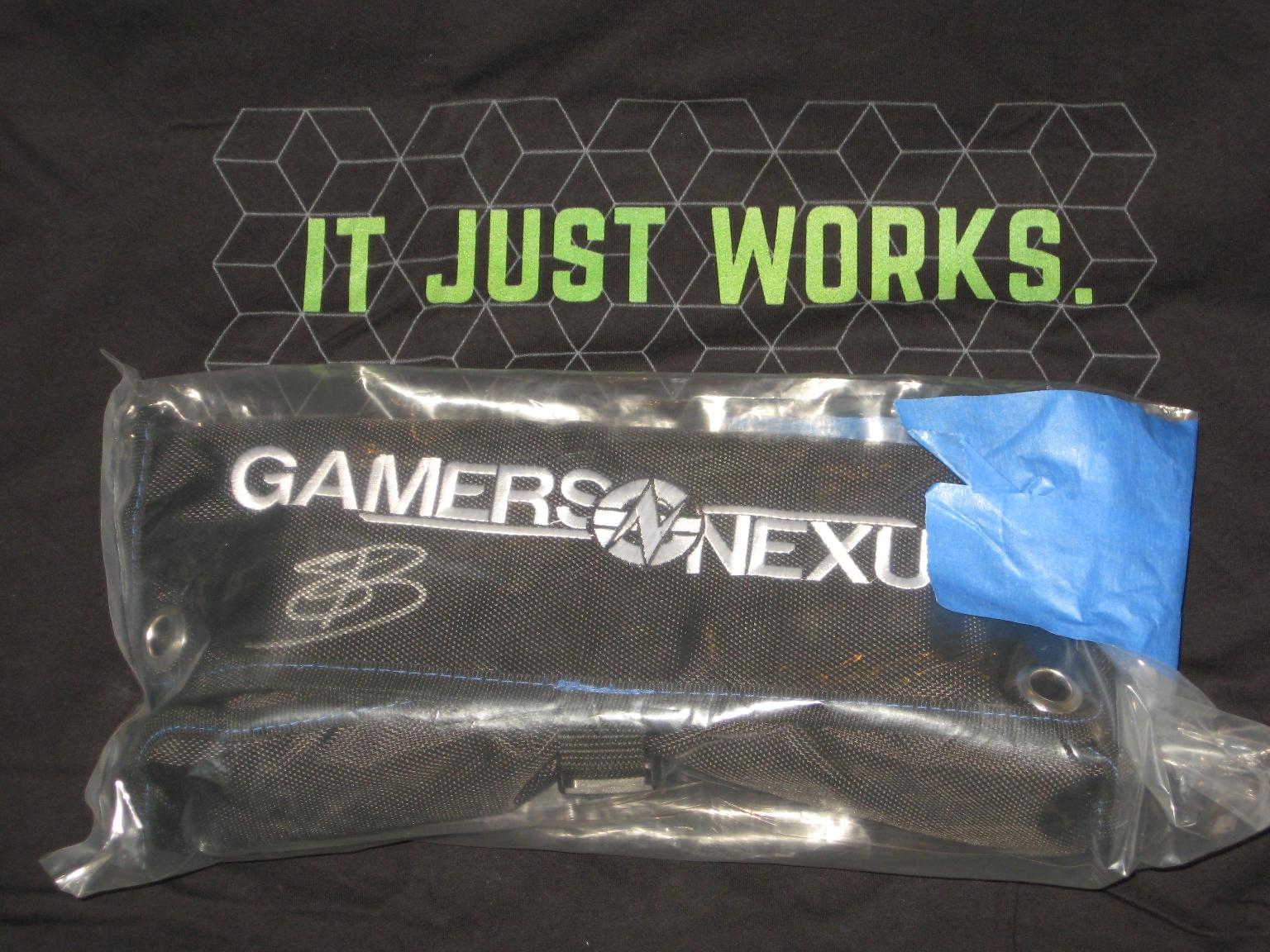
(at least the GN toolkit was worth it. That isn't the elusive GN mod-mat shampoo and Thermal paste conditioner shower kit, lol)
I recall when I had tossed something into a scene to test for Fisty, the fibermesh brows tended to hover a foot over the top of the figure in mid-air with some figure shapes. That was some time ago, and the best I could find retrying the experiment was this combo of Uki with Mika8 dialed in. I can't say that HP did wrong here, the fiber mesh brows do work with Uki as intended, and they were never intended to be used with other figure shapes.

For a tad over a year now, I had simply swapped out Uki's brows with Molly's brows when playing with kitbashing. Great set of brows with lots of adjustments if they detach from the forehead, and they include 3delight presets not just Iray.
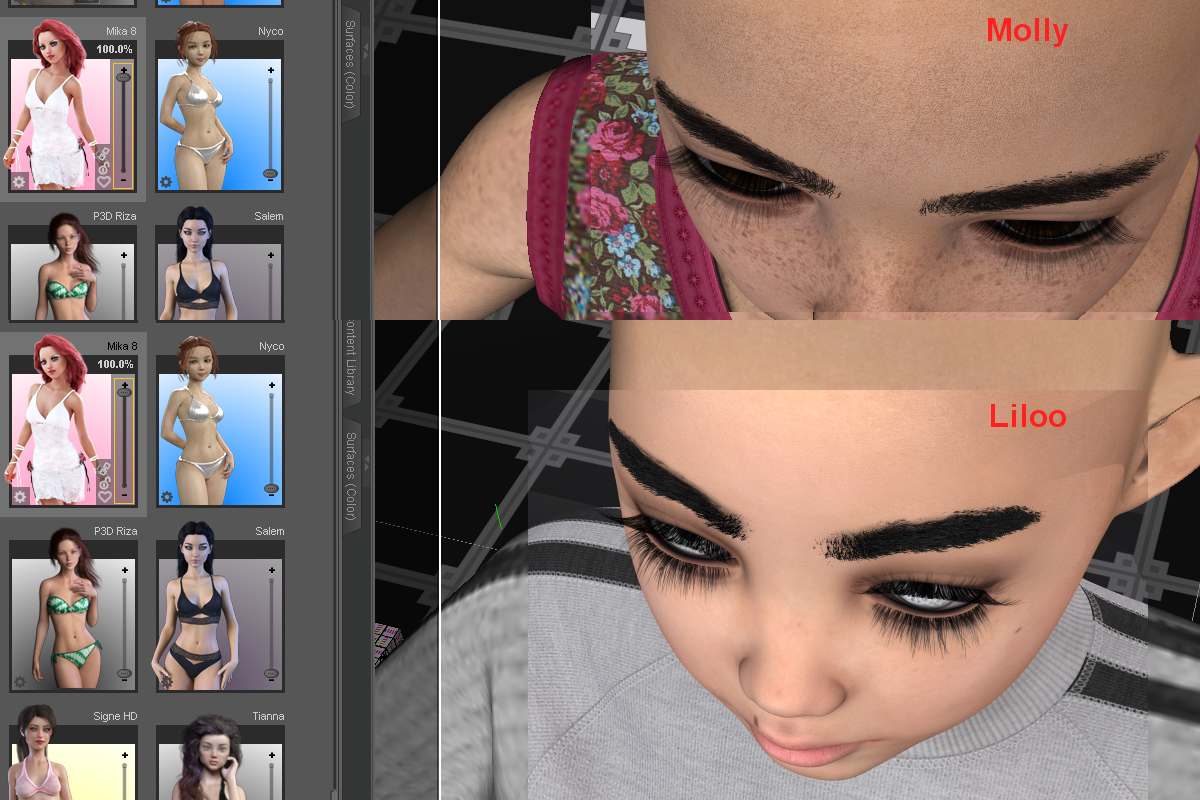
(screeching to a halt sound)
 uh, yeah, I'll get to Liloo in a second. As for Molly, as I was looking through folders triple-checking stuff regarding Liloo, I noticed that Molly also has them cool transparent makeup maps like GA Aryn and others I looked at the past few days. Just drop them into GIMP on top of the diffuse map to make your own makeup combination, I like that.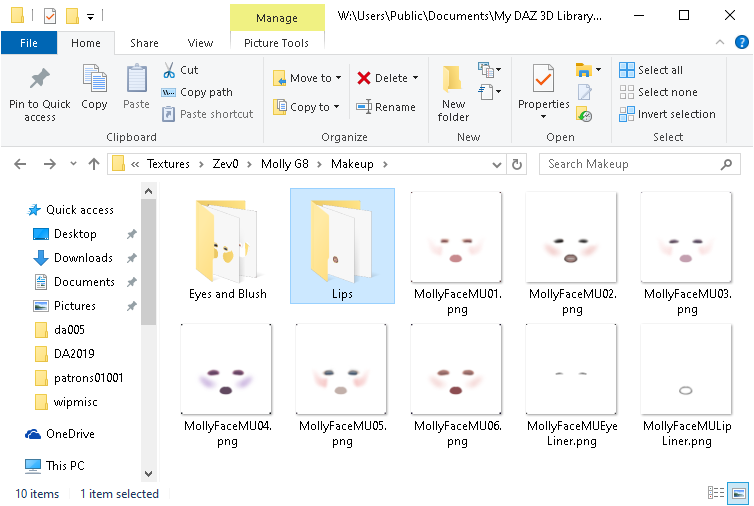
I decided for this, I would annex my use of Khloe's elf ears and diffuse eye map for Molly, and go with my failed attempt of dialing in an RGB value for brown, looks a tad more burgundy to me, oh well, still kind of looks cool. Being able to make ANY eye color I want is growing on me, that is cool.

So, left is Liloo with her only option, no makeup, no lipstick, or anything, just the bare minimum set of maps to do a render. I'm not even sure the color settings are correct because the Iray-to-3DL conversion lost ALL the dial strengths and color info. Right is Molly with her freckle mat option with fibermesh brows. And in the back was the latest purchase I decided to make for a bit of a reality check, Lilly with her only skin option (I didn't even bother doing a 3DL conversion or trying to apply the only 'Flush' makeup option). Liloo was a backburner item due to the lack of a 3DL listing on the product page (same with Lilly), and on the 3rd I decided why not toss some coffee funds Zev0's direction. I expected to have to do a 3DL conversion, however as I was pulling maps out of the folder into the surface tab, I kept looking around the baren folder tree and thinking "how much was this? where is the rest of it?", lol. There is the option of going to one of the other three or four figures I looked at recently that have transparent makeup maps and using them. However, that escalates this to the level of purchasing another 15 to 19 dollar complete figure, to use what wasn't included with a 25 dollar product.
let that sink in for a second. "purchasing another 15 to 19 dollar complete figure, to use what wasn't included with a 25 dollar product." 
 yeah. I did discover within the past few days, that Liloo and Lilly do include a costume foot shape morph dial, it's obscure and hidden. I don't normally think about feet, so I inadvertently overlook that when I was looking for any makeup mascara lipstick or eye color options for Liloo. To be clear, I don't have a problem with what little was included with the product, Liloo and Lilly do look good, they just feel a bit lackluster. And while the Liloo purchase was a bit of a token of thanks for the great work put into Molly, I do have considerable difficulty saying that less is worth more. Ok, said my two Farthings worth on that, not going to dwell, moving on. Hopefully, Zev0 does not 'hate' me for my honest thoughts on the pricing. Onto that Witchykin dress on Lilly.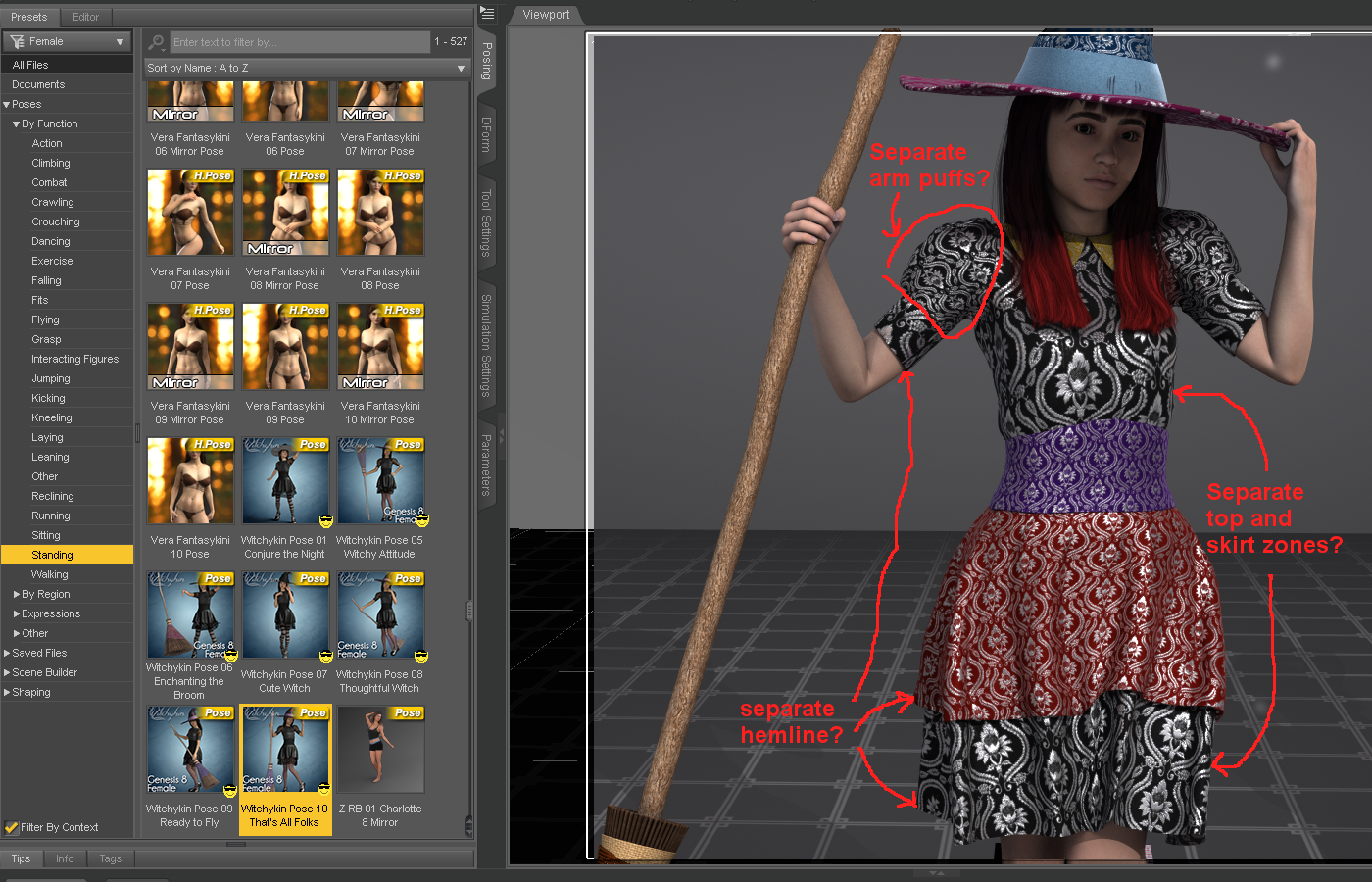
I kind of expected that dress to have a few more surface zone to work with. Because the dress is Iray only, my options are a tad limited. Thanks to Fisty and DestinysGarden I do have a few 3DL cloth shaders to work with, however, I kind of need surface zones to be in good locations to use them properly. The hat is set up well in that regard. As for the leggings not shown, I have some qualms about geo-shell things, because all too often PA's don't include maps for all the figure UVings that exist making them useless for so many things. Me and Fisty have agreed to disagree on the validity of Geo-shell outfit items, and she did have a good point about it being one of a very few ways to keep d-force clothes from snagging on the undergarments. If only PA's would include more than just the one UV set of maps. I was going to try this outfit on Kellyn originally, I still will, and in that circumstance, what's the point of having geo-shell lace underwear if it doesn't work with the equipment UV, because the maps don't exist for the Geo-shell on that UVing, lol.

EJ also has a blue figure that uses a Geo-shell for the blue skin effect (G3F Casiopea), the Geo-shell also doesn't work with equipment or other figure UV's because the Geo-shell maps do not exist for that UVing, lol. Because I don't have a single Geo-shell clothing item that includes maps for the equipment UVing (and they can be too conforming in locations for cloths), I prefer to have nothing to do with them, despite them being one of a very few ways to have d-force cloths work well over them. In any case, back to the witch dress, the Frolic set has leggings and underwear with appropriate zones to do cool stuff, so I may use that in the future with this dress (correction, the Keyhole stockings had the striped zones I was thinking of, Auto-fit to gen8 appears to look ok for them).

The Witchykin shoes, they look ok in passing, however, the disappearing toes, that is a no-no no no NOOOOOOOOOO. Baaaaad geo-grafting, bad bad.

making body parts disappear is a cheat at best this day and age, and it makes trying out outfit combinations a royal pain. There are better ways to tuck toes into shoes, like a foot pose and making sure the shoes actually fit Genesis. It's not all bad, I do like the poses the outfit came with, I've actually been fussing around with them poses a tad. The broom dress and hat do look ok, I do plan to play with them a tad more. (edit, oh, and thanks for making sure the normals are all facing outward so that I can see what I'm doing setting up surfaces on the outfit.)
On to other book-keeping. I have 3 major items that keep win10 from being a viable production OS for making stuff (been using the win7 FX8350 comp for that here).

I am happy to report that I am not nuts and the mouse random spasm behavior really was a problem (some claimed I was making it up), and the 1903 bug, rrrr, update (lol) appears to address that. So hopefully I can start playing with LAMH again on the GN R7 build. Things no longer flake out every other time I click the navigation tools in the top right of the viewport in Daz Studio, and I've yet to notice the entire scene tab getting 'selected' at random when trying to expand bone trees, so hopefully, that is fixed. (edit, one other thing that should be on that list even tho it's more of an annoyance rather than a No-Go show-stopper. Why do the taskbar and app right-click menus not appear half the time, and the rest it takes bloody ages to appear even if I set the "menu show delay" to zero seconds?)
Starfire hair! :) I needs it.Silent Winter: It is a custom head and body morph starting with the base G8F. The texture is just Aiko 8. Note that the image is a 3Delight render, so things would look a little different in Iray. The character is about 5'6" tall, which is why the hair is almost to the ground.
Daz 3D is part of

Connect
DAZ Productions, Inc.
7533 S Center View Ct #4664
West Jordan, UT 84084Licensing Agreement | Terms of Service | Privacy Policy | EULA
© 2026 Daz Productions Inc. All Rights Reserved.