-
Fit Genesis 9 clothings to Genesis 8
I'm trying to fit some outfits for Genesis 9 to Genesis 8 figure.
Some of them work fine but few items don't.
In most case they are high heel boots or pumps.In case of the attached image, weight transfer in the skirt of dress seems went wrong.
I installed only the desired items and figures along with DAZ Studio on another PC to try to figure out the cause of this and it fits as excepted.
However, I could not figure out which item or utility was affecting it.
Does anyone know how to solve this?Lucas 9!OrangeFalcon said:
Okay! So I was finally able to do a couple renders. I did a base form with him, pretty nice actually. The HD details look very good. And I made a female version. Here's what I did:
Removed Lucas body and reset all size sliders. Applied Base Feminine and Petite Goddess body (gratuitous, I know, but it helps achieve the frame). Applied Ashley 9's eyelashes, increased lip size (70% lower, 32% upper), reduced nose size (-24.5%), made face rounder (44.2%) and applied Face Transfer Female Fix (30%). The makeup is one of 01 of Mira 9's set. The only thing I couldn't find a fix for was the actual skin.
The HD details for the stubble are just baked into it(which is a nice style choice) but doesn't achieve the look I wanted. So I went with Tara 9's skin (fitting for my earlier comment).
I'm still tweaking it but I enjoy what I have so far.
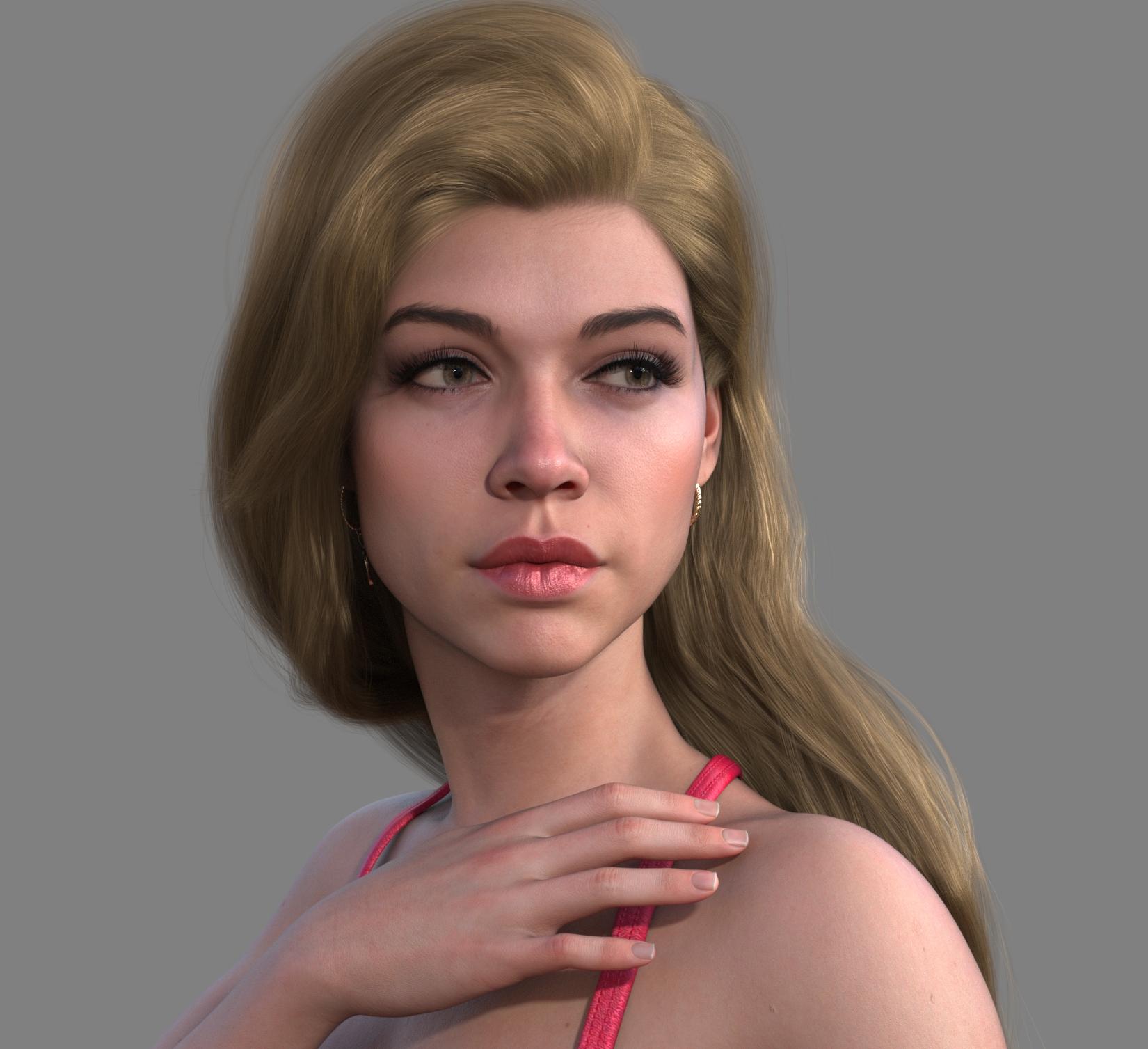
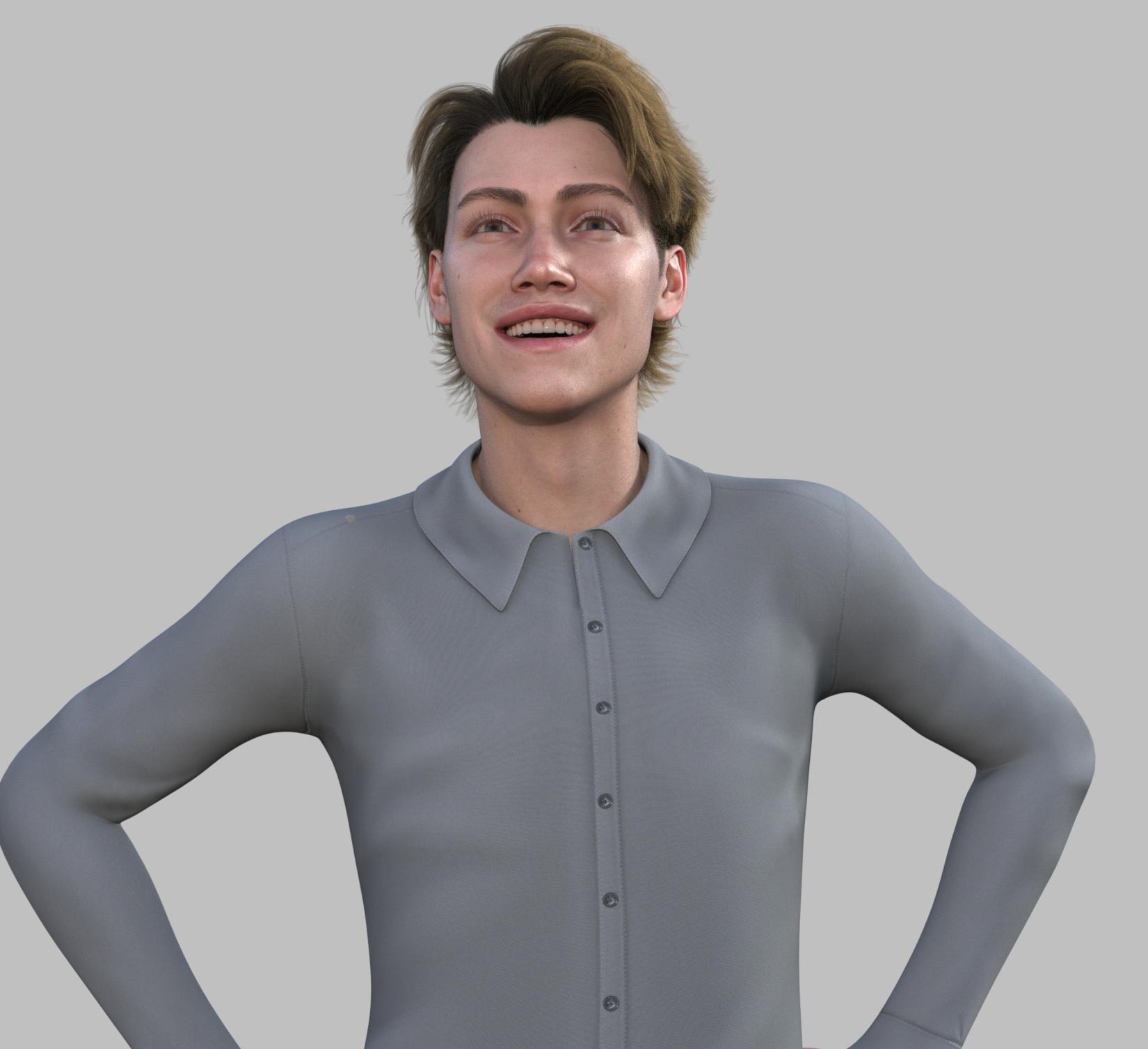
Wow, great renders!
He does look very English as Catwoman said, I forget her forum name. Or German as my 7th Grade German teacher looks a lot like this Lucas character. I guess if he's still in the Premier Rotation I will pick him up with my coupon, if something I like better doesn't come out in between, as I've already spent my coupon this month, plus bought the Astaroth 9 HD bundle. Too much cash flowing out to DAZ, so I will have to budget a $40 cap each month. I still have 3 of those 5 new Dog 8 breeds to buy. Patience I guess is in order.
Creating a hole without deleting faces.Basically you want to break a welded geometry to unwelded... You have no way to do it in DS. Even if you do it in modeling softwrae, you cannot import it as a morph and you'll break the item's UV as well. So that'll be a totally new item.
So what do you really want ? Simply make a hole on the item or just intentionally break the geometry ?
Lucas 9!Okay! So I was finally able to do a couple renders. I did a base form with him, pretty nice actually. The HD details look very good. And I made a female version. Here's what I did:
Removed Lucas body and reset all size sliders. Applied Base Feminine and Petite Goddess body (gratuitous, I know, but it helps achieve the frame). Applied Ashley 9's eyelashes, increased lip size (70% lower, 32% upper), reduced nose size (-24.5%), made face rounder (44.2%) and applied Face Transfer Female Fix (30%). The makeup is 01 of Mira 9's set. The eyebrows belong to CJ Sage. The only thing I couldn't find a fix for was the actual skin.
The HD details for the stubble are just baked into it(which is a nice style choice) but doesn't achieve the look I wanted. So I went with Tara 9's skin (fitting for my earlier comment).
I'm still tweaking it but I enjoy what I have so far.
Face Transfer problemsHi everyone,
I've been using Face Transfer since 2021. I'm using Daz Studio with the Genesis 8 character and the Face Transfer plugin to create a custom character. Everything looks great except for an issue with the left eye (some of the right as well). The eye seems misaligned, and it looks like there's a secondary eye or geometry behind it.
I've tried inspecting the geometry with the Geometry Editor and noticed the misaligned portions, but I’m not sure how to move or adjust the geometry to align it properly with the eyelid. Is there a way to resize or reposition the eye geometry directly in Daz Studio to fix this? If you would like to see the issue, please take a look at the attached jpg file.
Any advice or suggestions would be greatly appreciated!
Thanks in advance for your help!
Mirroring Conforming Clothing GeometryDopeFusion said:
Thanks!
You're right that Jay doesn't have a tutorial for this, but I simply followed the Daz Studio online user guide to do the conversion. It worked great, but as I went to sculpt fit morphs in zbrush, it appears that all of the normals are inverted. This makes sense because we didn't really 'mirror' the geometry as much as turn it inside out, lol. So I am unable to sculpt a fit morph for the bag. If you have any suggestions on how to flip the normal view in zbrush, let me know. I'm worried if I flip the normals, even though the geometry hasn't changed, Daz Studio might not recognize it as a morph and refuse to import it. Thoughts?
EDIT: So it looks like, if I go Tools->Display Properties->Flip in zbrush, it will flip the normals so I can do my sculpt. Exporting that morph, however, doesn't work. But if I flip the normals back to the way they were after doing my sculpt, I can import the morph. So, problem solved I guess. Sloppy hack, but whatever. XD
Yes, better flip normal in DS with Geometry Editor before GoZ to Zbrush for sculpting where there's such a "display issue". There's no this display issue if sculpting with Blender but you still need to flip normal before saving the figure asset.
Mirroring Conforming Clothing GeometryI would flip the normals first and then import that and do transfer rigging.
Then on top of that you can do fit morphs to specific characters.
Mirroring Conforming Clothing GeometryThanks!
You're right that Jay doesn't have a tutorial for this, but I simply followed the Daz Studio online user guide to do the conversion. It worked great, but as I went to sculpt fit morphs in zbrush, it appears that all of the normals are inverted. This makes sense because we didn't really 'mirror' the geometry as much as turn it inside out, lol. So I am unable to sculpt a fit morph for the bag. If you have any suggestions on how to flip the normal view in zbrush, let me know. I'm worried if I flip the normals, even though the geometry hasn't changed, Daz Studio might not recognize it as a morph and refuse to import it. Thoughts?
EDIT: So it looks like, if I go Tools->Display Properties->Flip in zbrush, it will flip the normals so I can do my sculpt. Exporting that morph, however, doesn't work. But if I flip the normals back to the way they were after doing my sculpt, I can import the morph. So, problem solved I guess. Sloppy hack, but whatever. XD
Invicta Couture Lingerie [Commercial]Invicta Couture Catalog
This post is dedicated towards the various products coming out with the Invicta Couture name in them, that are designed to work with each other to provide a large catalog of attractive wearables, that work in harmony with each other (both in looks and function).
Invicta Couture Lingerie Set [Commercial]
This Invicta Couture lingerie set is an elegant and highly attractive outfit that is sure to turn heads with its unapologetic sexy details and realism. High-Definition Micro Pressure morphs are included, 7 material options as well for each clothing item that provide the basics of what you would expect from such an outfit. A wide range of shapes are supported as well as over 100 adjustments morphs, to expand that shape library even further, and with extra morphs to support different styles and behaviors.

Click Here to see more!
Midnight Gold for Invicta Couture Lingerie Set [Commercial]
Midnight Gold expands upon the Invicta Couture lingerie set with many newly added accessories and expanded material library for the original set.
New accessories include a gothic veil, decorative face chain, nose ring, lip ring, hoop earrings, a large choker band with a hooked O ring accompanied by a rigged chain leash, nipple dangler jewelry, and ankle straps also accompanied by a rigged chain that you can pose however you like. The lip ring also comes with a HD Micro Pressure morph for added realism.
The expanded material library adds many new sexy latex, lace, and satin options for the original set. All material options added can be seen in the promo images.
Elevate your Invicta Couture lingerie set to a new level and the newly added accessories can be used without the need of the base set.

Click here to see more!
Invicta Couture Strapped Goddess [Commercial]
This stand alone set comes with the body harness, a front-tie bolero, thigh garters, thigh-high socks, ankle socks, mary jane style high platform heels, cat eye glasses, and nipple piercings!
A large material library for these items is included as well as HD micro pressure morphs for the body harness, thigh garters, and thigh-high socks.
Mix and match with the base Invicta Couture lingerie set to create a variety of outfits and styles.

Click here to see more!
Invicta Couture Black Rose [Commercial]
Invicta Couture Black Rose coming soon to the Daz3D store for Genesis 9! This Invicta Couture Black Rose set is an elegant and highly attractive outfit that is sure to turn heads with its unapologetic sexy details and realism. High-definition micro-pressure morphs, many material options, and elegant yet stylish stilettos are also included. A wide range of shapes are supported as well as over 100 adjustments morphs, to expand that shape library even further, and with extra morphs to support different styles and behaviors. Get this drop-dead gorgeous set today to wow your audience and bring a level of beauty to your renders that cannot be rivaled!

Click here to see more!
Gothic Indulgence for Invicta Couture Black Rose [Commercial]
Invicta Couture Gothic Indulgence coming soon to the Daz3D store for the Genesis 9 Black Rose set! This Invicta Couture Gothic Indulgence expansion set the adds an edgy gothic look to an already highly attractive outfit that greatly expands on wearable options and materials. A new pair of Ballet stylish heels are added, many material options, and new wearables such as the long-sleeve crop top and rib-band harness. A wide range of shapes are supported as well as over 100 adjustments morphs, to expand that shape library even further, and with extra morphs to support different styles and behaviors.

Click here to see more!
Lucas 9!Masterstroke said:
OrangeFalcon said:
Masterstroke said:
Looking at Lucas 9 confirms my view , that Genesis 9 is just a plain male figure with a feminie morph add on.
Yeah I'd say generally most of them have similar skin textures-I haven't gotten Lucas yet but taking a look, his skin looks similar to Tara 9 or maybe Kara 9. The interesting thing is that recently, the biggest differences between the G9 releases have been the face morph more than anything else. And that's a good thing, for sure, but without unique body morphs or skin textures (like Astaroth) it devalues the product when compared to some other things out there.
To be clear, I actuallly do like this character.
Me too. I was just referring to really the general situation with the new releases. I check my email first to see what Daz has sent me for new releases and when I saw the text Lucas 9 I was disappointed. Then I checked out the character and the bundle items and I'm sold now. I was hoping for a new female character but to be honest, I need more dedicated male characters like this anyway. Plus the clothes. So yeah, good one this week after all
Getting on the 9 train, or notWonderland said:
RawArt said:
The simple fact that really cannot be argued is that the figure is a 3d mesh. As a mesh it can be morphed ito all kinds of shapes (as my library can attest).
If I can morph the mesh on the chest into chest plates, or scales or any other kind of wierd fantasy/alien creature. There is absolutely no reason someone could not make a morph into their desired shape. Default shapes are simply default, they may not appeal to everyone, so if someone wants a specific look, then it can be morphed into it. There are no limitations as to how it can be shaped except how much the person is committed to want their pet preferences.
G9 is the best selling figure daz has put out, so they must have done something right
safe to say those chest shapes deviate greatly from the default...so something much more human could be done alot easier than those
But I still don't see how G9 is that superior to G8. You've been creating characters like that since, what was it, G1? You and others did some incredible things with G8. Someone, sorry can't remember who, made a little pink furry hedgehog out of G8F. And there are trans morphs you can purchase that let you make males into females and vice versa with G8. How is G9 really that different? And why aren't more people creating more fantasy creatures? I was really looking forward to new original fantasy or sci-fi characters with G9 but so far there is nothing in the store that different or crazier than what was done with G8. I realize clothes would be an issue with extreme shapes but really imaginative sci-fi or fantasy creatures or animals shouldn't need clothes anyway. Still hoping for cool new original sci-fi/fantasy creatures that aren't creepy or horror but beautiful and exotic. (Hint, hint..
 )
)G8 was a fine mesh to work with, but G9 is both easier to work with as a product maker and can give much more use to customers as it can pose better, wear clothes better, change genders easier. It has better rigging, better mapping, a much better topography and generally a much better mesh to build on.
You can see in the characters I produce that there are alot more features in my character than there were in previous generations all because it is a better mesh to build on.
Lucas 9!OrangeFalcon said:
Masterstroke said:
Looking at Lucas 9 confirms my view , that Genesis 9 is just a plain male figure with a feminie morph add on.
Yeah I'd say generally most of them have similar skin textures-I haven't gotten Lucas yet but taking a look, his skin looks similar to Tara 9 or maybe Kara 9. The interesting thing is that recently, the biggest differences between the G9 releases have been the face morph more than anything else. And that's a good thing, for sure, but without unique body morphs or skin textures (like Astaroth) it devalues the product when compared to some other things out there.
To be clear, I actuallly do like this character.
Getting on the 9 train, or notElor said:
Wonderland said:
And there are trans morphs you can purchase that let you make males into females and vice versa with G8. How is G9 really that different?
Transgender Shapes for Genesis 8 ?
It doesn't come close to what G9 offers and it doesn't allow:
- to use morphs from G8F and G8M together (I don't remember if a product is available to do that)
- to use G8F skin with G8M and vice-versa (you need to own a different product)
- to fit G8F clothes on G8M and vice-versa (you'll either have to autofit them, losing some functionnalities in the process, or buy another product)
If I want a character with Micheal's head, Victoria's body and Dain's skin, with Genesis 9, it's a five minutes process:
- Load Genesis 9
- Dial in Michael's Head morph at 100%
- Dial in Victoria's Body morph at 100%
- Load Dain's skin
- Load some clothes
And it's done.
If I decided to do the same with Genesis 8, each step will take more times, especially the first three because I'll have to either transfert the head morph or the body morph to the other gender base but not before doing some planning to decide which way will be the less headache inducing one: do I have the product to use G8M skin on G8F, do I prioritize using bend morphs created for G8F or other morphs created for G8M, which gender will provide the more problematic clothing for my scene (do I want to use high-heels, do I want to use a top clothing item made for G8M, etc), and so on.
I think just creating the fit clone to transfert morph from G8F to G8M / G8M to G8F will likely take more time than the couple of minutes I needed to have a Michael-Victoria G9 character set.
I know I'm using a simple example but adding more morphs to the mix will just make the gap between the time needed to do it with Genesis 9 and Genesis 8 growing bigger, to the disadvantage of the later, not the former.
I purchased all those products a long time ago and it really doesn't take long at all. You can exchange skins too and autofit always works well for me. I actually enjoy using some of the male clothing on the females for creative fashion looks. I have way more detailed morphs for G8 than exist yet for G9. I really miss Emma&Jordi's morphs. So far I don't see an advantage to G9 and the whole lip/makeup and eye issues are annoying. But I'm loving the FilaToon stuff so there's that, but the shaders also work on G8...
Lucas 9!Masterstroke said:
Looking at Lucas 9 confirms my view , that Genesis 9 is just a plain male figure with a feminie morph add on.
Yeah I'd say generally most of them have similar skin textures-I haven't gotten Lucas yet but taking a look, his skin looks similar to Tara 9 or maybe Kara 9. The interesting thing is that recently, the biggest differences between the G9 releases have been the face morph more than anything else. And that's a good thing, for sure, but without unique body morphs or skin textures (like Astaroth) it devalues the product when compared to some other things out there.
Lucas 9!Looking at Lucas 9 confirms my view , that Genesis 9 is just a plain male figure with a feminie morph add on.
New Year, New Sales Thread: Report Issues Here 2 "Reporting Only"protosynthetic said:
To be fair, the only premier perk explicitly mentioned on the whole sales page is an extra morph via Daz Connect. My guess is that it's intentional.
You missed the small characters:
Tip: Use your Monthly Character Coupon found in your Account Page to get Lucas 9 FREE and complete your collection!
New Year, New Sales Thread: Report Issues Here 2 "Reporting Only"Elor said:
The Premier bundle coupon doesn't work on Lucas: I got a Coupon code is not valid error message when I tried to apply it on a cart with Lucas's bundle.
To be fair, the only premier perk explicitly mentioned on the whole sales page is an extra morph via Daz Connect. My guess is that it's intentional.
Getting on the 9 train, or notSlightly baffled. The whole/only point of male characters in DS for me is for the female characters to run rings around them (as happens at home all too often.. ;) ). No need for a morph transfer for that to happen.
Regards,
Richard
Getting on the 9 train, or notWonderland said:
And there are trans morphs you can purchase that let you make males into females and vice versa with G8. How is G9 really that different?
Transgender Shapes for Genesis 8 ?
It doesn't come close to what G9 offers and it doesn't allow:
- to use morphs from G8F and G8M together (I don't remember if a product is available to do that)
- to use G8F skin with G8M and vice-versa (you need to own a different product)
- to fit G8F clothes on G8M and vice-versa (you'll either have to autofit them, losing some functionnalities in the process, or buy another product)
If I want a character with Micheal's head, Victoria's body and Dain's skin, with Genesis 9, it's a five minutes process:
- Load Genesis 9
- Dial in Michael's Head morph at 100%
- Dial in Victoria's Body morph at 100%
- Load Dain's skin
- Load some clothes
And it's done.
If I decided to do the same with Genesis 8, each step will take more times, especially the first three because I'll have to either transfert the head morph or the body morph to the other gender base but not before doing some planning to decide which way will be the less headache inducing one: do I have the product to use G8M skin on G8F, do I prioritize using bend morphs created for G8F or other morphs created for G8M, which gender will provide the more problematic clothing for my scene (do I want to use high-heels, do I want to use a top clothing item made for G8M, etc), and so on.
I think just creating the fit clone to transfert morph from G8F to G8M / G8M to G8F will likely take more time than the couple of minutes I needed to have a Michael-Victoria G9 character set.
I know I'm using a simple example but adding more morphs to the mix will just make the gap between the time needed to do it with Genesis 9 and Genesis 8 growing bigger, to the disadvantage of the later, not the former.
Help Recreating a Specific Face Look in Daz3Dsjuk1989+nyx said:
Hi everyone,
I’m trying to recreate a specific face look in Daz3D, and I’d love your advice! I’ve attached a reference images. These are AI generated images, but I love the eyes, nose, lips, face shape, eyelashes and just everything about the look and I'd love to recreate it in 3D.
If you know of any characters, morph packs, or third-party resources that might help, please let me know.
I’m completely open to suggestions for:
Base models (Genesis 3, 8, 9, or others).
Morph packs or custom presets that can help me shape the eyes, lips, face, and lashes.
Eyelash add-ons for more customization options.
Skin textures that have soft blush-like details for a natural look.I’m open to using any version of Genesis or any add-ons that you think might work. If you’ve tackled similar projects or have advice on tools for manual adjustments (like individual lash placement), I’d love to hear your tips!
Thanks in advance for your help!

I think if you took one of the FilaToon characters and then used your AI image here to guide you in making your own textures that matched these, you'd have a winner. I agree the look here is great.
Daz 3D is part of

Connect
DAZ Productions, Inc.
7533 S Center View Ct #4664
West Jordan, UT 84084Licensing Agreement | Terms of Service | Privacy Policy | EULA
© 2026 Daz Productions Inc. All Rights Reserved.