-
Filament bring out the Renders
Well so far I like Filament. Even when I'm planning on doing an IRAY render, Filament makes it possible to see what direction the light will come from with an HDRI. And it makes rendering videos maybe viable. I hope people start adding Filament shaders alongside the IRAY ones like they used to do with 3Delight and IRAY.
Filament bring out the RendersWendyLuvsCatz Thanks for sharing the info and results
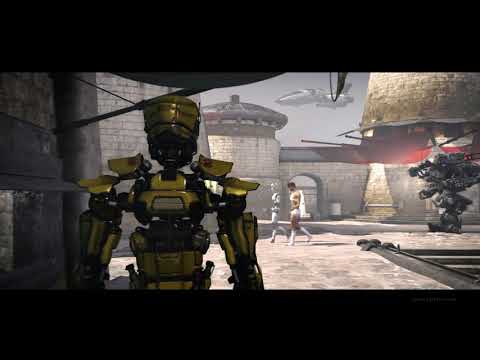
I thought I would share another quick animation experiment This time I wanted to explore how many moving figures I could place in one scene. I was able to have 8 aniblock figures before I started having problems with filament. It took 5 seconds per frame to render. The stock music is from https://www.free-stock-music.com/alexander-nakarada-mjolnir.html
 DS 4.14 Crashing
Which viewport Filament or Texture shaded?
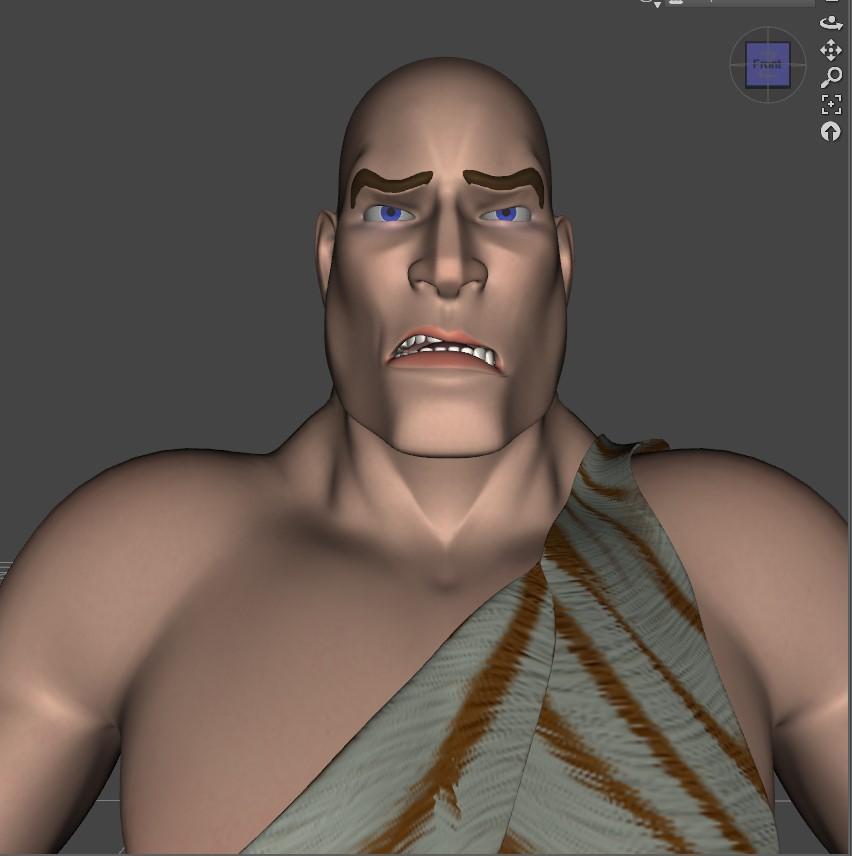
Auto Muscle Enhancer HD [Commercial]My first attempt at using the new Filament renderer on one of my characters. Still have to play with it a little.
This is an excellent first attempt, Sigurd! I do like how your character is lit and the nice tonal quality to it. I'm waiting for the Mac version of DS to get Filament enabled. I think Filament will inspire me to get back into animation.
Looking forward to seeing more!
Lee
Daz 4.14 grrrrrrrr!I had to get my old laptop out of mothballs because, as it turns out, the laptop has Open GL 4.1 installed while my desktop PC is only able to go up to Open GL 4.0. This means I will need to fire up the laptop every time I want to do a Filament PBR rendering. So annoying!
mcasual's Texture Animation script - Cannot add DAZ renders to surfaceI just used that script today with Filament too and it worked
does a single image in diffuse render in that TV?
it might be a surface setting or a glass screen in front
or maybe not UV mapped to fit a full imzge
Filament Install / UninstallFilament Install / Uninstall
Would someone be so kind as to write out step by step how to get Filament up and running from scratch and how to get Daz back to factory if someone is having trouble. Thanks!
Lighting in Filament?I can't asnwer righht away, but ask in one of the other filament threads otherwise.
Daz Studio 4.14 Pro, General Release!Iray - the introduction of Filament is what drew me into this build. It's what got me to try setting u Iray to render faster, and I did it. I'm really loving Iray!
Filament - Pretty cool, but it seems like it's still in beta or even alpha. To me it feels like it's just a PBR version of Texture Shaded, but becomes less friendly when Alpha maps are needed - as those don't render.
Steps in the right direction for animation, but needs to be better implemented for most Daz 3D Figures to use well.
Cadmium OutfitYes, the body and leggings are separate items.
Here is Jonathan outfitted with it (in Filament).
Filament bring out the Renders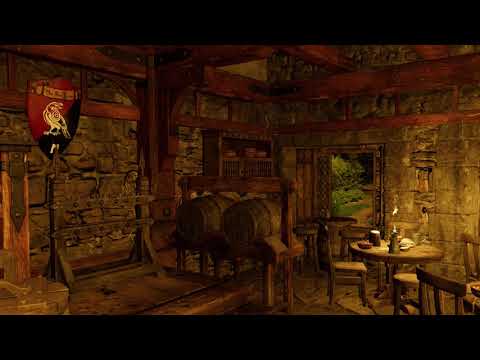
Black not Red Crow inn this time with the smokes san diffuse as StrangeFate suggested for filament
still eerie frozen so I am going to see if @mCasual TexAnim script will work with Filament
keep you posted

scrolling through my images so far rendered it indeed is working!!!
This is awesome, I really dig Filament for environments. I think it's the same thing I like about pre-Iray stuff, where it feels like it makes a better background for characters that aren't 100% photorealistic.
I've been continuing my Filament and Iray composites and man, that render viewport feature is super helpful. This was done with a mix of Iray, Filament, and smooth shaded, plus Nik Collection and Photoshop filters. I used the smooth shaded pass as a mask to define the light areas with the Filament pass.
 Filament bring out the Renders
Wow, love the sea creature one in particular!
I'm a mac user and I'll have to wait a while until I can get my hands on all the Filament goodness...
In the meantime I wanna see all the renders!
(Also, I'm kinda hoping that by the time Filemant for mac arrives, it'll support SSS and emissives... ok, that's a different subject all together.)
Filament bring out the RendersBlack not Red Crow inn this time with the smokes san diffuse as StrangeFate suggested for filament
still eerie frozen so I am going to see if mCasual's TexAnim script will work with Filament
keep you posted
scrolling through my images so far rendered it indeed is working!!!
Auto Muscle Enhancer HD [Commercial]My first attempt at using the new Filament renderer on one of my characters. Still have to play with it a little.
Knittingmommy's LaboratoryUsing Genesis 3 & 8 Face Controls on Stylized Characters with Bigger Heads
So here's what I've learned while using the Genesis 3 & 8 Face Control from @Faux2D and Daz3d on stylized characters. There are a few extra steps a person needs to take to get the Face Control in the right place. As you can see from the first screenshot, the controls load where it thinks the figure's head should be. With a stylized figure, this isn't always the case. You would treat it the same as if you were loading the Face Control on a figure you've already posed.
Load the Face Control with the figure selected.

Right-click on the Face Control and Change Parent to your figure's head with Parent in Place selected.
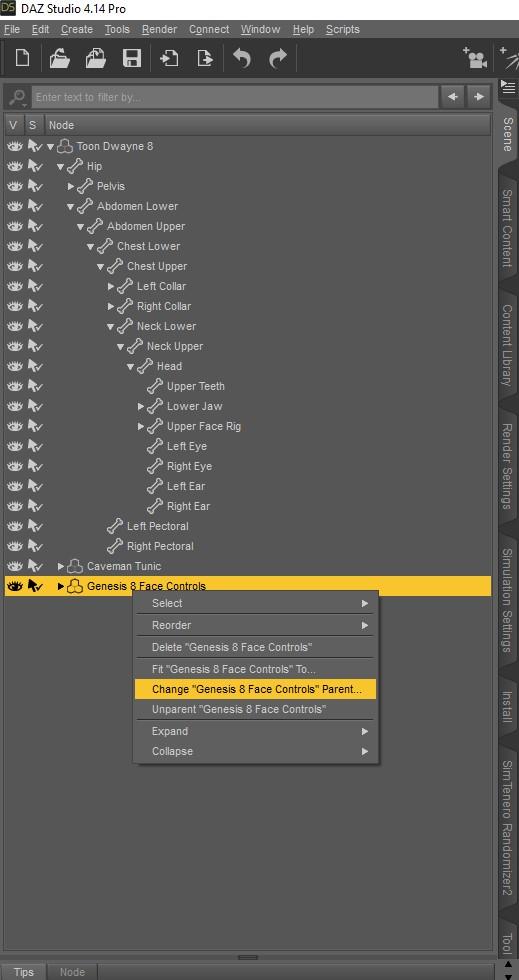
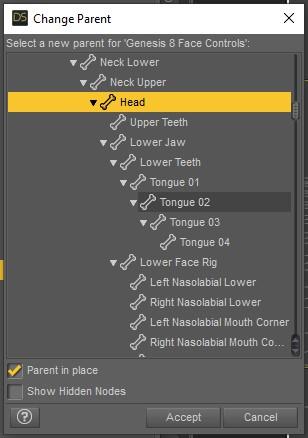
With the Face Control still selected, go to Edit>Figure>Zero>Zero Figure Pose
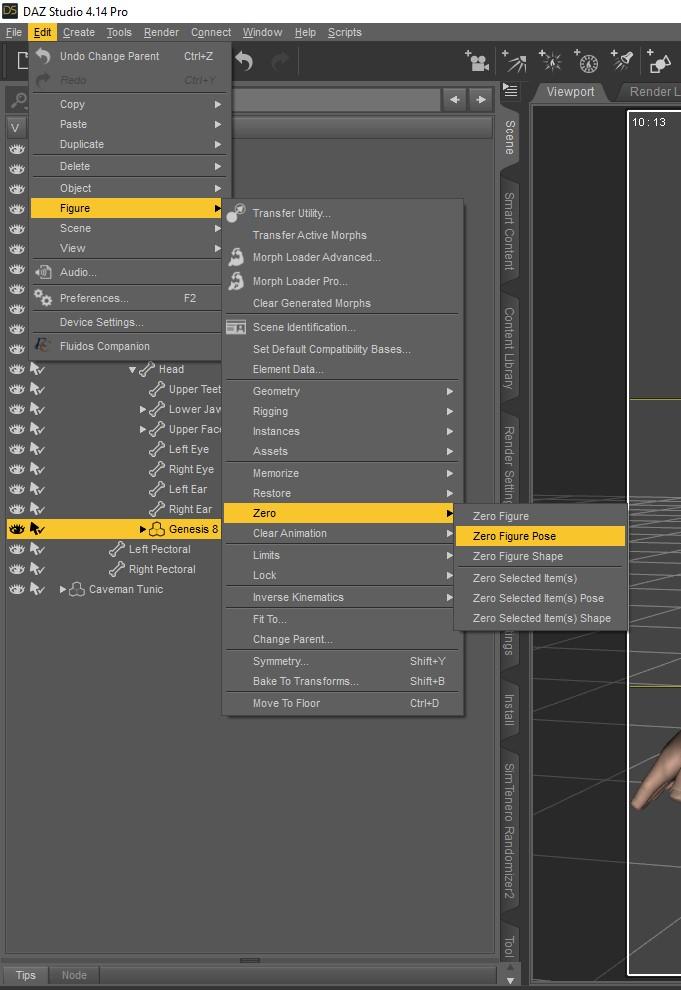
As you can see, the Face Control is in the right position, but we have a problem. It's buried inside the head.

To fix this, you need to pull the Face Control out of the head on the Z Translate until you can see the control in front of the head.
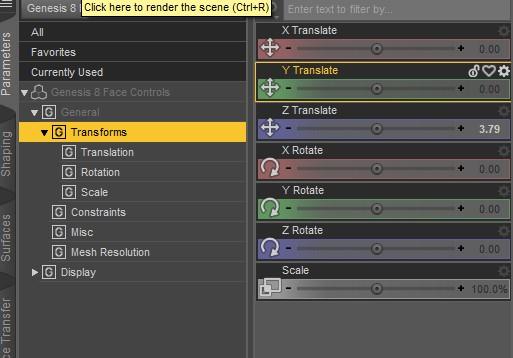
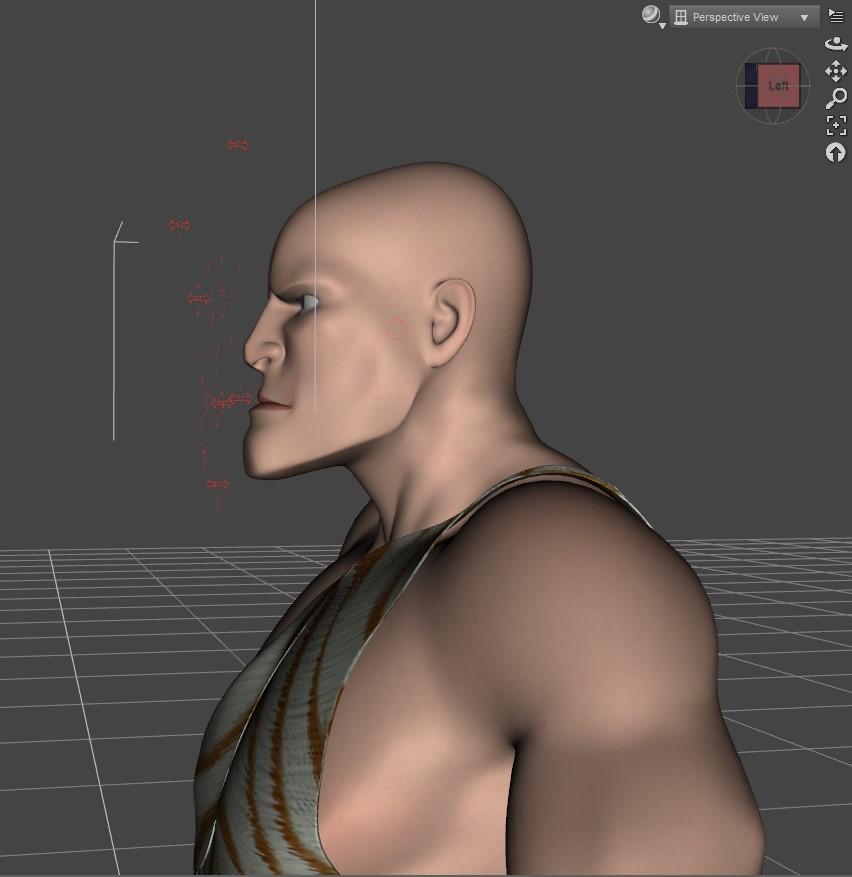
After that, you can control the facial movements as you would with any other characters.
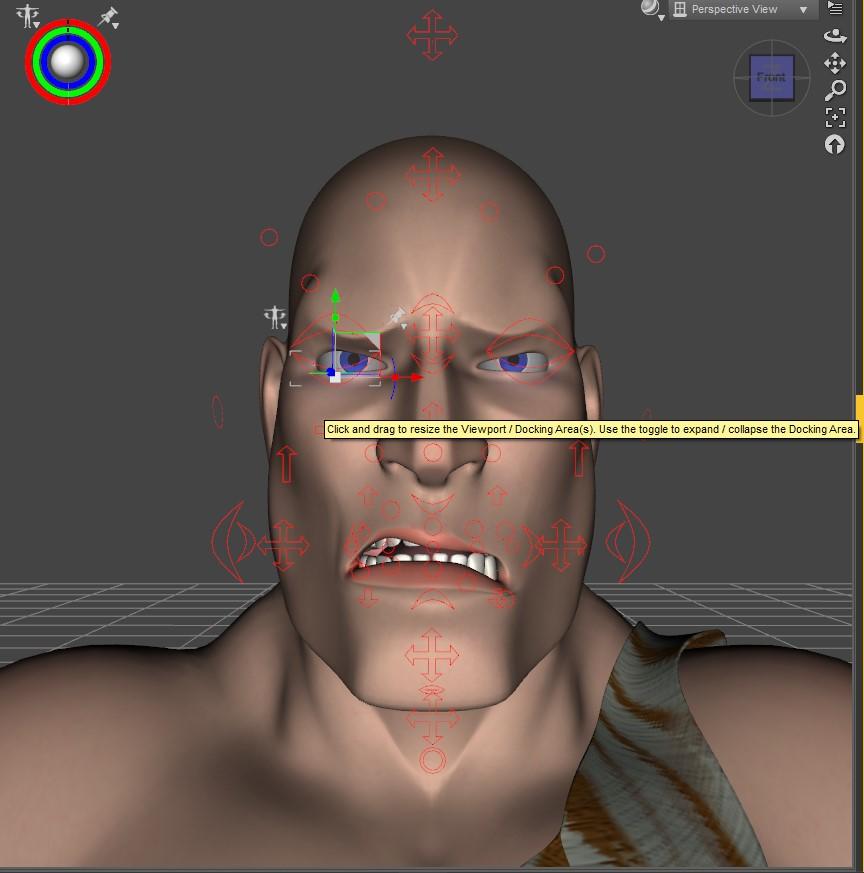
Here's a quick render showing the expression. It's my first render with Filament which I just started playing around with this evening.
 Daz 4.14 grrrrrrrr!
The nodes will be created when you render or use Iray drawstyle. You can also create a scene with the Singletons and use Edit>Preferences>Scene (Daz Studio>Preferences>Scene for Macs) to tell DS to load it when creating a new scene.
That's as maybe Richard, but it seems a very slow and complecated method compared to how simple it was before they changed everything.
that's the price we sometimes pay for progress. filament is totally worth it, if you ask me
Filament tutorials/shaders/lights?Right, you can't compare it to iray but so much better than the ancient OpenGL in DS , and definitely not replacement for Iray but extra tool , there is still iray Interactice draw mode for those that want more from. their preview mode , not all users have high-end graphic cards to run iray and many use CPU for rendering , this tool for them is helpful , so if you have any good stuff to share for Filament to help others , you more than welcome to join !

Of course, it's fast. But it's not really offering any features right now that aren't currently available in most OpenGL viewport previews. Screen Space reflections and AO with the ability to unlock texture compression and use PBR texture maps. It's a nice thing to have, but I wouldn't compare it to renders that Iray can do.
Filament tutorials/shaders/lights?I like filament...What would take weeks now takes mere minutes in FPS...13 seconds just a test...
Of course, it's fast. But it's not really offering any features right now that aren't currently available in most OpenGL viewport previews. Screen Space reflections and AO with the ability to unlock texture compression and use PBR texture maps. It's a nice thing to have, but I wouldn't compare it to renders that Iray can do.
Lighting in Filament?I studied the video that came with Filament and am having problems with lighting. I tried to get it to work with shadows but they refuse to show up. In one case I did have a partial shadow but when I rendered the image the shadow disappeared. Any ideas out there on how to get proper lighting with shadows?
On a side note, that video don't exactly match what I have in the instructions. I guess it was outdated by the time Filament was offered with the upgrade.
Filament tutorials/shaders/lights?I like filament...What would take weeks now takes mere minutes in FPS...13 seconds just a test...
Daz 3D is part of

Connect
DAZ Productions, Inc.
7533 S Center View Ct #4664
West Jordan, UT 84084Licensing Agreement | Terms of Service | Privacy Policy | EULA
© 2026 Daz Productions Inc. All Rights Reserved.