-
3D Printing Licences - What?
robertswww said:
daveso said:
so in the product library. I "bought" the 3d license for Victoria 8. It does not show anything in the product library, or the order..nor is it inidcated such on the product page. Very confusin
I'll use Victoria 7 as an example... search for the specific product you own in your Product Library and then click the View Product Page link. On the product page, look at the box titled, "Optional License Add-Ons:". In my Victoria 7 example (see attached screenshot), you will see next to the "3D Printing License $1.99" a very faint light gray filled-in checkbox with a checkmark indicating that I own the 3D License.
@GuyGenesis Thanks for pointing out the other way to see ownership of a 3D Printing License from directly within the Product Library.
My pleasure, I just happened upon it as I was going through my library, and thought it handy.
---
Giving away these license(s) was a very generous gesture by Daz, I truly appreciate it, and the extra support in the auto addition to library, alongside the loading maintenance. So, thank you.3D Printing Licences - What?My Product Library is showing I own the 3D Print License for Victoria 8.
The invoice referenced indicates product purchase of the "Staff Picks for Genesis 8 Females Bundle 1". My best guess DAZ is adding, via batch, the 3D Print License to eligible products purchased referencing the original product purchase invoice and date. I'm positive I've manually purchased the 3D Print License for Victoria 8 between August 1-7.3D Printing Licences - What?daveso said:
so in the product library. I "bought" the 3d license for Victoria 8. It does not show anything in the product library, or the order..nor is it inidcated such on the product page. Very confusin
I'll use Victoria 7 as an example... search for the specific product you own in your Product Library and then click the View Product Page link. On the product page, look at the box titled, "Optional License Add-Ons:". In my Victoria 7 example (see attached screenshot), you will see next to the "3D Printing License $1.99" a very faint light gray filled-in checkbox with a checkmark indicating that I own the 3D License.
@GuyGenesis Thanks for pointing out the other way to see ownership of a 3D Printing License from directly within the Product Library.
3D Printing Licences - What?daveso said:
so in the product library. I "bought" the 3d license for Victoria 8. It does not show anything in the product library, or the order..nor is it inidcated such on the product page. Very confusin
Here is how it appears in my Product Library. Notice the red circled portion. This label indicates the license type: Standard / 3dprint (possibly even interactive?)
How big is Daz3D's community (limited to this website or not)?Cybersox said:
pwiecek said:
Even though Renderosity now has Poser and La Fremme/Le Homme characters for it, there is still a lot of Genesis stuff over there. And there is a lot of Daz Studio stuff at the-site-that-shall-not-be-named
I believe that G8 products outsell LaFemme products by a considerable ratio at Rendo. That said, I think that Rendo is on the right track with creating their own base figure, as it's unwise to have a product that is dependent upon an outside manufacturer. Now the question is whether Rendo will play it smart and continue to keep the LF products running across multiple generations of Poser. I've always believed that one of the biggest mistakes that Poser made was in replacing their base figures with every new release of the software, as the fact that the Victoria products continued to accrue assets and features over multiple Poser iterations inevitably lead to their domination of the market. I remember that at the time of the transition from Poser 5 to Poser 6, the number of PAs who were creating add ons for James, Jessie, and Miki was actually quite repectable, but with each new generation of Poser figure after that, the number of PAs interested in making dedicated products decreased as it became obvious that they were essentially throwaways that were destined to be replaced and forgotten fairly quickly.
If you look at the Rendo's what's hot then you can see that DS products outsell the Poser ones whenever something (typically an environment, or prop set) is sold in both versions. However, as you said, it is the figure stuff that drives their income, and that comes mostly from G8, not LF or another figure.
I find it somewhat ironic that Daz Studio (and Genesis) was initially developed largely from money Poser users were paying Daz for Poser compatible products. Now it is the other way round, where DS users, buying DS stuff from Rendo, are providing the bulk of the funding for the further development of Poser.
3D Printing Licences - What?GuyGenesis said:
daveso said:
Richard Haseltine said:
Daz is in fact now adding the licenses for you, though it is a big job and may well take a couple of days or so to complete.
Can't get much better than that.
How do we know which products have the license applied?In your "Product Library" when you open a product under the order number is a label for license type: Standard License / 3dprinting License.
so in the product library. I "bought" the 3d license for Victoria 8. It does not show anything in the product library, or the order..nor is it inidcated such on the product page. Very confusin
How big is Daz3D's community (limited to this website or not)?pwiecek said:
Even though Renderosity now has Poser and La Fremme/Le Homme characters for it, there is still a lot of Genesis stuff over there. And there is a lot of Daz Studio stuff at the-site-that-shall-not-be-named
I believe that G8 products outsell LaFemme products by a considerable ratio at Rendo. That said, I think that Rendo is on the right track with creating their own base figure, as it's unwise to have a product that is dependent upon an outside manufacturer. Now the question is whether Rendo will play it smart and continue to keep the LF products running across multiple generations of Poser. I've always believed that one of the biggest mistakes that Poser made was in replacing their base figures with every new release of the software, as the fact that the Victoria products continued to accrue assets and features over multiple Poser iterations inevitably lead to their domination of the market. I remember that at the time of the transition from Poser 5 to Poser 6, the number of PAs who were creating add ons for James, Jessie, and Miki was actually quite repectable, but with each new generation of Poser figure after that, the number of PAs interested in making dedicated products decreased as it became obvious that they were essentially throwaways that were destined to be replaced and forgotten fairly quickly.
How to use a character bought from the store?Welcome davidsaul,
This tripped me up at first too. Many of the items in the store are "addons" to other products so you need to check carefully the things you purchase.
Check in the description where it says "Compatible Figures" or "Required Products" - you need to make sure that anything listed there are items you have. If you have already purchased the items the store will say "(owned)" after the product link - unless it requires one of the Genesis models which come free with Daz but are not tagged as owned for some reason. On the catalog thumbnails page under the items you will see that these have V4 & M4 which correspond to Victoria 4 and Michael 4 - so you can see this info there too.
Also, that item is for Poser and so I believe you would be able to use it in Daz (if you had the right models) but may not be too straight forward.
I would try and stick to items that specify "Daz Studio 4.20" in the compatible software and for compatible figures it would probably be best to stick to ones that are for the Genesis 8 (or 8.1) range for now. You can use things that are for earlier Genesis figures but they do have to be converted (usually that seems to work OK) so best to leave that till you are more familiar with the software.
Also, as a general note. Always check the "What's Included and Features" section - it will probably be a bit confusing at first but it does tell you what is included which is not always everything that you see in the promo pic.
How to use a character bought from the store?The Clown Clan isn't a model. It is a set of morphs and textures for the Michael 4 and Victoria 4 figures and requires them for use.
4.2 convert figure to weight mappingDid you mean you were trying to convert Victoria 4.2, or that you were using Daz Studio 4.20(.x.x)?
DAZ to Poser for a specific itemWhen using Victoria 4 in Poser you need to run the Updater on initial installation anda fter uinstalling new morph packs - there should be a desktop shortcut, or use /Runtime/Libraries/!DAZ/CraeteExPFiles-v4 (.bat for windows, or the Command file for a Mac).
Which Genesis? Assumignit's one or two you need to instal both the base product and the Poser Companion Files.
DAZ to Poser for a specific itemI bought some Daz3D products such as Victoria and Genesis, but I can't install or use that on Poser. When I try to insert the character, message appears from unfound files, such as V4BODYGrps.pz2; V4Chnnls.pz2; V4hipsGrps.pz2, and others. Can someone help me???
Difference between Arki's M and F Angeloi outfits?Hi all!
You will see a big difference in terms of all the outfit shape morphs. All of them are custom sculpted to fit the figures as distortion free as possible.
That means, all the shape morphs for Bodybuilder, Victoria 8, Michael 8, etc are custom sculpted, not generated by autofit. That plays a huge role when it comes to things like straight lines on belts, the wrappings on the tops, etc.
Also, the rigging is also adapted to the different male and female base figures. This means, skirts, belts, ribbons, etc have different setups to look as good as possible when you move them around.
As for the rest of the old Angeloi for V4/ M4 stuff... they might be updated for future products. I will not rule it out, but I also will not promise it. Right now my work schedule is a bit too unpredictable to foretell upcoming products or product series.
Hope that helps,
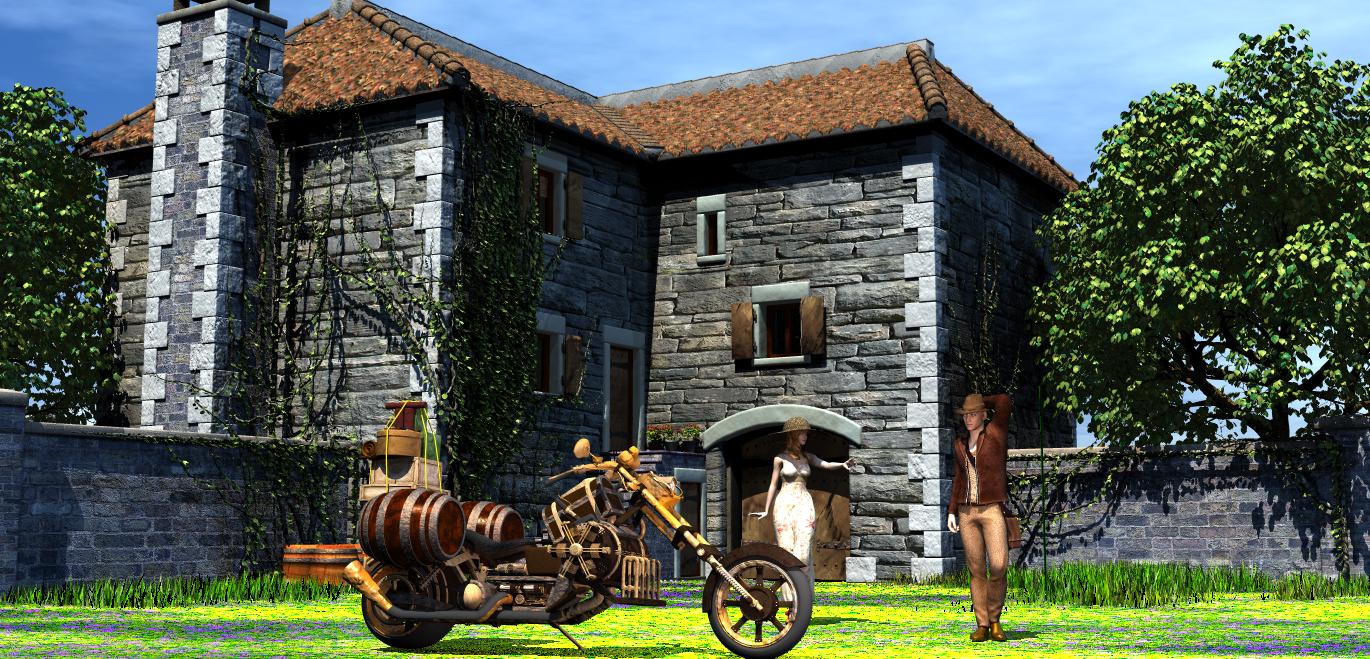
Kim/Arki53rd Bryce Render Challenge! ( Finished)I used Old country farmhouse, Steampunkbike (for the transportation), Tamesis for Victoria 4 with a Summer casual fitte dress and Worldly Jones for Genesis 3. The tree (and an instance), grass and ivy, as well as the potted plants and some barrels came with the farmhouse. I retextured the farmhouse and the plants, as well as the groundplane to have Bryce textures. The stone textures of the house were mostly from RaRaja, whose stone (wall) textures I like a lot. Same for most parts of the bike. The textures for the people were made substantially smaller. Without these retexture activities, Bryce crashed often. The sky is one from Horo (with IBL). I added an additional light to give some light to the people's shadow parts.
Rendering did not take very long, but modifying the scene is bound to lead to crashes.
Actually, this scene could have been made and rendered much more easily in DAZ Studio, I think. But, hey, this is a Bryce contest and I am a Bryce-fan, so it was worthwhile. Title: Take her for a spin?
 who is this model ? which assets for it ?
zombietaggerung said:
That looks like Victoria 8.1 to me. And if you want the hair too that's a freebie from renderosity called Rose Hair by zoro_d, it has 2 parts and and update.
thank you again
who is this model ? which assets for it ?That looks like Victoria 8.1 to me. And if you want the hair too that's a freebie from renderosity called Rose Hair by zoro_d, it has 2 parts and and update.
possible to convert v4 into g3 or g8To convert the textures, there is a product available at Rendo; https://www.daz3d.com/legacy-uvs-for-genesis-8-victoria-4 doesn't convert them. I much prefer the conversion route, but it takes more time than the link Leana supplied. It's about chosing which you prefer.
I mention Rendo as the title of the thread is about converting.
As an example,
the character shape is Aiko 3, transferred to G8 via the method described above by Leana; the texture was converted from Aiko 5, using BlackSmith Pro; for me, the Aiko 5 textures were close enough to Aiko 3 to mean I didn't have to go to the hastle of converting them as BlackSmith Pro can't do Aiko 3. I think the Lagacy UVs just might be able to.
possible to convert v4 into g3 or g8You can convert a V4 character into a G3 one using GenX2. You will need the GenX2 base program as well as both the G2 add-on and G3 add-on. If you want to use the V4 texture too you will need the legacy UVs for G3: V4 product as well.
If you want to convert the V4 character to G8: There's no G8 add-on for GenX2 as the plugin creator sadly passed away before G8 was released. However, you could still use GenX2 to convert the morph to G3 then use either Xtransfer or G3F to G8F Character converter to go from G3 to G8. For the texture you would need legacy UVs for G8: V4.
AIUTO...CHI CONOSCE L’ITALIANO? PARTE TREDICICrios said:
Concocordo con Silvhe, io lo uso dalla 2.5 e solo verso la 3.0, quando finalmente aggiunsero il rigging, che la DAZ creò la doppia versione. Free senza rigging e a pagamento con il rigging, da dire che all'epoca era possibile creare personaggi con il rig che funzionava anche in Poser, in quanto era ancora usati Victoria 4 e Michael 4.
Orpo quanto son vecchio e non me ne ero accorto! (◉_◉)
Io ho l'installazione della versione 2.0 nella mia libreria di backup e da qualche parte dovrei avere anche quella della 1.8...Però da quel che ricordo anche su quelle versioni era possibile realizzare delle animazioni complesse, non era solo "una posa e renderizza".
AIUTO...CHI CONOSCE L’ITALIANO? PARTE TREDICIConcocordo con Silvhe, io lo uso dalla 2.5 e solo verso la 3.0, quando finalmente aggiunsero il rigging, che la DAZ creò la doppia versione. Free senza rigging e a pagamento con il rigging, da dire che all'epoca era possibile creare personaggi con il rig che funzionava anche in Poser, in quanto era ancora usati Victoria 4 e Michael 4.
Daz 3D is part of

Connect
DAZ Productions, Inc.
7533 S Center View Ct #4664
West Jordan, UT 84084Licensing Agreement | Terms of Service | Privacy Policy | EULA
© 2026 Daz Productions Inc. All Rights Reserved.