-
Daz 4.23: force change character appearance?
Scenes in DS are basically just a big list of references. When you load a saved scene, it re-applies all the references to geometry, textures, morphs, etc. If morphs have been uninstalled or are otherwise not immediately available to the program, it will load without that morph applied; if, on the other hand, a new morph has been improperly saved with a default non-zero value, it will apply that morph to all characters of the same figure. Load a default (or preferably dev load, if available) of whichever figure you're using, go to the Currently Used heading in the Parameters pane, and look for anything that shouldn't be there.
Lucas 9!nemesis10 said:
tsroemi said:
Seconding all of the examples above, plus adding feminine-oriented gay men, plus fashion-conscious hipsters, plus men in many fotoshoots, etc. Really, there's so much diversity today in real life, and we explicitly got Gen9 because it's such a diverse figure, the textures should reflect that. But I quite like them otherwise!
One thing that bothers me a bit though, there's some kind of mean or arrogant streak in his general expression that I don't like, and I can't seem to get rid of it. It's mostly coming from the eyes I think, the lower lids seem to be tightened a little, as if he was just going, 'Oh really?!'. Has anyone played with the morph in that respect already and could give recommendations on how to fix that?
I would suggest Googling "Dylan O'Brien smiling" and take cues from the images you find. He can look a touch smirky but when he laughs, he opens his eyes a bit wider and raises his eye brows.
Thanks, that's really helpful! I'm just thinking he reminds me a tiny bit of River Phoenix as well, no?
Lucas 9!tsroemi said:
Seconding all of the examples above, plus adding feminine-oriented gay men, plus fashion-conscious hipsters, plus men in many fotoshoots, etc. Really, there's so much diversity today in real life, and we explicitly got Gen9 because it's such a diverse figure, the textures should reflect that. But I quite like them otherwise!
One thing that bothers me a bit though, there's some kind of mean or arrogant streak in his general expression that I don't like, and I can't seem to get rid of it. It's mostly coming from the eyes I think, the lower lids seem to be tightened a little, as if he was just going, 'Oh really?!'. Has anyone played with the morph in that respect already and could give recommendations on how to fix that?
I would suggest Googling "Dylan O'Brien smiling" and take cues from the images you find. He can look a touch smirky but when he laughs, he opens his eyes a bit wider and raises his eye brows.
Lucas 9!Seconding all of the examples above, plus adding feminine-oriented gay men, plus fashion-conscious hipsters, plus men in many fotoshoots, etc. Really, there's so much diversity today in real life, and we explicitly got Gen9 because it's such a diverse figure, the textures should reflect that. But I quite like them otherwise!
One thing that bothers me a bit though, there's some kind of mean or arrogant streak in his general expression that I don't like, and I can't seem to get rid of it. It's mostly coming from the eyes I think, the lower lids seem to be tightened a little, as if he was just going, 'Oh really?!'. Has anyone played with the morph in that respect already and could give recommendations on how to fix that?
Recreating Viconia DeVir from BG2 as G8F based on a 2D portraitI used Nylyssa as the base morph. I think most of the other morphs are from Genesis 8 Female Head Morphs, but I also used a couple from 200 Plus Head and Face Morphs for Genesis 8 Female(s) for the nostril shape. I didn't add eyebrows since I don't have any that look like the ones in the picture. None of the brows I have seemed to look right. I was mostly focused on the face shape. I'm sure there is a much better texture that could be used, but I just used a pale one from my library so I could get close to the color by simply changing the different surface colors. Hopefully this can be a good starting point. I'll share the dial settings if there's interest.
Recreating Viconia DeVir from BG2 as G8F based on a 2D portrait^Good effort - definitely looks close. You even got the mole in the right place. Does she not have eyebrows?
I think as far as the morph goes, it's right. I'd say with a slightly different texture, this'd be even better - a darker base with more highlights perhaps. And the lipstick is a slightly darker red (kind of muddy red?). feldarzt did say they weren't worried about the texture, so those are just my random thoughts.
What did you use for the morph (mix of characters / dial-spun from the morph pack(s) / custom sculpt)?
Export from Daz with multiple UV setsIt's actually as simple as creating a template that includes both head and body. Here is base 8.1M with Conrad's tattoos.

Here are the Map Transfer settings with head and body in a single template. Make sure Target UV is set to "base male" on at least the head surface.
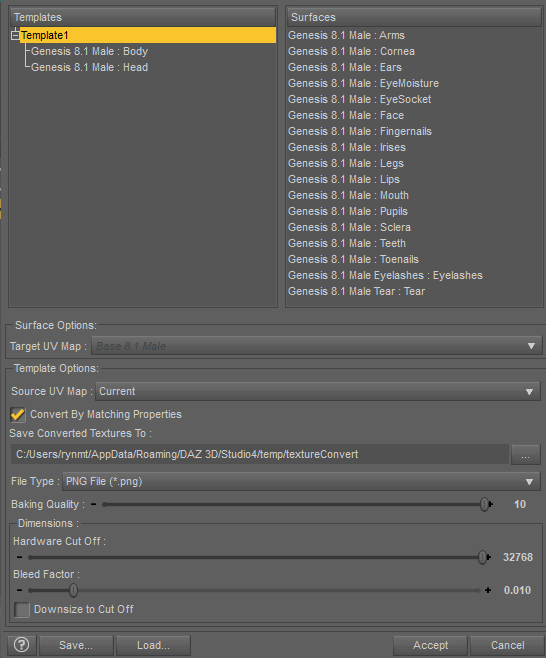
If you switch to base G8M textures and reapply Conrad's tattoos, the neck one doesn't apply (and there might be some issues with the chest tattoo, I haven't looked super close).

But if you replace the textures with the ones you just Map Transferred....
 (Solved) Closeup 1920x1920 px portrait takes so long to render (on a 4090)
Thanks, felis. I've tried looking at the top in wire texture shaded view. One thing that I've noticed is that the material of the top is quite thick in some areas, namely the straps. Other than that, I haven't seen anything that looks wrong. So I've opted for not modifying anything. With the smoothing modifier, one morph for the straps included with the top and a little bit of Mesh grabber were the strap clipped through the Genesis 8 figure's skin, I've done what I've been able to.
I've also used a different hair in the end for the model, short this time, that being SBH, I've converted to the Omni shader for the render.
The truth is that the top's straps still look kind of ugly now. Perhaps increasing the smoothing iterations would help. I'll try that.
Export from Daz with multiple UV setsGordig said:
crosswind said:
Yep, Map Transfer is just the tool you wanted if G8 >> G8.1.... but it doesn't work if vice versa.

It does. I've been buiding all my characters on 8.1, which requires me to map transfer in either direction depending on which skin I'm using and what I'm trying to add to it.
Ah... ? You can merge separate Head and Body texture maps from G8.1 as one Torso map for G8.0 ? How to do that, pls ? I ever did that in Blender and FaceForm wrap but failed with Map Transfer.
Export from Daz with multiple UV setscrosswind said:
Yep, Map Transfer is just the tool you wanted if G8 >> G8.1.... but it doesn't work if vice versa.
It does. I've been buiding all my characters on 8.1, which requires me to map transfer in either direction depending on which skin I'm using and what I'm trying to add to it.
Export from Daz with multiple UV setscrosswind said:
Yep, Map Transfer is just the tool you wanted if G8 >> G8.1.... but it doesn't work if vice versa.
Thanks crosswind, finally got the results I've wanted
 in Unity/Unreal
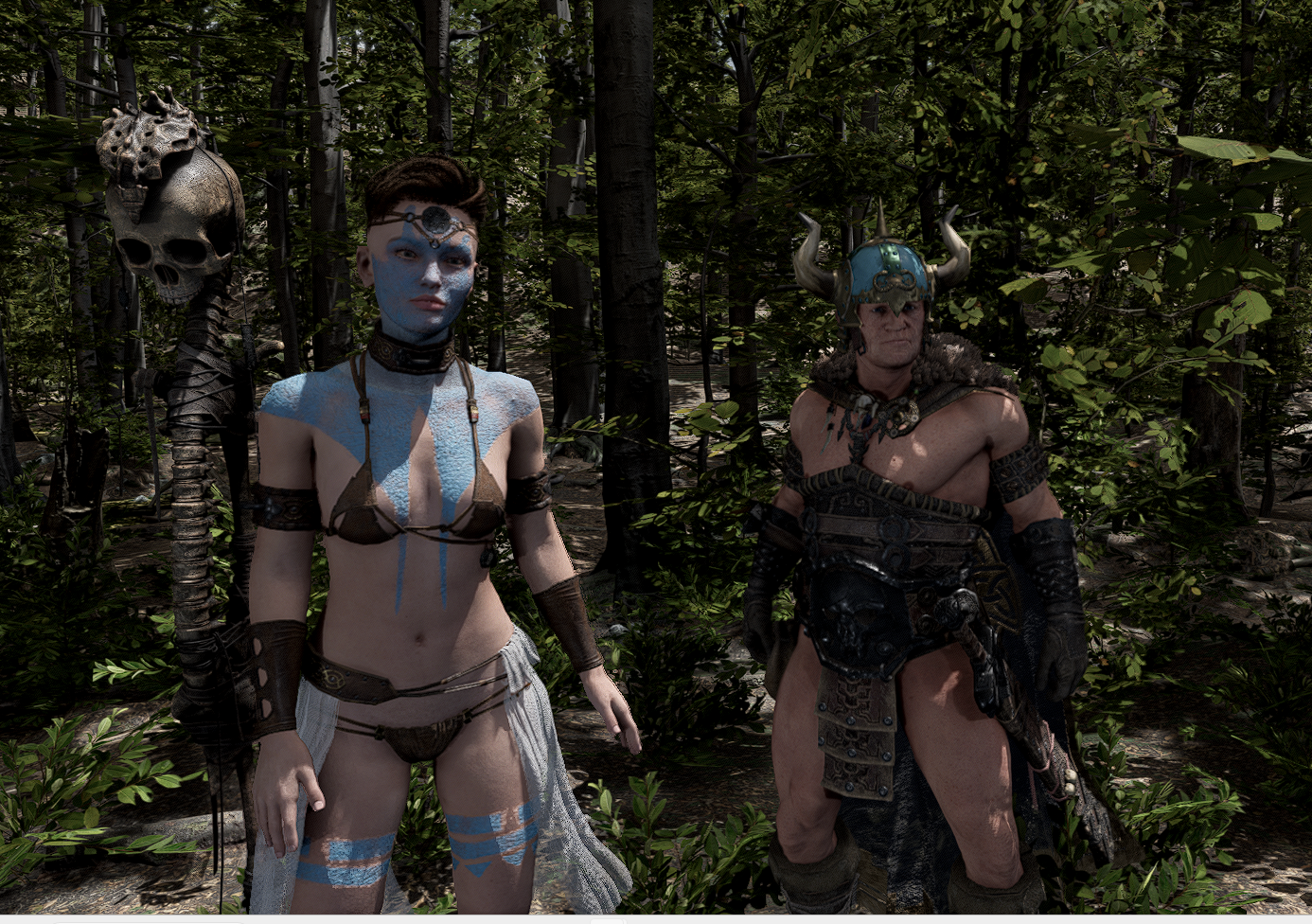 Export from Daz with multiple UV sets
Yep, Map Transfer is just the tool you wanted if G8 >> G8.1.... but it doesn't work if vice versa.
Can anyone help identify this character morphs and skin?Gordig said:
She indeed appears to be part of the Moussoian lineage, perhaps a morph combined with miss Melina. A distant relative, perhaps, but undeniably part of the family.
Got a new PC and want to Move Daz from the C drive to my external drive.Fishtales said:
Windows 10 isn't 'done', there are some on here still using Windows 7 with Studio :) I have been using EaseUS Todo PCTrans Pro for a few years now and it has worked smoothly so far :) I bought the Lifetime license which, after three Laptop upgrades, has worked out cheaper in the long run.
https://www.easeus.com/pc-transfer-software/pctrans-pro-buy.html?linkid=e_pctranspro_float
I know its not "DONE" but it will be done getting updates as far as protection goes
we have a computer that still runs 7 but its unplugged from the internet
Got a new PC and want to Move Daz from the C drive to my external drive.Windows 10 isn't 'done', there are some on here still using Windows 7 with Studio :) I have been using EaseUS Todo PCTrans Pro for a few years now and it has worked smoothly so far :) I bought the Lifetime license which, after three Laptop upgrades, has worked out cheaper in the long run.
https://www.easeus.com/pc-transfer-software/pctrans-pro-buy.html?linkid=e_pctranspro_float
Can anyone help identify this character morphs and skin?The morph certainly looks like it might have Melina genes probably with some Mousso. Thank you for picking that up!Dystopian HD Jacket won't simulate [solved?]Maybe that morph is a saved version of a dForce simulation done by the PA, and that you dial the morph to get the result of the PA's simulation? The product doesn't have "dForce" in the product name.
Fit Genesis 9 clothings to Genesis 8Well, I know this vendor is newcomer but I can't believe they even gave no Feet Pose Preset for these high heel Boots...
 Anyway ~~
Workflow for the Boots conversion:
1) Load a G9 Base and load Boots to it. Select G9, apply the attached Feet Pose Preset : Feet Pose - Petra Boots G9. (ss 1) Select the boots, set its Resolution Level to Base. Export them to OBJ file with the file name : BaseZero (ss 2)
2) Load a G8F Base, apply the attached Feet Pose Preset : Feet Pose - Petra Boots G8F for Rigging Only (ss 3) Then load the Boots into the Scene rather than on G8F ! Import OBJ file BaseZero to the Boots by using Morph Loader Pro. Than dial the morph BaseZero and Lock it. (ss 4)
3) Re-rig the boots to G8F by using Transfer Utility. (ss 5) Import OBJ file BaseZero to the Boots again with the settings in (ss 4) ! Then you may find some poke-thru on G8F's heels... add a Smoothing Modifier to them. (ss 6) Export the boots to overwrite OBJ file BaseZero !
4) Remove Smoothing Modifier, then import OBJ file BaseZero to the Boots with Morph Loader Pro again !!! Then set Resolution Level back to High Resolution. (ss 7) (Certainly you can skip this step... i.e. just keep Smoothing Modifier on the Boots...)Finally, Zero G8F Pose first, then apply the attached Feet Pose Preset : Feet Pose - Petra Boots G8F (ss8) Check foot Bend/Side-side/Twist joint rotations.(ss 8) Then save a G8F version Wearable Preset or a new Figure Asset ~~
Edit: The above ways can almost apply for all the conversion cases with complex clothing / high heels etc. for G9 >> G8 or G8 >> G9. Just some order of steps may vary....and more additional steps may be required. G1G2G3 are with T-Pose, so tweaking Pose before the key steps will be a key trick.
Then, in some cases you may need Clones, in some others, you may need no Clones at all. So, wisely check the items first... so as to find a quicker / perfect way. Besides, if you know a modeling / sculpting software (e.g. Blender..), you can make even more perfect conversion results.
Good luck !
Fit Genesis 9 clothings to Genesis 8Actually there're quite a few tricks for converting G9 clothing to G8F or vice versa. In this a bit complex case, there're ruffles on the skirt + big hems as well as Buttons with Rigid Follow Nodes (RFNs)... Never use Auto Fit in such cases...it'll transfer wrong weight as well as break RFNs.
Workflow for the Dress:
1) Load a G9 Base, and Dress to it. Dial G8F Clone on G9. Set Resolution Level on the Dress to Base, export the Dress to OBJ file (File > Export...) with the file name > BaseZero. (ss 1~2)
2) Simulate the Dress in Simulation Settings pane.(ss 3) Export the Dress to OBJ file again, but with the file name > BaseSim
3) Load a G8F Base, load the Dress into the Scene rather than G8F ! Select the Dress, import above two OBJ files to the Dress by using Morph Loader Pro (Edit > Object > Morph Loader Pro...). (ss 4) Then dial the morph BaseSim. (ss 5)
4) Re-rig the Dress to G8F with Transfer Utility (Edit > Object > Transfer Utility...) with the same settings in (ss6)Finally, Zero and delete the morph BaseSim, dial and Lock the morph BaseZero. Reset Resolution Level to High Resolution. Check the weight with joints bending as well as the Buttons with RFNs.(ss 7) Then save the Dress as a Wearable Preset for G8F or save as a new G8F version's figure asset, as you wish.
Be noted, there might be issues with some corrective morphs (pJCMs) but since it's a dForece ready Dress, Simulation with memorized Pose or Timeline will make it work well. Or, you can fix pJCMs yourself by using Mesh Grabber or external application (e.g. Blender, Hexagon...) Or, you even can transfer the corrective morphs made on its G9 version to this G8F version, by using an ERC Freezed Clone... Check my tutorial if you're interested. https://youtu.be/kh2iaN1WyyY?si=J9ma89FtUdLwJanN
Edit: Converting the high heel boots will be another workflow... show you later on.
Lucas 9!nonesuch00 said:
OrangeFalcon said:
Okay! So I was finally able to do a couple renders. I did a base form with him, pretty nice actually. The HD details look very good. And I made a female version. Here's what I did:
Removed Lucas body and reset all size sliders. Applied Base Feminine and Petite Goddess body (gratuitous, I know, but it helps achieve the frame). Applied Ashley 9's eyelashes, increased lip size (70% lower, 32% upper), reduced nose size (-24.5%), made face rounder (44.2%) and applied Face Transfer Female Fix (30%). The makeup is one of 01 of Mira 9's set. The only thing I couldn't find a fix for was the actual skin.
The HD details for the stubble are just baked into it(which is a nice style choice) but doesn't achieve the look I wanted. So I went with Tara 9's skin (fitting for my earlier comment).
I'm still tweaking it but I enjoy what I have so far.
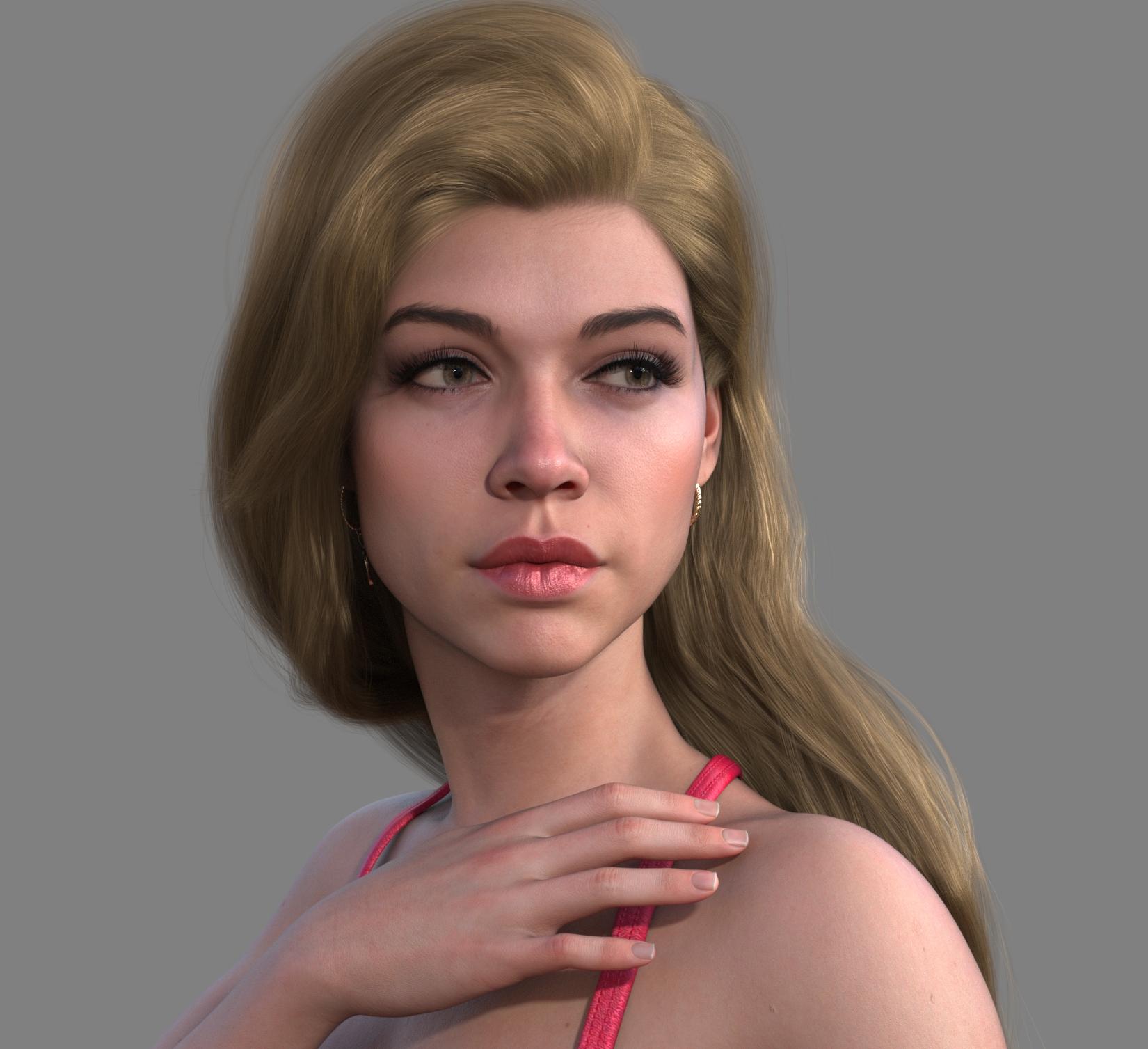
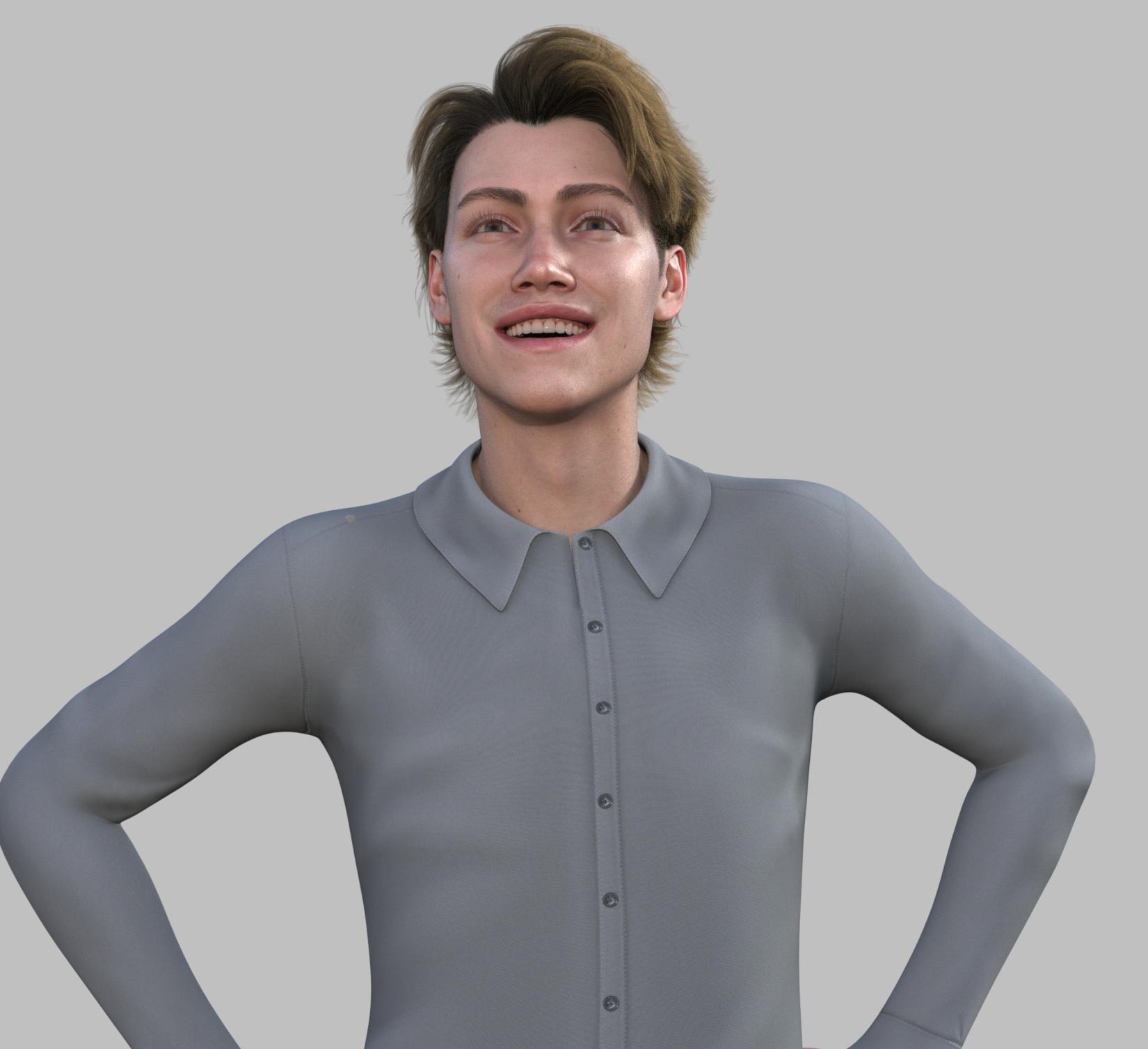
Wow, great renders!
He does look very English as Catwoman said, I forget her forum name. Or German as my 7th Grade German teacher looks a lot like this Lucas character. I guess if he's still in the Premier Rotation I will pick him up with my coupon, if something I like better doesn't come out in between, as I've already spent my coupon this month, plus bought the Astaroth 9 HD bundle. Too much cash flowing out to DAZ, so I will have to budget a $40 cap each month. I still have 3 of those 5 new Dog 8 breeds to buy. Patience I guess is in order.
Thanks! Yeah, he definitely looks British to me. I like the skin and the overall style of the clothing added with the bundle, too. I have a shortage of dedicated male characters so this was a good buy for me. I used my free bundle coupon on the character bundle and bought the add-on with it, used 8 tokens and paid $16.89. I was debating whether or not to wait until next week but by then, that new bundle might not interest me and I possibly couldn't use the promotions to reduce the add-on bundle for Lucas. So yeah, went with it!
Daz 3D is part of

Connect
DAZ Productions, Inc.
7533 S Center View Ct #4664
West Jordan, UT 84084Licensing Agreement | Terms of Service | Privacy Policy | EULA
© 2026 Daz Productions Inc. All Rights Reserved.