-
Filament bring out the Renders
very cute

a png series should work with alpha
otherwise an image on a plane,
I use mesh backdrops and cycloramas a lot in general rather than environment background as I move the camera
Thanks. I'll give that a try. I'm currently working on an animation in 3Delight. LAMH doesn't show up in Filament sadly. Once I'm done with that animation, I'll try another animation using Filament and add a plane as a my green screen. I want to be able to add an image behind my character in my video during editing in Hitfilm. A green plane should work.
Auto Muscle Enhancer HD [Commercial]Here is my second attempt at using the SF Sexy Skins. Your comments and critiques are welcome.
Thank you for looking.
I definitely like this one, Sigurd! The skin sheen gives more depth to the figure. Also the skin tone, while a little on the cool side, is quite realistic looking. Naturally, the figure in and of itself, is fantastic. The Filament render is amazingly good. I like the result quite a lot.
I took your render into Photoshop and put it through my contrast/tone workflow and it turned out really well for my style. You are definitely making me want to try Filament more and more! It will be great when the Mac version of DS gets this.
Please show us more when you get a chance. :)
Lee
New DS Filament Render EngineI did some tests on skin and lights using filament. One is using 3 point lights and I added an environment and a distant light for additional light and shadows for the second render.

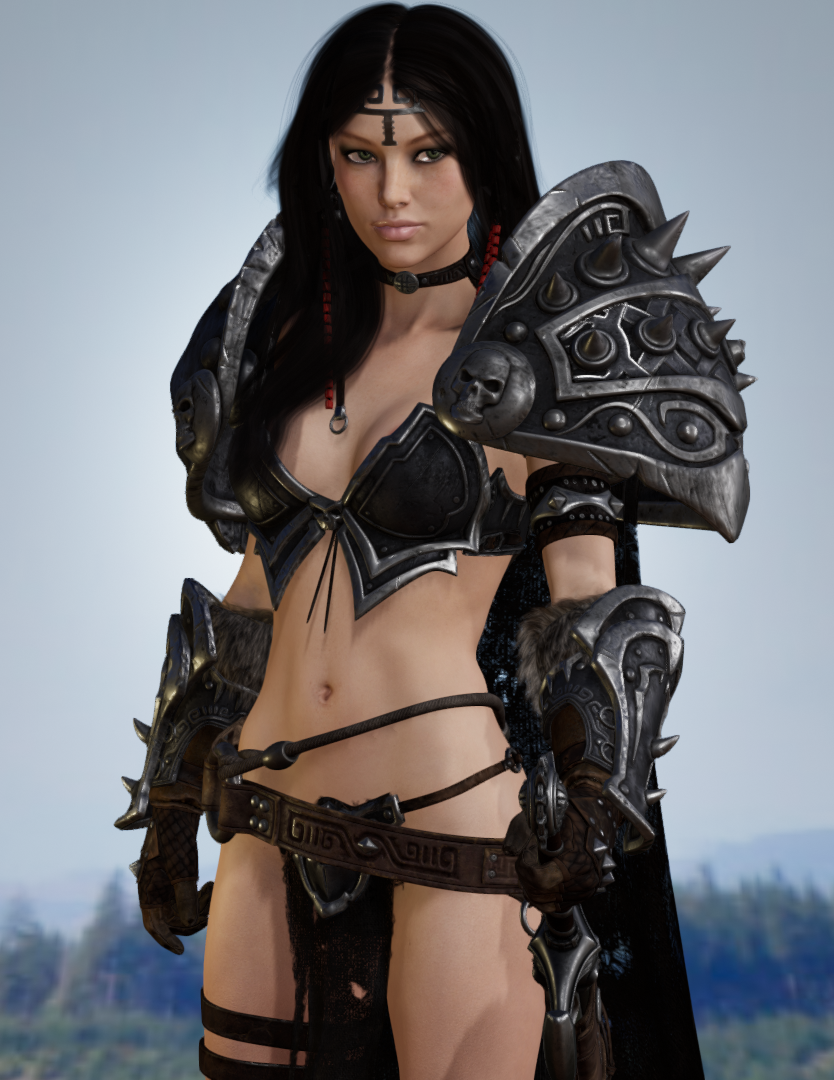 New DS Filament Render Engine
THANK YOU @3Diva for the Filament scene subset you posted for people to download! With that I was able to jump right into exploring the new engine without any hassles.
~GenI've looked through this thread and didn't see an answer to the problem I'm having. I might have missed it. I wanted to try Filament out so I downloaded and installed DS 4.14 through Daz Central. I have Filament (PBR) as one of my draw options in the viewing styles, but it's grayed out. I'm on a PC so it should be available. If you look at the screenshot, I have the Viewport selected, but no Filament.

What am I missing? Was I supposed to do something first? I created a new Filament Draw Options, Environment Options, and Tone Mapper Options to my scene. But still, not able to select Filament preview.
Help!
Filament requires Windows (currently), 64-bit, OpenGL > 4.1
Okay, that was it. Thanks, @Sevrin!
I thought I was running 4.1, but I was running 4 which is the latest version my CPU is running. Can't update that. I did have an older, low-end nVidia graphics card I could install which runs Open GL 4.6. I didn't know we had one or I would have put in my computer before now because I've been working without a graphics card since November of last year!
Anyway, I got it in and downloaded the drivers and I'm up and running, so I can take a look at Filament now. It's no longer shaded out. I'll be so happy when I can get a proper rendering computer again!
Yay! I'm glad you are going to be able to play with Filament! I look forward to checking our your renders! :D
I made a Scene Subset with some of the Filament scene nodes if you're interested in trying it: https://www.daz3d.com/forums/discussion/comment/6220241/#Comment_6220241
You're welcome! :)
I think loading up Filament for the first time can be a bit of a shock because of how blown out the default settings are. Just a couple of tweaks with the Filament Draw node can make a big difference. I think it would be cool if, upon switching to Filament, the Filament Draw Node got added automatically (like they add the Environment and Tone Mapping nodes when switching to Iray) with settings that tame the blowout and bring it a little more in line with what you would see with Iray. That's one of my "wish list" items for improvement to Filament going forward - automatic load of Filament Draw node with decent settings upon switching to Filament preview. Until then, though, that scene subset works pretty well to tame the blowout, I think. :)
New DS Filament Render EngineTHANK YOU @3Diva for the Filament scene subset you posted for people to download! With that I was able to jump right into exploring the new engine without any hassles.
~GenI've looked through this thread and didn't see an answer to the problem I'm having. I might have missed it. I wanted to try Filament out so I downloaded and installed DS 4.14 through Daz Central. I have Filament (PBR) as one of my draw options in the viewing styles, but it's grayed out. I'm on a PC so it should be available. If you look at the screenshot, I have the Viewport selected, but no Filament.
What am I missing? Was I supposed to do something first? I created a new Filament Draw Options, Environment Options, and Tone Mapper Options to my scene. But still, not able to select Filament preview.
Help!
Filament requires Windows (currently), 64-bit, OpenGL > 4.1
Okay, that was it. Thanks, @Sevrin!
I thought I was running 4.1, but I was running 4 which is the latest version my CPU is running. Can't update that. I did have an older, low-end nVidia graphics card I could install which runs Open GL 4.6. I didn't know we had one or I would have put in my computer before now because I've been working without a graphics card since November of last year!
Anyway, I got it in and downloaded the drivers and I'm up and running, so I can take a look at Filament now. It's no longer shaded out. I'll be so happy when I can get a proper rendering computer again!
Yay! I'm glad you are going to be able to play with Filament! I look forward to checking our your renders! :D
I made a Scene Subset with some of the Filament scene nodes if you're interested in trying it: https://www.daz3d.com/forums/discussion/comment/6220241/#Comment_6220241
New DS Filament Render Enginetoo much negativity being posted in other threads by people not wanting to use Filament so wanted one where people just shared renders
Why moan? They don't have to use it. Especially if they're fortunate enough to own a high-end computer, or a Nvidia Graphics Card/GPU. Or be able to afford a new graphics card every-so-often, or a new machine (which means they can do Iray renders in seconds. Or use Octane!)
Some of use don't get any of that, and (probably) never will.
It's about time the low-end users of Daz got a little love. Filament may have issues, but there are some work arounds IF you're prepared to put the time in. Hopefully, the next update will improve any transparency issues (especially the ones that I'm having with hair models, and see-through clothing), bring in the ability to use emissives, and use Iray lighting (although, that might not be possible - but, one can dream).
EDIT: I was going to post about something, but I got up on my "soap box" instead... Sorry.
How many people are still using Genesis 2?I'm still using Genesis 2, but mostly for Lilith 6. My first animated Filament render is with Lilith 6. I fell in love with Lilith 6 as soon as she was released, but I didn't buy her until a few years later (her Pro Bundle was in a sale, and cost around $6).
I still have some love for Aiko 6. But Lilith is my "go-to" model, if I want to do a scene with an "older" model.
Filament bring out the RendersHere's a quick test animation I did which I rendered to test Spring Dynamics using Filament. I have questions. Is it possible to add a background so I can apply a green screen? I couldn't figure out how to get a background to render unless I add a prop. I have a green screen prop somewhere so I might try that, but it would be nice if Filament would render a green screen. Any ideas?
So far, I'm liking it. It rendered out a 300 frame animation in no time, lickety split!
 DS 4.14 Crashing
Richard I was applying springs to a character after I already applied them to another on one occasion and trying to use VWD on another. I have also had crashes when I simply started a render in Iray and in Filament.
DS 4.12 has not crashed even on same hardware with same drivers.
Daz Studio 4.14 Pro, General Release!I'm at a loss and digging through page upon page of the forums is far too much of a hassle.
I am honestly curious as to why Tone Mapping and Environment are now an 'opt in' must be 'created' process?
And here is why I ask. If I choose to use 3DL under the Render Settings, I receive a ton of new options that have nothing to do with Iray. Even Scripted 3DL has its own options.
So, when I switch to Iray shouldn't all those tools directly related to Iray render engine needs be apparent under the Render Settings Tab? Why not make it a preference to 'opt in' automatically under the Preference options. That is what it is for right? To customize the user's preferences and session needs?
and since Filament is looking to be a pending render option, why not have purely Filament only based render settings appear?
Or am I asking far too much?
Set up a scene the way you want it, including any Singleton nodes, then in Edit>Prefrences (Daz Studio>Preferences on a Mac) you can use the Stasrt Up and Scene tabs to have that scene load to configure things to suit your needs (you can also do this with a preset or a script, but a Scene is probably the simplest way here). These options allow almost any configuration desired, and offer a great deal of flexibility with only scenes or presets used, much more so that would be practical through prefrences itself.
Indeed; because I always used custom "progressive rendering" settings most of the time I work from an existing scene so that I did not have to go through all the setup. This is extraordinarily easy to do with Windows without using any Daz stuff other than to make the settings:
- Start DAZStudio.
- Set everything up; I change "progressive rendering" and "simulation" settings.
- Save the scene in a convenient place; I save it in a "Presets" directory but it doesn't much matter so long as you give the file an appropriate name, e.g. "animation settings" or "HDRI settings" etc.
- If you have not "pinned" DAZStudio to the Windows taskbar do so now; right click on the running DAZ icon on the toolbar and pick "pin to taskbar" (the entry just above "Close Window" at the bottom.)
- Exit DAZStudio.
- Go to where you have DAZ on the Windows toolbar (it will still be there because you pinned it), right click on the icon. You will see the scene file you just created at the top of the recent files list.
- Go up to the file and right click again, click on "pin to list" on the context menu that pops up (there is also a push-pin icon on the right which you can click on instead.)
Once you have done this you can start DAZStudio with all those settings just by right clicking on the task bar and selecting the scene file from the top. You can then change the settings and just save the file or, to start a new scene with those settings, do a "save as..." to an appropriate file name and start work. Easy.
In fact there are a great many ways of doing this. For example you can save "render settings" presets and just load one when you start.
Auto Muscle Enhancer HD [Commercial]lee_moon Wow! This looks real good. A good example of a Meso-Endo and you lighting is awesome as always.
Thank you for the kind words. At first, not a big fan of Filament. I bought the SF Skins for it and I thought they looked a little cartoonish. Went back to my original Iray Mats and some of them have weird patches on them when using Filament. Tried different Mats and found others that will work fine. After that had to play a little with some of the values to get something that was not too bad. Next I will concentrate on the lighting and see if I can get some shadows going. Might try the Filament interior lighting on a scene when I have time.
What I do love about it is nearly instantaneous renders! Has anyone else noticed their Iray renders are faster? Mine are finishing in about half the time with this new iteration.
Thank you, Sigurd!! I really like this character and was glad to get the Brute HD expansion during the recent sales. I think his physique is pretty much where I want it. Might adjust his face a wee bit, but am pretty happy with it.
I've also got a lean physique that I'm still working on. The face/head are looking a little young so I need to do something with the face. I want to preserve the head/cranium shape and the overall physique, but the face needs to age up just a bit. Might throw up some sample renders in a day or two.
I've been reading the threads on Filament and I'm liking some of the images folks have been sharing. I think there's a lot of potential for certain render styles with Filament being used as the final renderer. That and doing animations with AME/ASE figures in reasonable times makes Filament interesting to me. :) I can't wait to see your accomplishments!!
I'm still using DS 4.12.0.86 on the Mac mini and new MacBook Pro. It's been stable and I'm cautious of using 4.14 until I see more Mac user's feedback on it. :) If you're seeing rendering speed improvements, then I might have to try 4.14 out on one of the Macs.
Lee
mcasual's Texture Animation script - Cannot add DAZ renders to surfaceI wouldn't know without seeing your file and your path etc but you should be able to recheck and try all that yourself
I was thinking the prop and scene itself could have been the issue hence suggesting trying an image from that series in the diffuse and running a normal render without the script first to rule that out
the script will only do what you tell it to do in the job
and I did find with Filament at least having a 901 frame series I needed 899 as my number of frames in the script or it skipped images frequently but a loop shouldn't do that but who knows it might need to be a frame or less than the job says
I broke it again...So while messing around with Iray and 3delight rendering I seem to have messed up somehow. I dont often get involved with rendering in the formats because I use Reality wich suits my needs very well but I have been hearing about Filament and got curious.
So prior to this if I rendered anything in either Iray or 3delight once i hit the render button i would get a preview window where the render itself would show. I have no idea what I have done but obviously I have done something because that preview window no longer appears anywhere.
Any ideas folks?
Daz Studio 4.14 Pro, General Release!I'm at a loss and digging through page upon page of the forums is far too much of a hassle.
I am honestly curious as to why Tone Mapping and Environment are now an 'opt in' must be 'created' process?
And here is why I ask. If I choose to use 3DL under the Render Settings, I receive a ton of new options that have nothing to do with Iray. Even Scripted 3DL has its own options.
So, when I switch to Iray shouldn't all those tools directly related to Iray render engine needs be apparent under the Render Settings Tab? Why not make it a preference to 'opt in' automatically under the Preference options. That is what it is for right? To customize the user's preferences and session needs?
and since Filament is looking to be a pending render option, why not have purely Filament only based render settings appear?
Or am I asking far too much?
Set up a scene the way you want it, including any Singleton nodes, then in Edit>Prefrences (Daz Studio>Preferences on a Mac) you can use the Stasrt Up and Scene tabs to have that scene load to configure things to suit your needs (you can also do this with a preset or a script, but a Scene is probably the simplest way here). These options allow almost any configuration desired, and offer a great deal of flexibility with only scenes or presets used, much more so that would be practical through prefrences itself.
Although Filament, as with any Drawstyle, can be used as a render engine that isn't its main purpose - its main pupose is to be a Drawstyle, a PBR drawstyle to get closer to Iray.
Edited to remove something I misunderstood.
Auto Muscle Enhancer HD [Commercial]lee_moon Wow! This looks real good. A good example of a Meso-Endo and you lighting is awesome as always.
Thank you for the kind words. At first, not a big fan of Filament. I bought the SF Skins for it and I thought they looked a little cartoonish. Went back to my original Iray Mats and some of them have weird patches on them when using Filament. Tried different Mats and found others that will work fine. After that had to play a little with some of the values to get something that was not too bad. Next I will concentrate on the lighting and see if I can get some shadows going. Might try the Filament interior lighting on a scene when I have time.
What I do love about it is nearly instantaneous renders! Has anyone else noticed their Iray renders are faster? Mine are finishing in about half the time with this new iteration.
Auto Muscle Enhancer HD [Commercial]My first attempt at using the new Filament renderer on one of my characters. Still have to play with it a little.
I can't try it yet because I'm using a Mac. But is it faster than iRay? What about the shaders: did you have to hassle with those? It does look really fine.
Filament bring out the RendersI love your shadows in that

Thank you, I still can't get shadows to work when using "Atmosphere for Filament" so this is two renders combined. Also, it seems that shadows flicker a lot unless it's the right distance light and camera angles.
I can see a lot of people being put off by filament in its current state, but I couldn't resist exploring what we have now, it's kind of fun to see what it can do in this first implementation. Hopefully, the bugs will be worked out soon and it lives up to its potential benefits
Filament Install / UninstallI am struggling with getting decent renders using PBR. I show the same scene here with slices revealing it under Iray, 3Delight and PBR. There is no doubting the immediacy of PBR, but the end product seems to me (and it may be my fault, I accept) washed out and flat. Fast, but not realistic.
The first experiment i did went brilliantly, I thought (and didn't note what I did) but since then I have been unsuccessful.
This isn't really reelvant to this thread, there is an active Filament thread on lighting https://www.daz3d.com/forums/discussion/445567/filament-tutorials-shaders-lights#latest here and a more general thread here https://www.daz3d.com/forums/discussion/442982/new-ds-filament-render-engine#latest
Filament bring out the RendersWell so far I like Filament. Even when I'm planning on doing an IRAY render, Filament makes it possible to see what direction the light will come from with an HDRI. And it makes rendering videos maybe viable. I hope people start adding Filament shaders alongside the IRAY ones like they used to do with 3Delight and IRAY.
hopefully they can do so without being pressured to
some actually want to
but it shouldn't be an obligation just like 3Delight or Poser versions of stuff isn't and hopefully people won't gripe it's distracting them from making other stuff they want
Lighting in Filament?Bump post removed.
There is ana ctive thread on Filament and lighting here https://www.daz3d.com/forums/discussion/445567/filament-tutorials-shaders-lights#latest
Daz 3D is part of

Connect
DAZ Productions, Inc.
7533 S Center View Ct #4664
West Jordan, UT 84084Licensing Agreement | Terms of Service | Privacy Policy | EULA
© 2026 Daz Productions Inc. All Rights Reserved.